

WP Top News — Build a Complete News Portal in WordPress
Description
WP Top News is a flexible WordPress news plugin that helps you create, organize and display news articles in beautiful, responsive layouts.
Create your own news directly from your WordPress dashboard and display it anywhere on your website using simple shortcodes.
Whether you are building a news portal, online magazine, newspaper website, blog, organization website or a dedicated news section, WP Top News gives you multiple ways to present your content.
With the free version, you can start with clean Grid and List layouts.
Upgrade to Pro to unlock advanced layouts including Editorial Grid, Modern List, Breaking News Ticker, Homepage Hero, Featured News Slider and RSS Feed Display.
📰 Multiple News Layouts
WP Top News gives you multiple professional ways to present your news content.
✅ Free layouts:
- Basic Grid
- Basic List
✅ Pro layouts:
- Editorial Grid – magazine-style editorial layout
- Modern List – clean horizontal news layout
- Breaking News Ticker – multiple ticker styles
- Homepage Hero – highlight important stories on your homepage
- Featured News Slider – showcase selected news in a responsive slider
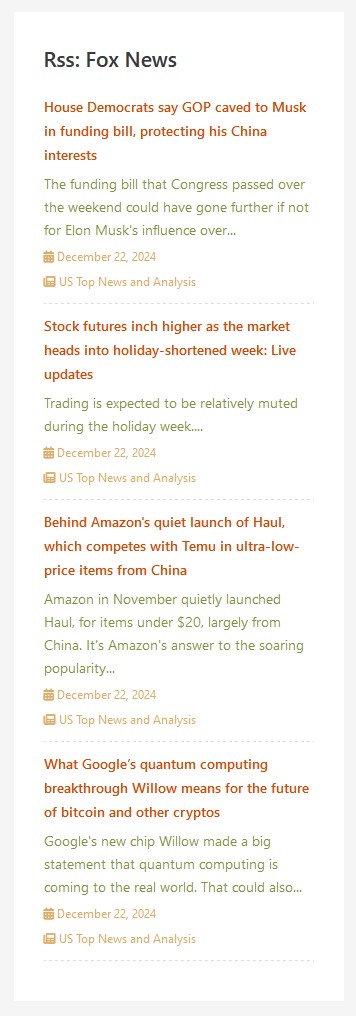
- RSS Feed Display – display RSS content using ticker and widget options
✨ Create Your Own News
Create and manage your news directly from the WordPress dashboard.
✔ You can:
- Create unlimited news items
- Organize news with categories
- Display news by category
- Activate or deactivate news items
- Control the number of news displayed
- Choose how news is ordered
- Control grid columns
- Show or hide descriptions
- Enable pagination
- Open news details in the same or new tab
- Support RTL layouts
🎨 Beautiful News Layouts
Choose the layout that fits your website and content.
🌟 Free
✅ Basic Grid
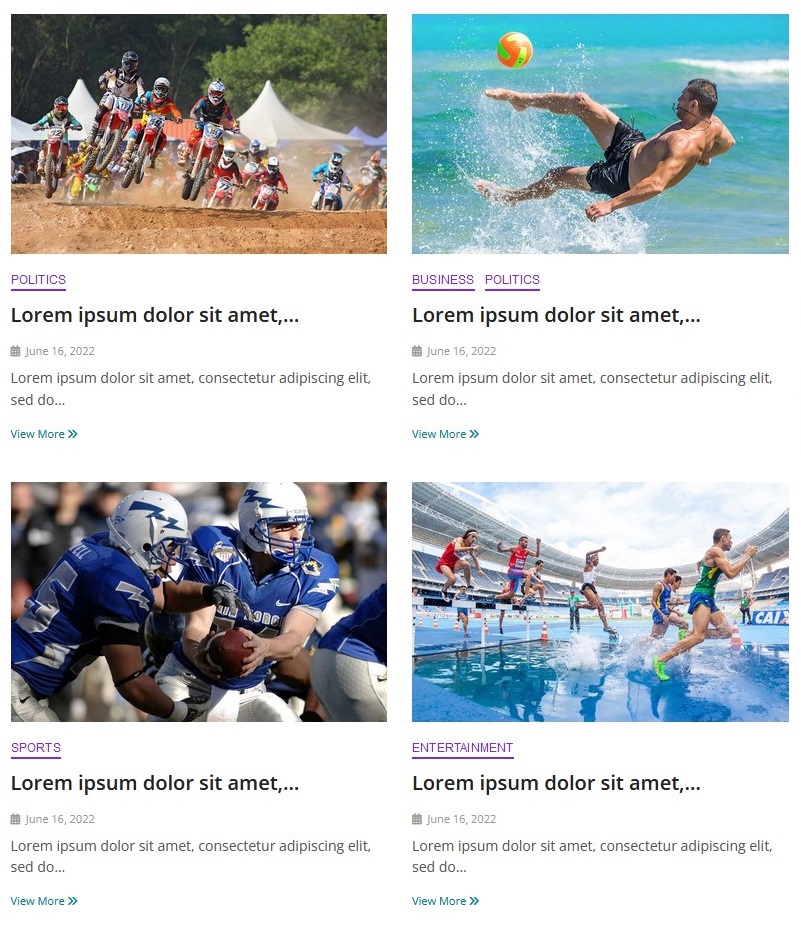
Display your news in a clean and responsive grid layout.
Control the number of columns and other display options using the plugin settings or shortcode.
✅ Basic List
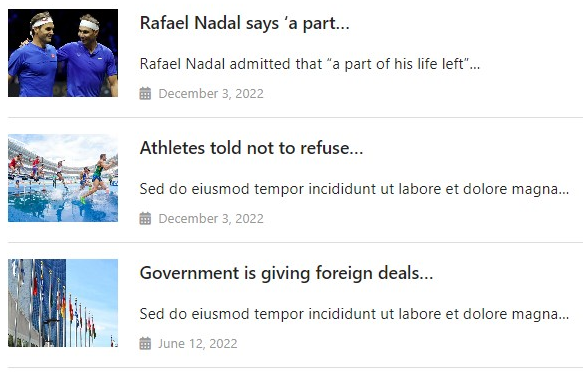
Display your news in a simple and readable list layout with featured images, titles and descriptions.
✨ Pro
✅ Editorial Grid
Create a magazine-style editorial layout with large featured images, categories, titles and descriptions.
✅ Modern List
Display news in a clean modern horizontal layout with large images and article information.
✅ Breaking News Ticker
Highlight important stories using multiple ticker styles:
- Marquee
- Horizontal
- Typewriter
- Vertical
Customize ticker labels, icons, speed and styling.
✅ Homepage Hero
Create a prominent hero news section for your homepage and highlight important stories.
✅ Featured News Slider
Display selected or featured news using a responsive slider carousel.
✅ RSS Feed Display
Display RSS feed content using ticker and widget-related options.
⚡ Powerful Shortcodes
WP Top News includes shortcode options that give you control over how your news is displayed.
✔ Display news in a grid:
[wtn_news layout=”grid”]
✔ Display news in a list:
[wtn_news layout=”list”]
✔ Display news from a category:
[wtn_news layout=”list” category=”sports”]
✔ Hide descriptions:
[wtn_news layout=”list” description=”hide”]
✔ Control grid columns:
[wtn_news layout=”grid” column=”2″]
You can combine shortcode options to create different news sections throughout your website.
📱 Responsive Design
WP Top News layouts are designed to work across desktop, tablet and mobile devices.
🌍 RTL Support
WP Top News includes RTL support for websites using right-to-left languages.
🌐 Translation Ready
WP Top News is translation-ready and includes a POT file for localization.
💎 WP Top News Pro
Take your news website further with WP Top News Pro.
✔ Pro features include:
- Editorial Grid layout
- Modern List layout
- Breaking News Ticker
- Homepage Hero section
- Featured News Slider
- RSS Feed Display
- Advanced shortcode options
- Layout customization
- Ticker customization and styling
- Multiple ticker styles
- Ticker speed controls
- Ticker icon customization
- Additional display options
🚀 Why WP Top News?
- Build a complete news portal in WordPress
- Create and manage your own news
- Multiple professional news layouts
- Free Grid and List layouts
- Advanced Pro layouts
- Breaking news ticker styles
- Homepage hero section
- Featured news slider
- RSS feed display
- Category-based news display
- Powerful shortcode options
- Responsive design
- RTL support
- No coding required
External Services
WP Top News allows you to optionally display content from RSS feeds when the RSS Feed Display feature is used.
When an RSS feed URL is configured, your website may connect to the external RSS feed provider to retrieve feed content.
The availability, accuracy and content of an external RSS feed are controlled by the respective RSS feed provider.
Please make sure you have permission to use content from any external RSS feed.
WP Top News also uses Freemius for optional plugin licensing, account management, premium upgrades and related services.
Freemius may process information required for licensing, updates, purchases and account management when you interact with Freemius-powered features.
For more information, please see the Freemius privacy information:
https://freemius.com/privacy/data-practices/
Support
Need help?
Visit the WordPress.org support forum or contact us through our website.
We are happy to help with bugs, questions and suggestions.
Installation
Install WP Top News as a regular WordPress plugin. Here are different ways to install plugin:
Install by search plugin:
- In your WordPress admin dashboard, go to Plugins > Add New.
- Search for “WP Top News”.
- Click Install Now.
- Activate the plugin.
- Go to the WP Top News menu in your WordPress dashboard.
- Create your news items.
- Configure your preferred layout.
- Copy the generated shortcode.
- Add the shortcode to any page or post.
You can also install WP Top News manually:
- Download the WP Top News ZIP file.
- Go to Plugins > Add New > Upload Plugin.
- Upload the ZIP file.
- Click Install Now.
- Activate the plugin.
Screenshots

Build a professional news portal with the flexible Grid layout.
Clean and responsive List layout for displaying your news posts.
Editorial Grid — Pro feature with a magazine-style layout.
Modern List — Pro feature for a polished article-listing design.
Breaking News Ticker — Pro feature with multiple ticker styles.
Homepage Hero — Pro feature for creating an eye-catching news hero section.
Featured News Slider — Pro feature with a responsive slider/carousel.
General Settings – configure your news layout and display options.



Faq
How do I display my news?
After activating WP Top News, create your news items from the News section in your WordPress dashboard.
Then add the shortcode to any page or post.
For example:
[wtn_news layout=”grid”]
or:
[wtn_news layout=”list”]
Can I display news by category?
Yes. You can display news from a specific category using the category shortcode option.
Example:
[wtn_news layout=”list” category=”sports”]
Can I use different layouts on different pages?
Yes. You can use shortcode options to display different layouts and configurations on different pages.
For example, you can use a Grid layout on one page and a List or another Pro layout on another page.
Is WP Top News responsive?
Yes. WP Top News layouts are designed to work across desktop, tablet and mobile devices.
Does WP Top News support RTL languages?
Yes. RTL support is included.
Do I need coding knowledge?
No. WP Top News is designed to be easy to use. You can create and display news using the WordPress dashboard and shortcode.
Is a Pro version available?
Yes. WP Top News Pro adds advanced layouts and customization features including Editorial Grid, Modern List, Breaking News Ticker, Homepage Hero, Featured News Slider and RSS Feed Display.
Can I display RSS feeds?
Yes. RSS Feed Display is available in the Pro version.
Can I use WP Top News to build a news website?
Yes. WP Top News is designed to help you create news sections, magazine-style layouts and complete news portal experiences using your own WordPress news content.
Reviews
Perfect customer service
By  dvalverdeb on June 20, 2023
Good plugin with perfect customer service
easy to contact and fast to answer!!
good customer service
By  giftyamoah315 on January 16, 2023
I used their live chat on demo website and i was quickly helped with my issue. plugin works well too.
Awesome news plugin for new ecommerce site
By  Syborg (glasslessmirror) on December 7, 2022
doesnot work correctly.
By  thedailymock on October 12, 2022
excelente complemento
By  huellas3 on March 31, 2022
Awesome Plugin
By  Henry Nama (henrynine) on July 23, 2020
nice work
By  mankindway on October 28, 2019
Changelog
2.4.4
- New: In-plugin review prompt added to all settings pages
- New: Internal news details in the same tab option added
- New: Internal news layout option added – Grid, List
- New: Internal news grid Columns option added
- New: Visual free/Pro row distinction across all settings pages — green rows
for free features, amber rows for locked Pro features - Improved: Pagination rebuilt with cleaner HTML structure
- Fix: Sidebar links fixed to new site
- Fix: Showing annual pricing instead of monthly pricing
- Fix: External API key settings field changed from text to password
- Tested: Compatible with WordPress 7.0.3
- Updated: Freemius SDK to 2.13.4
- Updated: Donate link removed from readme
- Improved: Overall stability and compatibility
2.4.3
- Freemius SDK updated to 2.12.2
- Textdomain init issue fixed
2.4.2
- Updated Freemius SDK to the latest version
2.4.1
- Grid layout news description word wrap issue fixed
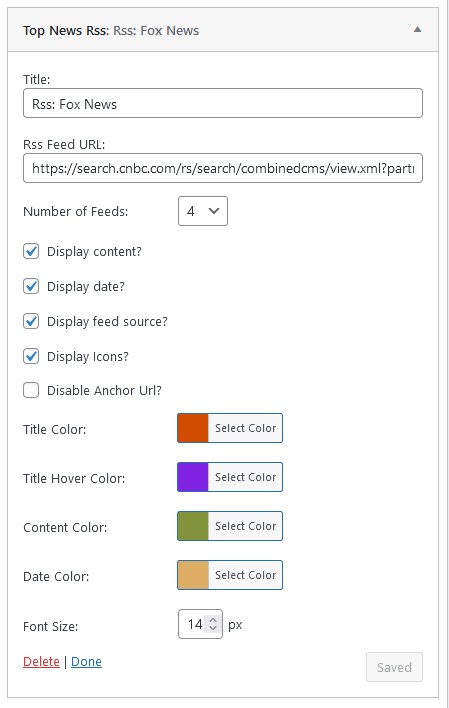
- RSS widget anchor url disable option added
- RSS widget xml parsing minor bug fixed
- RSS widget title color option added
- RSS widget content color option added
- RSS widget title hover color option added
- RSS widget date color option added
- RSS widget title font size option added
2.4.0
- Freemius SDK updated to 2.9.0
- Front deprecated issue fixed
- Support for PHP 8.2
- Iconpicker console error fixed
- Rss feed widget implemented
- Code optimized
2.3.9
- Freemius SDK update to 2.8.1
- Css fixed
2.3.8
- Freemius SDK update to 2.6.2
- Code optimized
2.3.7
- Freemius SDK update to 2.5.10
2.3.6
- Pagination show/hide option added
- News per page option added
- Url changed to news
- Rewrite Rules apllied to open news details page
- Small bug fixed
- Security nonce applied to admin settings pages
2.3.5
- Pagination added to internal news
- Code optimized
- Freemius updated
- Bug fixed
2.3.4
- Bug fixed
- CSS fixed
2.3.3
- Minor bug fixed
- Freemius version upgraded
2.3.2
- Security fix
2.3.1
- News Custom Post Type introduced
- News layout List/Grid added
- Font Awesome Free 6.1.1 integrated
- Active / Inactive news option added
- News Order By, Order Option added
- RTL support options added
- Bug fixed
2.3
- User-Agent header issue fixed
- Security fix
2.2
- Layout and display number shortcode issue fixed
- Image issue fixed
- Description issue fixed
- Code reorganized
- Css improved
- Not found image applied
- js issue fixed
2.1
- Code optimized
- Css fixed
- File renamed
- language Pot file added
- Bengoli language added
2.0
- Security fix
1.9
- Css fixed
- Small bug fixed
1.8
- Caching time increased to 1 hour as the free API offers 1 hour delay
- Free user data display issue fixed
- Code Optimized
1.7
- fontawesome icon pack added
- Calander and Newspaper icon added
- Error notice fixed if no API data available
- Help And Video Tutoriual page added
- API settings page reorganized
- Code Optimized
1.6
- Code Optimized
- Notice Bug fixed
1.5
- Grid column option added (max. 3)
- Shortcode in text widget improved
- Display, Layout, Description shortcoded option added
- Responsive issue fixed
1.4
- Secured API key
- Number of news option added
- Title word length option added
- News description word length option added
- Zooming news image
- Display News Source in a news item option added
- Display News Date in a news item option added
1.3
- Layout option added (List and Grid view)
1.2
- New 19 News Paper source included
- Design updated in admin general settings
1.1
- Some bug fixed related to API key
- Design updated
1.0
- Initial release