
Shield Security – Smart Bot Blocking, Brute-Force Login Protection & File Scanning
Description
Most security plugins hand you a dashboard full of alerts and expect you to know what to do next. Shield works differently.
It blocks threats automatically, repairs what it can on its own, and then shows you exactly what still needs your attention — ranked by impact, not volume. Less noise. More action.
🤖 Security That Runs Itself
The most powerful thing Shield does is what it handles without you:
- Automatic IP Blocking — every visitor is quietly scored as they interact with your site. Failed logins, firewall blocks, silentCAPTCHA failures, and other signals accumulate into a reputation score. When a visitor’s score crosses the threshold, Shield blocks them — automatically, without you lifting a finger
- Automatic File Repair — when a file integrity scan finds a changed WordPress core file, Shield pulls the original from WordPress.org and restores it. Detected and fixed, without waiting for you to act
- Automatic Bot Recognition — Shield identifies legitimate crawlers (Google, Bing, DuckDuckGo, Yandex, Apple) and known services (ManageWP, Pingdom, Stripe, CloudFlare) and never blocks them. Your SEO and monitoring tools keep working
🧭 Guided Security, Not Just a Dashboard
Shield organises your security into four focused areas so you always know where to look:
- Queue — things that need your attention, ranked by priority. Not everything at once — just what matters right now
- Investigate — dig into blocked IPs, security events, and the specific signals that triggered each one
- Configure — guided setup for each protection area, with clear recommendations matched to your site
- Reports — a clear view of what Shield has blocked, detected, and repaired over time
The goal: guide you quickly towards action, not bury you in data.
🛡️ Free Protection
Bot Blocking & Firewall
silentCAPTCHA— blocks bad bots on login, registration, lost password, and comment forms using passive signals invisible to real visitors. No CAPTCHA keys. No external requests. No JavaScript that breaks your forms. Everything runs on your server (GDPR friendly).- Firewall rules blocking common WordPress attack patterns — SQL injection probes, known exploit signatures, suspicious request parameters
- XML-RPC protection — disable or restrict entirely, including pingbacks and trackbacks
- REST API firewall — block unauthenticated requests
- Fake crawler detection — identifies bots spoofing legitimate search engines
Login & Account Security
- Two-factor authentication (2FA) — email codes, Google Authenticator, or YubiKey OTP for all users
- Brute force protection with configurable login attempt limits and cooldown
- Session locking — tie sessions to a browser or IP to stop account theft after a successful login
- User enumeration blocking — closes off
?author=probes used to harvest usernames before an attack
Scanning & Integrity
- Core file scanning — compares WordPress core against official checksums and repairs changed files automatically
- Suspicious PHP detection — flags PHP files in locations where they have no business being
- Abandoned plugin detection — identifies unmaintained plugins most likely to carry unpatched vulnerabilities
Visibility & Control
- Security Admin PIN — lock Shield’s own settings so other administrators cannot quietly weaken your configuration
- Security activity log — logins, user changes, plugin and theme events, post edits, and suspicious requests: Everything in one clear view
- IP Rules — automatic & manual block and bypass rules, CIDR range support, full per-IP request history
🤝 CrowdSec Integration
Shield is the only WordPress security plugin with a native CrowdSec integration. CrowdSec aggregates threat signals from millions of sites into a shared IP reputation network — your site blocks known attackers before they ever probe you, using intelligence far beyond your own traffic history.
ShieldBACKUPS Disaster Recovery
ShieldPRO includes ShieldBACKUPS: fast, off-site WordPress backups built for recovery after hacks, broken updates, or server failure.
Your backup is kept away from the site it protects, so you have a clean recovery path when WordPress itself is down, damaged, or under attack.
There are no cloud storage costs, backups are encrypted and copied securely, and there are no storage API keys or authentication details stored on your WordPress site.
✨ ShieldPRO
- ShieldBACKUPS — off-site backups and disaster recovery for WordPress sites
- Passkeys — phishing-resistant, passwordless login for users
- Backup login codes — emergency 2FA access when a device is lost
- AI-based malware scanner — detects known and unknown PHP malware
- Plugin & theme file scanning — compares installed files against WordPress.org originals, flagging unauthorised changes
- Vulnerability scanning — active checks across all installed plugins and themes
- Broader spam protection — WooCommerce, EDD, Contact Form 7, Ninja Forms, Elementor, and more
- Traffic rate limiting — cap request rates per IP to absorb high-volume bot floods
- User suspension — manual or automatic suspension of idle accounts
- MainWP integration
- White Label — rename and rebrand Shield for client sites
Who It’s For
Shield suits site owners, agencies, and MSPs who want protection that runs itself — not a plugin that demands constant attention to be useful.
If you have been burned by security plugins that generate more noise than protection, or dashboards that tell you everything is wrong without telling you what to fix, Shield was built to be the alternative.
Partnerships & Integrations
We believe that silentCAPTCHA is one of the simplest and most powerful solutions available today for all WordPress site owners to block and eliminate automated bot spam.
That’s why we’ve started a collaboration campaign with other WordPress plugin developers to adapt their plugins to natively support Shield’s silentCAPTCHA solution, alongside Google reCAPTCHA & Cloudflare Turnstile.
When you use one of the products from any of our partners, you will be able to activate Shield’s silentCAPTCHA bot spam protection so that your forms are protected from automated spam. You won’t need any site/API keys, custom integrations, or JavaScript that can break your forms. It all works automatically for you when you enable the feature.
As of this release, we have partnered with the following WordPress form providers:
- Everest Forms v3.5+
- Easy Form Builder v4+
Installation
- Browse to Plugins -> Add New in your WordPress admin area.
- Search for
Shield Security. - Click Install Now, then Activate.
- Open
Shieldfrom the admin menu and follow the guided setup.
Screenshots

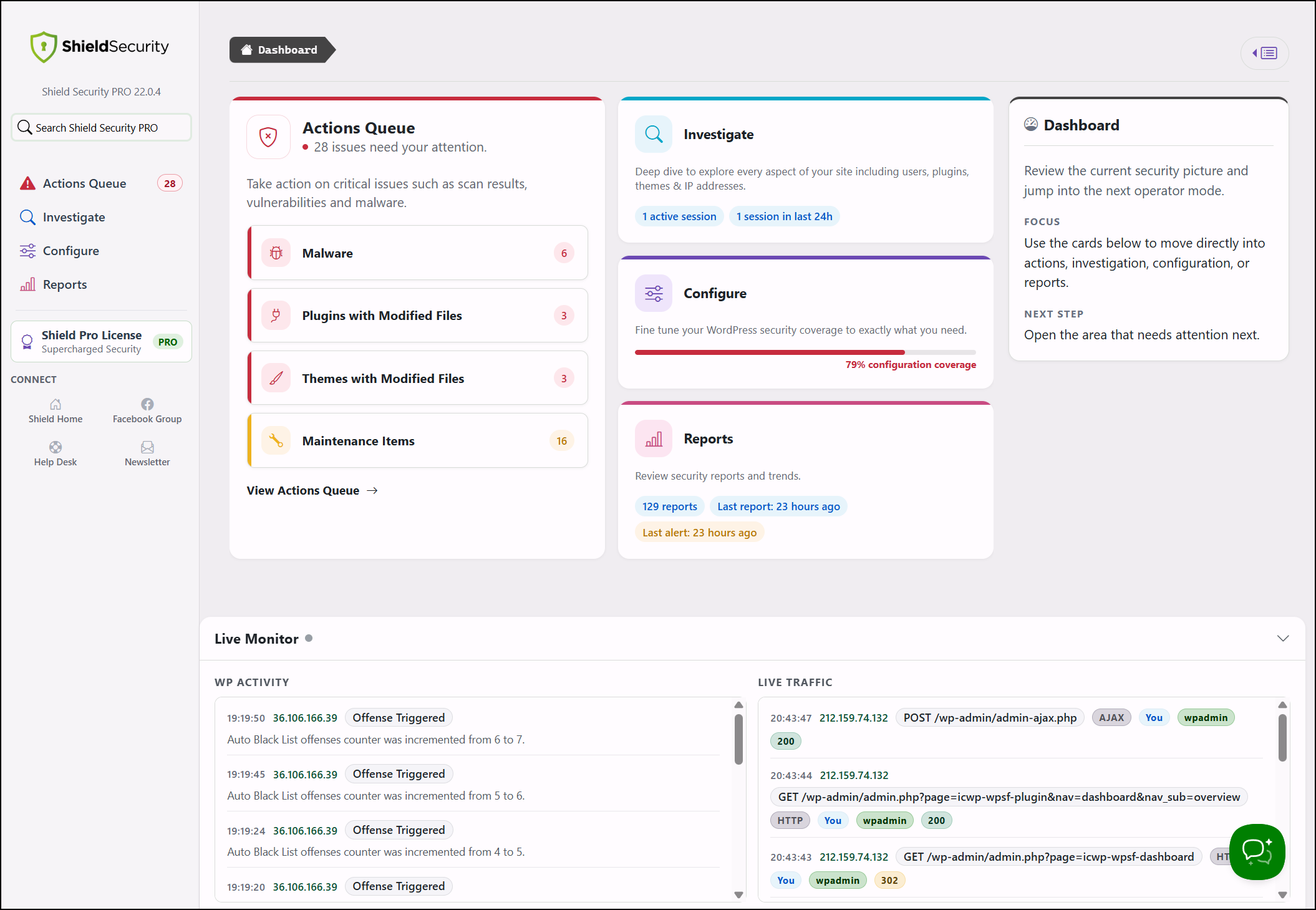
Security overview with current site status, important recommendations, and recent security events.
Faq
Please see the dedicated security help centre for details on features and some FAQs.
Shield assigns offense points to visitors who trigger security rules — failed logins, firewall blocks, silentCAPTCHA failures, and other signals. When a visitor’s points reach the configured threshold, they are blocked automatically. You can review blocked IPs, adjust thresholds, or add manual rules from the IP Rules section.
It analyses passive signals — timing, form interaction behaviour, and request characteristics — to distinguish automated requests from genuine visitors. There is no challenge to complete, no external site keys to set up, and no JavaScript that can break your forms. Everything stays on your server.
Your host or network firewall protects the server perimeter. Shield works inside WordPress, where it understands login attempts, user changes, plugin activity, file integrity, and attack patterns specific to WordPress. The two layers solve different problems and complement each other.
Yes. silentCAPTCHA protects the WordPress comment form in the free plugin. ShieldPRO extends coverage to Contact Form 7, Ninja Forms, WooCommerce, and a range of other integrations.
Generally, no. Running two plugins that control the same login or request flows leads to duplicate blocking, noisier logs, and harder troubleshooting. If you keep another plugin active, disable the areas where they overlap.
This usually happens after adding your own IP to the block list, or enabling 2FA when your site cannot deliver email codes.
- Open an FTP or file manager connection to
<your WordPress root>/wp-content/plugins/wp-simple-firewall/. - Create a file in that folder called
forceoff. - Load any page on your site — Shield will switch off.
Delete forceoff from the server once you are back in.
Email delivery depends on your site’s mail configuration, not Shield. If it is unreliable, set up a dedicated transactional email service or switch users to an authenticator app instead.
Yes to both. Shield supports CIDR notation for IP ranges, and bypass entries always take precedence over block rules.
Yes. ShieldPRO includes White Label controls to rename and rebrand Shield for client sites.
Reviews
Manipulative, fear mongering, plugin
By  missgoldieispregnant on October 4, 2026
My level of coding and configuration knowledge is definitely low, so I can’t comment on the technical capabilities of this plugin. However, as a free user I do need to say that I find the way the plugin sends warnings about unaddressed vulnerabilities to be manipulative. You get these alarmist notes from Shield Security about what isn’t configured within Shield Security and urgently needs to be configured, but wonder of wonders all of these things Shield says you must must must do to avoid calamity can’t be done unless you pay for the “pro” version of the plugin. Shield’s scare tactics are deplorable and a form of emotional blackmail they should rise above.
If you’re going to offer a free version of your plugin, you should really think through how that free version can communicate the ethics and trustworthiness of your company. If you don’t do that, as is apparently the case here, you should do us all a favor and not offer a free version at all.
LOCKED OUT
By  hollywoodonlocation on August 20, 2026
This stiupid plugin blocks me from even viewing my websites (3) and logging in. I can’t even log in from the backend of my host! And yes, I added my IP to a whitelist over a year ago, and checked it a few months ago. I’m going to have to ask my host to disable it and then I’m deleting this horrible plugin.
Where did it go?
By  Fields (wordlion) on July 17, 2026
what happened to the option to block an ip address? i have years of effort in there and it seems utterly gone from the interface…..
i got seven big critical new warnings and they all relate to settings in pro…. what a joke you are… only want warnings that relate to what i have installed…. shield’s greed of late is vile…and if you took away the ip block then adios, although i already deactivated…. shield seems more a sales plugin for a highly pricy obnoxious annual plan—anyone without a life plan never gets my money–than a security plugin you actually need and that does not take away features while throwing up red flags you can’t even act upon…..
Excellent support (and very useful plugin!)
By  belleisle on June 18, 2026
When I reached out to the team for support, they were very reactive and forthcoming. I very much appreciate their plugin and have now switched all of my WordPress installs to this all-in-one solution.
I USE PRO: It's packed with features.
By  coughlin on June 18, 2026
I have used several other security and firewall plugins on our sites, and some of them are very frustrating to use and cost just about as much. I like Shield Security becuase:
- The interface is much more intuitive for me to navigate than some of the others
- It has the features I need, and they actually work as expected
- The inline help text and explainer videos really help when configuring tools
- The reports are helpful, not just data
- Paul has been very responsive to questions and super helpful
While there may be less expensive plugins for WP security, this one packs a lot into the price and makes it worth the investment for my sites.
Excellent software and superb tech support
By  masorey on June 9, 2026
I’ve been using this software since day one, and it has always been good and reliable. Best of all, whenever I’ve had any trouble, the support team has been incredibly helpful and lightning fast.
The Free Version is Useless.
By  peachpit on May 27, 2026
My client picked this plugin, not me. And I just spent 2 days recovering and repairing their website. It was so bad, and that’s why I had to leave a review. We all know that premium versions of security plugins offer more security, in general. I manage around 50 websites currently; all of them are on Free Wordfence security, except this one. None of them have been hacked. Do with that what you will. Take some time to understand what is being restricted and what protection & control you actually have when using this particular plugin’s free version. Nothing is perfect, but this free version was really unnecessarily bad. I couldn’t even run a follow up scan-even THAT is restricted? Yeah, no.
I hate this expensive, complex plugin
By  sondrasneed on March 11, 2026
I’m so tired of visitors being locked out of client sites, clients being locked out. I have no idea how to get real support. It’s sold as a simple, robust security plugin, but it’s by no means simple; unless you’re a security expert. I want a refund but have no idea how to reach someone to get it. So unhappy.
Causes critical error
By  exoduss on September 16, 2025
Installed it two times, and each time it completely blocked access to the WordPress dashboard. Had to use FTP to delete this plugin.
Solid Security Plugin with Some Hidden Pitfalls
By  Amanda Mae (amahend) on June 9, 2025
I’m a web developer and I like Shield Security. It’s solid and offers strong protection.
That said, after following their advice to improve my security grade, I couldn’t edit the WordPress Customizer for months.
Support was polite but mostly suggested generic fixes like disabling HTTP headers, which didn’t solve the problem. It took me some digging to find the real cause. The issue was the anonymous REST API setting blocking access.
Once I disabled anonymous REST API, everything worked again. I realize this was my fault for not researching the setting before enabling it, but since Shield’s dashboard recommended it to improve my security score, it caught me off guard.
Shield Security is the best security plugin on the market, but it would be helpful if they added a clearer caution about how some settings might break parts of WordPress. It’s powerful but comes with some tricky trade-offs.