
External Store for Shopify
Description
Display Shopify products on your WordPress website with simple shortcodes.
Free features
- Product grid and collection shortcodes with search filter
- Responsive grid with configurable columns, sorting and price display
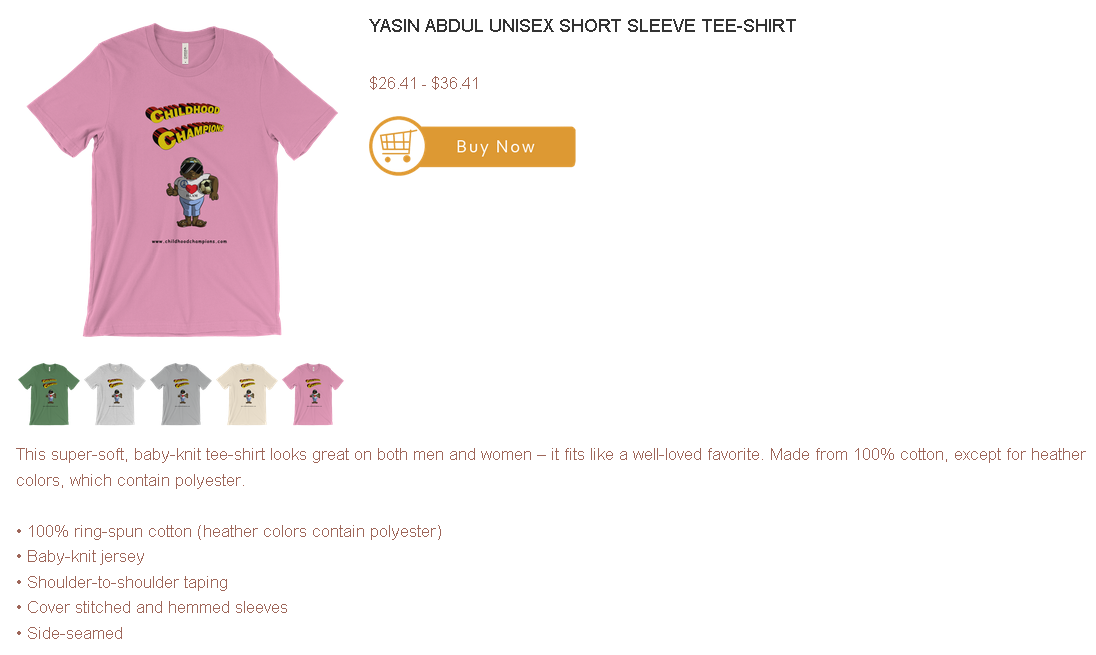
- Single product page with gallery, price, sale price and sold out label
- Product structured data (JSON-LD) for better search results
- Built-in cache for fast pages, plus a Clear cache button
- Test connection, shortcode generator and one-click disconnect in the settings
- Secrets are never printed back into the settings page
- Accessible, translatable and lazy loaded images
Premium features (plug and play)
If the pro folder exists, the premium features switch on automatically. If it does not exist, the free version keeps working exactly as before.
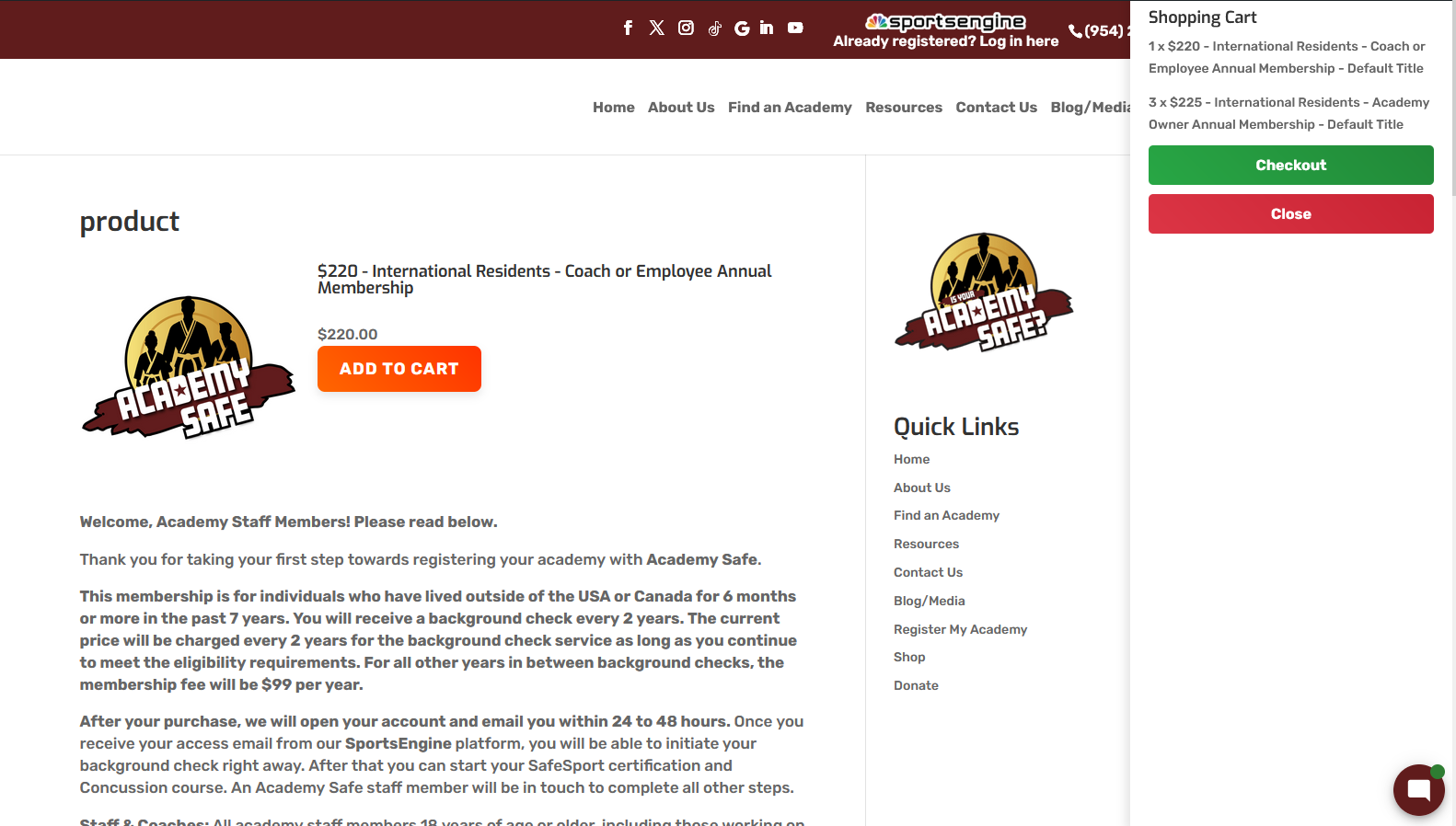
- JS cart drawer with variant and quantity support, live cart counter and checkout button
- Quick “Add to cart” buttons inside the product grid
- Sale badges and list / cards layouts
[wp-shopify-related]related product recommendations[wp-shopify-cart-button]cart button anywhere- Premium product templates
New attributes in 1.7.0
[wp-shopify type="products" columns="4" sort="title" reverse="yes" show-price="yes"]
Sort values: title, price, newest, best-selling (collections also support manual and default).
How it works?
A) Set up all the apis as directed by the App
B) Set up two new pages on your WordPress website
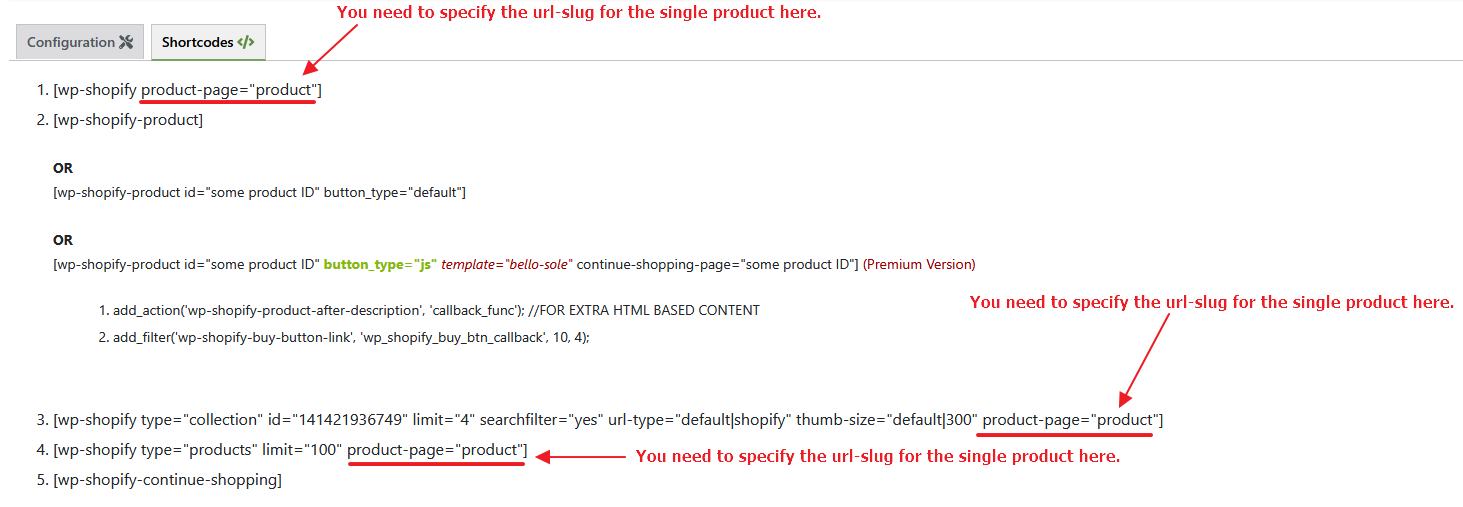
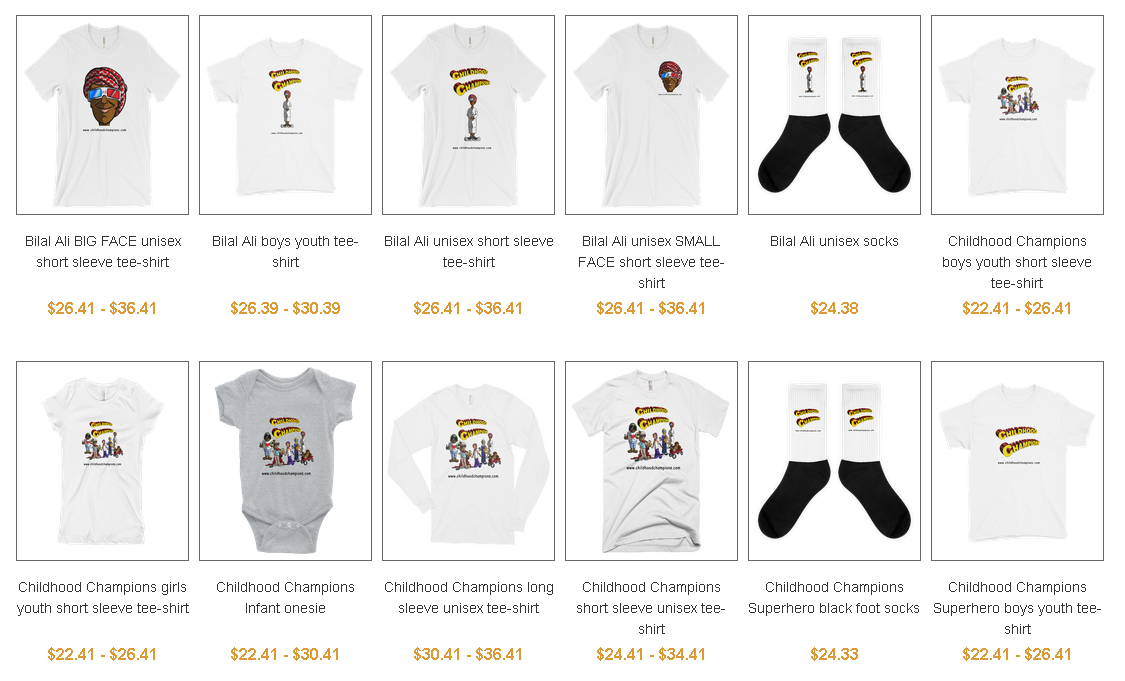
Page #1 Set the permalink to shopify (or products, shop, catalogue etc.) and add code [wp-shopify type=”products” limit=”100″ url-type=”default”]
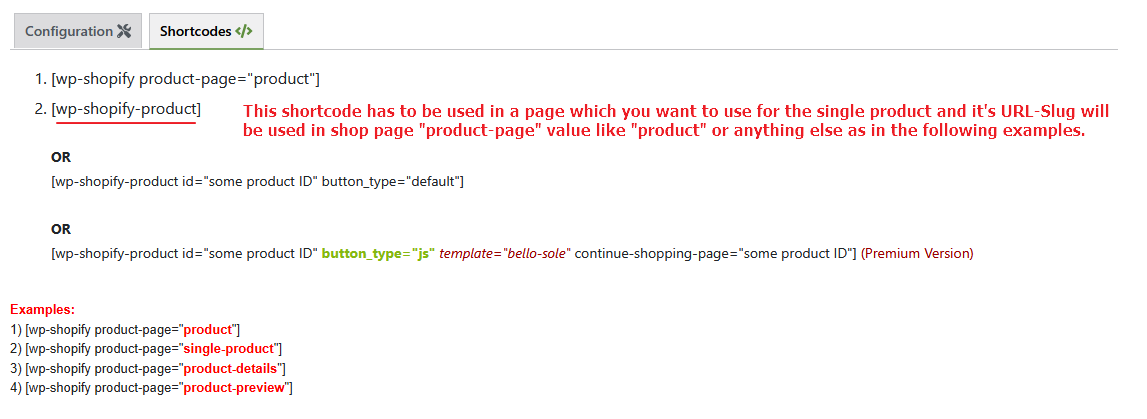
Page #2 Set the permalink to product (note there is no “s” at the end of the product in the url, the slug/permalink should be with exactly “product”) and insert code [wp-shopify-product] (this is where product redirect link to shopify store will work on your WordPress website)
C) Modify the layout of your WordPress website pages with the CSS
Installation
Note: This is a two-part install; you have to do some configuration on your Shopify store admin, then you must install code on your WordPress site.
In your Shopify admin, do the following:
- Login to the Shopify 2 Admin Panel.
- Go to Apps, then click the “Manage private apps” link at the bottom of the page.
- Click the “Generate API credentials” button.
- Set the Private app name to “Product Display” and be sure you have Read access to Products, variants and collections.
- Click the save button, and note your Private app API key and Password.
Install the WordPress part of this mod as usual (using the Install button
on the mod page on WordPress.org). The follow these steps:
- In your WordPress admin, do the following:
– In Plugins->Installed Plugins, click the “Activate” link under WP Shopify.
– In Settings->WP Shopify, set your Shopify URL, API Key and password.
To show a specific product on your blog, use the shortcode
[wp-shopify-product] with parameter “id” as a self closing tag.
So showing product 617935406 would be done as follows:
[wp-shopify-product id=”617935406″]
The id is shown in the URL when you edit a product in your admin.
Screenshots

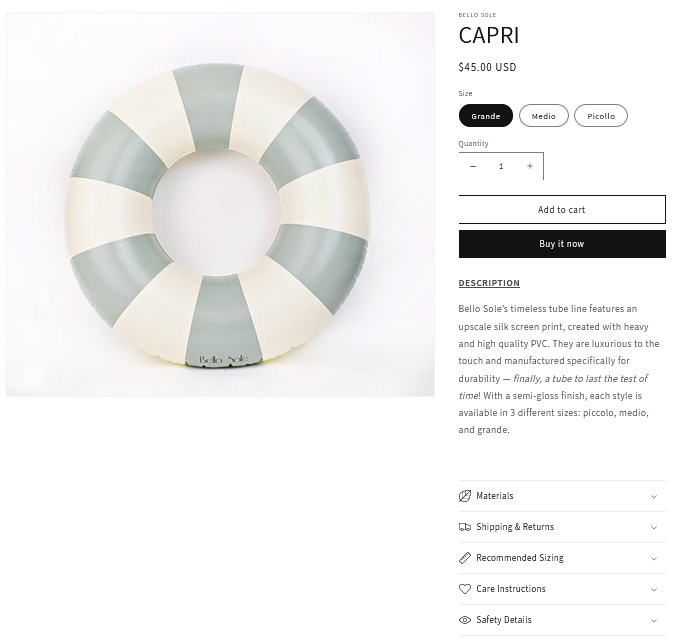
Single Product
Shop/Collection
Settings
Product
Add to cart
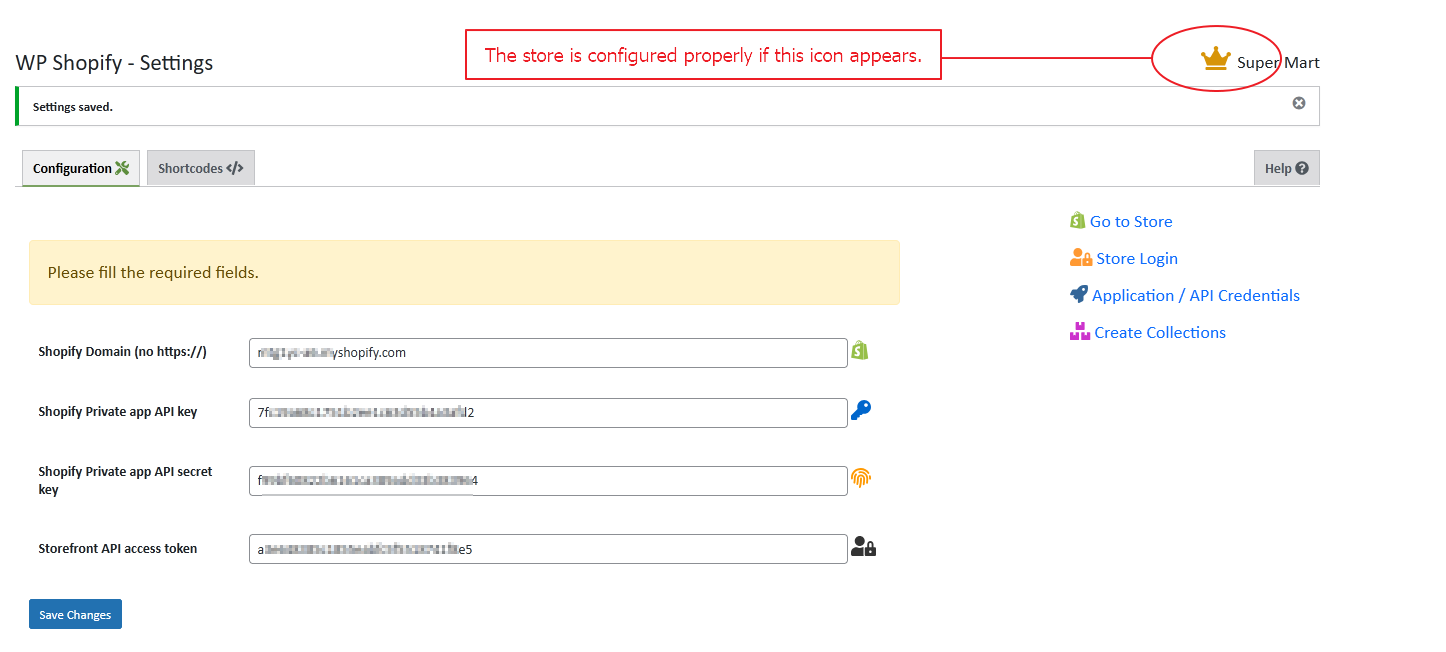
The Crown icon appears after configuring the store successfully.
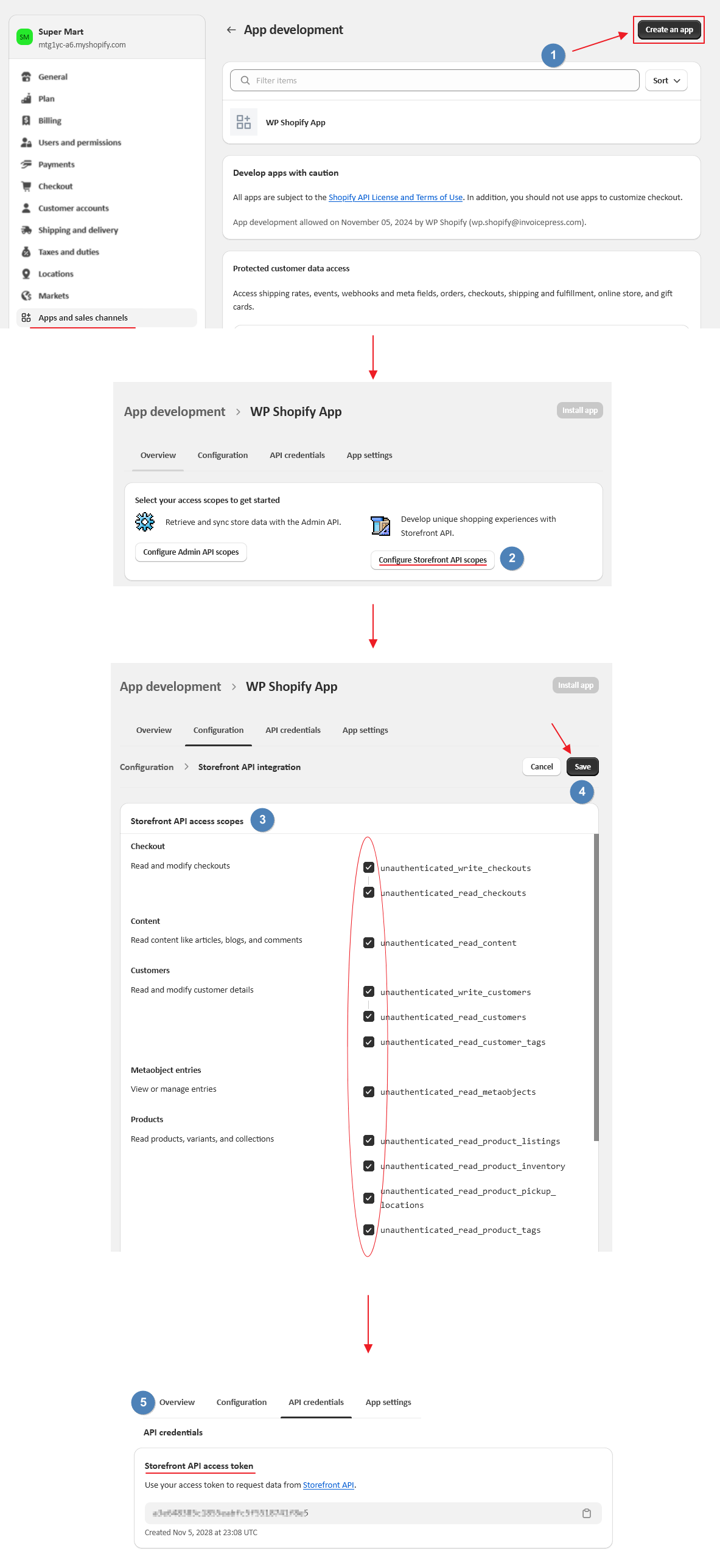
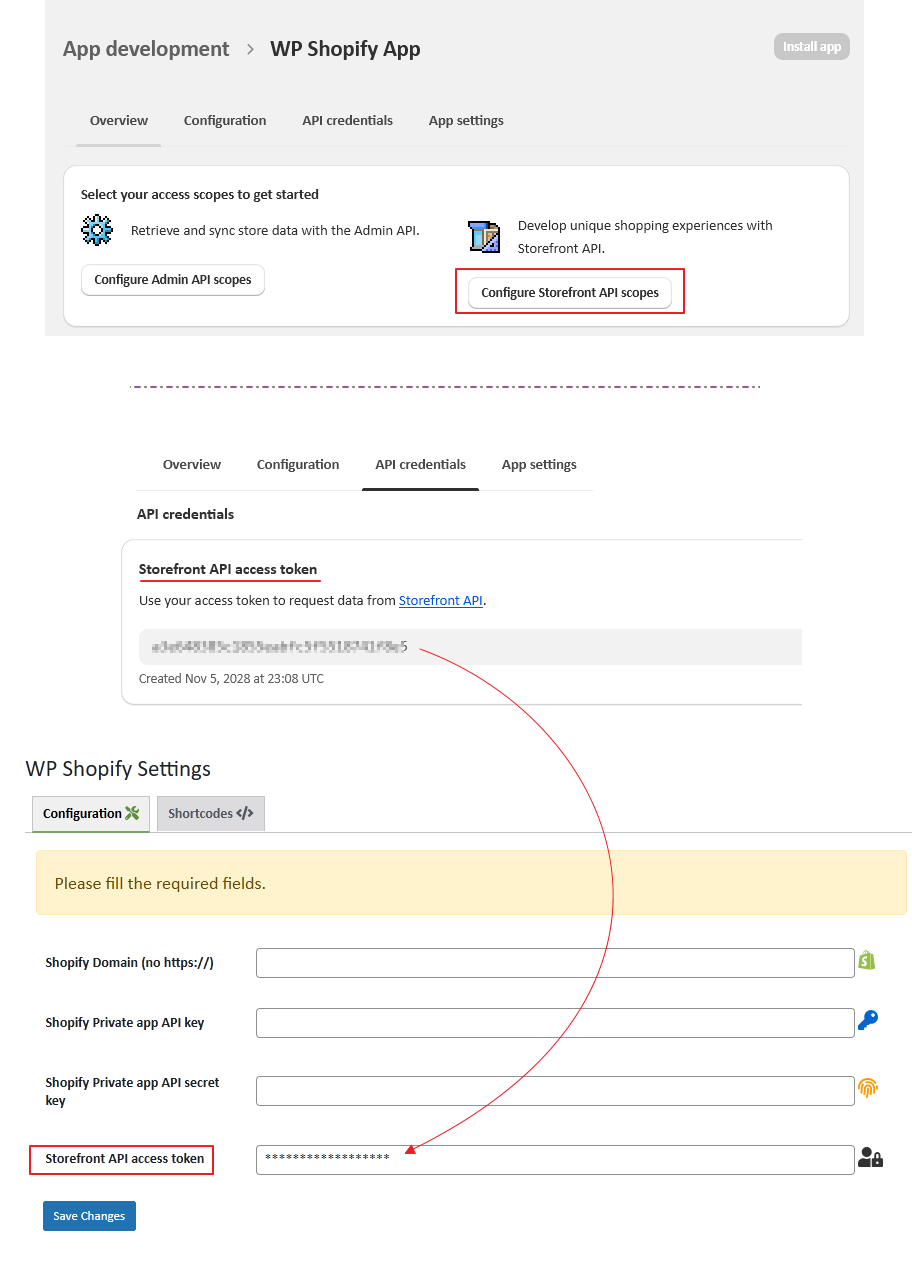
Storefront API access token/creating an app in Shopify store.
Fill the required fields to configure the Shopify store with the WP Shopify plugin.
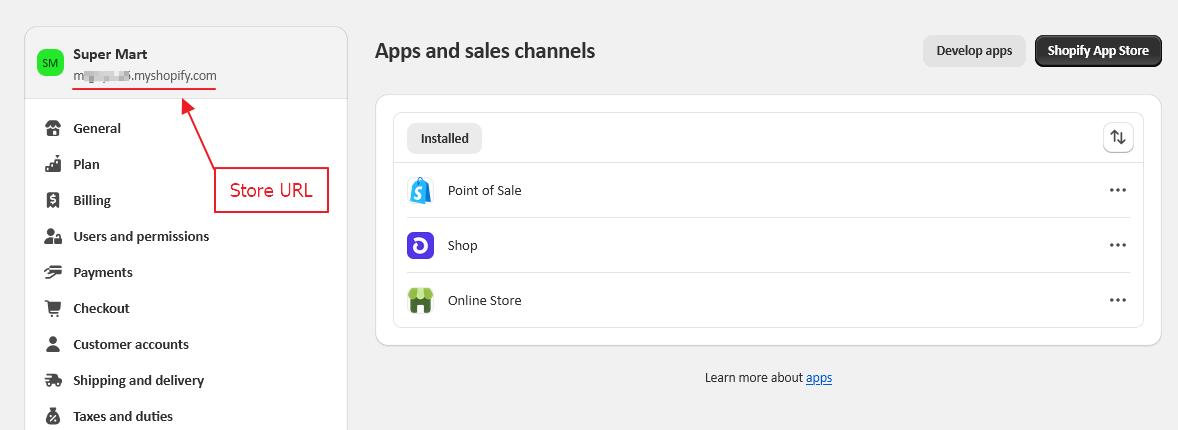
Store URL
App Development > WP Shopify App
button_type=”js” implementation


Faq
Why are my products not updating immediately?
Product data is cached for 10 minutes by default. Change the cache time on the settings page, or use Settings > External Store for Shopify > Tools > Clear cache.
How do I check that my store is connected?
Open the Tools tab on the settings page and click “Test connection”.
How should I know that my store is configured properly?
To configure your store properly, you will need Storefront API access. To achieve this, go to Apps and sales channels > develop apps > create an app and configure storefront API integration. Make sure to check all the access scopes (checkboxes) and save. You will get the Storefront API access token to configure your store on the plugin settings page.
Video tutorial showing the credentials and the crown icon
Enter all the credentials correctly in the required fields on the plugin settings page, a crown icon in the top right will appear. And the go to store button will be active as well as redirecting you to your Shopify store.
Is there any step-by-step guide to install and configure this plugin?
Configure this plugin with Shopify Store by following the steps below:
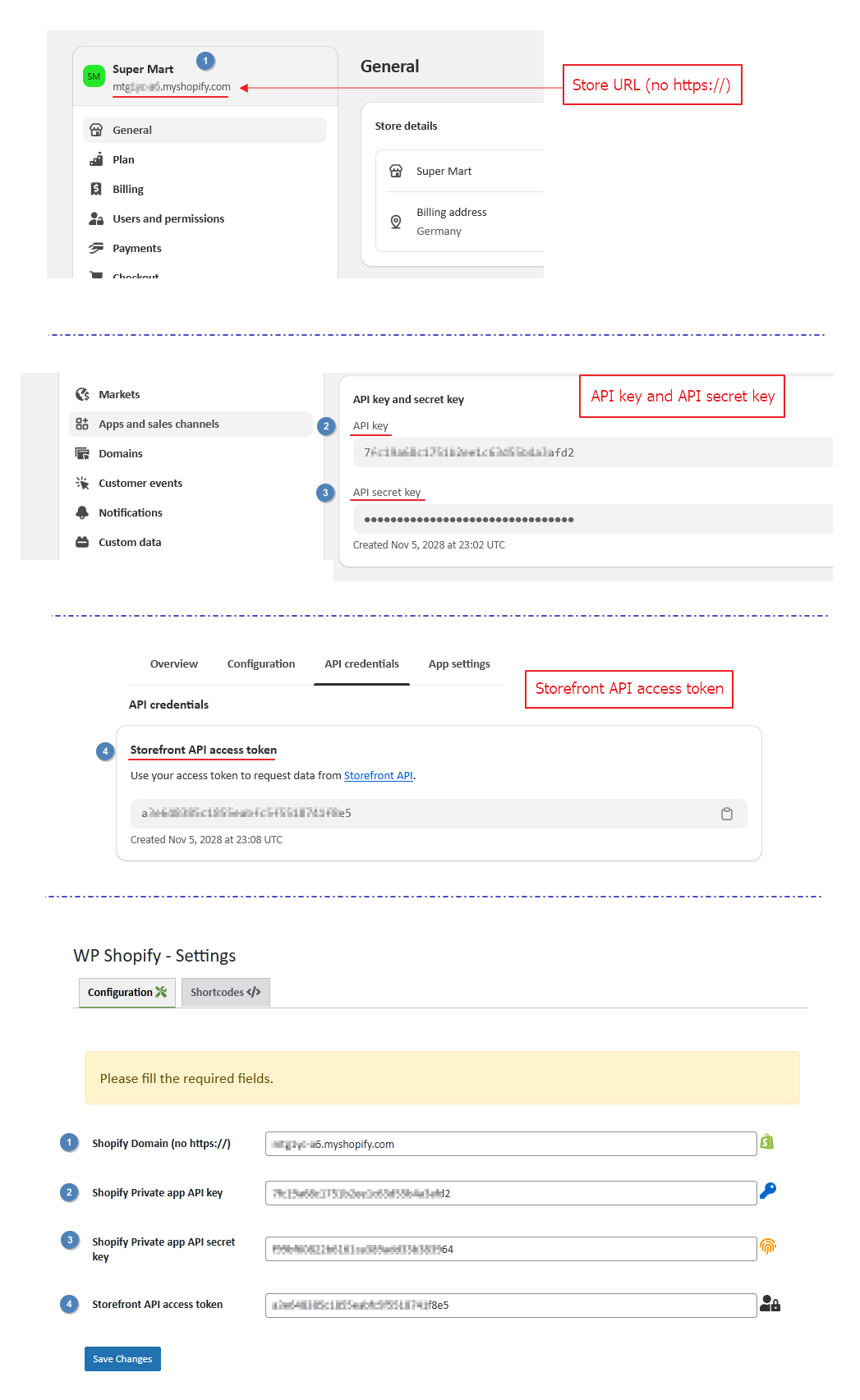
👉 1. Create a store or if you have an existing one, find the URL
screenshot-9.png

👉 2. Create an APP and Install that APP on your store
👉 3. Configure the storefront within your store APP
screenshot-10.png

👉 4. Get the app storefront API access token, API key and API secret key to insert in the required input fields on the plugin settings page. Save changes and check the outcome.
screenshot-8.png

Reviews
Great plugin and support
By  bbdm on February 18, 2025
Fahad has been incredibly helpful in getting the plugin setup and working best for our website. So appreciative!!
Not well documented
By  wobfan on November 2, 2024
The documentation for this plugin is below all standards. The default reocmmendation when you click on the only help symbol in the plugin is a 1.5 min video where the author basically explains nothing. There’s no documentation available or linked otherwise. The installation instructions from the plugin page are also deprecated and not well written.
Working with the help of support
By  LexGear (lexgear) on November 15, 2022
Great Plugin 🙂
By  fkqengineering on September 14, 2022
Plugin will stop you from accessing your Dashboard
By  adabob on May 21, 2020
Changelog
1.7.0
- Security: Storefront API requests are now built from validated values only (numeric ids, whitelisted sort keys), which removes the GraphQL injection risk from the product id in the URL.
- Security: All shortcode output is escaped, settings are sanitized and validated, secret fields are no longer printed into the settings page and AJAX actions require the manage_options capability.
- Security: The Shopify domain is validated (no IPs or paths), API calls use the WordPress HTTP API and the hard-coded session cookie was removed.
- Security: The debug helper is limited to administrators with WP_DEBUG enabled.
- New: Response cache with a configurable duration and a Clear cache button.
- New: Tools tab with Test connection, status information and Disconnect.
- New: Shortcode generator on the settings page.
- New: columns, sort, reverse and show-price shortcode attributes.
- New: Compare-at (sale) price, sold out label and Product structured data (JSON-LD).
- New: Optional price formatting in the website language.
- New: Search filter now shows a message when nothing matches and works with several lists on one page.
- New (Premium): Cart drawer with variant and quantity support, quick add buttons, sale badges, list / cards layouts, [wp-shopify-related] and [wp-shopify-cart-button].
- Improvement: Responsive CSS grid, lazy loaded images, scripts and styles load only where needed, versioned assets for proper browser caching.
- Improvement: Storefront API updated, deprecated fields removed, premium /pro folder is loaded after the core so it works as a clean add-on.
- Improvement: The gallery thumbnail switch on the single product page now works on the front end.
- Compatibility: Tested with WordPress 7.1. Requires WordPress 5.8 and PHP 7.4.
- Cleanup: Plugin data (settings and cache) is removed when the plugin is deleted.
1.6.0
- Security: Hardened premium template inclusion against potential Local File Inclusion (LFI) risks by adding sanitize_file_name(), strict whitelist validation, and fallback to ‘default’ template in shortcode handler. [22/02/2026 / Thanks to patchstack / timomangcut & @ratputin]
- Improvement: Enhanced input sanitization in shortcode attributes for better overall security and reliability.
- Compatibility: Tested with latest WordPress and Shopify API changes.
1.5.9
- New: Limit attribute default value fix. [01/09/2025 / Thanks to Maryam KJ]
1.5.8
- New: Plugin name updated for users convenience. [26/08/2025 / Thanks to WordPress Plugins Team]
1.5.7
- New: product-page attribute added. [12/08/2025 / Thanks to Christopher Hutchins]
1.5.6
- Fix: Limit parameter in the shop shortcode. [04/08/2025 / Thanks to Sachin & Maddy Stillman]
1.5.5
- Fix: Shopify API password and PHP error. [27/07/2025 / Thanks to @sjmaki]
1.5.4
- Fix: Vulnerability reported is reflected cross-site scripting (XSS) issue. [19/07/2025 / Thanks to Willow (Automattic) / Security Researchers for WPScan and Jetpack]
1.5.3
- New: Clear cart and a trash icon added to remove the items. [18/02/2025]
1.5.2
- New: button_type=”js” provided with the normal theme as well. [15/02/2025]
1.5.1
- Fix: Notice: Function _load_textdomain_just_in_time was called incorrectly. [12/12/2024]
1.5.0
- Fix: Fatal error: Uncaught TypeError: array_map(): Argument #2 ($array) must be of type array, bool given. [18/11/2024]
1.4.9
- New: Update settings page interface. [06/11/2024]
1.4.7
- Fix: [WP Shopify] Warning: Undefined variable $o. [Thanks to @hyuman][16/05/2024]
1.4.6
- Video tutorial link added for the storefront API keys. [Thanks to Mary Mueller][04/04/2024]
1.4.5
- Concatenation related issue resolved. [Thanks to Niko Moustoukas][08/03/2024]
- Fix: https://wordpress.org/support/topic/created-api-with-keys-etc-nothing-but-errors/ [Thanks to @kindred][01/04/2024]
1.4.4
- Updated description with the helpful guidelines. [Thanks to @kira01][28/01/2024]
1.4.3
- Translatable strings. [Thanks to @bichareh][11/08/2023]
1.4.2
- Translatable strings. 03/08/2023 [Thanks to @bichareh]
1.4.1
- Accessibility feature revised. 10/03/2023 [Thanks to JAMES MENENDEZ / FKQ]
1.4.0
- Accessibility feature added. 01/03/2023 [Thanks to JAMES MENENDEZ / FKQ]
1.3.9
- Video tutorial removed from the support tab. 06/02/2023 [Thanks to Joshua Stokes & Andrew Robbins]
1.3.8
- Back to shop link added through the shortcode on single product page. 20/12/2022 [Thanks to KC Clark]
1.3.7
- JS based add to cart button included in the shortcodes as a new attribute “button_type”. 14/10/2022 [Thanks to Roman von Contzen]
1.3.6
- Search filter attribute added to the collection based shortcode. 22/06/2022 [Thanks to KC Clark]
- url-type and thumb-size attribues added to the collections shortcode. 14/09/2022 [Thanks to James Menedez]
1.3.5
- Settings page css tweaks. 19/06/2022 [Thanks to KC Clark]
1.3.4
- Capri theme added in premium version. 14/05/2022 [Thanks to Dylan Ence]
1.3.3
- GraphQL implemented with access token. 17/04/2022 [Thanks to Maria Abad-Guillen]
1.3.2
- Stylesheet path fixed for shotcodes function. 14/04/2022 [Thanks to kamasi]
1.3.1
- Updated version with help tab.
1.3
- Updated version for WordPress.
1.2
- Fatal error fixed. [Thanks to @adabob and @andrewmrobbins]
1.1
- Shortcode improved with two more attributes. [Thanks to lakewebworks]
1.0.1
- Languages added. [Thanks to Abu Usman]
1.0.0
First version