
WP GPX Maps
Description
WP GPX Maps turns a GPX file into an interactive map and charts: upload the track, add the GPX Map block (or the [sgpx] shortcode) and your readers get the route, the elevation profile and the statistics of your hike, ride or run.
Maps
- OpenStreetMap and other free maps (no account needed): OpenStreetMap, Humanitarian, Hike & Bike, OpenSeaMap, and the Thunderforest maps (OpenCycleMap, Outdoors, Transport, Landscape) with a free Thunderforest API key.
- MapBox with your own API key: Outdoors, Streets, Satellite, Satellite Streets, Light, Dark, Standard and custom styles, 3D terrain, fog and a tilted 3D view (
pitch,bearing). - Track colored by grade (blue descent, green flat, yellow to red climb), speed, heart rate or elevation, with a legend.
- Several GPX files in one map (
gpx="a.gpx,b.gpx"), one color per file with a legend. - Start / finish markers, distance markers every N km or miles, waypoints with popups, full screen, photos from NextGEN Gallery or from the images attached to the post.
Charts
- Filled elevation profile, speed, heart rate, cadence, temperature and grade.
- Move the mouse on the chart and the position is shown on the map; move it on the track and the point is shown in the chart.
- GPS noise is smoothed out: grade averaged over about 100 m, speed without single spikes.
- Meters, kilometers, feet, miles or nautical miles; speed in km/h, mph, min/km, min/mile, knots or min/100 m.
Summary
Total distance, maximum and minimum elevation, total climbing and descent, average and maximum speed, maximum grade, average heart rate, cadence and temperature, total time and moving time (pauses excluded).
Easy to use
- GPX Map block for the block editor with live preview: pick an uploaded GPX file from a list and set every option in the sidebar.
- Upload and manage your GPX files in Settings > WP GPX Maps (editors and authors can upload their own files).
- Every option has a default in the settings, so a simple
[sgpx gpx="/wp-content/uploads/gpx/my-track.gpx"]is enough. - GPX 1.0 and 1.1, Garmin and Strava extensions (heart rate, cadence, temperature), multi-track files.
- Cache of the processed tracks, scripts loaded as an ES module, works with PHP 7.4 to 8.4.
Support and development
- Questions and bug reports: the support forum.
- Development, issues and pull requests: GitHub.
- Translations: translate.wordpress.org.
- Support the development: GitHub Sponsors.
Icons made by Freepik from www.flaticon.com, licensed under CC BY 3.0.
Installation
- Install the plugin from Plugins > Add New (search for “WP GPX Maps”) and activate it.
- Upload your GPX files in Settings > WP GPX Maps > Tracks, or use any GPX file already on your site or on another site.
- In a post or page add the GPX Map block and choose the GPX file. With the classic editor use the shortcode, for example
[sgpx gpx="/wp-content/uploads/gpx/my-track.gpx"]. - Optional: in Settings > WP GPX Maps set the defaults for all the maps, a Thunderforest API key for the Thunderforest maps or a MapBox API key for the MapBox maps and 3D terrain.
Screenshots

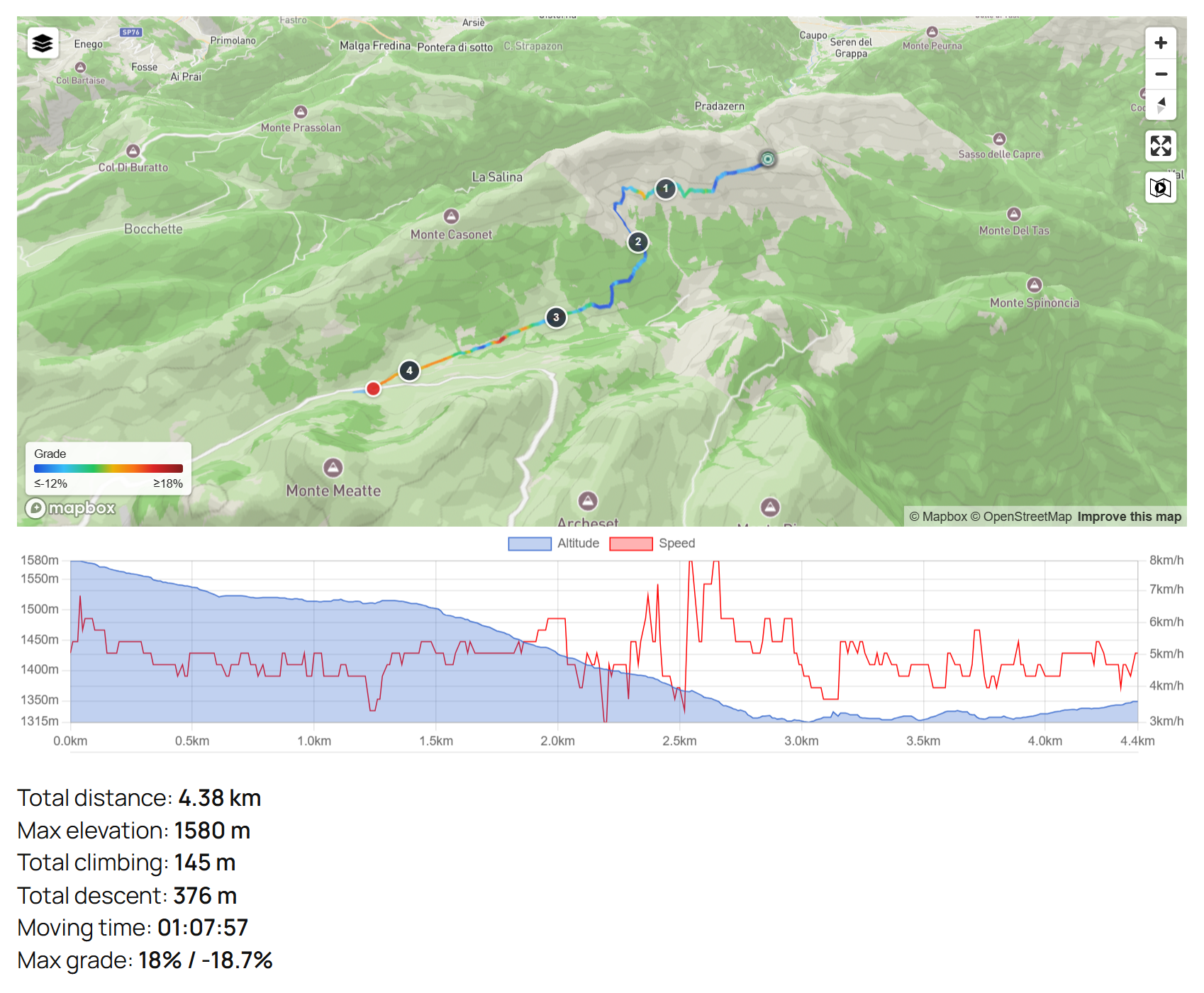
Track colored by grade on a MapBox Outdoors map with 3D terrain, distance markers, elevation and speed chart, and summary.
3D view of a trail on MapBox Satellite Streets.
The same trail with the MapBox Dark and Light styles.
OpenStreetMap, no API key needed: elevation and speed chart and full summary with moving time.
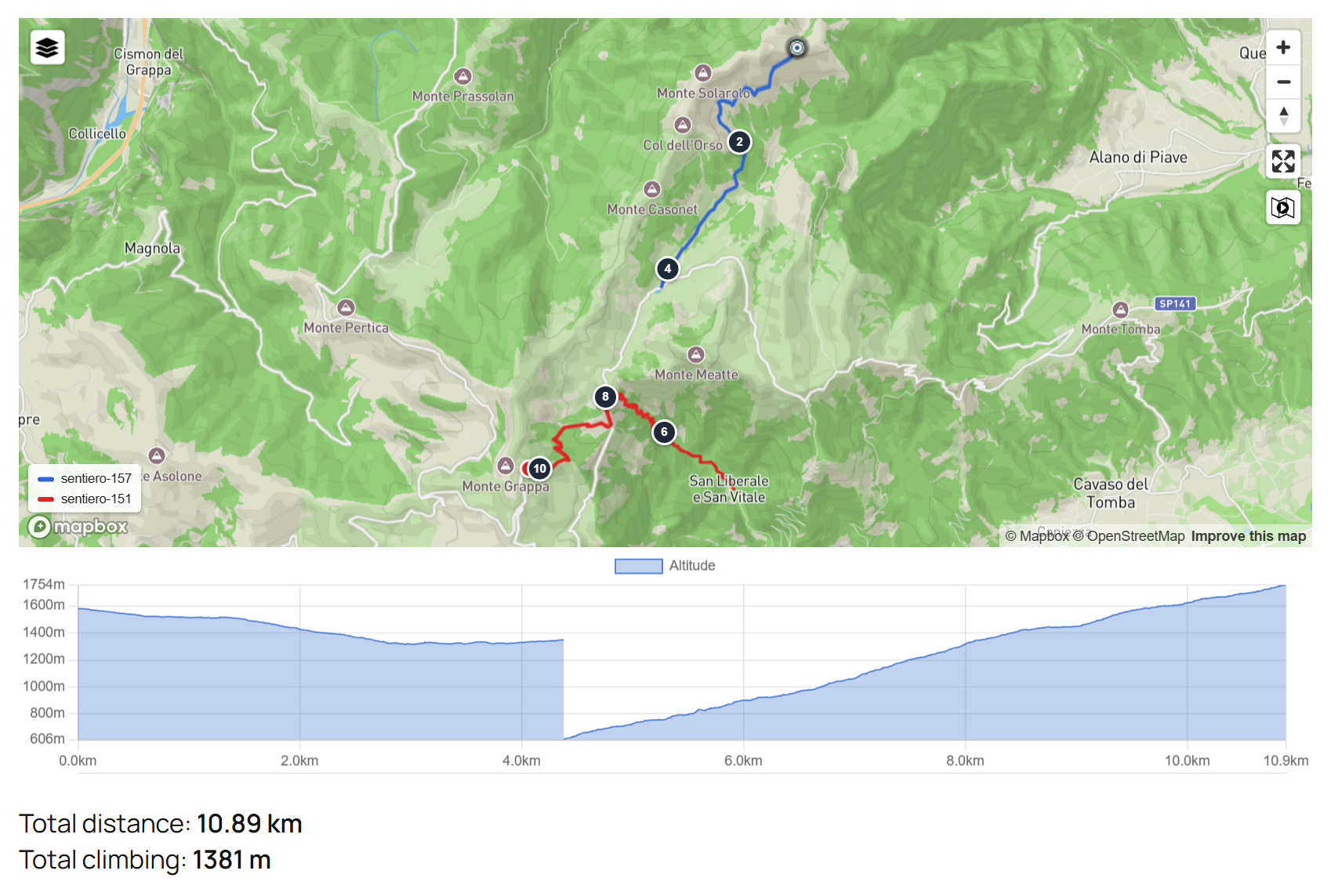
Two GPX files in one map, one color per file, with a continuous elevation profile.
Track colored by speed: moving on the chart shows altitude, speed and grade, and the position on the map.
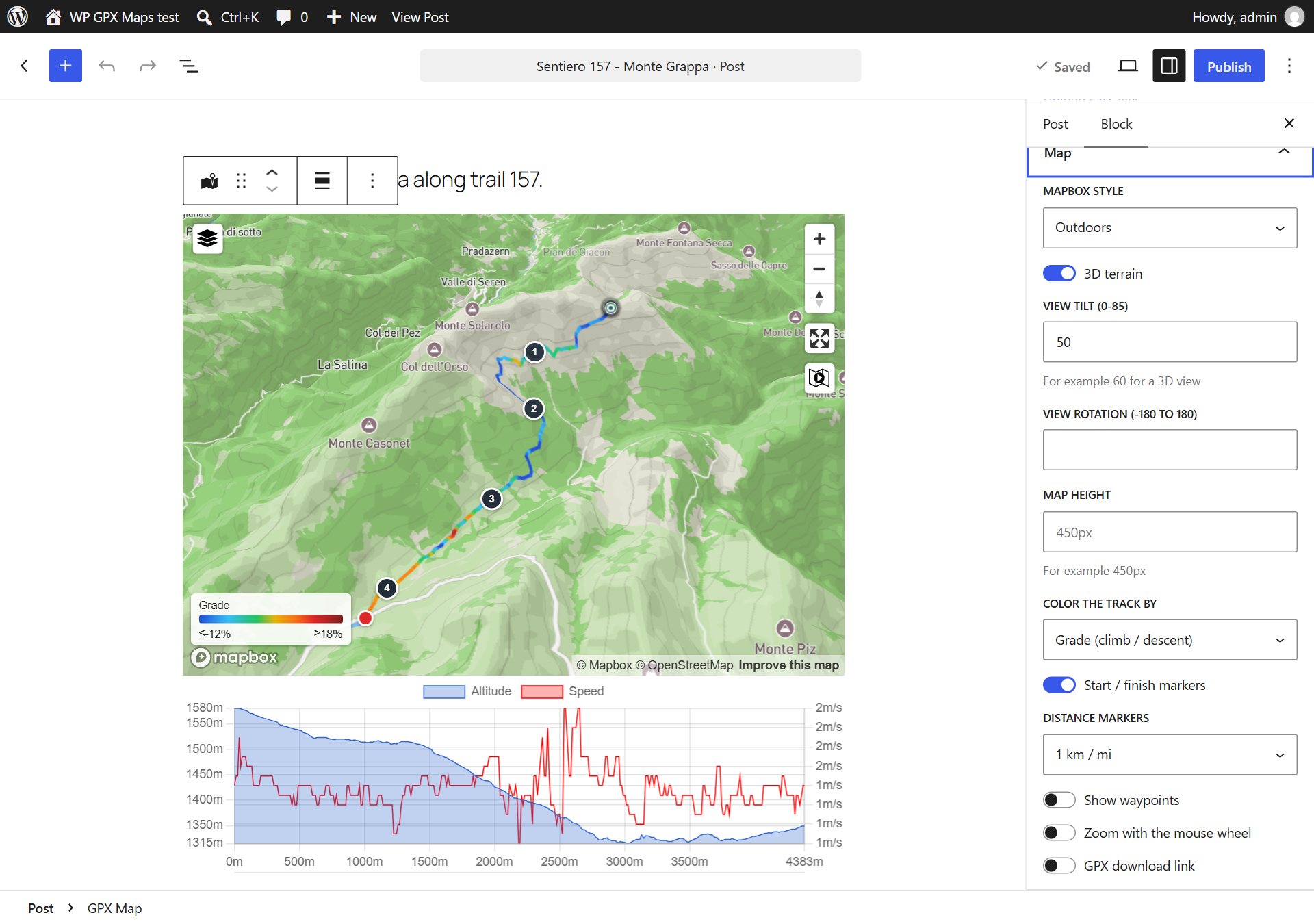
The GPX Map block in the block editor: live preview and options in the sidebar.



Faq
Do I need an API key?
No. OpenStreetMap, Humanitarian, Hike & Bike and OpenSeaMap work without a key. The Thunderforest maps need a free Thunderforest API key. MapBox styles and 3D terrain need your own MapBox access token: when it is set in the settings, all the maps use MapBox.
How do I show the 3D view?
Set a MapBox access token, then enable 3D terrain and a view tilt in the block (or mapbox3d=true pitch=60 in the shortcode). bearing rotates the view, mapboxstyle chooses the style of a single map, for example satellite-streets-v12.
How do I show several tracks in one map?
Use the GPX files separated by commas: [sgpx gpx="/wp-content/uploads/gpx/day1.gpx,/wp-content/uploads/gpx/day2.gpx"]. Each file gets its own color and the totals are for the whole route.
Which shortcode attributes are available?
The main ones (every attribute also has a default in the settings; true / false turn an option on or off):
- gpx: path of the GPX file from the site root, or its URL; several files separated by commas.
- mheight, gheight, width: map height, chart height (
0pxhides the chart), width. - mtype: map type without MapBox:
OSM1OpenStreetMap,OSM2OpenCycleMap,OSM3Thunderforest Outdoors,OSM4Transport,OSM5Landscape,OSM7Humanitarian,OSM9Hike & Bike,OSM10OpenSeaMap,OSM11GSI Japan. - mapboxstyle, mapbox3d, pitch, bearing: MapBox style, 3D terrain, view tilt (0-85) and rotation.
- colorby:
grade,speed,hr,elevationornone. - mlinecolor: track color (several colors separated by spaces, one per track).
- kmmarkers: distance marker every N km or miles; startend: start / finish markers.
- waypoints, startIcon, endIcon, currentIcon, waypointicon, zoomonscrollwheel, download.
- showele, showspeed, showhr, showcad, showatemp, showgrade and their colors glinecolor, glinecolorspeed, glinecolorhr, glinecolorcad, glinecoloratemp, glinecolorgrade.
- uom: 0 meters, 1 feet/miles, 2 meters/kilometers, 3 meters/nautical miles, 4 meters/miles, 5 feet/nautical miles.
- uomspeed: 0 m/s, 1 km/h, 2 miles/h, 3 min/km, 4 min/mile, 5 knots, 6 min/100 m.
- chartFrom1, chartTo1, chartFrom2, chartTo2: range of the altitude and speed axes.
- summary and summarytotlen, summarymaxele, summaryminele, summaryeleup, summaryeledown, summaryavgspeed, summarymaxspeed, summarymaxgrade, summaryavgcad, summaryavghr, summaryavgtemp, summarytotaltime, summarymovingtime.
- nggalleries, ngimages, attachments, dtoffset: photos on the map.
- pointsoffset, donotreducegpx, skipcache: processing of large files.
The complete list with the current defaults is in Settings > WP GPX Maps > Help.
What happens with very large GPX files?
The plugin skips points closer than 10 meters (pointsoffset) and can keep about 200 points for the map and the chart, then caches the result, so even long tracks load fast.
Is it free?
Yes, WP GPX Maps is free and open source (GPLv2 or later).
Reviews
Fallos con php 8.x
By  Juan Carlos López (juancar2911) on February 21, 2026
Aunque en la documentación dice que han solucionado problemas de compatibilidad con php 8.x, he tenido que regresar a php 7.x porque los mapas se rompian y no mostraban los recorridos.
Great plugin when it works!
By  markjgwilliam on April 19, 2025
I have been using for a number of years, however as others point out its rather buggy and lacks frequent updates or support. With a recent update to PHP8 on my site it breaks my posts so I have unfortunately had to deactivate it. Shame as I haven’t found a similar plugin…
test your updates better
By  sjoerd72 on April 15, 2024
Great plugin but please – test better – you should test with tracks that do not have time/date/elevation per point.
Please update wp-gpx-maps-utils.php (lines 379 – 383):
$points->maxEle      = (count($_ele) > 0 ? max( $_ele ) : 0);
$points->minEle      = (count($_ele) > 0 ? min( $_ele ) : 0);
$points->totalLength = max( $_dist );
$points->maxTime     = (count($_time) > 0 ? max( $_time ) : 0);
$points->minTime     = (count($_time) > 0 ? min( $_time ) : 0);
If tracks do not contains times(speed) or elevation the code breaks
TOP
By  alpencross on March 28, 2024
Ich nutze Sie auf meinem Alpencross Block und bin total begeistert!
Was not no more – exactly what I needed to display routes
By  deepmill on August 3, 2022
Once one of the best plugins but…
By  stefanprobst on August 2, 2022
Superbe plugin Gps
By  michcro21 on February 25, 2022
Finally it's working again
By  camperxr on February 2, 2022
nothing
By  Pierre MUZAS (Peter94) on February 13, 2021
Works great !
By  madrille70 on February 11, 2021
Changelog
1.9.00
- New: “GPX Map” block for the block editor, with live preview, a list of the uploaded GPX files and all the main options in the sidebar (the [sgpx] shortcode keeps working)
- New: several GPX files in one map, gpx=”a.gpx,b.gpx”: one color per file, legend, cumulative distance and totals
- New: start / finish markers (hide with startend=”false”) and distance markers every N km or miles (kmmarkers=”5″)
- New: summary with moving time, max speed and max grade (summarymovingtime, summarymaxspeed, summarymaxgrade)
- New: filled elevation profile and a vertical line on the selected point; hovering the track also shows the point in the chart with MapBox
- Fix: “Total descent” was a negative number
- Fix: the chart distance no longer restarts from 0 for each track of a multi-track GPX file
- Fix: chart tooltip showed pixel positions instead of distance and values; selecting a point from the map did not show it in the chart
- Developers: wpgpxmaps_get_track_info() and wpgpxmaps_module_url(); the map module exports Leaflet
- New: MapBox style, 3D terrain and initial 3D view for each map: mapboxstyle, mapbox3d, pitch, bearing (also in the block)
- Charts: grade averaged over about 100 m and speed without GPS spikes; max speed computed the same way; whole meters on the altitude axis
- Fix: gheight=”0px” showed an empty chart instead of hiding it
- New: color the track by grade (climb / descent), speed, heart rate or elevation, with a legend on the map: colorby=”grade|speed|hr|elevation”, in the block and in the settings
- Fix: “false” values in the shortcode (e.g. showele=false, summary=false) now turn off options enabled in the settings
- Maps also start when the page is already loaded (block editor preview, content loaded later)
- Developers: hooks for add-ons (filters wpgpxmaps_shortcode_atts, wpgpxmaps_map_extra, wpgpxmaps_map_html, wpgpxmaps_block_shortcode_atts, wpgpxmaps_admin_tabs; actions wpgpxmaps_enqueue_scripts, wpgpxmaps_admin_tab_{tab}; JavaScript event “wpgpxmaps:ready”)
1.8.00
- MapBox provider: needs ApiKey and brings a lot of new cool features like 3d maps and much more
- Security: fixed a reflected XSS. Shortcode parameters can no longer be set from the page URL (query string)
- Security: GPX files and folders must be inside the WordPress site, wp-content or uploads folder (path traversal)
- Security: added nonce checks to GPX upload and to the update notice dismiss (CSRF)
- Security: safer cache reading, no network access while parsing GPX, temporary copies of remote GPX are deleted
- Fix: map not displayed on pages with nested permalinks or with WordPress in a subfolder
- Fix: map not displayed when waypoints are enabled
- Fix: PHP 8 fatal errors with missing, invalid or remote GPX files that can’t be downloaded
- Fix: PHP 8 errors with tracks without time or elevation and with empty heart rate, cadence or temperature values
- Fix: PHP 8 warnings with images without GPS data, missing NextGen galleries, Clear Cache and shortcodes outside posts
- Fix: files uploaded by Editors and Authors are saved in their own folder again
- Fix: total time in the summary is correct for tracks longer than 24 hours
- Fix: chart error (and map not centered) with GPX files that contain more than one track
- Fix: chart error when the altitude chart is disabled
- Fix: heart rate, cadence and temperature are read from every GPX app (e.g. Strava), not only Garmin
- Fix: custom waypoint icon was never shown
- Fix: MapBox maps use the API key and the default style from the plugin settings
- MapBox: waypoints with popups, no duplicate markers when the style is changed, play button icon
- Fix: GPX files with more than one track are drawn as separate lines (Leaflet and MapBox)
- Fix: browsers load the new JavaScript after every plugin update (no stale cache)
- Thanks to arnaud-izzi (PHP 8 fixes for GPX files without elevation, GitHub #65) and DAnn2012 (help text, GitHub #66)
- Requires WordPress 6.5 and PHP 7.4 or newer
1.7.10
- Fix security issues
1.7.06
- Fix vulnerability
1.7.05
- Fix NextGen warnings
1.7.04
- Fix php8+ errors
1.7.03
- fix download file link
- fix error with images exif parsing
1.7.02
- fix admin error
1.7.01
- General: Removed Maptoolkit (code OSM6) map provider. Requested by H.F. (Maptoolkit Managing director)
- General: Added new map type “Thunderforest – Outddors” (OSM3)
- Admin: Added admin notices in the dashboard
- Settings Tab: In the map selection changed to the correct maps provider from “Open Cycle Map”* Settings Tab: to “Thunderforest”
- Administration Tab: New Tab with the settings “Editor & Author upload” and “Show update notice”
- Help Tab: In the map selection changed to the correct maps provider from “Open Cycle Map” to “Thunderforest”
- Output: In the map selection changed to the correct maps provider from “Open Cycle Map” to “Thunderforest”
- Output: Fixed in map footer for each map, the corresponding map provider is displayed with URL
- Code: Added PHP version notices, WordPress 5.3 requires PHP 5.6.20
- Code: Added Missing entries for add and delete options
- Code: Style for output moved in a seperate CSS file
- Code: Adjustments a la WPCS
- Code: Small CSS design optimizations for the tabs
- Code: Upgrade bootstrap-table to 1.13.2
- Code: Removed german language file (now over translate.wordpress.org)
1.7.00
- Added: Authors can upload GPX tracks in a folder called as your user name, inside [../wp-upload dir/gpx/[your user name] (thanks to wildcomputations)
- Added: Authors an Admins can see the current values for shortcodes in help tab
- Added: Button to instant copy the shortcode of the selected GPX file in the tab track
- Added: different size logos for the plugin store (icon.svg, icon128x128.png and icon256x256.png) [inside ../plugins/wp-gpx-maps/assets]
- Changed: Settings tab is for non-Admin users is not more visible
- Tweak: Help tab is easier to read
- Tweak: Plugin is now complete translatable (Backend + Frontend)
- Tweak: WordPress coding standards
- Upgrade: Leaflet to 1.5.1
- Upgrade: leaflet.fullscreen to 1.4.5
- Upgrade: Chart.min.js to 2.8.0
1.6.07
- resolve admin error
1.6.06
- Added average values under the graph (thanks to cyclinggeorgian)
1.6.04
- NGG gallery is working
- Getting HR, Cad and Temp working again (thanks to cyclinggeorgian)
- Fix javascript errors
- Fix multiple traks gpx
1.6.03
- Fix syntax error causing graph not to display (thanks to nickstabler)
1.6.02
- Resolved errors with start and end icons
1.6.01
- Removed Gogole maps. Leafletjs instead.
- — NextGen Gallery is not working, due next gen image format changed — I’ll fix soon
1.5.05
- renamed javascript functions to avoid collision with other plugins
- reduced chart line thickness
1.5.04
- fix uom
- fix file not found
1.5.03
- fix random error
1.5.02
- Security improvements
1.5.01
- Improved security
- Included javascript
- Multiple file upload
- Implemented sorting in file list
- Renamed internal function to improve wp compatibility
1.5.00
- replaced highcharts with chartjs. This is a forced choice due highcharts license issue, view: https://devfarm.it/wordpress-plugin/wordpress-plugin-directory-notice-wp-gpx-maps-temporarily-disabled/
1.3.16
- Added Norwegian nb_NO translation (thanks to thordivel)
- Added Japanese ja_JP translation (thanks to dentos)
1.3.15
- Switched to HTTPS where possible (thanks to delitestudio)
1.3.14
- Added Thunderforest Api Key on settings: for OpenCycleMap
1.3.13
- Added google maps api key on settings
- Removed parameter ‘sensor’ on google maps js
- Added unit of measure of speed for swimmers: min/100 meters
1.3.12
- Fix incompatibility with Debian PHP7 (thanks to phbaer) https://github.com/devfarm-it/wp-gpx-maps/pull/5
1.3.10
- Improved german translations (thanks to Konrad) http://tadesse.de/7882/2015-wanderung-ostrov-tisa-ii/
1.3.9
- Retrieve waypoints in JSON, possibility to add a custom marker (Changed by Michel Selerin)
1.3.8
- Improved Google Maps visualization
1.3.7
- NextGen Gallery’s Attachment support. Thanks to Stephan Klein (https://klein-gedruckt.de/2015/03/wordpress-plugin-wp-gpx-maps/)
1.3.6
- Fix: remote file download issue
- Fix: download file link with WPML
- Improved cache with filetime (thanks to David)
1.3.5
- Fix: Garmin cadence again
- Fix: WP Tabs
1.3.4
- Fix: Garmin cadence
- Infowindows closing on mouseout
1.3.3
- Add feet/Nautical Miles units (thanks to elperepat)
- Update OpenStreetMaps Credits
- WP Tabs fix
1.3.2
- fix: left axis not visible (downgrade highcharts to v3.0.10)
- fix: fullscreen map js error
1.3.1
- fix: http/https javascript registration
- fix: full screen map css issue
1.3.0
- Speed improvement
- Rewritten js classes
- Added Temperature chart
- Added HTML5 Gps position (you can now follow the gpx with your mobile phone/tablet/pc)
1.2.6
- Speed improvement
1.2.5
- Added Catalan translation, thanks to Edgar
- Updated Spanish translation, thanks to Dani
- Added different types of distance: Normal, Flat (don’t consider altitude) and Climb distance
1.2.4
- Added Bulgarian translation, thanks to Svilen Savov
- Added possibility to hide the elevation chart
1.2.2
- Smaller map type selector
- Fix: Google maps exception for NextGen Gallery
1.2.1
- Fix: NextGen Gallery 1.9 compatibility
1.2.0
- NextGen Gallery 2 support
- NextGen Gallery Pro support
1.1.46
- Added meters/miles chart unit of measure
- Added Russian translation, thanks to G.A.P
1.1.45
- Added nautical miles as distance (Many thanks to Anders)
1.1.44
- Added Chart zoom feature
- Some small bug fixes
1.1.43
- Added Portuguese (Brazilian) translation, thanks to André Ramos
- new map: Open Cycle Map – Transport
- new map: Open Cycle Map – Landscape
1.1.42
- qTranslate compatible
1.1.41
- Added Polish translation, thanks to Sebastian
- Fix: Spanish translation
- Minor javascript improvement
1.1.40
- Improved italian translation
- Added grade chart (beta)
1.1.39
- Added French translation, thanks to Hervé
- Added Nautical Miles per Hour (Knots) unit of measure
1.1.38
- Fix: garmin gpx cadence and heart rate
- Updated Turkish translation, thanks to Edip
- Added Hungarian translation, thanks to Tami
1.1.36
- Even Editor and Author users can upload their own gpx. Administrators can see all the administrators gpx. The other users can see only their uploads
1.1.35
- Fix: In the post list, sometime, the maps was not displaying correctly ( the php rand() function was not working?? )
- Various improvements for multi track gpx. Thanks to GPSracks.tv
- Summary table is now avaiable even without chart. Thanks to David
1.1.34
- 2 decimals for unit of measure min/km and min/mi
- translation file updated (a couple of phrases added)
- File list reverse order (from the newer to the older)
- nggallery integration: division by zero fixed
1.1.33
- Decimals reducted to 1 for unit of measure min/km and min/mi
- map zoom and center position is working with waypoints only files
- automatic scale works again (thanks to MArkus)
1.1.32
- You can exclude cache (slower and not recommended)
- You can decide what show in the summary table
- German translation (thanks to Ali)
1.1.31
- Fixed fullscreen map image slideshow
1.1.30
- Multi track gpx support
- Next Gen Gallery images positions derived from date. You can adjust the date with the shortcode attribute dtoffset
- If you set Chart Height (shortcode gheight) = 0 means hide the graph
- Fix: All images should work, independent from browser cache
1.1.29
- Decimal separator is working with all the browsers
- minutes per mile and minutes per kilometer was wrong
1.1.28
- Decimal and thousand separator derived from browser language
- Added summary table (see settings): Total distance, Max elevation, Min elevation, Total climbing, Total descent, Average speed
- Added 2 speed units of measure: minutes per mile and minutes per kilometer
1.1.26
- Multilanguage implementation (only front-end). I’ve implemented the italian one, I hope somebody will help me with other languages..
- Map Full screen mode (I’m sure it’s not working in ie6. don’t even ask!)
- Added waypoint custom icon
1.1.25
- Added possibility to download your gpx
1.1.23
- Security fix, please update!
1.1.22
- enable map zoom on scroll wheel (check settings)
- test attributes in get params
1.1.21
- google maps images fixed (templates with bad css)
- upgrade to google maps 3.9
1.1.20
- google maps images fixed in Yoko theme
1.1.19
- include jQuery if needed
1.1.17
- Remove zero values from cadence and heart rate charts
- nextgen gallery improvement
1.1.16
- Cadence chart (where available)
- minor bug fixes
1.1.15
- migration from google chart to highcharts. Highcharts are much better than google chart! This is the base for a new serie of improvements. Stay in touch for the next releases!
- heart rate chart (where available)
1.1.14
- added css to avoid map bars display issue
1.1.13
- added new types of maps: Open Street Map, Open Cycle Map, Hike & Bike.
- fixed nextgen gallery caching problem
1.1.12
- nextgen gallery display bug fixes