
Pixel Manager for WooCommerce – Conversion Tracking, Google Ads, GA4, TikTok, Dynamic Remarketing
Description
The Pixel Manager is the most complete conversion tracking plugin for WooCommerce. Set up Google Ads conversion tracking, Google Analytics GA4 e-commerce tracking, Meta/Facebook Pixel, TikTok Pixel, and more – in minutes, not hours. No coding required.
Unlike Google Tag Manager (GTM), which requires significant technical expertise to configure WooCommerce e-commerce tracking correctly, the Pixel Manager provides a turnkey solution with over 12 years of development. It automatically handles edge cases like payment gateway redirects, order duplication prevention, and consent mode – all the things that take hours to get right with manual tag management.
🆕 New: Conversion tracking for OpenAI ads on ChatGPT
OpenAI is rolling out advertising on ChatGPT, and the Pixel Manager is one of the first WooCommerce plugins to support it. The free version installs the OpenAI browser pixel with the full shopping funnel, and the Pro version adds a server-side Conversions API connection and Advanced Matching – so you can measure exactly which purchases your ChatGPT ads drive, from day one. Also new: Microsoft Clarity heatmaps and session recordings (Pro, beta), and the rebuilt, faster Nova admin interface (free).
🚀 Endorsed by Google’s Tag Team
This plugin was recommended to us by Google’s Tag Implementation Team. That should say enough.
This plugin was demonstrated to me by a Google Tagging Support person. ‘nough said 🙂
We’re using this for our biggest clients and it’s working great!
Pixel Manager for WooCommerce is the go-to plugin for both tech wizards and casual users.
What makes the Pixel Manager different?
Most WooCommerce tracking plugins only handle the basics: firing a conversion pixel on the thank you page. The Pixel Manager goes much further. It tracks the entire e-commerce customer journey – from product impressions and add-to-cart events through checkout and purchase – across all major advertising and analytics platforms simultaneously. This gives you complete data for conversion optimization, dynamic remarketing audience building, and accurate ROAS reporting.
The Pro version adds server-side tracking (Conversion API / CAPI) that sends conversion data directly from your server to advertising platforms. This bypasses browser limitations like ad blockers, Safari ITP cookie restrictions, and network issues – typically recovering up to 30% more conversions that browser-only tracking misses. Our unique Automatic Conversion Recovery (ACR) feature goes even further by automatically identifying and recovering missed conversions nightly.
Key Benefits
✅ Easy setup – just enter your tracking IDs and you’re done.
✅ Accurate e-commerce event tracking across all platforms.
✅ GDPR and CCPA compliant with Google Consent Mode v2.
✅ Works with 15+ consent management platforms out of the box.
✅ Lightweight – won’t slow down your WooCommerce store.
✅ Payment Gateway Accuracy Report – diagnose conversion tracking drops.
✅ Automatic Conversion Recovery (ACR) – recover lost conversions (Pro).
✅ OpenAI ads (ChatGPT) conversion tracking – browser pixel free, server-side (Pro).
✅ AI-ready – AI agents can safely configure the plugin through the WordPress Abilities API.
Free Tracking Pixels
- Google Ads Pixel – conversion value tracking, dynamic remarketing, cart item data
- Google Analytics Pixel (GA4) – full Enhanced E-Commerce tracking
- Meta Ads Pixel (Facebook Pixel) – remarketing events and custom audiences
- TikTok Pixel – full shopping funnel from product view to purchase
- Microsoft Ads UET Tag (Bing Ads) – conversion tracking, dynamic remarketing and Microsoft Ads Consent Mode
- Pinterest Tag – shopping funnel events with product data
- Reddit Pixel – shopping funnel events with product data
- Snapchat Pixel – shopping funnel events with product data
- OpenAI Pixel – conversion tracking for ads on ChatGPT
- Hotjar Pixel – heatmaps and session recordings
The server-side connections behind these pixels (Conversions API, Events API), Advanced Matching, Enhanced Match and Enhanced Conversions are part of the Pro version.
Free Features
- Google Tag Gateway for Advertisers – first-party tracking through Google’s servers
- Google Consent Mode v2 – full compliance with EU, UK, and US privacy regulations
- Google Ads Dynamic Remarketing – build audiences based on product interactions
- Google Ads Cart Item Tracking – feed cart data to Smart Shopping and Performance Max campaigns
- Google Shopping New Customer Parameter – optimize for new customer acquisition
- GA4 Enhanced E-Commerce – track product impressions, add to cart, checkout steps, and purchases
- Meta Remarketing Events – ViewContent, AddToCart, InitiateCheckout, Purchase
- Basic Order Duplication Prevention – avoid counting the same conversion twice
- Customizable filters – fine-tune tracking output for your specific setup
- Lazy-loaded product list support – works with infinite scroll and AJAX product loading
- Payment Gateway Accuracy Report – identify which payment gateways cause conversion tracking drops
- Nova admin interface – rebuilt from the ground up, faster and cleaner, with a getting-started checklist for new installs
- Abilities API integration – AI agents (Claude, ChatGPT, and others) can discover, read, and safely update your tracking settings
- Opportunities – prioritized, actionable suggestions to improve your tracking and campaign performance
Have a look at the full feature list over here.
Premium Tracking Pixels
- AB Tasty – A/B testing and personalization (beta)
- Adroll Ads
- AppLovin – conversion tracking through the AppLovin (Axon) pixel, with the full shopping funnel and server-side events through the Conversion API (beta)
- Contentsquare Statistics
- CrazyEgg Analytics
- Criteo Ads – retargeting and audience events through the Criteo OneTag (beta)
- GroundTruth Ads – omnichannel engagement and conversion tracking (beta)
- Hyros – ad attribution through the Hyros Universal Script with funnel milestone tags (beta)
- LinkedIn Ads
- Microsoft Clarity – heatmaps and session recordings with e-commerce events (beta)
- Mixpanel – product analytics with the full shopping funnel, server-side purchases through the Ingestion API, session replay and user identification (beta)
- Klaviyo – consent-gated onsite tracking alongside the Klaviyo plugin, with reliable Started Checkout on custom checkouts, cart, collection and search events, and server-side orders through the Events API (beta)
- Nextdoor Ads – conversion tracking through the Nextdoor Universal Pixel (beta)
- Optimizely – experimentation and feature testing (beta)
- Outbrain Ads
- Spotify Ads – conversion tracking through the Spotify Ad Analytics pixel, with the full shopping funnel and server-side events through the Conversions API (beta)
- Taboola Ads
- Triple Whale – browser pixel and checkout funnel for stores connected to Triple Whale (beta)
- X (Twitter) Ads
- VWO (Visual Website Optimizer) – A/B testing
Premium Features
- Automatic Conversion Recovery (ACR) – automatically recover missed conversions nightly
- Server-side tracking (CAPI) – Meta, TikTok, Pinterest, Snapchat, Reddit, OpenAI, Nextdoor, Spotify, AppLovin, Microsoft Ads, GA4 Measurement Protocol
- Advanced Order Duplication Prevention
- Google Ads Enhanced Conversions – first-party data for improved attribution
- Google Ads Conversion Adjustments – send refund data back to Google Ads
- Scroll Tracking – measure how far visitors scroll on your pages
- Automatic Phone and Link Click Tracking
- Customer Lifetime Value on orders – the basis for value-based bidding and high-value-customer audiences
- Always send server-side events – recover conversions even when the browser pixels never loaded
- Server-side PageView events – reliable PageViews for Meta and Snapchat when browser tracking is blocked
- Lazy-loading the tracking library – defer it to the first interaction for better page-speed scores
- Subscription value multiplier – report sign-ups at their expected lifetime value
- Disable tracking for specific user roles – keep staff and test accounts out of your data
- Google TCF support – IAB Transparency and Consent Framework support for Google tags
Have a look at the full feature list over here.
Ready to recover lost conversions and get accurate tracking data? Visit sweetcode.com to learn more about the Pro version.
Documentation
Comprehensive setup guides, troubleshooting, and API references: Open the documentation
News
Consent Management
The Pixel Manager integrates with all major Consent Management Platforms (CMPs) to ensure your tracking pixels respect visitor consent choices. It supports Google Consent Mode v2, including region-specific consent defaults for the EU, UK, and US states with privacy regulations.
Compatible consent management plugins:
- Beautiful and Responsive Cookie Consent
- Cookiebot
- Cookie Confirm
- Cookie Script
- Complianz GDPR/CCPA Cookie Consent
- Cookie Notice
- Cookie Notice & Compliance for GDPR / CCPA
- Cookie Law Info
- FAZ Cookie Manager
- GDPR Cookie Compliance
- WP AutoTerms
- CookiePro by OneTrust
- Termly
- Iubenda
- WP Consent API
- WP Cookie Consent
Please read the following for additional setup information
Requirements
Security Review
Although we follow security best practices, we wanted to ensure that we didn’t miss anything. So, we had the plugin reviewed by Patchstack, a cybersecurity company specializing in WordPress security.
The summary of their report was: “We were unable to detect any vulnerabilities that would impact the security status of the plugin in a serious way.”
Managed Vulnerability Disclosure Program
We are committed to ensuring the security of our customers and their data. If you believe you have found a security vulnerability in the Pixel Manager for WooCommerce, we encourage you to report it through Patchstack our security partner. Patchstack runs a managed Vulnerability Disclosure Program (mVDP) that helps us receive, triage, and respond to reported vulnerabilities. Patchstack also provides a reward for the responsible disclosure of security vulnerabilities. Report a vulnerability
Installation
-
Upload the plugin directory into your plugin’s directory
/wp-content/plugins/ -
Activate the plugin through the ‘Plugins’ menu in WordPress
-
Get the Google Ads conversion ID and the conversion label. You will find both values in the Google Ads conversion tracking code. Get the conversion ID and the conversion label
-
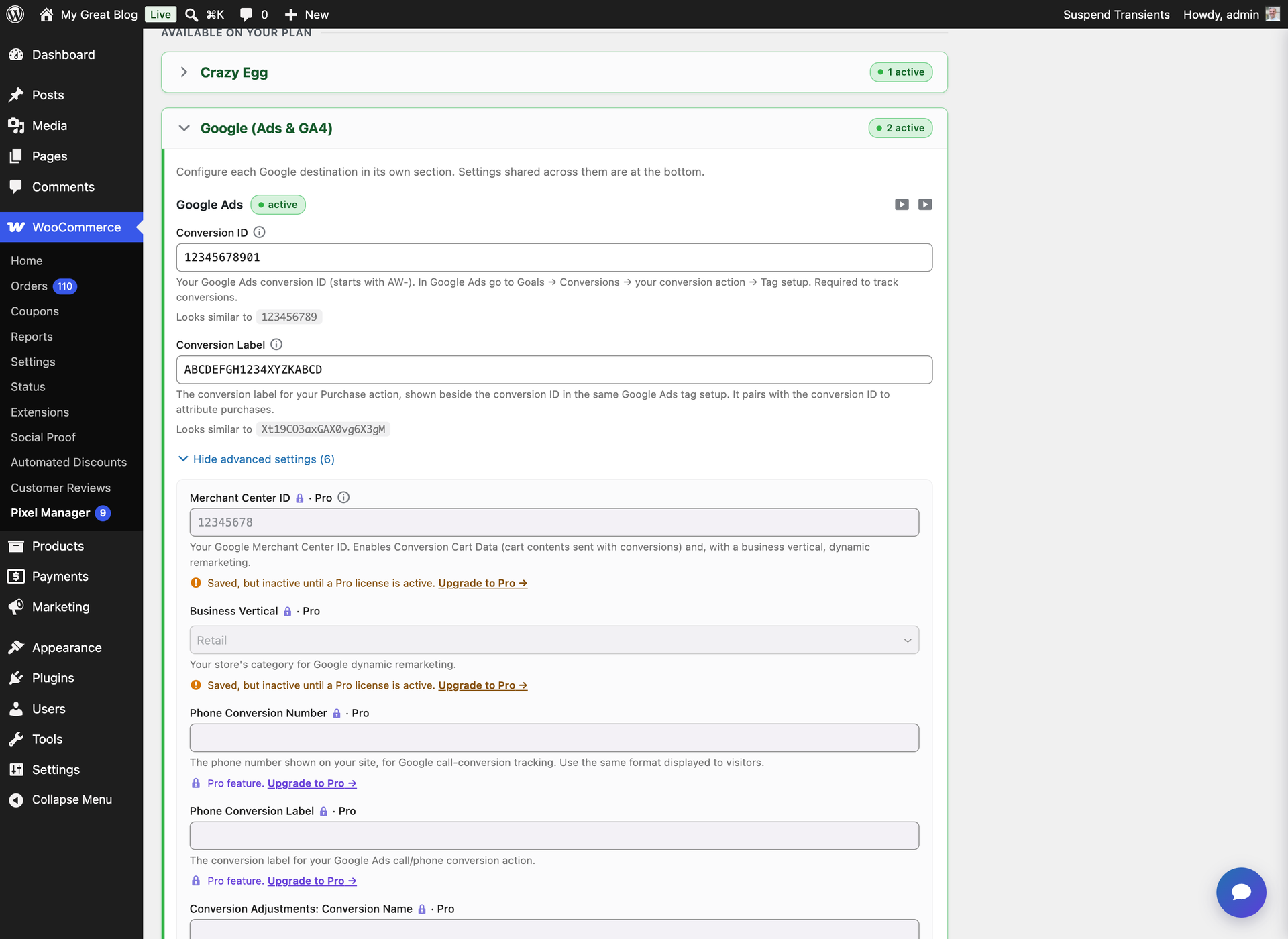
In the WordPress admin panel go to WooCommerce Pixel Manager, open the ‘Tracking Pixels’ tab and expand the ‘Google (Ads & GA4)’ section. Please enter the conversion ID and the conversion label into their respective fields.
-
Head over to our documentation and follow our installation guides. Here are some of our most popular guides:
-
And read through our FAQ.
Screenshots

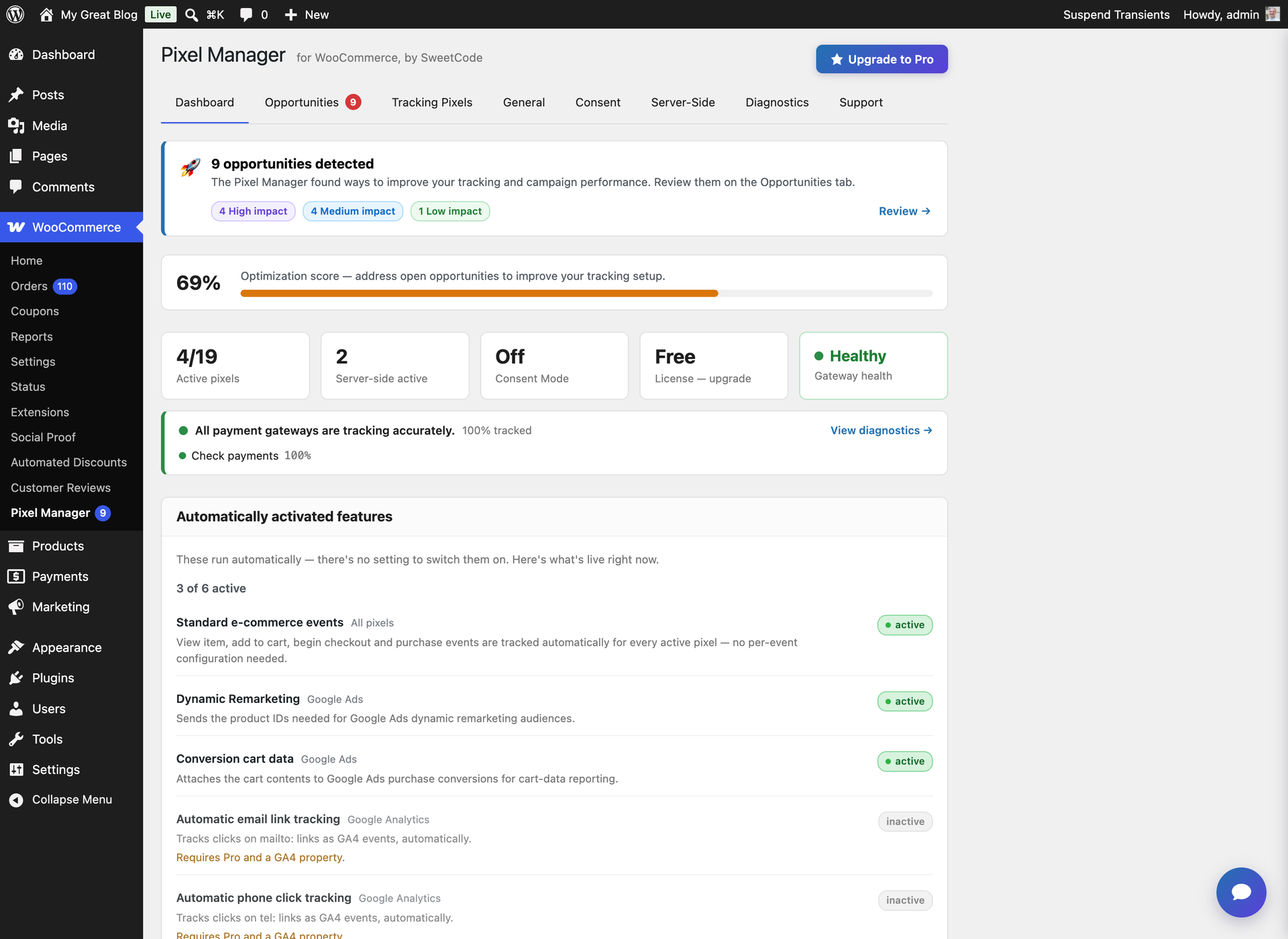
Dashboard – an at-a-glance overview of your tracking health, optimization score, and active pixels
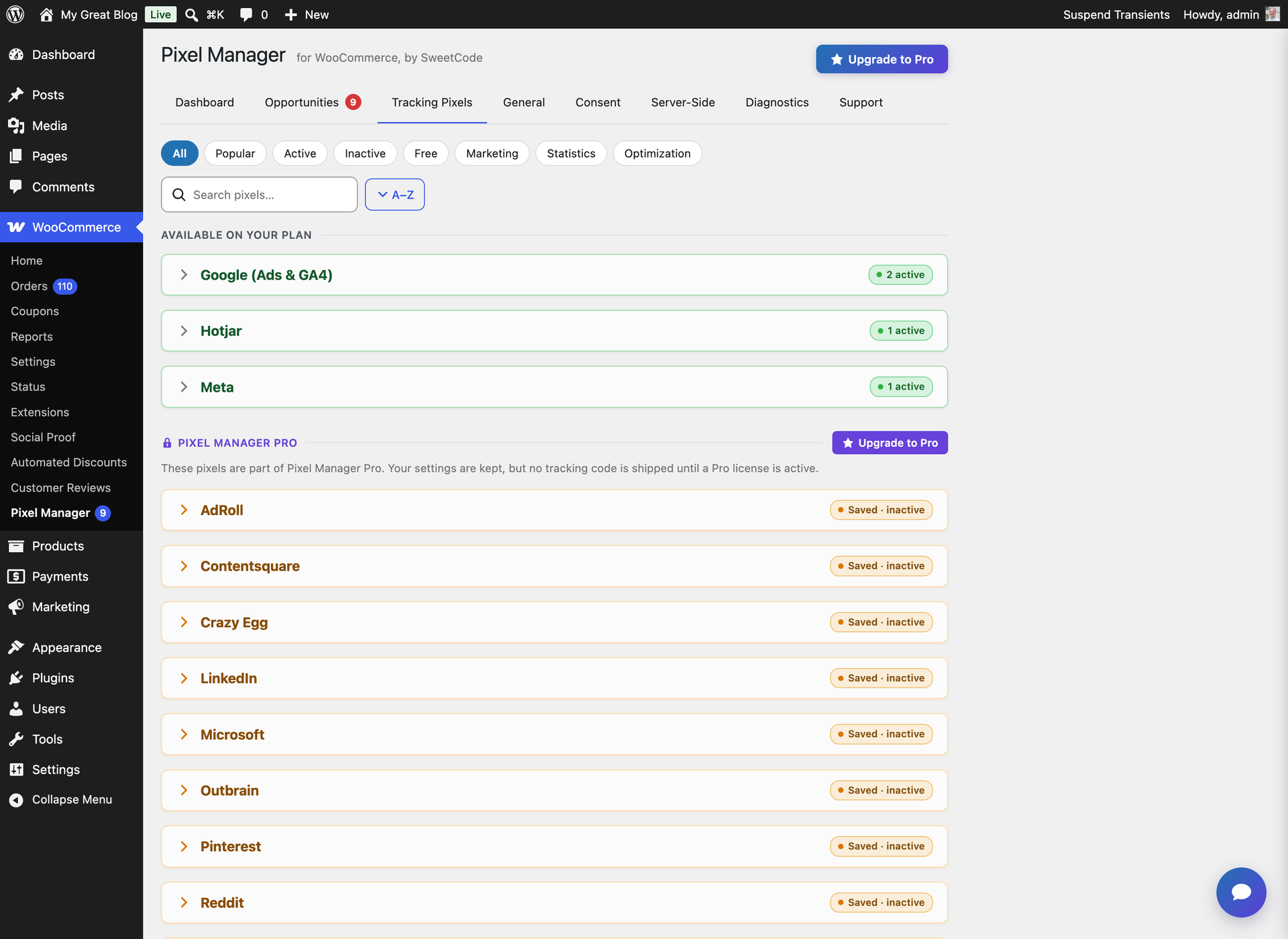
Tracking Pixels – set up Google Ads, GA4, Meta, Hotjar and more from a single screen
Pixel setup – just enter your conversion IDs, no coding required
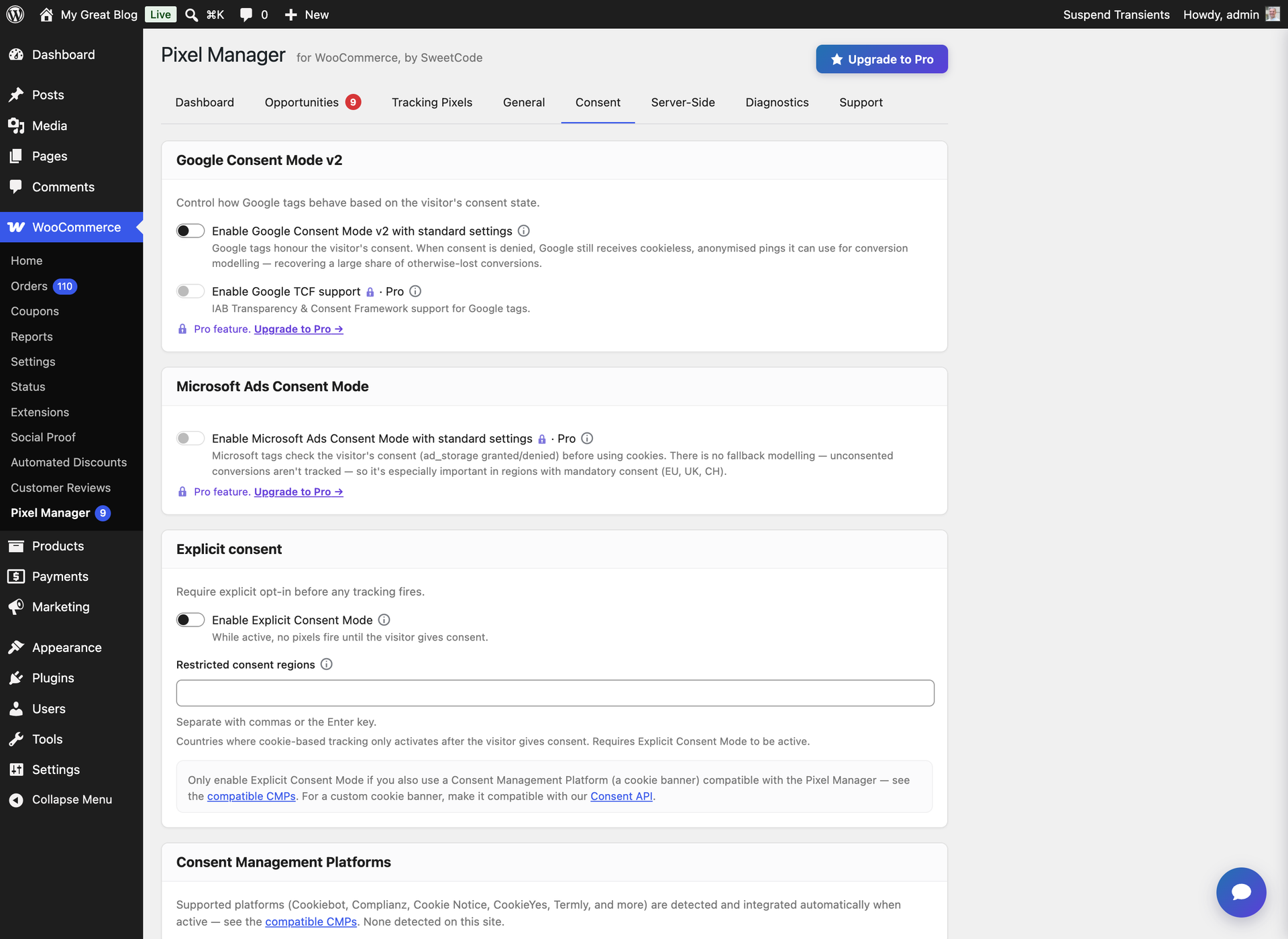
Consent – Google Consent Mode v2 with automatic integration for the major consent management platforms (GDPR & CCPA ready)
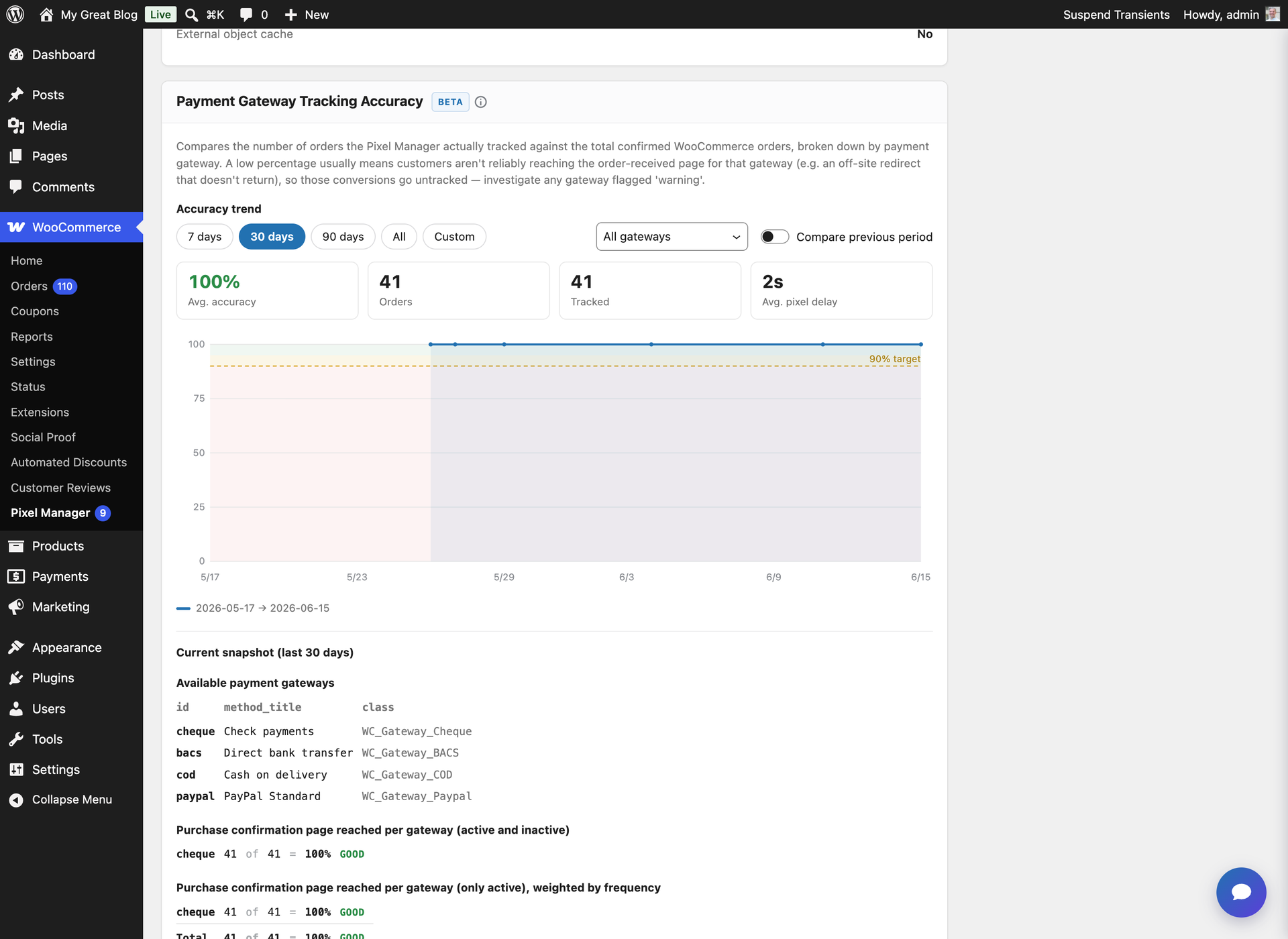
Payment Gateway Accuracy Report – spot which payment gateways are dropping your conversion tracking
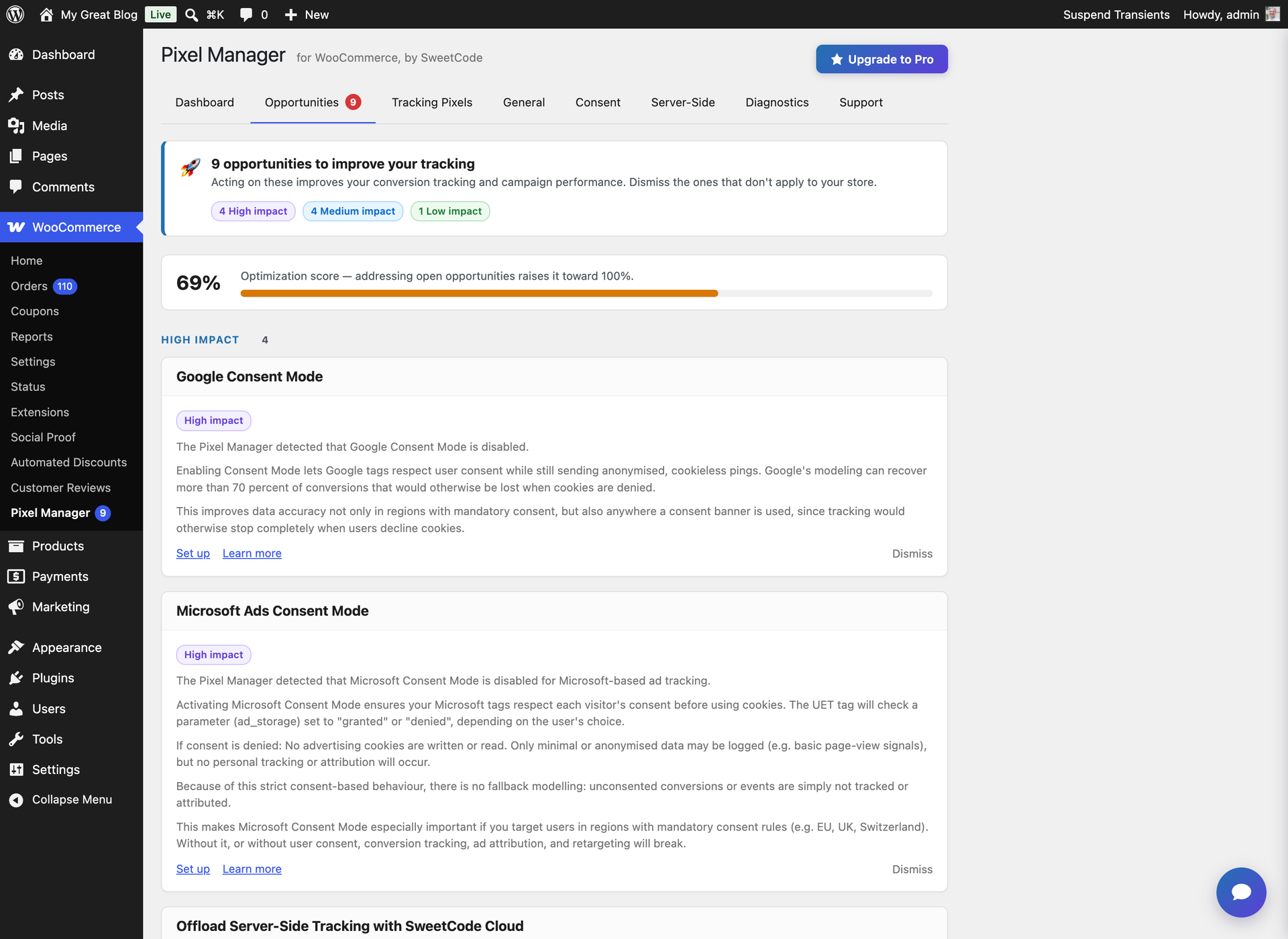
Opportunities – prioritized, actionable suggestions to improve your tracking and campaign performance
Faq
While Google Tag Manager is free, it requires significant technical expertise and many hours of configuration to set up proper WooCommerce e-commerce tracking. You need to create custom data layers, configure triggers and tags for each platform, handle consent mode integration manually, and test extensively to avoid tracking errors. The Pixel Manager provides a turnkey alternative that’s optimized specifically for WooCommerce with over 12 years of development. It automatically configures the correct e-commerce events, handles edge cases like payment gateway redirects and order deduplication, and includes unique features like Automatic Conversion Recovery (ACR) and the Payment Gateway Accuracy Report that GTM cannot replicate. Most users find Pixel Manager saves dozens of hours compared to manual GTM setup, while delivering more accurate conversion data.
Server-side tracking sends conversion data directly from your WooCommerce server to advertising platforms like Meta (Facebook), TikTok, Pinterest, Snapchat, Reddit, OpenAI, and Google Analytics 4 – rather than relying solely on browser-based pixels. This results in more reliable, accurate tracking because it works even when browser tracking is limited by ad blockers, Safari ITP cookie restrictions, browser privacy settings, VPNs, or network issues. Our Pro version typically recovers up to 30% more conversions compared to browser-only tracking, directly improving your campaign optimization and ROAS calculations.
Yes. The Pro version includes an OpenAI tracking pixel with browser-side conversion tracking, a server-side Conversions API connection, and Advanced Matching for improved event matching. You only need to enter your OpenAI pixel ID and, for server-side tracking, a Conversions API token. Purchase conversions are always sent server-side for maximum reliability, so you can accurately measure which sales your ads on ChatGPT generate.
ACR is our unique Pro feature that automatically recovers conversions missed due to tracking issues – whether from payment gateway redirects (like PayPal), browser limitations, ad blockers, or network problems. It runs nightly using the WordPress Action Scheduler, identifies WooCommerce orders that weren’t properly tracked by your advertising pixels, and sends the conversion data to your advertising platforms retroactively (within the allowed attribution windows). This can recover approximately 50% of otherwise lost conversions, directly improving your Google Ads, Meta, and TikTok campaign performance.
Yes. The Pixel Manager fully supports Google Consent Mode v2, including the new ad_user_data and ad_personalization parameters required by Google since March 2024. It also supports region-specific consent defaults for the EU, UK, and 11+ US states with privacy regulations. The plugin integrates with 15+ consent management platforms (CMPs) out of the box, automatically adjusting tracking behavior based on visitor consent choices. This ensures your WooCommerce store is compliant with GDPR, CCPA, and other privacy regulations while still collecting the maximum amount of conversion data allowed.
The Pixel Manager tracks the complete e-commerce customer journey: product list views (impressions), product detail views, add to cart, remove from cart, begin checkout, add payment info, and purchase events. These events are sent simultaneously to all configured tracking pixels (Google Ads, GA4, Meta, TikTok, etc.) with standardized product data including product ID, name, category, brand, price, and quantity. This comprehensive event tracking powers Google Analytics GA4 Enhanced E-Commerce reports, Google Ads Smart Shopping and Performance Max campaigns, Meta dynamic remarketing ads, and TikTok product catalog campaigns.
Yes. The Pixel Manager makes Google Ads conversion tracking setup on WooCommerce straightforward. Simply enter your Google Ads Conversion ID and Conversion Label, and the plugin automatically tracks purchase conversions with accurate order values, fires dynamic remarketing events for audience building, sends cart item data to optimize Performance Max and Shopping campaigns, tracks the Google Shopping new customer parameter for new customer acquisition campaigns, and supports Enhanced Conversions (Pro) for improved attribution using first-party data.
No. Performance is a core design priority. The back-end code is small and efficient with fast, cached database queries. Larger tasks like ACR processing run during off-peak hours using the WordPress Action Scheduler. The front-end JavaScript library is compiled, tree-shaken to only load code for active pixels, minified, and pre-compressed with gzip and brotli. The Pro version adds lazy loading of the tracking library to further reduce impact on page load time. Many users report the Pixel Manager is faster than alternative tracking plugins and significantly lighter than a comparable Google Tag Manager setup.
Yes. Head over to this link: Documentation
- Turn off any kind of caching and / or minification plugins.
- Log out of the shop.
- Turn off any kind of ad or script blocker in your browser.
- Search for one of your keywords and click on one of your ads.
- Purchase an item from your shop.
- Wait up to 48 hours until the conversion shows up in Google Ads. (usually takes only a few hours)
With the Google Tag Assistant you will also be able to see the tag fired on the thankyou page.
The Pixel Manager is ready for the new WooCommerce High Performance Orders Storage (HPOS) feature.
Our plugin is designed to work seamlessly with 99.99% of all other plugins. In the rare event of a conflict with a third-party plugin, we typically identify a fix or workaround quickly.
To illustrate its broad compatibility, here are a few examples of third-party plugins that work well with the Pixel Manager:
- Async Javascript
- Automptimize
- CartFlows
- Cloudflare Plugin
- Cost of Goods for WooCommerce (WPFactory)
- Doofinder for WooCommerce
- FlyingPress
- Hummingbird
- Litespeed Cache
- Litespeed ESI
- NitroPack
- Siteground Optimizer
- W3 Total Cache
- WooCommerce Brands
- WooCommerce Composite Products
- WooCommerce Cost of Goods (SkyVerge)
- WooCommerce Deposits
- WooCommerce Google Product Feed
- WooCommerce Subscriptions
- WooCommerce Wishlists
- Woo Discount Rules
- WP Fastest Cache
- WP Marketing Robot Feed Manager
- WP Optimize
- WP Rocket
- WP Super Cache
- YITH WooCommerce Brands
- YITH WooCommerce Wishlist
Rest assured, this is just a small sample, and the Pixel Manager should integrate smoothly with almost all other plugins you may use.
Yes, they are part of the step by step documentation. Head over to this link: Documentation
As this is a free plugin we don’t support old versions of WordPress and WooCommerce. You will have to update your installation.
Offsite payment gateways (like PayPal Standard) redirect visitors away from your WooCommerce store during checkout, which can prevent browser-based conversion tracking from firing. The free version cannot fully solve this, but the Pro version’s Automatic Conversion Recovery (ACR) feature specifically addresses this problem by detecting untracked orders and sending the conversion data server-side. We generally recommend using direct payment gateways (like Stripe, PayPal Commerce Platform, or Mollie) for the best tracking accuracy and higher conversion rates.
Here is a non-exhaustive list of causes that might interfere with the plugin code.
- Minification plugins try to minify the JavaScript code of the plugin. Not all minification plugins do this good enough and can cause problems. Turn off the JavaScript minification and try again.
- Caching could also cause problems if caching is set too aggressively. Generally don’t ever enable HTML caching on a WooCommerce shop, as it can cause troubles with plugins that generate dynamic output.
You probably have some script or ad blocker activated. Deactivate it and the issues should go away. Usually you can disable the blocker for just that particular site (your WooCommerce back end).
Our plugin injects tracking pixels on the front end of WooCommerce shops. As a consequence scripts of our plugin have been added to some privacy filter lists. The idea is to prevent the scripts running if a shop visitor has some ad blocker enabled and wants to visit the front end of the shop. This is totally ok for visitors of the front end of the shop. But, it becomes an issue for admins of the shop who have a blocker activated in their browser and visit the backend of the shop.
Unfortunately, there is no way for us to generally approve our scripts in all blockers for the WooCommerce back end.
Therefore, we recommend admins of the shop to exclude their own shop from the blocker in their browser.
Please post your problem in the Pixel Manager for WooCommerce Support forum: Link
You can send the link to the front page of your shop too if you think it would be of help.
You can report security bugs through the Patchstack Vulnerability Disclosure Program. The Patchstack team helps validate, triage, and handle any security vulnerabilities. Report a security vulnerability.
Reviews
Exceptional support – fast replies and real technical help
By  rtck on September 30, 2026
What really stands out about Pixel Manager is the support. The team replies incredibly quickly and stays engaged throughout the whole conversation, even when you have plenty of follow-up questions.
We’ve discussed some fairly technical aspects of our WooCommerce tracking setup, and the answers have been detailed, clear and useful. They take the time to understand your setup and work through the details with you.
That kind of responsiveness makes a huge difference when dealing with conversion tracking. Easily some of the best support I’ve experienced for a WordPress plugin. Huge thanks to the team – highly recommended!
Good
By  academ34 on July 21, 2026
Good plug in
Reliable tracking plugin for serious WooCommerce stores
By  buspower on May 28, 2026
One of the best WooCommerce tracking plugins I’ve worked with.
I originally started using Pixel Manager Pro during a period when Meta Pixel tracking became unreliable on our WooCommerce stores. After testing multiple solutions, this was the first plugin that actually gave me confidence in the tracking data again.
What I especially appreciate is that the plugin works well even in more advanced environments with:
- Cloudflare caching
- Conversion API
- WooCommerce optimizations
- complex ad tracking setups
The tracking became significantly more stable and transparent, and debugging events became much easier.
But honestly, what impressed me the most was the support and overall customer experience. Aleksandar has been extremely responsive, professional, and genuinely helpful from day one.
Recently I accidentally forgot to cancel two unused license renewals for websites we are shutting down / converting into catalog-only sites. After I explained the situation, the refunds were processed quickly and without any unnecessary complications.
That kind of support and trust-based communication is rare nowadays.
We will definitely continue using Pixel Manager Pro on our main store going forward.
Highly recommended.
Really good plugin
By  glawing on April 30, 2026
Nice plugin. Best for me is you see what transaktions the pixel fired on and not.
One of the best experiences I've had with the WooCommerce ecosystem
By  jh (jethrohazelhurst) on April 14, 2026
One of the best experiences I’ve had with the WooCommerce ecosystem.
As a store owner for years I’ve been stumbling from disaster to disaster with Consent Mode, Consent Management Platforms, Enhanced conversions, Duplicate events, Tags and conversion events I’ve had to roll myself on the thank-you page because of no support from the official ad platform integrations. It’s been a nightmare.
Last week I was staring down the barrel of implementing a convoluted google tag manager config because my Microsoft Ads tracking was completely broken. Then I thought I’d ask Reddit for a sanity check – lo and behold sweetcode replied to my thread suggesting I look at their pixel manager.
Incredibly I had just come across them in a github thread while trying to work out how I’m going to disable the various gtag/uet tags across my site to work with google tag manager. Long story short, after a bit of research Pixel Manager for WooCommerce came up highly reviewed in all the right places, including glowing endorsements from the Business Bloomer slack group.
They offered a free trial so what was there to lose at this point. We tested the setup but ran into some issues with our CMP (Termly) not triggering the correct consent signals. After a quick message to support they identified a race condition and within a day had pushed the update live.
All my tracking issues solved and with way more thought and features than I could have hoped for built into the plugin itself.
This is simply sublime software. Thank you to Aleksandar and SweetCode for this amazing plugin!
Annoying NAGs
By  ernyjones on January 28, 2026
Want a permanent nag on your dashboard, with the “dismiss” button magically ignored on the next refresh? Then you’re in the right place 🙂
We're using this for our biggest clients and it's working great!
By  wodobo on January 23, 2026
This has been a huge help for our agency. We’ve been able to make the connections we need to keep the marketing efforts working as needed. Our biggest clients are loving it!
Simple & works nicely
By  taxsyn on January 14, 2026
Have been using it for over a year and does everything it says. Nice work.
Simple, functional, free
By  Gal Baras (galbaras) on January 13, 2026
This plugin was demonstrated to me by a Google Tagging Support person. ‘nough said 🙂
Very useful
By  supporthealth on December 28, 2025
Gives ready access to images, very useful
Changelog
1.71.0
Release date – 20.10.2026
- Tweak: The tracking library loaded on every shop page is about 40% smaller, with IP and location lookups loading only on shops that use the IP exclusion list or region-based consent. Pixel code now downloads while the cookie banner check runs, so pixels start sooner
- Tweak: The Meta Purchase now carries the order number as order_id, which Events Manager listed as unavailable
- Tweak: Cookies the Pixel Manager writes in the browser now carry the Secure attribute on HTTPS pages, which PCI compliance scans check for
- Fix: The standalone Google Tag Gateway proxy no longer stops working a week after the last settings change, when it answered every request with a 503 and the Google tag loaded directly from Google instead
- Fix: The Google Tag Gateway service worker now registers with every gateway handler. The WordPress handler still logged a service worker scope error on every page after the 1.70.0 fix, and the standalone proxy answered the worker with a 400 error
- Fix: The standalone Google Tag Gateway proxy now works when WordPress core sits in its own subdirectory or the content folder is not named wp-content, as on Bedrock, instead of sending every request through the slower WordPress handler
- Fix: The standalone Google Tag Gateway proxy now sends empty POST requests with a length. Google refused them with a 411 error
- Fix: IP ranges in CIDR notation from the
pmw_ip_exclusion_listfilter now exclude the visitor in the browser too. A range broke the browser check, so only exact IPs stopped the browser pixels - Fix: Pinterest checkout starts now carry each product’s category and brand, and over the Conversions API also its price, quantity and name, which Pinterest reported as missing
- Fix: Settings saved through the admin REST API are now checked against each setting’s type, and a save that names a whole group of settings validates every field inside it, Pro licensing included. A malformed save could store a list as the Google Tag Gateway path, which broke every shop page on PHP 8
- Fix: Server-side requests to ad platforms and the debug report’s connection checks now always verify the TLS certificate. A crafted request header or a private server IP could switch the check off, and only sites set to the local environment type skip it
1.70.0
Release date – 13.10.2026
- New: With Explicit Consent Mode off, the Pixel Manager now applies the cookie banner’s own pre-decision state, so opt-in banners from Complianz, Cookiebot, CookieYes, OneTrust, iubenda, Usercentrics and others no longer let pixels fire before the visitor answers. For banners that load asynchronously it waits up to two seconds for their answer
- New: The debug report lists the other active Google Analytics, Google Tag Manager and ad pixel plugins, so a second tracking setup shows up in the first support reply
- New: AI agents can now do everything the admin offers through the Abilities API, from backups, imports and logs to opportunities, SweetCode Cloud and the Google and Meta account connections, with exactly the access their user has in the admin, shop managers included. All abilities appear on the WordPress MCP Adapter’s default server
- Tweak: The Meta Conversions API Gateway and Event Setup Tool checks run daily instead of weekly, and both cards say that Meta can keep reporting a removed setup for a while
- Tweak: A settings save that a security plugin or host firewall blocks before it reaches WordPress now says so and names the blocked request, instead of showing “API error 403”
- Tweak: A Nova page that hits an error no longer takes down the whole admin. Only that page is replaced by a request to contact support, with a button that copies the error details
- Tweak: With Explicit Consent Mode on, click IDs from the landing page URL are no longer stored in the browser before the visitor allows marketing. In every mode, declining or withdrawing marketing consent removes the stored click IDs
- Tweak: Updated Freemius SDK to the latest version
- Fix: The Google setup assistant now shows which permissions you allowed on Google’s consent screen and what stops working for the ones you declined. Reconnecting asks for the declined permissions again instead of silently reusing the earlier choice
- Fix: Google Ads conversions with cart data no longer deduct coupons twice. Item prices are now sent before coupons, as Google requires, because Google subtracts the order discount from the cart itself
- Fix: Beautiful and Responsive Cookie Consent’s built-in Pixel Manager integration no longer saves a permanent consent record that overrides the banner, which could keep a visitor who allowed marketing denied on every page. Visitors already affected are fixed on their next page view
- Fix: Cookiebot declines, Cookiefirst decisions and Usercentrics saved selections now reach the Pixel Manager, and unnamed Cookiefirst and Cookie Compliance categories count as denied
- Fix: A pixel that never loads, for example Meta behind an ad blocker, no longer suppresses the page view of every other pixel. The page view waits only when server-side page views are active, for at most three seconds, and never for a pixel the visitor has not consented to
- Fix: GA4 keeps tracking when the shop’s server cannot reach Google to check the tag ID, and an ID Google rejects gets an admin notice that explains the GT- alternative. Shops that also send GA4 through another tag, such as a GTM container, may now see page views double and should keep one sender
- Fix: Visitors recognised as bots or excluded by the IP exclusion list no longer load any browser pixel, so GA4’s automatic page view and the Google Ads remarketing hit no longer reach Google for them
- Fix: The Pixel Manager log no longer stays empty when WooCommerce logging is disabled or its level threshold is higher, and the Logger card says where the entries go
- Fix: A failed cart sync request no longer clears the stored cart, so the next page still has cart data for checkout events, and its error message says the request only reads the cart
- Fix: With the order subtotal value logic, a Stripe fee paid out in another currency than the order, for example AED on a EUR order, is converted to the order currency before it is deducted. It used to be subtracted as is, which under-reported conversion values and turned small orders into zero
- Fix: Turning off order de-duplication or turning on HTTP request logging through the Abilities API now arms the same timers as the admin interface, so de-duplication comes back on after 6 hours and logging switches off after 12 instead of staying that way
- Fix: The Google Tag Gateway service worker registers again. Since 1.69.1 the gateway dropped the header Google sends to allow it, so every page logged a service worker scope error in the browser console
- Fix: The server-load warnings for the Tag Gateway path and the first Conversions API token now appear when you leave the field, instead of interrupting your typing after the first character
- Fix: GA4
add_payment_infoevents include the selected payment method aspayment_typeagain, on the classic checkout and the Checkout block, and switching payment methods within a second is no longer dropped as a duplicate
1.69.2
Release date – 23.09.2026
- Tweak: Moved the code-scanner annotations in the free version onto their own lines, so the WooCommerce.com security audit no longer reports seven sinks that were already escaped or validated
1.69.1
Release date – 22.09.2026
- Fix: A post title can no longer break out of the data layer script. WordPress keeps the entities of a closing script tag in a title saved by a Contributor, and the plugin decoded them right before writing the title into its inline script, so the markup after that tag ran on every view of the post. Every inline script now escapes its angle brackets
- Tweak: Every value the plugin prints into a script, an attribute or a link now goes through the escaping function that fits that exact position, so a value that a validation rule stops today stays harmless if that rule ever loosens. None of the corrected sites was exploitable
- Fix: The browser-to-server event endpoint refuses a purchase named inside a pixel’s own object. It only checked the wrapper’s event field, so an unauthenticated request could hand a fabricated purchase with any value straight to a merchant’s Conversions API. Every pixel object is now searched for a purchase event name, and purchases only ever leave through the order hooks
- Fix: A URL that merely carries an order key no longer turns the front page, an archive or a search result into the order confirmation. The plugin printed that order’s customer data into whatever page the key was appended to, and looked the key up however it was shaped. Confirmation pages are also sent with no-cache headers now
- Fix: The public rate limits count the connecting address first. The visitor address comes from proxy headers any client can set, so a rotating header used to hand out a fresh allowance per request and write a database row for each one. A real proxy still gets an allowance per visitor behind it
- Fix: The Google Tag Gateway proxy no longer forwards the visitor’s WordPress login and WooCommerce session cookies to Google’s servers, no longer follows an upstream redirect on the server, and relays only the response headers a browser needs, so a policy header from upstream cannot apply to the shop’s own origin
- Tweak: A settings import now runs every field through the same validator as the settings page, drops keys that are not settings, refuses a schema version the plugin does not know and, on a free tier, keeps the stored values of Pro-only settings. It used to check that a few keys exist and store the file as it was
- Tweak: The products data layer cache is capped at 50 entries per page, an order key must look like one before it is looked up, click IDs from the landing URL are validated like those from cookies, the settings version can no longer be written as if it were a setting, log downloads are limited to the plugin’s own logs, the log redaction masks email addresses, and the Hyros referrer URL is encoded in full
1.69.0
Release date – 21.09.2026
- Fix: A product a shopper adds while the plugin is reading the cart stays in the cart. WooCommerce serves the plugin’s requests with the whole session loaded and writes all of it back at the end, so a request that only reads could still put the older cart back and the added item vanished in front of the shopper. The plugin’s requests now persist nothing, and the one that has to write refreshes the cart first
- Fix: On shops that run iubenda, the visitor’s consent is read at last. iubenda names its cookie after the site ID by default, and the Pixel Manager knew only the older cookie policy ID name, so every category stayed denied and every marketing pixel blocked. It now also reads iubenda’s legacy cookie, and ignores one that states no purposes instead of raising an error
- Fix: An interface whose name carries no
Interface_prefix is now found by the plugin’s autoloader. Three of them, among them the pixel adapter contract every server-side pixel implements, were reachable only because four places required their file by hand, so any other code path that touched them ended in a fatal error - Fix: A checkout started from the mini cart now carries the cart’s products, value and currency. The plugin left the cart empty while it re-read it from the server, and a checkout click is sent the moment it happens, so the event went out hollow on product and category pages
- Fix: An add to cart or add to wishlist event that reaches the Facebook pixel without product data no longer disappears. The adapter read the missing product and threw, so the event was lost from the browser pixel and the Conversions API alike. Meta needs the product on both events, so a productless one is now skipped cleanly
- Fix: The Diagnostics accuracy trend no longer crashes the admin interface when a custom date is typed rather than picked. A date field reports itself as empty for as long as a typed entry is incomplete, and that empty value reached the report’s date arithmetic while the page was being drawn, so the whole interface dropped to its error screen
- Fix: A blocked Google tag no longer fills the shop’s error tracking with stackless noise. When a content blocker kept the tag from loading, every Google Ads and Google Analytics event raised a promise rejection that carried no message at all, so the recorded entries named neither a cause nor a source. The wait now fails with a reason, and every event handles it
- Fix: The Google Tag Gateway health check can no longer be answered from a cache. It carried no cache headers at all, and a shop was found serving it from its CDN with a 30 day lifetime, so the check reported the gateway healthy by replaying the last time it had been
- Tweak: The Tag Gateway measurement path field now recommends an unguessable path instead of suggesting
/metrics. That is Google’s own example, so a great many shops share one predictable path, which is what makes a blocker rule worth writing against all of them at once
Earlier versions
For the changelog of earlier versions, please refer to the changelog in the /changelog-archive/ folder of the plugin or the full changelog on https://sweetcode.com/docs/pmw/changelog/free