

Ajax Cart for WooCommerce
Description
Ajax Cart for WooCommerce makes buying smoother in two ways:
- On the classic cart page (the
[woocommerce_cart]shortcode most stores and classic themes use), totals are recalculated with AJAX as soon as a quantity changes — no “Update cart” click — with -/+ buttons around the quantity. - A side cart (optional): a cart drawer that slides in from the side when a product is added, with a floating cart button — on classic and block themes alike, on every page but the cart and checkout.
On the newer Cart block (the default for stores created since WooCommerce 8.3), WooCommerce already updates quantities by itself; there the plugin adds a confirmation before an item is removed, and the side cart works the same.
No other hacks, code or theme changes are needed: the features are active as soon as the plugin is.
You can try and play with this plugin demonstration clicking here
Free version features:
- Automatically reload and recalculate the classic Cart using AJAX when quantity changes
- Show -/+ buttons around item quantity on cart page
- Show item quantity as select instead numeric field
- Show user confirmation when change item quantity to zero — and, on the Cart block, before an item is removed
- Side cart: a cart drawer that slides in when a product is added, with a floating cart button and item count
Premium version features:
- Allow to change/synchronize quantities in shop, minicart and single product pages view demo
- Make the
Add to cartbutton to perform with AJAX, without full page reload view demo - Faster AJAX reload call when change quantities in Cart page
- Option to lock quantity inputs to allow only change using plus and minus buttons
- Update price vs quantity calculation automatically on Single Product pages
- Change quantities with -/+ buttons inside the side cart
- Free shipping progress bar (“Spend $12.00 more for free shipping”) in the side cart, Mini-Cart, classic Cart and Cart block — the amount read from your free shipping method, or your own
- Undo a removed item on the Cart block
- Minimum, maximum and step for every product quantity, on the classic and the block cart
Get the PRO version here.
If you looking for a related plugin with more complete features maybe you can try Better Usability for WooCommerce plugin.
Installation
- Upload
woocommerce-ajax-cart.zipto the/wp-content/plugins/directory - Activate the plugin through the ‘Plugins’ menu in WordPress
- Done. This plugin no requires extra configurations to work
Screenshots

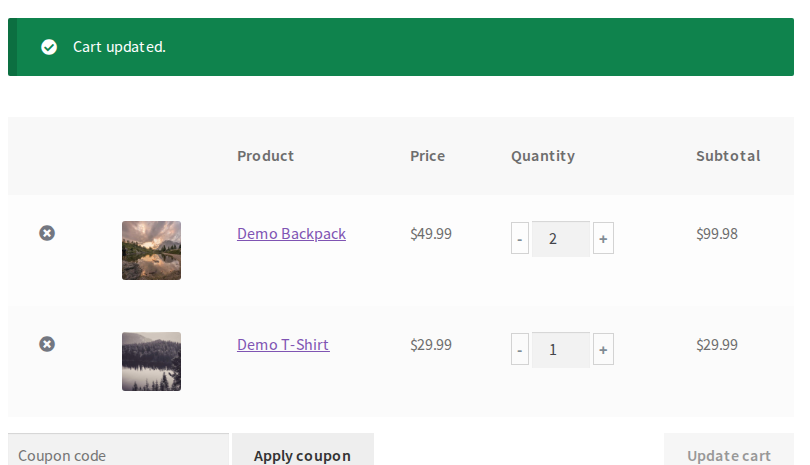
The cart page: a click on “+” or “-” updates the totals with AJAX, without clicking “Update cart”.
Reviews
This plugin works fine with theme
By  arifcodes on March 20, 2023
I use this plugin for my client project. I really love this plugin.
Working well (upd)
By  romancr on January 27, 2023
Is not working. Cart update still requires an “Enter” on a quantity field to be updated. Nothing changed.
Upd: The issue was in theme. Plugin is great, thank you!
Great plugin
By  ssabaripriyatharshini on October 22, 2020
Works Fine and easy
By  Dan (danmonells) on September 5, 2020
The Update Cart button also has an Undo function.
By  niguramu on July 15, 2020
Problem solved in 5 hours after report.
By  ucsendre on May 27, 2020
- Notifications such as admin notices must be dismissable.
- This means that the notices should not only be closed, but hidden permanently when the “Dismiss” link is closed.
Great Plugin
By  ahmedelkashef on May 18, 2020
Finally a plugin that fixes this!
By  danohawkaz on April 23, 2020
Good 🙂
By  pucedemecv95 on April 13, 2020
The best function & support
By  magedmoh94 on October 17, 2020
Changelog
1.4.1
- Changed: a cleaner Get PRO tab — the PRO features one per row with a check, a red YouTube “Watch demo” button for each feature video, and the buy button at the top and the bottom
1.4.0
- Fixed: the Side cart settings tab opened empty (a tab name with a space)
- New: side cart — a cart drawer that slides in from the side when a product is added, with a floating cart button and item count (Settings > Side cart; off by default)
- New: on the Cart block, a confirmation before an item is removed (with the “confirmation when quantity goes to zero” setting)
- The description now says where each feature applies: the classic cart page, and what the Cart block already does by itself
- Changed: a cleaner settings page — the settings in a card, one row each with the label and its field aligned, on/off settings as switches, multiple choices as chips, a setting’s sub-options in a panel under it, and Reset set apart from Save
1.3.28
- Changed: the settings page’s script variable, nonces and notice links now carry the plugin’s own prefix; “Tested up to” is declared only in readme.txt
1.3.27
- Renamed to “Ajax Cart for WooCommerce” and given a new icon, following the WordPress.org trademark guidelines (the plugin’s address and settings are unchanged)
- The plugin header now declares its license and that it requires WooCommerce
- Fixed: with another of our plugins on the same site, the two no longer share — and override — each other’s settings, notices and update code
1.3.26
- Tested with WordPress 7.1 and WooCommerce 11.2 (on PHP 8.4)
- Security hardening: the settings page escapes every value it prints and unslashes what it saves, and dismissing an admin notice now requires a valid nonce
1.3.25
- Added
High-Performance order storagecompatibility
1.3.24
- Reset quantity to minimum value when denying the confirmation to remove item from the cart
1.3.23
- Tested with WooCommerce 6.4.1 and WordPress 5.9.3
- Fixed reported PHP warning error at Admin panel
1.3.22
- Changed default quantity buttons CSS for better looking
- Testing with WordPress 5.8.1 and WooCommerce 5.8.0
1.3.21
- Avoid to add hide style for product quantity multiple times
- Prevent user from click on quantity buttons when disabled
- Tested with WordPress 5.8
1.3.20
- Tested with WooCommerce 5.0.0
- Fixed translation domain path
1.3.19
- Added dropdown_steps argument support for woocommerce_quantity_input_args hook
1.3.18
- Fixed fatal error on frontend when WooCommerce plugin not enabled
- Let dropdown respect min_value and step values
- Added wac_quantity_div and wac_template_file filters
- Removed old legacy migration
1.3.17
- Using document instead document.body listeners that was causing issues with some themes
- Trigger correct Update cart button in Cart for themes that using multiple layouts
- Changed HTML structure of buttons to make it more clickable
1.3.16
- Tested with latest WordPress and WooCommerce version
- Fixed critical bug when changing quantity in Cart
1.3.15
- Tested with latest WordPress and WooCommerce versions
- Removed unwanted admin notices
1.3.14
- Optimized plus and minus quantity javascript listeners
1.3.13
- Show confirmation to remove product when user empty quantity input
1.3.12
- Removing deprecated PHP short_open_tag blocks
1.3.11
- Updated template override compatibility to 4.0.0 and WC tested up to 4.2.0
1.3.10
- Reversed changelog ordering to make it more standard
- Changed plugin notices to respect the guidelines
1.3.9
- Added compatibility support with WooCommerce 4.0.1
1.3.8
- Compatibility with WooCommerce Bundled Products
1.3.7
- Hide quantity select in Cart when maximum value is same as minimum value
1.3.6
- Updated supported woocommerce version to 3.8.1
1.3.5
- Updated supported woocommerce version to 3.7.1
- Prevent page reload when adding to cart in certain conditions
1.3.4
- Changed limit from 50 to 1000 for quantity in select
- Added compatibility with Giftable for WooCommerce plugin
1.3.3
- Removing +/- buttons when product is sold individually
1.3.2
- Added compatibility with WooCommerce 3.6.4
- Standardized to
use strictmode on frontend script, removing unused code
1.3.1
- Registering scripts using common hook
wp_enqueue_scripts