
Weight Based Shipping for WooCommerce
Description
Weight Based Shipping brings shipping by weight to WooCommerce. Your price list becomes a table of rules — weight brackets, a price per pound or kilogram, free shipping over an amount, a different rate per country — and the plugin calculates the shipping cost your customer sees at checkout from that table.
The plugin has been in the directory since 2013 and runs on more than 50,000 stores. There is no carrier account to open and no rate service to connect: prices come from your own table and are calculated inside your store.
Weight brackets
A price for every weight range, the way carrier price lists are written and what table rate shipping usually means: up to 2 kg $5.00, 2 to 5 kg $8.00, over 5 kg $12.00. Weights come from your products, in kilograms, grams, pounds, or ounces — whichever unit your store uses.
Shipping per lb or per kg
Charge by weight itself rather than by range: $1.50 for every 0.5 kg, or a straight price per kilogram or per pound. Add a base amount and you get the familiar “$3.75 for the first 5 kg, plus $0.75 for every kilogram over it”.
Free shipping over an amount
Free delivery once the cart reaches your threshold, normal rates below it. The threshold can be an order amount or a weight — free shipping up to 10 kg, paid above.
Rates by order total
Price shipping by the cart total as well as by weight: $6.00 under $50, $3.00 from $50 to $100, free from $100. Weight and order total also combine in one rule, so free shipping over $100 can stop at 10 kg and let heavier orders pay their way.
Flat rates, handling fees, and surcharges
Not every line of a price list depends on weight. A rule can add a fixed amount — a flat national rate, a handling fee, a surcharge on oversized orders — and applies only to the orders it is meant for.
Shipping rates by country
Different shipping rates for different countries in one table: a domestic rate, a rate for neighbouring countries, and a rest-of-the-world rate. For finer geography, down to postcodes, the method slots into WooCommerce shipping zones.
Quantity based shipping
For products of a uniform weight, weight stands in for quantity: $4.00 for every 0.5 kg is $4.00 per 0.5 kg item. The quantity based shipping recipe extends that to bulk pricing.
Several shipping options at checkout
Standard and Express, or delivery alongside pickup: add the method to a zone as many times as you have options, each with its own name, its own rules, and its own price.
Rule priority
Rules that both apply add up — a handling fee on top of a per-class rate, as a mixed cart should be priced. Rules meant as alternatives get conditions that cannot both hold, such as 0–2 kg and 2–5 kg, and only one of them applies.
For everything beyond that, the Pro edition adds mods:
— Stop ends the evaluation at its rule: the first match wins, and a rule placed higher overrides everything below it.
— Drop takes the items a rule has already priced out of the calculation, so nothing is charged twice.
— Deny withholds the method from orders it must not carry — a weight your carrier does not accept.
— Require shows the method only for orders that match — a refrigerated option only when something frozen is in the cart.
Mods has the details.
Rates by shipping class [Pro]
Pro rules can target a shipping class, so each kind of product is priced its own way: a flat price for T-shirts, a per-kilogram rate for bulky goods, a surcharge on anything fragile. The same targeting decides free shipping product by product — items that never ship free, items that do not count toward the threshold, or one product that makes the whole order free.
Split shipping [Pro]
Pro keeps several tables inside one shipping method. When two of them each cover part of the cart — a frozen courier and an ordinary parcel — the customer sees one combined option, priced as the sum of both parts. Multiple shipping options covers both arrangements.
Copy rules from staging to production [Pro]
Build and test the price list on a staging or local site, then move it to the live store without retyping a number: copy a table, or just the rules you pick, and paste it on the other site. The transfer goes through the ordinary clipboard, so there is no file to export and upload. Copy and paste shows it step by step.
Pro also brings undo and redo, value thresholds converted by an active currency switcher, and direct email support. Compare the editions.
Documentation
Getting started builds a first price list, how rules work explains matching and combining, and troubleshooting covers a checkout that reports no shipping options. Recipes are worked setups: shipping by weight, shipping per lb, free shipping over an amount, rates by country, and rates by shipping class.
Install the plugin, open the starter table, and replace the numbers with your own. If anything does not add up, ask in the support forum.
Like the plugin? Leave a review!
Installation
- Install and activate the plugin from Plugins Add Plugin, or upload the Pro package from your purchase email.
- Make sure your products have weights (Product data Shipping); a product without one counts as zero.
- Go to WooCommerce Settings Shipping, open a zone, and add the Weight Based Shipping method.
- Open it and replace the numbers in the starter table with your own.
Rules use the store’s weight unit, set at WooCommerce Settings Products, so settle on kg, g, lbs, or oz first. Getting started walks through the same steps with screenshots.
Screenshots

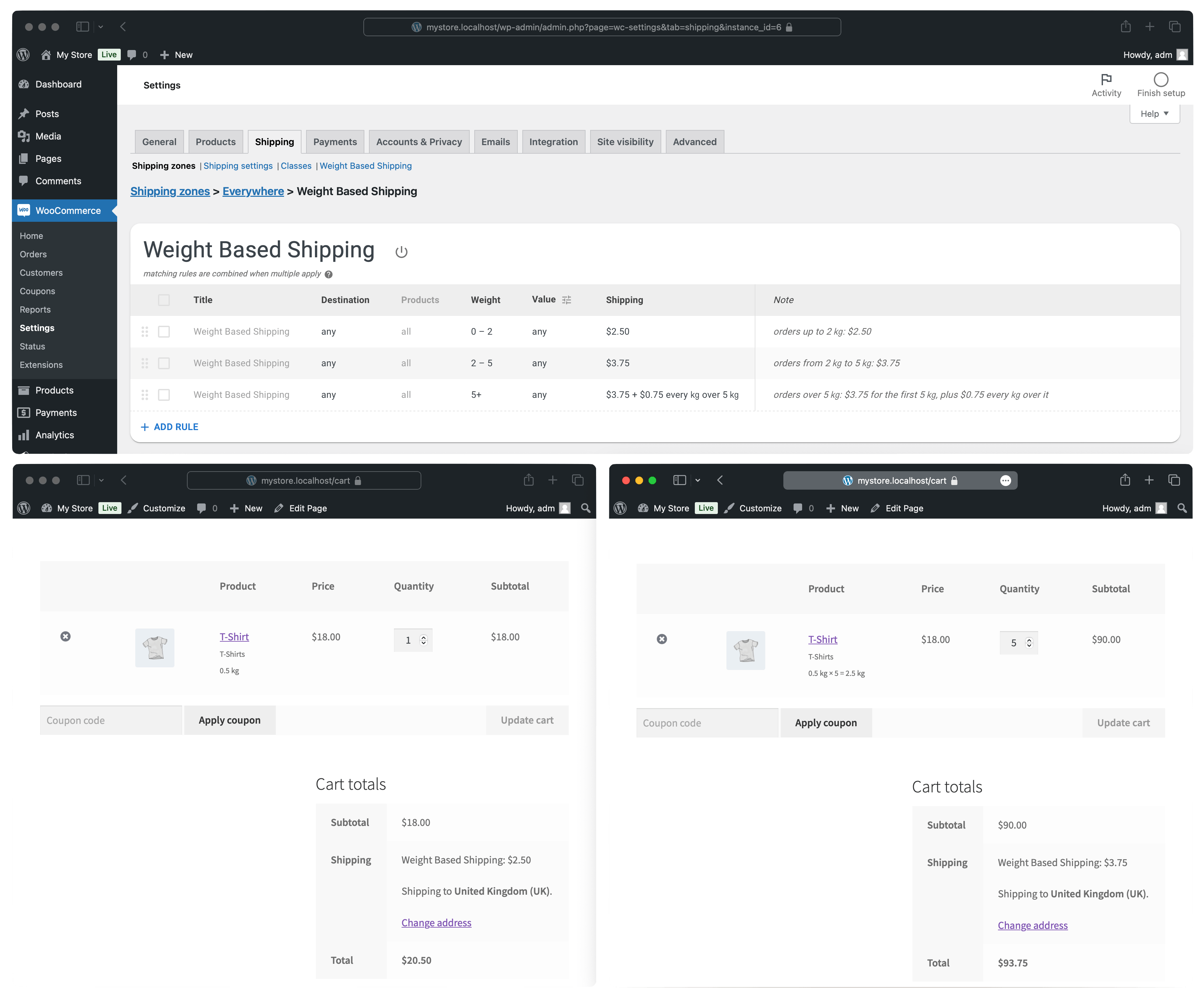
Tiered weight-based shipping configuration
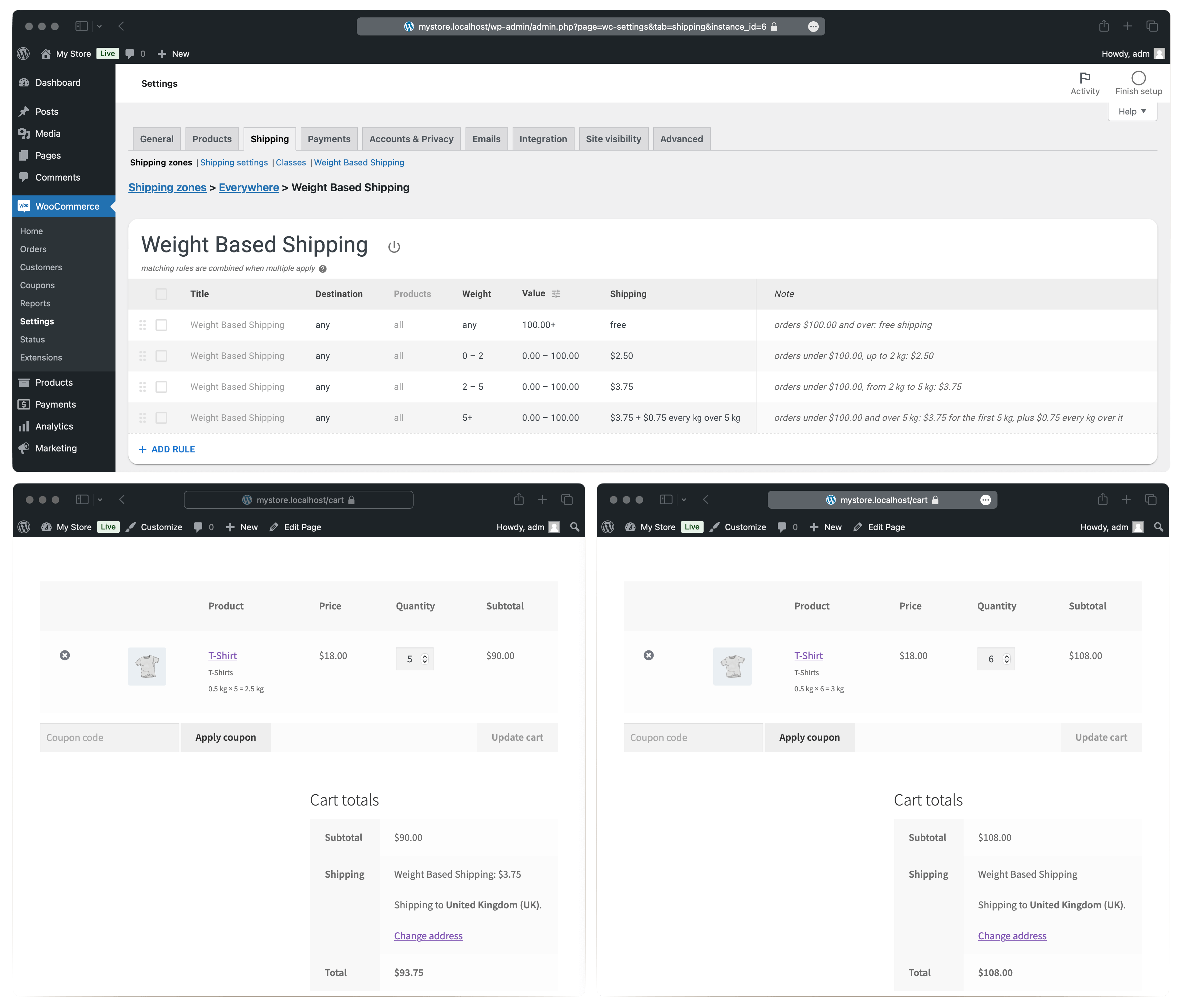
Free shipping over a threshold, and tiered weight-based shipping
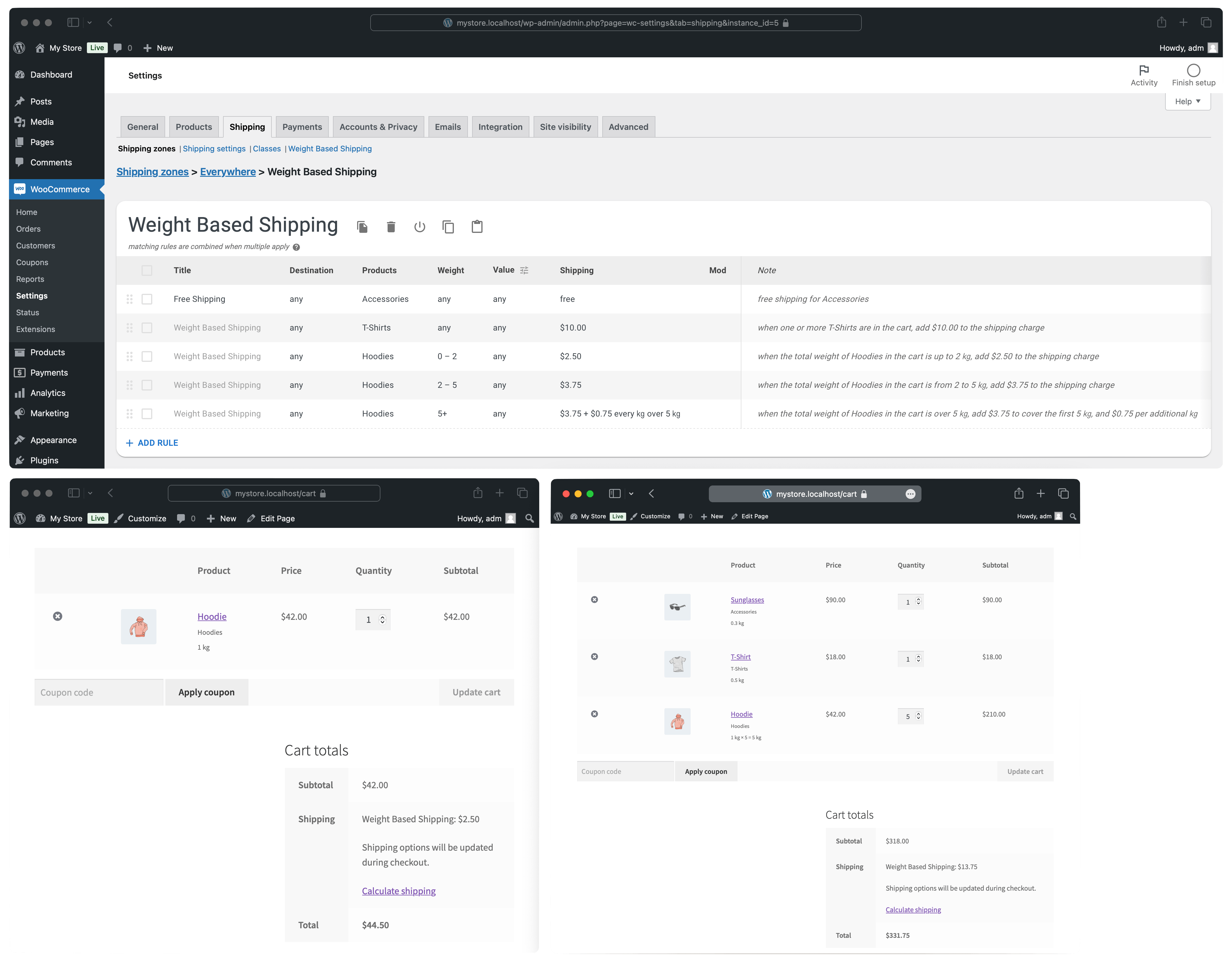
Per-product shipping with shipping classes
Faq
Give each weight range a price of its own, charge a rate for every unit of weight, or combine the two. The shipping by weight recipe puts all three tables side by side.
The same way: rules follow the store unit, so the same tables read as lbs or oz without conversion. Worked examples in pounds: shipping per lb.
Bound the paid rules so their value range stops at the threshold. Past that point nothing but the free rule applies. In the Pro edition, placing the free rule first with the Stop mod does the same. The free shipping over an amount recipe shows the working table.
Name the country or state in the Destination column of each rule, and leave a catch-all for everywhere else. Rates by country shows a domestic and an international table.
Through weight. When a product line weighs the same per unit, a price per unit of weight is a price per item; the quantity based shipping recipe sets that up, bulk pricing included.
Yes. Put them in a shipping class and write a rule per class — a flat price for one, a per-kilogram rate for another, a surcharge on a third. Rates by shipping class.
Yes. A group of products can travel free while the rest of the cart pays, and the presence of one product can make an entire order free. Free shipping for specific products covers both.
Stop them counting toward the threshold, stop them shipping free, or both at once. Exclude products from free shipping works through the three arrangements.
Yes, through WooCommerce zones built from postcodes: lists, wildcards and ranges all work there, and a method placed in such a zone prices exactly that area. Shipping zones and the global method.
Yes. It is an ordinary zone method and sits next to any other, so a weight-based rate, a flat rate, and local pickup can be offered side by side. A free rule of the plugin is simply one more option and does not hide the others.
The cart total: each product’s weight counted as many times as it was ordered, then added together. Product weights and units covers variations, bulk editing, and virtual products.
The store’s unit, set at WooCommerce Settings Products. Figures in the rules are taken at face value, so changing the unit later changes what they mean.
They count toward the order value of rules that cover the whole cart, since that figure is the cart subtotal. WooCommerce keeps them out of the weight itself.
The lower bound is included and the upper is not, so brackets 0–5 and 5–10 hand over at exactly 5 kg with no gap between them. Rule conditions.
Every matching rule contributes, and the customer sees a single price that is their sum. There is no priority between rules, so alternatives need conditions that cannot both be true; the Pro edition also offers the Stop mod, which ends the evaluation at the first rule that matches. How rules work.
Discounts are applied first and tax is excluded, unless After taxes is switched on in the Value column — the setting for stores that display prices with tax included, so the threshold matches the number the shopper sees. Order value, taxes, and currency.
According to your WooCommerce tax settings: the plugin’s prices are taxable, and WooCommerce applies its shipping tax class to them. Enter the prices in the rules without tax.
Either no rule matched the cart, or the method is absent from the zone the address falls into. The usual reasons a rule does not match: a gap between weight brackets, a product without a weight, or a weight typed into the Value column, which is the order total. No shipping options at checkout is a checklist that finds the cause in a few minutes.
Yes. Rates are calculated on the server, so the block cart and checkout show the same prices as the classic pages. The plugin also declares compatibility with high-performance order storage.
Product-aware rules, the Mod column (Stop, Drop, Deny, Require), several rule tables in one shipping method with split shipping, editor conveniences such as undo and copy-paste, multi-currency thresholds, and direct email support. Free vs Pro is the full comparison.
Reviews
This plugin is a quite brilliant
By  groggy72 on November 9, 2025
Works brilliantly, thank you Dan for making such an great plugin and supporting it.
Does exactly as needed – Perfect!
By  Zak Single (zaksingle) on January 21, 2025
Great plugin, highly recommend, does exactly what it should do. Thank you devs!
Great Plugin, that saved me a lot of time
By  aminefaizdev on September 14, 2024
Great Plugin, that saved me a lot of time
A great reliable plugin
By  Sharon (wordpress159) on September 14, 2024
I have been using this plugin now for about 3 years with my small online business and it has worked brilliantly without missing a beat. It was also easy to setup. Moving on now to the paid version due to my expanding needs.
Great product, great support
By  cupperscoffee on April 5, 2024
Had a problem (mostly a lack of knowledge!) in setting up different shipping rates for different products. Dependant on weight of some of the products, shipping needed to be free for the entire purchase, but this only applied if a particular class of products was over a minimum weight. I reached out for assistance, and Dan was quick to respond with exactly what I needed to clarify how to line it all up. Much appreciated, it’s working exactly like we needed it to. Thanks Dan!
1st Class Plugin and Support
By  solotk on August 25, 2023
All queries dealt with promptly and politely, even if some of the questions were a bit dumb!
Many thanks to the Developer
Very good
By  Fabio Bernini (reteinformatica) on August 14, 2023
Does just what it says and what I wanted. Please never stop updating it. Thank you very much!
Has potential but unnecessarily complicated to setup
By  wpdevboy on April 15, 2023
Because it creates its own separate zone tab under WC shipping settings this causes a massive amount of confusion when it comes to setting up the rates – do you set them up in the standard shipping zone section or under the weight based tab??? nothing is very clear and only through a process of trial and error can you work how to get it to work the way you want it.
Present shipping cost in product page
By  mariosnft on March 20, 2023
Hello guys,
is there a way to fetch the shipping cost calculated by weight and / or location of a product and present it in a single product page?
Best,
Marios
Free version are awesome!
By  Bojan Denić (evilmc) on March 15, 2023
The free version is too good. Thank you!
Changelog
6.20.0
- Split-shipping breakdown: show in the cart and checkout blocks as well; add visibility settings; format in multiple lines for better readability.
- Tested with WooCommerce 11.2.
6.19.0
- Fix order subtotal might be incorrectly detected for block-based Cart.
- Fix a fatal error on the cart and checkout pages with Local Pickup Plus.
6.18.0
- Fix Local Pickup or other global shipping methods are not available on checkout when the global WBS method is enabled.
6.17.0
- PRO: Restore updates check.
- Tested with WooCommerce 11.1.
6.16.1
- Tested with WordPress 7.1, WooCommerce 11.0.
6.16.0
- PRO: Update the updater code.
- Tested with WordPress 7.0, WooCommerce 10.8.
6.15.3
- Hide woocommerce ads on the settings page.
6.15.2
- Tested with WooCommerce 10.7.
6.15.1
- Tested with WooCommerce 10.6.
6.15.0
- Fix deprecation warnings from PHP 8.3, 8.4.
- PRO: Support Require mod. All required rules must be matched for a shipping method to be activated.
6.14.0
- More flexible configuration loading for better compatibility with third-party code.
- Tested with WooCommerce 10.5.
6.13.0
- Improve the appearance of the Save, Undo, Redo buttons.
- Move the settings icon into the table header.
- Fix “from” field of the Weight/Value dropdown is not automatically focused.
- Fix the replacement suggestion for zero-length ranges having fractional numbers in the Weight/Value dropdown.
- Improve wording.
- Other UI tweaks.
6.12.1
- Don’t show the legacy global config tab by default for new installations.
6.12.0
- PRO: Support automatic multi-currency conversion provided by the plugins: CURCY Multi Currency for WooCommerce, WooCommerce Multilingual & Multicurrency (WCML), Booster for WooCommerce, FOX Currency Switcher Professional for WooCommerce (WOOCS).
- Tested with WooCommerce 10.4.
6.11.0
- Redesign Save, Undo, Redo buttons.
- Replace unicode symbols for kg, cm, mm, with plain texts for better rendering.
- Tested with WordPress 6.9.
6.10.1
- No longer test with PHP 7.2 (end-of-life reached 2020-11-30), WooCommerce prior to 7.0 (released in 2022-10-11), WordPress prior to 5.8 (released in 2021-07-20).
- Avoid settings save errors on extra whitespace added to the responses by other plugins.
6.10.0
- Fix minor legacy UI appearance issues.
- Tested with WooCommerce 10.3.
6.9.1
- Tested with WooCommerce 10.2.
6.9.0
- Fix “Automatic conversion of false to array is deprecated”.
- Table headers are not sticky anymore as it doesn’t work well with the recent WooCommerce UI updates.
- Tested with WooCommerce 10.1.
6.8.0
- Rename the plugin according to the requirement from the WooCommerce team.
- Tested with WooCommerce 10.0.
6.7.0
- Fixed the Save button position for RTL locales.
- Tested with WooCommerce 9.9.
6.6.2
- Tested with WordPress 6.8.
6.6.1
- Better handle possible clipboard copy-paste issues.
- Tested with WooCommerce 9.8.
6.6.0
- Fix the issue when the shipping tax is excluded from the shipping total after an order is placed when using the checkout block with WooCommerce 9.7+.
- Fix PHP 8.4 notices regarding implicit nullables.
6.5.0
- Fix the global shipping method not being activated by WooCommerce 9.7.
- Tested with WooCommerce 9.7.
6.4.1
- Use the new global method by default for new installations.
6.3.1
- Tested with WooCommerce 9.6.
6.3.0
- UI tweaks.
- Tested with WooCommerce 9.5.
6.2.0
- Limit the width of the Destination column.
6.1.0
- Rename the column Amount to Value.
- Add a note regarding multiple matching shipping rules.
- Tested with WordPress 6.7, WooCommerce 9.4.
6.0.0
- Make the new UI the default. No breaking changes.
5.11.0
- Fix order subtotal might be incorrectly detected for block-based Cart.
- WBS6 preview: UI tweaks.
5.10.0
- Fix WooCommerce PayPal Payment admin messages cause WBS rules to appear empty.
- Tested with WooCommerce 9.3.
5.9.4
- Tested with WooCommerce 9.2.
5.9.3
- Tested with WordPress 6.6, WooCommerce 9.1.
5.9.2
- Tested with WooCommerce 8.9, 9.0.
5.9.1
- Tested with WordPress 6.5, WooCommerce 8.8.
- WBS6 preview: minor fix of the Save button visibility
5.9.0
- Prevent running with unsupported PHP, WordPress, or WooCommerce versions.
- Fix an error when multiple installations of the plugin are active.
5.8.0
- Ship WBS6 Preview with the free version.
- WBS6 preview: improve the WooCommerce sticky header height detection.
5.7.2
- Tested with WooCommerce 8.6, 8.7.
- WBS6 preview improvements (Plus version only).
5.7.1
- Tested with WooCommerce 8.5.
- WBS6 preview improvements (Plus version only).
5.7.0
- Tested with WooCommerce 8.4.
- WBS6 preview improvements (Plus version only).
5.6.3
- Tested with WordPress 6.4, WooCommerce 8.3.
- Drop PHP 7.1 support.
5.6.2
- Tested with WooCommerce 8.2.
5.6.1
- Tested with WooCommerce 8.1.
5.6.0
- Enable WBS6 preview (Plus version only).
5.5.7
- Tested with WooCommerce 8.0, WordPress 6.3.
- Drop WooCommerce pre-5.0 support.
5.5.6
- Show a notice on the global shipping method suggesting to try shipping zones instead.
- Remove WooCommerce pre-2.6 compat code.
- Prepare WBS6 preview.
5.5.5
- Tested with WooCommerce 7.9.
5.5.4
- Tested with WooCommerce 7.8.
5.5.3
- Tested with WooCommerce 7.7.
5.5.2
- Tested with WooCommerce 7.6.
5.5.1
- Declare compatibility with HPOS.
- Tested with WordPress 6.2.
5.5.0
- Check nonce on config update.
- Remove the legacy config import option (used for 4.x -> 5.x migration).
- Tested with WooCommerce 7.5.
5.4.1
- Tested with WooCommerce 7.4.
5.4.0
- Use the cart price provided by WooCommerce by default for fresh installations of the plugin. It makes Order Subtotal to account for virtual items’ prices and increases compatibility with third-party plugins.
- Make sure a user has manage_woocommerce capability to update the shipping rules.
- Tested with PHP 8.2.
5.3.27
- Raise the minimum required WordPress version to 4.6.
5.3.26
- Tested with WooCommerce 7.1.
5.3.25
- Tested with WooCommerce 7.0, WordPress 6.1.
5.3.24
- Tested with WooCommerce 6.9.
5.3.23
- Tested with WooCommerce 6.7
5.3.22
- Tested with WooCommerce 6.5, WordPress 6.0.
5.3.21
- Fixed a PHP warning triggered by some other plugins about a missing InstalledVersions.php file.
- Tested with WooCommerce 6.4.
5.3.20
- Tested with WooCommerce 6.3.
5.3.19
- Tested with WordPress 5.9, WooCommerce 6.1.
5.3.18
- Tested with WooCommerce 6.0.
5.3.17
- Tested with WooCommerce 5.9.
5.3.16
- Tested with WooCommerce 5.8.
- Drop PHP 5.6 support.
5.3.15
- Tested with WooCommerce 5.7.
5.3.14
- Tested with WooCommerce 5.6.
5.3.13
- Tested with WordPress 5.8, WooCommerce 5.5.
5.3.12
- Tested with WooCommerce 5.3.
5.3.11
- Tested with WooCommerce 5.2.
5.3.10
- Tested with WooCommerce 5.1, WordPress 5.7.
5.3.9
- Bump the minimum supported PHP version to 5.6.
- Tested with WooCommerce 5.0.
5.3.8
- Tested with WooCommerce 4.9.
- Require minimum WooCommerce 3.2.
5.3.7.1
- Tested with WooCommerce 4.8, WordPress 5.6.
5.3.7
- Fix the issue with the global WBS method not being triggered by WooCommerce for customers having no location set.
- Tested with WooCommerce 4.7.
5.3.6.1
- Tested with WooCommerce 4.6.
5.3.6
- Raise the minimum required WooCommerce version to 3.1.2.
- Tested with WooCommerce 4.5.
5.3.5
- Fix unsaved settings warning with WooCommerce 4.4.1.
5.3.4.5
- Tested with WordPress 5.5.
5.3.4.4
- Fix a typo in the settings link.
5.3.4.3
- Tested with WooCommerce 4.3.
5.3.4.2
- Tested with WooCommerce 4.2.
5.3.4.1
- Tested with WooCommerce 4.1.
5.3.4
- Fix small appearance issues with recent WordPress/WooCommerce.
5.3.3.2
- Tested with WooCommerce 4.0, WordPress 5.4.
5.3.3.1
- Tested with WooCommerce 3.9.
5.3.3
- Fix appearance with WordPress 5.3.
5.3.2.2
- Update the supported WooCommerce version to 3.8, WordPress to 5.3.
5.3.2.1
- Update the supported WooCommerce version to 3.7.
5.3.2
- Workaround VaultPress false-positive.
5.3.1
- Fix ‘400 Bad Request’ error on saving settings.
5.3.0
- Add the ‘after discount applied’ option to the Order Subtotal condition to match against order price with coupons and other discounts applied.
5.2.6
- Fix WooCommerce 3.6.0+ compatibility issue causing no shipping options shown to a customer under some circumstances.
5.2.5
- Fix PHP 5.3 compatibility issue.
5.2.4.1
- Update the supported WordPress version to 5.1.
5.2.4
- Partial support for decimal quantities.
5.2.3
- Update the supported WordPress version to 5.0.
5.2.2
- Improve prerequisite checking.
- Update the supported WooCommerce version to 3.5.
5.2.1
- Update supported WooCommerce version.
5.2.0
- Don’t ignore duplicate shipping classes entries. When multiple rates are specified for a class in a rule, they all will be in effect starting from this version.
5.1.5
- Fix issue with Weight Rate causing zero price in case of a small order weight and large step (“per each”) value.
- Fix appearance issues with WooCommerce 3.2.
5.1.4
- Fix the blank settings page in Safari when Yoast SEO is active.
5.1.3
- Fix WooCommerce pre-2.6 compatibility.
- Minor appearance fixes.
5.1.2
- Fix the blank settings page in Firefox when Yoast SEO is active.
5.1.1
- Fix settings not saved on hosts overriding arg_separator.output php.ini option.
5.1.0
- Support WooCommerce convention on shipping option ids to fix shipping method detection in third-party code, like Cash On Delivery payment method and Conditional Shipping and Payments plugin.
5.0.9
- Show a warning on PHP 5.3 with Zend Guard Loader active known to crash with 500/503 server error.
5.0.8
- Fix IE11 error preventing from adding/importing rules.
5.0.7
- Fix welcome screen buttons appearance in WP 4.7.5.
5.0.6
- A bunch of minor fixes.
5.0.5
- Fix PHP 5.3.x error while importing legacy rules.
- Fix WooCommerce 3.x deprecation notice about get_variation_id.
5.0.4
- Fix WooCommerce 3.x deprecation notices.
- Deactivate other active versions of the plugin upon activation (fixed).
5.0.3-beta
- Fix ‘fatal error: call to undefined function Wbs\wc_get_shipping_method_count()’.
5.0.2-beta
- Avoid conflicts with other plugins using the same libraries.
- Deactivate other active versions of the plugin upon activation.
5.0.1-beta
- Fix Destinations not being saved on WooCommerce 3.0.
5.0.0-beta
- Rewritten from scratch, better performance and look’n’feel.
- Shipping Zones support.
4.2.3
- Fix links to premium plugins.
4.2.2
- Fix rules not imported from an older version when updating from pre-4.0 to 4.2.0 or 4.2.1.
4.2.1
- Fix saving rules order.
4.2.0
- Allow sorting rules by drag’n’drop in the admin panel.
4.1.4
- WooCommerce 2.6 compatibility fixes.
4.1.3
- Minimize chances of a float-point rounding error in the weight step count calculation (https://wordpress.org/support/topic/weight-rate-charge-skip-calculate).
4.1.2
- Don’t fail on invalid settings, allow editing them instead.
4.1.1
- Backup old settings on upgrade from pre-4.0 versions.
4.1.0
- Fix WC_Settings_API->get_field_key() missing method usage on WC 2.3.x.
- Use package passed to calculate_shipping() funciton instead of global cart object for better integration with 3d-party plugins.
- Get rid of wbs_remap_shipping_class hook.
- Use class autoloader for better performance and code readability.
4.0.0
- Admin UI redesign.
3.0.0
- Country states/regions targeting support.
2.6.9
- Fixed: inconsistent decimal input handling in Shipping Classes section (https://wordpress.org/support/topic/please-enter-in-monetary-decimal-issue).
2.6.8
- Fixed: plugin settings are not changed on save with WooCommerce 2.3.10 (WooCommerce 2.3.10 compatibility issue).
2.6.6
- Introduced ‘wbs_profile_settings_form’ filter for better 3d-party extensions support.
- Removed partial localization.
2.6.5
- Min/Max Shipping Price options.
2.6.3
- Improved upgrade warning system.
- Fixed warning about Shipping Classes Overrides changes.
2.6.2
- Fixed Shipping Classes Overrides: always apply base Handling Fee.
2.6.1
- Introduced “Subtotal With Tax” option.
2.6.0
- Min/Max Subtotal condition support.
2.5.1
- Introduce “wbs_remap_shipping_class” filter to provide 3dparty plugins an ability to alter shipping cost calculation.
- WordPress 4.1 compatibility testing.
2.5.0
- Shipping classes support.
- Ability to choose all countries except specified.
- Select All/None buttons for countries.
- Purge shipping price calculations cache on configuration changes to reflect actual config immediatelly.
- Profiles table look tweaks.
- Other small tweaks.
2.4.2
- Fixed: deleting non-currently selected configuration deletes first configuration from the list.
2.4.1
- Updated pot-file required for translations.
- Added three nice buttons to plugin settings page.
- Prevent buttons in Actions column from wrapping on multiple lines.
2.4.0
- By default, apply Shipping Rate to the extra weight part exceeding Min Weight. Also, a checkbox added to switch off this feature.
2.3.0
- Duplicate profile feature.
- New ‘Weight Step’ option for rough gradual shipping price calculation.
- Added more detailed description to the Handling Fee and Shipping Rate fields to make their purpose clear.
- Plugin prepared for localization.
- Refactoring.
2.2.3
- Fixed: first time saving settings with fresh installations does not save anything while reporting a success.
- Replace short php tags with their full equivalents to make code more portable.
2.2.2
Fix “parse error: syntax error, unexpected T_FUNCTION in woocommerce-weight-based-shipping.php on line 610” https://wordpress.org/support/topic/fatal-error-1164.
2.2.1
Allow zero-weight shipping. Thus, only Handling Fee is added to the final price.
Previously, the weight-based shipping option has not been shown to the user if the total weight of their cart is zero. Since version 2.2.1 this is changed, so the shipping option is available to user with price set to Handling Fee. If this does not suite your needs well, you can return previous behavior by setting Min Weight to something a bit greater than zero, e.g., 0.001, so that zero-weight orders will not match constraints and the shipping option will not be shown.