

WC Korkmaz Contract – Contracts for WooCommerce
Description
This plugin lets you create distance sales contracts, pre-information forms, and fully custom legal contracts for WooCommerce. It automatically fills the contracts at checkout and emails them as PDF attachments after order confirmation.
- Fully compatible with WooCommerce’s new block-based checkout.
- Add and edit legal contracts from the WordPress admin.
- Choose a PDF design for each contract and adjust section order, logo, typography, colors and page margins with an actual PDF preview.
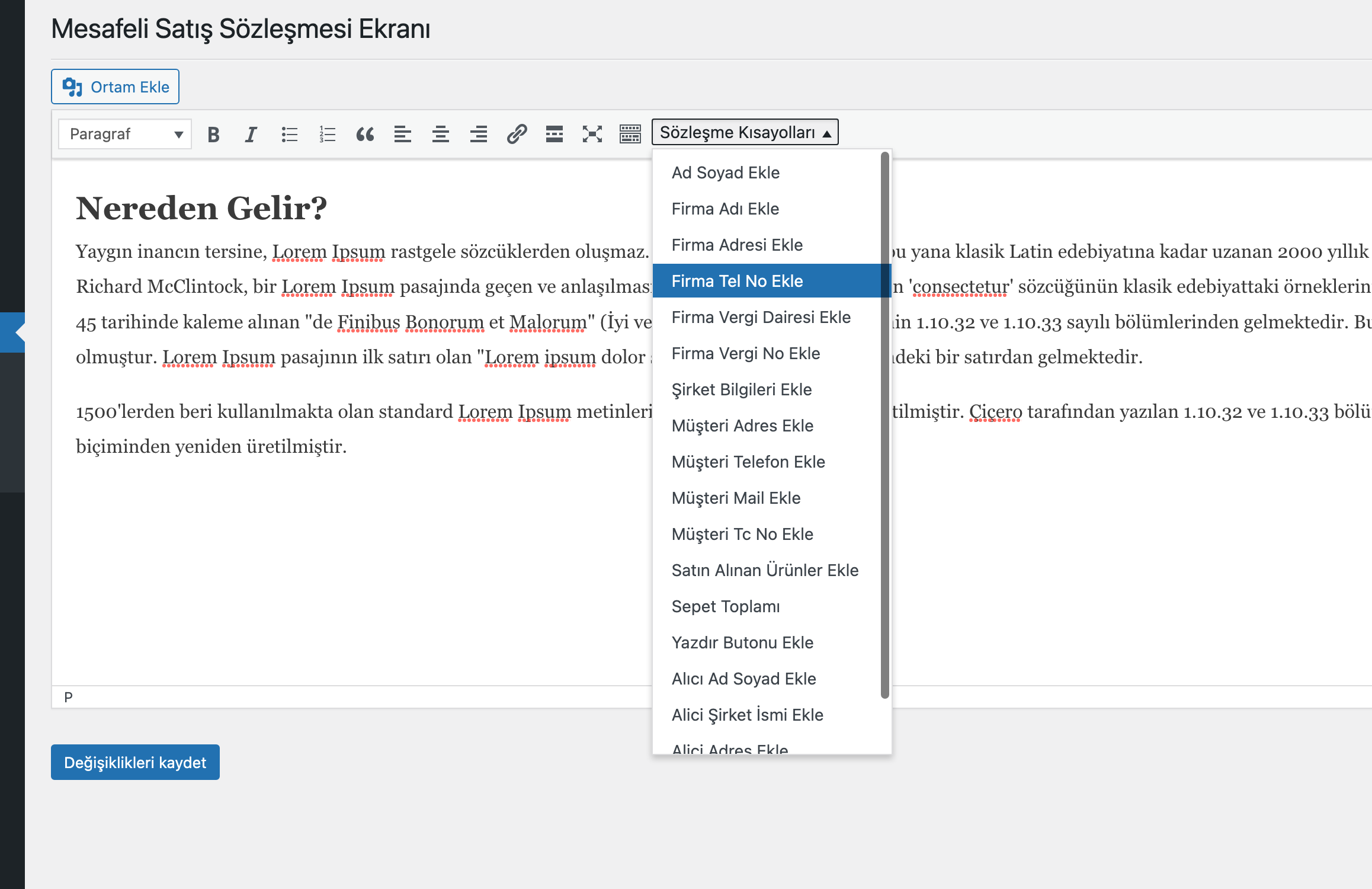
- Insert any order/customer/store data into any part of your contract via placeholders.
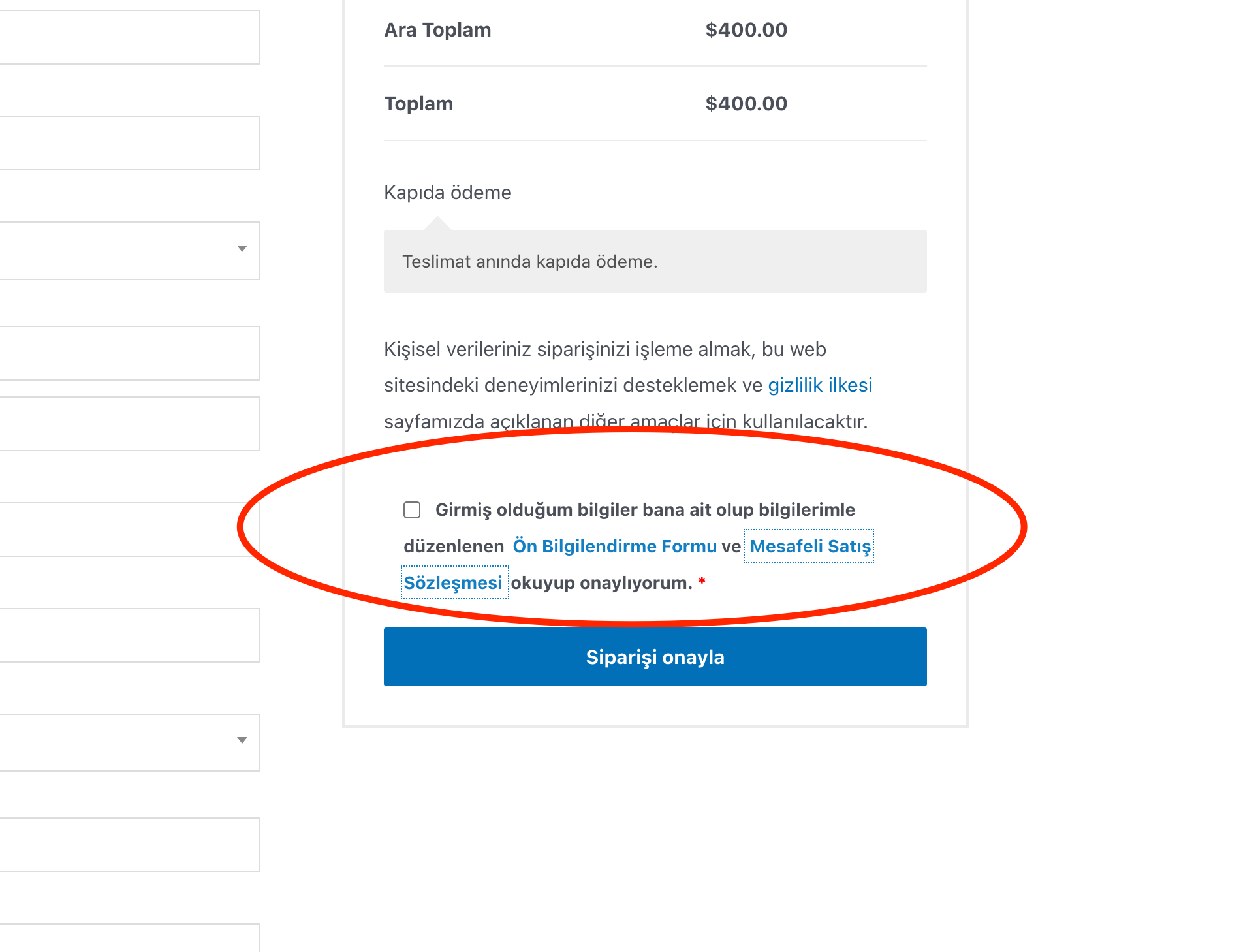
- Automatically generate contracts on the checkout page.
- Automatically send contracts in PDF format upon order confirmation.
- View past contracts on both admin and customer order pages.
- Store emailed PDFs under the WordPress uploads directory and serve customer downloads through protected links.
Localization
This plugin is translation-ready. Source strings are in en_US (English – United States). Complete bundled interface catalogs are provided for Turkish (tr_TR), German (de_DE), French (fr_FR), Spanish (es_ES) and Arabic (ar), including WooCommerce Blocks JavaScript translations. Existing WordPress and Loco Translate catalogs retain priority. Saved contract texts, custom labels and company information remain administrator content; changing the interface language does not automatically translate them.
Contribute translations here:
https://translate.wordpress.org/projects/wp-plugins/wc-korkmaz-contract/
Arabic interface translation and RTL controls are included. Dompdf has limitations with complex-script shaping and bidirectional text, so Arabic contract PDF typography is not guaranteed by the interface translation. Check the actual PDF preview before using an Arabic contract. Background: https://github.com/dompdf/dompdf/issues/3091
External Services
- yemlihakorkmaz.com/sozlesmeornek.txt — used to fetch the default contract template.
Data sent: none (HTTP GET). Privacy: https://yemlihakorkmaz.com/privacy
This external request is used only when contract templates are empty and the plugin needs a sample template.
Development and third-party libraries
PDF previews use Mozilla PDF.js 6.4.299, distributed locally under Apache-2.0 (build/pdfjs-LICENSE.txt). The viewer and worker load only when an administrator opens a PDF preview; no external viewer service or CDN is used. Source: https://github.com/mozilla/pdf.js/ — API examples: https://mozilla.github.io/pdf.js/examples/
To rebuild the JavaScript assets, use Node.js 22.13 or newer, run npm ci and npm run build in the source directory. Node.js and node_modules are not needed on the WordPress server.
To refresh translation catalogs after changing interface text, run sh scripts/build-translations.sh with WP-CLI i18n and GNU gettext installed. The source-to-bundle mapping generates JSON catalogs for the actual registered checkout and editor script paths. Fill newly added PO entries before release.
Installation
- Download the plugin here or install it from Plugins Add New in your WordPress dashboard.
- (Manual) Upload and extract the archive into
/wp-content/plugins/. - Go to Plugins Installed Plugins and click Activate.
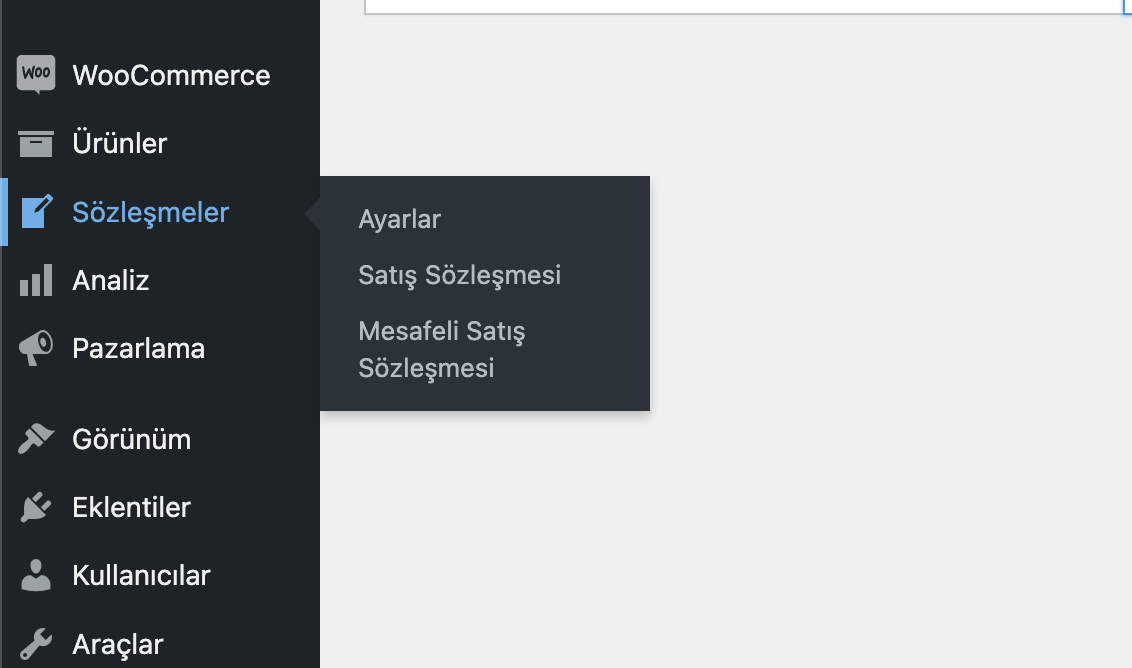
- A new Contracts menu will appear in the admin — add your contracts there.
- On a fresh installation, complete Contracts Setup Wizard. Until completion, administrator screens return to the wizard; plugin management and required background/media services remain available. Existing installations keep their settings and can launch the wizard manually.
Screenshots

Contracts – Admin menu
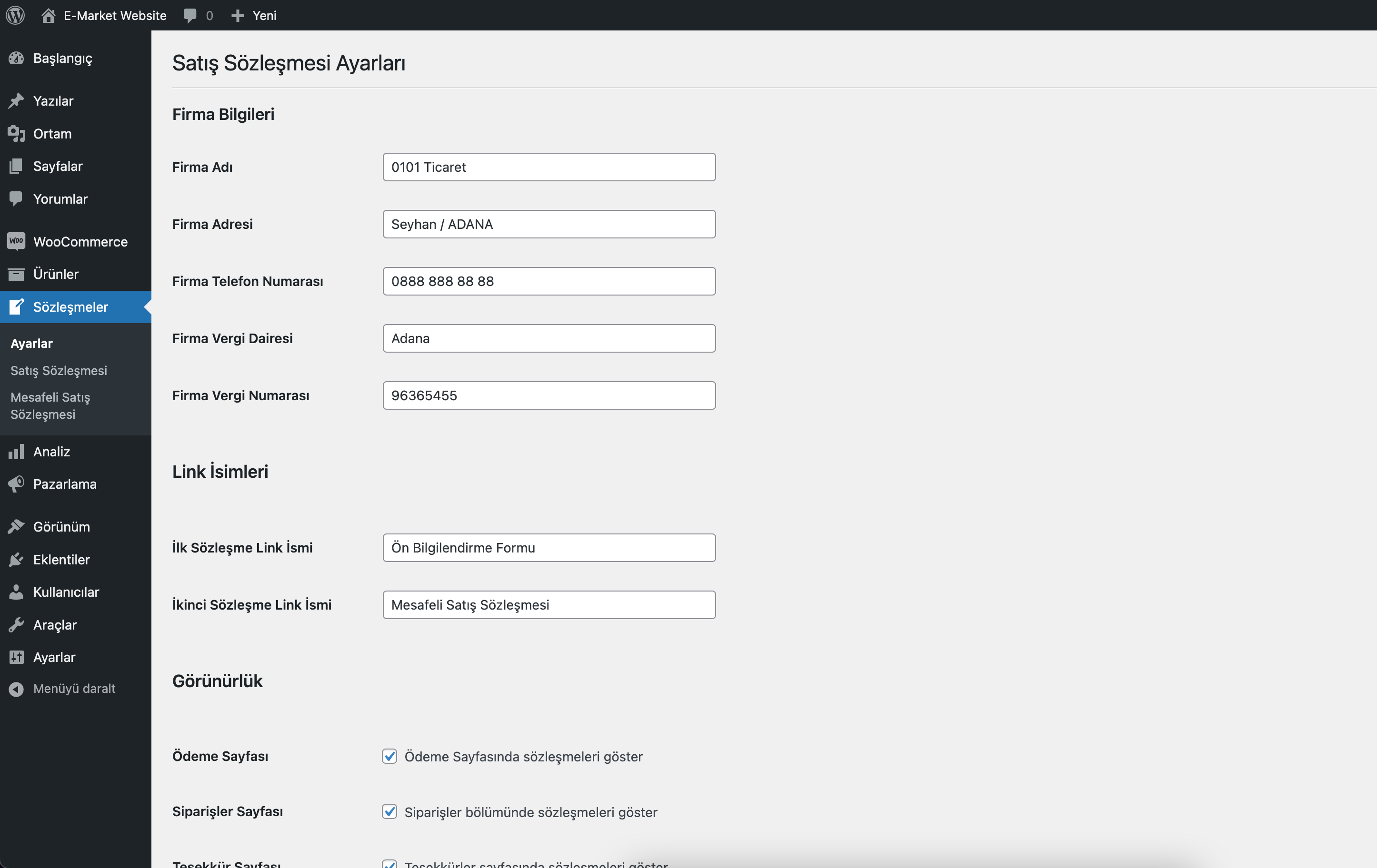
Settings section
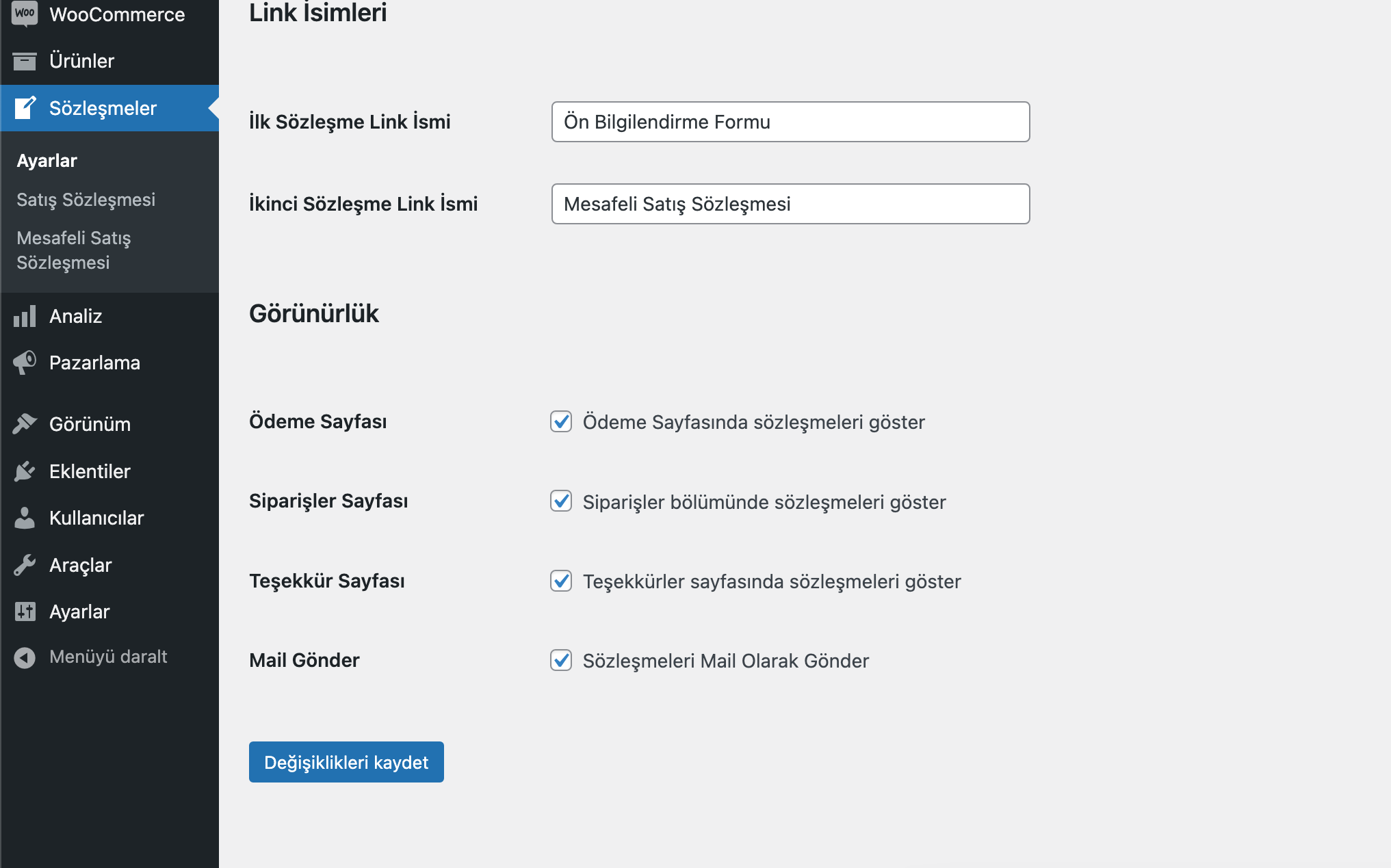
Options section
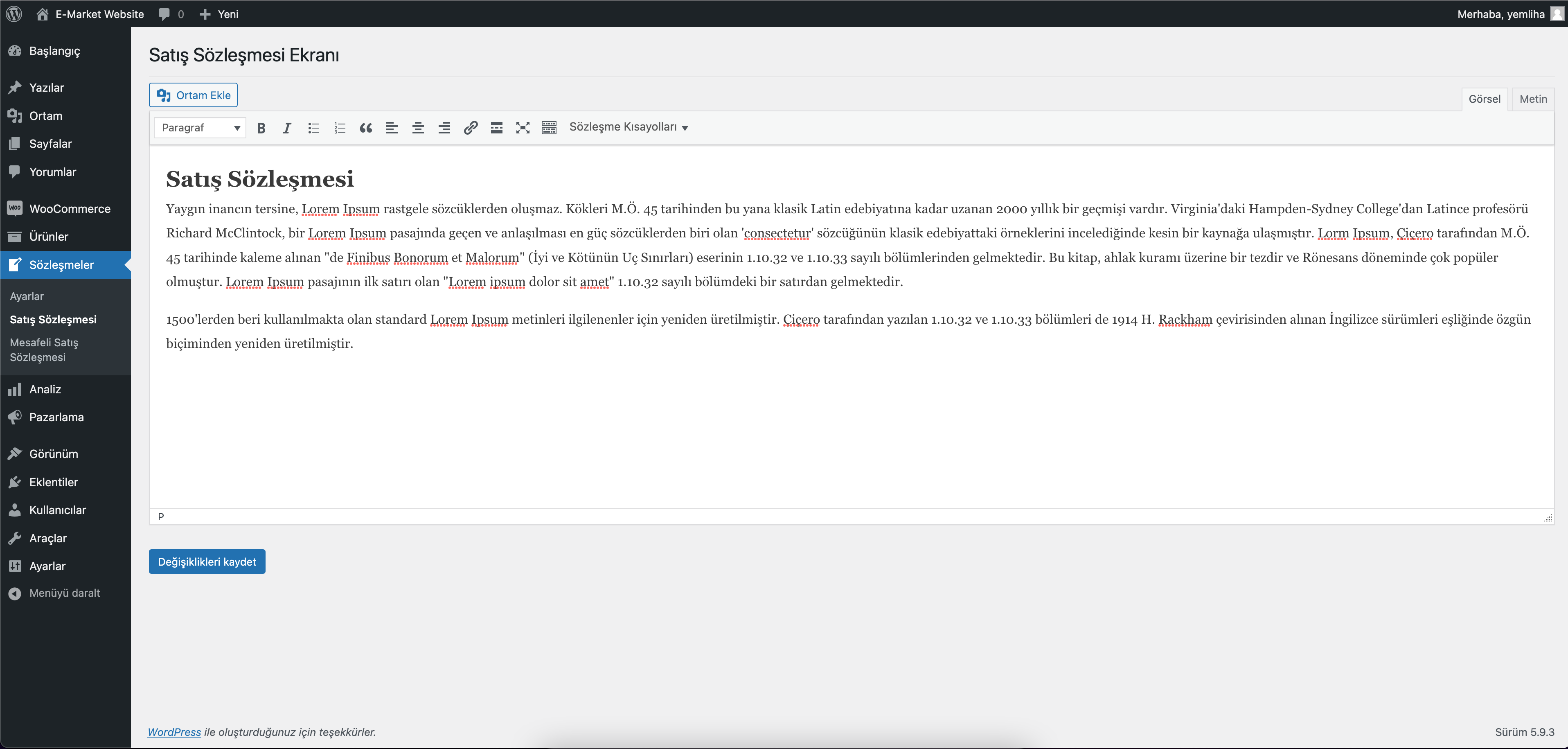
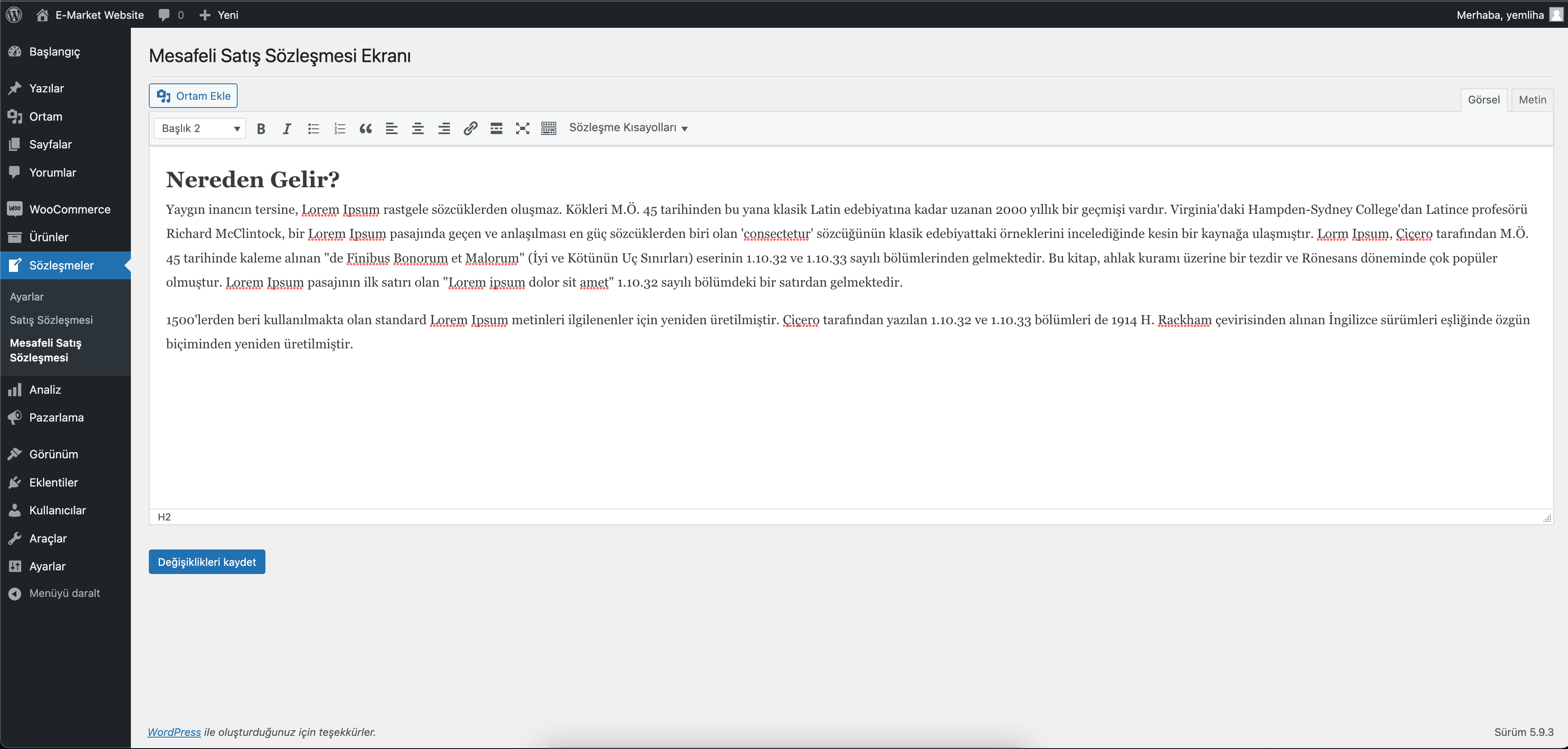
First contract edit screen
Second contract edit screen
Placeholder insertion in contract editor
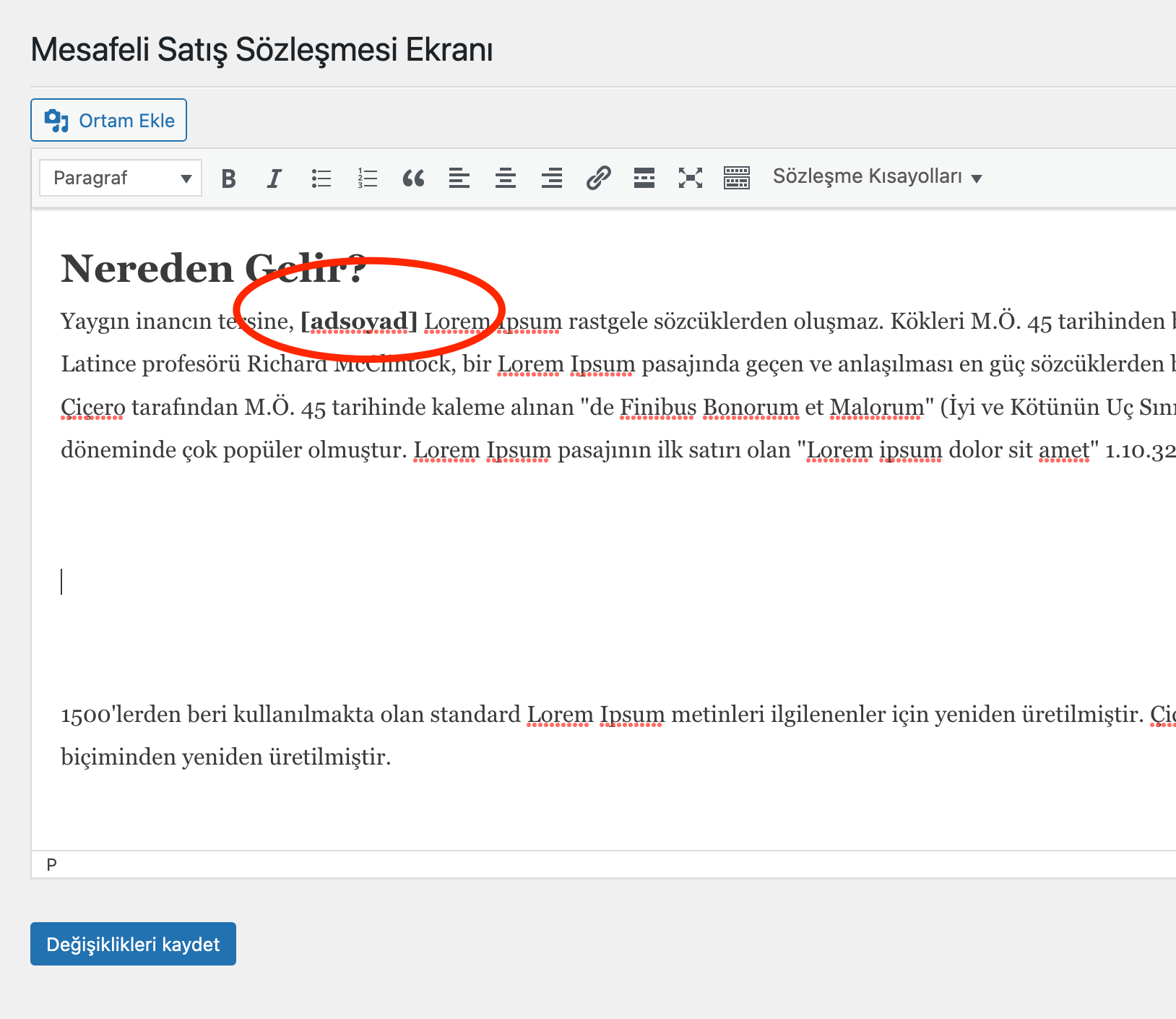
Using placeholders anywhere in the text
Checkout – Contract display and confirmation
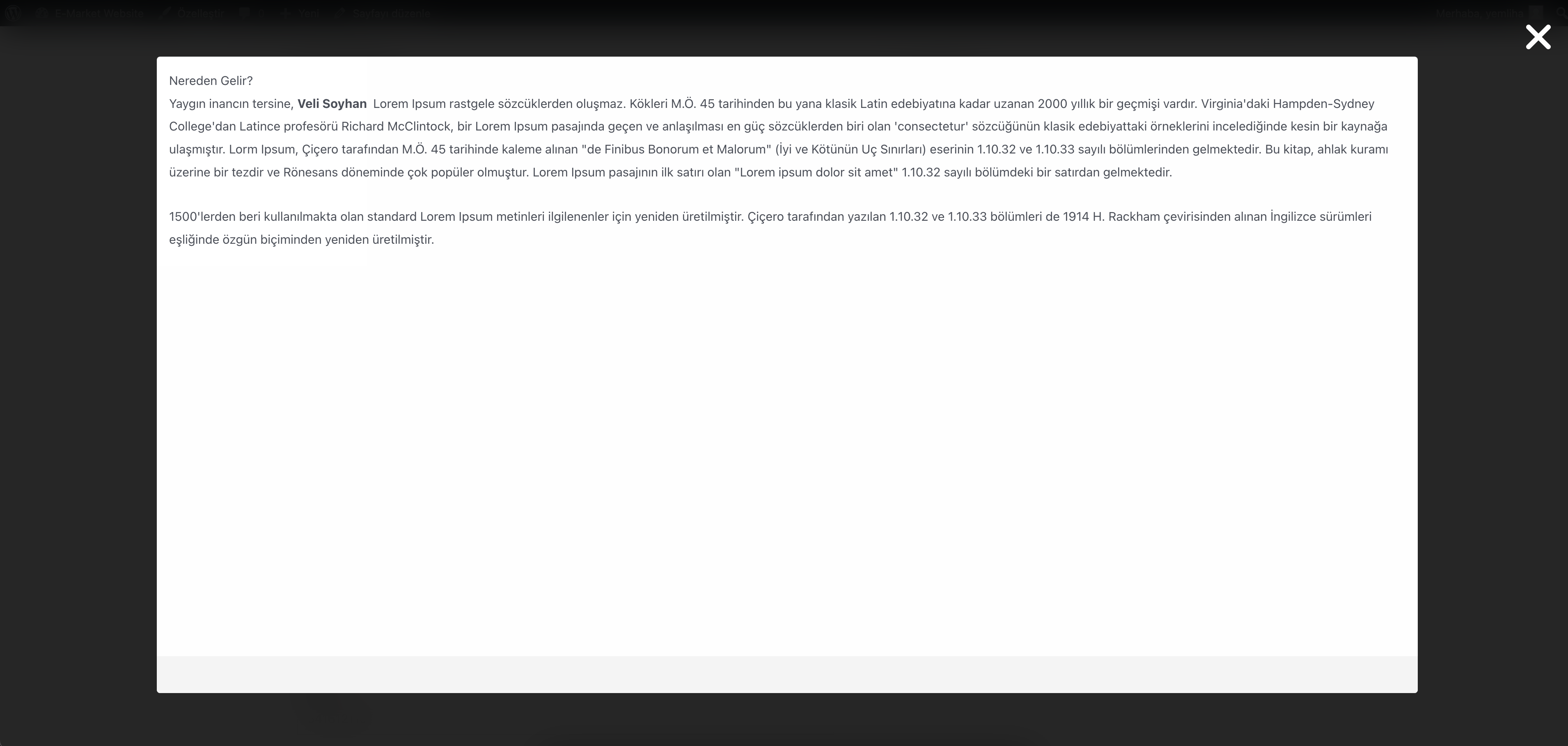
Checkout – Viewing contracts in a modal
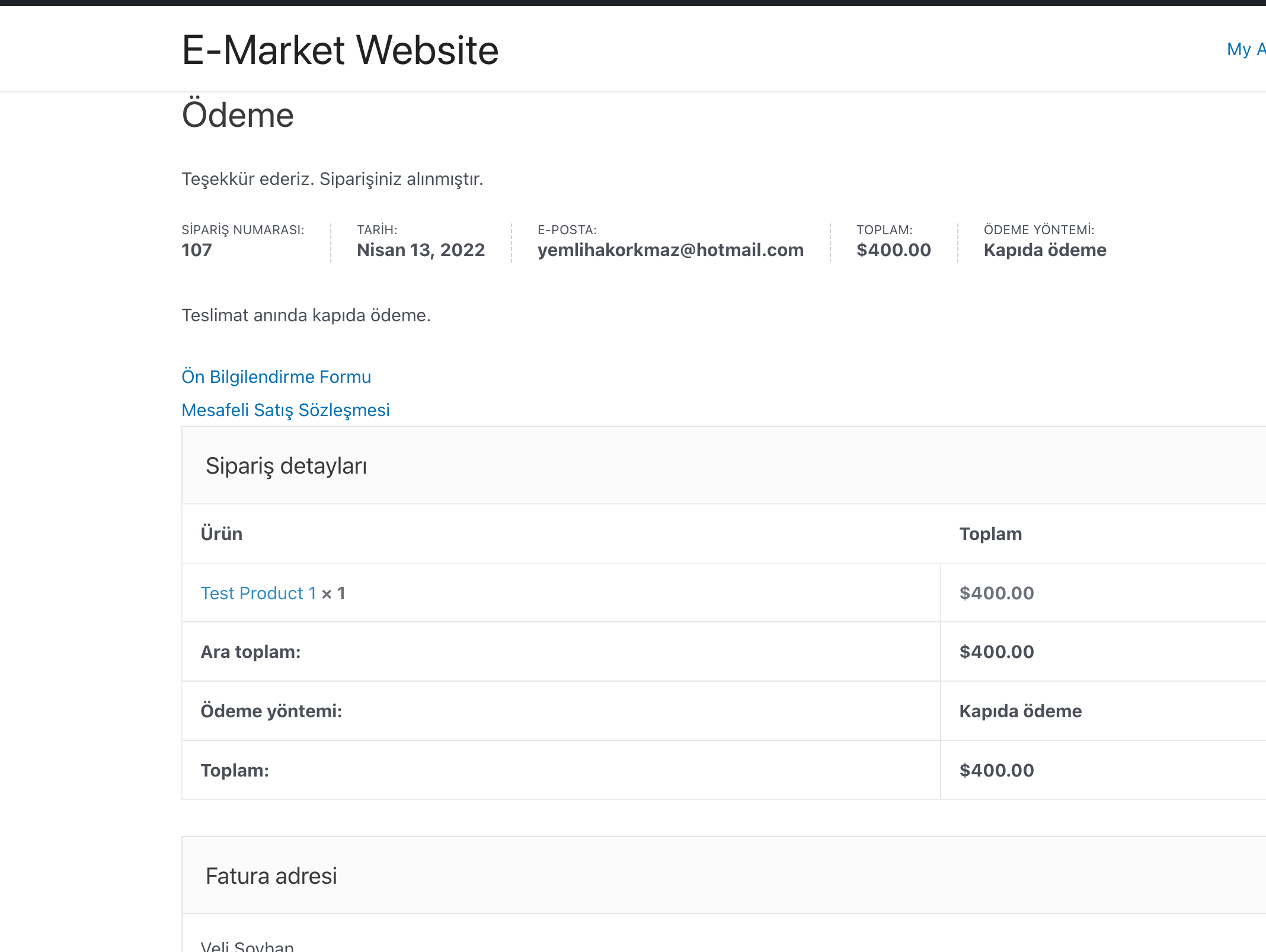
Thank-you page – Contract display
Faq
Is it completely free to use?
Yes. The plugin is completely free to use. No charges apply.
What does the setup wizard require?
The five steps check WooCommerce, collect company details and contract names, save the two contract texts with optional PDF designs, and ask for a final review. Empty contract texts and missing required company fields cannot advance. Progress is saved between visits; future steps cannot be opened directly. Completing setup restores normal administrator navigation. Contract acceptance stays required at checkout.
On a fresh installation the wizard is mandatory for users who can manage plugin settings. Plugin installation/activation, login/logout, media requests, AJAX, REST, cron and CLI continue to work. Network administration is excluded. Existing installations are not forced through setup after an update. “Run setup again” preserves saved texts and designs and starts the mandatory flow explicitly.
I don’t want PDFs to be sent via email. Can I disable this?
Yes. There is a setting on the plugin’s settings page to disable PDF email attachments.
When are contract PDFs prepared?
The accepted contract text is saved with the order immediately. PDFs are generated in the background through WooCommerce Action Scheduler (with WP-Cron as a fallback), so rendering does not delay payment. The queue needs working WordPress cron or a server cron runner. While files are pending, the order page shows a preparation notice and protected download links. Notifications configured to include contract PDFs wait for the files; temporary failures are retried. A shop manager can use the order action “Retry contract PDF generation” after fixing a persistent failure.
How do I change a contract’s PDF appearance?
Open the contract editor and expand “PDF design”. Choose Simple, Corporate or Minimal, then adjust the heading, local PNG/JPEG logo, company details, text, closing note, section order, fonts, colors, A4 orientation and margins. Use “Preview PDF” before saving. “Current appearance (unchanged)” preserves the existing layout. Design settings are saved separately for each contract and captured with new orders; later edits do not change an existing order’s saved design. Existing PDFs are retained. Closing notes appear in the PDF only; contract terms belong in the main contract text.
The preview uses sample data and the same Dompdf renderer as order PDFs, without creating an order or storing a preview PDF. Remote images and third-party shortcodes are excluded from previews. The local logo must remain available until background PDF generation finishes.
How are stored contract PDFs protected on Apache and Nginx?
The plugin writes an Apache .htaccess rule into the contract PDF folder and serves customer/admin downloads through protected WordPress URLs. Nginx does not read .htaccess, so the settings screen includes a direct-access security check and a copyable Nginx location rule for your server block.
How can I disable the ID/Tax number fields?
Use the option on the plugin’s settings page to hide or disable those fields.
I need more support. What should I do?
Please email: [email protected]
Reviews
Çok Başarılı Bir Eklenti
By  sacavusoglu on October 15, 2025
Türkiye’de satış yapacak müşterilerimize Woocommerce içerisinde Ticaret Kanuna gerekli olan sözleşmeleri eklemekte kolaylık sağlıyor. Ayrıca geliştiriciye, ilgili eklentide bazı sorunlar olduğu belirttiğimizde anında güncelleme sağladı.
Kendisinin eklentiyi uzun zamanlar desteklemesi dileğiyle, teşekkür ederiz.
Harika eklenti ve destek
By  eunal on October 13, 2025
Harika ve son derece kullanışlı bir eklenti, tavsiye ederim. Ayrıca tema ile yaşadığım ve bir kaç gündür çözemediğim problemi, Yemliha Korkmaz uzaktan bağlanarak, 5 – 10 dk içinde giderdi. Gerçekten çok teşekkür ederim.
Ellerinize Sağlık
By  aaltay on October 1, 2025
Çok başarılı bir eklenti olmuş. İhtiyaca çözüm bulmuşsunuz. Sitenize “Donate” eklerseniz bir kahve ısmarlayabiliriz 🙂
Gayet güzel
By  kiralikbeyin on August 8, 2025
Mis gibi çalışıyor. Teşekkürler.
Desteğiniz için Teşekkürler
By  ecomproject on March 25, 2025
WordPress güncellemelerini yakından takip ederek uygulamayı sürekli güncel tuttuğunuz ve teknik sorunlarda satıcı olarak bizlere sağladığınız destekleriniz için teşekkür ederiz.
2.0.3 Hata
By  Cem Çalışkan (kocdizayn) on March 10, 2025
2.0 dan sonra her güncellemenizde uygulamanın bir yeri çalışmıyor. 2.0.3 de woocommerce sipariş sayfasında müşteri ad soyad alanı pasif oluyor ve yazılamıyor.
mükemmel geliştirici tebrikler
By  onlinesatis on July 25, 2024
Gerçekten çok iyi bir insan ücretsiz verdiği eklentiye uzaktan bağlantı ile destek verdi. Çok teşekkür ediyorum kendisine elleriniz dert görmesin.
Emekleriniz İçin Sonsuz Teşekkür
By  mehmetsakirarslan on March 7, 2024
Merhaba,
WooCommerce Sipariş Sözleşmeleri PDF eklentisini ücretsiz olarak geliştirdiğiniz için içtenlikle teşekkür etmek istiyorum. Bu eklenti, işimizi büyük ölçüde kolaylaştırdı ve müşterilerimize profesyonel bir deneyim sunmamıza yardımcı oldu. Sizlerin ücretsiz olarak sunduğunuz bu değerli kaynağın, işimizi geliştirmemize ve büyütmemize olanak sağladığını bilmekteyiz.
Size 5 yıldız vererek ve olumlu bir yorum bırakarak destek olmak istiyorum. Sizin gibi tutkulu ve cömert geliştiricilerin varlığı, açık kaynak topluluğunun gücünü ve dayanışmasını göstermektedir. Emeğiniz için bir kez daha teşekkür ederim.
Saygılarımla,
Excellent Plugin
By  bilgi25 on November 29, 2023
This plugin allows you to create a contract at the checkout step for your Woocommerce orders. It dynamically pulls important data from the user and adds it to your contract. The producer puts great effort at this point. It is also very fast and successful in terms of plugin support. Thanks…
Harika Eklenti!
By  semihakd on October 16, 2023
WooCommerce Sipariş Sözleşmeleri Pdf eklentisi, işimi çok kolaylaştırdı! Artık müşterilerime sözleşme ayrıntılarını profesyonelce sunabiliyorum. Hem hızlı hem de kullanıcı dostu arayüzü sayesinde, sözleşmelerimi saniyeler içinde oluşturup müşterilere iletebiliyorum. Ayrıca, özelleştirme seçenekleri sayesinde her türlü ihtiyaca uyum sağlıyor. Kesinlikle öneririm!
Geliştiri kendi siteme uygun css özelleştirmeleri konusunda bile destek oldu. Umarım güncellemeler devam eder ve eklentiyi kullanmaya devam edebilirim.
Çok teşekkürler!
EN:
Plugin has made my job so easy! Now I can present contract details to my customers professionally. Thanks to its fast and user-friendly interface, I can create and send my contracts to customers in seconds. Also, thanks to its customisation options, it adapts to all kinds of needs. I highly recommend it!
The developer even helped me with css modifications for my own site. I hope updates will continue and I can continue to use the plugin.
Thanks a lot!
Changelog
2.5.2
- Admin: Apply the setup wizard’s colors and panel layout to contract editors, settings and advanced field mappings. Clarify visibility controls, show explicit enabled/disabled states and explain the effect of disabling checkout approval.
- Orders: Replace plain document links with accessible, colored PDF cards in admin order details, both HPOS and legacy order lists, customer order details and the thank-you page. Display preparation and availability states while preserving protected download URLs.
- Email: Add HTML and plain-text summaries for available contract PDF attachments. Clarify notification timing and the lack of an automatic pending-payment notification; preserve background generation, deferred notifications and retries.
- Translation: Refresh all five bundled interface catalogs, including mobile and RTL presentation. Preserve saved settings, contract text, PDF designs and checkout acceptance validation.
2.5.1
- Admin: Redesign the setup wizard with a progress sidebar, compact mobile steps, grouped company/contract/email fields, review cards and a clearer completion screen. Preserve setup validation, saved data and all bundled interface languages.
2.5.0
- Translation: Bundle complete German, French, Spanish and Arabic interface catalogs, refresh all PHP/Blocks translation files, preserve custom catalogs and improve RTL interface alignment.
- Setup: Add a five-step Setup Wizard under Contracts, mandatory on fresh installations, with saved progress, validated company/contract settings, existing PDF previews, server-side step checks and final review. Gate administrator navigation until completion while keeping plugin management and background services available; preserve existing installations and allow an explicit rerun.
- PDF design: Add independent Simple, Corporate and Minimal presets for each contract, configurable sections, local logos, typography, colors, A4 orientation, margins and page numbering. Keep the existing appearance as the default and freeze the selected design with each new order.
- Admin: Preview the actual Dompdf output before saving, with a locally bundled, lazily loaded PDF.js viewer, page navigation, readable page text and a download option. Keep PDF rendering out of the checkout request.
- Admin: Add contract-specific titles, preparation steps, a variable picker shared by Visual/Code views, an insertable starter outline and an unsaved sample-data preview. Preview requires administrator permission and a nonce, runs in a sandbox and creates no orders or PDFs.
- Admin: Prevent accidental loss of unsaved edits, show save results, reject empty templates and require correction or explicit acknowledgement of unknown placeholders. Keep existing template data and registered shortcode support.
- Admin: Group advanced field mappings, keep save actions visible, synchronize custom selectors, name all field pickers for assistive technology and collapse technical server details.
- Performance: Save accepted contract text during checkout and generate PDFs through Action Scheduler in the background, with locks, bounded retries, protected downloads and an authorized order retry action. Preserve configured PDF email attachments by deferring the relevant notifications until documents are ready.
- Performance: Use WordPress entity decoding, memoize contract rendering, ignore unrelated input events and avoid loading classic checkout scripts/styles on block-only checkout pages.
- Accessibility: Make contract reading links keyboard accessible, preserve explicit checkbox acceptance, and improve the contract dialog on small screens.
- Translation: Fill missing PHP translations from the bundled catalog while preserving existing WordPress and Loco translations, including locale changes.
2.4.13
- Fix: Load the Legal Contracts stylesheet through block metadata and keep 24px of vertical spacing around the contract area, independently of theme block gaps. Verify block and classic checkout on Twenty Twenty-Five, Twenty Twenty-Four, Storefront and Astra at desktop and mobile widths.
- Fix: Mark the unaccepted contract checkbox as invalid through WooCommerce’s CheckboxControl API so checkout focuses it instead of falling back to the top of the page. Preserve the first invalid field priority and associate the validation message with the checkbox for assistive technologies.
- Security: Update Dompdf to 3.1.6 and refresh its font, SVG, HTML and CSS dependencies. Verify Turkish contract PDFs, images, multi-page tables and email attachments on a separate local WordPress/WooCommerce installation.
2.4.12
- Fix: Keep the Legal Contracts block at its saved checkout position, including older self-closing blocks, and preserve the merchant’s editor layout.
- Fix: Load WordPress JavaScript translations from normalized script URLs and preserve custom Loco Translate catalogs.
- Fix: Register the correct WooCommerce data store script dependency and support legacy empty contract blocks in the editor.
- Compatibility: Verified with WordPress 7.1.3 and WooCommerce 11.2.1, including classic and block checkout approval, local bank transfer orders, and contract PDF downloads.
2.4.11
- Admin: Show missing checkout field notices only on the plugin’s own admin pages.
2.4.10
- Admin: Limit missing checkout field notices to the main WordPress dashboard screen only.
2.4.9
- Fix: Center contract modals on narrow mobile screens, including iOS Safari, instead of letting the dialog align to the left edge.
2.4.8
- Fix: Delay block type metadata registration until WordPress has initialized translations, avoiding WordPress 7.0 early textdomain notices in admin and update screens.
2.4.7
- Fix: Avoid early translation calls from plugin action links, activation defaults, and block script data before WordPress initializes translations.
2.4.6
- Fix: Moved block checkout additional field registration to a later WooCommerce hook to avoid early translation loading notices.
- Fix: Plugin translations and upgrade routines now run from
initwith explicit priorities.
2.4.5
- Fix: Classic checkout contract previews now read the selected option from mapped select field wrappers, preventing full state/country option lists from appearing in contract text.
2.4.4
- Compatibility: Added support for common custom checkout field IDs such as
billing_tax_number,billing_tax_office, andbilling_tc_number. - Compatibility: Kept legacy Turkish field IDs working for existing stores and old orders.
- Fix: Contract previews and generated PDFs now read modern and legacy tax/identity meta keys.
- Fix: Admin missing-field warnings now translate correctly when bundled translations are newer than the installed language pack.
2.4.3
- Admin: Checkout field availability warnings are now shown only as WordPress admin notices, not on the customer checkout page.
- Admin: Missing checkout field notices link directly to the field mapping screen.
- Compatibility: The warning is recorded only for users who can manage WooCommerce and is cleared when no missing fields remain.
2.4.2
- Security: Contract PDFs are now served through protected download URLs instead of direct public uploads links.
- Security: Added an admin PDF storage security check with Apache and Nginx server-rule guidance.
- Security: Checkout AJAX, contract template saving, and PDF downloads now include nonce checks.
- Security: Contract snapshots are generated server-side from order data, while legacy meta keys remain compatible.
- Compatibility: Block checkout now sends and validates contract approval on the Store API side.
- Compatibility: Block checkout contract approval now migrates to the default terms area before the place order button.
- Compatibility: Classic shortcode checkout now has stronger contract field fallbacks and clearer approval validation.
- Admin: Fields mapping screen now offers selectable checkout fields plus manual custom selectors.
- Privacy: Removed the checkout-time external IP lookup from the block integration.
- PDF: Restricted Dompdf remote fetching to same-site hosts by default and strengthened PDF filename generation.
- Admin: Restricted plugin assets to plugin admin screens and fixed the email status value mismatch.
- Release: Updated the stable tag to match the plugin version.
2.3.8
- Fix: Block checkout entegrasyonu korunurken
register_block_type_from_metadata()frontend’de query sonrasi zamana alinarakis_feed was called incorrectlynotice’i engellendi. - Fix: Block checkout’ta sozlesme blogu gorunurlugu korunur.
2.3.7
- Fix: Block checkout’ta sozlesme blogunun gorunmemesine neden olan entegrasyon zamanlamasi duzeltildi.
- Compatibility: Block checkout auto-insert ozelligi korunarak frontend render kaydi geri uyumlu hale getirildi.
2.3.6
- New: Block tabanli checkout sayfasinda
irem/ozel-sozlesmelerblogu yoksa otomatik olarak checkout icerigine eklenir. - Compatibility: Klasik checkout (
[woocommerce_checkout]) kullanan sayfalarda herhangi bir otomatik icerik degisikligi yapilmaz.
2.3.5
- Fix: Aktivasyon sonrası görülen
Function is_feed was called incorrectlynotice’ı için blok entegrasyon kaydı frontend’de query sonrası zamana alındı. - Fix: Blok editör stili erken enqueue edilmek yerine güvenli şekilde register edilir.
2.3.4
- New: Logging açıkken admin ayarlar ekranında log çıktısı (son kayıtlar) gösterilir.
- Fix: Erken aşamada conditional tag çağrılarına karşı checkout context kontrolü güçlendirildi (
is_feednotice önlendi). - Update: Log ayarı açık/kapalı davranışı korunarak yeni log görünümü eklendi.
2.3.3
- New: Admin panelde “Enable plugin logging” ayarı eklendi.
- Update: Plugin logları varsayılan olarak kapalı; yalnızca ayar açıldığında yazılır.
- Performance: Gereksiz checkout log yazımı kapatılarak disk I/O azaltıldı.
2.3.2
- PDF:
render_shortcodes()içindethe_contentfallback kaldırıldı; tema/eklenti kaynaklı harici içerik enjeksiyonu engellendi. - Stabilite: PDF boyutu ve render yükü düşürülerek checkout sırasında timeout/504 riskleri azaltıldı.
2.3.1
- Checkout:
[satin_alinan_urunler]sipariş özeti artık DOM yerine sunucu tarafında oluşturuluyor (ürün, adet, toplam). - Modal: Daha sağlam Tingle modal altyapısına geçildi ve arayüz yenilendi.
- Cache: CSS/JS dosyaları için otomatik sürümleme (filemtime) eklendi.
2.3.0
- Güvenlik: PDF klasörüne otomatik .htaccess ve index.php eklenerek dizin listeleme ve arama motoru indekslemesi engellendi.
- PDF içeriği:
[satin_alinan_urunler]ve[sepettoplami]sipariş verilerinden (ürün, varyasyon meta, toplam) dolduruluyor; Checkout DOM’una bağlılık kaldırıldı. - Kısa kodlar: Sözleşme metninde üçüncü parti kısa kodlar
do_shortcode+the_contentfiltresiyle işleniyor; modal ve PDF’te çalışıyor. - UX: Checkout sözleşme JS’inde son anda yapılan değişiklikler form gönderiminde yakalanıyor; gereksiz döngüler engelleniyor.
2.2.1
- Fix: Updated
checkout-contracts.jsto improve reliability on checkout updates.
2.2.0
*New: Added Turkish (tr_TR) translation (.po/.mo and JS JSON).
*New: Implemented wp_set_script_translations() for block/JS translation loading.
*Fix: Minor stability and text improvements.
2.1.5
- Fixed an language function.
2.1.4
- Fixed an admin-page function.
2.1.3
- Fixed PHP version handling.
2.1.2
- Fixed various issues.
2.1.1
- Fixed various issues.
2.1.0
- Tested with WordPress 6.8.
- Added nonce verification to all POST handlers.
- Replaced direct filesystem calls with the WP_Filesystem API.
- Minor security and code-quality improvements.
2.0.9
- Fixed a JavaScript issue.
2.0.8
- Fixed a JavaScript issue.
2.0.7
- Fixed a JavaScript issue.
2.0.6
- Fixed mail attachments.
2.0.5
- Fixed a PDF URL error.
2.0.4
- Fixed HTML errors.
- Resolved errors during PDF creation.
- Fixed an issue preventing contracts from being attached to emails.
2.0.3
- Modernized the settings-page UI.
- Added a settings link on the Plugins screen.
- General bug fixes.
2.0.2
- General bug fixes.
2.0.1
- General bug fixes.
2.0
- Added support for WooCommerce’s new block-based checkout.
- Resolved errors during PDF creation.
- Fixed issues occurring during email PDF delivery.
- Security updates and code optimizations.
1.3.3
- Fixed an HTML tag error during PDF creation.
1.3.2
- Added a settings option to control contract sending conditions.
- Fixed a filename issue related to HPOS updates.
1.3.1
- Added separate placeholders for first name, last name, tax office, tax number, and company name.
- Fixed an issue with a single placeholder replacement.
- Fixed an escape-character display issue in the modal.
1.3
- Updated for WordPress 6.3.2 compatibility.
- Resolved JavaScript issues.
- Added individual/corporate option for ID and tax office fields.
1.2
- Updated for WordPress 3.6 compatibility.
- Fixed an input issue with payment-method info.
- Added default field information alongside the fields.
1.1.3
- Fixed an issue where contracts were not emailed upon order completion.
- Fixed modal-related issues.
- Fixed a regression introduced in 1.1.2.
1.1.2
- Added an “Fields” admin section for defining which checkout fields feed the placeholders.
- Fixed potential modal issues.
- General improvements.
1.1.1
- Fixed a contract URL issue in multisite setups.
1.1
- Fixed several issues from the latest update.
1.0.9
- Improved language-selection options in the plugin.
1.0.8
- Replaced Bootstrap and jquery.modal with HystModal to resolve compatibility issues.
1.0.7
- Removed unnecessary code.
1.0.6
- Removed Bootstrap and Tingle libraries.
- Fixed city/district selection error.
- Fixed an ID-number related issue.
1.0.5
- Fixed an error caused by JavaScript.
1.0.4
- Fixed incorrect contract URLs shown on the Thank-you page.
1.0.3
- Added a special placeholder for product-related tables.
- Corrected incorrect placeholders.
- Adjusted emailed filenames to match contract titles.
1.0.2
- Fixed errors when disabling features on the settings page.
- General bug fixes.
1.0.1
- Added an option to toggle ID/Tax numbers.
- Removed the print button.
- Fixed modal slowdowns on the checkout page.
1.0.0
- Initial release.