

Visitor Traffic Real Time Statistics
Description
Visitor Traffic Real-Time Statistics for WordPress
Unlock powerful insights into your website traffic with Visitor Traffic Real-Time Statistics, the WordPress plugin for tracking visitors, page views, countries, browsers and more — all in one intuitive dashboard.
With real-time data and easy-to-use shortcodes, you’ll get a complete picture of your site’s performance without the complexity. Whether you’re a blogger, business owner, or marketer, this plugin gives you the tools to understand your audience better and make smarter decisions.
Why Choose Visitor Traffic Real-Time Statistics?
- Real-Time Visitor Tracking: See how many people are on your site right now and how your traffic changes through the day.
- User-Friendly Dashboard: All your key insights are displayed on a single, easy-to-navigate dashboard.
- Comprehensive Analytics: Track visitors by country, browser, referrer, page and hour of the day.
- Shortcode Integration: Display visitor stats anywhere on your site with simple shortcodes.
- SEO Insights: See which search engines send visitors, the pages they land on, and what visitors search for on your site.
- Accurate Numbers: Bots and crawlers are filtered out, and time on site only counts while the visitor is actually reading.
Available Shortcodes (Simple & Flexible)
Add these shortcodes to any post, page, or widget to showcase your traffic stats:
[ahc_stats_widget]– Display a site-wide statistics widget on the front end.[ahc_stats_widget title="Your Title" fontsize="16" display_today_visitors=true display_total_visitors=true]– Customize the widget with your own parameters.[ahc_today_visitors]– Display today’s visitors.[ahc_today_visits]– Display today’s page views.[ahc_total_visitors]– Show your all-time visitor count.[ahc_total_visits]– Display total page views.[ahc_yesterday_total_visitors]and[ahc_yesterday_total_visits]– Display yesterday’s visitors and page views.
Free Version Features:
- Live count of visitors online and today’s traffic compared with yesterday.
- Traffic report with daily and monthly trends.
- Visitors by country on an interactive world map.
- Browsers, search engines, top referring sites and top pages.
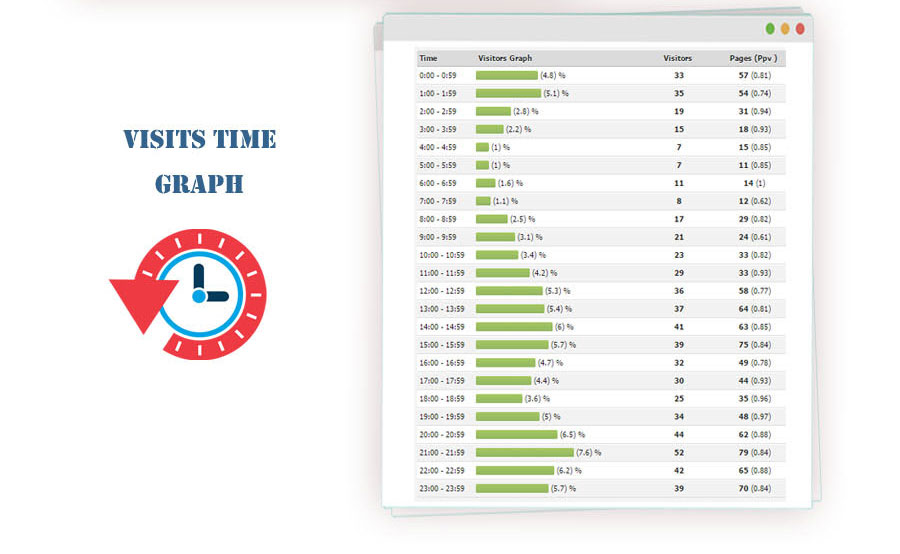
- Visits by hour of the day.
- Search traffic: the pages search visitors land on and your site’s own search terms.
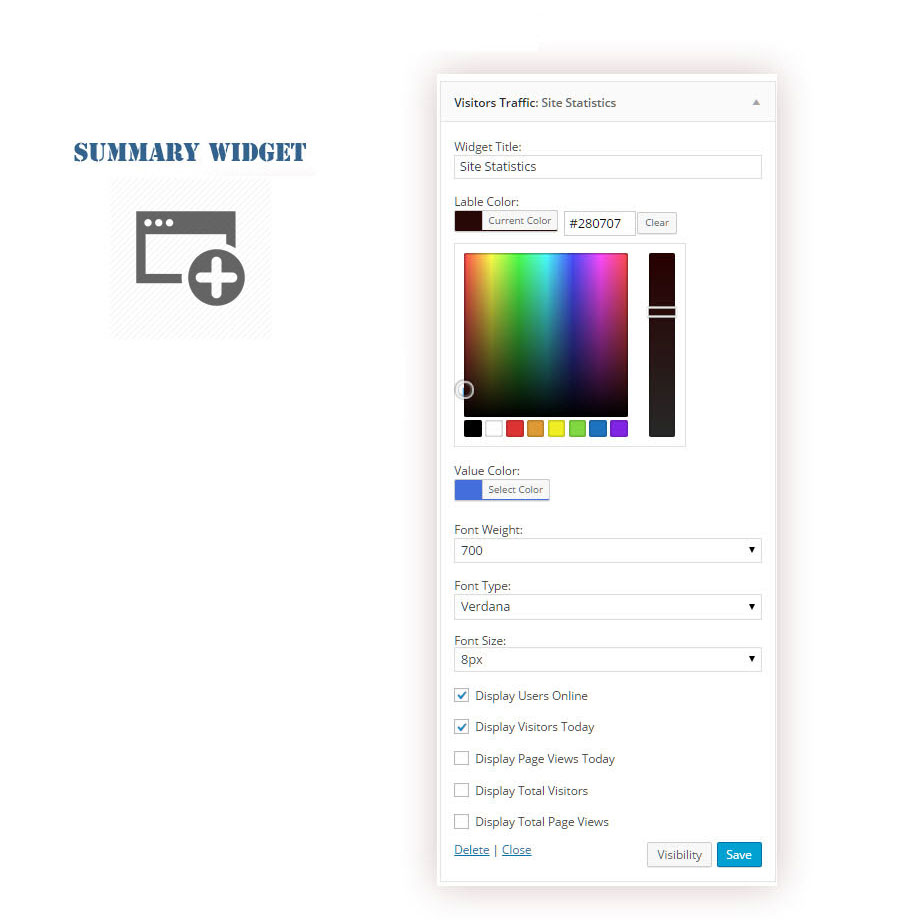
- Shortcodes and a widget to display key stats on your site.
Upgrade to Pro for Even More Power!
Take your analytics to the next level with Visitor Traffic Real-Time Statistics Pro:
- Live Visitors: See who is online right now, where they are and which page they are reading.
- Full Traffic Sources: Every source (direct, search, social and referrals) with complete history.
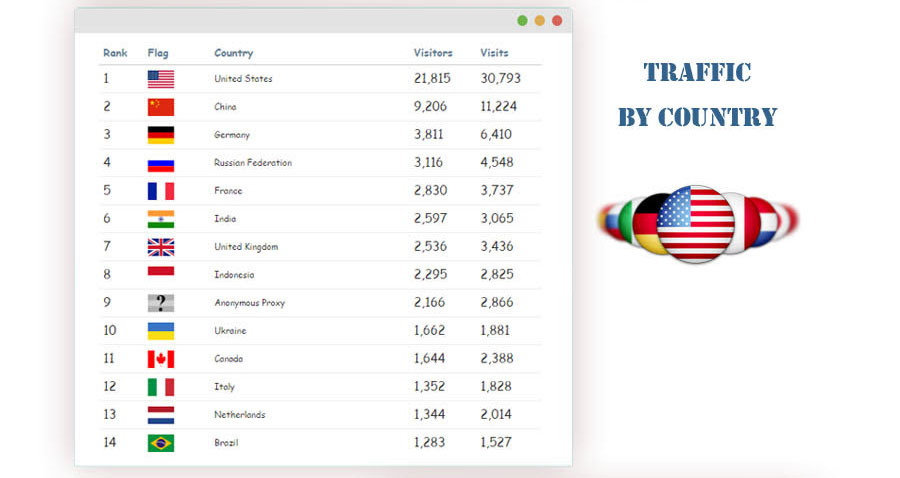
- Country Insights: Visits, visitors and trends for every country, with unlimited history.
- Visitor Journeys: Follow the path each visitor takes through your pages.
- Per-Page Statistics: Views, visitors and time on page for every post and page.
- Visit Duration: See how long each visitor really stays.
- Multisite Support: Track traffic across multiple sites in one place.
Who Can Benefit?
- Bloggers who want to track reader engagement.
- E-commerce store owners looking to understand customer behavior.
- Marketers seeking to optimize SEO strategies.
- Website administrators who need detailed traffic analysis.
Get Started Today!
Install the plugin now to gain valuable insights into your site traffic and grow your online presence.
Go PRO Now to unlock all premium features and maximize your analytics potential!
Visit Our Support Center for any assistance.
Your website is getting visitors. Don’t miss out on the insights that can help your business grow.
Installation
- Download the package.
- Upload it from Plugins > Add New > Upload Plugin, or extract the .zip file into the wp-content/plugins/ folder.
- Activate the plugin from the Plugins page.
Thanks!
Screenshots

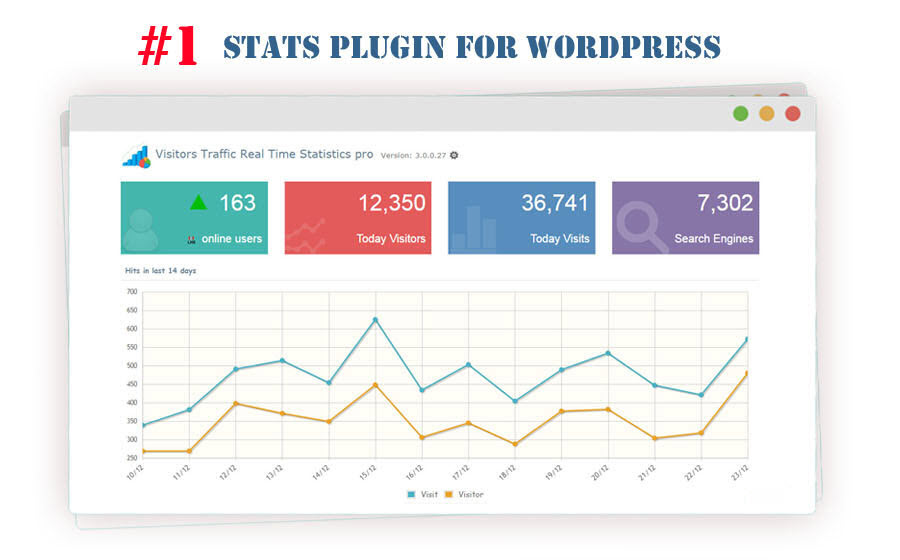
Visits & Visitors Statistics
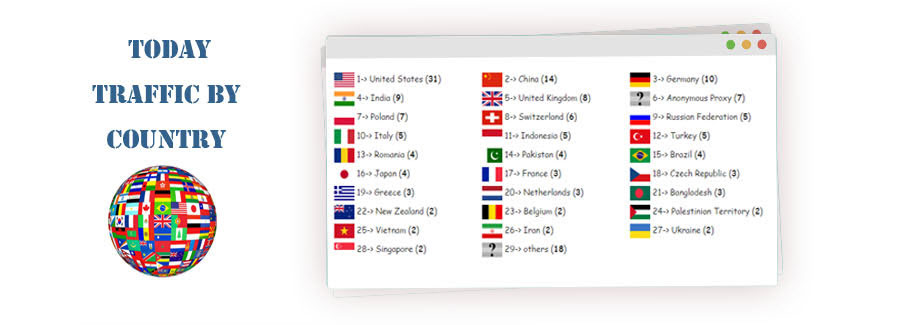
Traffic by country
Visitors map
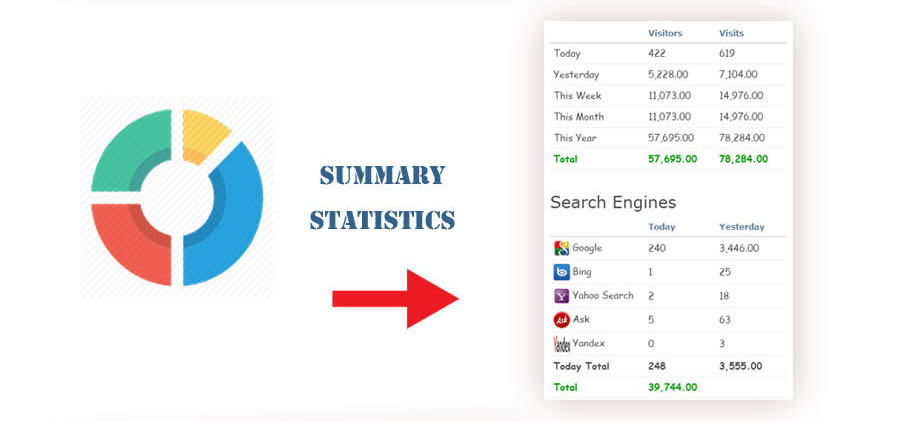
Summary statistics
Browsers
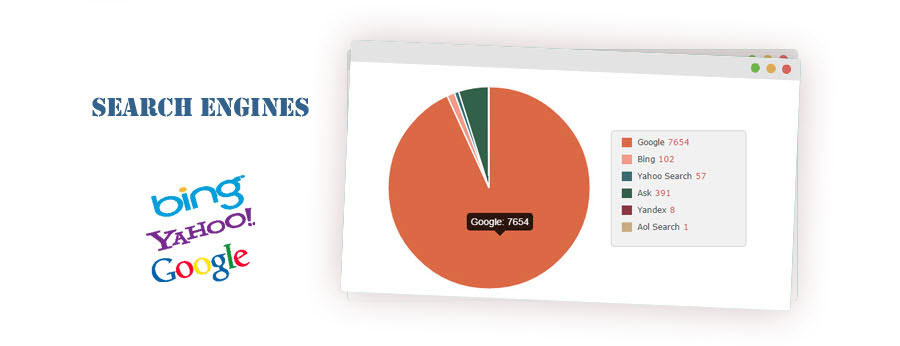
Search engines
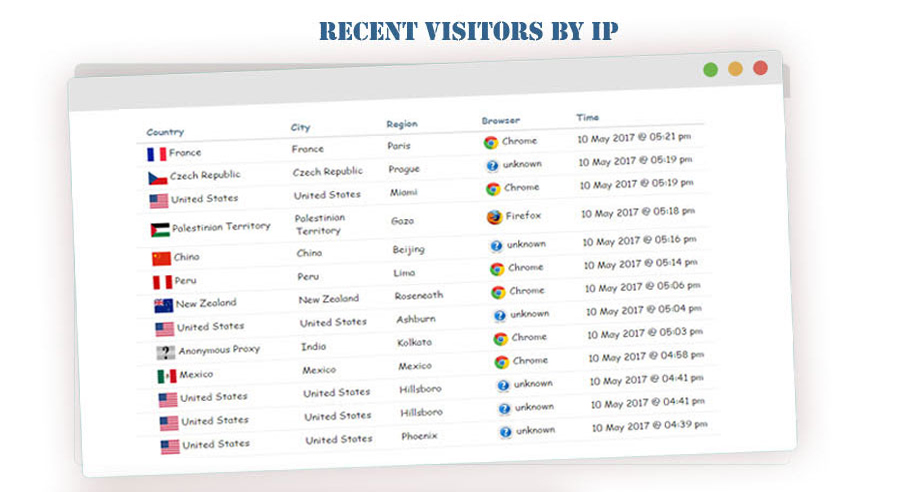
Traffic by IP
Traffic by country
Visits times
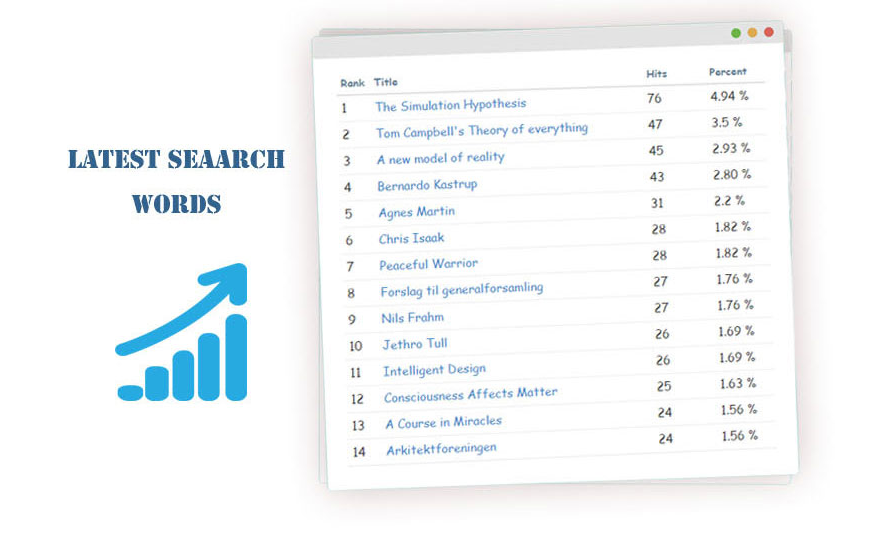
Latest search words
Traffic by title
Visits & Visitors Statistics



Faq
- Download the package.
- Upload it from Plugins > Add New > Upload Plugin, or extract the .zip file into the wp-content/plugins/ folder.
- Activate the plugin from the Plugins page.
Or go to your website dashboard > Plugins > Add New, search for “Visitor Traffic Real Time Statistics”, then install and activate it.
Notes:
* The plugin uses the timezone from Settings > General. You can choose a different one on the plugin’s Settings page.
* If you use a caching plugin, clear your website cache after activating.
- Purchase your license on our website here.
- Check your email (inbox and junk folder) for the download link of the plugin’s .zip file.
- Open your website dashboard > Plugins > Add New and upload the .zip file.
- Activate the plugin.
- Open “Visitor Traffic Pro” from your dashboard menu.
Notes:
* Check the timezone on the plugin’s Settings page.
* If you use a caching plugin, clear your website cache after activating.
You can use the following shortcodes:
*[ahc_stats_widget] adds a box with the site statistics
*[ahc_stats_widget title=”” fontsize=”16″ fonttype=”” display_today_visitors=true display_today_pageviwes=true display_total_visitors=true display_total_pageviwes=true] the same box with custom options
*[ahc_today_visitors] shows today’s visitors
*[ahc_today_visits] shows today’s page views
*[ahc_total_visitors] shows total visitors
*[ahc_total_visits] shows total page views
*[ahc_yesterday_total_visitors] shows yesterday’s visitors
*[ahc_yesterday_total_visits] shows yesterday’s page views
All data is stored locally in your WordPress database, so you don’t need a data processing agreement with an external company.
The plugin doesn’t officially support Multisite yet, but it should work without issues. Full Multisite support is planned for a future release.
Safari unzips downloaded .zip files automatically, but WordPress needs the plugin as a .zip file. To turn this off:
- Open Safari.
- Open Settings (Preferences).
- On the General tab, uncheck “Open ‘safe’ files after downloading”.
Yes. Visits are recorded by a small script in the browser, so cached pages are counted too.
If you use a caching plugin, clear your website cache after installing or updating.
Yes, this plugin is compatible with PHP 7.x and PHP 8.x. If you run into any issues, please report them.
Yes. IPv6 addresses are supported as long as PHP on your server was built with IPv6 support.
Reviews
Deeply concering results
By  Kindly Thrive Support (compassionateveg) on October 12, 2026
I found the data from this plugin to be shockingly inaccurate. It reported average time on site of 16 to 24 minutes, while Google Analytics showed approximately one second for the same traffic. It also reported substantial traffic from Google, Bing, and other sources that was not reflected in Google Analytics. The discrepancies were so significant that I lost confidence in the reliability of the reports. Based on my experience, I would strongly recommend independently verifying this plugin’s data before relying on it to evaluate website performance.
I’m very happy with the plugin
By  Ryan Miller (narokamy) on April 11, 2026
I’ve been using this plugin for about 3 weeks, and the results have been excellent. It’s very easy to set up and gives clear, real-time insights about visitors, traffic sources, and user behavior.
It really helped me build a better marketing plan based on actual data instead of guessing, which made a noticeable difference for my site.
I’m very happy with the plugin and definitely recommend it.
need to upgrade to pro for everything
By  peq42 on March 3, 2026
Plugin includes nothing for free.
Causes Database Issues
By  gothboy on October 30, 2025
As much as I like this plugin I’ve had to remove it because it causes database issues which prevents the site from loading.
Nice start on free, but too much "Go Pro"
By  KlimaPic (klimapic) on February 26, 2025
Yes, the plugin does its job in free.
And I understand the advertising for PRO. But it is all over and in between the stats. Plus I had a popup just now.
Maybe that will stop me from going PRO, because it annoys me to be forced to buy. Less is sometime more. Maybe you take care in the next updates.
bagus
By  bejomojo on June 25, 2024
bagus
I highly recommend it
By  jairus78 on March 29, 2024
After extensively using the free version, I made the decision to upgrade to the premium version of this plugin, and I must say, it’s been a game-changer. In comparison to other popular plugins, this one stands head and shoulders above the rest. I highly recommend it.
Misleading title
By  (ranka) on December 10, 2023
The name “Real Time Statistics” is misleading. There is only one real time stat and its users online count, nothing more. So, if you want a real time statistics, this plugin is not for you.
Plugin name should be: “Very Basic Traffic Stats”. Also if you are buying a pro version, there is nothing “more”. It’s not worth the money. If you want basic stats, then use free version. If you need something serious, do not buy, and go look for something more advanced traffic plugin.
Not worth even a penny.
best free analytics plugin I've seen
By  axfalcon on October 31, 2023
best free analytics plugin I’ve seen
No longer returns any statistics
By  blockhater on July 11, 2023
It worked for awhile, at least giving the number of hits. Now, it’s not reporting. Jetpack is giving me better stats. I’m uninstalling it; I don’t have time for broken stuff.
Changelog
8.18
- Stronger bot filtering: crawlers and automated browsers that run JavaScript but do not call themselves “bot” (GoogleOther, Google-InspectionTool, Chrome-Lighthouse, HeadlessChrome, Puppeteer/Playwright/Selenium, uptime monitors, HTTP libraries, AI crawlers…) are no longer counted as visitors. The real request User-Agent is checked as well as the one reported by the page, and automated browsers (navigator.webdriver) are ignored. Real visitors on CUBOT phones are counted again.
- Pages prerendered by the browser are only counted when the visitor actually opens them. Chrome prerenders top Google results, which was inflating “search engine visits”.
- Accurate time on site: engaged time is now measured in the browser (visible tab + recent interaction) and reported per page view. It replaces the Heartbeat-based duration, which kept counting for idle/background tabs and measured the first-to-last request of an IP over the whole day. Single-page visits are now part of the average. Visits recorded before 8.18 show “-” instead of an invented value.
- Clearer traffic sources: each visit is counted once, under the source of its first page. Google visits now appear under Organic Search (they were listed as a “google.com” referral), and Gmail, Google Docs, Translate and similar links are no longer counted as search engine visits.
- More accurate countries: the visitor IP is taken from Cloudflare/CDN headers first, internal proxy addresses are skipped, “IP:port” values are understood, and Cloudflare’s country takes priority. The location cache now expires (30 days, 1 day for unknown).
- Visitors whose IP cannot be determined are no longer counted as a new visitor on every page view.
- Performance: database schema checks (including two ALTER TABLE statements) no longer run on every request, only once after an update. The front end no longer loads jQuery and WordPress Heartbeat for visitors, and the visitor IP is no longer printed into the page HTML (which page-cache plugins could serve to other visitors).
- Removed the fake “First Visit” hit recorded on installation.
- Refreshed dashboard design: new header with the site-time clock, colored stat boxes with 7-day sparklines, Traffic Report with range buttons and visitor columns + page-view line, a single “Browsers & Search Engines” card with ranked bars (replaces the two pie charts and no longer loads Google Charts), and a clearer layout that works on phones.
- New “Visitors by Country” map: countries shaded by their number of visitors, with a Today / 7 days / 30 days / All time switcher. Borders ship with the plugin, so the map no longer loads map tiles from an external server. The ranked top-countries list beside it is a Pro preview.
- New Summary Statistics layout: traffic per period with the change vs. yesterday and new vs. returning visitors (last 30 days).
- Fix: “Last 7 Days”, “Last 30 Days” and “This Year” in Summary Statistics counted one extra day; they now match the Traffic Report.
- Cards no longer stretch to the height of the card next to them, so there is no empty space under short tables.
- “Visits Time Graph” is now “Visits by Hour”: one compact 24-hour chart with the busiest hour and the current hour highlighted, instead of a paged table (date search and Excel export are kept).
- Faster Traffic Report and Summary Statistics: date filters now use the database index instead of scanning every visit, plus a new covering index; “All time” caches past months. Fixes: “All time” showed a single month when the history spanned whole years, and “30 days” / “Last month” showed one day too many.
- Recent visitors: cleaner rows (country in bold with the city, readable color-coded time on site such as “2 min 5 sec”), and a row now expands inline instead of opening a popup.
- The “Online Users” box now shows the live number of visitors online (refreshed every 30 seconds). The list of who is online remains a Pro feature.
- Fix: “Today vs. yesterday” badges compared today-so-far with the whole of yesterday, so they showed a decrease for most of the day. They now compare with yesterday up to the same time.
- “Traffic by Title” redesigned: ranked rows with a share bar, and clicking a page expands it inline instead of opening a popup.
- New, cleaner upgrade window that explains what PRO adds; it appears at most once per session and “Don’t show again” turns it off.
- “Latest Search Keywords” is now “Search Traffic”, with three tabs: the pages search-engine visitors land on, what visitors type into your site’s own search box (including searches that found nothing), and a preview of Google search keywords from Search Console (coming to PRO). Google and Bing no longer share search keywords with any analytics plugin, so the old keywords list was almost always empty.
- Uninstall: when “Delete plugin data on uninstall” is enabled, the online-users and daily-stats tables and the database version markers are now removed too, so a later re-install sets up the database correctly.
- Redesigned Settings page: sections as cards with a side menu, on/off switches, the geolocation database status at a glance, a separate danger zone for data deletion (with a confirmation) and a save bar that stays in view. Fix: the last excluded user role could not be removed, and saving an empty access list caused a PHP warning.
- Redesigned Help page: quick links (FAQ, support, review), every shortcode with a copy button, a table of all [ahc_stats_widget] options with an example, and answers to common questions. Fix: in [ahc_stats_widget], display_total_visitors=false also hid the total page views.
- Shortcodes and the “Visitor Traffic” widget: consistent “Label: value” rows, no empty heading or invalid style when no title/font is set. The widget now uses the theme’s widget wrapper and title style, its settings are sanitized when saved, and a stray backslash was removed from its settings form labels. All shortcode numbers were checked against the database (today, yesterday and total).
- English review of every label, notice and message: clearer box and panel titles (“Search Engine Visits”, “Today’s Traffic by Country”), consistent “vs. same time yesterday”, fixed typos and punctuation, an up-to-date message on the Plugins page and a rewritten upgrade banner. The plugin description and FAQ were updated to match the features of this version.
- Better first run: until the first visit is recorded, the dashboard shows a short “Tracking is on” guide (see your first visit, exclude your own visits, add a shortcode). The “vs. yesterday” badges show a neutral dash when there is nothing to compare and “New” when yesterday had no visits, instead of a misleading green “0%”. Empty tables say “No visitors recorded yet” instead of “No data available”.
8.17
- Security hardening (follow-up to the 8.16 X-Real-IP XSS fix): visitor data in the dashboard (IP, country, city, region, browser, page titles) is now escaped with entity double-encoding, so values stored by older versions can no longer be decoded back into HTML. Invalid IP values left in the database by older versions are cleaned up automatically on update.
- Security hardening: the dashboard’s HTML-to-text helper now uses an inert parser instead of innerHTML, and the IP filter in the Recent Visitors search is escaped before being used in the database query.
8.16
- Security fix: resolved an unauthenticated stored DOM-based Cross-Site Scripting (XSS) vulnerability via the ‘X-Real-IP’ (and other forwarded-IP) HTTP headers. The visitor IP is now strictly validated as a real IPv4/IPv6 address before it is stored, and all visitor data shown in the IP details popup is escaped before being added to the page.
- Visitor map now shows place names in English for all countries (switched to Esri World Street Map tiles, no API key required).
8.15
- Fix: the visitor map on the dashboard showed “API KEY REQUIRED” placeholder tiles instead of the map, because the CARTO basemap service now requires an API key. The map now uses OpenStreetMap tiles, which work without any key.
8.14
- Critical fix: on sites running PHP older than 8.1, the tracking request (admin-ajax.php) crashed with a fatal error, so no visits were recorded at all. The bundled geolocation library requires PHP 8.1+; it is now loaded only when the server supports it. On older PHP, visitor country is resolved from the Cloudflare header (if the site is behind Cloudflare) or from a lightweight external lookup, with the result cached to keep tracking fast. Visit recording works on all supported PHP versions again.
8.13
- Fix: visitor tracking script (front.js) no longer depends on jQuery, so it loads and records visits even on sites that defer or remove jQuery via performance/optimization plugins. This resolves cases where statistics were not being recorded on some sites.
8.12
- Security fix: resolved a reflected XSS vulnerability in the Traffic Sources date filter (from_dt / to_dt) on the statistics page; these values are now properly escaped with esc_attr() before output
8.11
- Fixed visitor tracking sometimes failing with a 400 (Bad Request) error on pages whose title or referrer contained special characters; all tracking values are now properly URL-encoded
- Front-end tracking script is now versioned so browsers always load the latest version after an update
- Visitor map now stretches to fill the space next to the statistics panel, removing the empty gap below it
- Side-by-side dashboard panels now share the same height, removing uneven gaps below shorter panels (including the visitors list next to the country panel)
8.10
- performance improvements
8.9.1
- Security fixes and general performance improvements
- Country, region and city are now detected from a local GeoIP database (MaxMind GeoLite2) instead of external API calls, fixing slowdowns and server overload on busy sites
8.9
- Country, region and city are now detected from a local GeoIP database (MaxMind GeoLite2) instead of external API calls, fixing slowdowns and server overload on busy sites
- New Geolocation settings tab with auto-download and monthly auto-update of the database
- Fixed IPv6 addresses not showing in visitor reports
- Security fixes and general performance improvements
8.8
- Refreshed the dashboard with new summary boxes and trend indicators
8.7
- Accurate session duration tracking using WordPress Heartbeat API (fixes single-page visits showing as 1 second)
- Redesigned dashboard with modern stat boxes, sparkline charts, and day-over-day comparison indicators
- Smarter Y-axis scaling on the visitors chart for cleaner readability with large numbers
- Improved English and Arabic labels (grammar, spelling, and consistency)
- Fixed timezone handling in duration calculations to prevent incorrect time values
8.6
- Resolved fatal error caused by missing
ahcpro_get_current_timezone_offset()function in visitor tracking.
8.5
- Prevent Stored XSS in visitor tracking
- Prevent XSS when displaying page titles in the admin
- Use safe text for DataTable content
- Improved wp-cron cleanup (performance)
- Safer DB Cleanup (DELETE by batch)
- Bot Filtering (Reduce Monitoring Overhead)
8.4
- Fixed spelling error in “visitors yesterday”
- Corrected label under “Views Today” from “visitors” to “views”
- Improved UI text consistency for visitor/view statistics
8.3
- Bug fixes
- Top bar widget
- Page and post statistics
- Addition of new statistics and reports
- Enhancements to existing reports
8.2
- CSS Bug fixes.
- Fix map issue with opera browser
8.1
- Compatibility issue with certain ad blockers causing page display errors.
7.8
- Ensure $vtr_ip_address is properly initialized before usage to prevent undefined variable warnings.
7.7
- Bug fixing in the browser statistics
- Bug fixing in the timezone settings
- WordPress 6.7.1 support
7.6
- changing the upgrade to PRO link
- WordPress 6.5.5 support
7.5
- changing the upgrade to PRO link
7.4
- changing the upgrade to PRO link
- Bug fixes – NOTICE message
7.3
- Security Bug fixing in ajax requests (Broken Access Control)
7.2
- Bug fixing
- WordPress 6.3.1 support
7.1
- fixing in ajax requests
6.9
- Security bug fixing in ajax requests
6.8
- Security bug fixing
6.7
- WordPress 6.2.1 support
- Bug fixing in excel reports and search filters
6.6
- WordPress 6.2 support
6.5
- CSS Bug fixes
- Shortcode improvements
You can use one of the following shortcodes:
*[ahc_stats_widget] adds a front-end widget to display the site statistics
*[ahc_stats_widget title=”” fontsize=”16″ fonttype=”” display_today_visitors=true display_today_pageviwes=true display_total_visitors=true display_total_pageviwes=true ] adds a front-end widget to display the site statistics with custom parametrs
*[ahc_today_visitors] this will return today’s visitors
*[ahc_today_visits] this will return today’s visits
*[ahc_total_visitors] this will return total visitors
*[ahc_total_visits] this will return total visits
6.4
- CSS enhancements
- Bug fixes – NOTICE message
6.3
- Convert IPv6 to IPv4
6.2
- change widgets colors
6.1
- Bug fixing in traffic by IP report
5.9
- Bug fixing (sweetalert conflict)
5.8
- Bug fixing in multisite
5.7
- multisite (network) support
5.6
- Shortcode improvements
You can use one of the following shortcodes:
*[ahc_stats_widget] adds a front-end widget to display the site statistics
*[ahc_stats_widget title=”” fontsize=”16″ fonttype=”” display_today_visitors=true display_today_pageviwes=true display_total_visitors=true display_total_pageviwes=true ] adds a front-end widget to display the site statistics with custom parametrs
*[ahc_today_visitors] this will return today’s visitors
*[ahc_today_visits] this will return today’s visits
*[ahc_total_visitors] this will return total visitors
*[ahc_total_visits] this will return total visits
5.5
- new feature (Shortcode instead of widget)
- [ahc_stats_widget] Please read the plugin description for more details
5.4
- Bug fixing – fix conflict with Dokan plugin
5.3
- Bug fixing in the plugin accessibility
5.2
- Bug fixing in the plugins page – settings URL
5.1
- Bug fixing in the plugin accessibility
4.9
- Settings page – bug fixing
4.8
- new feature, User Role Exclusion From Statistics
4.7
- interface enehancment
4.6
- Bug fixing in menu
4.5
- Bug fixing in IP execlusion
4.4
- Escape variables and and options
4.3
- Security bug fixes
4.2
- Bug fixes & sanitizating
4.1
- Security bug fixes
- fix IP exclusion issue
3.17
- Bug fixes in settings – part 2
3.16
- Bug fixes in settings
3.15
- Bug fixes in widget
3.14
- Bug fixes – PHP warning message – fixing another issue
3.13
- Bug fixes – PHP warning message
3.12
- Bug fixes – NOTICE message
3.11
- Query improvements reported by @purityboy83 (Thanks purityboy83 for reporting this type of issues)
3.10
- Bug fixes – NOTICE message
3.9
- Authenticated (subscriber+) SQL Injection – Security Bug fixes
3.8
- WordPress 5.8 compatibility
3.7
- Security bug fixes
3.6
- WordPress 5.8 compatibility
3.5
- Bug fixing in the Statistics widget
3.4
- Reactivate the Statistics widget
3.3
- Bug fixing in the settings page
3.2
- Upgrade bootstrap libraries
- use google charts instead of jqplot
- Sanitize data
3.1
- Security bug fixes
- CSS fixes
- Upgrade libraries
2.13
- Removing start index page
2.12
- Urgent bug fixing (Security Notice) in the ajax calling
2.11
- Fix PHP Notice in the settings page
2.10
- Bug fixing (2) in the user roles (settings page)
2.9
- Bug fixing in the user roles (settings page)
2.8.1
- bug fixing in javascript
2.8
- Adding new options in the settings page
- bug fixing in javascript
2.7.4
- Hot fixes in GEO locations
- bug fixing – “PHP Notice: Undefined variable”
2.7.3
- bug fixing – “PHP Notice: Undefined variable”
- adding deactivation poll as modal window, This will help us figure out why the plugin was deactivated
- Enhancements in getting country and city names
2.7.2
- fix notice message in the plugins page after latest wordpress updates
2.7.1
- Add one starting page for all of our plugins
- CSS enhancements
- Hot fixes for the recent code
2.6
- Track logged in users (admin user)
- css enhancements
2.5
- Bug fixing in top referring sites
2.4
- Bug fixing in traffic by title report
2.3
- Bug fixing in GEOIP library
2.2
- Bug fixing in search engines statistics (PHP Notice: wpdb::prepare)
2.1
- Design enhancements
- Bug fixing in summary statistics
- Unlock 3 premium features
1.21
Bug fixing – Notice: Constant IS_DEMO already defined
1.20
- Bug fixing in the plugin accessibility
1.19
- Fix PHP Notice in settings page
1.18
- adding the ability to give access to statistics page for any user type
- Bug fixing in the IP exclusion
1.17
- bug fixing in RTL interface
- adding subscription box
1.16
- bug fixing in the plugin capabilities
- Reports enhancements
1.15
- iframe ads removed
- Libraries update
- CSS enhancements
1.14
- Java-script bug fixing
1.13
- CSRF bug fixing by adding validation and sanitization of the POST (prevent SQL injection) – reported by Mr. Paul & Plugin Vulnerabilities
1.12
- CSRF bug fixing in settings page (prevent SQL injection) – reported by Mr. Paul
1.11
- fix traffic by title issue
- fix php 7.2 compatibility issues
1.10
- bug fixing timezone UTC
- adding clock to the main dashboard
1.9
- bug fixing in IP forwarding
1.8
- improvements in tracking hits coming from search engines
1.7
- Bug fixing in functions.php > Parse error > line 2558
1.6
- Bug fixing in charts – make it responsive
- support caching (record hits for cached pages)
1.5
- Bug fixing in layout (for mobile devices)
1.4
- Bug fixing in hits counter
- Settings page enhancements
3 Adding the ability to change timezone from the settings - Styling enhancements
- GDPR Compatible
1.3
Bug fixing – Undefined variable found in some places
1.2
- fix php 7.2 compatibility issues
- modify theme
1.1
- fix php 7 compatibility issues
- optimize results
1.0.0.23
- upgrade charts
1.0.0.22
- Change Latest Search Words Box
- update style
1.0.0.21
- allow user to dismiss upgrade message
- update style
1.0.0.20
- Bug fixing
- upgrade graphs
1.0.0.19
- add color key after the hits chart
1.0.0.18
- Bug fixing & layout updates
1.0.0.17
- Bug fixing – Recording sub pages. Fixed by Glenn Rowe
1.0.0.16
- upgrade styles & layout
1.0.0.15
- layout changes
1.0.0.14
- adding new widget for online users
1.0.0.13
- Bug fixing
- changing the daily visits time graph to be beautiful
1.0.0.5
- change style to be beautiful
1.0.0.3
- upgrade charts to be more readable
1.0.0.2
- upgrade graphs & charts
- fixing errors
1.0.0.1
- Initial version