

WebberZone Top 10 — Popular Posts
Description
Top 10 is a post views counter and popular posts plugin for WordPress. It counts daily and total page views on posts, pages and custom post types, then displays your most viewed and trending posts with blocks, widgets and shortcodes.
All tracking data stays in your WordPress database, with no external services, no cookies and no personal data. Views are queued in a lightweight table and counted in the background, so tracking works behind page caches without slowing down your pages.
Top 10 also offers thumbnails with fallbacks, flexible display options and a built-in cache. Developers can customize queries, tracking and output with WordPress actions and filters.
Features
- Page Counter: Tracks hourly post views on posts, pages, and custom post types. Display counts automatically using blocks, shortcodes, or template functions
- Popular Posts: Display most viewed posts by total counts or within custom time periods
- Blocks: Popular Posts and Post Count blocks with configurable display options
- Widgets: Sidebar widgets for daily and overall popular posts
- Shortcodes: Use
[tptn_list]to display popular post lists and[tptn_views]to show view counts - Thumbnails: Featured images, the first image in the post, or a default image
- Exclusions and Styling: Exclude posts by category or ID, and use the included styles or your own CSS
- Admin Dashboard: Daily and overall popular posts with a views chart, plus sortable view-count columns on post lists
- Multisite Dashboard: Network-wide statistics across all sites in a multisite network
- Bot Filtering: Optionally skip known bots when counting views
- Koko Analytics Data Source: Build popular posts lists from Koko Analytics page views, optionally switching off Top 10 tracking
- Import and Export: Export and import view counts and settings, and migrate view data from WordPress Popular Posts
- Popular Posts Feed: RSS feeds of your daily and overall popular posts
- REST API and Abilities API: Popular posts and view counts for integrations, including the Abilities API on WordPress 6.9+
- Caching Compatibility: Works with WP Rocket, LiteSpeed Cache, W3 Total Cache, WP Super Cache, and similar plugins
- Developer-Friendly: Filters and actions to customize queries, tracking, and output
Features in Top 10 Pro
Top 10 Pro adds the following. See Free vs Pro for a full comparison.
- Faster Tracking: Fast and High-traffic trackers, site-wide tracking of archives and searches, and feed view counting
- Advanced Blocks: Advanced Popular Posts block with editable cards and six layouts, plus the Query, Featured Image and Popular Posts Pro blocks
- Page Builders: Elementor, Bricks and WPBakery elements
- Popular Authors: Popular authors blocks, shortcodes and widgets, built in
- Performance: Lazy-loaded lists, a query time limit, and configurable data retention
- Admin Tools: Admin bar menu, Feed vs web report, dashboard access by role and more
- Multisite: Network-wide popular posts lists, including Koko Analytics data, and copying settings between sites
- Display Options: Grid Thumbs style, lists restricted to taxonomy terms, and RSS feeds filtered by category or post type
- WP-CLI:
wp top10commands for counts, database, cache, settings, cron and status - Abilities API: Count editing and cache clearing for integrations
Privacy and GDPR
Top 10 does not use cookies and does not store personal data. Its database tables (wp_top_ten, wp_top_ten_daily, wp_top_ten_visits_funnel and wp_top_ten_visits_log; the prefix may vary) hold only post IDs, site IDs, view counts, visit times and whether a view came from the web or a feed. No IP addresses or user agents are stored. The user agent is read only to skip bots when that option is on.
You are responsible for ensuring GDPR compliance on your website.
Multilingual sites
Top 10 works with WPML, Polylang and TranslatePress without extra configuration, and caches popular posts separately for each language. See Multilingual support.
Translations and contributions
Help translate Top 10 on WordPress.org. Top 10 is developed on GitHub, where pull requests are welcome. Please use the support forum, not GitHub, for support requests.
Other WebberZone Plugins
- Contextual Related Posts – Related posts for your site and feeds
- Better Search – Relevance-based WordPress search
- Knowledge Base – Knowledge base and FAQ sections
- WebberZone Snippetz – HTML, CSS and JavaScript snippets
- Auto-Close – Close comments, pingbacks and trackbacks
- WebberZone Link Warnings – Accessible warnings for external links
Installation
WordPress install (easy way)
- Go to Plugins Add New in your WordPress Admin
- Search for “Top 10”
- Click Install Now and then Activate
- Configure settings under Top 10 Settings
Manual install
- Download the
top-10.zipfile - Go to Plugins Add New Upload Plugin
- Upload the ZIP file and click Install Now
- Activate the plugin
- Configure settings under Top 10 Settings
WP-CLI install
Run wp plugin install top-10 --activate. On a multisite network, use --activate-network instead.
Screenshots

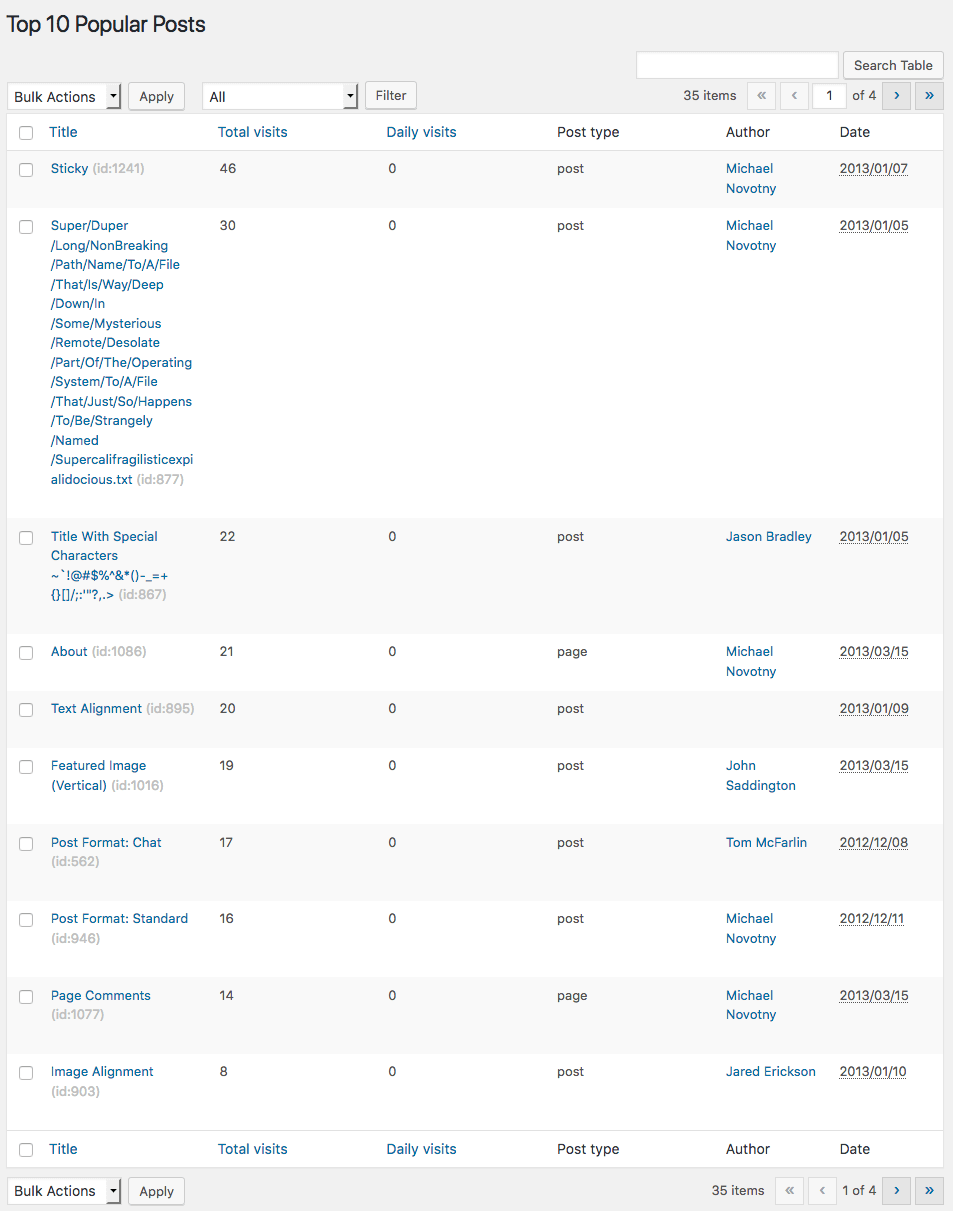
Top 10 – Popular posts overview in the WordPress admin
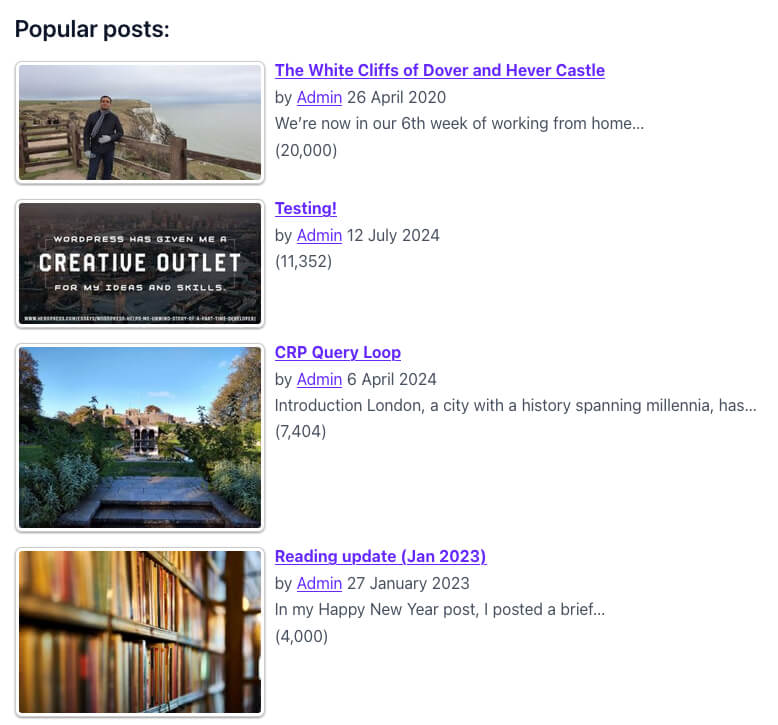
Top 10 – Popular posts list with thumbnails
Faq
Check the Top 10 documentation, then ask in the WordPress.org support forum. Top 10 Pro users with an active license can request support.
Add the Popular Posts block, the Popular Posts widget, or the [tptn_list] shortcode. Developers can call tptn_show_pop_posts() in a theme template. See Top 10 shortcodes for the shortcode options.
Choose where to show the count under Top 10 Settings Counter/Tracker. You can also use the Post Count block or the [tptn_views] shortcode.
Each visit is queued in a lightweight funnel table and added to the count tables every two minutes by a cron job, so tracking never blocks page loads and works correctly behind page caches.
For tracker types and how to change the interval, see Trackers in Top 10.
Yes. Views are recorded by a JavaScript tracker, so cached pages are still counted. Top 10 Pro can also lazy-load popular posts lists so cached pages show fresh lists.
Yes. Go to Top 10 Import/Export and use the WordPress Popular Posts importer. The WordPress Popular Posts tables must still be in your database.
Turn on “Do not track bots” under Top 10 Settings Counter/Tracker to skip known bots.
Yes. Set the Data source under Top 10 Settings Counter/Tracker. See Use Koko Analytics as the data source for Top 10.
Yes. Each site keeps its own counts, and the Network Admin dashboard shows statistics across all sites. Popular posts lists that combine several sites need Top 10 Pro.
No. Top 10 tracks page views and displays popular posts. It is not designed to replace analytics platforms.
Report security bugs through the Patchstack Vulnerability Disclosure Program. The Patchstack team helps validate, triage and handle any security vulnerabilities.
Reviews
Great plugin, perfect support
By  filmoweszlaki on October 14, 2026
I’m using Top 10 plugin on my blog for a long time. For having long term visit statistics, and popular posts. When I started it was simple, fast and light plugin, counter which served its purpose brilliantly. Right now, Ajay is developing a lot of features, which are changing plugin and are giving more and more functionalities. But even more important for me is his attitude, once I had some issues with plugin, he was able to support me very quickly, and resolve issues. That guy not only knows his job, but is is doing it with passion, much appreciated for that wonderful plugin.
Lightweight, flexible, and actively maintained
By  altstack on September 8, 2026
I’ve tried several similar plugins, but I’ve continued to use Top 10 because it is lightweight and easy to manage in day-to-day use. Its public functions and hooks are easy to find and understand, making it flexible enough to adapt to different needs.
The plugin is actively developed, and the support is responsive and helpful.
El mejor contador de visitas
By  Pedro Martínez (margencer0) on March 11, 2026
Top 10 es, según mi experiencia, el mejor contador de visitas que hay en la actualidad para un blog de WordPress
Does the job! Responsive and helpful support team
By  sunnyhova on November 30, 2024
Was using WordPress Popular Posts to see pages getting visits on my website until it stopped working. Had to look for alternatives and found this. Installed it but it still didn’t work. I had to remove it and lo and behold, an email from the developer! Couldn’t believe it because I haven’t seen that before.
To cut a long story short, he helped me to resolve the problem and the plugin works like a charm!
I definitely recommend. 5 stars.
different views count
By  adhitasya on November 19, 2024
large different views count,
- at Top 10 just 5 views, on jetpack 120 views
- at Top 10 7K views, on jetpack 10K views
tell me why?
Not good as Popular post widget
By  Pierre236 (Pierreto) on June 10, 2024
Since the widgets in my Soledad theme (pencidesign) don’t allow you to choose post types (well, they do, but as always, it doesn’t work), I installed the Popular Post plugin.
The plugin works perfectly and looks good, but it says it’s out of date and needs changing.
So I installed this plugin, with lots of useless options and inconsistent settings between the widget and the admin configuration.
But the display is ugly, the photos don’t adapt automatically and perfectly, like Popular Post, and like the old plugins, before the arrival of tablet and mobile, it asks you to set sizes for the photos.
But what size to set?
There’s no option for desktop, tablet or mobile!
Good programmers have images that adapt to the device!
I thought I’d have to buy the pro version for the display to be correct, but after registering on the site, there’s nothing.
So it’s a shame to see WordPress going downhill, evolving in the wrong direction and good plugins disappearing.
Good Replacement for WPP
By  vipo on April 11, 2024
I was forced to replace WordPress Popular Posts (plugin is banned from Kinsta Hosting) and was happy to find Top-10. Does a nice job, but not yet as versatile as WPP. Already has a lot of extension points (hooks), which i’ll further investigate (e.g. showing category names after title/excerpt). Developer seems responsive and very supportive, which is nice!
The Best One
By  idlogs on August 11, 2023
Use this plugin since 2018 for all my sites, easy to install and configure. Just one time issue with my new site, but it’s solved.
Nice plugin, awesome features and plus great support!
Big Thank You!
As improved my page views and time on site
By  ianhparker on September 19, 2022
Good plugin
By  avecesveoviajes on June 10, 2022
Changelog
4.6.0
Release date: 15 October 2026
Release post: https://webberzone.com/announcements/top-10-v4-6/
Added
- Koko Analytics as an optional data source for popular posts, including a mode that switches off Top 10 tracking.
- [Pro] Koko Analytics data in popular posts lists that span network sites.
- WordPress Abilities API support for popular posts and view counts on WordPress 6.9+.
- [Pro] Abilities for editing view counts and clearing the cache.
- [Pro] Advanced Popular Posts block with editable cards and six layout patterns.
- [Pro] Feed vs web tab on the Top 10 dashboard, reporting feed and web views and the posts most read via feed.
- Feed Visits column in count exports, restored on import.
Changed
- Popular posts lists spanning multiple network sites are now Pro only.
- Cached popular posts lists refresh when view counts or posts change, instead of waiting for the cache to expire.
- Daily popular posts queries add up view counts before loading posts, reducing query time on large sites.
Security
- Prevented password-unlocked excerpts from being shared with other visitors through cached popular posts lists.
- Prevented thumbnails from exposing images inside or attached to password-protected posts before the password was entered.
- Hardened thumbnail URLs to reject unsafe protocols.
- Restricted the popular posts REST endpoint to its documented parameters (
limit,post_types,dailyandcontext), preventing unbounded queries and probing of hidden post meta.limitis capped at 100 andpost_typesaccepts only public post types. - Prevented the view count REST endpoint from returning counts for posts the visitor cannot read, such as drafts.
Fixed
- Malformed custom thumbnail dimensions caused PHP errors during image-size selection.
- The popular posts query cache was never reused because its key changed every second.
- With Do not track bots enabled, views were not counted on cached pages that a bot had generated.
- Custom date ranges, such as those on the Top 10 dashboard, were rounded to midnight or the hour instead of using the exact start and end times.
- Every database upgrade re-altered the visits log and funnel table columns.
- The popular posts REST endpoint and
get_tptn_posts()returned no posts, or raised a PHP warning, when called without alimit.
Earlier versions
For the changelog of earlier versions, please refer to the releases page on GitHub.