

WP Taxonomy Manager
Description
WP Taxonomy Manager brings taxonomy setup, term maintenance, and CSV transfers into one WordPress admin workspace. Work with categories, tags, WooCommerce product taxonomies, and custom taxonomies that your account can manage.
Website and documentation
- Live website: wp-taxonomy-manager.com – see the features, screenshots, and latest updates.
- Documentation: Setup and feature guides for every screen, including CSV import and export.
- Pro plans: Compare plans and pricing for the Pro tools listed below.
Free features
- CSV term export – Download term names, slugs, descriptions, parent slugs, and custom links from a selected taxonomy.
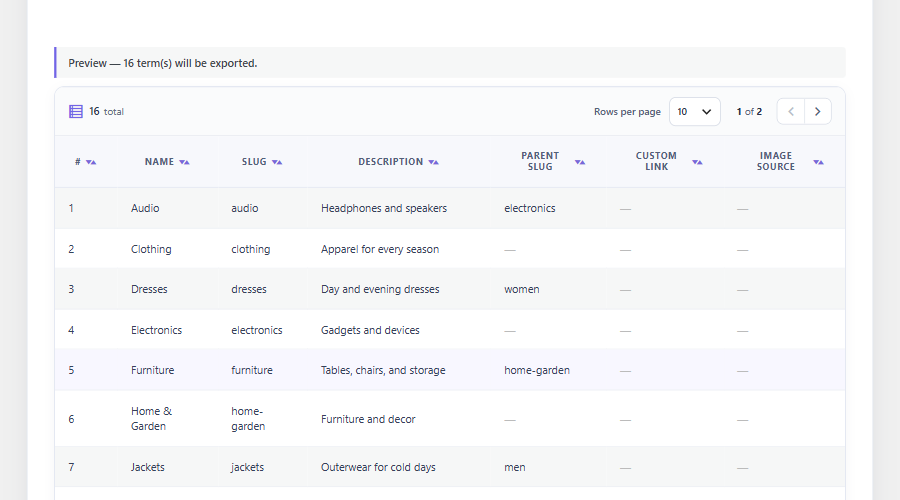
- Export preview – Review the selected terms in the admin before downloading a file.
- Export filters – Narrow exports by empty state, name, parent, or term count.
- CSV term import – Create new terms from CSV and skip existing names or slugs. Parent rows are created before their children wherever they appear in the file, and equal names can be imported under different parents.
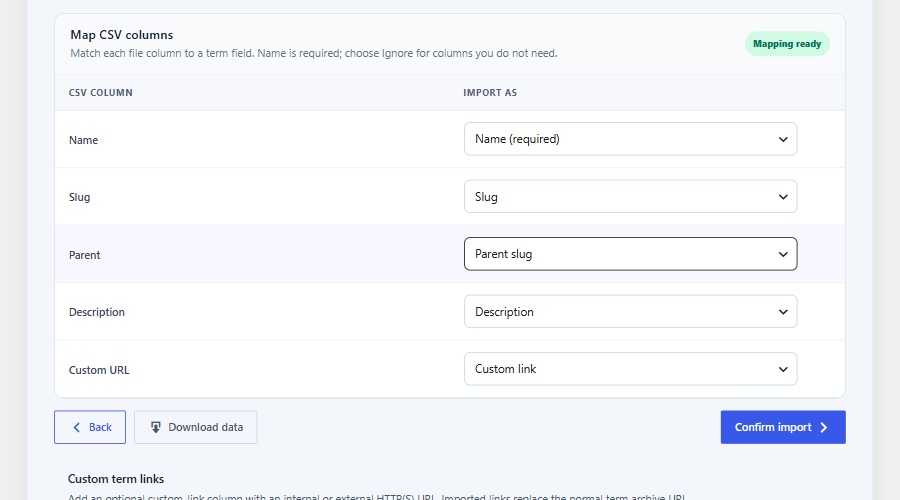
- Spreadsheet-friendly CSV – Comma, semicolon, and tab-separated files are detected automatically, and UTF-16 or Windows-1252 files saved by Excel are converted to UTF-8.
- Term paths – Describe a hierarchy in one column, such as “Clothing > Men > Shirts”; missing parent terms are created.
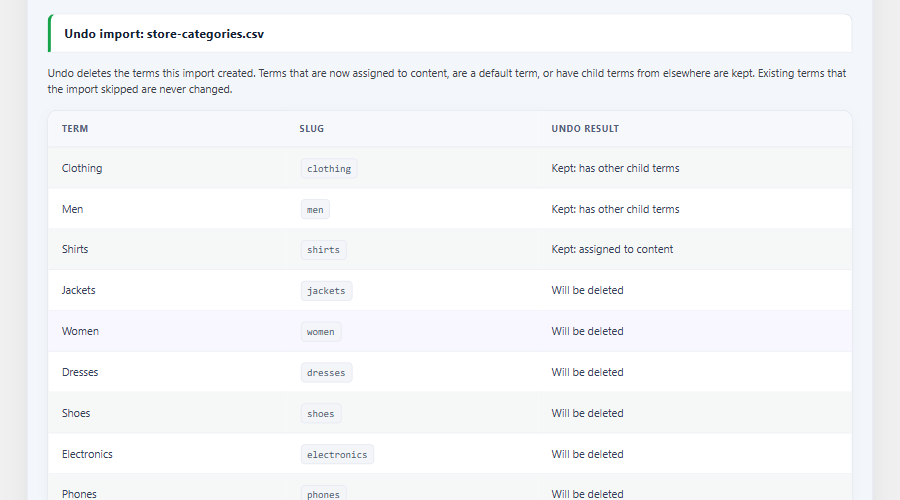
- Import undo – Review the last five CSV imports and undo one. Undo previews every term first and keeps terms that are now in use.
- Visual column mapping – Match source CSV columns to import fields and ignore columns you do not need.
- Custom taxonomy builder – Register hierarchical or non-hierarchical taxonomies and attach them to selected post types without code.
- Term creation – Add terms from the plugin workspace, including an AJAX form for quick creation.
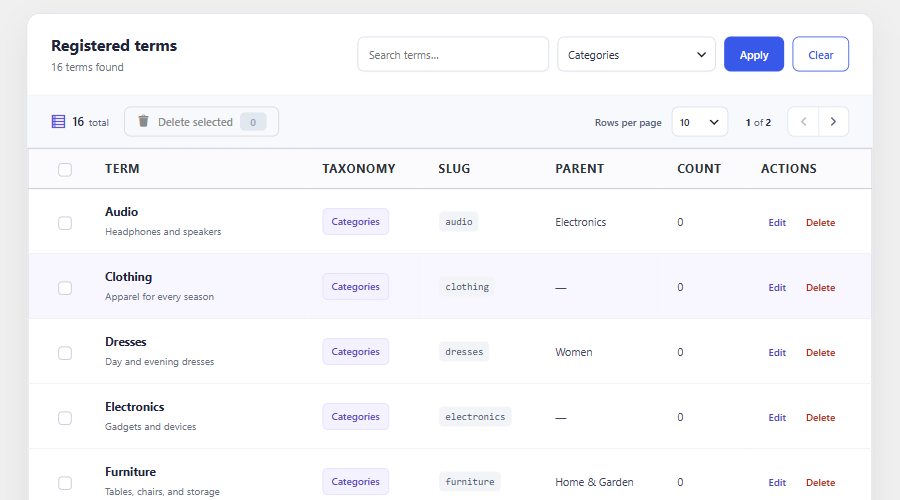
- All Terms workspace – Browse, edit, and delete terms from one admin area, with bulk deletion for selected terms.
- Inline mass editor – Search and page through terms, then update names and slugs in place.
- Custom term links – Point a term to an internal or external HTTP(S) URL through the term form or a CSV column.
- Term redirects – Record same-site archive URL changes and redirect old 404 URLs to the current term URL. Merged terms also redirect to the surviving term; admins can review and remove rules. Requires path-based permalinks.
- Unused term cleanup – Preview terms with no content relationships or children, delete up to 50 selected terms after confirmation, and restore them from cleanup history with new IDs.
- Demo term generator – Create sample terms for development or content planning.
- Keyword auto tagging – Assign existing taxonomy terms to published posts when configured keywords match.
- User CSV transfer – Export users by role, then import new accounts or update existing users’ profile details. Exports include password hashes and should be stored securely.
- Dashboard and settings – View term and activity counts, recent CSV imports, and quick links, and adjust the plugin’s available options.
CSV fields
The Free term CSV needs a ‘name’ or ‘term_path’ field and supports ‘slug’, ‘description’, ‘parent_slug’, and ‘custom_link’. A parent slug can match an existing term or another row in the same file. Import accepts .csv or .txt files with CSV content.
Pro features
Pro features require an eligible license or trial.
- Advanced CSV Import – Preview row-level errors and warnings, check hierarchy, and choose create-only, update-only, or combined imports. Apply prepared rows in bounded background batches, resume paused jobs, and download row-level error reports.
- Import presets – Save per-user column mappings and choose which mapped fields may update existing terms.
- XLSX and JSON transfers – Import and export taxonomy terms in Excel and JSON formats.
- Term images – Add or replace Media Library images on term screens, import images from public URLs, include image URLs in CSV exports, and display images with a shortcode.
- Term ordering – Order siblings within each parent group, browse large groups 100 terms at a time, and save in bounded batches. Optionally apply that order to frontend term queries that use WordPress’s default sort; explicit query sorts are preserved.
- Duplicate term management – Find normalized-name duplicates and read-only similar-spelling or initials suggestions, inspect merge impact, merge with confirmation, and restore from the audit history. Successful merges can also create a redirect from the removed term’s old archive URL.
- Scheduled remote CSV sync – Import a bounded remote CSV on a schedule with optional Basic or Bearer authentication and a recent-run log; requires Action Scheduler.
- Custom term fields – Define text, color, image, select, and URL fields and display saved values with a shortcode.
- Term Meta Transfer – Preview, export, and import registered scalar metadata for existing terms. Supported ACF taxonomy fields require active ACF and the ACF Term Fields add-on.
- Term Maintenance – Preview bulk term-field changes or copy and move terms between compatible taxonomies, with bounded batches and a conflict-aware restore window.
- AI auto tagging – Suggest existing taxonomy terms through any configured WordPress AI Client text provider. Requires WordPress 7.0 or later and a provider API key; WooCommerce is not required.
- WooCommerce term visuals – Show brand logos and global attribute color or image swatches when WooCommerce is active.
Who can use it?
WP Taxonomy Manager is useful for site administrators moving term data between sites, content teams maintaining large term libraries, developers creating taxonomies, and WooCommerce stores organizing product terms.
External services
WP Taxonomy Manager connects to the services below. Nothing is sent until an administrator takes the action described.
WP Taxonomy Manager support (wp-taxonomy-manager.com)
When an administrator sends the Ask a question form, the plugin sends the name, reply email, topic, and question to https://wp-taxonomy-manager.com/wp-json/wtmp-support/v1/message so the team can reply by email. If Include site details stays checked, it also sends the site address, the WordPress, PHP, and plugin versions, the Free or Pro plan, and the site language. Privacy policy.
WP Taxonomy Manager email updates (wp-taxonomy-manager.com and SendFox)
Only after an administrator clicks Yes, subscribe me in the updates notice, the plugin sends that administrator’s email and the site address to https://wp-taxonomy-manager.com/wp-json/wtmp-updates/v1/subscribe, which adds the email to the WP Taxonomy Manager list in SendFox. Privacy policy, SendFox privacy policy.
Freemius (licensing)
License activation, Pro updates, and the optional account connection invitation use the Freemius SDK. Freemius terms, Freemius privacy policy.
AI provider (Pro AI suggestions)
Only when Pro AI suggestions are turned on, up to 6,000 characters from the post and up to 100 existing term names are sent to the text provider configured in the WordPress AI Client on your site. The provider’s own terms and privacy policy apply.
Installation
- Upload the plugin folder to
/wp-content/plugins/or install via Plugins Add New - Activate through the Plugins screen
- Open WP Taxonomy in the left admin menu
Screenshots

Dashboard with term and activity totals, quick actions, and recent CSV imports.
Preview the categories, tags, or custom taxonomy terms before downloading the export.
Map CSV columns to term fields; comma, semicolon, and tab files are detected automatically.
Search and manage terms from the All Terms workspace.
Review an import before undoing it; terms now in use are kept.

Faq
Which taxonomies are supported?
Built-in categories and tags, plus custom taxonomies registered by a theme or plugin, including WooCommerce product taxonomies when WooCommerce is active. Your account must have permission to manage the selected taxonomy.
Can I import terms with parent-child relationships?
Yes. Include a parent_slug column, or a term_path column such as “Clothing > Men > Shirts”. The Free importer creates parent rows before their children wherever they appear in the file; a term_path also creates missing parents. Pro Advanced Import also checks hierarchy during preview.
Can I undo a CSV import?
Yes, for the last five Free CSV imports. Open Data Manager > Import or the Dashboard, choose Review undo, and check the preview. Undo deletes only terms that import created and keeps any term that is now assigned to content, is a default term, or has child terms from elsewhere. Existing terms that the import skipped are never changed.
My spreadsheet saved the CSV with semicolons. Will it import?
Yes. The Free importer detects comma, semicolon, and tab separators from the header row, and converts UTF-16 (“Unicode text”) and Windows-1252 files to UTF-8. Other legacy encodings should be saved as “CSV UTF-8” first.
Does this work with large CSV files?
CSV imports are subject to the upload, memory, and execution limits configured on your WordPress server. Pro Advanced Import enforces its configured file-size and row limits, processes prepared rows in bounded background batches, and can resume paused or stalled jobs within the job lifetime. Resume is best effort if a process stops between a term write and its saved progress.
Can I import and export taxonomy term images?
Yes, with Pro. Add an image_source column containing a public HTTP or HTTPS image URL. Import downloads the image into the WordPress Media Library and generates attachment metadata. Export can include the resulting Media Library source URL. WooCommerce product category thumbnails are supported.
Can a taxonomy term link to a custom page or external website?
Yes. Enter a Custom Link while adding or editing any taxonomy term, or supply a custom_link CSV column. WordPress-generated term links then use that HTTP(S) URL. The feature can be disabled without deleting saved links from WP Taxonomy Manager Settings.
What happens to a term’s old URL after I change its slug or merge it?
With path-based permalinks, the plugin records the old same-site archive path when a term URL changes. Pro merges also record a path from the removed term to the surviving term. The old path receives a 301 redirect only if it would otherwise return a 404. Review or remove saved rules under WP Taxonomy > Term Redirects. Deleting a term without merging it does not create a redirect because there is no chosen destination. Plain query-string permalinks are not supported by this redirect feature.
How do I clean up unused categories or tags?
Open WP Taxonomy > Unused Terms, select a taxonomy, and review the candidates. The scan checks 500 terms per page; you can confirm deletion of up to 50 selected terms at a time. Terms with any content relationship (including drafts), child terms, default-term IDs, or custom links are excluded. Cleanup history can recreate deleted terms with their metadata, but restored terms receive new IDs. A term cannot be restored if its old slug has been taken by another term.
Does the duplicate finder merge similar names automatically?
No. Pro Duplicate Terms shows normalized-name matches plus read-only suggestions for similar spelling or shared initials, such as WordPress and WP. Open the impact preview to review relationships, child terms, and metadata, then explicitly confirm any merge. A successful merge can add a redirect for the removed term’s old archive path when path-based permalinks are in use.
Can I create a custom taxonomy without writing code?
Yes. Use the Register Taxonomy page to create, name, and attach a taxonomy to any post type directly from the admin UI.
How do I ask the team a question?
Click the round Ask a question button at the bottom right of any WP Taxonomy Manager screen, write your question, and send it. The team replies to the email shown in the form. You can also use the contact page.
Reviews
AWESOME PLUGIN!!!!
By  Tony de la Riva (delaRivaBrands805) on June 5, 2026
Works like a dream with one click! I had a custom taxonomy (created with ACF Pro) with about 70 items on one site and needed to copy all of them over to a second site. This plugin literally allowed me to do that in less than 1 minute. Awesome, awesome plugin—best one like it in the WP world right now. Huge thanks to Md.Rakib Hossen for creating it and making it available. I hope this plugin takes off and gets 100k installations!
Exactly What I Needed!
By  Reshad (reshad01) on September 25, 2025
This plugin makes managing taxonomies so much easier. Importing and exporting categories, tags, and even custom taxonomies with a simple CSV saves me a lot of time. The interface is straightforward — no complex setup, just install and start using.
Simple and Effective Plugin for Easy CSV Import and Export
By  johnleo2025 on September 15, 2025
I recently used this plugin, and I have to say—it works perfectly! Importing and exporting CSV files was smooth and hassle-free. Everything worked right away without any extra setup, which saved me a lot of time.
The plugin is simple, easy to use, and does exactly what it promises. I was able to manage my site data quickly and without confusion. Honestly, it’s one of the most useful plugins I’ve tried, and I highly recommend it to anyone who needs a straightforward solution for taxonomy CSV import/export.
Changelog
2.2.0 – 20/10/2026
- Added: CSV import detects comma, semicolon, and tab separators, and converts UTF-16 and Windows-1252 files to UTF-8.
- Added: A term_path (or category_path) column, such as “Clothing > Men > Shirts”, creates missing parent terms.
- Added: Recent CSV imports with a previewed undo that keeps terms now in use, default terms, and terms with other children.
- Added: Search on the Add-ons page.
- Added: An “Ask a question” button on every plugin screen that sends a question to the WP Taxonomy Manager team, with optional site details.
- Improved: The readme lists the external services the plugin connects to and what each receives.
- Improved: Parent rows are created before their children wherever they appear in a CSV, so name-sorted exports keep their hierarchy on re-import.
- Improved: Equal term names can be imported under different parents.
- Improved: Redesigned Dashboard with term totals, grouped quick actions, recent imports, and a responsive layout.
- Improved: Sidebar submenu groups align and size correctly on mobile.
- Improved: Every plugin screen has the same, wider spacing on both sides, on desktop and mobile.
- Fixed: The Data Manager “Choose an action” step no longer overflows its card on tablets and phones.
- Fixed (Pro): Excel and JSON term exports failed with an “export request is invalid” error because the download link was HTML-escaped.
- Fixed: Term names and descriptions containing “&” were exported, previewed, and edited as “&”. Pro Advanced Import now also matches such names to existing terms.
2.1.3 – 12/10/2026
- Improved: Place Data Manager steps 1 and 2 side by side on wide screens, with a compact layout that stacks on smaller screens.
- Improved: Reduce excess spacing in the export panel so choices and actions stay closer together.
2.1.2 – 12/10/2026
- Improved (Pro): Browse and reorder direct siblings within a parent group, with page controls, keyboard-friendly move buttons, and bounded batch saves instead of a 500-term limit.
- Improved (Pro): Frontend custom ordering applies when a term query omits orderby; explicitly requested sorting remains intact.
2.1.1 – 11/10/2026
- Improved: The optional email updates opt-in accepts confirmed 2xx responses and reports server error codes when a subscription fails.
- Improved: Clear notices when the updated updates bridge reports an unsubscribed SendFox contact or an incomplete contact response.
2.1.0 – 09/10/2026
- Added: Term Redirects for changed archive paths and successful Pro merges, with an admin rule list and removal controls.
- Added: Unused Terms preview, bounded cleanup, and restore history with new term IDs.
- Added (Pro): Import mapping presets, selective field updates, background batches, progress, best-effort resume, and downloadable row-level error reports.
- Added (Pro): Term Meta Transfer for registered scalar fields and supported ACF taxonomy fields when the ACF Term Fields add-on is enabled.
- Added (Pro): Term Maintenance for previewed bulk edits and compatible-taxonomy copy or move, with bounded batches and conflict-aware restore.
- Improved: Combined Free keyword and Pro AI Auto Tagging settings in one guided workspace.
- Improved: Admin navigation, settings visibility, term management screens, and dependency-aware add-on controls.
- Improved: Free installs show a Get Pro menu linking to website pricing; Premium installs show license activation until a license is active, then account details.
- Fixed: Freemius account and license screens handle missing plan data without PHP warnings.
2.0.0 – 26/09/2026
- Fixed: Plugin Check translation, output escaping, and release package errors.
- Added: Visual CSV column mapping, inline mass term editing, and export filters for name, parent, term count, and empty terms.
- Added: A searchable All Terms workspace with inline editing and bulk deletion.
- Added (Pro): Drag-and-drop term ordering with optional frontend ordering, duplicate merge and restore, and scheduled remote CSV sync with authentication, retries, and a recent-run log.
- Added (Free): Keyword auto tagging for published posts.
- Added (Pro): Custom term fields, optional AI auto tagging, WooCommerce brand and attribute visuals, and Media Library term image controls.
- Added (Pro): Add-ons controls for Duplicate Terms, Remote CSV Sync, and WooCommerce integration.
- Improved: Advanced Import now offers create-only, update-only, and combined modes; XLSX and JSON transfers are available with Pro.
- Improved: WordPress.org descriptions now explain shipped Free and Pro features separately.
- Fixed: CSV exports protect spreadsheet formula-like values while retaining import round trips.
- Fixed: Taxonomy and user CSV actions now enforce the relevant WordPress capabilities.
0.1
- Initial version
0.2
- Fixed: Text domain issues
- Fixed: short function naming issue.
1.0
- Fixed: Plugin Security issues.
- Fixed: Translate issues.
1.1
- Added: Display of all imported data in a structured table.
- Improved: Implementation of enhanced UI/UX design for a smoother experience.
1.2
- Fixed: Display of all imported data in a structured table not showing.
- Fixed: Not working Implementation of enhanced UI/UX design.
1.3 – 29/03/2026
- Added: Users data export/import feature.
- Improved: Plugin menu include for better experience and management.
1.4 – 26/05/2026
- Added: Register Taxonomy — create and persist custom taxonomies from the admin UI, choosing between Tags (non-hierarchical) or Categories (hierarchical) type and attaching to any post type.
- Added: Create Term — accordion list of all registered taxonomies; expand any row to add a new term with a title and optional description via AJAX (no page reload).
- Added: Export data preview — see all terms in a table before downloading the CSV.
- Added: Unified Import/Export UI with pill-style tab switcher; import and export panels toggle dynamically without a page reload.
- Improved: Full plugin UI reorganisation — consistent page header on every page, card layout with gradient header strip, and bordered/shadowed table containers.
- Improved: Users page redesigned with two side-by-side panels (Export / Import); role selection replaced with checkboxes.
- Improved: CSS rewritten with CSS custom properties for the color scheme; duplicate rules removed and responsive breakpoints consolidated.
- Fixed:
fputcsv()andstr_getcsv()deprecated escape-parameter warning (PHP 8.4) that was prepending error output to exported CSV files and corrupting imports. - Fixed:
ImportLogger::log()was called with the wrong class name (Import_Logger) and as a static method when it was an instance method — both now corrected. - Fixed: Broken singleton
init()method that silently created a second unused instance. - Fixed:
taxocsie_admin_notice_remove()parenthesis grouping — the third screen ID condition was outside theisset()guard, risking a PHP notice on screens without an ID. - Fixed:
TAXOCSIE_VERSIONconstant was mismatched with the plugin header. - Removed: Facebook footer links from all admin pages.
- Removed: Debug
error_log()calls left inautoload.phpandadmin/preview.php.
1.5 – 08/08/2026
- Added: A Demo Generator feature to quickly generate sample taxonomy terms for testing and development.
- Added: Premium dry import preview with CSV validation, create/update/skip/error summaries, hierarchy checks, and row-level diagnostics without changing taxonomy data.
- Added: Pro taxonomy image import/export through the
image_sourceCSV column, including secure Media Library sideloading, attachment generation, export preview, and WooCommerce product category thumbnail compatibility. - Added: Custom taxonomy term links with Add/Edit Term fields, Settings control,
term_linkintegration, andcustom_linkCSV import/export support. - Fixed: Plugin activation no longer triggers a fatal error when a source checkout is missing Composer’s vendor directory; a fallback internal autoloader and administrator notice are used instead.
- Improved: Third-party admin notices are suppressed consistently across every WP Taxonomy Manager page, including Premium and Settings screens.
- Added: Feature settings for dry-run CSV size, preview row limits, and third-party notice visibility.
- Improved: Demo Generator redesigned with a compact responsive form, clearer option groups, and aligned quick actions.
- Fixed: Demo taxonomy statistics now render Type, Terms, and Actions in their correct table columns.