

Survey Form Block
Description
Ask your customers how likely they are to recommend you and how satisfied they are, then see the answer as a number. Survey Form Block builds the survey in the block editor and works out your Net Promoter Score and CSAT from every response, on your own site.
There is no third-party survey service and no account to create. Responses are stored in your WordPress database and are not sent to any outside service; the only copies that leave your site are the response emails you choose to receive.
What you can measure
- Net Promoter Score (NPS): the 0–10 “How likely are you to recommend us?” question. The Summary shows your score, from −100 to +100, and how many people are promoters (9–10), passives (7–8) and detractors (0–6).
- Customer satisfaction (CSAT): a star rating with 3 to 10 stars. The Summary shows the average rating and CSAT, the share of people who chose one of the top two ratings.
- Opinion scales and sliders: a 1–10 opinion scale, or a range slider with your own minimum and maximum, summarised as an average. Sliders also show the lowest and highest answer.
- The reasons behind the score: follow up with a text or paragraph question. The Summary shows the newest answers, and the Survey List keeps all of them.
See the results
- Summary: one card per question, with the NPS, average rating and CSAT, scale averages, a bar for every option of a choice or switch question, and the newest written answers. It is worked out from every stored response.
- Responses: search, sort and page through answers under Survey Forms Survey List, correct a response in place, and delete one or several at a time.
- CSV export: download every response of a survey as a file that opens correctly in Excel. Spreadsheet formulas typed into answers are defused.
- Response emails: by default you get one email when a survey receives its first response. You can switch to an email for every response (at most 30 an hour), choose who receives them, or turn them off.
Ask anything else
Text, paragraph, email (with a format check), number (with minimum, maximum and step), phone, website, date (a native date picker with optional earliest and latest dates), dropdown, radio buttons, checkboxes, on/off switches and section dividers. Any question can be required. Questions can sit side by side in columns (full, two thirds, half, one third, one quarter) and stack on phones.
Start from a template
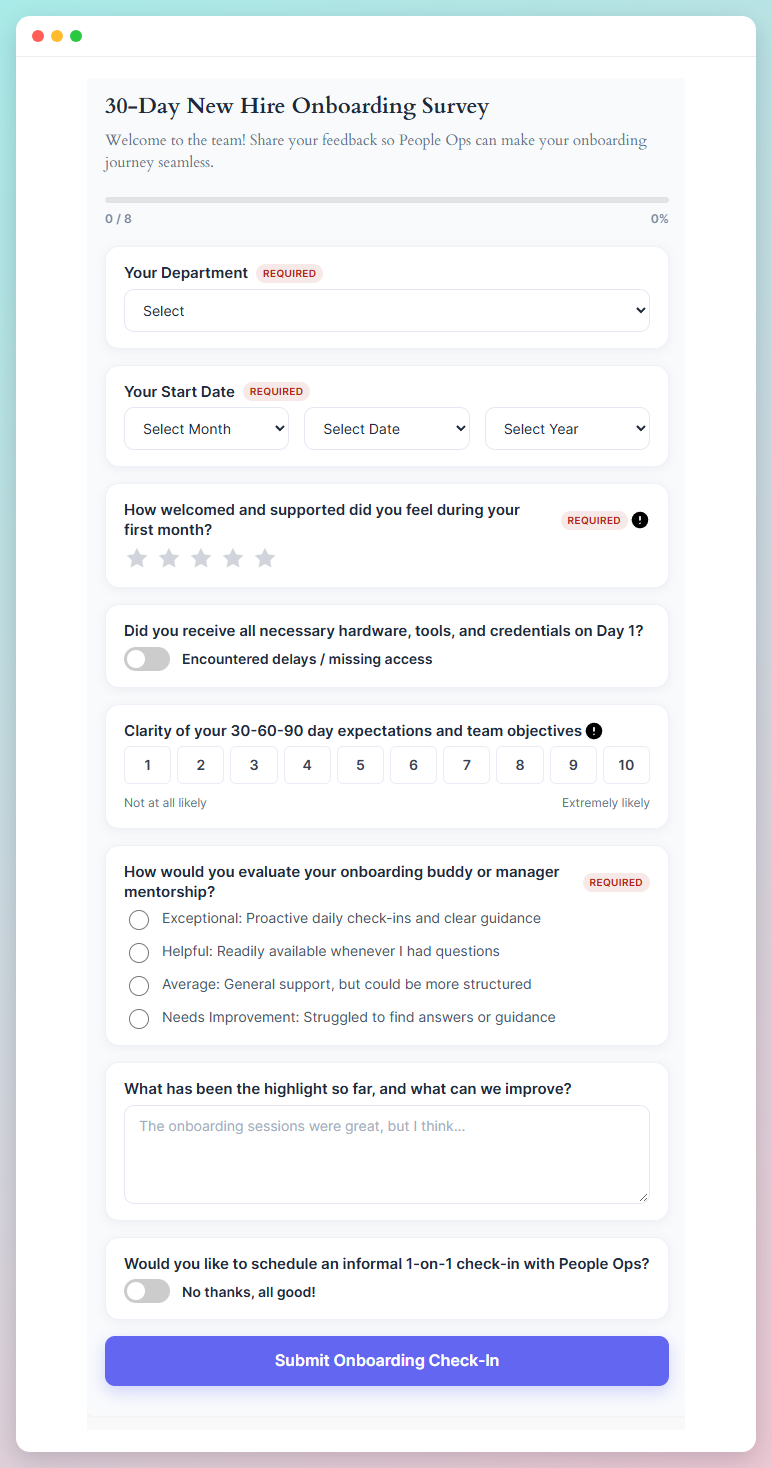
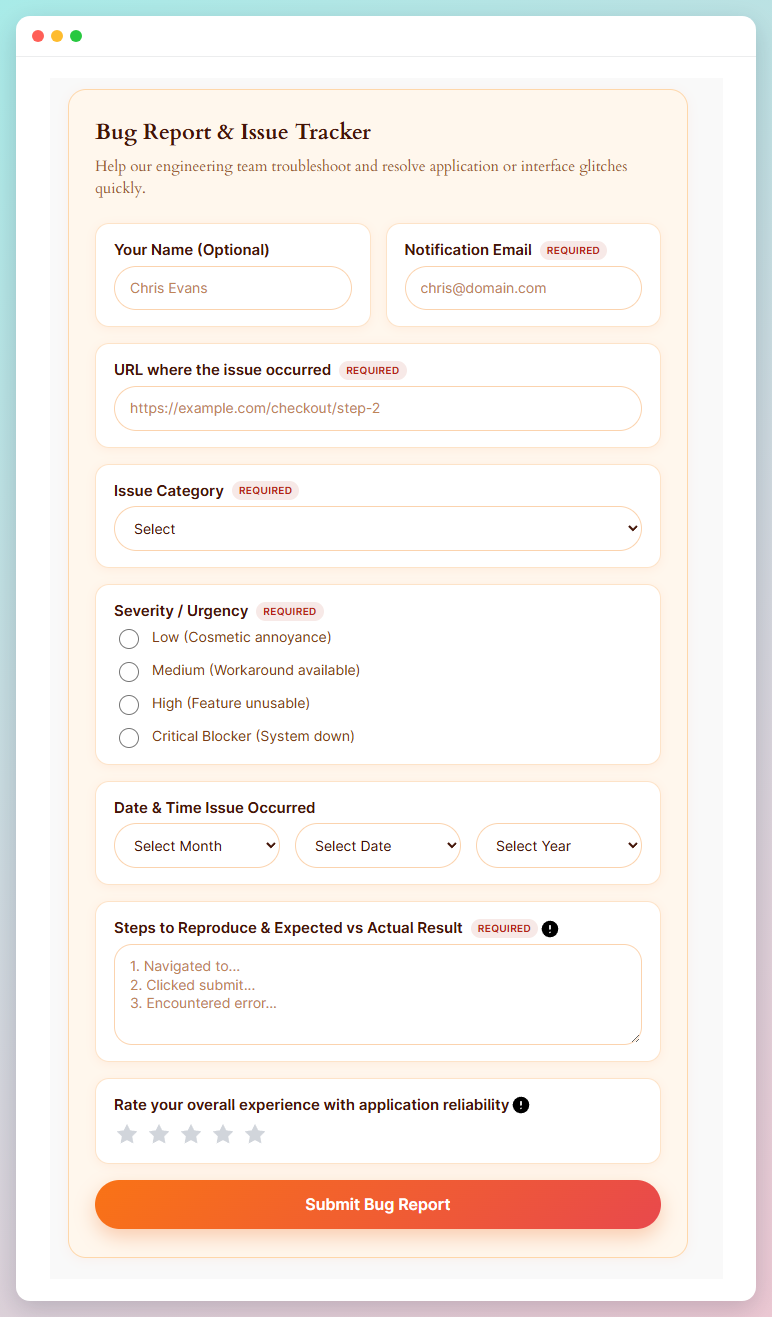
Six ready-made surveys come as block patterns, under Survey Forms in the pattern inserter: Customer Satisfaction & NPS, Product Feedback & Feature Request, Event Registration, Job Application, Website Usability & Bug Report, and Employee Onboarding Check-in. Every survey you insert from a pattern gets its own responses.
Design
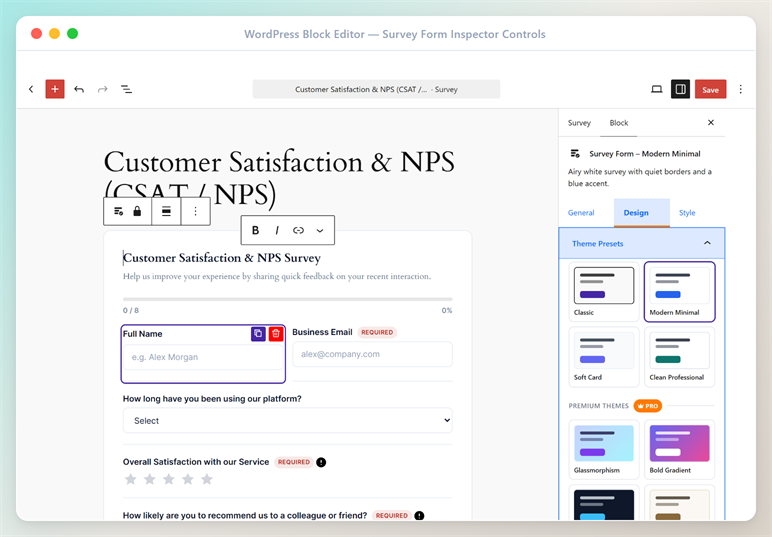
The Design tab groups every visual control in one place, with a live preview in the editor that matches the frontend.
- Theme Presets: One-click survey styling. Free themes: Classic, Modern Minimal, Soft Card and Clean Professional. Applying a theme updates colors, borders and button styling while leaving your questions, wording and typography untouched — and every value stays editable afterwards in the Style tab.
- Survey Layouts: Classic, Card (each question in its own card) and Minimal (roomy spacing with hairline separators).
- Input Styles: Classic and Outlined, with a corner-radius control and a visible focus ring.
- Submit Button: Custom label plus Classic, Filled and Outline styles, with width, alignment, corner radius and a lift hover effect.
- Progress Indicator: An optional linear bar showing how many questions have been answered.
- Motion: A subtle fade-in for questions, automatically disabled for visitors who prefer reduced motion.
- Success State: Icon, headline and inline or card presentation for your thank-you message.
- Labels & Dividers: Required-field marker style, help-icon color, and section divider color, thickness and typography.
- Responsive: Per-device question spacing, a max-width control, and a configurable breakpoint for stacking multi-column questions.
- Block Variations: The inserter offers ready-styled starting points so a new survey looks designed from the first click.
Reusable surveys
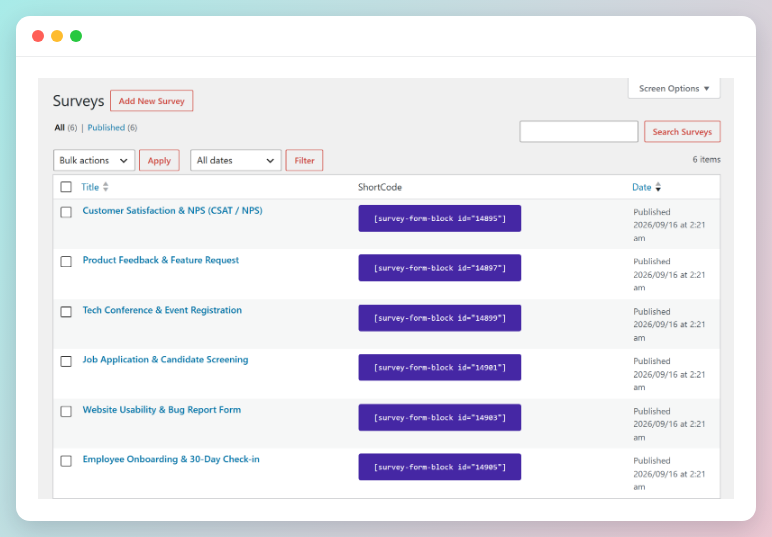
Survey Forms Surveys is for surveys you want in more than one place. Each entry holds a single survey and gets its own shortcode, shown in the ShortCode column — click it to copy, then paste it into any page, post or widget, or call do_shortcode() from a template.
Because every copy points at the same survey, editing it once updates all of them, and every copy writes to the same set of responses.
Dropping the Survey Form Block straight onto a page still works exactly as before — the Surveys screen is an addition, not a replacement.
Pro
Survey Form Block Pro adds an advanced design toolkit. To see plans and prices, open Survey Forms Demo & Help after installing the free plugin and choose Pricing.
- 7 premium themes: Glassmorphism, Bold Gradient, Midnight Dark, Elegant, Neumorphic, Sunset Warm and Ocean Cool
- Floating, Split and Full-Width survey layouts
- Question card designer — background or gradient, border, radius, shadow, padding and hover states
- Filled, Underline, Rounded and Floating Label input styles, plus focus color, field background and placeholder color
- Gradient, Soft and Minimal button styles with lift, scale, glow and slide-fill hovers
- Entrance animations (slide, scale, reveal) with duration and stagger control
- Gradient, Segmented, Circular and Step-Dot progress indicators
- Survey backdrop: gradient, image, readability overlay and glass blur
- Banner and full-replace success states with pop, scale and slide animations
- Question icons and decorative divider styles
Every Pro setting degrades gracefully: if a license is not active, saved Pro values are kept intact and the survey falls back to the closest free equivalent instead of breaking.
How to use
- Install and activate the plugin.
- In the block editor, add the Survey Form Block, or pick a ready-made survey from the Survey Forms patterns.
- Edit the questions in the block and style them from the right-hand sidebar — the General, Design and Style tabs.
- Publish the page. Responses appear under Survey Forms Survey List; choose Summary there for the NPS, CSAT and totals.
- To use the same survey in several places, add it under Survey Forms Surveys instead and paste its shortcode wherever you need it.
- For installation help click on Installation Tab
– Did you like this plugin? Dislike it? Have a feature request? Please share your feedback with us
⭐ Check out the Parent Plugin of this plugin-
🔥 b Blocks – Best gutenberg blocks collections for WordPress.
⭐ Check out our other WordPress Plugins-
🔥 Html5 Audio Player – Best audio player plugin for WordPress.
🔥 Html5 Video Player – Best video player plugin for WordPress.
🔥 PDF Poster – A fully-featured PDF Viewer Plugin for WordPress.
🔥 Document Embedder – Best WordPress Document Embeder Plugin.
🔥 3D Viewer – Display interactive 3D models on the webs.
🔥 Advanced Post Block – Best Post Display Plugin for WordPress.
External services
The plugin does not send your visitors’ answers to any outside service (response emails go out through your site’s own email setup). It does connect to the services below. Your visitors’ browsers contact none of them unless you choose a Google font for a survey.
bPlugins and Freemius: opt-in usage data (free version)
After activation the plugin asks whether you want to share some information with bPlugins. Nothing is sent unless you choose Allow & Continue. If you do, your name and email address, the site’s name and URLs, and the WordPress, PHP and plugin versions are sent to bPlugins (api.bplugins.com) and Freemius (wp.freemius.com), and afterwards the plugin reports when it is activated, deactivated or uninstalled.
bPlugins: privacy policy, terms of service. Freemius: privacy policy, terms.
Demo & Help screen (administrators only)
When you open this screen and its tabs, your browser loads images from WordPress.org (ps.w.org) and bPlugins (templates.bplugins.com), lists other bPlugins plugins from the WordPress.org plugin directory (api.wordpress.org), loads Pro prices from bPlugins (api.bplugins.com), shows live demos from bblockswp.com (run by bPlugins) in a frame, embeds videos from YouTube, and opens Freemius Checkout (checkout.freemius.com) if you choose to buy. Like any web request these carry your IP address and browser details; apart from the product being viewed or bought, no site data is sent.
WordPress.org: privacy policy. bPlugins: privacy policy. YouTube: terms, Google privacy policy. Freemius: privacy policy.
Google Fonts
The Survey List and Demo & Help screens load the Roboto typeface from Google Fonts (fonts.googleapis.com). On your site’s pages, a survey loads a font from Google Fonts only if you pick one in its Typography settings; that request is made by your visitors’ browsers.
Google Fonts: privacy FAQ, Google privacy policy.
Installation
From Gutenberg Editor:
- Go to the WordPress Block/Gutenberg Editor
- Search For Survey Form Block
- Click on the Survey Form Block to add the block
Download & Upload:
- Download the Survey Form Block plugin (.zip file)
- In your admin area, go to the Plugins menu and click on Add New
- Click on Upload Plugin and choose the
survey-form-block.zipfile and click on Install Now - Activate the plugin and Enjoy!
Manually:
- Download and upload the Survey Form Block plugin to the
/wp-content/plugins/directory - Activate the plugin through the Plugins menu in WordPress
Screenshots

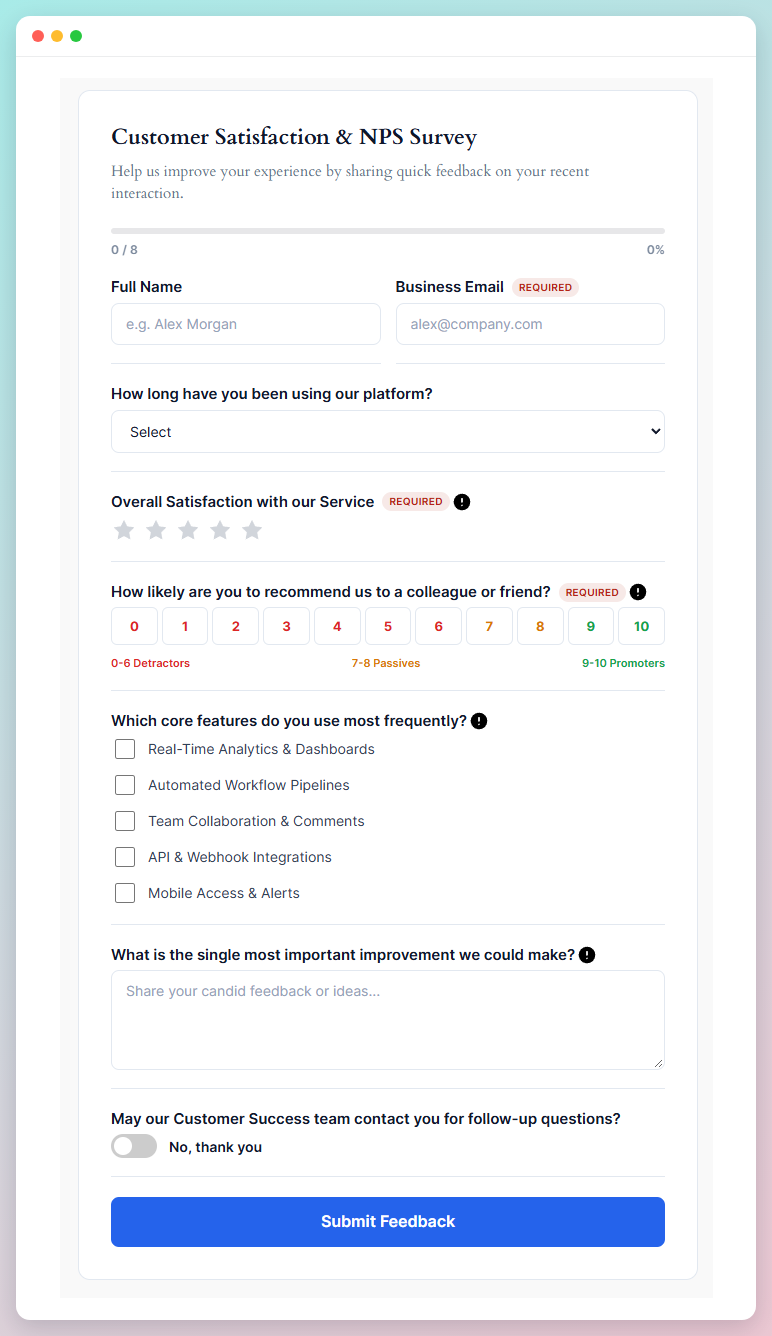
Customer satisfaction survey with a star rating, a 0-10 Net Promoter Score and a completion bar
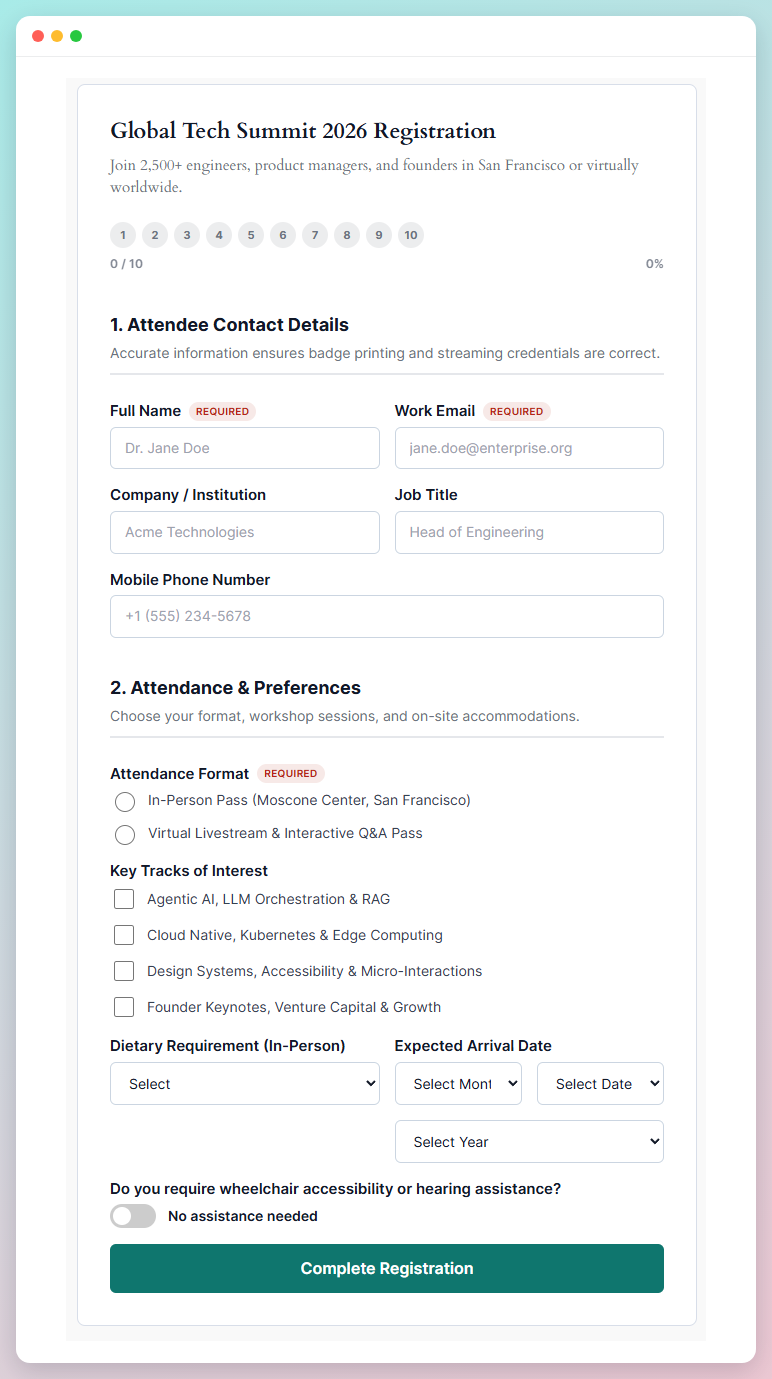
Event registration split into numbered sections, with radio, checkbox, date and switch questions
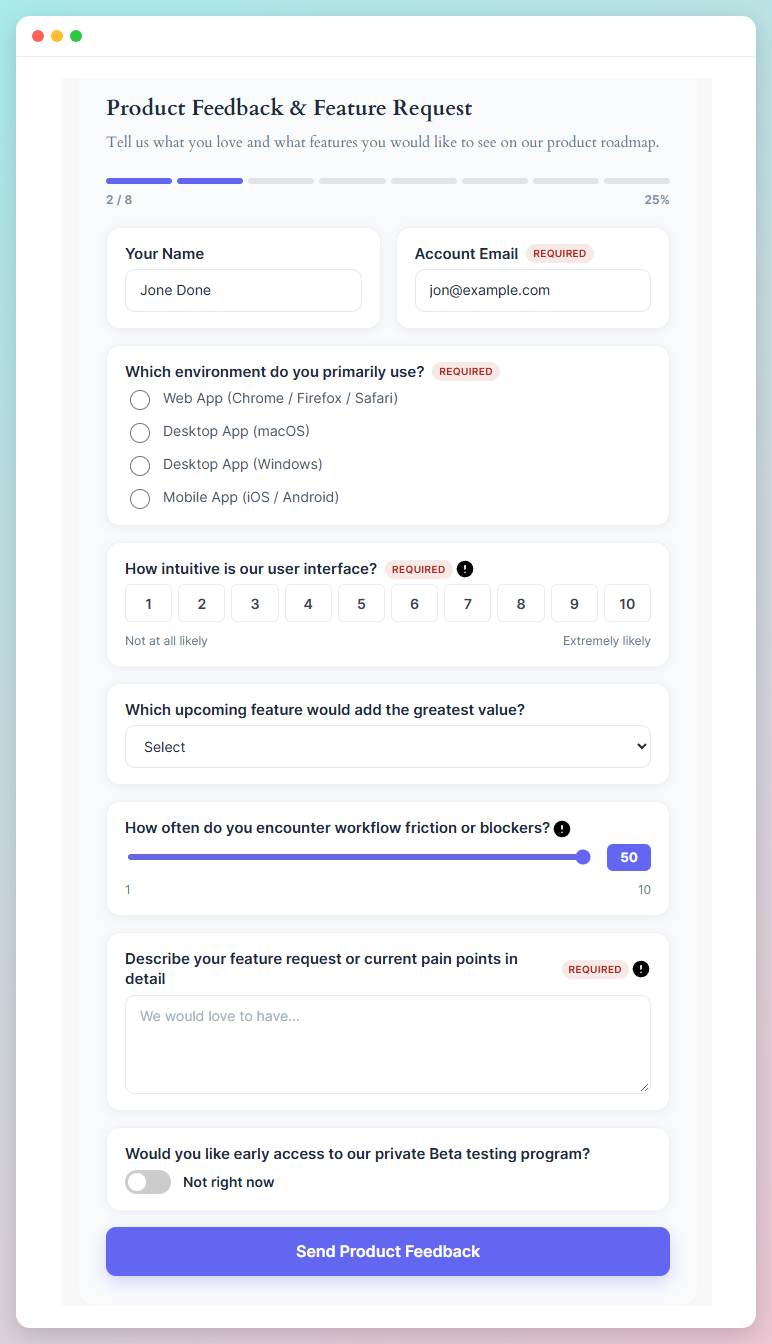
Product feedback form combining an opinion scale, a range slider and multiple choice
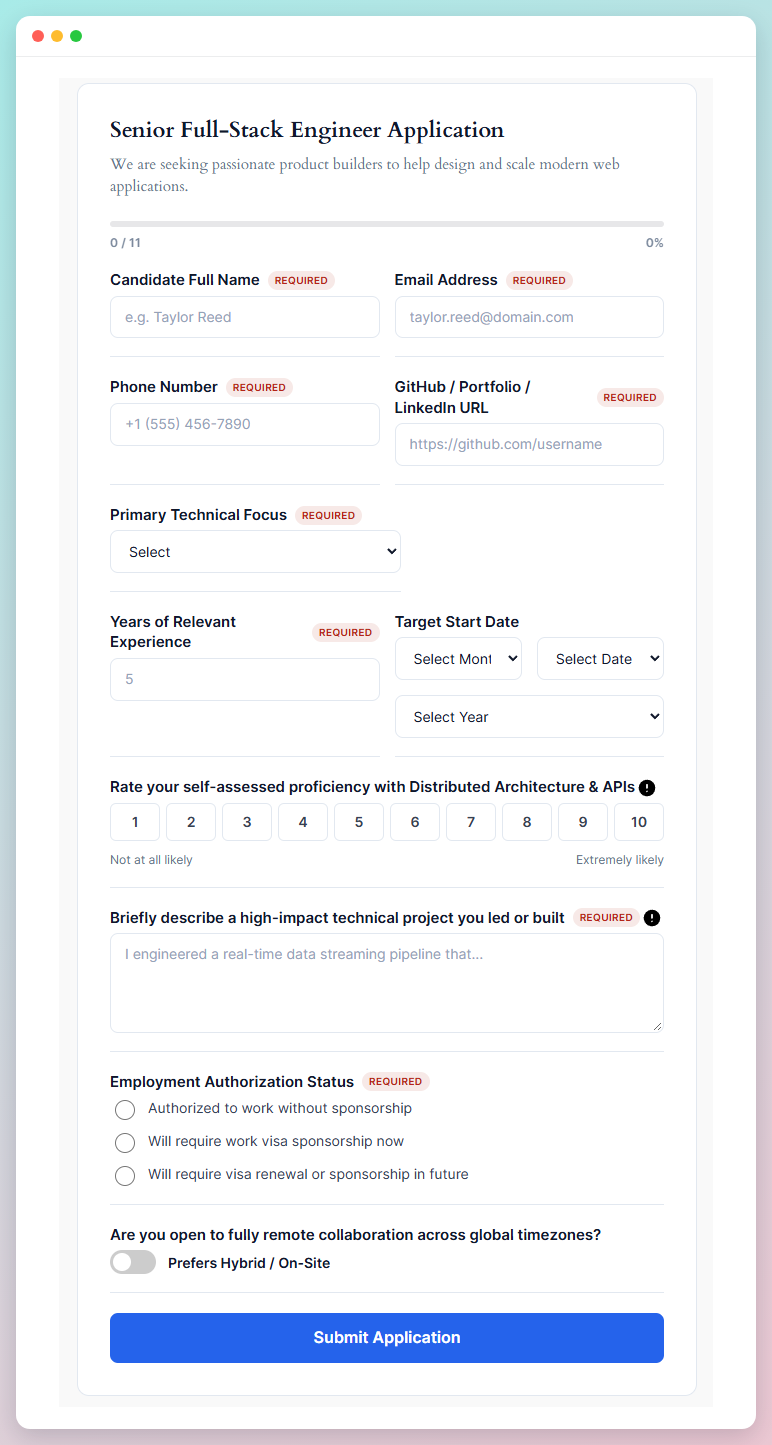
Job application form with file-ready text fields, dropdowns and required-field markers
Employee onboarding check-in built on the Soft Card layout
Website usability and bug report form, styled with the Clean Professional theme
Surveys saved once and reused anywhere: each gets a click-to-copy shortcode
Block inspector controls and settings panel with General, Design, and Style customization tabs
Faq
Is Survey Form Block free?
Yes. The survey block, every question type, the results summary with NPS and CSAT, CSV export and response emails are all free. A Pro version adds advanced themes, layouts, input styles, motion and progress indicators.
How is the Net Promoter Score calculated?
People who answer 9 or 10 are promoters, 7 or 8 passives, and 0 to 6 detractors. NPS is the percentage of promoters minus the percentage of detractors, rounded, so it runs from −100 to +100. Only people who answered the question are counted.
What does CSAT mean here?
The share of people who answered a star rating question with one of the top two ratings — 4 or 5 on a five-star question. The average rating is shown next to it.
Where are responses stored? Is anything sent elsewhere?
In two tables in your WordPress database. Nothing a visitor submits is sent to bPlugins or to any other service; response emails go out through your site’s own email setup. Each response holds the answers, the time, the survey it belongs to, and the respondent’s user ID if they were logged in. IP addresses are not stored with responses; to limit flooding, a hash of the address is kept for one minute. See External services below for what the plugin itself connects to.
Can I export responses?
Yes, free. Under Survey Forms Survey List, pick a survey and choose Export CSV. The file holds every response of that survey.
Will I get an email when someone answers?
By default, one email when a survey receives its first response, sent to the site’s admin email address. On the Survey List screen you can switch to an email for every response (at most 30 an hour), send them to other addresses, or turn them off.
How do you stop spam?
Submissions are limited per IP address: by default 20 a minute from a freshly loaded page and 10 a minute from a cached one. Developers can change this with the svb_submission_rate_limit and svb_submission_rate_window filters. There is no CAPTCHA built in.
Will my existing surveys change after updating?
No. Existing surveys keep the exact styling they were saved with — they load on the Classic theme, which reproduces the previous look. New design options are opt-in.
Can I show the same survey in more than one place?
Yes. Go to Survey Forms Surveys and add one there instead of building it straight onto a page. Each entry holds a single survey and gets its own shortcode, shown in the ShortCode column of the list — click it to copy. Paste [survey-form-block id="123"] into any page, post, widget, or into a theme template with do_shortcode(), and the survey appears there. Every copy writes to the same set of responses, and editing the survey once updates all of them.
Do I have to use the shortcode?
No. Dropping the Survey Form Block straight onto a page works exactly as it always has, and surveys built that way are untouched by this. The Surveys screen is there for when you want one survey in several places.
What happens to my responses if I delete the plugin?
Nothing – they are kept. Deleting the plugin leaves your surveys, responses and tables in place unless you opt in first, under Survey Forms Demo & Help Settings. That switch is off by default and asks you to type DELETE before it turns on.
Does it work with any WordPress theme?
Yes, it will work with any standard WordPress theme.
Can I still fine-tune colors after applying a theme?
Yes. A theme writes its palette into the normal Style controls, so every color, border and padding stays editable afterwards.
Does it work with page caching?
Yes. Submissions are not tied to a nonce that expires, so a visitor landing on a cached page can still respond. Flooding is limited per IP address instead, and the thresholds are filterable.
Where can I get support?
You can post your questions on the support forum here
Reviews
Great Gutenberg Survey Plugin
By  Joynal Abedin (joynalabedin) on July 10, 2026
Changelog
1.2.0 – 8 Novemaber, 2026
- Security (Pro): The bundled Freemius SDK is updated to 2.13.5, which fixes a stored cross-site scripting issue in admin notices;
- Security (Pro): Checking the licence status now requires the manage_options capability, like activating and deactivating already did;
- Fixed: A required NPS question rejected a score of 0, so the most critical answers could not be sent. An emptied checkbox group no longer counts as answered;
- Fixed: Date questions are now a native date picker and store the date as YYYY-MM-DD. The old month, day and year menus could save “undefined March, undefined”, made the whole survey disappear when the month was cleared, listed August twice, and stopped at 2023 by default. Questions still set to that old 1990-2023 default now accept any date;
- Fixed: The range slider starts at its “Starting value” setting and records an answer only once the visitor moves or taps it. It used to start in the middle and show a number that was never submitted;
- Fixed: Visitor-facing text – the required-field message, NPS and opinion-scale labels and error messages – can now be translated;
- Fixed: Surveys now appear even when a performance plugin delays scripts until after the page has loaded;
- Fixed: A survey shown twice on one page no longer shares input ids and radio groups between the two copies;
- Changed: New questions start as “Untitled question” with an “Option 1” choice and no placeholder, instead of sample names;
- Fixed: Every survey built from the same block pattern shared one set of responses, because each pattern carried a fixed survey id. Patterns now get a fresh id each time they are inserted. Surveys you already built from a pattern keep their id and responses;
- Fixed: Duplicating a survey block, or pasting a copy into the same post, now gives the copy its own id, so it collects its own responses. Ids already saved in a post are never changed;
- Fixed: Opening a post that holds a survey no longer marks it as having unsaved changes;
- Fixed: The survey block no longer crashes on the Widgets screen;
- Changed: The free plugin no longer contains the Pro design presets. Pro themes, layouts, input and button styles, motion, progress styles, success presentations, the question card designer, the backdrop and question icons now ship only in Survey Form Block Pro. Nothing changes on screen: on a site without Pro, saved Pro choices still fall back to their closest free equivalent;
- Changed: The demos notice now appears only on the plugin’s own screens and only to administrators, and stays dismissed once closed. It no longer appears on the main Dashboard;
- New: Response emails. By default you get one email when a survey receives its first response. On the Survey List screen you can switch to an email for every response (at most 30 an hour), turn emails off, and choose who receives them;
- New: Developers can use the svb_after_submission action, which fires after each stored response with its id, survey id, answers and survey name;
- New: Export a survey’s responses to CSV from Survey Forms Survey List, free. The file holds every response of that survey, not only the ones loaded on screen, opens correctly in Excel, keeps answers to questions you have since deleted, and defuses spreadsheet formulas typed into answers;
- New: A Summary view on the Survey List screen, free. It shows the survey’s Net Promoter Score with its promoter, passive and detractor split, the average star rating and CSAT (the share of the top two ratings), averages for scales and sliders, a count per option for choices and switches, and the newest written answers. It is worked out from every stored response;
- New: The plugin now records each survey’s questions and the post that holds it whenever that post is saved, so reports know each question’s type. Surveys saved before this update are read from their post the first time their summary is opened;
- Security: Changing a survey’s column labels now requires permission to edit the post that holds the survey. Until now any user who could write posts, such as a Contributor, could rename the columns of any survey on the site;
- New: A one-time request to review the plugin on WordPress.org, shown to administrators on the plugin’s own screens once the site has collected 10 responses. Closing it or following it removes it for good;
- Changed: This page now lists the external services the plugin connects to and where its source code lives. The plugin’s homepage link pointed at a page that does not exist and now points here;
1.1.1 – 29 September, 2026
- Fixed: The opt-in screen was blank on free installs. That screen is drawn by a script shipped with the licensing SDK, and the script was missing from the plugin because the build folder was being excluded at every depth rather than only at the plugin root;
- New: A survey’s shortcode can now be copied from the editor. Open a survey under Survey Forms Surveys and it sits above the form, one click to copy, so you no longer have to go back to the list to fetch it;
- Improved: The ShortCode column on the Surveys screen now confirms the copy instead of only offering it, and copies through the clipboard API where the site allows it;
- Fixed: The ShortCode column’s tooltip could sit on top of the button it belongs to, and on a neighbouring row’s button. Another bPlugins plugin styles the same class name, so whichever stylesheet loaded last was deciding the position;
- Changed: Live demos now open from Demo & Help Demos rather than a separate menu item. They are hosted online, so nothing has to be created on your own site to view them;
- Improved: The Survey Responses screen now follows the Demo & Help dashboard – same typeface, palette and card treatment, so the two screens read as one product;
1.1.0 – 27 September, 2026
- New: Design tab in the block inspector, grouping Theme, Layout, Question Card, Input Style, Button, Progress, Effects, Backdrop, Success State and Labels & Dividers;
- New: 11 survey themes — Classic, Modern Minimal, Soft Card and Clean Professional are free; Glassmorphism, Bold Gradient, Midnight Dark, Elegant, Neumorphic, Sunset Warm and Ocean Cool are Pro;
- New: Six survey layouts — Classic, Card and Minimal (free) plus Floating, Split and Full Width (Pro);
- New: Six input styles — Classic and Outlined (free) plus Filled, Underline, Rounded and Floating Label (Pro);
- New: Button design system with Classic, Filled and Outline (free) plus Gradient, Soft and Minimal (Pro), including custom label, width, alignment, radius and hover effects;
- New: Completion progress indicator — Linear (free) plus Gradient, Segmented, Circular and Step Dots (Pro);
- New: Entrance animations with stagger control, automatically disabled for visitors who prefer reduced motion;
- New: Redesigned success state with icons, headline, and inline / card / banner / replace presentations;
- New: Question icons, section divider styles and required-field marker options;
- New: Survey backdrop with gradient, image, readability overlay and glass blur (Pro);
- New: Block variations so the inserter offers ready-styled surveys;
- New: Responsive question spacing, max-width and a configurable column-stacking breakpoint;
- New: Demo & Help dashboard with licence activation;
- Security: The endpoint that records a form’s field labels now requires the edit_posts capability. It previously checked only a nonce, so any logged-in user could overwrite the field labels of any form on the site;
- Security: Submission payloads are now sanitised value by value instead of as one blob, and the submitter-supplied creator id is cast to an integer;
- Fixed: Multi-line answers no longer lose their line breaks, and answers containing quotation marks are no longer discarded on save;
- Fixed: A failed submission now shows an error instead of a thank-you message. Previously the response was ignored, so a rejected request looked like a success while the answer was lost;
- Fixed: Responses submitted from a cached page are no longer rejected. The public endpoint required a nonce that expires after 24 hours, so on sites with page caching real responses were being turned away; submissions are now protected by per-address rate limiting, which caching cannot invalidate;
- New: Submission throttling with the svb_submission_rate_limit, svb_submission_rate_window and svb_client_ip filters for sites behind a reverse proxy;
- Fixed: Switch / Toggle answers are stored as readable words instead of true and false, and each switch can now carry its own on and off wording (Yes/No, Agreed/Declined, and so on). Responses recorded earlier still display correctly;
- New: Responses can be edited and deleted from the Survey Responses screen, individually or several at once;
- New: Deleting a response now asks for confirmation in a styled dialog rather than a browser alert, with keyboard support and focus starting on Cancel;
- Fixed: After installing the plugin, Allow & Continue and Skip on the opt-in screen now both land on Demo & Help, on the free plan and the paid one alike. Two things were wrong: the licensing SDK was initialised from a file inside includes/, so it identified the plugin by that subdirectory and built every admin URL from it, and it was configured with a plain page menu while the plugin registers a post type menu;
- Changed: Survey Forms is now a single menu holding Surveys, Survey List, Demo & Help and Account. Existing screen URLs are unchanged;
- New: Uninstall cleanup. Deleting the plugin can now remove its surveys, responses, tables and settings – but only if you switch it on first under Survey Forms Demo & Help Settings. It is off by default, so deleting the plugin keeps your data unless you ask otherwise;
- New: The required-field marker is now configurable: choose an asterisk, a badge or nothing, set the badge wording, and pick its colour, under Design Labels & Dividers. The badge previously read a hard-coded, untranslatable “Required”;
- New: Star Rating, Range Slider and Number questions can now be configured from the inspector – number of stars, and minimum, maximum, step and starting value. These were read by the form but had no control, so they could only be set by editing the block markup by hand;
- New: Surveys can now be saved in one place and reused – add one under Survey Forms Surveys, copy its shortcode from the ShortCode column, and paste
[survey-form-block id="123"]into any page, post, widget or template. Surveys placed directly on a page are unaffected and keep working as before; - New: A Refresh button on the Survey Responses screen pulls in responses that arrived after the page was opened, without losing the survey, search or sorting you were looking at;
- Improved: The Survey Responses screen has been redesigned – one rounded card instead of stacked strips, a heading that lines up with the table, icons on the row actions, dates split into day and time, a placeholder for unanswered questions, and clearer sorting and selection states;
- Fixed: The survey and per-page pickers had lost their dropdown arrow, so they looked like plain text fields;
- Improved: Field settings in the block inspector now use consistent labels and spacing, with Disable and Required grouped together;
- Fixed: A survey saved before a styling option existed no longer renders as a blank space;
- Fixed: An empty form id is no longer accepted, and uninstalling now removes the plugin tables correctly;
- Improved: The submissions screen was rebuilt without DataTables, jQuery and the Tailwind browser compiler – 485 KB of third-party assets replaced by 10 KB – and gained search, sorting, paging and a submitted-on column;
- Improved: Added database indexes on form id; both tables were scanned in full on every lookup, and on every post save;
- Improved: Plugin code is no longer loaded on front-end requests that do not need it, and the schema check no longer runs on every page load;
- Fixed: Radio groups now get a unique name — two radio questions, or two surveys on one page, no longer share a selection;
- Fixed: Number, phone, URL and date fields now inherit the same styling as text fields instead of raw browser chrome;
- Fixed: Inputs now have a visible focus ring; the previous rule removed the outline without replacing it;
- Fixed: Help tooltips no longer push a horizontal scrollbar onto narrow screens;
- Fixed: Multi-column rows now pack from the start with a real gutter instead of spreading to the edges, and fields in a row align to the top;
- Fixed: The toggle switch and star-rating badge no longer stack below their control;
- Fixed: “Add New Field” no longer submits the form in the editor;
- Fixed: Duplicate React keys in radio and dropdown option lists;
- Improved: Star rating redrawn as a crisp SVG with hover preview and keyboard focus states;
- Improved: Unanswered required fields are highlighted individually after a failed submit;
1.0.2 – 8 April, 2026
- Security: Logged-in users without admin rights could download all survey responses (CVE-2026-5626). Reading responses now requires the manage_options capability. Update if you run 1.0.1 or earlier;
1.0.1 – 25 April, 2025
- Compatible with WordPress 6.8;
1.0.0 – 13 Jan, 2025
- Initial Release