

Spotlight Social Photo Feed
Description
Instagram Feed Plugin for WordPress
Spotlight embeds your Instagram feed anywhere on your WordPress site. Pick a layout, connect your Instagram account, and customize the design in a live preview, and your site will update itself every time you post to Instagram.
It’s used on 60,000+ websites and holds a 4.7-star rating from more than 170 reviews.
See All Template Designs | Get Spotlight Instagram Feeds PRO | Take the Interactive Tour
New: The unique Polaroid Sticker and Thumbnail Gallery templates are now available in Spotlight Essentials. See them on the demo page.
Free Features
The free version gives you everything you need to run a good-looking Instagram feed, and every feed picks up your theme’s fonts so it fits in with the rest of your site.
- Connect unlimited Instagram accounts and create unlimited Instagram feeds
- Combine posts from several Instagram accounts in a single feed
- Show photos, videos, reels, and carousel (gallery) posts in your feed
- Start from a pre-designed template or build your own design
- 20+ design options, including columns, number of posts and image ratio
- Customize each feed per device for desktop, tablet and phone
- Order posts by date, popularity or at random
- A popup lightbox that shows photos at full size without sending visitors to Instagram
- A feed header with your profile photo and bio
- “Follow” and “Load more” buttons you can restyle and translate
- Embed singular Instagram posts with Instagram oEmbed support
- Add Instagram feeds using a block, shortcode, or widget
Agencies and freelancers: send clients the Spotlight Access Token Generator so they can give you access to their Instagram account without sharing their Instagram password.
Who Uses Spotlight
Spotlight works best for businesses whose Instagram already does a lot of the selling, and where a fresh feed on the website helps visitors decide to book, visit or buy.
Hotels, tours and holiday rentals: Show recent guest photos and destination shots on your booking pages, so people see what the experience actually looks like before they commit.
Restaurants, cafés and bars: Put today’s specials, new menu items, and events on your homepage without logging in to WordPress every time something changes.
Online shops: Link Instagram posts to the products in them and turn your feed into a shoppable gallery with Spotlight PRO and WooCommerce.
Photographers, artists and creatives: Use your Instagram as a portfolio that keeps itself up to date, with a lightbox that shows your work at full size.
Venues and event organizers: Use a hashtag feed with Spotlight PRO to pull in what attendees are posting, then hand-pick the posts you want to show.
Agencies: Connect as many client accounts as you need, create a separate feed for each site and manage everything from one screen.
Why Spotlight
Your site stays up to date on its own. Post to Instagram as you normally would and Spotlight adds the new posts to your website automatically.
It looks like part of your site. Feeds inherit your theme’s fonts, and you can adjust spacing, colors and layouts until the feed matches your design. If you know CSS, you can add your own styles to each feed.
It’s built with performance in mind. Spotlight downloads optimized thumbnails to your own server, caches your feeds and works alongside WP Rocket and LiteSpeed Cache. If Instagram has an outage, your feed keeps showing the last posts it imported.
It’s good for SEO. Feeds are part of your page HTML rather than sitting in an iframe, so search engines can crawl them, and every image gets alt text based on its Instagram caption.
It’s accessible. Visitors can navigate feeds, the lightbox, and the buttons with a keyboard, and screen readers get clear labels and alt text.
Works With Your Favorite Tools
Spotlight fits into the tools you already use.
- Block editor: add the Spotlight Instagram Feed block to any post, page or template
- Classic themes: use the Spotlight widget in any widget area
- Elementor: a dedicated Spotlight widget in Essentials and above
- Divi, Beaver Builder and other page builders: drop in the shortcode anywhere they accept one
- WooCommerce: link Instagram posts to your products with Spotlight PRO
- WP Rocket and LiteSpeed Cache: Spotlight works alongside both to keep your pages fast
Spotlight PRO
Spotlight PRO is our most popular premium plan, and it’s the one to look at if you want your feed to do more than display your own posts.
- Everything in Essentials, including every premium template, customization option, and Instagram stories.
- Hashtag feeds: Display public posts from across Instagram that use a hashtag, which is ideal for campaigns, events and user-generated content.
- Tagged posts: Show the posts your customers have tagged you in.
- Shoppable feeds: Link posts to WooCommerce products, pages or any URL.
- Link in bio pages: Send your Instagram traffic to a page on your own site rather than a third-party link tool.
- Moderation and filtering: Hand-pick the posts to show or hide, or filter them by caption keywords and hashtags.
The Essentials plan unlocks every layout and design option, including premium templates such as the new Polaroid Sticker, which frames each post like a polaroid photo stuck to a wall, and the Thumbnail Gallery, which shows one large featured post with a row of thumbnails to browse the rest. You can try both on the demo page. Essentials also plays videos and reels in the lightbox, and adds Instagram stories and a dedicated Elementor widget. The Agency plan adds Instagram and feed analytics, media management, and licenses for up to 20 sites.
All plans come with email support and a 30-day money-back guarantee. Compare the plans or try the premium demos.
What Users Say
Great extension, highly recommended
“Not only is the plugin extremely easy to use with its sleek interface, but it’s also worth noting that the free version is generous compared to other extensions. […]” – @fairycookies
My new go-to for Instagram feeds
“The key feature for me was the image lightbox popup, so your site visitor remains on the page and doesn’t jump over to Instagram to get distracted. I’m pleased to report that this feature works perfectly in the free version. […]” – @photomaldives
A plugin that just works, plain and simple
“[…] this is a plugin I’ve been using for years to display Instagram photos on different WordPress websites. And the few times I’ve had an issue (usually on the Instagram API side), the support team has always responded quickly and kindly.” – @olimate
As Featured In
- Kinsta: WordPress Instagram Plugins for Displaying Interactive Feeds
- HubSpot: The Top Instagram Plugins for WordPress
- Elegant Themes: Best WordPress Instagram Plugins
- aThemes: Best WordPress Instagram Plugins
- WPExplorer: How to Add Instagram Photos to WordPress
- Elementor: Best Instagram Plugins for WordPress
- WP Mayor: How to Import Instagram Photos to WordPress
Support
We support both the free and premium versions of Spotlight.
Disclaimer
Spotlight Social Photo Feed is a RebelCode product that uses the official Instagram(tm) API. It is not affiliated with or endorsed by Instagram, Facebook, or Meta.
Installation
From your WordPress dashboard
- Go to Plugins > Add Plugin.
- Search for “Spotlight Social Photo Feed”.
- Click “Install Now”, then “Activate”.
- Go to the “Instagram Feeds” menu item to create your first feed.
By uploading the zip file
- Click the “Download” button on this page.
- Go to Plugins > Add Plugin > Upload Plugin and upload the zip file.
- Activate the plugin.
- Go to the “Instagram Feeds” menu item to create your first feed.
Step 1: Choose a layout
Every new feed starts with a choice of layout. Pick the one closest to what you want, since you can change every detail later. You can also import a feed you’ve exported from another site at this step.
Step 2: Connect your Instagram account
If you haven’t connected an account yet, Spotlight walks you through it next. You’ll need an Instagram Business or Creator account, which is free to switch to in the Instagram app. You can connect as many accounts as you like and manage them from the Accounts settings page. See the guide to connecting accounts for more detail.
Step 3: Customize your feed
Adjust the design in the live preview and switch between desktop, tablet and phone to fine-tune each one.
Step 4: Embed your feed
Add your feed anywhere on your site using one of these methods:
Screenshots

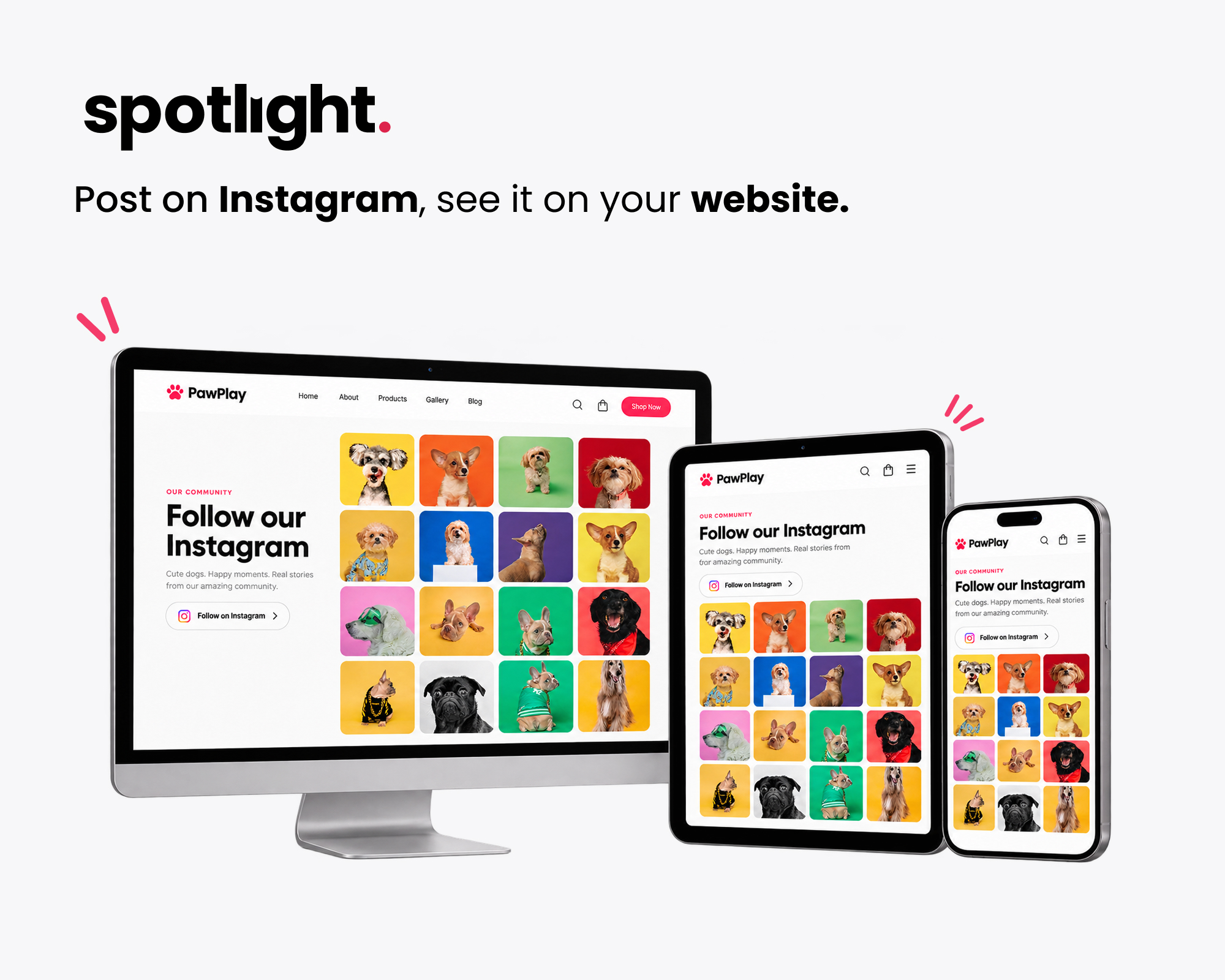
Display your Instagram feed on your WordPress website, updated automatically every time you post.
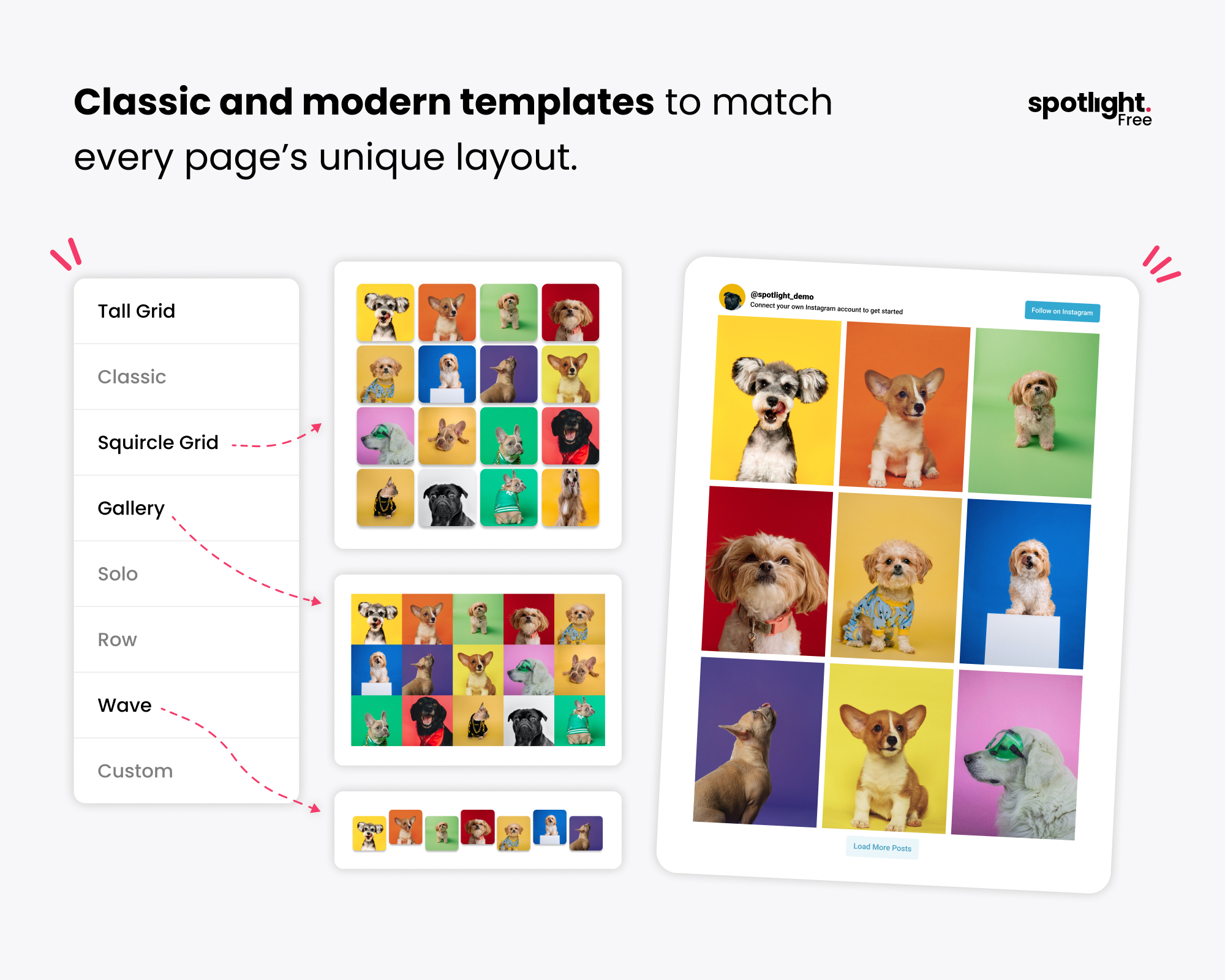
Choose from free Instagram feed templates like Tall Grid, Squircle Grid, Gallery and Wave, or design your own.
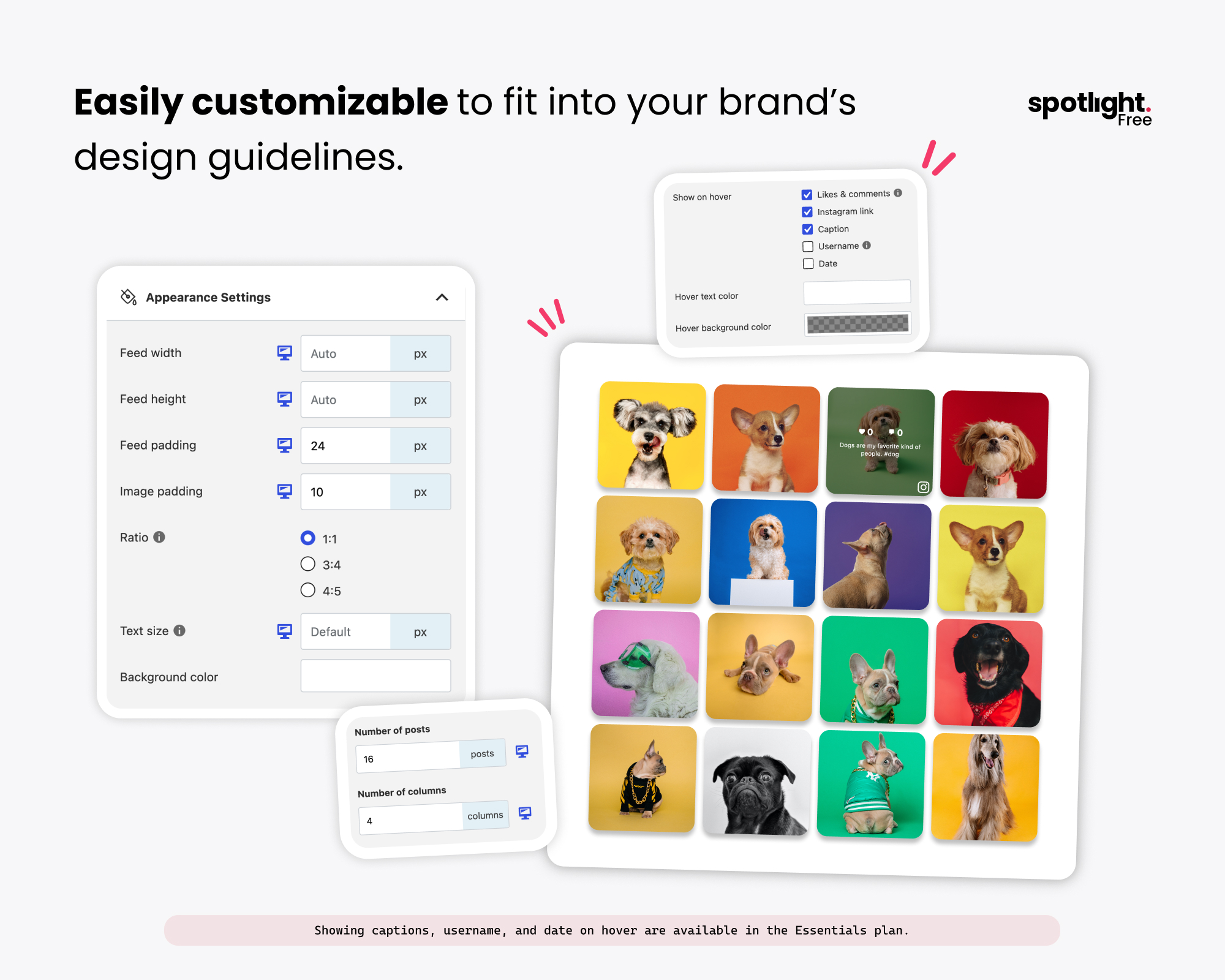
Customize your Instagram gallery’s columns, spacing, image ratio and hover details to match your brand.
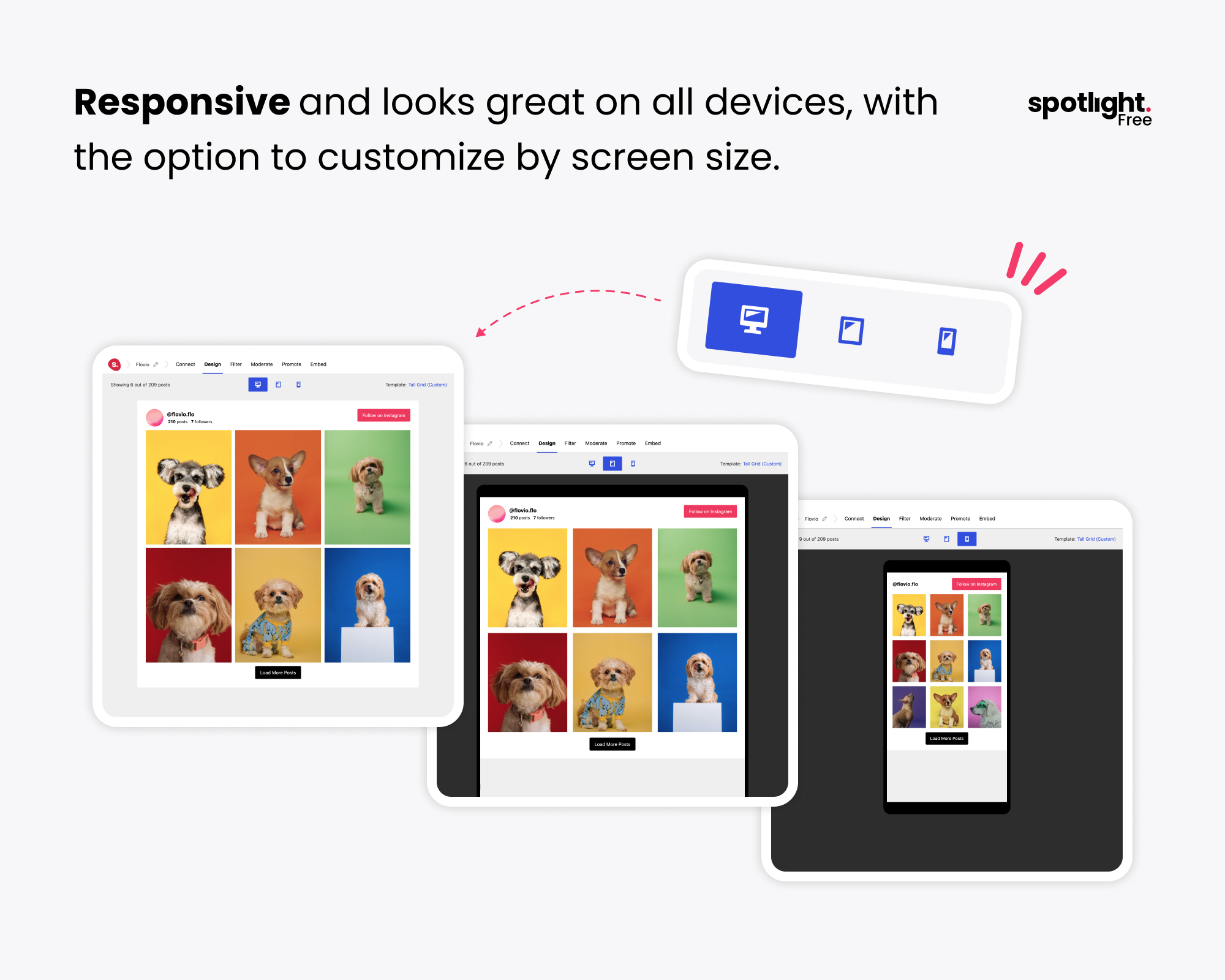
Responsive Instagram feeds that look great on desktop, tablet and mobile, with separate settings for each screen size.
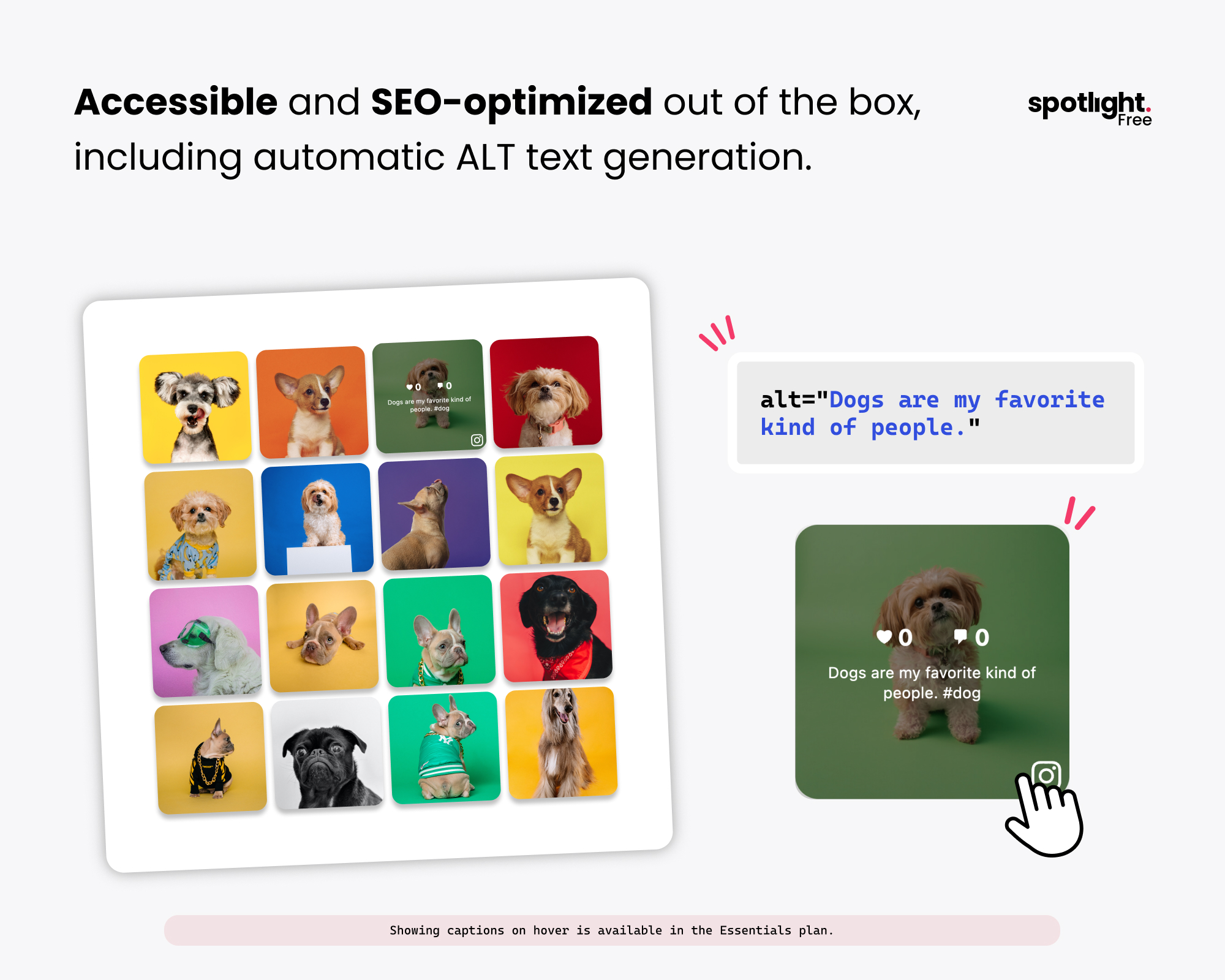
Accessible, SEO-friendly Instagram feeds with alt text generated automatically from each post’s caption.
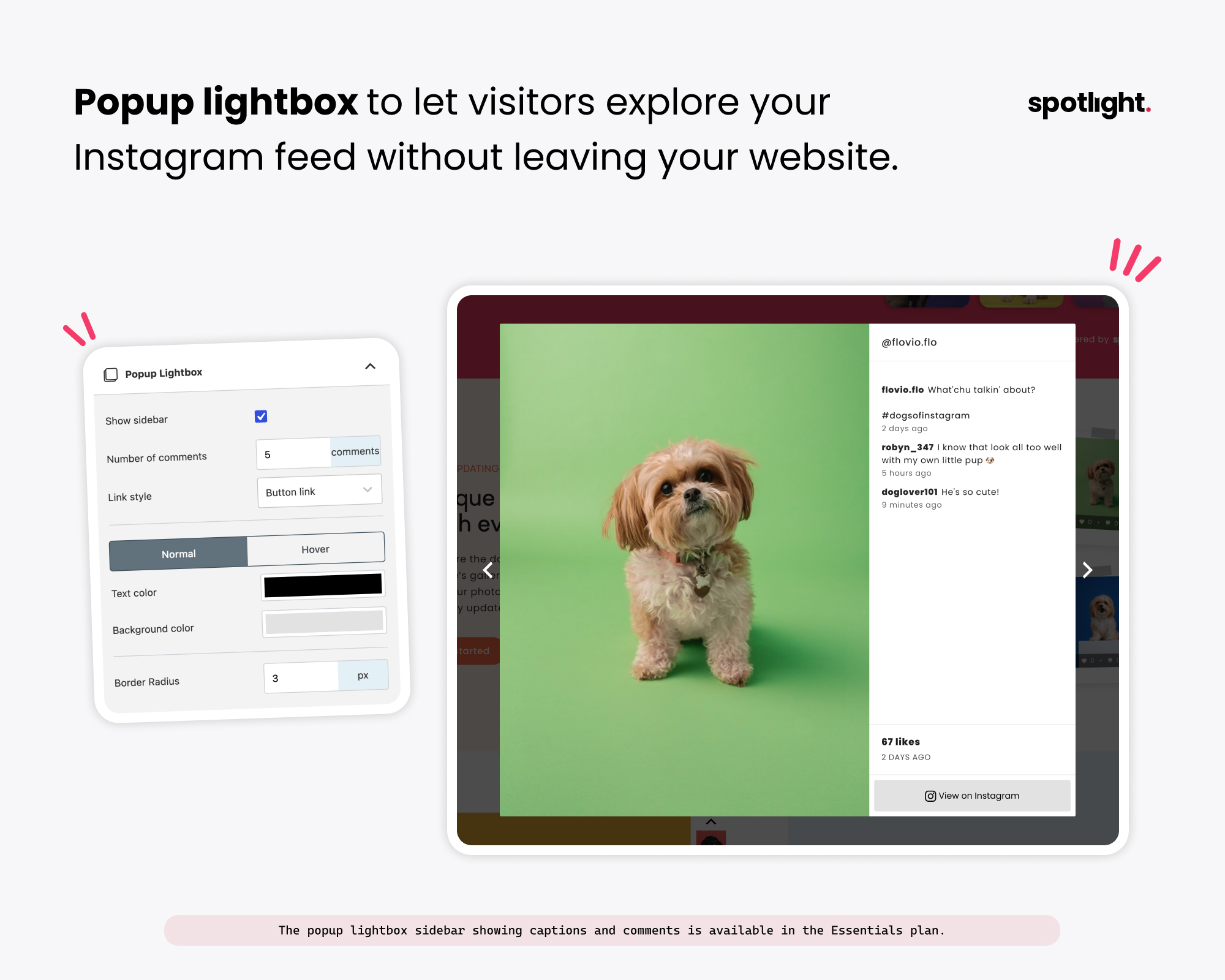
A popup lightbox lets visitors browse your Instagram photos without leaving your site, with a caption and comments sidebar in Essentials.
[Essentials] Unlock every Instagram feed layout and template, including the new Polaroid Sticker and Thumbnail Gallery.
[PRO] Display Instagram hashtag feeds and posts you’ve been tagged in.
[PRO] Filter and moderate your Instagram feed by hashtag, caption keyword or hand-picked posts.
![[Essentials] Unlock every Instagram feed layout and template, including the new Polaroid Sticker and Thumbnail Gallery.](https://ps.w.org/spotlight-social-photo-feeds/assets/screenshot-7.jpg?rev=3758101)
![[PRO] Display Instagram hashtag feeds and posts you’ve been tagged in.](https://ps.w.org/spotlight-social-photo-feeds/assets/screenshot-8.jpg?rev=3758101)
![[PRO] Filter and moderate your Instagram feed by hashtag, caption keyword or hand-picked posts.](https://ps.w.org/spotlight-social-photo-feeds/assets/screenshot-9.jpg?rev=3758101)
Faq
You need an Instagram Business or Creator account. Instagram no longer lets third-party apps display posts from personal accounts, so if yours is a personal account you’ll need to switch it first. Switching is free and only takes a minute in the Instagram app’s settings, and it doesn’t affect your followers or your existing posts. If you’re not sure which one to pick, our guide to Instagram Creator vs Business accounts compares the two.
Install and activate Spotlight, go to “Instagram Feeds”, choose a layout and connect your account. Once you’re happy with the design, add the feed to any page using the Spotlight block, the widget, or the shortcode. The steps under Installation cover this in more detail.
Yes. Connect each account you want to use, then select them all in the feed editor. Spotlight combines their posts into one feed.
There’s no limit. You can connect as many accounts as you have legitimate access to and create as many feeds as you need, and you can show several different feeds on the same page.
Yes, with Spotlight Essentials or above. Free feeds include your video and reel posts, and the free lightbox shows photos at full size. Upgrading to Essentials lets visitors play videos and reels in the lightbox without leaving your site. Spotlight PRO also adds a sidebar to the lightbox with the caption, likes, comments, and date.
Yes, with Spotlight PRO. You can show public posts from across Instagram that use a hashtag, or filter your own feed to show or hide posts with certain hashtags. Our step-by-step guide shows how to embed an Instagram hashtag feed in WordPress.
Yes. Spotlight PRO’s moderation tool lets you click through your posts and choose which ones to show or hide, and you can also filter by keywords in captions. See the moderation and filtering options.
Yes. With Spotlight PRO you can link each post to a WooCommerce product, a page or any URL, so visitors can go straight from a photo to the product in it. Our walkthrough shows how to create shoppable posts in WordPress from start to finish.
Yes. Spotlight adds Instagram oEmbed support to WordPress for free, so you can embed individual posts as well as full feeds. Meta has changed how Instagram embeds work in 2026, and our article on Instagram embeds in WordPress explains what that means for your site.
No, Spotlight loads feeds without iframes, stores optimized thumbnails on your own server rather than pulling every image from Instagram, caches feed data, and works alongside WP Rocket and LiteSpeed Cache to provide the best performance possible.
Spotlight checks Instagram for new posts on a regular schedule and updates your feeds in the background. Because posts and thumbnails are stored on your site, your feed keeps working even if Instagram is having problems.
It usually comes down to the account connection (including personal accounts that need switching to Business or Creator), a caching or optimization plugin interfering with the feed, or WordPress’s scheduled tasks not running. Our troubleshooting guide covers 7 fixes for an Instagram feed not showing in WordPress, and you can always ask us on the support forum.
Send your client the Access Token Generator. They sign in to Instagram themselves and send you the access token, which you can paste straight into Spotlight. To see the token for an account that’s already connected, go to Instagram Feeds > Settings > Accounts, click the account’s username and enter your WordPress password.
Yes. Feeds use your theme’s fonts by default, and the Spotlight block, widget and shortcode work with the block editor, classic themes and most page builders. Spotlight Essentials and above add a dedicated Elementor widget, and our guide shows two ways to add an Instagram feed to Elementor.
Reviews
Great extension, highly recommended!
By  fairycookies on September 16, 2026
I’m happy to give you 5 stars. Not only is the plugin extremely easy to use with its sleek interface, but it’s also worth noting that the free version is generous compared to other extensions.
Plus, within just a few hours, I received a response by mail from the developers about a configuration question I had about my site using Ajax, and the answer was completely satisfactory and detailed — Problem solved 🙂
Great extension, highly recommended!
A plugin that just works, plain and simple!
By  olimate on August 21, 2026
Hi friends, I’m giving you 5 stars because this is a plugin I’ve been using for years to display Instagram photos on different WordPress websites. And the few times I’ve had an issue (usually on the Instagram API side), the support team has always responded quickly and kindly. A plugin that just works, plain and simple! 🙂
Support réactif
By  archipelstudios on July 31, 2026
Merci au support qui a été très réactif, lors d’un problème qui était créé par un autre module !
Beautiful IG feed and outstanding support
By  seventhree on February 15, 2026
Fantastic plugin that displays our Instagram feed beautifully. What truly sets them apart is their customer service. Hendra from the support team was incredibly fast, friendly, and provided the exact CSS solution I needed.
Nice way to display your instagram feed
By  whiteelephantagency on November 27, 2025
We had to pay for the upgrade to really get the look and feel we wanted but ultimately it works, our clients are happy and it has been good on desktop and mobile. Would highly recommend if youre managing a site where social presence is critical such as food & hospitality, entertainment, etc.
Extension with ads on your website !
By  zast on November 21, 2025
I had ads appearing on the pages of my website. They were only on this extension. I thought they were Adsense ads, but when I looked closer, I saw that they were admaster ads on this extension. They came from this extension because I disabled it and now I no longer have these ads.
buggy useless plugin that is not user friendly
By  nisaac86 on July 30, 2025
I installed this plug-in for a client of mine, and there have been so many issues with the connection of the Instagram account. I then have to walk through my client on how to connect their account again. This is very frustrating, my client is not very good behind the computer, and this is just a terrible plug-in. I would say the only upside to this plug-in, is that when it is working, it is not a monthly basis subscription.
Just what I needed.
By  Victor Mendoza (victortree) on July 15, 2025
The setup was very simple and the result was just as I expected.
It is really a great satisfaction to use a plugin when it is user friendly and efficient. Spotlight Social Feeds, allowed me to perform the feed embedding with a simple and completely customizable shortcode.
Looks and works good, but disappointing support, accessibility & translation
By  networka on May 10, 2025
The plugin basically works and looks visually appealing. However, I can’t give it a better rating because two critical issues have remained unresolved for years:
- The lightbox is not fully keyboard accessible. It’s impossible to start videos or navigate through a gallery within a single post using only the keyboard, a clear failure in terms of basic accessibility.
- The plugin is not translatable, which severely limits its use in multilingual projects or for non-English websites.
The translation issue has been raised multiple times – I personally submitted a request for translation support over three years ago. Nothing has changed since then. That’s extremely disappointing, especially considering that accessibility and internationalization are not “nice-to-haves,” but essential standards.
It may look good and function well on the surface, but anyone relying on accessibility or multilingual support will be left behind.
Best Insta plugin & support
By  ramonsca on January 31, 2025
I had an issue with the plugin … their support is the best! They answered very quickly and solved my issue immediately. Highly recommend!
Changelog
1.8.1 (2026-10-21)
Added
– Added a “Recommended plugins” page to the Instagram Feeds menu, listing other plugins from the Spotlight team.
– Added a dismissible banner on the Feeds screen that recommends Vireo Analytics, a free analytics plugin with a report for Spotlight feeds.
Changed
– The Help page now opens inside the WordPress admin on the free version too, instead of in a new tab.
– On the free version, the account menu item is now called “Account” instead of “License”.
– Updated Freemius SDK to the latest version.
Fixed
– Upgrade and PRO badges showed on top of the feed editor’s sidebar section headers when scrolling.
Removed
– Removed the survey banner from the Feeds screen.
1.8.0 (2026-10-07)
Added
– New feeds now start with a layout choice. Users with a connected account go straight to the customizer; users without one are guided through connecting first.
– Feeds can be imported from the new feed layout step.
Changed
– The Spotlight block is now registered from block.json (Block API v3), so it works in the iframed block editor.
– The Follow button is now a single link, so keyboard and screen reader users get one clear control.
– Updated the UI build tools and dependencies to fix known security vulnerabilities.
– Spotlight now requires WordPress 6.3 or later.
Fixed
– The profile photo was slightly off-centre in the Centered header style.
– Spacing issues in the new feed screens on mobile.
– The selected preview device button in the feed editor could show its icon blue on blue.
– The feed editor preview flashed when switching to tablet or phone.
– The plugin menu showed a “License” item that led to a “not allowed” page on sites not connected to Freemius.
– The “Help” menu item on free sites left the WordPress admin instead of opening in a new tab.
Removed
– Removed an unused survey endpoint that contained a hardcoded external webhook URL.
1.7.5 (2026-03-10)
Changed
– Updated Analytics date handling to use WordPress date/time functions for improved timezone consistency.
– Improved null validation before calling version_compare() to prevent PHP 8.x deprecated warnings.
– Modernized internal function signatures for better PHP 8.3 compatibility.
Fixed
– Fixed long-standing PHP 8.x deprecated warning caused by version_compare() being called with a null value.
– Fixed multiple PHP 8.3 deprecated warnings and notices across Free and Premium versions.
1.7.4 (2025-11-11)
Added
– Added a 4:5 image ratio option to the Grid layout.
– Added 3:4 and 4:5 image ratio options to the Highlight and Slider layouts.
Fixed
– Fixed misaligned arrows in Slider layouts.
1.7.3 (2025-09-02)
Changed
– Spotlight now supports Meta’s oEmbed API v22.0.
– This ensures continued compatibility after Meta’s removal of certain oEmbed fields and the deprecation of the Facebook Page Post oEmbed endpoint (effective October 1, 2025).
1.7.2 (2025-02-11)
Added
– Added a Tall Grid template with a 3:4 ratio and a new Ratio option in Appearance Settings.
Changed
– Removed local error log and redirected errors to the WordPress debug log.
1.7.1 (2025-01-27)
Changed
– Updated PHP deprecations related to filtering.
– Updated Freemius SDK to the latest version.
1.7.0 (2024-12-10)
Added
– Implemented Instagram Business Basic API to replace the deprecated Personal API for enhanced functionality and compliance with platform requirements.
1.6.16 (2024-11-04)
Fixed
– Release issues.
1.6.15 (2024-11-01)
Added
– Notices for changes to Meta API for personal and business accounts.
1.6.13 (2024-06-03)
Changed
– Renamed the “All Access” plan to “Agency”.
– Updated the pricing page to use the new beta Freemius pricing app.
1.6.12 (2024-05-13)
Changed
– Changed upgrade button text.
1.6.11 (2024-02-12)
Fixed
– CSRF vulnerability when connecting accounts.
– The plugin now allows either the imagick or gd extension to be used for image processing, not just the gd extension.
1.6.10 (2024-02-01)
Fixed
– Fixed the heading for the “Performance” settings section.
1.6.9 (2024-02-01)
Changed
– Replaced all mentions of the “Performance” plan with “All access”.
1.6.8 (2024-01-10)
Changed
– The photo/video URLs for imported posts are now forcefully updated on every fetch.
Fixed
– A common conflict with other plugins that use a newer version of the psr/simple-cache package.
1.6.7 (2023-11-17)
Added
– Links for the Black Friday 2023 offer.
– A new filter that disables searching for feed instances.
Changed
– Optimized the queries that search for feed instances.
Fixed
– Removed use of deprecated onkeypress DOM event.
1.6.6 (2023-10-23)
Changed
– The feed now prioritizes thumbnails that are locally downloaded.
1.6.5 (2023-09-12)
1.6.4 (2023-09-12)
Changed
– Updated Freemius SDK to v2.5.12.
Fixed
– The error log contents were overflowing and not staying within the screen.
– Some links in the feed did not have the necessary SEO rel attributes.
– Removed a deprecated field from some Instagram API requests.
1.6.3 (2023-08-14)
Fixed
– IG posts with emojis or certain characters could not be imported.
1.6.2 (2023-08-08)
Changed
– Improved logging when importing posts from Instagram.
– Improved logging when downloading remote files.
Fixed
– String interpolation is now compatible with PHP 8 without warnings.
1.6.1 (2023-07-06)
Changed
– Updated Freemius SDK to the latest version
Fixed
– Fixed a missing import for RuntimeException that triggered an error during a feed update.
1.6 (2023-06-22)
Added
– Reels playback is now enabled in the popup box, if the API provides the video URL.
1.5.3 (2023-06-12)
Changed
– Optimized some JavaScript code to be slightly smaller.
Fixed
– Like and comment counts were not imported for Business accounts after the v1.5.2 update.
1.5.2 (2023-05-29)
Changed
– The use cases and templates in the feed creation wizard can now be double-clicked for faster wizard completion.
– Improved styling in news notifications.
Fixed
– Personal accounts could not fetch posts after a recent unannounced change to Instagram’s APIs.
– News notifications were not being displayed in the admin UI.
1.5.1 (2023-05-22)
Changed
– The cron job that updates feeds is now compatible with Action Scheduler.
Fixed
– Temporary file deletion fails safely without triggering warnings.
– The “Dev Tools” are no longer unnecessarily shown in the menu.
1.5 (2023-03-28)
Added
– An error log that records any errors that occur during background tasks.
Changed
– Updated the admin UI to support WordPress 6.2 and React 18
– Improved page routing in the admin UI
– Updated the Freemius SDK to v2.5.5
Fixed
– An error when a gallery post has an image with no permalink
– Non-square profile images did not maintain a 1:1 aspect ratio
1.4.4 (2023-02-09)
Changed
– The feed now uses a smoother fade-in animation when loading Instagram posts
– Replaced the review banner with a feature survey prompt
Fixed
– Feeds no longer appear to be stuck in a loading state when the feed cannot be loaded
1.4.3 (2023-01-18)
Changed
– The “Upgrade” buttons in the UI have been replaced with “Free trial” buttons
– Thumbnails use the file path returned by WordPress, potentially fixing conflicts with image optimization plugins
Fixed
– The “Additional CSS class(es)” field for the block was susceptible to an XSS exploit
– The incompatibility with “Say What? Pro” plugin was not entirely fixed in the previous version
1.4.2 (2023-01-11)
Fixed
– Incompatibility with “Say What? Pro” plugin
– The auto-integration with WP Rocket now excludes non-minified WordPress assets from optimizations
1.4.1 (2022-11-22)
Added
– Black Friday and Cyber Monday discount offers
1.4 (2022-11-14)
Added
– New “Custom CSS” option for feeds
– New “Wave” template
– New “Squircle Grid” template
Changed
– The images and icons in the feed creation wizard are now more distinct from each other
1.3 (2022-08-29)
Added
– Added support for Instagram embeds to WordPress
1.2 (2022-08-09)
Changed
– Using SVGs for better quality media type icons in feeds
– Reels now show a link to Instagram when they are opened in the popup box
Fixed
– The admin UI would not show up when the URL of the page was incorrect
– No longer using the Instagram shorthand URL for thumbnails due to CORS errors
1.1.1 (2022-07-14)
Fixed
– An error during import caused by null video URLs
1.1 (2022-07-07)
Changed
– The Settings page has peen redesigned
– You can navigate away from the feed creation wizard using the browser’s “Back” function.
– Informational notifications now auto-hide faster
– The sections in the feed editor sidebar now have headers that stick to the top when scrolling
– Feed buttons no longer have hover styles and will inherit their normal colors (only affects newly created feeds)
– Downloading and updating thumbnails is now faster
Fixed
– The “Load more” button was scrolling the page to the top
– A double scroll-bar issue in the feed editor page
– Some responsive feed options did not properly default to their “Desktop” value
1.0.1 (2022-04-26)
Added
– Added HTTPS and OpenSSL recommendations in the account info modal
Fixed
– Video thumbnails remain in their loading state even after the thumbnail is loaded
– The HTTPS and OpenSSL messages were being shown when they shouldn’t, and not shown when they should have been
1.0 (2022-04-19)
Added
– A feed creation wizard with use-case selection to cater the feed editing experience
– A “Guides” page with links to useful articles and tutorials
– New option to align the “Load more” and “Follow” buttons on the same row beneath the feed
– Pages and posts with an embedded feed can be created directly from the “Embed” tab in the editor
– A warning when the update schedule used to update the feeds does not exist
– Feeds can now be exported to, and imported from, a file
Changed
– Various visual improvements and fixes for the admin interface
– Reduced the size and loading time for embedded feeds
– Reduced the loading time for the admin app
– Improved the feed editor’s styles on mobile devices
– Improved accessibility in the feed
– Any “@” and “#” symbols in image alt texts are removed to aid those with screen readers
– Focus styles in the feed only appear when focusing with a keyboard
Fixed
– Video posts did not load their thumbnail on iOS
– The album navigation arrows in the popup box were not focusable with keyboard navigation
– All of the text on the page in the feed editor gets selected when using a color picker
– The “Follow” button’s text was not the same size in the header and footer of the feed
– The padding for the “Follow” and “Load more” buttons did not adjust with text size
0.10.3 (2022-03-08)
Fixed
– An InvalidArgumentException error after reconnecting a personal account as a business account
– Posts could no longer be imported if an error occurs during importing
– Connected accounts were not being automatically selected in the feed editor
0.10.2 (2022-03-02)
Fixed
– Security fix
0.10.1 (2022-02-22)
Fixed
– The feed’s styles were not being loaded for feeds embedded on the site
0.10 (2022-02-21)
Added
– A new option to set the maximum number of imported Instagram posts per account
– Images in the feed now use the caption as “alt” text
Changed
– Videos in galleries are now paused when you navigate within the gallery
– The feed now supports better keyboard navigation
– Improved accessibility in the popup box – the focus is trapped and all controls can be selected with the keyboard
– Reordered the sections in the Embed tab
– Filters can now use the spotlight/instagram/... prefix
Fixed
– Images that fail to load could cause an infinite request loop for the same image
Removed
– The layouts.js and layouts.css files are no longer needed
0.9.9 (2022-01-27)
Fixed
– Saved thumbnails are lost when the plugin updates Instagram posts
0.9.8 (2021-11-17)
Changed
– Now requiring a minimum WordPress version of 5.7
Fixed
– “Thumbnail not available” issue for wide feeds on larger screens
– On some sites, the plugin’s cron jobs were not being properly registered
0.9.7 (2021-10-20)
Changed
– The WordPress widget has been renamed to make it clearer in Elementor which widget is which
– Captions are now synced when posts are updated
Fixed
– Posts without thumbnails caused the feed to crash when those posts are clicked or the feed is very wide
– Some posts would wrongly use the original Instagram CDN image, even if Spotlight had generated optimized thumbnails
– The feed would wrongly show “Thumbnail not available” for posts that had thumbnails available
– Some sites that had HTTPS correctly configured were still seeing the notice that recommends enabling HTTPS
0.9.6 (2021-10-06)
Changed
– Account access tokens are now encrypted in the database
– Viewing an account’s access token now requires entering your password
– Videos in the popup box now sit on top of a black background
– Now recommending HTTPS and the “openssl” PHP extension
Fixed
– Videos in the popup box were invisible when using certain themes
– The popup box now shows an error if a video cannot load
– Videos in albums did not have their URLs updated
– Album posts would sometimes show “Thumbnail not available” even when a thumbnail is available.
0.9.5 (2021-08-16)
Fixed
– Videos in gallery posts had broken URLs and could not be played from the popup box
– Feeds only imported posts automatically from the first source
0.9.4 (2021-08-12)
Fixed
– A feed can no longer have the same account selected multiple times (how did you guys even manage that?)
– An infinite request loop if a thumbnail fails to load in the feed
– A previous solution for the “Image not available” error in the popup box was not working correctly
– JSON data in HTML attributes is now encased in single quotes to prevent escaping problems
0.9.3 (2021-08-09)
Changed
– The minimum WordPress version requirement is now version 5.3
– The popup box no longer shows images from Instagram’s CDN by default
– Photos in album posts now have their thumbnails downloaded and generated
– Optimized some database queries for better performance
– Avoiding an unnecessary image redirect when showing images in the popup box
– Thumbnails in the feed now have explicit “width” and “height” attributes
Fixed
– Fixed a JS error that caused the feed editor page to go blank
– The “Feeds” column in the “Settings > Accounts” page did not show any feeds
– The import completion notification was wrongly saying that more batches were being imported
– The styling of the navbar in the admin app was broken on Chrome
– Fixed an error that prevented the cache from being cleared
0.9.2 (2021-07-29)
Added
– Added a filter to transform Instagram post responses from the REST API
Changed
– More user-friendly error message when connecting with an invalid access token
Fixed
– Duplicate posts were being imported, causing memory exhaustion errors
– Fixed a database insertion error
– Fixed a fatal error when a response status code is invalid
– Fixed an argument type error that is triggered during the clean up cron job
– Fixed blank admin UI for mobile devices on WordPress 5.8
0.9.1 (2021-07-23)
Fixed
– Fixed an error on the “Widgets” page for WordPress version 5.8
– Fixed a PHP notice when clearing the cache if the thumbnails folder does not exist
– The original image would not be deleted after optimization if an error occurs
0.9 (2021-07-20)
Added
– Accessibility and SEO attributes to buttons and links in the feed
Changed
– Replaced the built-in import engine with an upgraded version
– Posts that have not changed on Instagram will not be updated unnecessarily
– Large numbers of Instagram posts are now imported in batches
– Minor database query optimizations
Fixed
– Timeout errors when importing large numbers of Instagram posts
– Timeout errors when clearing the cache for large numbers of Instagram posts
– A PHP notice about an undefined ‘shortcode’ index
– A conflict with pages that have the word “spotlight” in their permalink
– Expired images in the popup now fallback to a local image
– A styling incompatibility with LearnDash Advanced Quizzes
– Vertical center alignment for album images and videos
– The feeds shows the wrong number of posts when tablets and phones show more than on desktop
0.8.2 (2021-06-30)
Changed
– Replaced Guzzle with an in-house solution, resolving many plugin conflicts
– The feed is now centered in its container or block when its width is not set to “Auto”
Fixed
– The header “Account to show” option did not work
– A conflict with BuddyBoss caused a fatal error due to a typed shortcode parameter
0.8.1 (2021-06-09)
Fixed
– The Guzzle conflict detection has been disabled due to false-positives
0.8 (2021-06-08)
Added
– New feed templates to get started with a preset design
– Feeds can now be exported and imported
– Integration with WP Rocket and Litespeed Cache plugins
– You can now start designing feeds before connecting an account
– The REST API now includes an “Expires” header for proper browser caching
– A link to customer support in the navigation bar when on the Feeds page
– New dev tools page to help diagnose problems (currently hidden)
Changed
– Reduced total size of JS and CSS loaded on the site by 28%
– Removed use of dashicons in the feed
– Moved the preview device selector into the preview viewport
– Icons have been added to the action menus for feeds and accounts for better clarity
– Delete options in the action menus for feeds and accounts are now red to indicate danger
Fixed
– Fixed a conflict with the WooCommerce Paypal Payments extension
– Album images of posts not owned by your account no longer request the thumbnail, which caused an API error
– Various usability and accessibility fixes in the feed editor
0.7 (2021-04-08)
Added
– Support for IGTV videos
– New link to the “Feeds” page in the Plugins page
– New link to documentation and FAQs in the Plugins page
– New options for hover colors and border radius for the “Follow” and “Load more” buttons
– New option to toggle whether the “Load more” button causes the page to scroll down
– Optimization can now be run manually from the “Configuration” settings page
– URLs in captions are now turned into links
Changed
– Reduced the total size of JS and CSS loaded on the site by 70%
– Improved updating of data during imports
– Removing use of PATCH and DELETE HTTP methods
Fixed
– Feeds had no header if another feed on the same page showed a header for the same account
– Some tagged posts could not be imported due to use of invalid request fields
0.6.1 (2021-03-04)
Changed
– Now compatible with PHP8
Fixed
– An error, caused by curly braces offset access syntax, which is not supported in PHP8.
0.6 (2021-03-03)
Added
– New option to duplicate feeds
Fixed
– The feed did not load on sites that send CORS preflight requests
– Fixed hashtags without spaces between them becoming a single link
– Undefined index errors during an import or update
0.5.4 (2021-02-11)
Changed
– Now detecting a conflict with the official “Facebook for WordPress” plugin
Fixed
– Fixed “Argument 1 passed” error when viewing/previewing a feed
0.5.3 (2021-02-04)
Added
– Added the ability to clear cache for a single feed only
– Added more tooltips in the editor and improved the wording of existing tooltips
– Added a notification if an error occurs while saving the settings
Changed
– The actions in the feeds list are now in a menu
– The feed usages in the feeds list now link to the post on the site, not the edit page
– The sources in the feeds list now link to the account info or hashtag page on Instagram
– The default click behavior on mobile devices is now set to open the popup box
– The admin interface uses the WP Admin color scheme as much as possible
– Better error messages when account connection fails
– The copied info from our access token generator can now be directly pasted into the access token field
– Unavailable images and videos now show a message in the popup box, instead of broken content
– The popup box’s size in the preview now matches the device being previewed
Fixed
– Image and video URLs were not being renewed, causing broken content when they expire
– Thumbnails are now served using HTTPS is the site is using SSL
– The popup box is no longer too large for mobile devices
– Text in the popup box was too large
– The popup box now prevents the page from scrolling, which used to result in 2 scrollbars
– Extending the execution time during imports to prevent long imports from terminating early
– Fixed incompatibility with plugins that introduced circular references in post type objects
– Fixed an SQL error that occurs when using MySQL version 8.0 or later
– All connected accounts were being included in a feed’s context, even if unused in that feed
– Scrollbars would show up in the editor preview, even when there was nothing to scroll
0.5.2 (2020-12-17)
Added
– The plugin now checks for required PHP extensions and will show a message if one is missing
Changed
– The “Cookie nonce is invalid” error has been changed to highlight that you are not logged in
– Tweaked the scaling of the hover date so that it doesn’t overlap with the Instagram icon
Fixed
– Fixed an “Invalid argument type” error that occurs during import
– When the feed loads a post with a video in an album, the feed app would crash
– On 32-bit systems, feeds would only show 1 post
– The logo in the block editor is too large when using certain themes
– The onboarding process triggered a feed load twice after connecting the account, resulting in an error
– When navigating away from the editor, the “unsaved changes” prompt did not show up
0.5.1 (2020-12-01)
Changed
– Optimized the rendering for the grid layout, resulting in smoother loading animations
Fixed
– All posts in the feed would flash when more posts are loaded using the “Load more” button
– When PHP strict_types is enabled, a type error occurred while fetching posts from Instagram
0.5 (2020-11-17)
Added
– New option in the feeds list to update the Instagram posts for a feed
– The “Show/hide PRO Features” selection is remembered in the browser
Changed
– Video thumbnails are generated for non-tagged and non-hashtag posts
– Added a notification when connecting an account using an access token fails
– Duplicate posts, even if fetched for different sources, will no longer be shown in feeds
Fixed
– Incompatibility with Kadence plugins caused modal popups to not appear
– Incompatibility with LiteSpeed cache when loading JS when DOM is ready
– Corrupted feed options would cause an error that prevented editing and saving feeds
– Modals no longer cover up toast notifications in the admin app
– Warnings would show up when activating the plugin on a new site
– Cron jobs would not be recreated after their schedule is changed in the settings
– Feed usage in the block editor was not detected and shown in the feeds list
– Duplicate crons would be created when run manually using WP Crontrol
0.4.2 (2020-10-30)
Changed
– Various tiny performance optimizations
– The default optimization age limit is now 7 days, down from 30 days
– Increased the quality of generated thumbnails with minimal disk space impact
Fixed
– Downloading thumbnails for videos would occasionally cause a fatal error
– Custom post types used by the plugin were not properly registered
0.4.1 (2020-10-27)
Changed
– Now using a beacon in the bottom-right of the screen for important plugin-related alerts
– Using paused videos as thumbnails, until a better solution can be found for video thumbnails
Fixed
– Thumbnails are now saved locally, after Instagram made an unannounced change to their API
– Thumbnails are resized and automatically and optimally scaled for the screen
0.4 (2020-10-26)
Changed
– Greatly improved the loading time for feeds on the site
– All pages are now much more responsive and usable on mobile devices
– Filtering fields will auto-add their typed value when they lose focus
– Improved the message shown in the shortcode when a feed does not exist
– Added redundant WordPress styles to ensure a consistent look and feel
Fixed
– Addressed the “Cache key is invalid” entries in the debug log
– Fixed thumbnails not loading due to Instagram deprecating their thumbnails API
– Fixed an error that sometimes prevented feeds from being saved
0.3.2 (2020-09-30)
Changed
– The plugin now clarifies whether errors come from Instagram’s API or the plugin itself
– Overall performance of the editor has been greatly improved
Fixed
– The text size option was showing wrong values for tablets and phones
– Videos did not load and would remain as grey tiles
– The preview did not always reflect changes made to the feed’s options
0.3.1 (2020-09-16)
Fixed
– The page would not load or crash if an account has no access token expiry date
– The top navigation bar would did not update to indicate the current tab.
0.3 (2020-09-16)
Added
– Added a block for the WordPress Gutenberg block editor
– Account information is now updated during media imports
Changed
– Now using the WordPress-bundled React, reducing JS file sizes
– Improved the responsiveness of the navbar
Fixed
– Fixed an error that caused feeds to break when not logged in
0.2.4 (2020-08-21)
Fixed
– Some fields in the Design tab would incorrectly remain disabled
– The app no longer gets stuck on the flashing logo during loading
– Feeds did not work when other plugins encounter errors or raise warnings
0.2.3 (2020-08-14)
Changed
– Videos use an Instagram-style video player
– The popup box is now responsive
– Now showing smaller thumbnails in smaller feeds
Fixed
– Front-end CSS is now correctly minimized for increased page load speeds
– Fixed app not loading correctly after an update, due to browser caching
0.2.2 (2020-07-30)
Added
– Hover info now scales with the size of the media tiles in the layout
Changed
– Added reset styles to media in the popup box to improve compatibility with themes
– Improved how media in the popup box gets scaled to better match Instagram’s own scaling
Fixed
– Media in the popup box would incorrectly have black bars
– Cancelling after clicking the Cancel button disabled the Cancel and Save buttons
0.2.1 (2020-07-13)
Fixed
– “Too many IDs” error when a Business account has more than 50 posts
0.2 (2020-07-09)
Added
– Freemius integration
– Admin notifications
– New “Tools” section in the settings and an option to clear the API cache
– The live preview shows a message when user options result in no posts being shown in a feed
0.1 (2020-06-23)
Initial version of Spotlight Instagram Feeds.