
Smart Image Resize for WooCommerce
Description
Your product images are all different sizes. Your shop looks messy. You’ve been manually editing photos in Photoshop or Canva, or just living with the ugly grid.
Smart Image Resize fixes this in one click. It makes every product image the same size — without cutting off any part of your product.
No Photoshop. No manual work. No cropping.
How it works (30 seconds to set up)
- Install and activate — it starts working immediately
- Upload a product image — it’s automatically resized to match your store’s dimensions
- Extra space? Filled with a clean background color (white by default)
That’s it. Every image comes out the same size, perfectly centered, nothing cut off.
Who is this for?
- Dropshippers — your suppliers send you images in 50 different sizes. This makes them all uniform automatically.
- Multi-vendor stores — vendors upload whatever they want. The plugin fixes it behind the scenes.
- Agencies — install it on client stores so they can’t mess up their product grid no matter what they upload.
- Any WooCommerce store — if your product grid looks uneven, this is the fix.
Already have hundreds or thousands of images uploaded?
No problem. The built-in bulk tool processes your existing catalog. Hit one button and it fixes everything you’ve already uploaded.
What you get (Free)
- Process up to 150 images
- Automatic resizing on upload
- Bulk resize existing images
- Whitespace trimming (removes empty space around products)
- Protection against stretching small images
- Works immediately — no configuration needed
What you get with Pro
- Unlimited images — no processing cap, no matter how big your catalog
- Smaller file sizes — converts PNG to JPG and generates WebP automatically
- Watermarking — add your logo to protect your photos
- Priority support — get help fast via chat or email
Works with any WooCommerce setup
Compatible with popular themes like Flatsome, Avada, Astra, OceanWP, and more. Works alongside multivendor plugins (Dokan, WCFM, WC Vendors), image optimization plugins (Smush, ShortPixel, Imagify, EWWW), and page builders. If it runs WooCommerce, it works.
Real reviews from store owners
★★★★★
“After 3 minutes I bought the PRO version. We have 30,000 imported products with different photos.” — @prokurent
★★★★★
“Customers don’t care to crop their images on their own. This saved a ton of tedious work.” — @jpontinen
★★★★★
“The time saving benefits are enormous and support is A+.” — @chickwithbob
Installation
- Upload the
smart-image-resizefolder to/wp-content/plugins/ - Activate the plugin through the Plugins menu
- Go to WooCommerce > Smart Image Resize — it works immediately with smart defaults
Screenshots

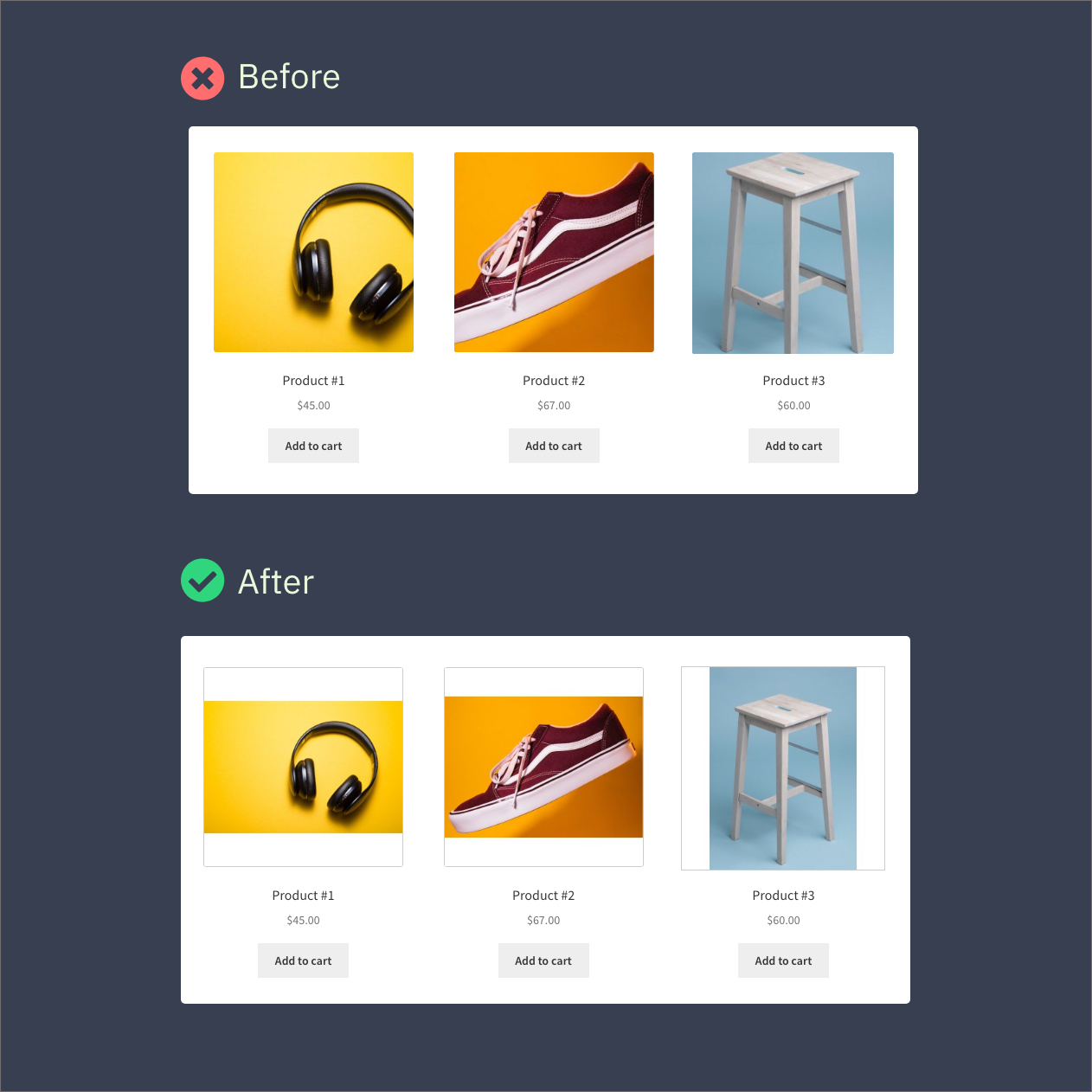
Before and after — messy product grid vs. clean, uniform images
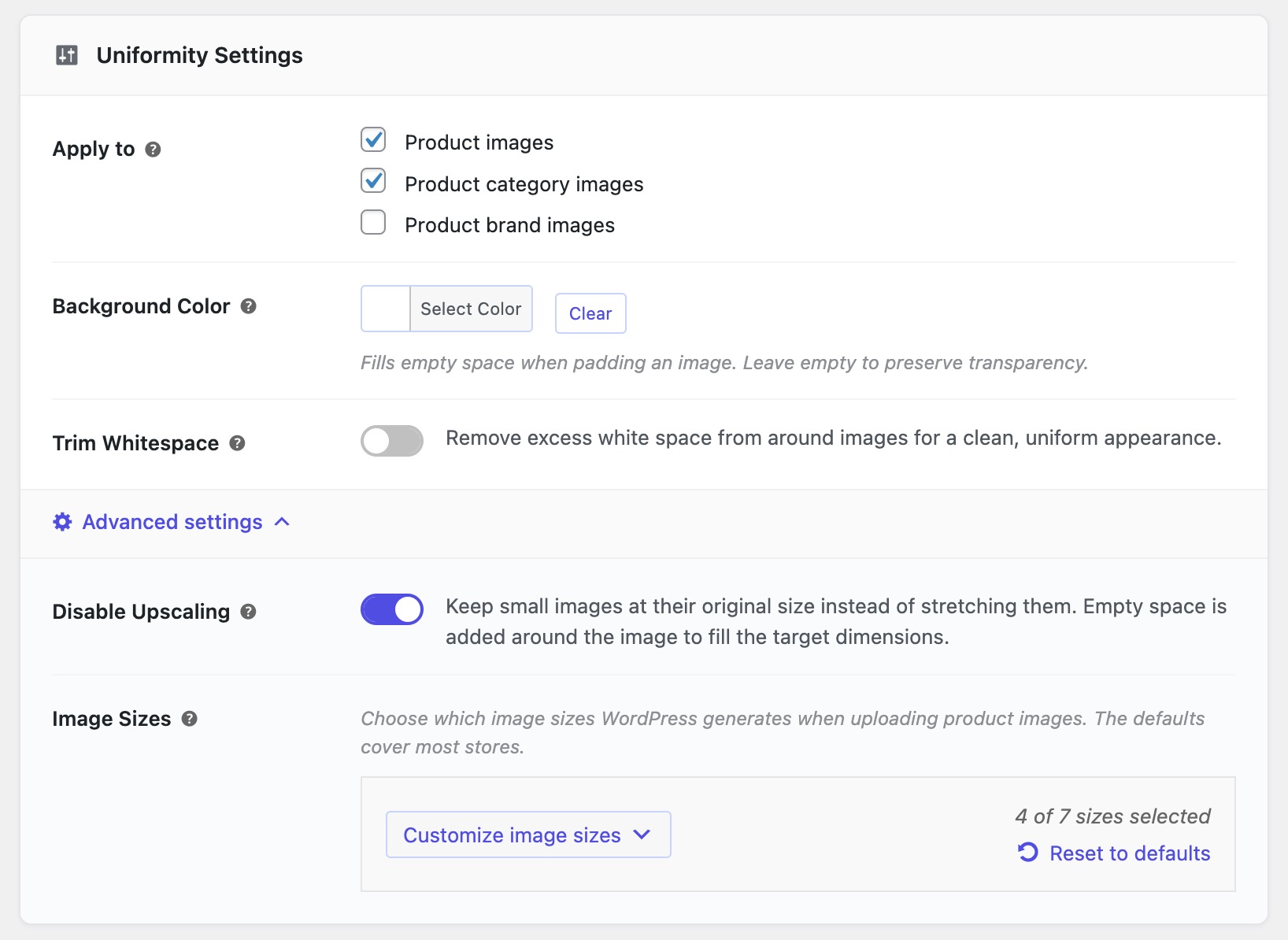
Settings page — simple, no learning curve
Bulk resize — process your entire catalog in one click
Processing — sit back while it handles everything
Whitespace trimming — removes empty space around your product automatically


Faq
No. Install it, activate it, done. It starts working on your next image upload. If you want to tweak settings later, they’re at WooCommerce > Smart Image Resize > Settings.
Never. This plugin does NOT crop. It fits your image inside the target size and fills any leftover space with a background color (white by default). Your whole product stays visible.
Yes. Go to WooCommerce > Smart Image Resize > Bulk Resize, click Start, and it processes everything you’ve already uploaded. No need to re-upload anything.
This usually means one of two things:
- Your original image is too small — the plugin had to stretch it. Fix: turn on “Disable Upscaling” in Settings > Advanced. Small images will keep their original size instead of being stretched.
- Compression is too aggressive — Fix: go to Settings > Optimization and lower the compression level.
After fixing either of these, run the bulk resize tool again to reprocess.
You’re seeing cached (old) versions. You need to clear:
- Your browser cache (Ctrl+Shift+R or Cmd+Shift+R)
- Any caching plugin you use (WP Rocket, LiteSpeed, W3 Total Cache, etc.)
- Your CDN cache if you use one (Cloudflare, etc.)
Once caches are cleared, you’ll see the updated images.
Your theme might be showing the full-size original image instead of the resized version. Fix: go to Settings > Advanced and turn on “Resize Original Image.” Then run the bulk tool again.
No. Your server ran out of memory on a large image. Just refresh the page and click Start again — it picks up where it left off. If it keeps happening, ask your hosting provider to increase PHP memory (512MB minimum recommended).
Yes. Go to the Help tab and use the bulk-restore tool. It reverts all images to their original state. Nothing is permanently destroyed.
No. It only processes WooCommerce product images. Your other images are left alone. (You can optionally enable it for category images in settings.)
Yes. Images uploaded by vendors are processed the same way. No extra setup needed.
Yes. See our documentation for instructions.
- Free users: WordPress.org support forum — we respond to every thread.
- Pro users: Priority support — faster response via chat or email.
Your resized images stay resized — they’re real files on your server, not temporary. In most cases everything continues to look fine. However, some themes load images in a special way that requires the plugin to be active. If images look off after deactivating, just reactivate and they’ll be fine again. The plugin is lightweight and uses zero resources when no images are being uploaded.
Reviews
Exactly what I needed
By  musherenko on December 3, 2025
Fastest 5 star review I’ve ever left. Woocommerce store with thousands of existing products and more added daily. We have to source our product images from various suppliers and manufacturers, all whom save their images in different formats and sizes. Some of which have a lot of unnecessary white space which affects all of our product thumbnails. So some products look smaller than others on archive galleries.
You can use the built in crop tool on woocommerce so they’re all 1:1 but it will obviously crop some of your images which looks horrendous. This tool with a click of a button processed all our images, removed all the unnecessary white space and resized them so now every single product image appears the same size.
Preprocessing our images in photoshop would be an impossible task as we already have thousands of images and add more daily. This took 5 minutes to setup. Let the bulk gen run and walk away. Come back and it’s finished. I upgraded to the pro version which was on sale. Lifetime license for the cost of a one year subscription. Now not only do all the products appear uniform but are displayed in webp which Imagify wouldn’t do for thumbnails.
Smart Image Resize IS SMART!
By  ejcalvarez on October 15, 2025
Smart Image Resize is very help and easy to use!
Only works halfway
By  zettbee on May 9, 2025
The plugin creates new images but does not change the original. Many of the current (premium) themes automatically change the uploaded images to .webp. Because these are so small, they use the original for zoom images, product thumbnails and lightbox. I manage 10+ webshops with different premium themes and see that the images created by the plugin are only used in the product gallery and product image. The thumbs, zoom, etc. are the unmodified original image. So if the original is also modified, the plugin works 100%, now it only works half.
Does the trick
By  kosia on June 10, 2024
Easy to use, sorted out my image problems.
Seems to work good
By  valterekholm on April 23, 2024
Since I have not used it much I can only give 4
Very helpful plugin
By  merchandcart on April 11, 2024
Very helpful plugin
Great but needs UPSCALING
By  TC (chopperstwisted) on March 14, 2024
I have the pro version and overall I like this plugin but it’s missing some features that I feel are critical. I’ve had the pro version for a few years but now I’m looking elsewhere to find the features shown below. I will not be renewing if nothing has changed.
- Upscaling images so that you can meet the minimum sizes required by different platforms.
- Modified images should replace the original images to drastically save space.
- Set minimum sizes so that after trimming an image it’s not smaller than the set size.
- Option to manually process images from the media screen.
- Include the image regeneration ability within the plugin instead of relying on another 3rd party plugin.
- It would be nice if you had accounts on your site for accessing subscription and license information.
Great plugin so stop reminding to review please
By  fortylashes on February 3, 2024
Great plugin. But Stop reminding me to review the plugin.
support
By  mirywambu on December 13, 2023
great support
Very useful tool!
By  valeko on September 4, 2023
Very useful tool!
Changelog
1.18.0
- Declared compatibility with WP v7.1
- Improved image manipulation performance.
- Various bugfixes and improvements.
1.17.1
- Security hardening.
1.17.0
- Added support for processing original/full-size images.
- Added bulk-restore capability to revert image changes.
- Refreshed admin UI for a cleaner experience.
1.16.0
- New: Built-in bulk resize tool (no third-party plugin needed).
- Improved: Redesigned admin interface.
1.15.1
- Various improvements and bugfixes.
- Compatibility with WooCommerce 10.6.
1.15.0
- Added support for product brand images.
- Various improvements and bugfixes.
1.13.1
- Compatibility with WooCommerce 10.3.
1.13.0
- Enhanced bulk resize page UX.
- Various improvements and bugfixes.
1.12.1
- Admin tweaks for better user experience.
1.12.0
- New filter
wp_sir_exclude_trim_sizesto exclude sizes from trimming. - Added AVIF format support.
- Fixed compatibility with Phlox theme.
- Various improvements and bugfixes.
1.10.2
- Various improvements and bugfixes.
1.10.0
- Added support for Phlox theme.
- Added option to prevent upscaling small images.
- Introduced dedicated Help tab.
- Improved compatibility with PHP 8.3.
- Various bugfixes and stability improvements.
1.8.1
- Compatibility with WooCommerce HPOS.
1.8.0
- New experimental “Cropping mode” setting.
1.7.7
- Improved theme and plugin compatibility.
- Fixed trim whitespace border size in GD.
- Compatibility with WooCommerce 6.9.
1.7.6
- Removed confusing “Use WordPress cropping” option.
- Fixed WebP files not deleted when feature disabled.
- Compatibility with WooCommerce 6.3.
1.7.5
- Background reprocessing of skipped images.
- Improved CMYK image handling.
- Performance and stability improvements.
1.6.0
- Per-size resize fit mode.
- Stability improvements.
1.5.0
- Filter processed images in Media Library.
- Improved whitespace trimming.
1.4.0
- Category image support.
- WooCommerce REST API support.
- Improved bulk-import processing.
- Performance improvements with Imagick.