

RichText Extension
Description
RichText Extension adds useful decoration features to the Gutenberg rich text editor.
Highlighter
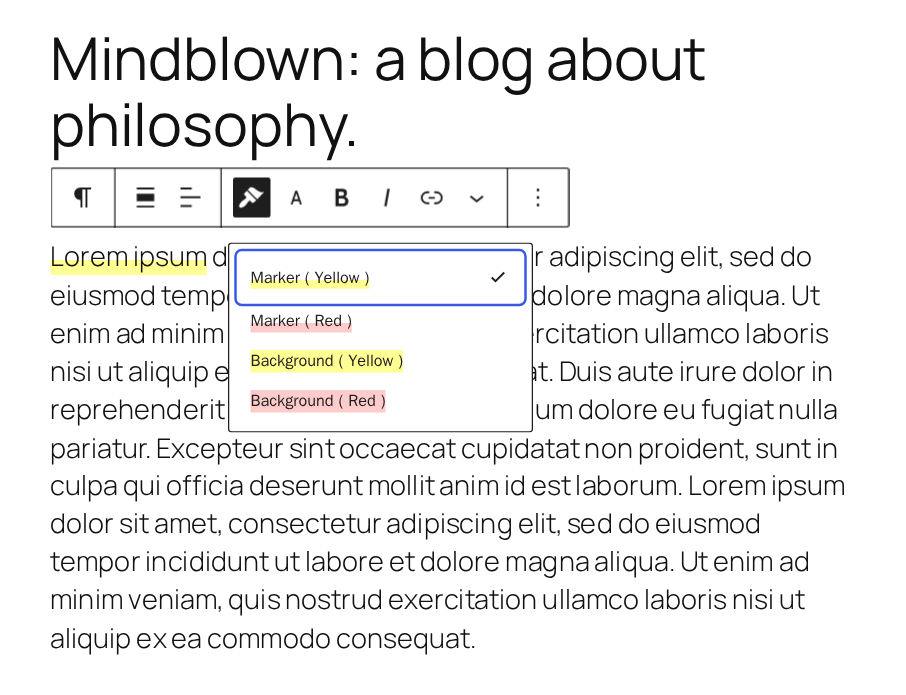
Draw a marker on inline text. You can set the color, thickness, opacity, and type of the marker to create various marker styles. You can configure up to four highlighters.
Font size
Change the size of inline text. You can specify the size in em, rem, or px, and configure up to four font sizes.
Underline
Add an underline button to the block toolbar.
Note: The underline markup has changed since version 2.0.0. If existing underlines do not work, try clearing the format.
Clear format
Remove all formatting from the selected text.
Installation
- Upload the
richtext-extensionfolder to the/wp-content/plugins/directory. - Activate the plugin through the ‘Plugins’ screen in WordPress.
Screenshots

Settings (Highlighter)
Settings (Font size)
Settings (Other formats)
Block toolbar (Highlighter)
Block toolbar (Font size)



Reviews
Handy!
By  ashf on May 15, 2024
Another gem from AKi.
well done …
By  kontur.us (netzaufsicht) on June 22, 2021
Seriously underrated
By  zandiver on May 12, 2021
Brilliant idea
By  Akinola Peace olamide (akinolapo1) on May 17, 2020
Changelog
3.2.0
- Tested to WordPress 7.2
- Drop support for WordPress 7.0
- Drop support for PHP 8.0 and 8.1
- Add: Support for em, rem, and px units in font sizes
- Enhancement: Rebuild the settings page
- Enhancement: Improve the look of the highlighter and font size dropdown items
- Enhancement: Add translation context to ambiguous strings
- Change: Disabling underline in the settings also disables its keyboard shortcut
- Change: Migrate settings to a new format
- Remove: Deprecated underline format used before version 2.0.0
- Fix: Multiple font sizes or highlighters are applied to the same text
- Doc: Update banners and screenshots
3.1.0
- Tested to WordPress 7.1
- Drop support for WordPress 6.9
- Fix: Uninstall process does not delete some options
3.0.1
- Security: Escape translatable output in the options page
3.0.0
- Tested to WordPress 7.0
- Drop support for WordPress 6.8
2.9.0
- Tested to WordPress 6.9
- Drop support for WordPress 6.6 and 6.7
2.8.0
- Tested to WordPress 6.8
- Drop support for WordPress 6.5
2.7.0
- Tested to WordPress 6.7
- Drop support for WordPress 6.4
2.6.1
- Add missing changelog entry
2.6.0
- Tested to WordPress 6.6
- Drop support for WordPress 6.3
2.5.0
- Tested to WordPress 6.5
- Drop support for WordPress 6.2
- Fix: Can’t disable “Underline” and “Clear format” buttons
- Fix: Deprecation notice in PHP 8.2
2.4.0
- Tested to WordPress 6.4
- Drop support for WordPress 6.0 and 6.1
2.3.0
- Tested to WordPress 6.3
- Add: Striped style
- Enhancement: Always show preview style on the settings page
- Enhancement: Polish icons
- Enhancement: Polish block toolbar style
- Enhancement: Polish the settings page style
- Fix: Checkbox values are not updated when saving settings for the first time
- Drop support for WordPress 5.9
- Drop support for PHP 7.3
2.2.0
- Tested to WordPress 6.2
- Enhancement: Narrow spacing between dropdown buttons
- Enhancement: Improve accessibility on the settings page
- Fix: Dropdown buttons are not aligned in WordPress 6.2
- Fix: Default color scheme is not applied on the settings page
2.1.0
- Tested to WordPress 6.1
- Drop support for WordPress 5.6 through 5.8
- Enhancement: Apply admin color scheme to the settings page
- Enhancement: Polish the settings page style
- Doc: Update banners and screenshots
2.0.0
- Tested to WordPress 6.0
- Change: Underline tag type
- Doc: Add cautionary text about underline
- Doc: Update author name
1.3.0
- Tested to WordPress 5.9
1.2.3
- Clean: Update npm packages and build tools
1.2.2
- Clean: Update npm packages
- Remove: Bundled language files
1.2.1
- Doc: Update “Tested up to”
1.2.0
- Tested to WordPress 5.8
- Clean: Update npm packages
1.1.9
- Tested to WordPress 5.7
1.1.8
- Clean: Update deploy flow (GitHub Actions)
- Fix: Wrong plugin version
- Clean: Update npm packages and organize the development environment
1.1.7
- Clean: Refactor code and replace deprecated components with recommended ones
- Fix: Installation error in PHP 8
- Tested to PHP 8
1.1.6
- Change: Toolbar icon from Dashicon to SVG icon
1.1.4
- Remove: gulpfile.js
- Clean: Update npm packages, add .wp-env, and refactor the development environment
- Clean: Remove composer.lock and package-lock.json from .gitignore
- Clean: Remove the compiled JS files
- Clean: Remove the compiled CSS files
- Update development settings
- Add: Composer
- Delete: package-lock.json
1.1.3
- Doc: Correct a notation error in the translation
1.1.2
- Fix: Meta box warning
1.1.1
- Fix: Problem with the uninstallation process
1.1.0
- Remove: Activation check
1.0.2
- Fix: Styles are not applied right after installation
- Fix: Preview does not update when the status is changed
1.0.1
- Update: Build process
- Update: Translation
1.0.0
- Initial release