
Post Type Switcher
Description
This plugin adds a simple post-type drop-down to the post editor interface, allowing you to reassign any post to a new post type. It allows you to switch a post’s type while editing your post.
Supported Types
The plugin can convert nearly every combination of posts, pages, and even custom post types:
- Page to Post
- Post to Page
- Post to Custom
- Custom to Custom
As of 3.0.0, support for switching to or from Attachments was removed. This may come back in a subsequent version.
Invisible post types, such as revisions, menus, etc., are purposely excluded. But, if you need to access invisible post types, you can adjust the boundaries using the ‘pts_post_type_filter’ filter.
Bulk Editing
With bulk editing (thanks to Matthew Gerring) you can select all the posts in a certain type and convert them to a new type with one quick action.
Block Editor
With Block Editor support (thanks to Daniel Bachhuber) you can switch between post types that use either the Block Editor or Classic Editor without losing any of your embedded content.
Installation
- In your WordPress Dashboard go to “Plugins” -> “Add Plugin”.
- Search for “Post Type Switcher”.
- Install the plugin by pressing the “Install” button.
- Activate the plugin by pressing the “Activate” button.
- From the post edit screen, above the “Publish” button is the “Post Type” interface.
- Change post types as needed.
Minimum Requirements
- WordPress version 6.6 or greater.
- PHP version 8.0 or greater.
- MySQL version 5.7 or greater.
Recommended Requirements
- Latest WordPress version.
- PHP version 8.0 or greater.
- MySQL version 8.0 or greater, or MariaDB 10.5 or greater.
Screenshots

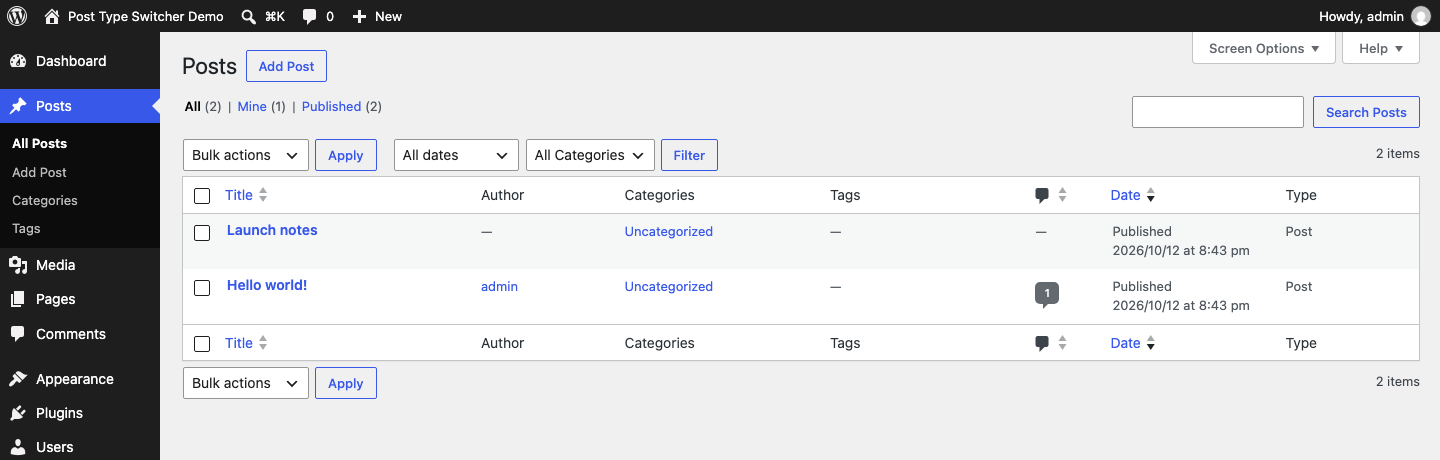
“Type” column in the Posts screen.
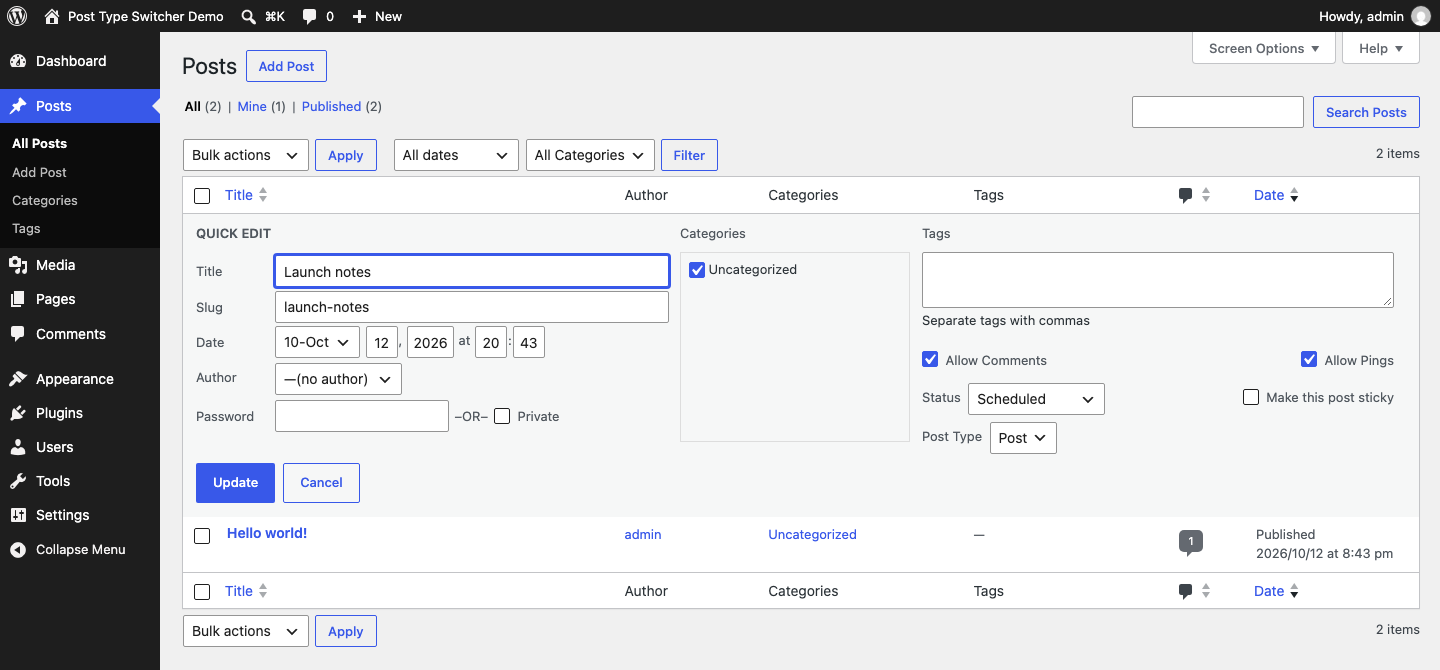
“Post Type” interface in Quick Edit.
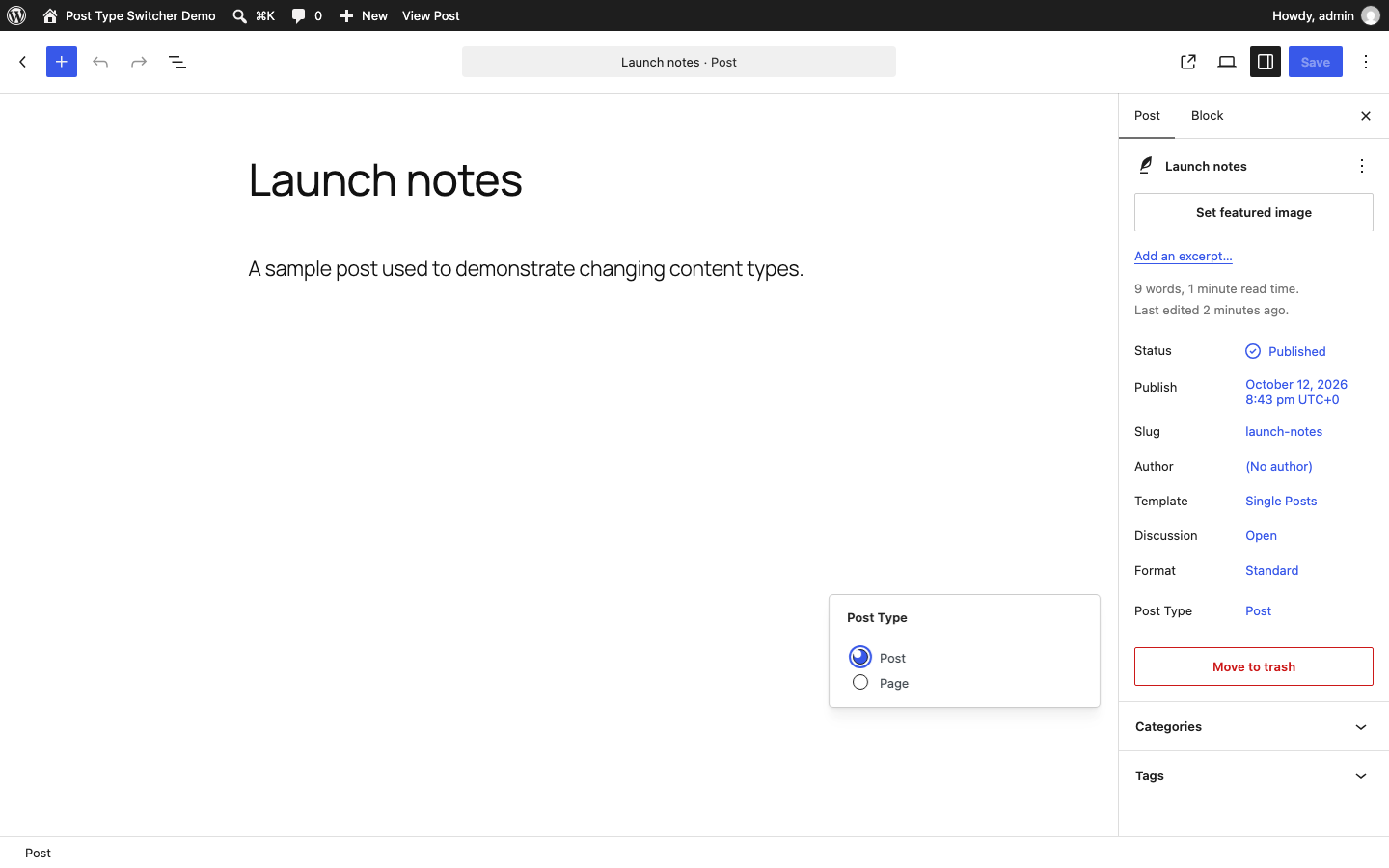
“Post Type” chooser in the Block Editor.
Faq
You need to selectively change a post’s type from one to another.
It should not. This plugin only changes the ‘post_type’ property of a post.
It should not. Be careful when editing HTML content while switching between editor types!
No. This plugin does not include any code capable of deleting anything.
Plugin conflicts are not unheard of and can be difficult to troubleshoot.
If you’re worried, backup your database and deactivate all other plugins before using this tool.
If you’re still worried, ask for help in the WordPress.org support forums.
Use the WordPress.org support forum for installation and usage questions.
Use GitHub Discussions for broader development conversations. Report reproducible defects through GitHub Issues.
Reviews
Very good
By  Eli (RealAct) on October 19, 2026
It works as expected, does exactly what it claims to do with no side effects.
Great
By  gwenm on October 12, 2026
Thank you very much, very great plugin.
Thanks
By  hkhoi1589 on July 31, 2026
This plugin saves me a lot of time
Saves Me Big Trouble
By  rmschwartz on February 21, 2026
The WordPress Dashboard is busy, and I don’t always pay attention to whether I’m working on pages or posts. When I goof up, I can fix the problem instantaneously. With out it — well — life is not so good. This should be a part of the Core.
Great plugin
By  holafreak on January 30, 2026
I’ve used this plugin for a while now and it’s amazing. Saves me a ton of time and is simply straightforward.
Thanks so much – that really saved me!
By  Roice (roicecz) on January 15, 2026
It does exactly what it’s supposed to. Thanks a lot!
Huge Time Saver
By  mirphi on July 24, 2025
Extremely useful plugin if you have migrated your site from Joomla and all your content is migrated as posts. Post Type Switcher allows you to quickly switch relevant items from posts to pages. Also very useful if you use custom post types and need to migrate content between types which you can do in a matter of seconds.
Great plugin if you use multiple custom post types
By  Kevin McClellan (crazywpgeek) on July 21, 2025
I have been using this plugin for several years now and have come to find that it’s a regular part of my routine now when I decide that a new custom post type is needed for a site, and super easy to move pages or posts to other post types when needed.
I also use page builders and have not seen any issues as a result of using this plugin as all the postmeta is still there. If it’s missing in the new post type then that means the new post type didn’t support it.
What I typically do is use another plugin to clone the page or post, and then move that to the new post type. That’s a good way to not disturb the current setup while working on the new post type and implementing features or building onto things.
I’m amazed how some sites that I help with have 1,000+ pages (before I came into the project). When I go through those sites I can usually come up with 3 or 4 post types that will help declutter, or put things that should have never been in “pages” into their own space. Post Type Switcher is so great at helping move things – and then we just set up some 301 redirects to preserve SEO and prevent 404 errors.
Practical and Useful
By  Ali Daei (aliedaei) on June 26, 2025
This plugin is very practical and useful. It has helped me in many cases. Thank you.
Works for Version 6.8
By  TapSuccess (tapsuccess) on April 25, 2025
It works for me. I have come back to this plugin for many years. It still works for version 6.8.
Changelog
4.1.1
- Restore the Block Editor interface by declaring all required WordPress script dependencies
4.1.0
- Require WordPress 6.6 and test through WordPress 7.1
- Load Block Editor assets from their generated dependency metadata
- Normalize request data before nonce and AJAX routing checks
- Rely on WordPress core for plugin translation loading
- Add maintained compatibility, quality, and release automation
4.0.1
- Prevent Authors & Contributors from changing types on posts of Editors & Admins
4.0.0
- Requires WordPress 6.2
- Requires PHP 8.0
- Improve block editor styling
- Stash original & previous types in post meta
- Add
pts_get_post_types_filterfilter - Load textdomain on
initinstead ofplugins_loaded
3.3.0
- Hide the “Type” column by default
3.2.1
- Update author
- Add sponsor link
3.2.0
- Block editor support
3.1.0
- Fix post targeting when called recursively
3.0.0
- Improved Quick-Edit and Bulk-Edit support
- Remove
attachmenttype support for now, as there is no way to switch back - Fix bug causing some post-types to switch unexpectedly
2.0.1
- Ensure quick-edit works with new procedure
- Quick-edit “Type” column works again!
2.0.0
- Improved plugin compatibility with WooThemes Sensei
- Filter post arguments vs. hook to save_post
- Add “post_type_switcher” action
1.7.0
- Add support for network activation
1.6.0
- Add textdomains for localization
- Load translation strings using load_plugin_textdomain()
- Before saving data chack if it’s not an autosave using wp_is_post_autosave()
- Before saving data chack if it’s not a revision using wp_is_post_revision()
- Security: Prevent direct access to directories
- Security: Translation strings escaping
- Add screenshots
1.5.0 – norcross
- Fix multiple quickedit dropdowns
1.4.0
- Improve handling of non-public post types
1.3.0
- Fix saving of autodrafts
1.2.1
- Improved WordPress 3.9 integration (added dashicon to publish metabox)
1.2.0
- Add bulk editing to supported post types
- Props Matthew Gerring for bulk edit contribution
1.1.1
- Add is_admin() check to prevent theme-side interference
- Change save_post priority to 999 to avoid plugin compatibility issues
- Remove ending closing php tag
- HTML and PHPDoc improvements
1.1.0
- Fix revisions being nooped
- Fix malformed HTML for some user roles
- Make a singleton (meh…)
1.0.0
- Fix JS bugs
- Audit post save bail conditions
- Tweak UI for WordPress 3.3
0.3.0
- Use the API to change the post type, fixing a conflict with persistent object caches
- No longer requires JavaScript
0.2.0
- Disallow post types that are not public and do not have a visible UI
0.1.0
- Release