
Customer Engagement System – Popup Builder, Forms, CRM & Email Marketing Automation
Description
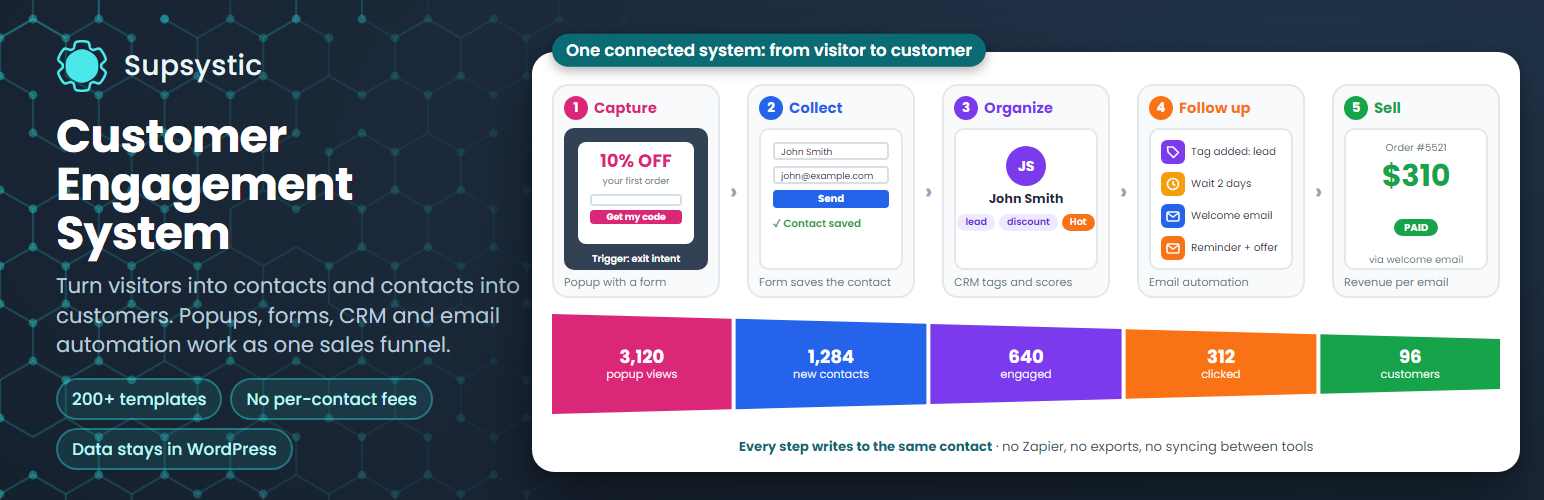
Customer Engagement System (CES) by Supsystic turns visitors into contacts and contacts into customers. A popup builder, a form builder, a CRM and email marketing automation share one contact base inside your WordPress, so an exit-intent popup can capture an email, the form tags the contact, and the right follow-up email goes out on its own. No Zapier, no syncing between services, no per-contact fees.
Popups, forms and contacts are unlimited, and your contacts stay in your own WordPress database.
Try it in your browser: open a live demo in WordPress Playground – no install, no account.
From visitor to customer in five steps
- Capture – a popup with an offer appears at the right moment: on exit intent, after a scroll or delay, or on a click.
- Collect – the form inside the popup saves the visitor as a contact in your CRM.
- Organize – tags, custom fields and an engagement score show who is ready to buy.
- Follow up – a tag starts an email automation: a welcome email, a reminder, an offer.
- Sell – every order is credited to the email, popup or form that brought it in.
Each step writes to the same contact, so your sales funnel builds itself and you can see where every customer came from.
Four modules, one contact base
- Popup – modals, slide-ins, bars and full-screen welcome mats with 10+ triggers and 10+ targeting rules.
- Forms – contact, lead, newsletter, quote, login and signup forms with conditional logic and spam protection.
- CRM – contacts, tags, custom fields and a timeline of everything each contact did on your site.
- Email Campaigns & Automations – newsletters, welcome series and follow-ups started by tags, with open, click and revenue tracking.
Every module writes to the same contact. A popup view, a form submit, an email click and a WooCommerce order all end up on one record.
Pick a goal – CES builds the rest
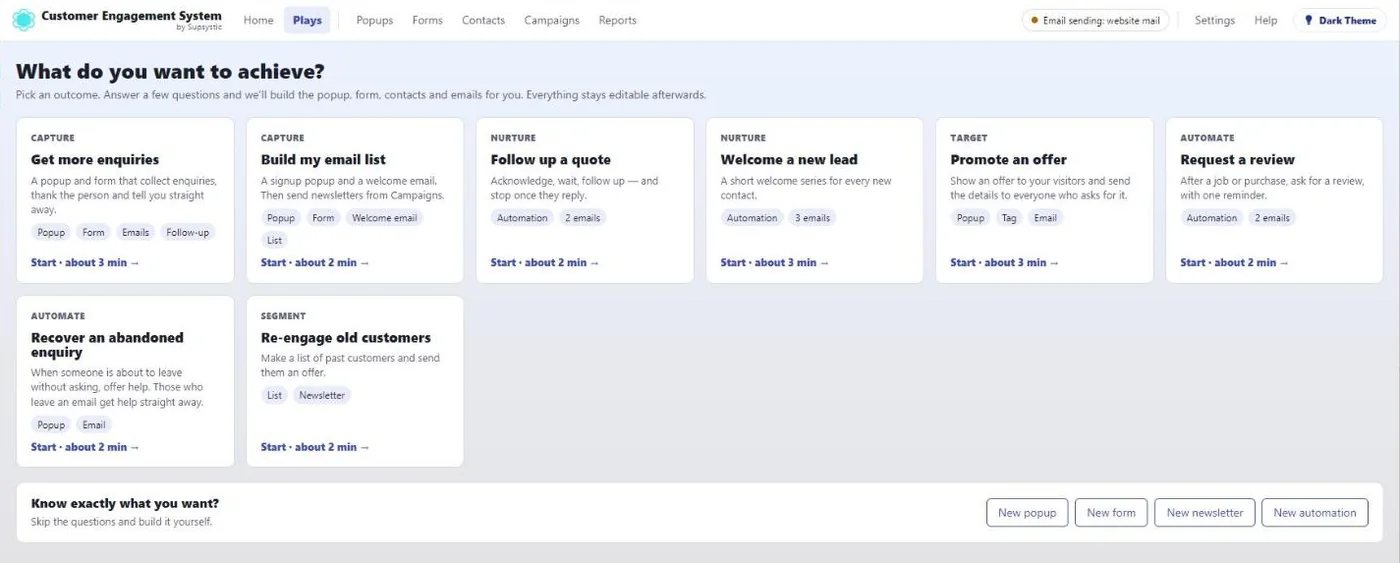
You don’t have to learn four modules first. Open Plays, choose an outcome and answer a few plain questions. CES creates the popup, the form, the contact tags and the emails for it, and you switch it on.
- Get more enquiries
- Build an email list
- Follow up a quote
- Re-engage past customers
- Welcome series, discount offers, review requests and exit-intent rescue
Everything a play creates stays editable in the full editors.
200+ templates for popups, forms and emails
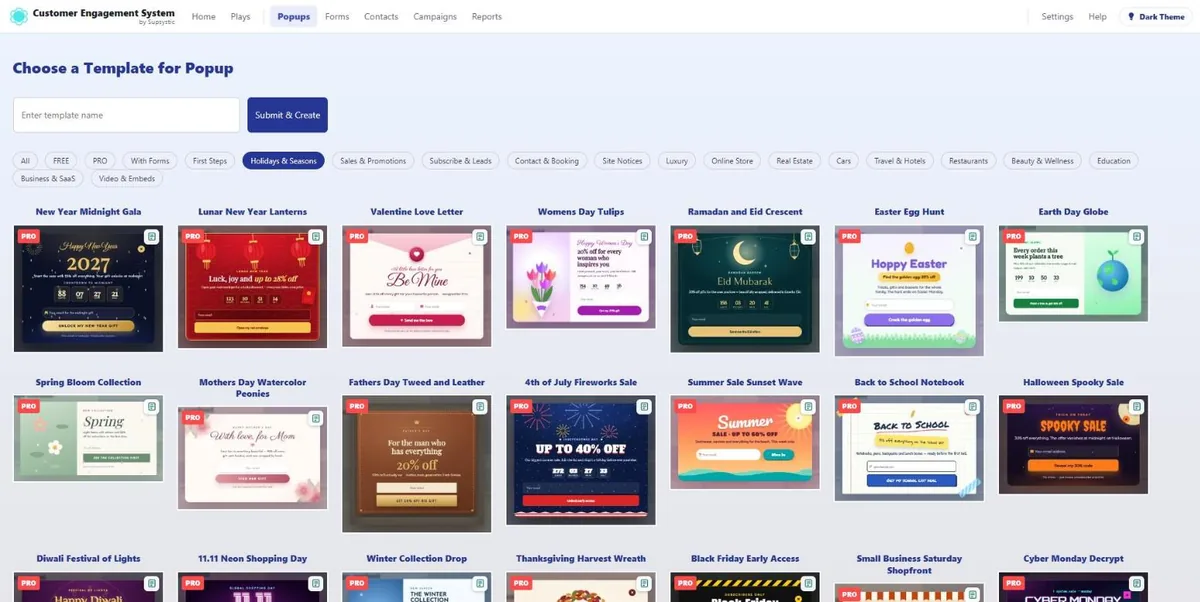
Pick a template, change the words and colours, and go live. Popup templates arrive fully set up: animated, with their own form, matching emails, triggers and targeting.
- Black Friday, Cyber Monday, Christmas, New Year, Halloween, Valentine’s Day and other seasonal sales
- Spin-to-win wheels, scratch cards, mystery boxes and advent calendars
- Exit-intent offers, cart recovery, free shipping bars and countdown timers
- Newsletter sign-ups, lead magnets, webinars and ebooks
- Contact, quote, booking and callback forms
- Restaurants, hotels, travel, real estate, beauty, fitness and luxury brands
- Welcome, thank-you, follow-up and newsletter emails
One-click colour palettes restyle the background, text, form and buttons together.
Popup builder
- Centre modals, corner and side slide-ins, top and bottom bars and full-screen welcome mats
- Triggers: page load with delay, click on any button or element, scroll, exit intent, bottom of page, inactivity, after WooCommerce checkout, AdBlock detected and number of pages visited
- Targeting: pages, posts, categories, post types, devices, languages, schedule, frequency, logged-in state, user roles, referrers, URL rules and countries
- Audience rules from the CRM: show a popup only to new visitors, known contacts, contacts with a tag or contacts in a list
- Multi-step popups, quizzes, yes/no flows and countdown timers
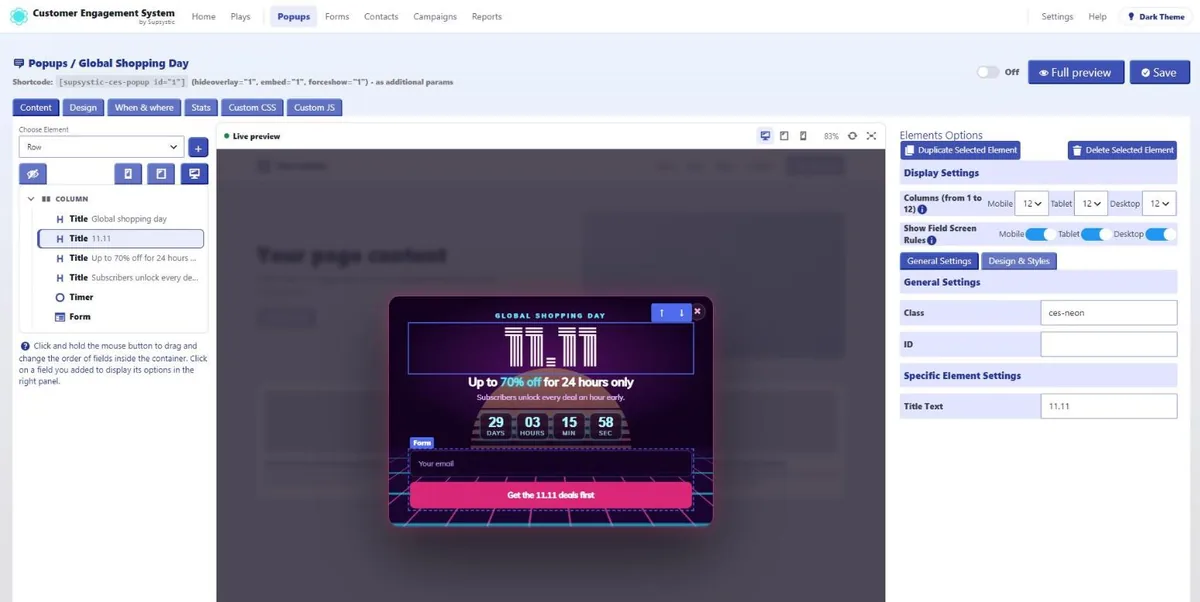
- Visual editor with a live preview: click an element to select it, double-click text to edit it in place
- Stats per popup: views, unique views, CTR, submits, bounces, time and UTM source
Form builder
- Contact, lead, newsletter, quote, booking, feedback and survey forms
- WordPress login, signup and password reset forms styled like the rest of your site
- 30+ field types, from text, email, phone and dropdowns to dates, ratings, ranges, file uploads, address search and WooCommerce products
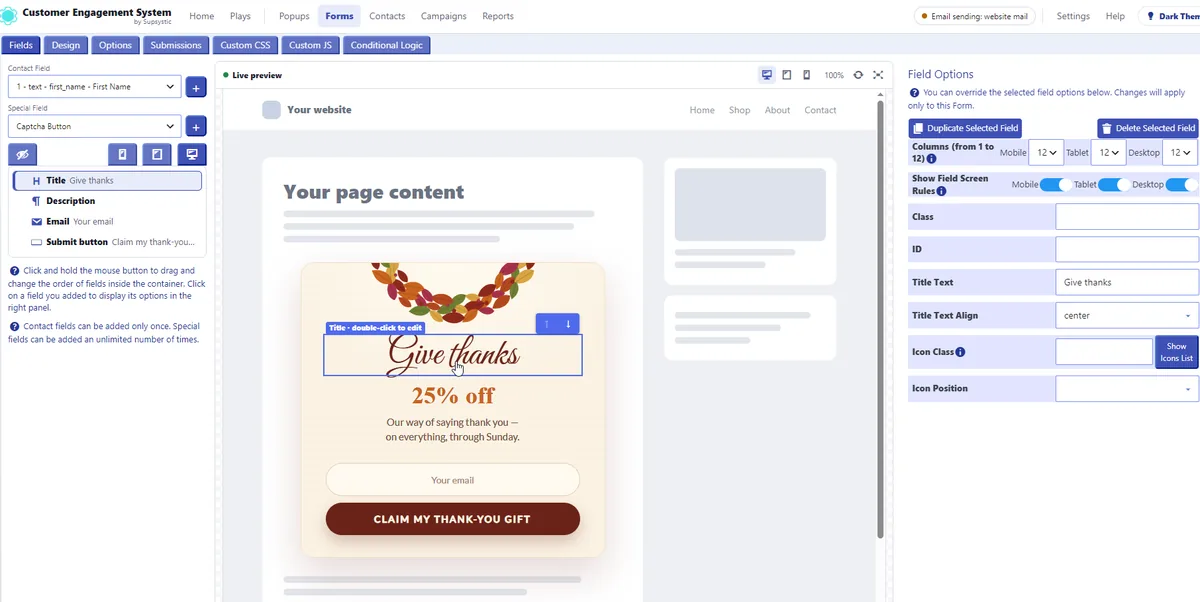
- Conditional logic to show, hide or require fields based on earlier answers
- Built-in spam protection with honeypot and CAPTCHA, plus double opt-in
- Admin notifications and branded auto-reply emails
- Tags added on submit that can start an automation
- Embed with a block or shortcode, or place the form inside a popup
WordPress CRM
- Unlimited contacts in your own WordPress database, with no per-contact pricing
- Tags, custom fields and saved lists for segmentation
- Activity timeline per contact: popups seen, forms submitted, emails opened and clicked, automations and orders
- Hot, warm and cold engagement score based on real opens, clicks and submits
- Import from CSV, WordPress users and WooCommerce, with automatic import of new users and orders
- Email replies collected over IMAP and shown on the contact as a chat
- Export everything to CSV at any time
Email marketing and automation
- Automations started by a tag from a popup, form, import or order: welcome series, lead nurturing, quote follow-ups, post-purchase and win-back emails
- Delays in minutes, hours or days, allowed sending hours, conditions and tag actions on open, click or unsubscribe
- Newsletters and one-off campaigns to tags, lists or field segments, sent now or scheduled
- Visual email editor with live preview, reusable branded templates and placeholders such as the contact’s first name
- Open, click, unsubscribe and bounce tracking per email and per contact
- Revenue attribution that credits each sale to the email, popup, form or UTM source behind it
- Send through PHP mail or your SMTP server with IMAP bounce handling, or connect Microsoft 365, Google Workspace, Zoho, Fastmail, SendGrid, Mailgun, Brevo, Postmark, SMTP2GO, Resend or Amazon SES
- Sending-domain check for SPF and DMARC
Works with WooCommerce
- Exit-intent coupons, free shipping bars and popups after checkout
- WooCommerce customers and orders imported into the CRM, guest orders included
- Total spent, order count and average order value on every contact
- Product, category and attribute fields in forms, product blocks in emails
- Win-back and post-purchase automations based on real orders
Why one system instead of five plugins
- No Zapier, no webhooks. The popup, form, CRM and email tool share one database and react to each other instantly.
- No per-contact fees. 500 or 50,000 contacts cost the same.
- Your data stays yours. Contacts, campaigns and statistics live in your WordPress database. Nothing is sent to Supsystic.
- One plugin to update. Fewer integrations to break, one place to look when something needs a change.
Made for
- WooCommerce stores
- Bloggers, publishers and newsletters
- Agencies and freelancers who build client sites
- Courses, memberships and communities
- B2B and service businesses that live on enquiries
- Restaurants, hotels, travel and local businesses
CES PRO
PRO switches on the advanced options in all four modules at once:
- Country targeting and the full set of advanced popup triggers
- 20+ more field types, input masks, regex validation, file and multi-file uploads
- Email verification before a contact is created
- Branching automations with conditions and unlimited steps
- Direct connections to 10+ mail providers
- 120+ premium animated popup, form, email templates and extra colour palettes
- Custom JavaScript per popup and per form
- Premium support
Learn more
External services
Customer Engagement System connects to the services below only for the features that use them.
-
Google Fonts – only when a popup or form uses a Google font. The visitor’s browser loads the font from
fonts.googleapis.com. Google Fonts privacy FAQ. -
Forms with Google reCAPTCHA switched on send the visitor’s CAPTCHA response to Google to verify the submission (privacy policy, terms).
Installation
- In your dashboard go to Plugins Add New Plugin and search for “Customer Engagement System”.
- Click Install Now, then Activate.
- Open Customer Engagement in the admin menu.
- Pick a play on the Plays screen, or create a popup or form from a template.
- Under Settings › Email sending, choose PHP mail or your SMTP server before you switch on email automations.
For scheduled emails on a live site, a real server cron that calls wp-cron.php every few minutes gives the most reliable timing.
Screenshots

Template library: animated popups installed in one click together with their forms and emails.
Popup editor with live preview: click any element to edit it.
Form builder with conditional logic, spam protection and branded auto-replies.
Plays: pick a goal and CES builds the popup, form, tags and emails.
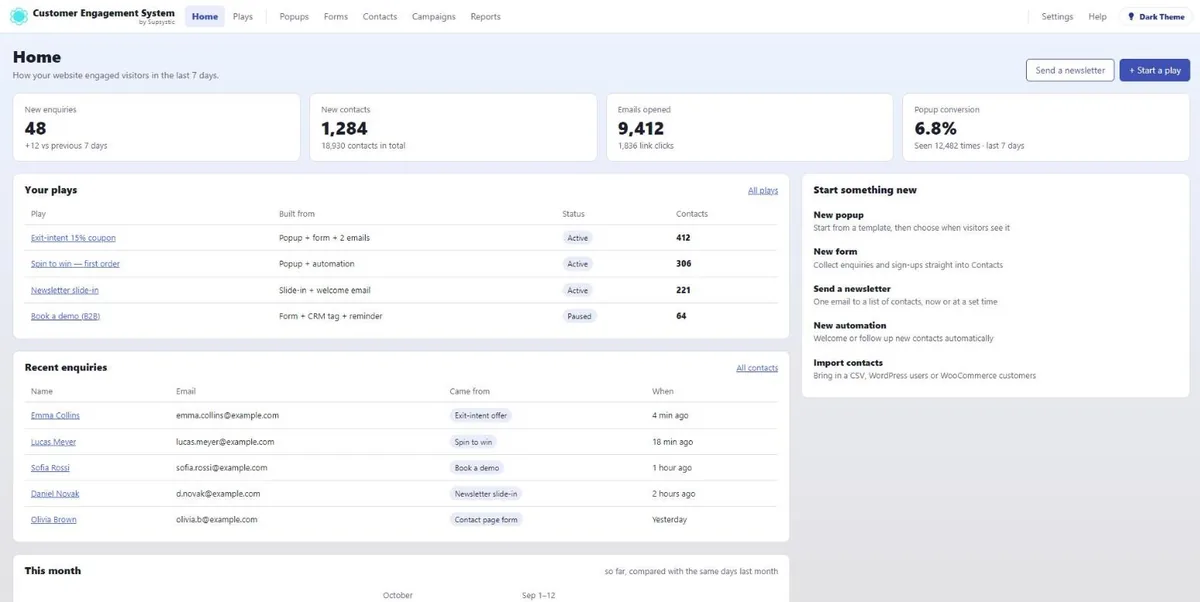
Home dashboard: enquiries, new contacts, opened emails and conversions at a glance.
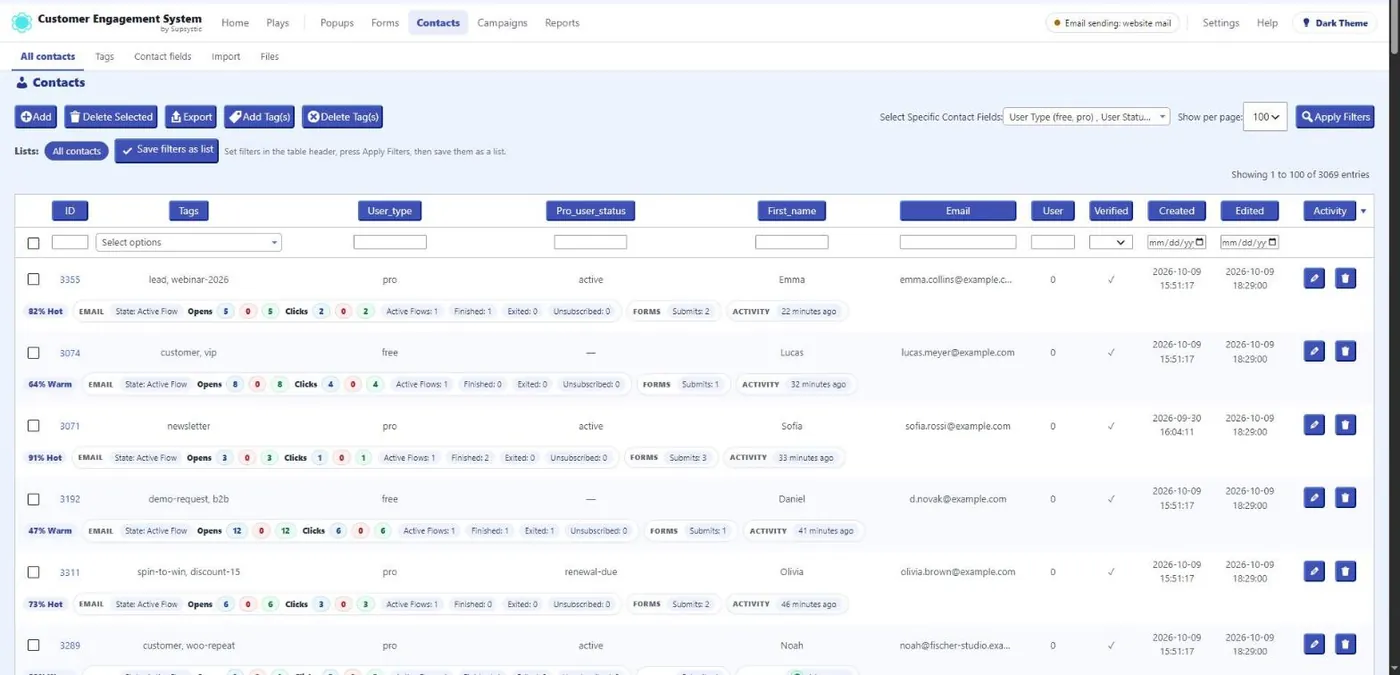
CRM contacts with tags, engagement score, opens, clicks and last activity.
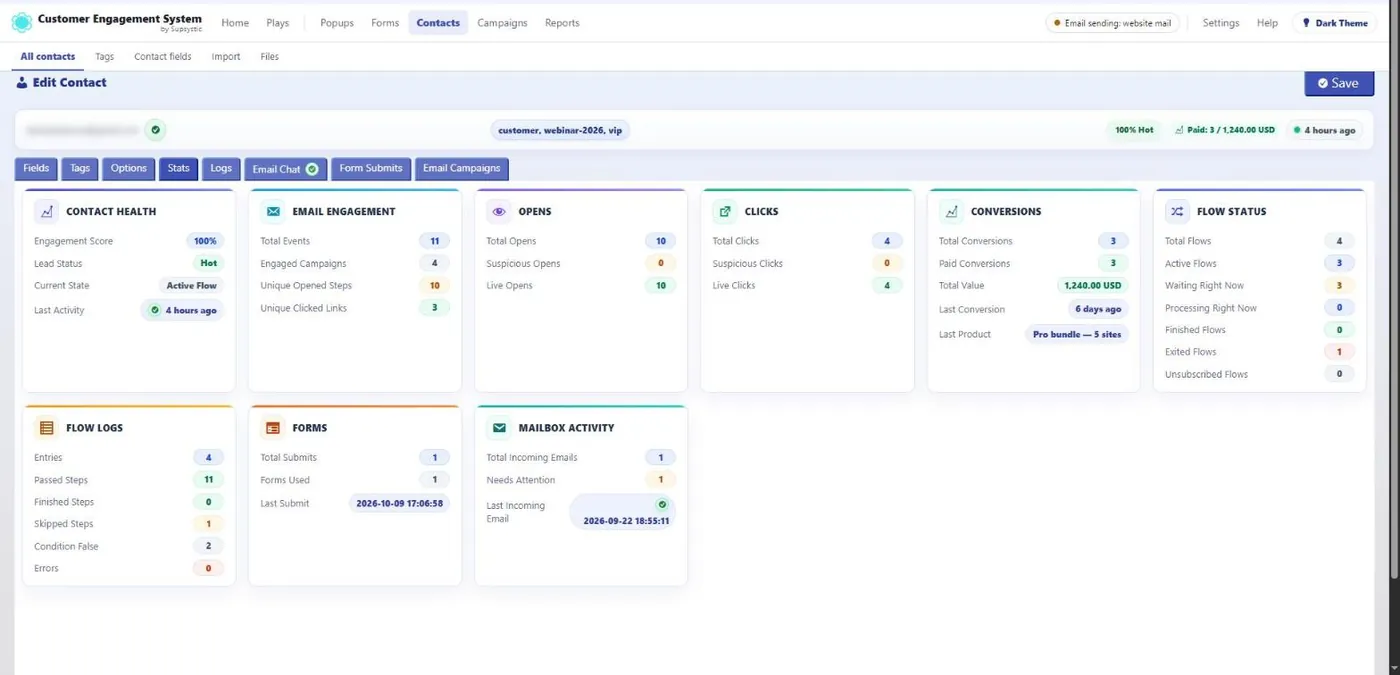
One contact, the whole story: score, emails, automations, form submits and orders.
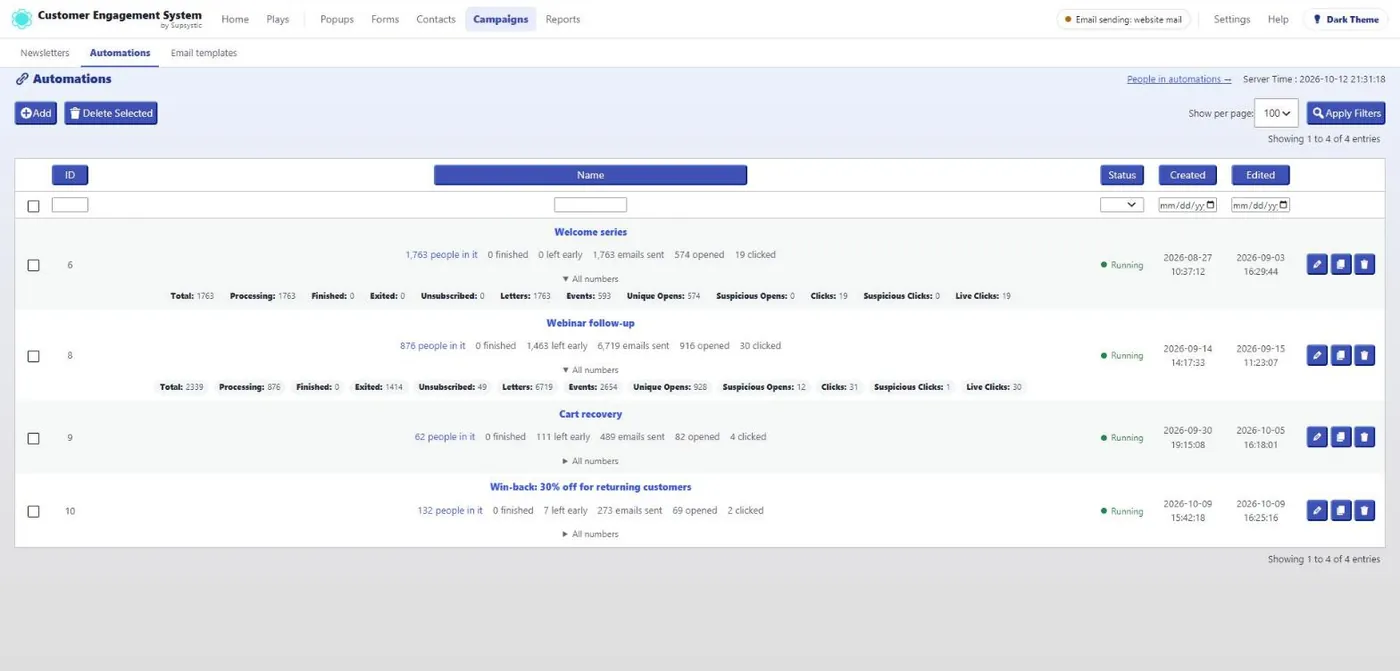
Email automations with the people in each chain, sends, opens and clicks.
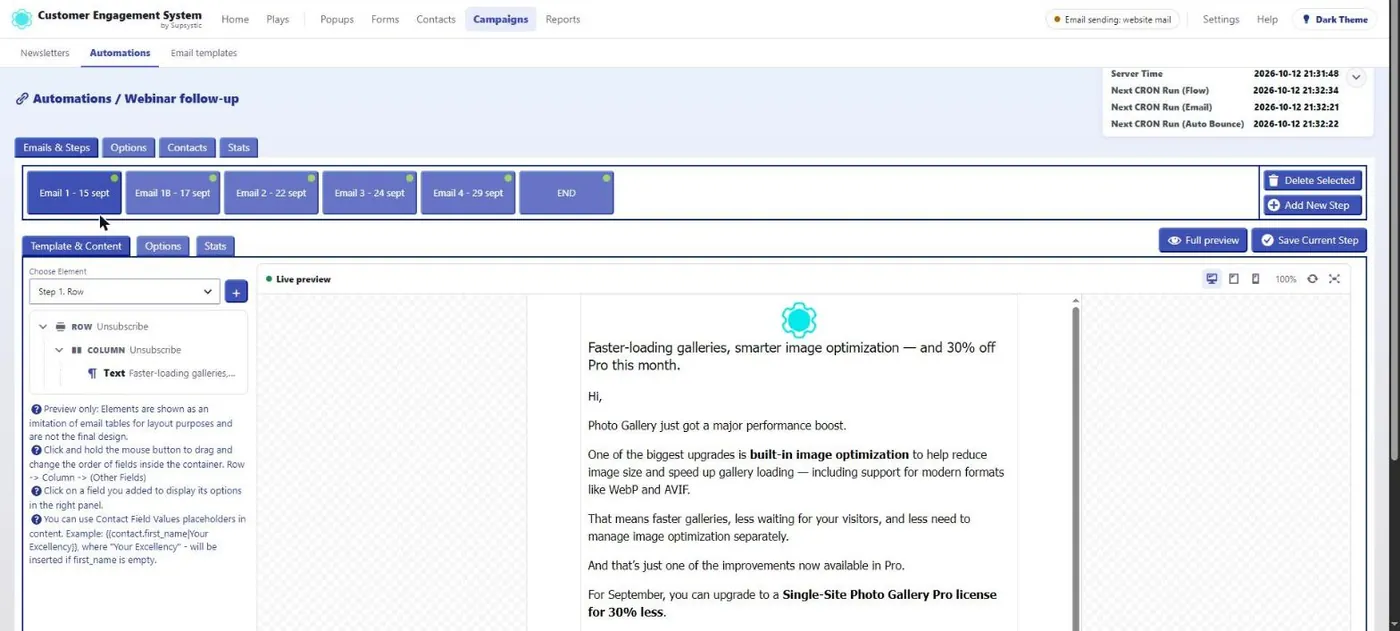
Visual email editor with live preview and placeholders.
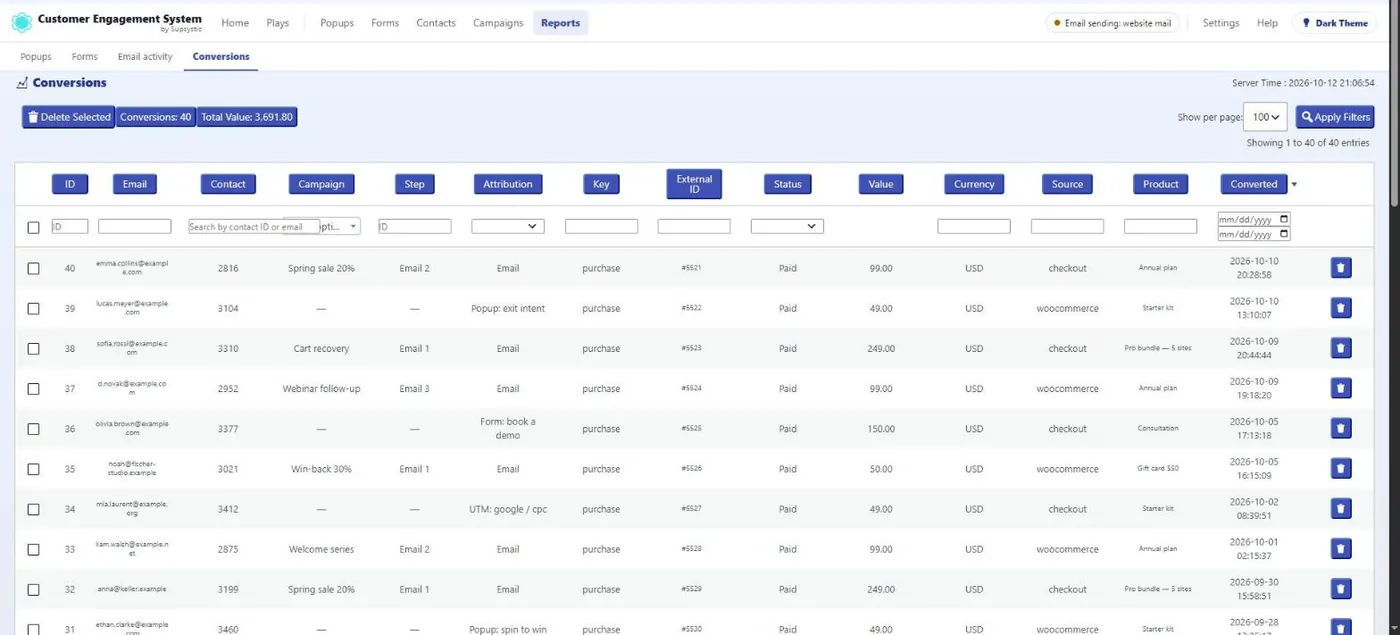
Revenue attribution: every sale tied to the campaign, step and source behind it.
Faq
It is a WordPress plugin with four connected modules – Popup, Forms, CRM and Email Campaigns & Automations – that share one contact base. It grew out of Popup by Supsystic.
No. Open Plays, choose the outcome you want and answer a few questions. CES builds the popup, form, contact tags and emails together. Every piece opens in its full editor when you want more control.
In your own WordPress database. Nothing is sent to Supsystic. You can export every contact to CSV at any time.
No. Popups, forms and contacts are unlimited, and contacts are never counted or charged.
Not for lists, newsletters or automations – CES handles those. You only need something that delivers the mail: PHP mail, your own SMTP server, or a direct connection to a provider such as Brevo, SendGrid, Mailgun or Amazon SES.
Yes. Customers and orders, including guest orders, are imported into the CRM with total spent and average order value, popups can appear after checkout, and automations can follow up on real orders.
Yes. Exit intent is one of the built-in triggers, and the template library includes spin-to-win wheels, scratch cards, mystery boxes and other gamified popups.
Yes. Every form can be embedded on any page or post with a block or shortcode, or placed inside a popup.
Popups are rendered only on the pages where their targeting rules match.
Yes. Popups and forms work with modern WordPress themes, and the shortcodes work in any page builder.
Please report security issues through the Patchstack Vulnerability Disclosure Program. The Patchstack team validates and triages each report and notifies us.
Reviews
Violate Plugin Policy.
By  Tim Codex (Tien Nguyen) on January 18, 2026
It always shows a pop up inside admin dashboard. Close button does not work. I am considering to report this plugin.
Does its job, RIP free version
By  SFAT LLC (sfatllc) on January 22, 2025
UX and UI are clunky since the plugin inception and can be overwhelming for casuals. Recent changes to Pro plan, that moved any gallery’s core functionality – which in my opinion is lightbox – to the paid plan basically killed its free version usefulness. Nonetheless, as a Pro product does its jobs, offers lifetime plan for decent money, which is very rare nowadays, has tons of options and effects. A lot can be achieved with it, without touching single line of CSS.
Critical error caused by this plugin
By  shahvatnak on October 15, 2024
Hello,
Please don’t get me wrong. I love your plugin . Unbelievable piece of art! second to none! but it turns my website down and and I’m getting critical error warning. Is there any bug or issue? Please fix it and I’ll update my rating back to 5 stars again.
Thank you for your hard work!
Update: Everything works fine now. Thank you!
Easy to create your Popup
By  miguel (miguelappstudio) on July 19, 2024
congratulations on your work!!
Personally, I finally found what I was looking for.
I liked it a lot.
It took me 5 minutes to create a Popup.
Thank you for letting us enjoy your creation.
Good luck with the sales!!
Convenient and simple
By  dimag4go on December 21, 2023
It took me a long time to choose my plugin.
This one is one of the most successful. The functionality I needed was in the free version – Christmas Countdown.
There was one problem with installation, but support helped quickly.
Not working anymore
By  ars111 on November 29, 2023
Plugin was working until 3 months ago when it stopped working. Authors seem not to care anymore. Not recommend it to anyone.
WORST PLUGIN EVER
By  hench1g on September 7, 2023
if u wanna frustrate every time u doing something – get this plugin. Not worth money and time, avoid at all cost. Unusable, unintuitiuve
Broken Plug In
By  montytx on August 4, 2023
Set it up, changed the default settings and it would not save anything.
Unreliable, breaks website
By  MeOnline (webber2012) on July 31, 2023
I have several websites that used this plugin, but it seems the latest version of this popup functionality is unreliable, changes of popups aren’t saved anymore and it even breaks entire websites. 🙁
todo ok
By  sisserv on March 24, 2023
muy buen plugin todo completo.
Changelog
2026
2.0.2 — October 22, 2026
- CES release with the latest Popup updates.
2.0.1 — October 22, 2026
- General code improvements and security hardening for Classic Popup by Supsystic. Thanks to Karthik Ramakrishnan (via WPScan) for Security Research.
2.0.0 — October 20, 2026
- Popup by Supsystic becomes the Customer Engagement System: Popup, Forms, CRM and Email Campaigns & Automations share one contact base
- New popup editor with live preview, click-to-select, inline text editing and one-click colour palettes
- 200+ templates for popups, forms and emails, including spin-to-win wheels, scratch cards and multi-step popups
- Form builder with conditional logic, double opt-in, spam protection and branded auto-replies
- WordPress CRM with tags, custom fields, saved lists, activity timeline, engagement score and CSV, WordPress users and WooCommerce import
- Email automations and newsletters with delays, sending hours, tag actions, open and click tracking and revenue attribution
- Plays: pick a goal and CES builds the popup, form, tags and emails
- Reports for popups, forms, email activity and conversions
1.13.3 — October 8, 2026
- Security fix: list table sorting parameters are now validated against a whitelist of columns
1.13.2 — September 29, 2026
- General security hardening and code improvements
1.13.1 — August 11, 2026
- General security hardening and code improvements
- Fixed a fatal error in the subscribe form’s reCaptcha rendering
- Added support for three new PRO CAPTCHA types on the subscribe form: reCaptcha v3, hCaptcha, and Cloudflare Turnstile – selectable alongside the existing reCaptcha v2
- Added new social sharing networks (Pinterest, LinkedIn, Reddit, WhatsApp, Telegram, Tumblr, VK) alongside Facebook and X, each with its own brand-color styling; existing popups migrate automatically
- Removed the discontinued Google+ share button (network shut down in 2019)
- Removed unused legacy reCaptcha v1 library
- Upgraded the bundled icon font to Font Awesome 6 (matching Gallery by Supsystic) across the whole plugin – admin and frontend
- Rebuilt the Social block: added Pinterest, LinkedIn, Reddit, WhatsApp, Telegram, Tumblr, VK, Viber and LiveJournal alongside Facebook and X, each rendered with its own brand icon and color; added box size, font size, transparency, border radius, and brand/black/white/custom color style controls (ported from Gallery Pro’s social sharing settings)
- Existing popups migrate automatically to the new network picker; the retired Google+ button no longer renders
- Fixed every remaining admin icon that went blank after the Font Awesome 6 upgrade (License tab, Delete/Clone buttons, Design/Texts/Social tabs, and others found in a full plugin-wide sweep) – old v4 icon names replaced with their v6 equivalents
- Fixed the popup preview window silently dropping any
<link>stylesheet tag (including Font Awesome), so icon-based content was invisible in preview even though it rendered fine on the live page
1.13.0 — July 31, 2026
- Added an extra safeguard so that user roles assigned through the subscription form can never be escalated beyond what you explicitly allow in the popup editor
- Completed a full PHP compatibility pass across the plugin core, the bundled templating engine, and the libraries
- Fixed an edge case where the subscription module could stay inactive after certain update paths, which could interrupt the popup editor or the subscribe/login forms
- Removed an outdated cross-promotion notice from the Social tab
1.12.0 — July 29, 2026
- Security patch and fixes hardened the subscription confirmation page
- Minor fixes
1.11.2 — July 28, 2026
- Minor fixes
1.11.1 — May 30, 2026
- Confirmed compatibility with WordPress 7.0
1.11.0 — March 30, 2026
- Fixed several popup design and overlay rendering issues
- Fixed the snow effect animation
- Removed leftover debug console output
- Fixed a conflict between popups and contact forms
1.10.38 — March 11, 2026
- Fixed the popup close button
- Added a new overview banner
1.10.37 — March 11, 2026
- Maintenance and compatibility update, tested with WordPress 6.9.3 and PHP 8.4
- General stability improvements
1.10.36 — January 19, 2026
- Maintenance and compatibility update, tested with WordPress 6.9 and PHP 8.4
- Resolved a caching-related display issue
- Additional security hardening and stability fixes
2025
- Delivered ongoing compatibility updates for WordPress 6.8.x
- Fixed a translation/textdomain loading issue and a file-metadata (Zone.Identifier) edge case
- General UI polish and stability fixes across the plugin
2024
- Added security nonce verification across admin actions
- Improved the ActiveCampaign subscription form with an expertise-level field option
- Additional security fixes
2023
- Completed a full compatibility pass for PHP 8.2 and WordPress 6.2
- Multiple rounds of hardening in response to the WordPress.org security scanner (WPScan), including nonce verification and safer string handling
- Fixed a popup-saving issue and a language-domain loading bug
- Retired the legacy “Neo” template in favor of better-supported designs
2022
- Added support for WordPress 6.0 and PHP 8.1
- Fixed a Media Library integration issue and several HTML-rendering edge cases
- Addressed feedback from the WordPress.org plugin review team
2021
- Added WordPress 5.7–5.8 compatibility
- Improved the reliability of plugin activation and the installer’s data handling
- UI refinements to checkboxes, radio buttons, and admin notices
2020
- Added WordPress 5.5 compatibility
- Fixed the MailPoet 3 integration and a mobile display issue
- Improved the GetResponse integration and simplified the email-sending code