

Icegram Collect – Easy Contact Form, Subscription Form & Lead Collection Plugin for WordPress
Description
Create high-converting contact forms, newsletter subscription forms, and custom lead capture forms in 3 simple steps — with automatic WordPress database storage, CSV export, and built-in ESP/Webhook sync included free.
Icegram Collect is the lightweight, no-bloat WordPress form and lead management plugin built for site owners who want forms that work out of the box without wrestling with complex drag-and-drop canvas settings.
Unlike basic contact form plugins that only send an email (meaning if your server mail fails, your lead is lost forever) or heavy form builders that lock database entry storage, Mailchimp, HubSpot, and Webhooks behind $100+/year paywalls, Icegram Collect stores every single submission safely in your WordPress database and syncs your leads automatically.
- Explore Features: Icegram Collect Official Page
- Compare Plans: Icegram Collect Pricing (Free & Premium)
- Need Help? Contact Icegram Support
Why Choose Icegram Collect Over Typical Contact Form Plugins?
- Never Lose a Lead Again (Free Local Database Storage): Every form submission is automatically saved to your WordPress database alongside instant email notifications — no extra entry-storage add-on required.
- 3-Step Ready-Made Form Setup: Skip complex 30-panel builders. Pick a form type (Subscription Form, Contact Form, or Custom Form), choose a clean layout style (or inherit your WordPress theme’s styling automatically), and publish.
- Unlimited Forms & Unlimited Lead Storage: Create as many contact forms, opt-in boxes, and inquiry forms as you need with zero caps on stored submissions.
- Free ESP, CRM & Webhook Integrations: Sync captured leads directly with Icegram Express, Mailchimp, HubSpot, Campaign Monitor, MailPoet, Zapier, and IFTTT in the free version.
- Lightweight & Broadly Compatible: Runs smoothly on WordPress 4.0+ and PHP 5.5 through PHP 8.3+ without slowing down your frontend pages or breaking older hosting environments.
Everything You Get in Icegram Collect
1. Ready-Made Contact, Subscription & Custom Forms
* Launch Subscription Forms, Contact Forms, or Custom HTML Forms in seconds.
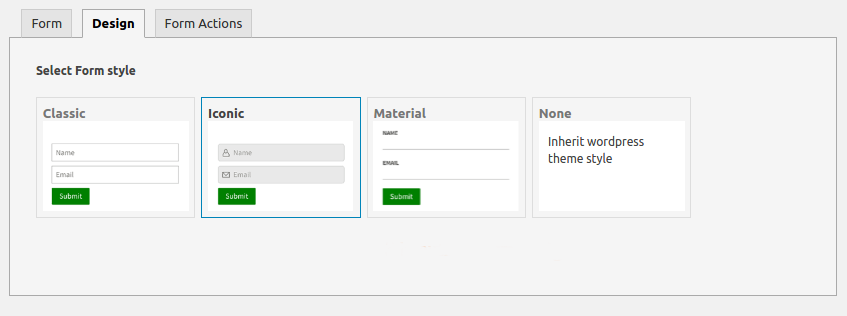
* Choose from clean, mobile-responsive form designs (including compact layouts) or select Inherit WordPress Theme Style so forms blend seamlessly into any theme.
* Add custom CSS directly inside your form settings when you want bespoke styling.
2. Built-In Lead Management Dashboard & CSV Export
* View, search (by name or email), filter (by month/year or form), and sort all captured leads from a single organized dashboard inside WordPress.
* View full lead details including Name, Email, Subject, and Message columns.
* Export your captured leads to CSV anytime for follow-up or offline reporting.
3. Direct Email Marketing, CRM & Webhook Automation
Connect your forms to your favorite marketing tools without writing code:
* Icegram Express (Email Subscribers & Newsletters): Automatically add leads to selected subscriber lists/groups.
* Icegram Engage: Display any Icegram Collect form inside popups, floating hello bars, slide-ins, or welcome mats.
* Mailchimp: Sync subscribers directly to your Mailchimp audiences with one-click API key verification.
* HubSpot: Push captured contacts straight into your HubSpot CRM.
* Campaign Monitor & MailPoet: Add form leads directly to your mailing lists.
* Webhooks, Zapier & IFTTT: Relay form submission data to 2,000+ external apps via Webhooks.
* Icegram Collect Premium Integrations: Unlock native integrations for ActiveCampaign [Premium], AWeber [Premium], and HubSpot Pro [Premium] with Icegram Collect Premium.
4. Smart Post-Submission Actions & Multi-Admin Alerts
* Display a customized Thank-You Message on submission or Redirect Leads to any custom thank-you URL or lead magnet download page.
* Send instant lead notification emails to one or multiple admin email addresses (comma-separated).
5. Built-In Spam Protection & GDPR Compliance
* CAPTCHA Spam Protection: Block spam bots and fake submissions effortlessly using the built-in CAPTCHA system — no extra anti-spam plugin required.
* GDPR Consent Field: Add a customizable GDPR consent checkbox (with HTML link support for your Privacy Policy) to any form.
* 100% Data Ownership: Open-source and self-hosted — your leads are stored on your own WordPress server, never on our servers.
Embed Your Forms Anywhere in WordPress
- Shortcodes: Drop
[rainmaker_form id="..."]into any post, page, Gutenberg Shortcode block, Elementor widget, or page builder layout. - Sidebar & Footer Widgets: Add forms to any widget area using the dedicated Icegram Collect widget or a standard Text widget.
- Popups, Slide-Ins & Welcome Bars: Pair seamlessly with Icegram Engage to trigger high-converting opt-in forms on exit-intent, scroll, or time delay.
What WordPress Site Owners Say About Icegram Collect
“One of the best form builders I could find. Others are complex and require money for even basic features. Icegram Collect gives a lot for free and is easy to use.” – Aswin
“Works perfect with Icegram Engage and increases your subscribers list on Mailchimp and Icegram Express email subscribers and newsletter plugin. Great support! Must try it!” – Lombra
“Great plugins with absolutely amazing tech support (Icegram Collect & Icegram Engage in my case)… As a developer who handles many clients it makes my life easier. A great experience all around.” – ttrusty
“Best tool for collecting emails on your site!” – wishmasta
Other Popular Plugins from the Icegram Team
- Email Subscribers & Newsletters (Icegram Express) – Complete self-hosted email marketing, newsletters, post notifications, and WooCommerce automation.
- Icegram Engage – High-converting popups, welcome bars, slide-ins, opt-ins, and lead generation campaigns.
- Icegram Mailer – Reliable email deliverability, no-code SMTP replacement, and email logs for WordPress.
- Temporary Login Without Password – Create self-expiring admin login links for developers and support teams.
- Duplicate Pages and Posts – One-click clone WordPress posts and pages into drafts.
- Icegram Cookie Manager – Fast, free GDPR and CCPA cookie consent banner for WordPress.
- Smart Manager – Bulk-edit WooCommerce products, orders, coupons, and WordPress posts in an Excel-like spreadsheet.
Installation
Option 1: Install Directly from Your WordPress Dashboard (Recommended)
- Log in to your WordPress Admin Dashboard and navigate to Plugins > Add New.
- Search for Icegram Collect.
- Click Install Now next to Icegram Collect – Easy Contact Form, Subscription Form & Lead Collection Plugin for WordPress, then click Activate.
- Click Icegram Collect in your WordPress admin sidebar to create your first Contact or Subscription form in 3 steps.
Option 2: Manual ZIP Upload
- Download the
icegram-rainmaker.ziparchive from the WordPress.org plugin page. - In your WordPress Admin Dashboard, go to Plugins > Add New > Upload Plugin, select
icegram-rainmaker.zip, click Install Now, and click Activate Plugin.
Screenshots

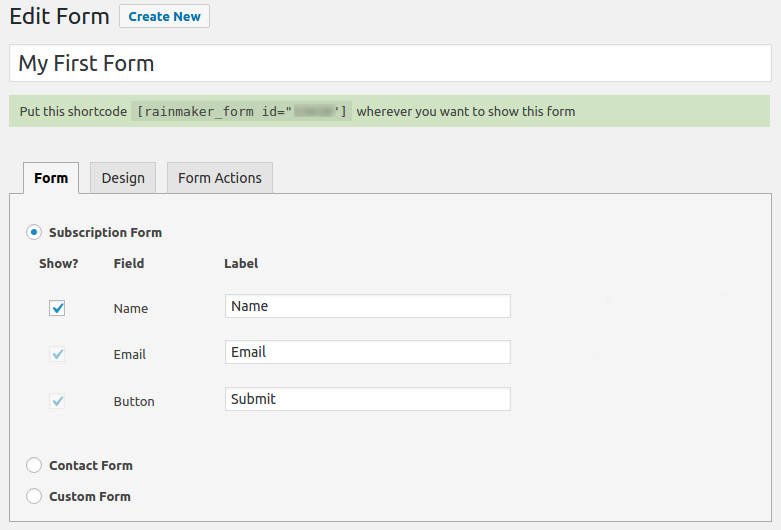
Select a Form Type – Create a Subscription Form, Contact Form, or Custom Form in seconds.
Pick a Design Template – Choose from clean, mobile-responsive form layouts or inherit your WordPress theme style.
Configure Form Actions – Save leads to the database, sync with ESPs/CRMs, send multi-admin email alerts, or trigger webhooks.
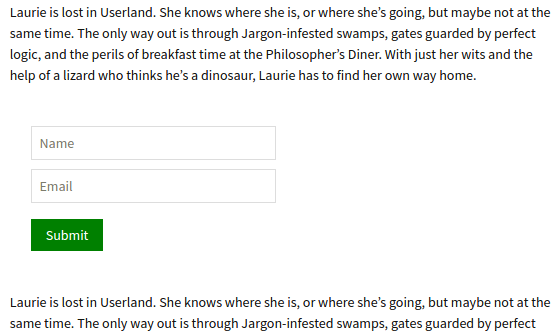
Embed Anywhere – Copy the form shortcode to place forms on any page, post, or builder layout.
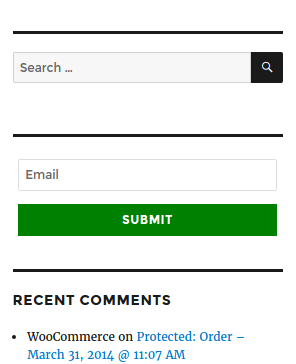
Sidebar & Footer Widgets – Embed forms inside WordPress text or sidebar widgets.
Popup Integration – Display your Icegram Collect form inside an Icegram Engage popup or welcome bar.
Centralized Leads Dashboard – Search, filter, sort, and manage all captured leads inside WordPress.



Faq
Does Icegram Collect save form submissions to my WordPress database for free?
Yes. Every form submission is automatically stored in your WordPress database under Icegram Collect > Leads, even in the free version. Even if your web host’s outgoing email fails, you will never lose a lead.
Are there any limits on the number of forms or leads I can collect?
No. You can create unlimited forms and store unlimited leads in your WordPress database with no monthly caps or paid entry unlocks.
How does Icegram Collect compare to Contact Form 7 or WPForms Lite?
Contact Form 7 does not store form submissions in the database by default (requiring a separate plugin) and recently restricted older PHP environments. WPForms Lite locks database entry viewing, CSV exports, Mailchimp, HubSpot, and Webhooks behind paid Pro tiers. Icegram Collect gives you a simple 3-step form creator with built-in database lead storage, CSV export, Mailchimp, HubSpot, Campaign Monitor, MailPoet, Icegram Express, and Webhooks included free.
Is Icegram Collect compatible with Icegram Express (Email Subscribers)?
Yes. Icegram Collect integrates natively with Icegram Express. Under the Form Actions tab, simply select Icegram Express and choose which subscriber list/group your new leads should be added to automatically.
How do I send lead notification emails to multiple email addresses?
In your form’s Form Actions tab, enter multiple recipient email addresses separated by a comma (,) in the notification email field. Every time a new lead is submitted, all listed addresses will receive an instant email alert.
How do I create a Custom Form that syncs with Icegram Express or Mailchimp?
When creating a Custom Form, include standard input fields for name (name="name") and email (name="email"). Icegram Collect maps those fields automatically to your local Leads database and any connected mailing list (such as Icegram Express or Mailchimp) selected under Form Actions.
Can I display an Icegram Collect form inside a popup, slide-in, or welcome bar?
Yes. When you use Icegram Engage, you can select any Icegram Collect form directly inside your popup, header bar, or slide-in campaign — or paste the Icegram Collect form shortcode into any popup plugin.
How do I connect my forms to Zapier, IFTTT, or external apps?
In the Form Actions tab of your form, enable the Trigger a Webhook option and paste your Webhook URL from Zapier, IFTTT, Make (Integromat), or your custom endpoint. Icegram Collect will automatically POST the submitted lead data on every submission.
Is Icegram Collect GDPR compliant?
Yes. All leads are stored locally on your own WordPress server (never on Icegram servers unless you explicitly connect a third-party integration), and you can enable a customizable GDPR Consent Checkbox (with HTML links to your Privacy Policy) on any form.
How do I redirect visitors to a Thank-You page or download link after submitting a form?
Under the Form Actions tab, enable Redirect to URL and enter the destination URL of your thank-you page or lead magnet download.
Will Icegram Collect match my WordPress theme’s fonts and colors?
Yes. In the Design step of your form, you can choose Inherit WordPress Theme Style so the form automatically adopts your active theme’s typography and button styling, or choose one of the built-in responsive form templates.
Reviews
Excellent support follow up
By  darlademorrow on November 7, 2023
Probably the best support follow up I’ve had all year. They proactively stuck with me over many weeks to get an issue resolved.
Best tool
By  wishmasta on May 21, 2023
Best tool for collecting emails on your site!
Custom Form
By  Rahul Shinde (rahul26) on March 16, 2021
Amazing support! Great products.
By  ttrusty on August 22, 2024
Great plugins with absolutely amazing tech support. (Icegram Collect & Icegram Engage in my case.) I found the support staff helpful, knowledgable, professional, friendly and most importantly—accurate. Not only did they acknowledge and understand my concerns, but they went out of their way to ensure my needs were met. You don’t always find high quality customer service and support this good. As a developer who handles many clients it makes my life easier. A great experience all around. Thanks Icegram team.
Thank you for this plughin
By  a23zz589 on January 25, 2021
Best Plugin
By  victorianalimited on December 15, 2020
Does what it should
By  Katarzyna (zwierze) on November 18, 2020
Nice to use, simple WP email form
By  octopihost on November 9, 2020
Very useful
By  capuchin on November 6, 2020
Excellent
By  llames on March 12, 2019
Changelog
1.3.21
- Update: Tested up to WordPress 7.1.3
- Fix: Deprecated warnings with PHP 8.2+
- Fix: Mailchimp subscriber data sync issue
1.3.20
- Update: UI/UX improvements
1.3.19
- Update: WordPress 6.8 compatibility check
- Fix: Added missing authorization and nonce checks [Thanks to the Patchstack team]
- Fix: Fixed issue where the MailChimp “Verify API Key” button didn’t work for existing forms
1.3.18
- Fix: HTML tags getting removed in GDPR field
1.3.17
- Update: WordPress 6.6 compatibility check
1.3.16
- Update: UI/UX improvements
1.3.15
- Update: WordPress 6.6 compatibility check
- Fix: Missing authorization and nonce checks when connecting to HubSpot [Thanks to Patchstack team]
1.3.14
- Fix: PHP Notice: Undefined index: HTTP_ORIGIN
1.3.13
- Fix: Small bug fix
1.3.12
- Update: UI/UX improvements
1.3.11
- Update: UI/UX improvements
- Update: WordPress 6.2.2 compatibility check
1.3.10
- Update: WordPress 6.1.2 compatibility check
- Fix: Database error for filtering leads based on Month/Year