

Hide Page And Post Title
Description
Hide Page And Post Title allows you to hide the title of individual pages, posts and public custom post types.
Simply enable the “Hide the title” option when editing the content. The setting is applied individually, so you can choose which pages, posts or custom post types should display their title.
Key Features
- Hide titles on individual pages.
- Hide titles on individual posts.
- Hide titles on public custom post types (CPT).
- Supports WordPress block themes and classic themes.
Enjoying the Plugin?
Enjoying the plugin? Please consider giving a review. Your feedback helps us improve the plugin and helps other WordPress users discover it.
Installation
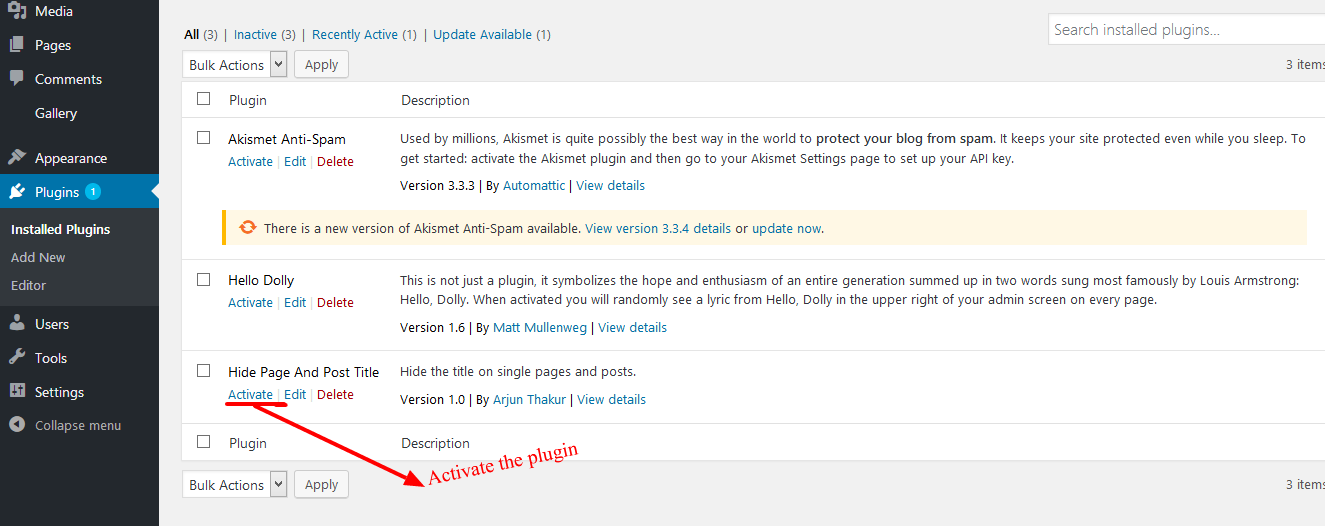
- Activate the plugin through the Plugins menu in WordPress.
- Edit an existing or new page, post or supported custom post type.
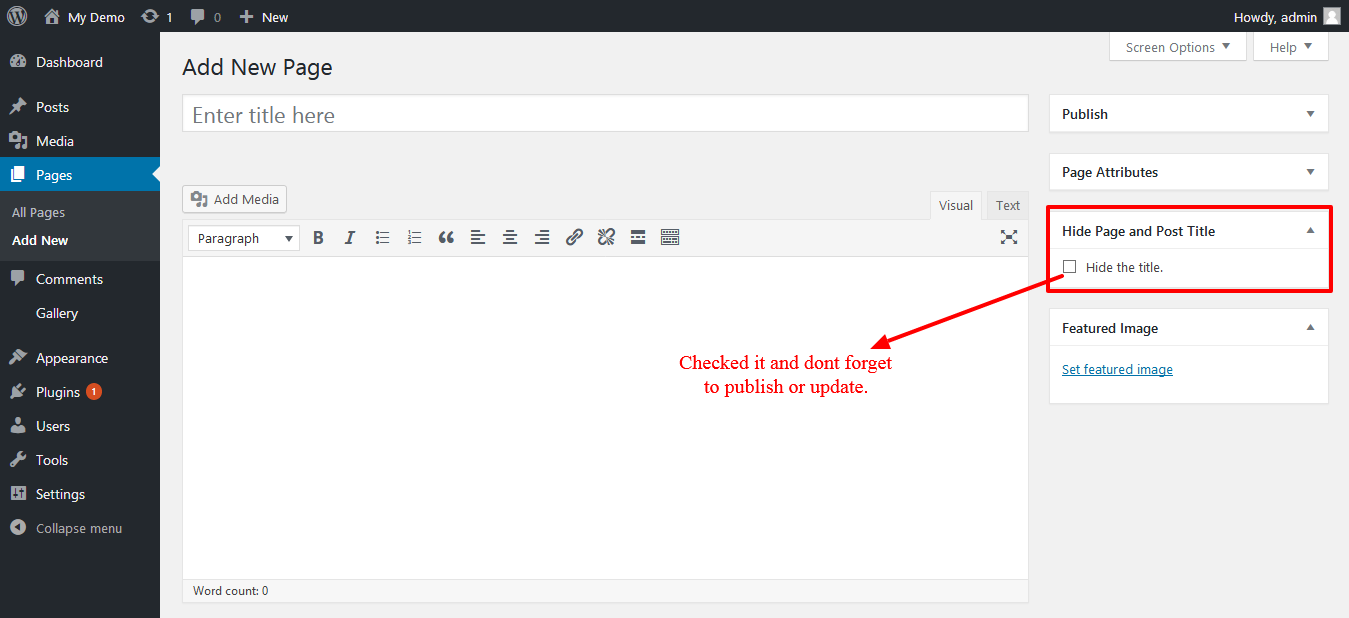
- Enable “Hide the title”.
- Update or publish the content.
- View the page or post on the frontend.
To show the title again, edit the content, clear “Hide the title”, and update it.
Screenshots

Activate the Hide Page And Post Title plugin from the WordPress Plugins screen.
Enable “Hide the title” when editing a page or post.
Faq
Yes. The plugin supports WordPress block themes as well as classic themes.
The plugin only hides the visible title on the page. It does not delete or change the title stored for the page or post, and it does not intentionally modify the document title or SEO metadata.
If the hidden title is the only H1 on your page, consider adding another appropriate heading to your content when needed.
- Edit the page or post.
- Enable “Hide the title”.
- Click Update or Publish.
- Visit the page or post to see the result.
Yes. The plugin supports public custom post types (CPT).
Edit the page, post or custom post type, uncheck “Hide the title”, and update the content.
Go back to the specific page, post or custom post type where you want to hide the title and confirm that “Hide the title” is checked. Then click Update or Publish and check the page again.
The title-hiding option is set individually for each page, post or custom post type.
Deactivating the plugin does not remove your saved title-hiding settings. If you activate the plugin again later, your previous settings will still be available.
When the plugin is deleted from WordPress, its saved title-hiding settings are removed from the database. Your page, post, and custom post type titles themselves are not deleted.
Reviews
It works!!
By  climatik on December 15, 2023
Thanks!!
Nice and simple!
By  postmanpat1066 on August 31, 2023
Nice! Simple and does just what it says, no muss, no fuss. Thank you!!
Ne fonctionne pas sur toutes les pages
By  lolo974 on August 18, 2023
Comme d’autres l’ont dit, cela ne fonctionne pas sur toutes les pages ou articles, alors que j’ai un vieux plugin “disable title” non mis à jour depuis plus de 9 ans qui fonctionne bien et a plus d’option. Ma version WordPress est 4.9.23 avec le thème Fanzone.
Keeps not working
By  frazeedavid on July 8, 2023
It works sometimes. Then when I make a page edit, the title displays again. I have to click off, save. Then click on and save again. Every time I make an edit to a page. Doesn’t work.
Doesn't work
By  ted0815 on June 16, 2023
There is no visible funktion. I set the flag, but Title is still on the page…
No funciona
By  otul on May 29, 2023
El titulo sigue visible, no funciona
Inefficient plugin
By  jan.mazanek on February 23, 2023
This plugin doesn’t remove title at PHP level from HTML. It hides via JQuery. It is even less efficient than to add CSS code to certain pages.
Needs Update
By  mathias2010 on January 25, 2023
Too bad – plugin does not work anymore. Please update.
The plugin didn’t work
By  racalazic on November 25, 2022
Causes top of page to be hidden
By  amdphreak on August 25, 2022
Changelog
1.6.3
- Fixed a JavaScript encoding issue that could prevent title hiding in some browsers.
- Improved the safe transfer of the title and selector values from PHP to JavaScript.
- Preserved existing security protections for embedded title and selector data.
1.6.2
- Updated plugin documentation and FAQs.
- Added screenshots to the plugin documentation.
- Improved plugin listing information and search relevance.
1.6.1
- Improved security and protection against direct access.
- Improved output escaping and validation.
- Raised the minimum supported WordPress version to 4.1 to support current WordPress functionality and security standards.
- Improved compatibility with current WordPress standards.
1.6.0
- Added support for WordPress block themes.
- Added support for the WordPress Post Title block.
- Improved compatibility with classic themes and different title structures.
- Improved title hiding without modifying secondary uses of the post title, such as breadcrumbs.
- Removed the plugin’s dependency on jQuery for its own title-hiding implementation.
- Improved security and validation when saving the title-hiding setting.
- Improved compatibility with newer PHP and WordPress versions.
- Preserved existing title-hiding settings when upgrading from earlier versions.
- Updated plugin documentation and FAQs.
1.5.8
- Previous release.