
Gutenslider — Slider Block for the Block Editor
Description
Gutenslider adds a slider block to the block editor. Each slide has a background (image, video, color or gradient) and holds any blocks you like on top: headings, paragraphs, buttons, columns. You build and style the slider where you write your content, and the editor shows it the way visitors will see it.
How to use it
- In the block editor, add a Gutenslider block.
- Pick images or videos from the Media Library. Each one becomes a slide.
- Select a slide and add blocks on top of it, or keep one set of content fixed above all slides.
- Choose the transition, arrows, dots, height and autoplay in the block settings, per device (desktop, tablet, mobile).
- Publish.
Features
- Unlimited slides with an image, a video from the Media Library or from a link, a color or a gradient as background, a focal point for each image and video, and a color or gradient overlay.
- Video sliders from links: paste YouTube video or playlist links, or links to video files (.mp4, .webm, .mov, .ogv), and every video becomes a slide. For playlists (the newest 15 videos, from the playlist’s feed): how many, in which order, with or without YouTube Shorts. The slide on screen plays (muted, or with sound after a click), the others pause and show their thumbnail; each slide keeps its video’s shape (16:9, or upright for Shorts). Works with several slides per view and centered slides.
- Videos play when their slide shows (a slider setting, and per slide), the slider’s autoplay waits for a playing video, and the videos of a slider share their sound: mute or turn up one, and the others follow.
- On small screens the arrows and dots fade while a video plays, so they don’t cover the player’s controls, and come back on any touch, pointer movement or keyboard focus.
- Any blocks on top of a slide.
- Two content modes: content per slide, or the same content on all slides while the backgrounds change.
- Transitions: slide, fade and flip, with transition time and time per slide.
- Up to eight slides per view (or automatic width), slides per step, space between slides, loop, centered slides, random order, autoplay with pause on hover.
- Arrows in eleven styles or as text (“Previous”, “Next” in the site’s font), and dots, with size and colors; on or off per device.
- Arrow positions (sides, next to the blocks below or above the image, top and bottom, corners), offsets, spacing and blend mode; dot positions (bottom, top, left, right) and an offset.
- Settings per device (desktop, tablet, mobile): slides per view, height, arrows, dots and visibility.
- Slider height in px or vh, height that grows with the content, wide and full alignment, and a full-screen mode.
- Content position (top, center, bottom, left, right), and the slide’s blocks on the image, below it or above it.
- Shape dividers at the top and bottom, in fifteen shapes, with color, height, flip and invert.
- Linked slides, keyboard navigation and hash navigation (a link can open a specific slide).
- Image slides can link to their image file, for lightbox plugins that open linked images (one gallery per slider with Lightbox with PhotoSwipe).
- A lightbox for the slide images and videos, and for Image and Video blocks on the slides: it opens out of the image (or fades in), pages with arrows, keyboard and swipe, shows a counter, thumbnails and a heading and text from the image’s title, caption or description, and comes in light, dark or your own colors.
- Blend modes and opacity for the content on the slides.
- Automatic captions from the Media Library; slides can be hidden.
- A Preview button in the editor that runs the slider as visitors see it.
Speed and accessibility
The front end uses the Interactivity API. The slider’s layout is rendered on the server, so the page does not shift when the script starts. Swiper and the modules a slider needs load only when the slider comes near the viewport. Images get responsive srcset and sizes; the first visible image loads with high priority, the others lazily. Arrows and dots are buttons with labels, slides are announced as slides, and autoplay respects “reduced motion”.
Gutenslider Pro
Pro adds more ways to design the same block: see what Pro adds
- 3D transitions: coverflow, cards and cube.
- Six shaped effects (morph, parallax, tilt, fan, stack, reveal) and twenty WebGL transitions (liquid, ripple, swirl, fluted glass and more).
- Scroll parallax for the backgrounds.
- Arrows that follow the pointer.
- Pagination as a few dots at a time, numbers or a progress bar, in the corners too; animated dot styles (pill, lines with progress).
- A lightbox zoom button: a full view where the photo fills the window, then zooms in where you click.
- YouTube playlists up to 100 videos (from the playlist page), and Shorts recognized from any link.
- More video sources for “Add videos”: YouTube channels (@handle, up to 100 of the latest uploads), Vimeo (videos, unlisted ones too, users, channels, showcases), Dailymotion (videos, users, playlists) and TikTok (video links, several at once; TikTok profiles cannot be read), with their players.
Source code
The JavaScript and CSS in build/ are compiled from the human-readable sources in src/, which ship with the plugin, together with the build setup (package.json, package-lock.json, webpack.config.js). To rebuild them: npm ci && npm run build (uses @wordpress/scripts).
Open source libraries
- Swiper 14.3.0 (MIT) for the slide transitions, bundled from npm; source: github.com/nolimits4web/swiper.
- Freemius SDK (GPL) for Pro licenses.
External services
The free plugin makes no requests to other servers on its own: no tracking, no remote fonts or scripts, and nothing is sent anywhere from your site. Slide images and videos come from your own Media Library; only video slides from links, which you add yourself, contact the video’s platform (see below). On the page, a platform’s player loads only when its slide is shown or its play button is clicked; from then on that platform receives the visitor’s IP address and browser data, as with any embedded video. Pages without such slides contact nothing.
Freemius (licensing for Gutenslider Pro). Gutenslider includes the Freemius SDK in anonymous mode: there is no opt-in screen, and the free plugin sends nothing to Freemius. Only if you buy Gutenslider Pro or activate a Pro license, your license key, site address, and the WordPress, PHP and plugin versions are sent to Freemius to check the license and deliver updates. Terms, Privacy
YouTube (only for YouTube slides). When you add YouTube links in the editor, your site asks YouTube for the video titles and sizes (youtube.com/oembed), reads the newest videos of a playlist from its public feed (youtube.com/feeds/videos.xml), and saves the video thumbnails (i.ytimg.com) to your Media Library. With Pro, playlists and channels are read from their pages (youtube.com/playlist, the channel page), and youtube.com/shorts/… tells which videos are Shorts. On the page, a YouTube slide without a saved thumbnail shows YouTube’s thumbnail from i.ytimg.com, and the player is loaded from youtube-nocookie.com when the slide is shown or played. Terms, Privacy
Vimeo (only for Vimeo slides). When you add Vimeo links in the editor (Pro), your site asks Vimeo for the video titles, sizes and thumbnails (vimeo.com/api/oembed.json), reads the video list of a user, channel or showcase from its public feed (vimeo.com/…/rss), and saves the thumbnails (i.vimeocdn.com) to your Media Library. On the page, the Vimeo player is loaded from player.vimeo.com, with “do not track” (dnt=1). Terms, Privacy
Dailymotion (only for Dailymotion slides). When you add Dailymotion links in the editor (Pro), your site asks Dailymotion’s public API (api.dailymotion.com) for the videos’ titles, sizes and thumbnails, and the video list of a user or playlist, and saves the thumbnails (dmcdn.net) to your Media Library. On the page, the Dailymotion player is loaded from geo.dailymotion.com. Terms, Privacy
TikTok (only for TikTok slides). When you add TikTok video links in the editor (Pro), your site asks TikTok for the video’s title and thumbnail (tiktok.com/oembed) and saves the thumbnail (tiktokcdn.com) to your Media Library. On the page, TikTok’s embed player is loaded from tiktok.com/player. Terms, Privacy
Video files from links. A slide can play a video file from another site; your site checks the link’s type once (a HEAD request) when you add it, and visitors’ browsers load the file from that site.
Installation
- In the admin, go to Plugins Add New, search for “Gutenslider”, then click Install and Activate.
- Open a post or page in the block editor and add a Gutenslider block.
- Pick images or videos for the slides, then add blocks on top.
To install by hand, upload the gutenslider folder to /wp-content/plugins/ and activate the plugin on the Plugins screen.
Screenshots

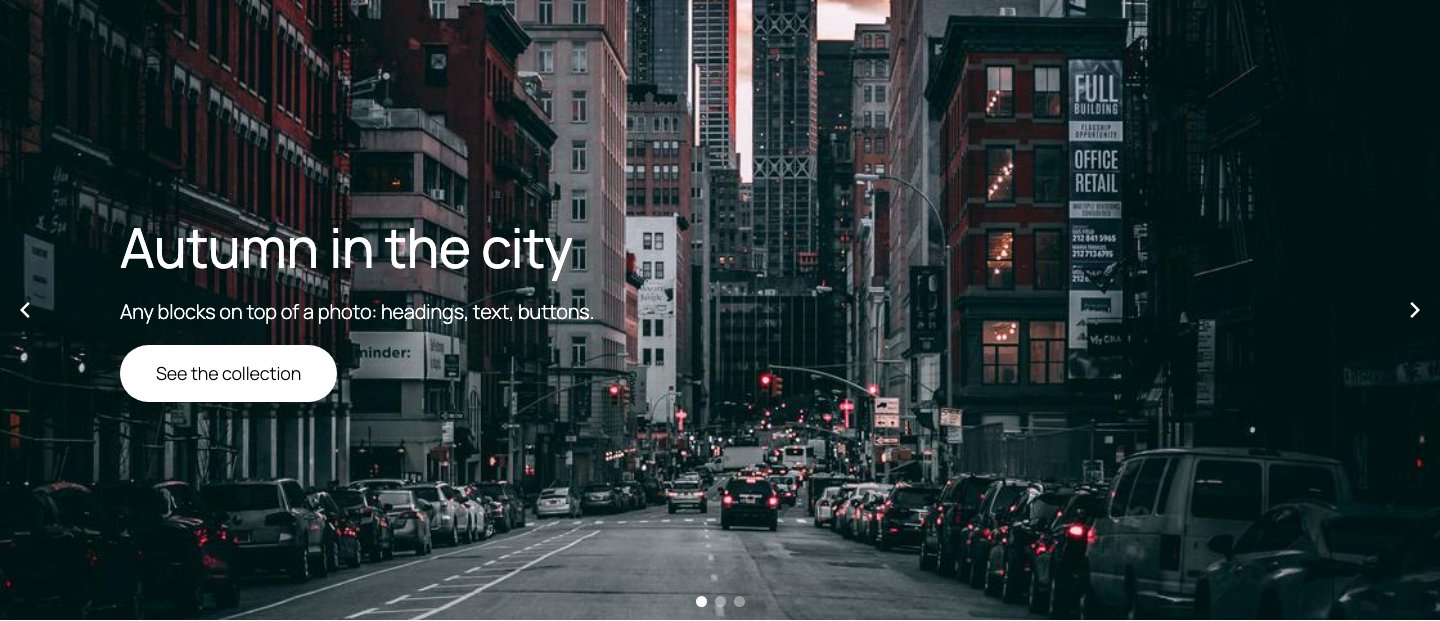
A full-width slider with a heading, text and a button on each slide.
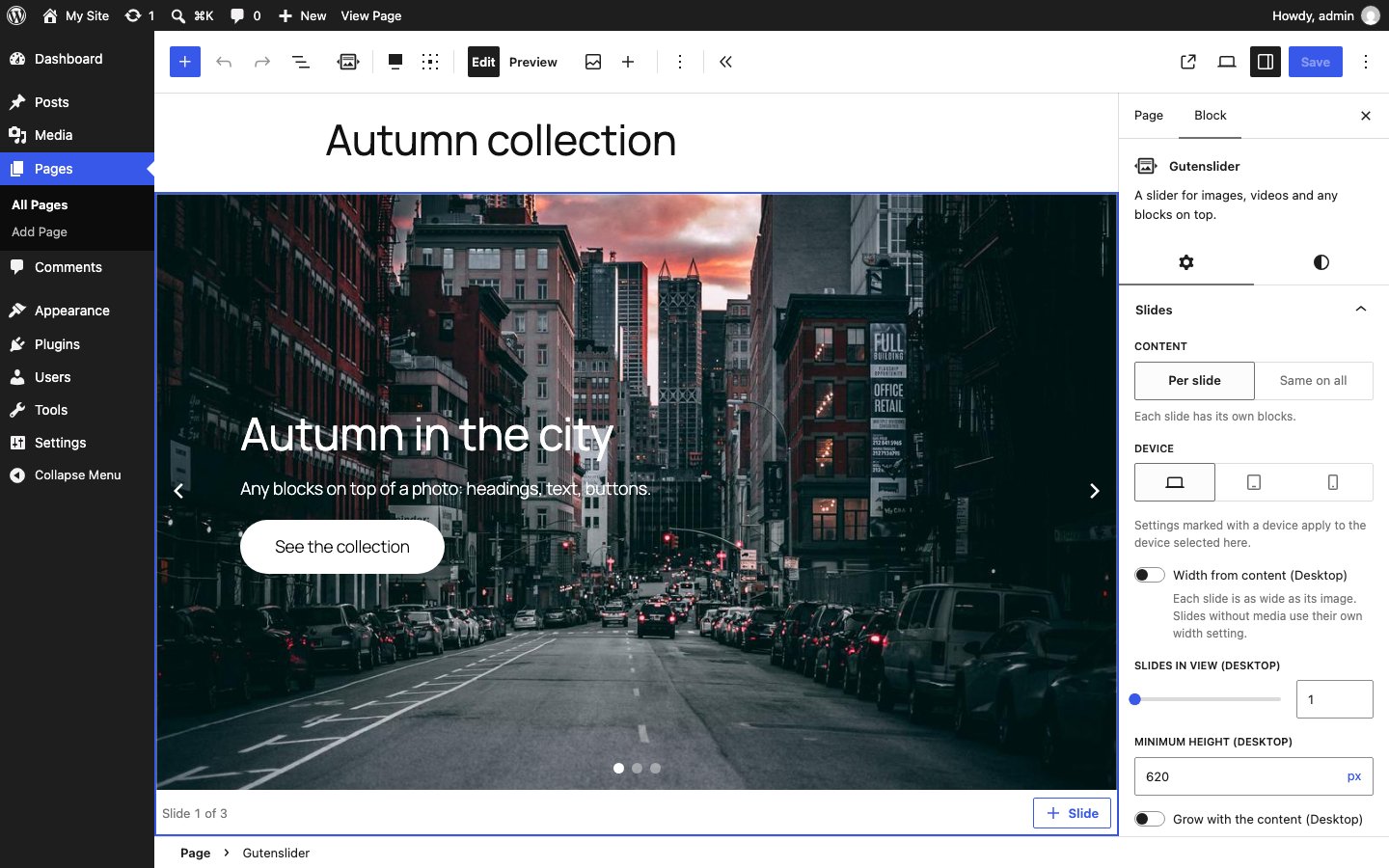
The Gutenslider block in the editor with its settings.
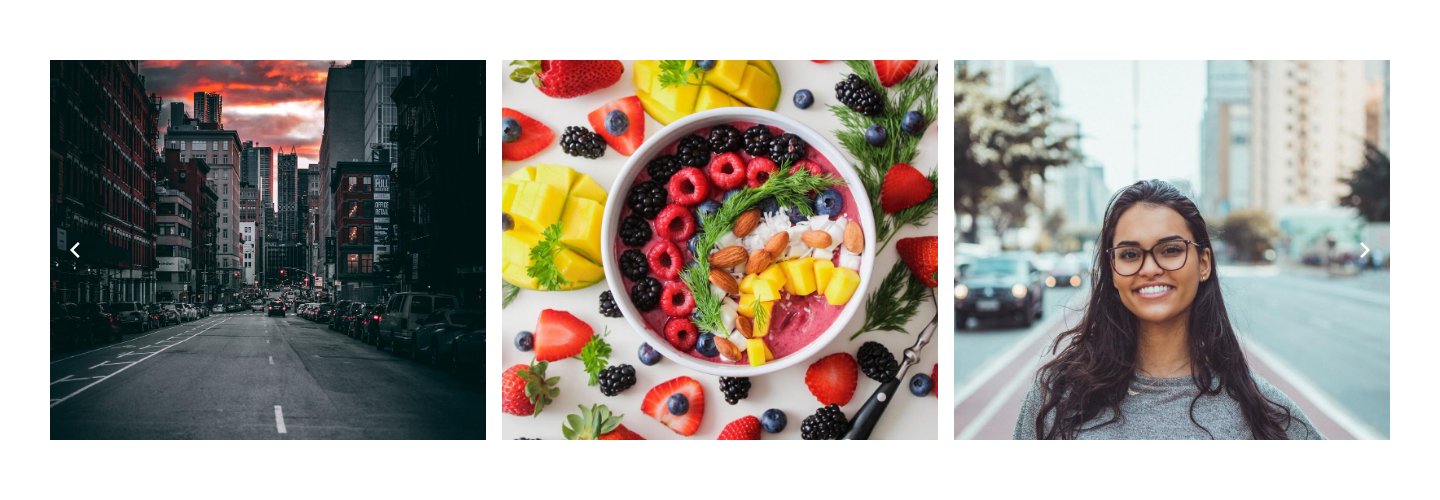
A carousel with three slides in view.
Faq
Any block. Headings, paragraphs, buttons and columns are the most common. If a block from another plugin needs extra styling on a slide, ask in the support forum.
Yes. Gutenslider works with block themes and classic themes that use the block editor. The content on a slide uses your theme’s fonts, colors and spacing.
Yes. Sliders made with 5.x and 6.x keep their settings and class names, so your custom CSS keeps matching. The lightbox now uses a native dialog; nothing needs to be changed.
Yes. Everything listed under Features is free, with no limits and no license. Gutenslider Pro is a separate plugin that adds the features listed under Gutenslider Pro.
You can help translate Gutenslider at translate.wordpress.org. Accepted translations are delivered to every site automatically.
Reviews
nicht mehr aktuell
By  eikvH on January 14, 2025
kein Support
Obsolete Plugin No Longer Supported
By  seamusjennings on November 17, 2024
This Plugin has not been supported throughout 2024. Fine for the free version, but unacceptable for the paid ones which they are still selling (Pro & Expert). My Licence no longer works and they do not respond to me tickets or messages. Soooo, basically this is a scam!
Excellent Plugin
By  Ham (thehamilton) on September 18, 2024
Use this on almost every site I build. Works well.
No support, no updates
By  tomfatom on May 15, 2024
the plugin would be fine but not well supported, very few updates, and it crashed my website
Accessibility issues with Gutenslider (Pro also)
By  needmoredesigns on March 25, 2024
Fine, but doesn’t get many updates, and has accessibility issues.
Not getting updated, no support on Forum
By  filant on October 31, 2023
Not getting updated, no support on Forum
Pro Re-Activation
By  separatereality on September 10, 2023
The dashboard integration (with freemium stuff) is a huge f…up…
I am trying for 10 minutes now just to reactivate my Pro-Account. Its with an Email-Address which is not my pages admin email and Gutenslider makes a big fuss about it. That should not even interest you!
The silder blocks by itself are good. But such a unnecessary stupid restore procedure makes it unlikely that I renew the licence.
Good plugin, bad dashboard ads
By  backwheelbates on April 15, 2023
Good plugin. Very annoying dashboard ads with this, making me want to quit using wordpress.
More trouble than its worth
By  turpin on January 8, 2023
Great when it’s working but that’s not often, constantly loses the license key so I have to keep re entering that. Old sliders become uneditable after updates so you basically have to redo them from scratch. Just more trouble than it’s worth really. Shame….plus I paid for it so now I feel kinda cheated. No response from support either, so you’re on your own.
I have a slider at the top of my front page that I can’t edit, just can’t adjust the images etc. Thre back end is completely broken.
Problems with uploading
By  seventoor (elyotdesigns) on December 22, 2022
Can’t even simply upload a normal jpg image. Instead it uploads this jpg image as a video.
Changelog
7.2.2
2026-10-22
- Now free: the flip effect, transition time and time per slide, arrow positions, offsets, spacing and blend mode, dot positions and offset, divider height and invert, lightbox thumbnails, heading and text, the fade opening and lightbox colors, and blend modes and opacity for the slide content.
- Gutenslider Pro’s features are in Pro’s own code only: coverflow, cards and cube, the shaped and WebGL effects, numbers, progress bar and a few dots at a time, the pill and line dots, scroll parallax, arrows that follow the pointer, the lightbox zoom and the Vimeo, Dailymotion and TikTok players. The free plugin does not check for a license anywhere.
- The free plugin reads YouTube playlists from their public feed (the newest 15 videos) and tells Shorts apart by the feed; Pro reads the playlist page (up to 100) and finds Shorts from any link.
- A slide whose video comes from a platform without a player here shows its poster.
- Fix: a slider with a spacing preset as block gap no longer needs PHP 8 (works on PHP 7.4 again).
- Updated Swiper to 14.3.0; build/ no longer keeps chunks from earlier builds.
- The plugin ships its build setup (package.json, package-lock.json, webpack.config.js) next to the sources in src/.
7.2.1
2026-10-12
- Updated the Freemius SDK to 2.13.5.
7.2.0
2026-10-05
- New: “Content width” (Slides panel): Wide or Content lines the slides’ blocks up with the theme’s wide or content width, like the header and the page’s text, while the background stays full width. Per slide and “Same on all” alike.
- In the editor the first click on a slider selects the slider, not the slide or block under the pointer; the next click reaches them.
- Fix: photos chosen in the Media Library or uploaded in a new slider become image slides again; since 7.1.0 they turned into empty video slides.
- Fix: in a looped slider with few slides, the copies the loop shows after the last slide take clicks again: the lightbox (with the right photo), links and the video player’s controls.
- Fix: arrows that follow the pointer (Pro) show again; the cursor was hidden and no arrow appeared.
- Fix: when YouTube briefly fails to send a playlist page, the newest 15 videos from its feed are kept for 10 minutes instead of an hour, then the whole list is read again.
7.1.0
2026-09-28
- New: video slides from links (“Add videos”): YouTube videos and playlists and links to video files; with Pro YouTube channels, Vimeo, Dailymotion and TikTok. How many videos per playlist or channel, in which order, with or without Shorts; the thumbnails are saved to the Media Library once. The player loads for the slide on screen only and pauses when the slide leaves; the slider’s autoplay waits for a playing video.
- New: “Play videos when their slide shows” for the whole slider (a slide can set its own), and one sound for all videos of a slider: mute or set the volume in one, the others follow.
- New: on small screens the arrows and dots fade over a playing video, clear of the player’s controls, and come back on touch, pointer movement or keyboard focus.
- New: “Link images to the file” (Advanced), for lightbox plugins that open linked images; slides with their own link keep it.
- New: the lightbox also opens Image and Video blocks on slides (image next to text), in slide order with the backgrounds; the zoom cursor shows only on what opens.
- New: the slide’s blocks can sit below or above the image instead of on it (Slides panel); the image keeps the minimum height, arrows and dots stay on it. Pro: arrows next to the blocks.
- New: random order (Motion): the slides are shuffled on each visit, also on cached pages, before they show, so the first slide is not swapped.
- New: an arrow style with text labels, “Previous” and “Next”, in the site’s font and the arrow colors.
- Lightbox zoom (Pro) opens a full view: the photo fills the window by width or height, the other controls hide, a click zooms in there, Escape goes back.
- Fix: replacing a slide’s image in the editor shows the new image, not the next slide.
- Fix: “Width from content” works with loop, and on one device only (e.g. auto on phones, three per view on desktops) without a layout shift.
- Fix: dots at the side are centered and clear of side arrows; dots on the right and the progress bar sit at the right; the fraction is centered.
- Fix: arrows next to the blocks stay readable on light backgrounds; text arrows get a soft shadow on photos.
7.0.0
2026-09-28
- Front end rebuilt on the Interactivity API (view script module); no jQuery.
- Swiper 14, loaded when a slider comes near the viewport, with only the modules the slider uses.
- The lightbox is a native
<dialog>(keyboard, swipe, focus return, captions, thumbnails); lightGallery was removed. - Parallax uses CSS instead of simple-parallax-js.
- No layout shift: the slider’s height and layout are rendered on the server before the script runs.
- Responsive image sizes per breakpoint; the first visible image loads with high priority, the rest lazily.
- Every value in the block markup is escaped; colors and units are validated.
- Both blocks are registered from block.json (apiVersion 3, works in the iframed editor).
- Freemius SDK 2.13, installed with Composer, in anonymous mode with no admin notices or menu pages.
- Removed: the five-star review link on the Plugins screen, the trial offer, and the old admin page.
- Readme: new name and description, External services and Source code sections.
- Requires WordPress 6.6 and PHP 7.4.
6.1.2
- Fix arrow formatting when arrows are disabled.
- Fix chunk names that confused caching plugins.
6.1.1
- Fix a bug when editing sliders.
6.1.0
- Page speed improvements.
- Load only the CSS and JS a slider needs.
- New setting to disable lazy loading on the first image.
- New setting to enable or disable zoom in the lightbox.
- Video slides pause when they are not active (can be disabled).
- Swiper 9.3.2.
- Styles tab for block padding and spacing.
- Freemius SDK 2.6.0.
5.9.2
- Add links to the plugin description.
5.9.1
- Improve compatibility with older Safari versions.