
Groundhogg — CRM, Newsletters, and Marketing Automation
Description
Groundhogg is the best WordPress CRM & Marketing Automation plugin. Create flows, email campaigns, and have a CRM all within your WordPress site.
Your CRM, now with AI agents, replies and a mobile app
Build flows, send email, and run your whole CRM from inside WordPress, with no limits on contacts, flows or emails.
Groundhogg’s Flow Editor makes it the most powerful marketing automation tool currently available for WordPress. Seriously, no other WordPress CRM comes close, we checked.
Create beautiful flows that convert leads into customers! Your customers will thank you.
Do your business a favor and switch to Groundhogg.
✨ What’s new
Ten releases in six weeks. Here are the highlights from 4.8 to 4.10.
- 🤖 AI agents can work inside your CRM. The new AI agent tab in Tools connects ChatGPT, Claude, Codex, Cursor, Gemini CLI, VS Code and custom connectors in a few clicks. Agents can build and edit flows, schedule broadcasts, and manage contacts, all within the permissions of the user they act as.
- 💬 Replies land in your CRM. Turn on Incoming Messages and replies to your emails are saved to the contact, laid out like a chat in a new Messages tab, with a Replies widget on your dashboard. (Needs an active license.)
- 📱 A mobile app for your CRM. Install it from the Tools menu with a QR code. Look up contacts, call, text or email them, work through tasks, add notes and answer replies from your phone.
- ⚡ A much faster Flow Editor. Changes show right away and save in the background, and undo and redo cover step settings, duplicated steps and pasted steps. Only one person can edit a flow at a time, and you choose what happens to contacts waiting at steps you delete.
- 🗓️ Broadcasts in a calendar. See what’s going out and when, and click any day to schedule a new one.
- 🕰️ A redesigned contact timeline. Flow runs and browsing sessions are grouped, opens and clicks sit under their email, and failed flow events show the error.
- 🎨 Interface themes. Light, Paper, Slate or Midnight. Saved per user, and also found in the command palette (Ctrl or Cmd + K).
Epic WordPress CRM, Email & Marketing Automation
Businesses that switch to Groundhogg save on average $240/m on CRM fees.
👉 Official Site | 📃 Documentation | 🎓 Training
🌎 Facebook Group | 📺 YouTube Channel | Ⅹ (Twitter)
🚀 Free 14-day demo! Try before you buy.
⭐⭐⭐⭐⭐ 5.0 average from 41 customer reviews · 3,000+ businesses · 35+ countries
Groundhogg CRM & Marketing Automation for WordPress can help you dramatically improve how you acquire leads and make more sales!
Our WordPress CRM is the very best alternative to Keap, ActiveCampaign, HighLevel, HubSpot, MailChimp and other SaaS platforms.
You don’t have to sacrifice CRM features when you switch to our self-hosted solution. In fact you can save $1,000s per year and have the added benefit of owning all your information.
If you are an agency, WaaS, WordPress developer, LMS/Course Creator, WordPress freelancer, or CRM implementation service provider then the Groundhogg CRM and Marketing Automation suite is for you.
🪓 Axe the “Success Tax”
Other SaaS (Software as a Service) CRM platforms will charge you more as your list grows.
But not us!
When using the Groundhogg CRM & Marketing Automation suite free or with any of our paid plans, we’ll never charge you more!
🚫 There are no limits on:
- Number of contacts
- Number of flows (automations)
- Number of emails sent
When using Groundhogg CRM & Marketing Automation you will never be limited on the amount of anything! Unlike other SaaS platforms.
Businesses save $1,000s a year after switching to Groundhogg.
💽 You own your data!
The reality of SaaS CRMs is that you pay, and pay, and pay, and you invest all this money into a system to help your business thrive, but it can be taken away at a moments notice.
Putting your data in a SaaS CRM is like renting an apartment, but with less protection and stingier landlords. You can get evicted at any time, for any reason. There is no recourse.
This leaves your business exposed. What would happen to your business if your CRM was turned off?
With Groundhogg you actually own your data! No one except you can make impactful changes.
🔎 At A Glance
Everything your business needs to thrive!
- Best in class CRM & Marketing Automation suite.
- Organize and segment your contacts to send more relevant communications.
- Automate your communications to save you time and increase your productivity.
- Collect data and mine your list so you can stop bleeding money. “The money is in the list!”
- Own your data so you’ll never be at the mercy of a SaaS company again.
- Control your expenses! There are NO LIMITS on how many contacts and users you can have! Groundhogg grows with you! Your costs do NOT increase when your lists grows. We don’t tax you for scaling up!
- Translate & configure into any language.
🌎 We care! Join our Community!
Groundhoggers are very generous with their business intelligence. Just as the Groundhogg CRM & Marketing Automation team is deeply committed to helping! So we create lots of tools to help you succeed.
- 🚀 Free 1-Hour Quickstart Course!
- 🌎 Community care & support in the open Facebook group!
- 📺 Over 60 hours of easy Groundhogg Youtube tutorials!
- 📃 Use our Knowledge Centre to get the answers you need.
- 🎙️ Ask your burning questions in Office Hours on our live Facebook stream every Tuesday!
🤷♂️ Who can benefit from Groundhogg CRM and Marketing Automation?
The Groundhogg CRM & Marketing Automation suite is being used by a wide variety of 3,000+ businesses in over 35+ countries. The diversity of use cases is huge!
If your business is using WordPress, you can use Groundhogg.
Here are some of the more common use cases:
- Digital Marketing Agencies
- WordPress Freelancers
- LifterLMS, LearnDash, or TutorLMS sites
- WooCommerce Sites
- WaaS Multisite Platforms
- Blogs and News Sites
- Coaches and Trainers
- Educators and Public Speakers
- Business Directories
- And many more!
💡 Made by people who know CRM & Marketing Automation!
Our team is based in Niagara Falls, Canada! We’ve been helping small businesses implement CRM and Marketing Automation since 2014 working with tools like Keap, ActiveCampaign, and HubSpot.
After some time, it became apparent that there was a desperate need in the WordPress ecosystem for a capable CRM and Marketing Automation tool for WordPress site owners.
One that could match SaaS platforms on features and reliability did not yet exist, so we built it!
Starting in 2018, Adrian Tobey (founder) and his team took their combined 20+ years of experience in the CRM and Marketing Automation industry to create a better option for WordPress based businesses.
We know flows, CRM, and marketing automation like the back of our hands!
You can trust us to not only provide you with stellar software and support, but also provide you guidance on the kinds of flows and automation you should be building to get maximum value from our products.
❤️ Businesses Love Groundhogg CRM & Marketing Automation!
3,000+ businesses in 35+ countries are using Groundhogg CRM & Marketing Automation to launch their flows, grow their lists and scale their businesses.
Our customers rate us 5.0 out of 5 across 41 customer reviews, and 28 of them switched from another CRM. Here’s what a few of them had to say about our products and support!
Price, better integrated with WordPress and WooCommerce than ActiveCampaign, more flexible, and perfect support.
Wojciech Habało, A4 Academy, switched from ActiveCampaign
My #1 reason for leaving HubSpot was cost. I also used Outreach with another company and it was also way too expensive for a small consultancy. I like that Groundhogg is integrated with my website, like HubSpot before it.
Gary Feldman, Consultant @ i-BN, switched from HubSpot
It is built into WordPress, and I can have more than one admin user on my plan. Groundhogg is customisable, so I can store the information I need to manage my Association’s membership. I can have a real relationship with the developers of Groundhogg. That’s not possible with Mailchimp. We are so glad we made the shift.
Simon Gurnsey, Treasurer @ AANZPA, switched from Mailchimp
It’s so nice having a CRM that is natively connected to your actual data.
Clifton Griffin, Founder of CheckoutWC
Great team, great product, and works with all the key WordPress tools I’m using.
So nice to be able to do broadcast emails, tagging, and marketing automation all from inside my WordPress website.
Chris Badgett, Founder @ LifterLMS
Read all the reviews. There are also over 110 ⭐⭐⭐⭐⭐ reviews for Groundhogg on WordPress.org and even more reviews on our Facebook Page!
Kris Britton of the KAYBE marketing agency moved all of his clients from HubSpot to Groundhogg!
Features
Here are the tools you can use to launch your funnel, grow your list, and scale your business faster with Groundhogg CRM & Marketing Automation!
🕺 Straightforward CRM & Contact Management
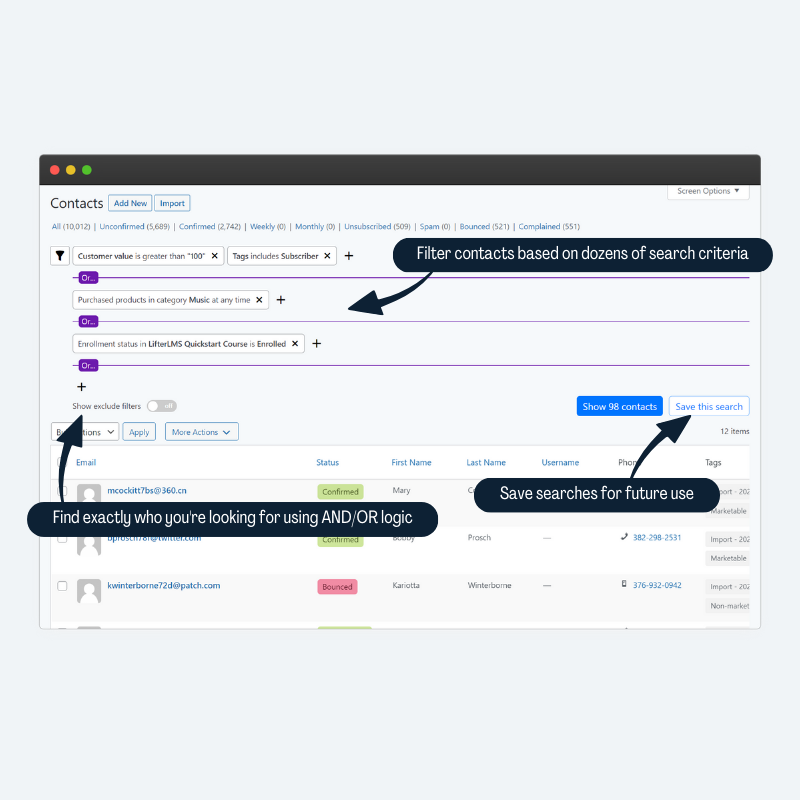
- Advanced searching and filtering on any data
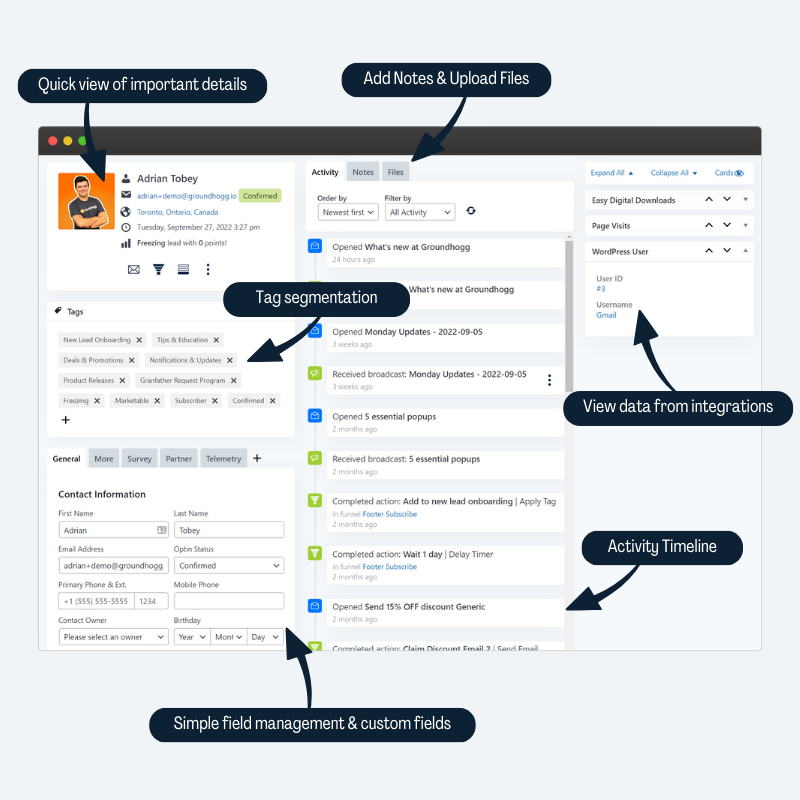
- Unlimited CRM custom fields
- Segmentation with tags
- A timeline of every flow run, browsing session, email open and click, with filters by flow, email, broadcast or activity type
- Activity and email history
- Profile pictures
- Automatic location discovery
- CRM Notes
- CSV importing & exporting
- Sync contacts in the CRM with WordPress users
- View aggregated information from other WordPress plugins in the contact record.
Quickly and easily segment your list with Groundhogg’s unrivaled search filter system!
Groundhogg’s search filters give you more control than any other CRM to segment your list to find exactly the leads you’re looking for.
Our integrations with WooCommerce, AffiliateWP, LearnDash, and more add additional search filters you can use to create powerful segments so you can send hyper targeted messages.
⚙️ Flows & Marketing Automation Features
- Create highly effective customer journeys with our easy to learn flow builder.
- A rebuilt, much faster Flow Editor with undo and redo for every change.
- Start flows from forms, payments, new users, and more!
- Create simple flows or complex ones, with branches, split tests and timers.
- Test a flow before you publish it with the built-in simulator.
- Publish changes to a live flow when you’re ready, and choose what happens to contacts waiting at the steps you removed.
- Measure the effectiveness of your flows with easy to read metrics.
- Add-ons and integrations connect the CRM with your favorite WordPress plugins.
- Open API to add your own triggers & actions.
📧 Simple Email Marketing & SMTP
- Use images, headers, paragraph and more.
- Simple preview & testing.
- Perfect for sales emails, newsletters, transactional notifications and more.
- Send broadcast emails to your contact lists, and see them all in a calendar.
- Compose an email to a contact from any of your sender profiles.
- Distinguish between transactional and marketing emails.
💬 Replies in Your CRM
- Replies to your emails are saved to the contact who replied, instead of going to your own mailbox.
- A Messages tab on every contact shows your whole conversation, laid out like a chat.
- A Replies widget on your dashboard lists who has replied and what you haven’t read yet.
- BCC your site’s private inbox address to keep a copy of emails you send from your own mailbox.
- Handle bounces from an IMAP inbox with a manual “Handle Bounces Now” check.
Incoming Messages needs an active Groundhogg license.
📈 Unmatched Analytics Reporting
- We track EVERYTHING in the CRM!
- Granular details of how your site is performing.
- See open rates, click through rates and conversions at a glance.
- Detailed results from your flows and broadcast emails.
- Integrate with Ecommerce to see revenue from your marketing.
- Learn more about your audience with demographic reporting.
- See which flows/emails are under-performing.
- Build custom reports, including tables and pie charts grouped by tag.
- Reports and segments are cached and indexed so dashboards load fast on big lists.
Use campaigns to make comparing reporting results easier
🇪🇺 GDPR Ready
- Simple GDPR features to keep you compliant.
- Automatic preferences center, data download, and opt out.
- Track GDPR consent in your CRM
- Prevent marketing to those who withdraw consent.
🤖 AI & MCP Ready
Let ChatGPT, Claude, Gemini, Cursor and other AI agents work inside your CRM, safely.
- Set up in a few clicks. The AI agent tab in Tools installs the MCP Adapter plugin, creates an application password for you, and has setup steps for ChatGPT, Claude, Codex, Cursor, Gemini CLI, VS Code and custom connectors. (WordPress 6.9 or later, for people who can manage options.)
- Build flows by asking for them. Agents can discover the available steps, build a flow with branches from scratch, activate it, and read and edit an existing one. Changes to a live flow are staged until they’re published, just like in the Flow Editor.
- Try before you publish. Agents can simulate what a flow would do for a contact, with no side effects, before anything goes live.
- Contacts: find, create, update and search contacts, read and add notes, and manage tags, owners, custom fields and saved searches.
- Email and broadcasts: list saved emails and sender profiles, send a saved or one-off email to specific contacts, schedule a broadcast to a segment, cancel one, and read open and click reports.
- Campaigns, settings and add-ons: create campaigns, read and change registered settings, and see which official add-ons are installed and licensed.
- Extensible. Add-ons can register their own abilities alongside Groundhogg’s.
- Every action runs through the same capability and per-object permission checks as the rest of Groundhogg. An agent can only do what its user is allowed to do.
More abilities, including SMS, are on the way.
📱 Works Where You Do
- Mobile app. Install it on your phone from Tools > Mobile app. Look up contacts, call, text or email them, work through your tasks, add notes, fill out forms for a contact and reply to messages. It only shows what the person using it is allowed to do, and add-ons can add their own screens.
- Interface themes. Choose Light, Paper, Slate (dark) or Midnight (dark) for the admin, per user.
- Command palette. Jump to settings, admin page tabs and themes with Ctrl or Cmd + K on WordPress 7.0 and later.
- Made for small screens. Admin pages, the preferences center and campaign archives work on phones.
🙌 Add-ons and integrations
Groundhogg does a lot on its own, and add-ons and integrations make …
Installation
Plugin Repo
- Install Groundhogg CRM and Marketing Automation
- Activate
- Complete the guided setup
- Start Marketing
FTP
- Upload the zip archive
- Unzip
- Activate through the plugins manager
- Complete guided setup
- Start Marketing
Screenshots

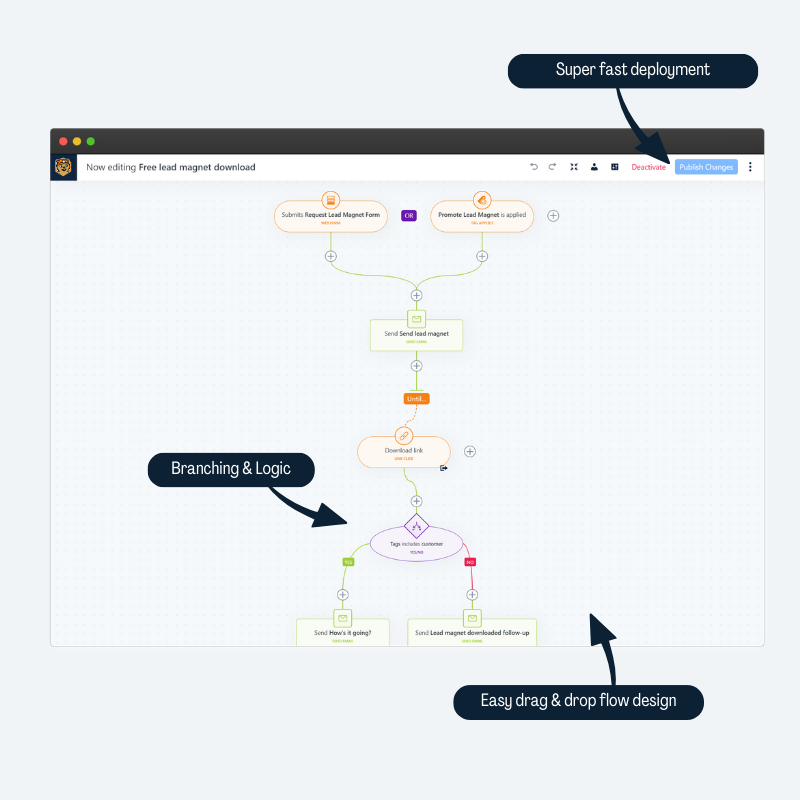
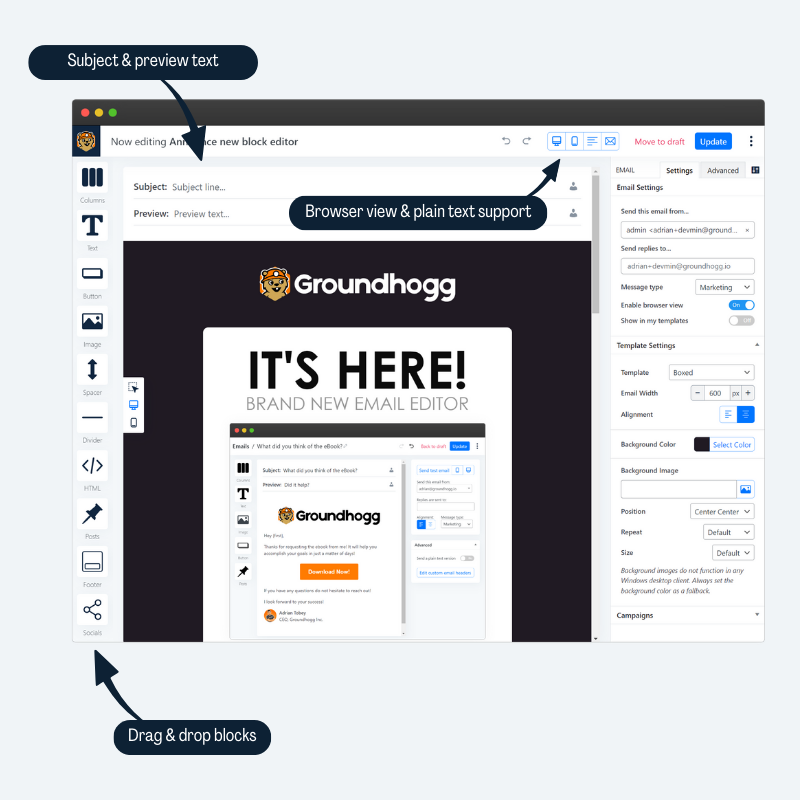
Create flows in the CRM quickly using our drag & drop editor.
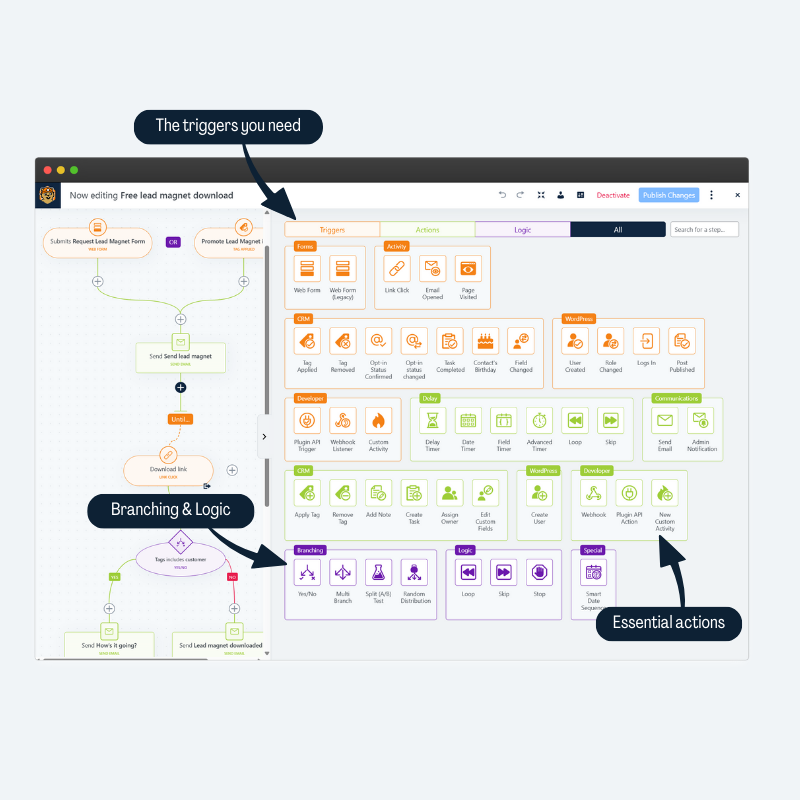
Use dozens of triggers, actions, and logic steps to create your flow.
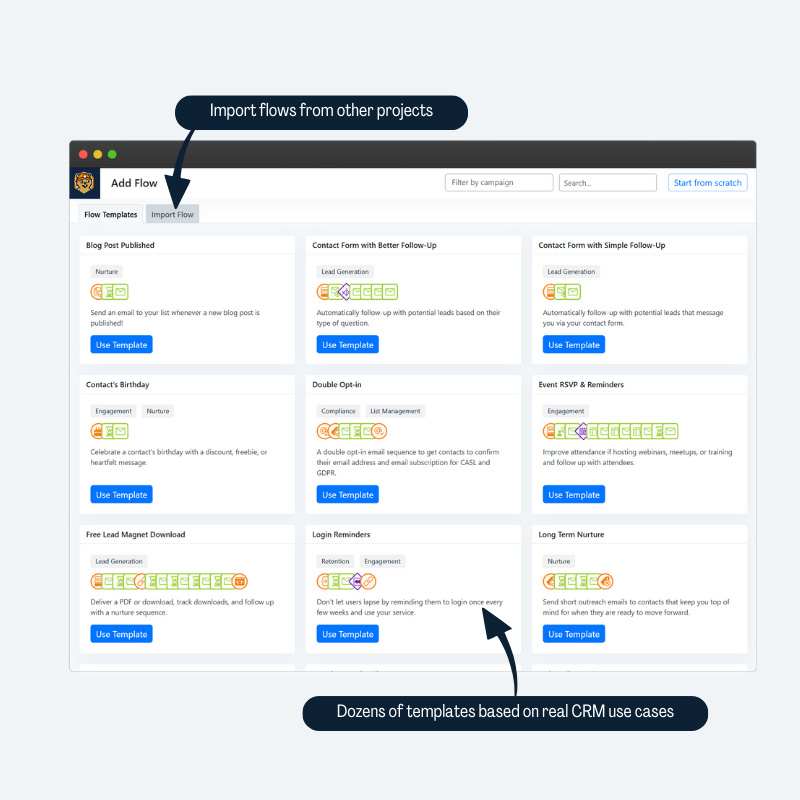
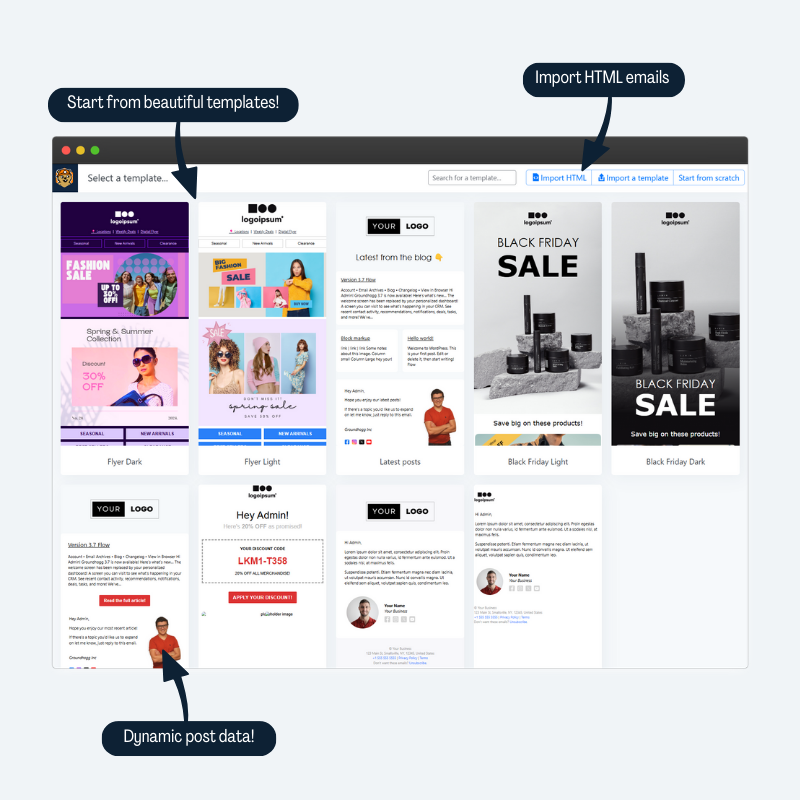
Start with pre-written templates based on real CRM use cases.
Quickly write, preview, test and send personalized emails from the CRM.
Start from beautiful templates, or import HTML from a 3rd party.
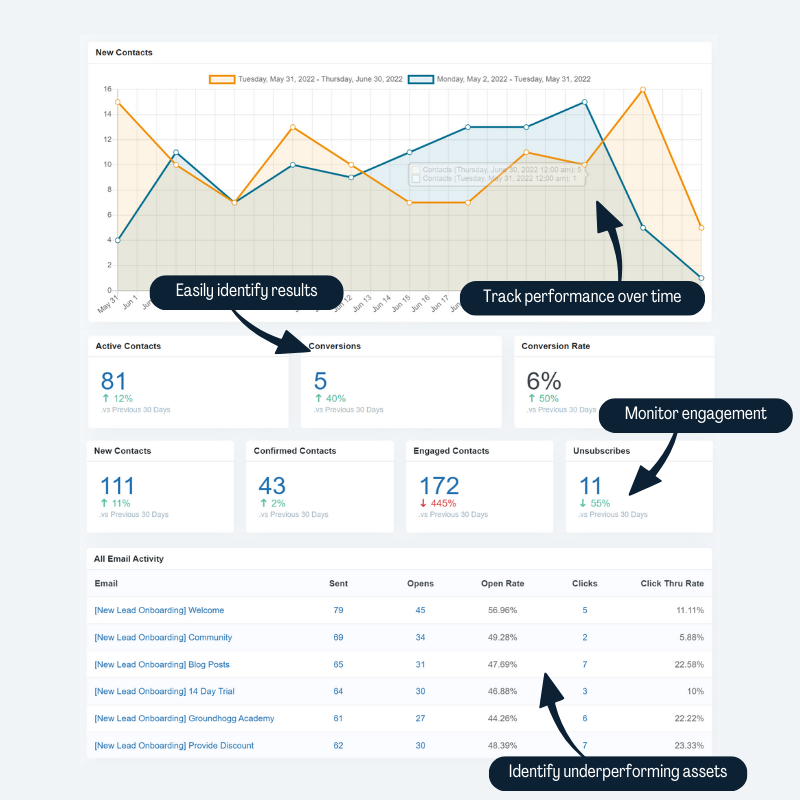
Groundhogg’s CRM reports give you the most data visibility of any small business CRM and Marketing Automation suite.
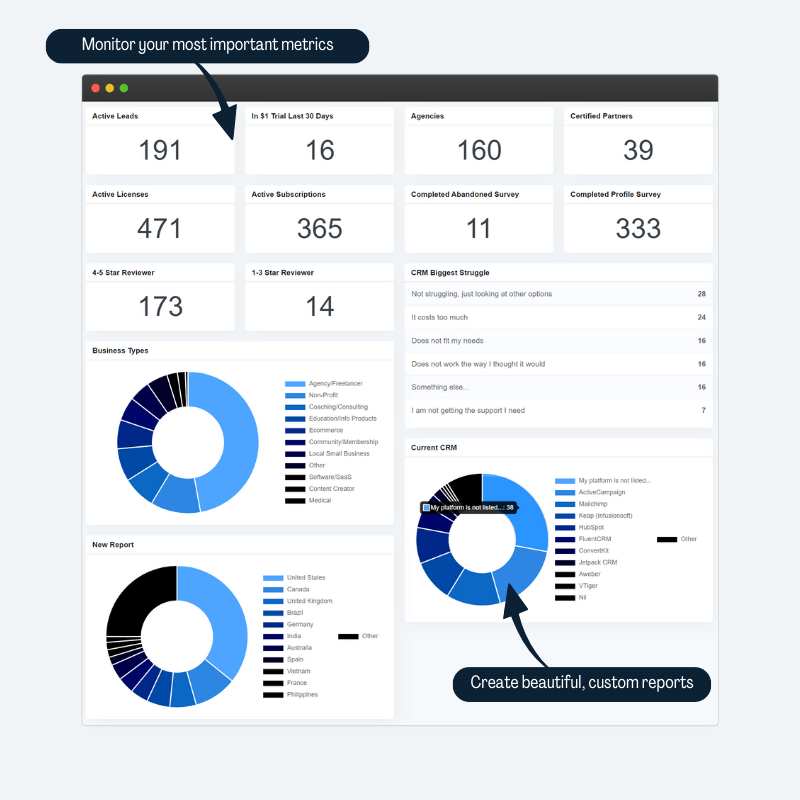
Create your personalized CRM report dashboard to monitor your most important metrics.
The Groundhogg CRM pulls data from all your integrations to show all activity and data on a single screen.
Filter contacts in the CRM using dozens of search filters to segment based on tags, custom fields, activity, purchase history, and more!
Send out mass emails to your list and view details reports of your subscribers’ engagement.

Faq
Does Groundhogg need any additional marketing software like MailChimp?
No, Groundhogg is a completely standalone, lightweight CRM and marketing automation system designed to save you $1,000s while helping you generate more revenue.
Does Groundhogg require and external transactional email service like SendGrid?
No, but it is highly recommended. Without a proper transactional email service your emails are likely to end up in spam.
Groundhogg provides a number of recommended solutions:
- MailHawk
- SendGrid
- AWS SES
- Elastic Email
- Basic SMTP for other services.
Groundhogg will automatically use the mail solution you have configured on your WordPress website.
Does Groundhogg have any required monthly fee or upgrades?
No, you can use Groundhogg CRM and Marketing Automation for free forever. Groundhogg is a Open Source project designed to democratize CRM and email marketing automation and provide simple easy to use tools to new and non-tech-savvy business owners.
That being said, our premium upgrades can seriously help your business! Use our proven tools and strategies to supercharge your marketing and WordPress site!
Does Groundhogg connect to Woocommerce or other plugins?
Yes, Groundhogg has integrations for the most popular WordPress plugins around to create an even more powerful CRM.
Does Groundhogg work with my theme?
Groundhogg is theme agnostic, meaning it will work with every and any theme. Groundhogg is mostly administrative and very little is seen by visitors.
Does Groundhogg track my subscribers?
Yes, Groundhogg has a very smart tracking system that will allow you to monitor your clients interactions with your emails and your site.
Does Groundhogg Integrate with my membership plugin?
Yes, Groundhogg has a builtin connection with the WordPress user API, meaning it will automatically use user roles in your site, like from a membership plugin.
Is Groundhogg secure?
We follow all best WordPress security practices. Plus it’s open source, so we have a large community looking out for potential weaknesses when it comes to your data.
Is Groundhogg GDPR, CANSPAM, or CASL compliant?
Yes, we have tools available to meet the criteria of all the worlds ANTI-SPAM & privacy legislation.
Is Groundhogg better than my current CRM/Marketing Automation tool?
Well, that’s up to you! We’ll never say Groundhogg is better than anyone, but it is different. And sometimes different is better than better.
Where can I upgrade to premium?
You can purchase a premium plan for access to support and our premium add-ons & integrations on our pricing page.
How can I report security bugs?
You can report security bugs through the Patchstack Vulnerability Disclosure Program. The Patchstack team helps validate, triage and handle any security vulnerabilities. Report a security vulnerability.
Reviews
Alarmist, misleading security email that wastes everyone's time
By  Pieter Bos (senlin) on October 21, 2026
Today Groundhogg broadcasted an email to all its clients with the subject “⚠️ Critical PHP security issue Action needed”.
The opening paragraph claims that a critical security issue affects nearly every WordPress site, “including yours”. That is simply not true in my case. My client’s site is already running PHP 8.3, so the blanket alarmist statement was completely unwarranted.
What makes this even worse is that I have not received any comparable warning from hosting companies, WordPress itself, or other theme and plugin developers. Groundhogg, however, decided to send a mass email urging people to contact their hosts, apply server configuration changes, and worry about potentially compromised websites.
Has Groundhogg considered the consequences of sending such a message to its entire customer base? Clients will inevitably contact their hosting providers, developers, and website maintainers in a panic, expecting immediate action. That means a potentially enormous amount of unnecessary work and wasted resources for people who have done nothing wrong.
Security advisories are important, but they need to be accurate, appropriately targeted, and responsibly communicated. Telling customers that a critical vulnerability affects their site without establishing whether that site is actually affected is not responsible communication.
One star for creating unnecessary alarm and potentially wasting the time and resources of countless customers and the professionals who maintain their websites.
the best CRM / email marketing tool for WP
By  Clifton Griffin (clifgriffin) on August 26, 2026
Running your CRM in WP is one of those things you’re not really *supposed* to do and I was really snobby about it for a long time.
But after trying to get my EDD transaction and subscription data to sync to Active Campaign with Zapier, etc and utterly failing and never having any confidence the right people were getting the right emails, I decided to give Groundhogg a go.
And you know what? It’s friggin awesome. It’s so nice having a CRM that is natively connected to your actual data. The flow, broadcast, and email tooling they have built is really impressive. Almost feels like you’re not in WP.
It’s a real testament to their drive to excellence and attention to detail.
All of this to say, I’ve been using Groundhogg for 4+ years and it’s never let me down once. And it won’t let you down either. Worth every penny for the pro plan.
The Best
By  blowntobits on July 26, 2026
10/10
Very happy with Groundhogg – used on 4 sites so far
By  timrobertsontfe on July 20, 2026
I’ve used Groundhogg on 4 websites so far. It does a whole pile of things that make it brilliant for communicating with our subscribers. The tags functionality, broadcast tools, and integrations are great.
Adrian Tobey and Gregg Franklin offer great support, and when they have a problem, they are quick to alert their customers.
Unlike many plugin providers Groundhogg are there to support their customers, even if it’s the customer’s error.
Highly customisable CRM system
By  timtwickham on July 17, 2026
A highly customisable CRM. It pretty well does all the basic stuff out of the box, but if you need more than that then you can add or customise most of the behaviours using the API etc. I’m not a web or PHP developer, but this has worked out for me in conjunction with Claude, though obviously takes a bit of time and some general software development expertise.
I've finally found the best free CRM and Marketing plugin!
By  geop (dcbeaulieu) on March 5, 2026
I’ve been looking for free CRM and email marketing plugins over the years (I’ve been creating WordPress websites since 2007). After finding and then using Groundhogg for almost a year for small and medium businesses/organizations, I can say that I haven’t found any better value. I’ve used Hubspot, Salesforce, and a handful of other CRMs and Marketing tools/plugins but nothing compares to the value I found in Groundhogg.
Try the free version of Groundhogg for yourself and see if it works!
There are always limitations and issues, and such is the case with anything, however, the value and the cost cannot be compared to anything else I have found. If anyone wants to learn how to use Groundhogg, give me a shout.
Many features, not all supported
By  saatchigalleryit on February 11, 2026
We have this product for about 3+ years. It is a great concept but some features are promoted as existing, although in reality are buggy or not completely functional as expected (maybe I have too hight expectations). The problems is, there is learning courve for it and you only realise some expected features or needed features aren’t there and it’s too late as you have it in production.
What frustrates me and made me write this review is, I have tickets opened with them in their support section that are opened from 2024 (almost 2 years) and also there are tickets closed without a resolution. I would have expected in almost 3 years to see some of the features we complained about being fixed or new features added in this sense.
For the money, ok but I would have loved to see a bit more attention to support and user voice in regards to what’s needed. For example, if you work as a sole individual with thsi CRM is ok-ish, but when you look integrating it in a company with several departments and each having multiple team members, you will struggle making it work, sharing data amongst the team members or keeping some sections private to each team/department.
Сreative and very reliable, well done guys
By  yevgy on January 10, 2026
Excellent work!
The BEST Alternative to Zoho
By  compassiondan on December 3, 2025
I have tried to use Zoho as my CRM with my WordPress site that relies heavily on WPForms. I love WPForms and would not switch away from it unless someone gave me a really good reason. The problem is that Zoho does not integrate easily/well with WordPress and WPForms. I have wasted a couple of thousands using Zoho developers to try and get things integrated. I also tried to work with Zoho directly and that was a bigger waste of time. Zoho sucks!
And just when I was ready to chuck it in on using a CRM, I found Groundhogg. Right from the beginning, Groundhogg installed their App, configured it, and gave me the most incredible customer support.
Whenever I had a question, they responded anywhere from within one hour to no more than a few hours (usually right away).
If you have a WordPress site, and you’re doing business with it, you need a CRM. There is only one choice…Groundhogg! Adrian and Gregg will give you support that exceeds your expectations.
Do I work for Groundhogg? No. Am I a fan? Absolutely!
Give Groundhogg a try. You will be incredibly happy you did.
Best CRM for WordPress
By  mauroverssi on July 22, 2026
We migrated to Groundhogg after years on Keap, and it was one of the best decisions we’ve made for our stack.
The cost difference alone is significant — we cut a substantial recurring expense without losing functionality. But the real win is architectural: Groundhogg lives inside WordPress instead of bolting onto it. Contacts, forms, funnels, tagging, and email all share the same database as the rest of the site, so there’s no syncing layer to babysit and no data drifting out of alignment between two systems. It plays well with the plugins we already rely on, and the developer-facing side (hooks, filters, REST access) makes it straightforward to extend when we need something custom.
The funnel builder covers the automation scenarios we throw at it — onboarding sequences, behavior-based tagging, transactional emails — and integrating an external SMTP provider for sending volume was painless.
Customer support deserves its own mention. Responses are fast, technically competent, and come from people who actually understand the product rather than reading from a script. When we’ve hit edge cases, we’ve gotten real answers instead of ticket deflection.
If you’re running anything serious on WordPress and paying for an external CRM, it’s worth seriously evaluating Groundhogg. Five stars.
Changelog
4.10 (2026-10-29)
- ADDED Interface themes. Choose Light, Paper, Slate (dark) or Midnight (dark) for the way the admin looks, or keep the default. A theme is saved per user, and only changes colors, not how anything works.
- Pick a theme with swatches on your user profile, from the new Look step of the guided setup, or in the command palette.
- Tables, forms, tabs, modals, notices, tooltips, pickers, the flow editor, the text editors and the email editor are styled for each theme. The email in the editor stays white, as it will look.
- Delete, trash and spam row actions in list tables show in a danger color, and the loading spinners are new animated ones.
- ADDED A mobile web app that can be installed on a phone. Look up contacts, call, text or email them, work through your tasks, add notes, fill out forms for a contact and read and reply to messages, all from a screen made for phones. Open it from the new Mobile app tab in Tools, which has a QR code, or from the link on the dashboard. It only shows what the person using it is allowed to do, and add-ons can add their own screens to it.
- ADDED A recommendation on the dashboard and in the last step of the guided setup, and a new AI agent tab in Tools, for connecting an AI agent. It installs the MCP Adapter plugin, creates an application password for you, and has setup steps for ChatGPT, Claude, Codex, Cursor, Gemini CLI and VS Code, and for custom connectors. Only offered on WordPress 6.9 and later to people who can manage options.
- ADDED Settings, the tabs of admin pages and the interface themes can be found in the WordPress command palette, opened with Ctrl or Cmd + K, on WordPress 7.0 and later.
- IMPROVED Admin pages are easier to use on phones. The header no longer sticks to the top, pages have a gutter, forms that sit beside a table, like tags and campaigns, stack, modals use the width of the screen, and the buttons around a table are tidier.
- TWEAKED The REST API documentation recommends application passwords, and API keys are deprecated.
- FIXED The link color, font and other text styles of a text block weren’t applied to what a replacement code adds, like the links of
{files}. They are now added to it as inline styles, so email clients that drop the styles in an email’s head show them. Emails saved with a replacement code before this need to be saved in the editor once to get them. - FIXED Asking the REST API for a single form by its ID caused an error. It now returns the form, as long as it is active. A PHP warning that
DOING_GROUNDHOGG_REST_REQUESTwas already defined, when the API loaded more than once, is gone. - FIXED The contacts by country, lead source and source page reports counted every contact, not only the ones created in the date range, and logged a notice.
- FIXED The contact editor ended in a fatal error on a server whose time zone data lists a time zone that it then doesn’t know, like America/Ciudad_Juarez. That time zone is left out of the list.
- FIXED The loading screen of the dashboard reports, the custom reports and bulk edit contacts stayed open when the request for what they show failed. It closes and says that it couldn’t load, and bulk edit doesn’t open its form without the count of the contacts that it will edit.
- FIXED Incoming Messages couldn’t be set up on a subsite of a multisite network that has its license on the main site. When the White Label add-on is network active and turned on, a subsite uses the licenses of the main site, which are synced and removed there.
- FIXED The click listener that is added to TinyMCE replaced the
setupof every editor in the admin, including the ones of other plugins and the post editor. It is only added on the pages of the plugin. - FIXED
{owner_signature}logged a PHP warning for a contact that has no owner.
4.9.4 (2026-10-13)
- ADDED The email abilities can set an email’s custom CSS, custom headers and UTM parameters when they create or update an email, and they return them when an email is read.
- TWEAKED Four column layouts show as two rows of two columns on small screens, instead of a single column. Use the column padding to space them.
- FIXED Emails scrolled sideways on phones in email apps that ignore the styles in an email’s head, such as Gmail with a non-Google account. This includes emails that were saved before this version.
- FIXED A font set for the links in a text block could break the CSS that came after it. Emails saved this way are repaired when they are sent or viewed.
- FIXED The tag picker on the map step of an import failed with “Groundhogg.createState is not a function” when the admin scripts were delayed or deferred. The step now loads the script that it needs.
- SECURITY Hardened how files are copied to a contact’s files by imports, the REST API and webhooks. Credit: Supakiad S. (m3ez) of E-CQURITY, via Wordfence.
4.9.3 (2026-10-09)
- SECURITY The page for an email in a campaign’s archive showed any broadcast on the site, including ones that hadn’t been sent and ones in campaigns that aren’t public, to anyone who knew its number. It only shows emails that have been sent and are in that campaign, and it can no longer be cached.
- FIXED Files uploaded to a contact before 4.7.2 were missing from the contact’s Files tab, and from {files} and the contact’s downloads. 4.7.2 changed the name of the folder that a contact’s files are kept in, and the files were left in the old one. They are moved to the right folder when the contact’s files are asked for, when the contact’s email address is changed, and when an old link to one of them is followed. Files that are in both folders are kept, and nothing is overwritten.
- FIXED Opening the archive of a campaign that isn’t public as someone who manages campaigns ended in a white screen. Anyone else gets a page that says it can’t be found.
- FIXED The flow editor couldn’t add or move a step into an empty branch of a split path, random distribution, split test or evergreen sequence. It said the branch didn’t exist.
- FIXED The bounce check could stop moving on when 200 or more emails in the inbox were dated within the same few hours, and read the same emails every time it ran.
- FIXED Setting up Incoming Messages sent an expired key when the site has an expired master license and a valid license for a single product.
- FIXED Activating a license key that the site hadn’t seen before logged a warning that included the key, and re-activating a key returned the license as it was before.
- IMPROVED The archive pages and the preferences center, including the profile, erase and unsubscribe pages, have a new look with cards, light and dark colors that follow the visitor’s setting, and a layout for small screens.
- DEV New
File_Box::get_legacy_upload_folder_basename()andFile_Box::maybe_move_legacy_upload_folder().get_uploads_folder()moves the files of a folder from before 4.7.2 before it gives the folder. - DEV New
Rewrites::current_upload_folder_path()andRewrites::is_in_campaign_archive(). - DEV The colors of the managed pages are CSS variables that begin with
--mp-, set onbody.managed-page.
4.9.2 (2026-10-06)
- ADDED Handle Bounces Now in Settings > Email, for sites that receive bounces in an IMAP inbox. It checks the last 7 days of the inbox and shows how many emails it checked, how many contacts were marked as bounced, and what it decided for each recipient.
- ADDED When contacts waiting at a deleted step are moved to another step, you can choose to run them when that step normally runs, or on a date and time.
- SECURITY Messages are now deleted with their contact, and a message that is left without its contact can no longer be read by anyone. Messages left behind by contacts that were deleted before this update are no longer readable, but they aren’t deleted.
- SECURITY The secret that verifies incoming messages is no longer created while a request is being checked, and a secret defined with GH_INBOUND_SECRET is the only secret that’s used.
- FIXED Bounces in an IMAP inbox were missed when the email had been read, or was more than a day old.
- The bounce checker carries on from where it last got to instead of only looking at unread email from the last day.
- A failure with a temporary status (4.x.x), like a full mailbox, is never marked as a hard bounce, and the action in a bounce report is read in any case.
- A failure with a permanent status (5.x.x) is no longer changed into a temporary one because of what the mail server said about it.
- A bounce report without a recipient can no longer mark whichever contact is being processed as bounced.
- FIXED Cancelling a broadcast, including when a segment filter fails while it’s scheduling, no longer clears the cancelled events of other broadcasts and flows from the queue.
- FIXED The Replies widget set to All said there was nothing to read when the newest replies were on contacts that you can’t see.
- FIXED A delay timer set to run on a day that none of its months have, like the 30th of February, ran on the delayed date. It now runs on the last day of the month. A step that has no time to run no longer has contacts put in it, and the reason is recorded as a failed event.
- FIXED The 4.9 update added an email composed to a contact that no longer exists, or with no contact, to whichever contact was being tracked, and copied an email a second time if the update was interrupted.
- FIXED Adding the activity table indexes in the 4.9 update locked the table when the server couldn’t add them without blocking. It now tries again a few times, and reports the database’s error if it can’t. Sites that can’t add indexes without blocking need to add them manually.
- IMPROVED Load earlier activity in a contact’s timeline keeps looking further back when a stretch of time has no activity, instead of showing nothing, and says “Beginning of contact history” when there is nothing more to load.
- FIXED Load earlier messages got stuck in a conversation when a whole page of messages was written in the same second, like after emails composed before the 4.9 update were moved, or an import.
- FIXED An undo or redo in the flow editor that failed partway left the flow showing only part of the change, and cleared the undo history. The flow is put back as it was, and the history is kept.
- DEV The messages feed takes
before_kindandbefore_idwithbefore, and returns the cursor for the next page innext. - DEV Moved contacts take
dateandtimein the deleted step choices of the flow abilities, andFunnel::resolve_deleted_step_events()takes atimetimestamp for them. The outcomes includerun_at. - DEV
Task::process()can return null to stop for now and be picked up again on the next pass. - DEV New
groundhogg/bounce_checker/manual_daysandgroundhogg/bounce_checker/limitfilters, andBounce_Checker::classify(). - DEV New
Inbound_Signature::ensure().Inbound_Signature::secret()only reads the secret. - UPDATED The license store URL, and the store products now come from
License_Manager.
4.9.1 (2026-10-02)
- SECURITY Hardened how contacts are linked to WordPress users and how sign-in links are created. Credit: Wordfence PRISM, via Wordfence.
- Linking a contact to a WordPress user now requires permission to edit that user.
- {auto_login_link} only creates a sign-in link in emails sent to the contact’s own user account.
- Sign-in keys are always blacked out in the email log, and sensitive logs are now hidden from non-administrators.
- FIXED {auto_login_link} caused a fatal error in emails composed to a contact.
- FIXED The v3 REST API now checks permission to edit when creating a contact with an email address that already exists.
- FIXED An email that failed to send left Groundhogg treating the rest of the request as if an email was still being sent.
4.9 (2026-10-01)
- ADDED Receive replies in Groundhogg. Turn on Incoming Messages in Settings > Email (needs an active Groundhogg license), then switch on “Save replies as messages” in an email’s settings, and replies to it are saved to the contact who replied instead of going to your own mailbox. You can also BCC your site’s private inbox address to keep a copy of emails you send from your own mailbox.
- A Messages tab in the contact record shows your conversation with each contact, the emails you’ve sent them and their replies, laid out like a chat. Emails you composed to contacts before this update are moved into it in the background.
- A “Replies” dashboard widget lists contacts who’ve replied and haven’t been read yet. Open a conversation right from the dashboard to read it, reply, or mark it read or unread.
- When composing an email to a contact, choose who it’s from out of your sender profiles.
- ADDED A new, shorter guided setup that gets your site ready to send: your business and who emails come from (with details filled in from WooCommerce or Easy Digital Downloads), privacy, your license, receiving replies, and updates. The last step helps you get started with AI, invite your team, and add your site’s users as contacts.
- ADDED Flow abilities for AI assistants.
- “Get Flow”, “Edit Flow”, “Publish Flow Changes” and “Discard Flow Changes” abilities, so an AI assistant can read an existing flow and add, change, move, duplicate, lock or delete its steps. Changes to an active flow are staged until they’re published, the same as in the flow editor.
- Segments used by the abilities can target contacts by behavior: email opens and clicks, page visits, form submissions, flow conversions, and other activity. They can also exclude another segment, and contact searches link to the matching contacts in the Contacts page.
- The simulate abilities can run against a flow’s unpublished changes, so a change can be tested before it’s published.
- ADDED When you publish changes to a flow or activate it, you choose what happens to contacts waiting at steps you deleted: cancel their events, or move them to another step. Before, they were silently removed from the flow. Deleted steps that contacts have already been through are archived, so their history and reports still work.
- TWEAKED The flow editor has been rebuilt to be much faster. Adding, moving, deleting and changing steps shows right away and saves in the background, and undo and redo now cover step settings, duplicated steps and pasted steps too.
- Only one person can edit a flow at a time, so two people can’t overwrite each other’s changes. The flow is unlocked as soon as its editor is closed.
- Duplicating a step with branches, like a Yes/No, copies the steps in its branches too, and steps copied from one flow can be pasted into another.
- Steps that other steps rely on, like the step a Reroute goes to or the step another flow’s “Add to Flow” starts at, can’t be deleted until those steps are changed.
- The search in the add steps panel stays while you switch between Triggers, Actions and Logic.
- The flow editor tour is written for people new to Groundhogg.
- TWEAKED If a flow or an email is changed from somewhere else while you have it open in the editor, the editor tells you and offers to reload.
- TWEAKED Public form submissions are limited to 20 per form, per IP address, every 10 minutes. People who can add contacts aren’t limited.
- TWEAKED The send time optimization option is hidden in the broadcast scheduler for now.
- TWEAKED Faster reports, segments and contact timelines.
- Segments, reports, and contact timelines that filter activity by type or by contact and date are faster, thanks to new indexes on the activity table. Existing sites get them from a background task after updating.
- Reports and contact counts are cached, so dashboards and reports load faster.
- TWEAKED Number filters in contact searches understand numbers formatted for your locale, and the flow, step and email filters can match more than one at a time.
- TWEAKED Settings and integrations.
- The telemetry setting explains exactly what’s shared when it’s turned on.
- Groundhogg’s capabilities are grouped under “Groundhogg” in the User Role Editor plugin.
- Dashboard notices and the template library load from Groundhogg’s CDN, with the original servers as a fallback.
- FIXED Flow triggers and timing.
- A trigger’s “Can be triggered” limit, like “At most once per contact” or “Up to X times per contact in X days”, was never enforced.
- When a trigger fired more than once at the same time, for example tagging several contacts at once, contacts after the first could get the first contact’s details in the flow.
- Delay timers set to run on the last day of the month never ran, dates that don’t exist like April 31 ran on the next month, runs on the 29th to the 31st could skip a month, and long delays could ignore which days they were allowed to run on.
- Delay timers in flows built with the abilities were titled “Wait 3 days” whatever they were set to.
- FIXED Flow editor and simulator issues.
- Unsaved step settings were lost when the flow editor couldn’t save, and autosave stopped after a failed save.
- The Publish Changes button stayed off when the only change to a flow was deleting steps, and deactivating a flow brought back steps deleted while it was inactive.
- The flow simulator stayed stuck loading when the contact it last simulated with had been deleted. Now it asks you to select a contact.
- The REST API’s commit route for flows always returned an error, and importing a flow could interfere with flows imported before it.
- Branch, trigger and jump lines that should curve were drawn straight when the editor was scrolled.
- FIXED Contact searches and counts could show out-of-date results right after a tag, activity or custom field changed, and a search combining two flow activity filters ignored the step and date range of the second one.
- FIXED Email tracking and contact identification.
- The open tracking pixel was missing from HTML emails that weren’t a full HTML document.
- Contacts that arrived from a link in a tracked email weren’t recognized as who they are, so merge tags like {user.*} were blocked for them.
- FIXED Activating a license from the guided setup or the troubleshooter failed, and the old guided setup never saved its privacy and sender settings.
- FIXED Forms on pages served by a full page cache could fail to submit because of an out of date nonce.
- FIXED Triggers that pass a WooCommerce order to a flow logged an “Order properties should not be accessed directly” notice on every paid order.
- FIXED The query table ability returned every contact, with the wrong total, when it was given filters. It now points to the search contacts ability instead.
- SECURITY Access and verification hardening.
- An account could get administrator access by posing as the Groundhogg support user when an admin turned on support access.
- Contacts created by a form submission are no longer treated as verified visitors, since anyone can submit a form.
- The privacy policy and terms links in settings are only saved as real links.
- DEV The flow editor’s canvas, settings panels and add steps panel are drawn in JavaScript, and edits are saved as operations through the
gh_flow_operationsandgh_flow_actionajax actions.- Step types can register JavaScript settings, titles and branch previews with
Funnel.registerStepType().Funnel_Step::save(),get_posted_data(),setting_name_prefix()andsetting_id_prefix()work as before. See docs/flow-architecture.md. Step::save()takes the settings to save, andStep::update_settings()changes some of them.
- Step types can register JavaScript settings, titles and branch previews with
- DEV Query caching and the activity table.
- Queries take a
cachevar,falseto skip the cache or a number of seconds that results can be stale for, and thegroundhogg/query/table_cache_groupfilter lets queries on other plugins’ tables be cached.Table_Query::where()andWhere::subWhere()accept a callback. - The activity table has two new indexes,
type_time_contact_idx(activity_type, timestamp, contact_id) andcontact_time_idx(contact_id, timestamp, activity_type, email_id, step_id), which replacescontact_idx. NewDB::index_exists(),DB::add_index_online()andDB::is_being_altered()methods.
- Queries take a
- DEV New
groundhogg/email/reply_to_messagesandgroundhogg/inbox/address_prefixfilters, andgh/v4/messages/unreadandgh/v4/messages/readREST endpoints. - DEV Add-ons register their abilities on ordered actions:
groundhogg/abilities/register_schema_extensions,groundhogg/abilities/register_step_types,groundhogg/abilities/register_categoriesandgroundhogg/abilities/register_abilities, so step types see the schema extensions of every add-on. See docs/abilities-registration.md. - DEV New
groundhogg/form/v2/rate_limitandgroundhogg/form/v2/rate_limit_windowfilters for the form submission limit,0turns it off. - DEV The
Legacy_Contact_Queryclass, deprecated since 3.2, has been removed.
4.8.3 (2026-09-18)
- ADDED Custom reports have been rebuilt for a faster, more consistent editor, with new “Table (Tags)” and “Pie Chart (Tags)” report types that group contact counts by one or more tags, with drill-down to the matching contacts.
- TWEAKED Calendar date pickers have clearer hover states, greyed-out dates that are out of range, and a more interactive month picker.
- FIXED Admin Notification steps could fail with a fatal error, leaving events stuck “In Progress” and sending duplicate notifications.
- FIXED Groundhogg’s bundled select2 replacement no longer takes over other plugins’ select2 dropdowns in wp-admin.
- FIXED “Translation loading for the groundhogg domain was triggered too early” notice on WordPress 6.7+, by loading the plugin textdomain before the plugin initializes.
- FIXED Forms built with the “Create Flow” ability could not be submitted.
- SECURITY Further hardened how contact data and email rendering are handled for visitors whose identity has not been verified. Credit: Ayukiab, via Patchstack.
4.8.2 (2026-09-16)
- ADDED “Add to Flow” action step, so a flow can enroll the contact in another flow (or restart the same one) at its first step or a step you choose, instead of requiring a separate manual step or automation to do it.
- ADDED “Simulate Flow” and “Live Simulate Flow” abilities, so an agent can trace what a flow would do for a contact from a given step (branches taken, roughly when timers resolve) with no side effects, or actually run it for real – the same simulation the funnel editor’s own “Simulate” panel uses.
- ADDED “List Settings” and “Update Settings” abilities, backed by a new settings registry with JSON-schema validation, so an agent can discover and change a plugin’s registered settings instead of only the objects (contacts, emails, flows, etc.) abilities already covered.
- ADDED “Add Custom Field” and “Update Custom Field” abilities for creating and editing a contact’s custom fields, with the same validation rules the contact editor itself uses.
- ADDED A “Groundhogg Extensions” ability category: “List Extensions” to see which official add-ons are installed and licensed, “Check License” and “Activate License” to manage a license key, and “Install Extension” to remotely install and activate one – gated on WordPress’s own
install_plugins/activate_pluginscapabilities since it installs code on the site. - ADDED “Create Tag” and “Create Campaign”/”Associate Campaign” abilities for creating tags and campaigns and attaching a campaign to other objects, rather than requiring one to already exist.
- TWEAKED Dashboard widgets can now be reordered by drag-and-drop; the layout is remembered per-browser.
- SECURITY Hardened handling of contact-submitted data to prevent it from being reinterpreted as active content elsewhere in the CRM. Credit: Ayukiab, via Patchstack.
4.8.1 (2026-09-14)
- ADDED “Create Flow” and “Activate Flow” abilities, so an AI agent can build a flow (funnel) from scratch, including branching steps, and turn it on. A new “List Step Types” ability lists the buildable step types and their settings so an agent can discover what’s available before building.
- ADDED “List Replacement Codes” ability for discovering the merge tags available for use in emails.
- ADDED Add-ons can now register their own ability categories and abilities alongside Groundhogg’s, and extend the contact and segment schemas with their own fields, so the WordPress Abilities API integration introduced in 4.8 isn’t limited to what Groundhogg itself provides.
- TWEAKED Email-related abilities are now named consistently around “email template” (
create-email-template,update-email-template,get-email-template) instead of a mix of “email” and “email-template”. - TWEAKED Ability descriptions now link out to relevant documentation for easier reference when working with an agent.
4.8 (2026-09-10)
- ADDED AI agents and other tools can now act on your CRM through the WordPress Abilities API: find and manage contacts and their notes, create and send saved or one-off emails, schedule and report on broadcasts, and add contacts to flows. Every ability runs through the same capability and per-object permission checks as the rest of Groundhogg. This is an early release — more abilities, including SMS, are coming in future updates.
- ADDED Redesigned contact activity timeline: flow runs and browsing sessions are grouped into collapsible sections, and email opens and clicks are nested under the email they belong to.
- Failed flow events now show in the timeline along with the error that caused them.
- Filter the timeline by a specific flow, email, or broadcast, or by activity type, using the new filter picker.
- “Load earlier activity” button to page further back through a contact’s history.
- Relative date headers and a date/time gutter in the timeline for easier scanning.
- The contact timeline now loads in a single request, fetched by date range instead of a fixed number of items. Refreshing and paging load only the new slice and update the view in place instead of rebuilding it.
- ADDED Broadcasts now open in a month calendar instead of a table, so you can see what is going out and when at a glance. Click a broadcast for its send time, audience size, and open and click stats, with links through to its report, preview, recipients, or to cancel it.
- Click any day from today onwards to schedule a broadcast for it, with the date already filled in.
- Filter by status from the legend above the calendar: sent, sending, scheduled, pending, or cancelled.
- The month you are viewing is kept in the address bar, so leaving the page and coming back returns you to where you were.
- The previous table is still there behind the “List view” link, for searching, sorting, and bulk actions. Whichever of the two you switch to becomes your default the next time you open the page.
- ADDED The Licenses settings tab now shows a notice when an installed extension has no active license or its license has expired, with a link to groundhogg.io to purchase or renew.
- ADDED Contacts with no name now display a name inferred from their email address (e.g. “[email protected]” shows as “Jane Doe”) in the contacts table, page title, and profile card.
- TWEAKED Dropdowns in the admin now use Groundhogg’s native item picker instead of the bundled select2 library, for a consistent look and a lighter page load.
- SECURITY Viewing, editing, deleting, or creating a note or task now also requires access to the contact (or other object) it is attached to. Previously
view_notes/view_tasksalone could expose notes and tasks on contacts a user was not otherwise permitted to see, both through the REST API and anywhere theview_note/view_taskcapabilities are checked. - SECURITY Links shown in the contact timeline (such as clicked email links) are validated against a scheme allowlist before rendering, and long links are truncated with hover-to-expand.
- FIXED Popovers anchored to something near the right edge of the screen could extend past it. They are now kept within the viewport horizontally, as they already were vertically.
- FIXED Step is_entry()/is_conversion() could trigger “Undefined property” warnings.
- FIXED Broadcasts using a segment with filters from an outdated add-on could schedule duplicate emails, far more than the segment’s contact count. The contact query no longer silently falls back to the legacy engine, and such broadcasts are cancelled with an error instead of scheduling.
- DEV Abilities API: a first set of abilities is registered on
wp_abilities_api_init, covering contacts (get, create, update, search, notes), tags, owners, custom fields, and saved searches; emails (create, list, and send saved emails, list sender profiles, send a saved or composed email to specific contacts); broadcasts (schedule to a segment with optional batching, list, cancel, read open/click report); and flows (list, add a contact or segment). Abilities live inincludes/abilities/, each extending\Groundhogg\Abilities\Ability; reusable output shapes are\Groundhogg\Abilities\Schemas\Schemasubclasses. - DEV Custom objects (experimental — schema and API may change): register lightweight object types with
register_custom_object( $type, $args )instead of creating a dedicated table. Each type is backed by the sharedgh_objects/gh_object_metatables and resolves throughget_db(),create_object_from_type(), and the query builder like any first-party object. Extend\Groundhogg\Custom_Objectfor a typed runtime class. Pass'show_in_rest' => falseto skip thegh/v4/objects/{type}REST controller (CRUD, meta, relationships) and keep the type PHP-only. - DEV Contact_Query::used_legacy_fallback() exposes when a query dropped to the legacy engine; new
groundhogg/contact_query/legacy_fallbackaction andgroundhogg/contact_query/throw_on_legacy_fallbackfilter. - DEV
view_note/view_task(and their edit/delete counterparts) now cascade into a view check on the associated object. Newgroundhogg/roles/note_association_cap_check_typesfilter controls which associated types participate (contact, deal, company by default); a type left out keeps the prior behaviour of the blanketview_notes…