
Gift Cards (Gift Vouchers and Packages) (WooCommerce Supported)
Description
Gift Cards by Codemenschen lets you sell gift cards for your services, products and experiences. It works on any WordPress site, with or without WooCommerce.
Your customers pick a design, enter the amount and a personal message, and see a live preview of the card. After payment they receive the gift card as a PDF by email, or you send a printed card by post. The voucher code can later be redeemed in your shop or at your counter.
A spa, a restaurant, a hotel, a fitness studio or an online shop can be set up in a few minutes. One click in Settings creates the pages and sample content, so the forms work right away.
See how it works in the video guide
Three ways to sell
- Gift Cards
[wpgv_giftcard]: customers choose one of six designed templates, in landscape or portrait format. They fill in the value, the names and a message, and watch the card update as they type. - Gift Items
[wpgv_giftitems]: sell fixed packages such as “60 minute massage” or “Dinner for two”, grouped in categories. An item without a price becomes “Enter your amount”, so the customer chooses the value. - Gift Vouchers
[wpgv_giftvoucher]: a simple voucher form. Set a price on a Gift Voucher to sell it at a fixed value, or leave it empty and let customers type any amount between your minimum and maximum.
Features
- Live preview of the gift card while the customer types.
- Six ready-made gift card designs: three in landscape and three in portrait format.
- Ready-made quotes that customers can add to their message with one click.
- PDF voucher sent to the buyer and the recipient by email.
- Postal delivery with your own shipping methods, if you also send printed cards.
- Payments with Stripe, PayPal, Sofort and bank transfer or invoice.
- Expiry date as a fixed date or a number of days after purchase.
- Redeem vouchers at the WooCommerce checkout.
- A balance check page. Logged-in customers see what is left on their own vouchers, and admins can look up any code.
- One Orders list for gift cards, gift items and gift vouchers, with a Type filter and search.
- Mark orders as paid or used, resend the email and regenerate the PDF from the order list.
- Create paid orders by hand for counter sales, presents or refunds, and email the voucher right away.
- Export the complete gift card database to a JSON file and import it on another site.
- Editable emails for the buyer, the recipient and the admin.
- Translated into Czech, Danish, French, German, Hindi, Spanish, Swedish and more.
Gift Cards Pro
New: AI backgrounds. Describe the artwork you want, for example “spring flowers on soft pink”, choose a style (Photo, Illustration or Abstract) and the card format. The Codemenschen AI service creates background images for your gift card templates in seconds. They are saved in your media library and ready to use in the template builder. Your Pro license is all you need. There is no API key to set up, and every license starts with free AI credits.
Gift Cards Pro also adds:
- A template builder for your own gift card designs, with your backgrounds, logo, texts and colors.
- Scheduled delivery: the card reaches the recipient on the date the buyer picks.
- An Email Delivery Center to see, retry and resend every recipient email.
- WooCommerce gift card products, gift options on product pages, and Cart and Checkout Blocks.
- Partial redemption from the frontend for your staff, with a balance history for every voucher.
- More payment methods: Klarna, Mollie and MultiSafepay, plus Stripe embedded checkout.
- Barcodes on vouchers, invoices as PDF, extra charges and incremental voucher codes.
- Polylang support for settings, emails and PDFs in several languages.
- One year of updates and support, and a 30-day money-back guarantee.
Try the live demo or compare the plans on wp-giftcard.com.
Help us translate
You can translate the plugin into your language on translate.wordpress.org.
Documentation
Please read the documentation of Gift Cards to learn more about all features.
Suggestions
If you have ideas for the plugin, please write to us.
Installation
- Go to Plugins > Add New, search for “Gift Cards Codemenschen” and click Install, then Activate.
- Open Gift Cards > Settings and click “Set Up Pages and Sample Content”.
- Fill in your company name, currency and payment method. Your gift card pages are ready.
Screenshots

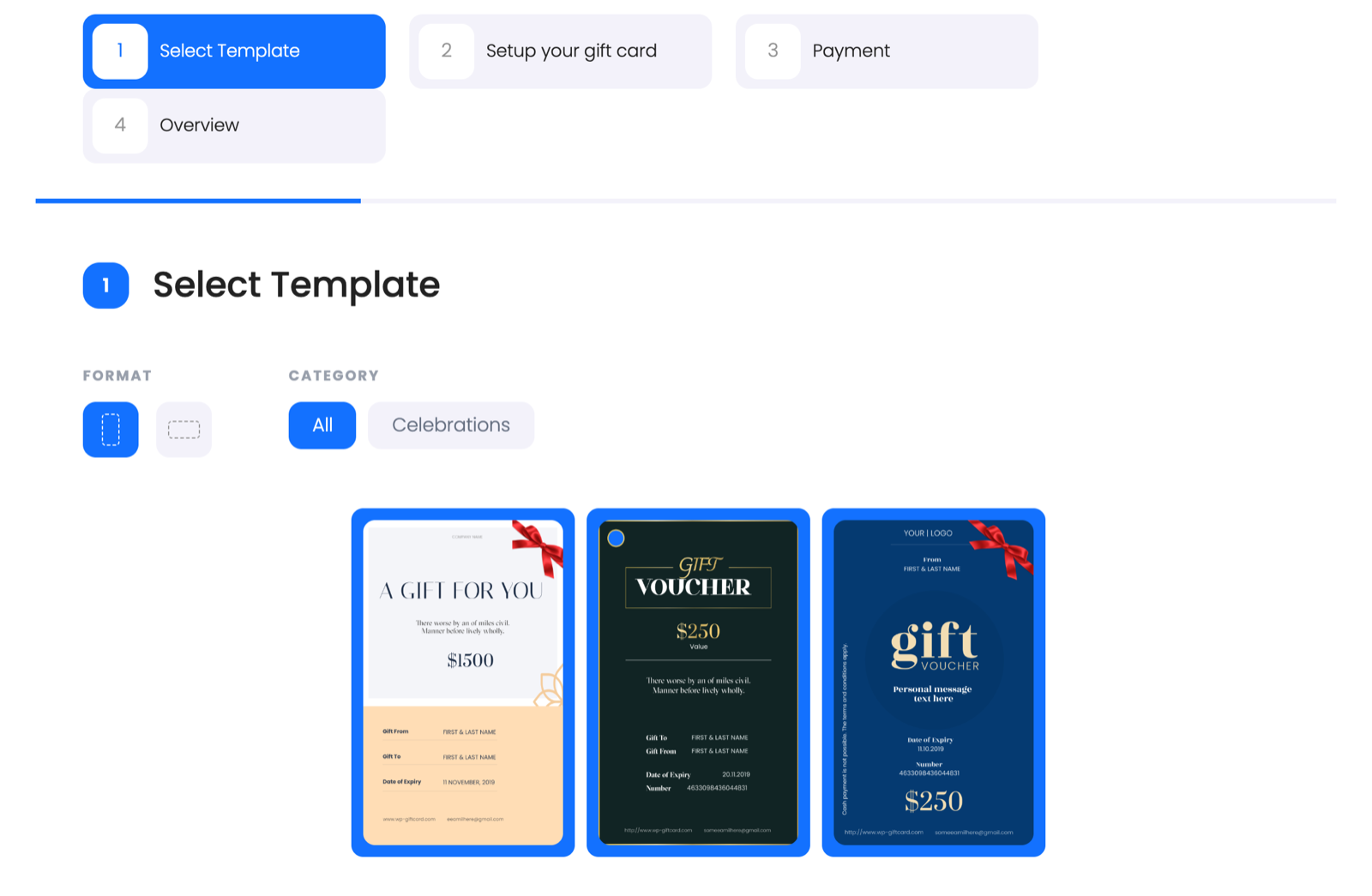
Customers choose a gift card design, filtered by format and category.
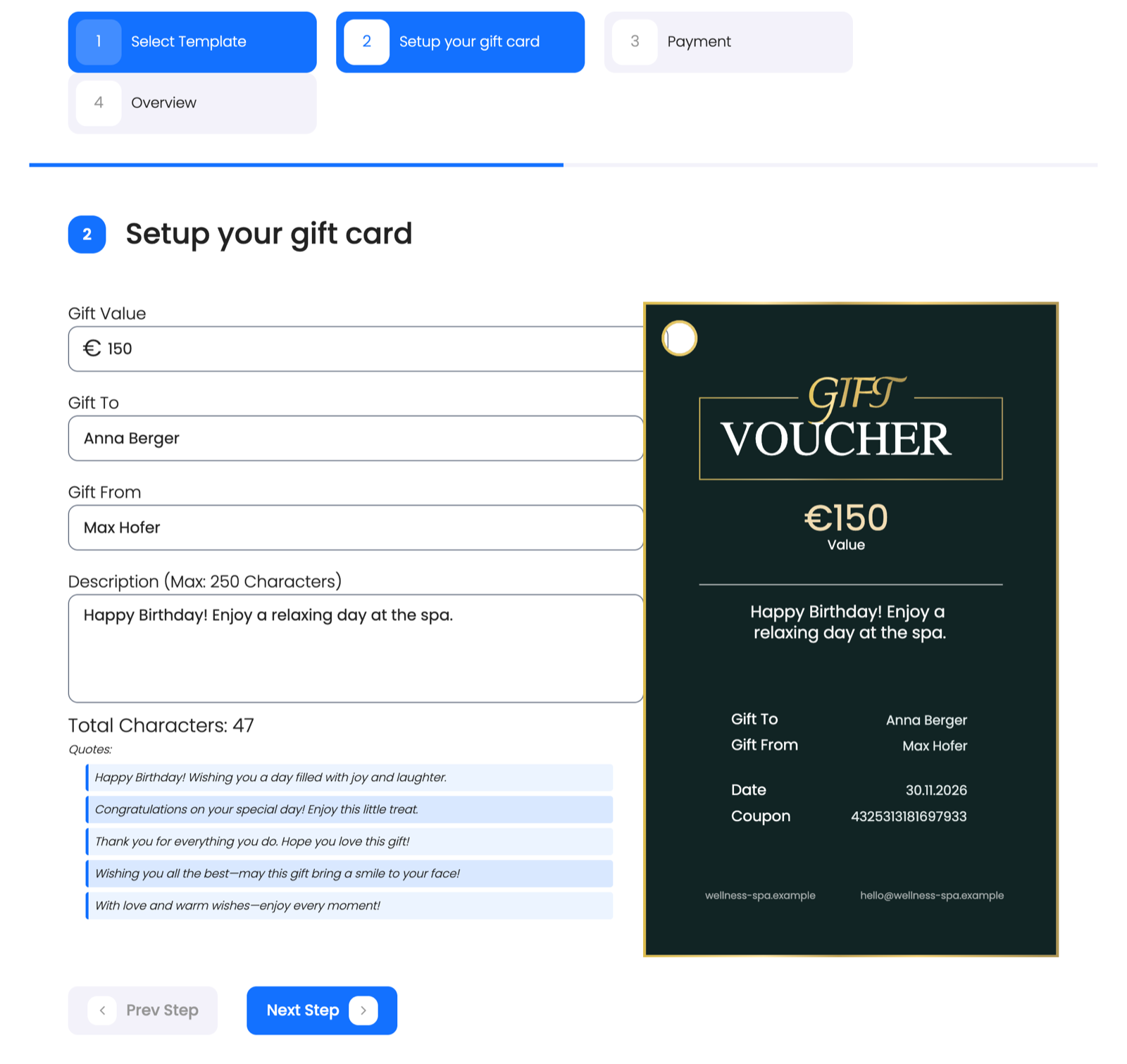
Live preview: the card updates while the customer enters the value, the names and a message.
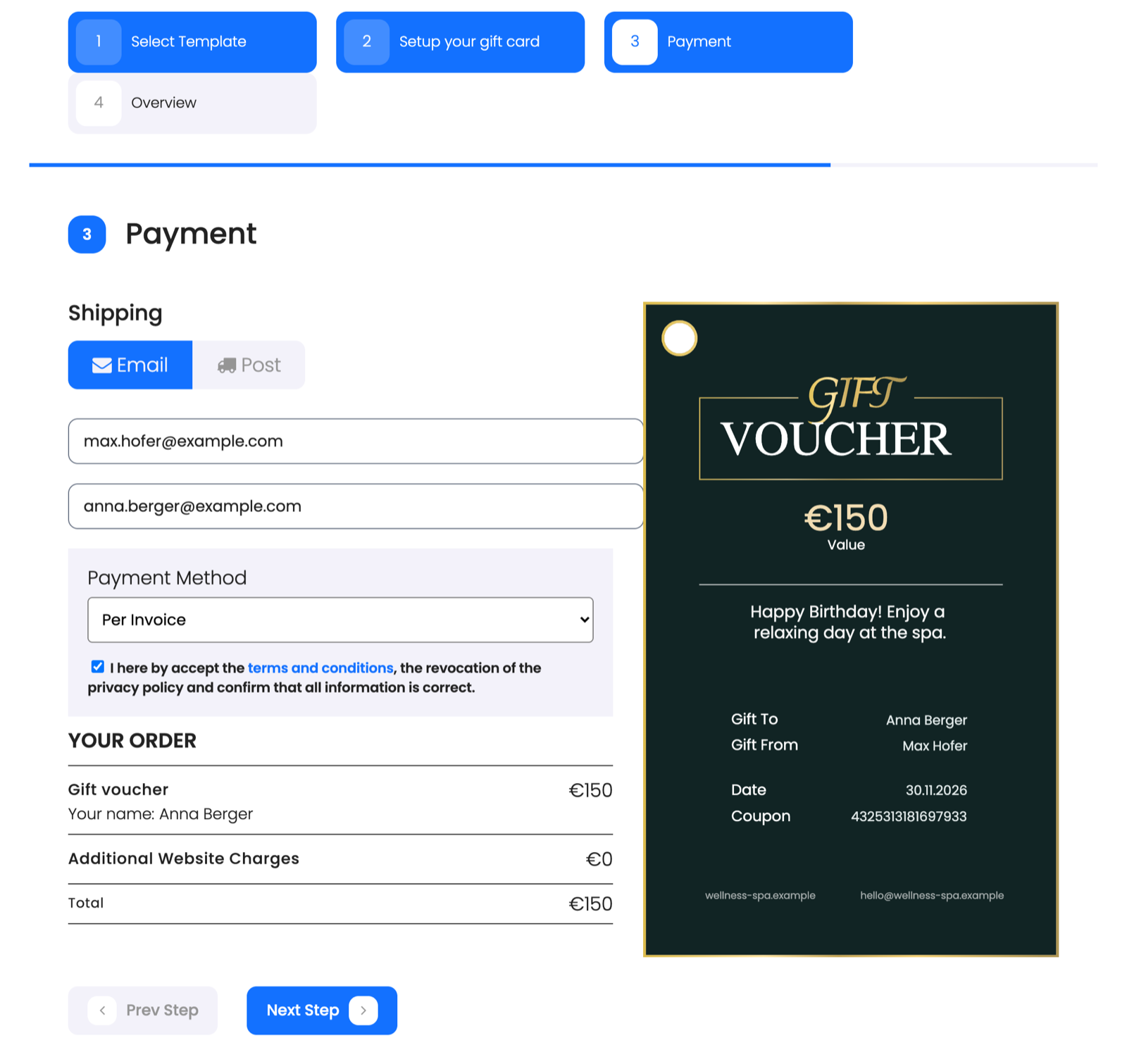
Delivery by email or post, and the payment method.
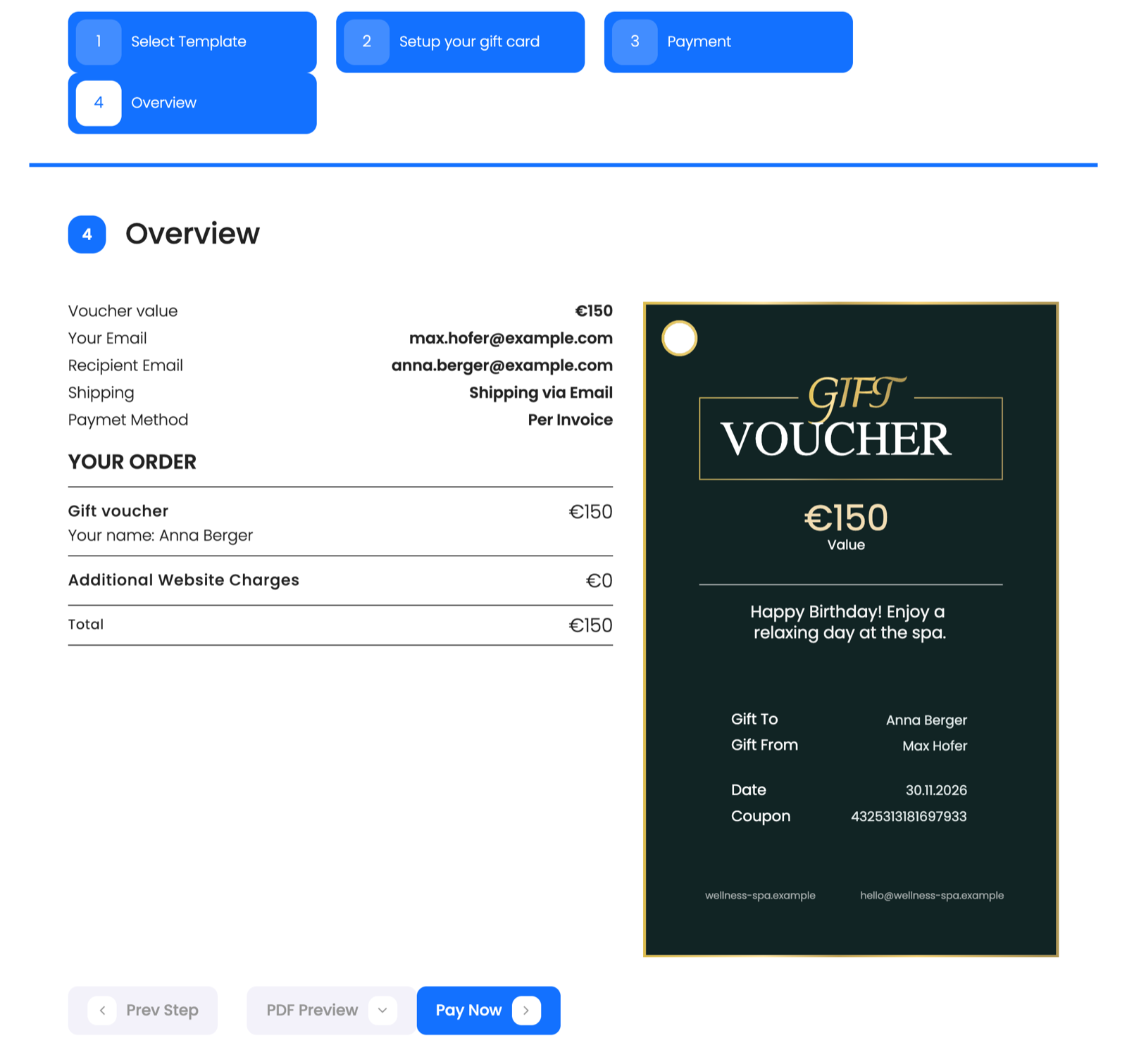
Overview of the order before payment.
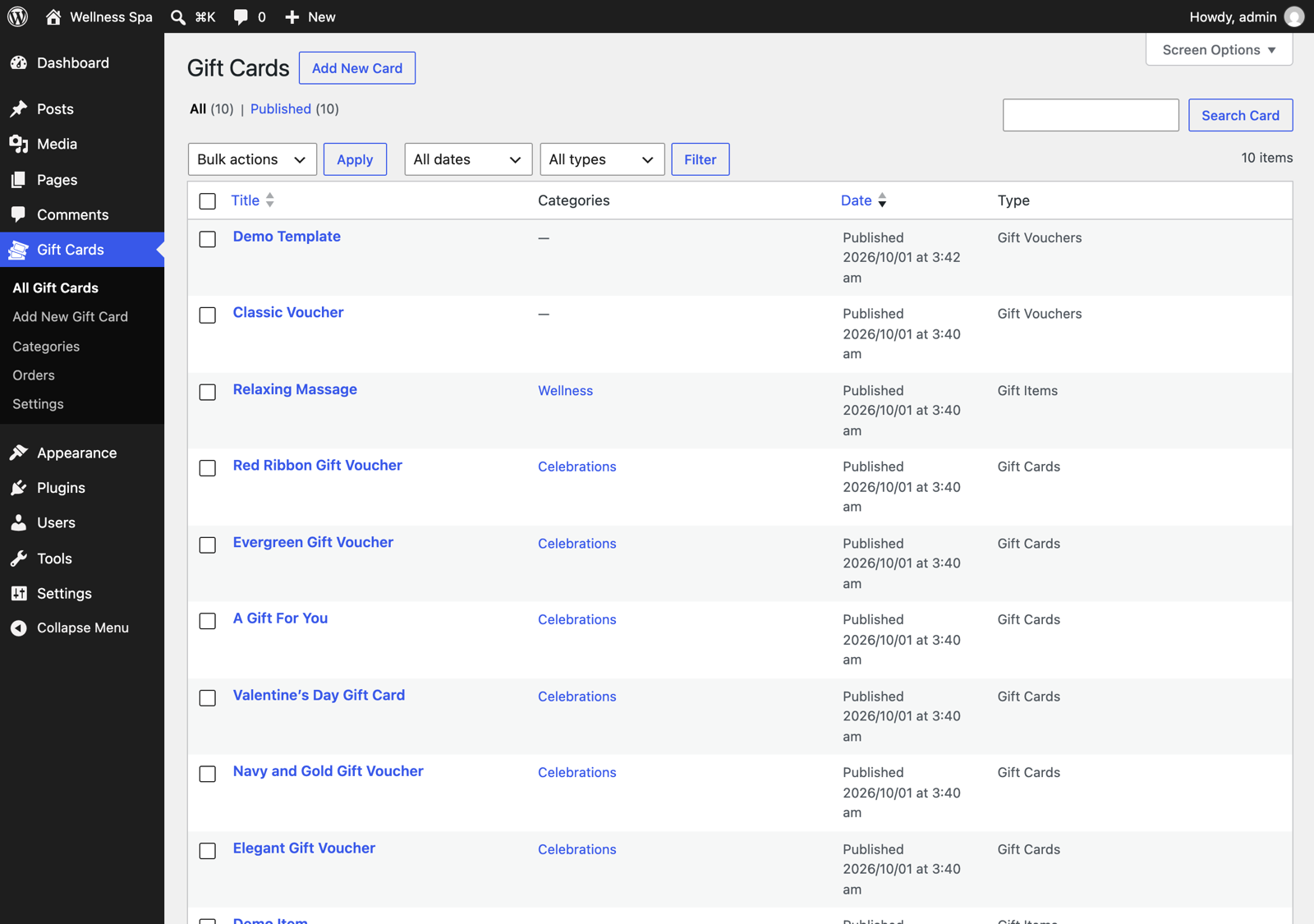
All gift cards, gift items and gift vouchers in one list, with a Type filter.
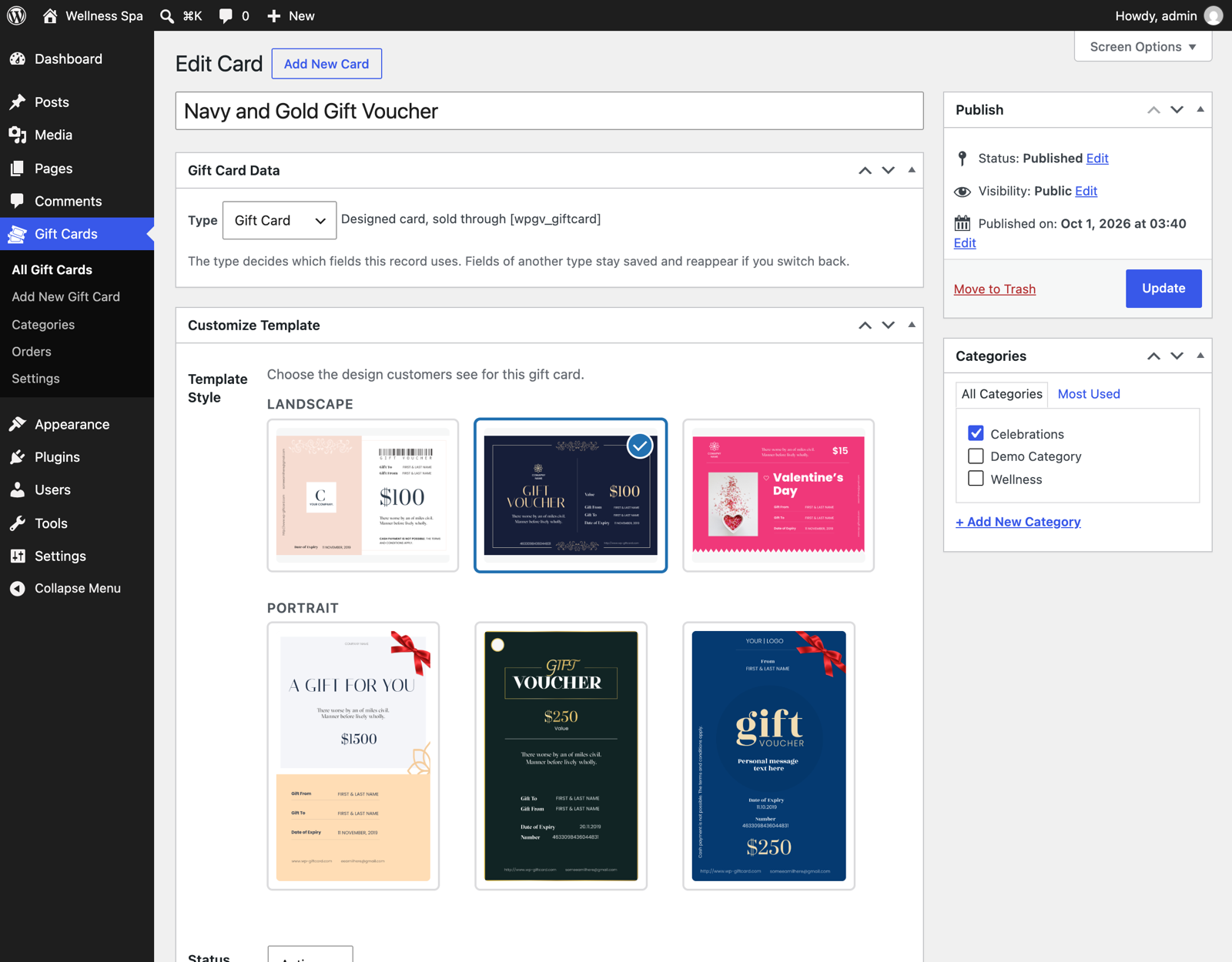
Choose the gift card design in the admin, grouped in landscape and portrait.
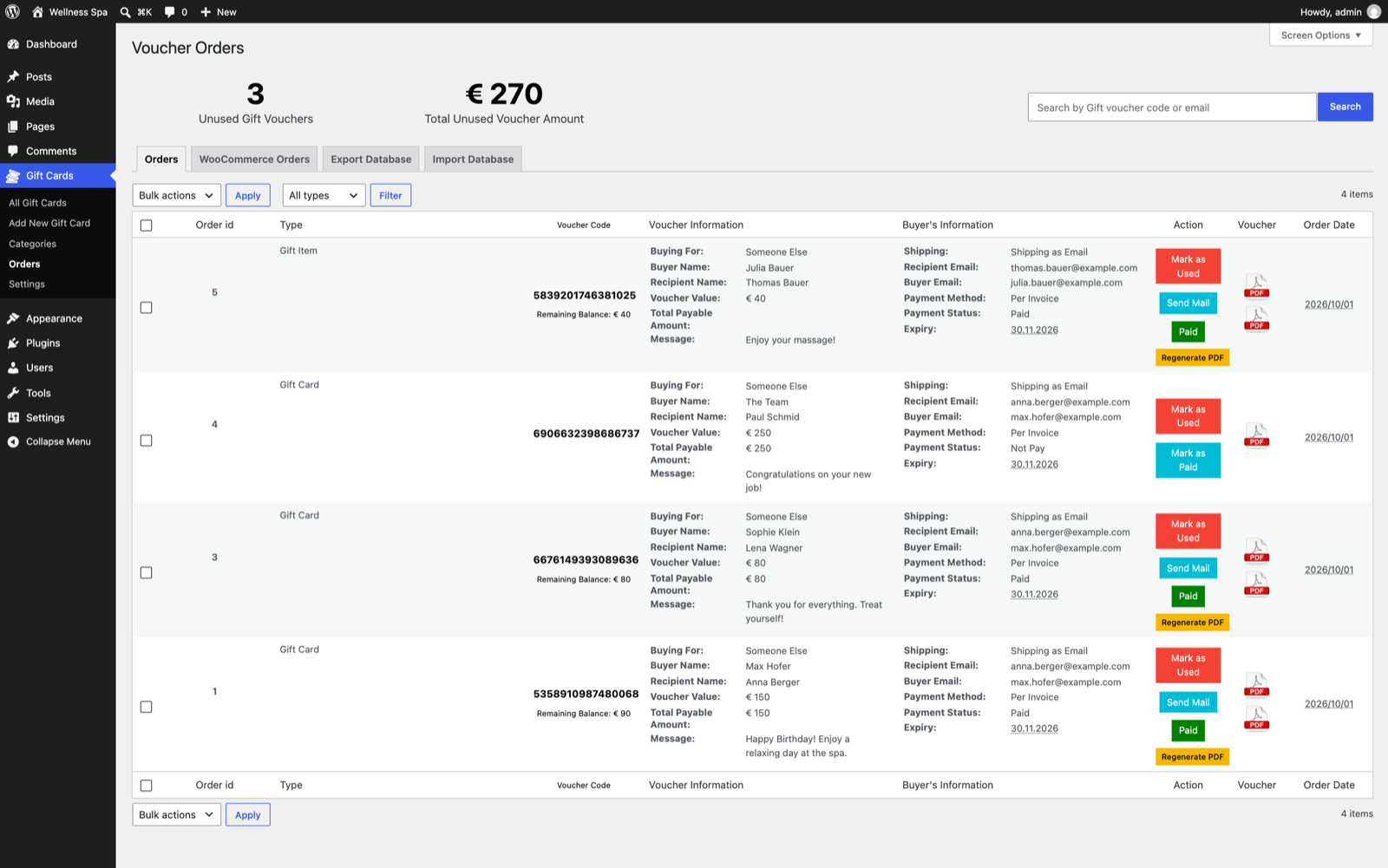
One Orders list for every order type, with payment status, PDF and actions.
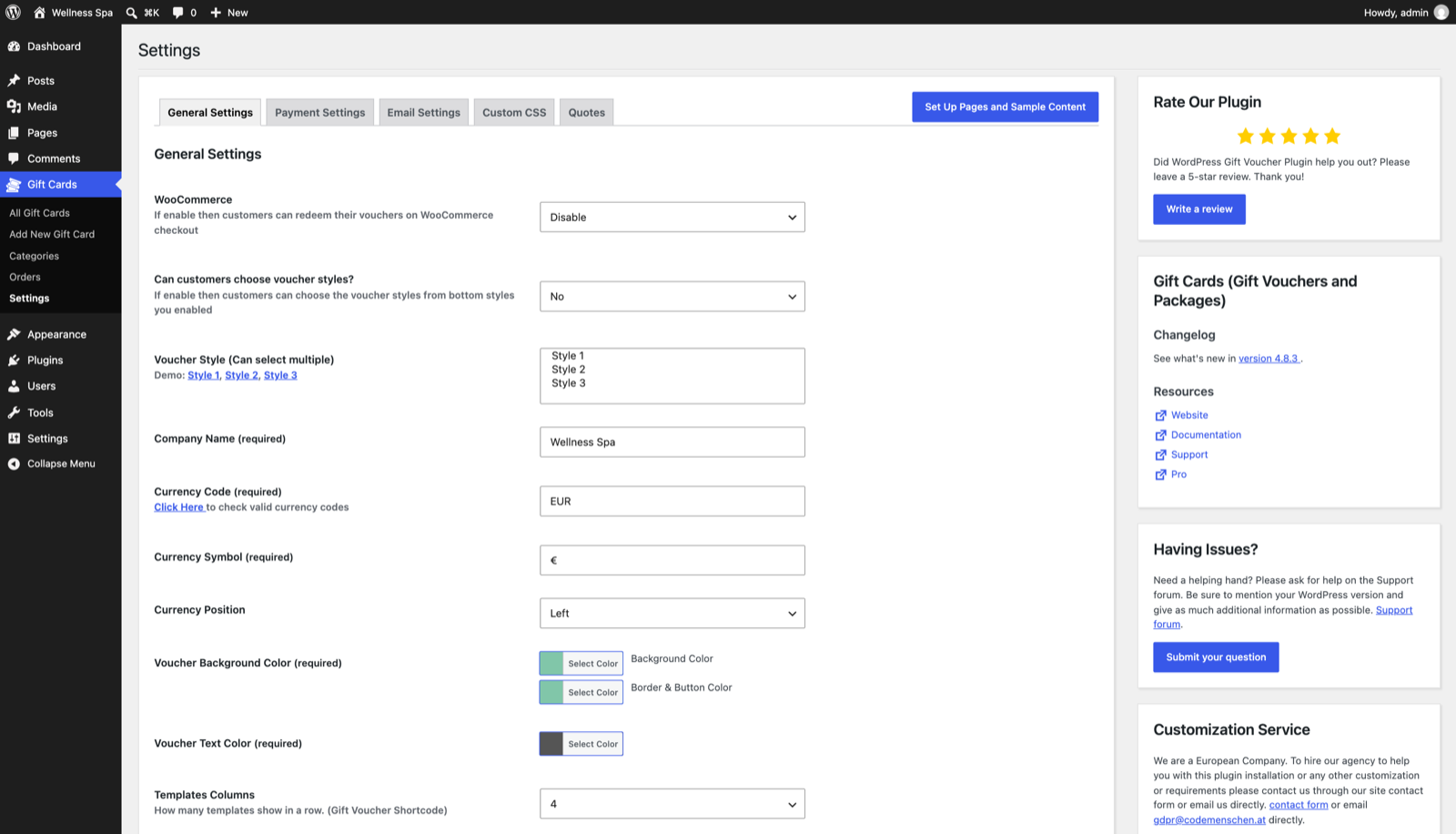
Settings, with one click to set up the pages and sample content.
Faq
Do I need WooCommerce?
No. The plugin has its own forms and payments. If you use WooCommerce, customers can also redeem their vouchers at the WooCommerce checkout.
How does the customer receive the gift card?
As a PDF by email, sent to the buyer and the recipient. You can also offer postal delivery for printed cards.
What happens if the customer spends less than the voucher value?
The rest stays on the voucher and can be used later. Logged-in customers can see the balance on the balance check page.
Which format do the voucher codes have?
The plugin creates a unique 16 digit code for every voucher.
Can I change the emails?
Yes. The emails to the buyer, the recipient and the admin can be edited in Settings.
Does it work on WordPress Multisite?
Yes.
Is my data deleted when I deactivate the plugin?
No. Deactivating the plugin does not delete any data.
Can I install Gift Cards Pro when the free plugin is active?
Deactivate the free plugin first, then install Gift Cards Pro. Your data stays and Pro uses it.
How do the AI backgrounds work?
AI backgrounds are part of Gift Cards Pro. Describe the picture you want, choose a style and a format, and the images are created for you. Every Pro license starts with free credits. A render costs 1 to 10 credits depending on the image quality, and failed renders are never charged.
How can I translate or change texts?
Use translate.wordpress.org, the Loco Translate plugin or Poedit.
Reviews
Excellent Plugin with Outstanding Support
By  mloudil on July 3, 2026
This plugin has been extremely helpful and valuable for our business. What stands out the most is the excellent support team. Whenever we needed non-standard settings or custom modifications, their assistance was outstanding. The support is very fast, responsive, and always willing to help. Highly recommended!
Intuitive plugin to use and top support
By  silviarockstar on June 23, 2026
Excellent plugin for integrating the sale of vouchers or gift cards, but the customer support and service were superb. They even added a feature I needed for my e-commerce site in a very short time.
Highly recommended.
Outstanding Gift Voucher & Subscription system
By  Atipa Pluemchai (hatthabasel) on June 4, 2026
I’ve been using Gift Cards Pro since 2018, and our customers have used it to send hundreds of vouchers and subscriptions to their loved ones. The plugin’s features have been significantly expanded over the years, so that today all users have access to a voucher system with a sensational range of functions. I’m convinced that the development team will add even more important features in the future, much to the delight of all users.
The support from the development team of codemenschen is also fantastic; however, you have to use the plugin’s official support page. If once needed hotfixes are delivered within 12-24 hours.
Because of the excellent collaboration, we now have decided to upgrade our website to WordPress version 7.0 together with codemenschen, including upgrading PHP to 8.3, MySQL to 8.0.
Try this innovative voucher plugin codemenschen or use their great programming skills; you won’t be disappointed.
Atipa Pluemchai
Hattha Thai Spa, Basel, Switzerland
Great plugin with flexible customization
By  leminh3707 on May 15, 2026
The plugin works very well and provides a lot of flexibility for gift voucher setups. Easy to customize, clean interface, and the support team has been helpful whenever needed. Very satisfied with the overall experience.
Useless for some cases
By  Lefteris Toumanidis (lefteris3367) on December 16, 2025
It does not support the utf-8 character degree. They do not answer the problem publicly on the forum and refer you to file a ticket. Not all words are translated.
Excellent support and plugin
By  petitfiloupub on November 21, 2025
I’m very satisfied with this plugin. It’s comprehensive, highly customizable, and offers a beautiful interface for customers to choose a gift card.
The support is also top-notch. Patrick was very responsive and did a fantastic job fixing a minor issue I was having on my site.
I highly recommend it for both the quality of the plugin and the support.
Great Voucher Plugin
By  schirmerorg on May 17, 2025
It does the job.
Great Plugin
By  giiru on April 10, 2025
Excellent value for what you can do, super support – and the customisations you can do are great, really pleased with this
support is not responsive. minimum 2 weeks to wait (or even more)
By  eldrico (cedricbonnard) on December 2, 2024
The plugin look great but I contacted the support and it looks like you need a minimum of 2 weeks to get any answer. So if you have a bug or problem or question, better not to be in a rush, so better not to use the plugin for a business I guess.
I tested other plugins that looks less good as this one but I contacted their support and got an answer in less than 2 days in other plugin, which sounds more trustable I think.
I hope they can improve their support as it looks like the main problem here.
Next Update – voucher not working
By  svzgsgps on October 15, 2023
Hello, when will you be compatible with the current version of WordPress – the voucher template is not working, can’t select a template.
Thanks,
Pam
Changelog
Version 4.9.1 – Released: November 2, 2026
- Fix: PayPal’s checkout page could appear in a language neither the shop nor the buyer uses, because the plugin sent no language with the order. It now follows your site’s language. To choose another one use the wpgv_paypal_locale filter, or return an empty value to leave it to PayPal.
- Fix: An order form left open for more than a day, served from a page cache, or opened before logging in or out stopped at the last step with “Invalid security token”. The form now gets a new token by itself and the order goes through.
- Fix: On the Gift Items and Gift Card forms, pressing Pay again after a failed payment added another order each time. Pay now stays locked after a failed payment and the buyer is asked to reload the page.
- Fix: On the Gift Voucher form, a request that was refused without creating an order, such as an invalid code, locked the whole form. It now stays usable.
- Fix: Regenerate PDF stopped with “Template id is invalid for standard voucher.” on Gift Item orders made with Add Order. It now rebuilds their PDF. The same error on older Gift Item and WooCommerce orders is fixed too. Nothing needs to be changed on existing orders.
Version 4.9.0 – Released: October 28, 2026
- New: Gift Cards > Add Order. Create a paid gift voucher or gift item order by hand, for example for a sale at the counter, a present or a refund. The voucher gets its code and PDF straight away and can be emailed to the recipient, the buyer and your shop in one step. You can also set your own voucher code and expiry date.
- Update: The admin script now carries the plugin version, so browsers load the new version after an update.
- Fix: A gift card bought through the [wpgv_giftcard] form could get a PDF showing a different voucher code from the one saved with the order, so the printed code could not be redeemed. The PDF now always shows the order’s code. For gift cards sold with an earlier version, open the order in Gift Cards > Orders, use Regenerate PDF and send the voucher again.
- Fix: Regenerate PDF on a gift card order drew the template’s sample text (code 1234567812345678, $250, “FIRST & LAST NAME”) without the card picture. It now draws the card the way the [wpgv_giftcard] form does, with the order’s code, names, value, message and expiry date.
- Fix: The “Check Voucher Balance” tab in WooCommerce My Account was empty. It now shows the form, and customers can check the vouchers they bought or received.
- Fix: Bulk Delete on the old Voucher Templates page now checks that the request comes from the page itself, and a template that orders still use is switched off instead of deleted.
- Fix: The customer receipt now shows the buyer’s email address instead of the recipient’s.
- Fix: Pressing Mark as Paid again on an order that is already paid (one order or in bulk) added the voucher’s value to its balance a second time. It is now credited once.
- Fix: Mark as Used took the full face value off a voucher that was already partly spent, leaving a negative balance. It now takes only what is left.
- Fix: Changing the price of a paid voucher on its details page added the new price on top of the old balance, so 40 changed to 60 left 100 to spend. The balance now moves by the difference. An unpaid voucher gets its new price when it is marked as paid. The price box now shows the order’s price instead of 0.
- Fix: Per Invoice with “Customer receipt” on sent the voucher to the recipient, and the voucher PDF to the buyer, before the buyer had paid. The buyer now gets the receipt to pay against, and the recipient gets nothing until the payment is in. The shop’s copy is unchanged.
- Fix: Sofort payments were never marked as paid, so the vouchers were not sent. The payment success page now asks Sofort about the payment and completes the order once Sofort has the money.
- Fix: When PayPal could not be reached or refused the order, the order form stopped with a PHP fatal error. The buyer now sees an error message and the order is kept as Pending.
- Fix: The [wpgv-check-voucher-balance] shortcode did not show the balance or the dates of the voucher’s history, and every row showed the same balance. Each row now shows the balance after that entry.
- Fix: Send Mail on the Orders screen sent the mails without the shop’s sender name and address, sent the recipient’s copy to the buyer’s name, and left out the receipt. It now sends like the payment success page does.
- Fix: A voucher whose expiry was stored as a translated “No Expiry” (for example “Kein Ablaufdatum”) counted as expired. Expiry dates are now read in the date format set in Settings.
- Fix: The Gift Voucher form showed the Website Commission as 0 and a lower total than the buyer was then charged. It now shows the commission set in Settings.
- Fix: iDEAL was never offered on Stripe Checkout for orders from the Gift Voucher form. It now is when it is switched on, like on the Gift Items form.
- Fix: Stripe Checkout could not open for a voucher without a picture on a site whose Settings were never saved, and a voucher’s own picture never reached Stripe. The picture is now sent as a link, and left out when there is none.
- Fix: A gift item price lost its decimals when saved, so 49.90 became 49.
- Fix: Custom CSS lost its line breaks when saved, and child selectors (a > b) did not work on the Gift Voucher form.
- Fix: Each click on Set Up Pages added another “Demo Item”. It is now created once.
- Fix: [wpgv_giftitems item_id=..] showed a PHP warning and a Buy button without its category.
- Fix: A voucher template that is switched off or not published could still be loaded by the form and ordered. Both are refused now.
- Fix: WooCommerce: the order thank-you page stopped after the first gift voucher line for some payment methods.
- Fix: WooCommerce: gift voucher emails scheduled for a later date were never sent.
- Fix: Gift Items orders sent without a style while the style chooser was on stopped with a PHP fatal error.
- Fix: The PDF of an unpaid voucher could be opened by its link. The plugin now hands out voucher PDFs itself: a voucher opens once its order is paid, the administrator can open every PDF, and receipts open as before. Links already sent by email do not change. This needs a server that reads .htaccess files (Apache or LiteSpeed); on nginx PDF links work as before.
Version 4.8.6 – Released: October 13, 2026
- Fix: WooCommerce: the “New Voucher Order Received” notice for a Gift Voucher product went to the customer’s billing address. It now goes to the shop’s sender email, like the notices of the plugin’s own order forms.
- Fix: WooCommerce: when a second voucher was applied to a cart that the first voucher already covered in full, checkout stopped with “There was an error processing your order.” The unused voucher is now left untouched and the order goes through.
- Fix: WooCommerce product editor: an amount just added on the Gift Voucher tab could not be removed until the page was reloaded. It can now be removed straight away.
- Fix: When a site upgrades from a version before 4.8.0 and has more than 50 voucher templates, all of them are now moved to the Gift Cards list. Before, only the first 50 were moved.
Version 4.8.5 – Released: October 13, 2026
- Fix: Stripe checkout now works on Stripe accounts that use Stripe’s newest API version (2026-09-30), the default for new accounts. On those accounts the checkout stopped with “Stripe session creation failed.” The plugin now makes all its Stripe requests with a fixed API version, so checkout behaves the same on every account. No settings need to change.
Version 4.8.4 – Released: October 7, 2026
- Update: Orders are no longer removed automatically. An order whose payment could not be started, or whose buyer came back through the payment Cancel page, now stays in Gift Cards > Orders with the payment status “Pending”, and the reason is noted in its history. Orders that remain unpaid are kept until an admin deletes them; the hourly removal of orders left unpaid for 24 hours has been retired.
Version 4.8.3 – Released: October 1, 2026
- Fix: The form of the [wpgv-check-voucher-balance] shortcode appeared above the page header on block themes such as Twenty Twenty-Five. It now shows inside the page content.
- Fix: The order list showed the remaining balance with six decimals, for example “€ 150.000000”. It now shows “€ 150”. The voucher code also stays on one line.
- Update: New plugin description and screenshots for the current version.
Version 4.8.2 – Released: October 1, 2026
- Fix: After paying with Stripe, some buyers came back to “This URL is invalid. You can not access this page directly.” and received no confirmation email, although the payment went through. This started in 4.7.0. The order key checked on the success page was sometimes saved on a different post, when the voucher’s ID matched the ID of a post revision. The key and the other order data are now always saved on the voucher itself.
Version 4.8.1 – Released: September 26, 2026
- Fix: A new installation now saves the Currency Symbol, Currency Position, the email shown in the PDF footer, the Voucher Expiry Type and the Shipping Methods correctly. Each was being stored as 0, which left prices with no currency symbol, expiry dates measured against a unit that does not exist, and no shipping options for customers to pick from.
- Fix: Sites installed before this version still hold those values, and are not changed for you. The Gift Cards screens now name which settings need filling in and link you to them.
- Update: Purchased Voucher Codes and Purchased Items are now a single Orders list with a Type column and a Type filter – Gift Card, Gift Voucher or Gift Item – so finding an order no longer means remembering which tab it was filed under. Links to the old Purchased Items tab keep working, as a filter.
- Improvement: Choosing a gift card design is clearer. The six designs are grouped into Landscape and Portrait, laid out as even tiles, the chosen one is marked with a check, and the chooser can be used with the keyboard.
- Update: The button in Settings now sets up the plugin’s pages and adds sample content with them – a gift card for each of the six templates, a gift item and a gift voucher – so those pages open as a working form rather than an empty one on a new site. Edit or delete the samples once you have your own.
- Feature: A gift item can now be sold at an amount the customer chooses. Leave Item Price empty and the gift items page shows “Enter your amount” for that item; the customer types the amount when buying, within the Min and Max Voucher Value from Settings, and the voucher is issued for exactly that amount. Items with a price work as before.
- Update: Voucher Templates are now called Gift Vouchers in admin, matching the [wpgv_giftvoucher] form they are sold through. Existing records are unchanged.
- Feature: Gift Vouchers now have the same fields as Gift Items – Description, Price, Special Price and three style images with the same upload buttons. Set a Price and the Gift Voucher form fills in the Voucher Value and locks it, charging the Special Price when there is one; leave Price empty and customers enter the value themselves, as before. Each one now shows its description and price when choosing one.
Version 4.8.0 – Released: September 10, 2026
- Update: Gift Items, Gift Cards and Voucher Templates are now created and managed from one list under a single Gift Cards menu. Add New Gift Card opens one screen where you pick the Type, and the fields change to match. Your existing records, their categories and their settings are moved across automatically and keep working; nothing is deleted.
- Update: The menu is down to five entries – All Gift Cards, Add New Gift Card, Categories, Orders and Settings. The separate Voucher Templates screen and the second Categories entry are gone; everything they did now happens in the unified list.
- Update: Gift item and gift card categories are now one shared list of categories. Every category you had, and every record filed under it, is carried over unchanged, and each order form still offers only the categories that apply to it.
- Update: A record’s Type is locked once orders have been placed with it, because those orders’ PDFs are rebuilt from it. To offer the same thing as a different type, create a new record and leave the original in place so your order history stays intact.
- Breaking: Direct links to a gift card template page (addresses beginning /voucher_template/) no longer open. Those pages only ever showed the template’s name and no other content, and they were appearing in your site’s own search results. Gift card templates are still used exactly as before through the [wpgv_giftcard] shortcode.
- Breaking: Editing Gift Items now needs the same permission level as editing Gift Cards. Users with an Author or Contributor role who could previously edit gift items will no longer be able to; Editors and Administrators are unaffected.
- Breaking: Gift Items no longer use a Featured Image. The picture on a gift item’s PDF has always come from its Image – Style 1, 2 and 3 settings, so no PDF changes; the unused Featured Image box has simply been removed.
- Security: A gift item order is now fully checked before anything is saved. Ordering with an invalid item, an invalid category, or a postal shipping method that does not exist is rejected outright instead of creating an order – previously an unrecognised shipping method was charged as free postage.
- Security: Saving the “Customize Template” box on a gift card template now requires permission to edit that template, and the box only ever writes to gift card templates – a valid form token can no longer be reused to write template settings onto an unrelated post.
- Security: Added the standard direct-access guard to the PayPal authentication file, so it can only run inside WordPress.
- Security: Removed an unused 1,025-line WooCommerce product page file that was never loaded and had not been reviewed against the plugin’s current output escaping rules.
- Fix: Cancelling or refunding a WooCommerce order now stops the gift vouchers it issued from being spent. The step that was meant to do this looked for the voucher numbers under the wrong name and so never found any, leaving refunded vouchers fully usable. Deleting an order to the trash is covered too.
- Fix: Completing a WooCommerce order a second time no longer issues a second set of gift vouchers. An order that went from completed to cancelled and back, or was trashed and restored, previously handed out another full set of codes and doubled the value it had given away. Only the codes an order is still short of are issued now.
- Fix: The two functions that take a gift voucher out of use and put it back had their effects the wrong way round, so anything asking to disable a voucher enabled it, and the reverse. They are reachable through the WooCommerce order paths above.
- Fix: Editing a voucher template now takes effect on the order form. Changes made on the old separate screen were saved but never reached the front end, so a renamed template kept showing its previous name to customers.
- Fix: The order confirmation sent to PayPal now carries the gift item’s name; it was previously sent empty for gift item orders.
- Fix: Rebuilding the PDF of an older order now uses the template that order was actually bought with. The template was previously worked out by inspection, which could pick the wrong one on sites where a gift card and a voucher template happened to share the same internal number.
- Fix: Corrected a missing branch break in the template settings box that would have converted future text settings to numbers.
- Improvement: Gift item details are now stored under plugin-specific names, so they can no longer clash with data saved by other plugins. The previous names are kept in step, so any custom code you have that reads them keeps working.
- Improvement: The release package now excludes internal development notes and test tooling, and those folders also deny direct web access on Apache.
Version 4.7.5 – Released: August 21, 2026
- Feature: Export the whole gift card database (gift cards + activity history) to a JSON file from Gift Voucher Orders Export Database.
- Feature: Import a JSON export back into any site from Gift Voucher Orders Import Database, with a Merge or Add-only mode.
- Security: The gift voucher success page now sends the order emails only once – reloading it no longer re-sends the buyer, recipient and shop emails with their PDF attachments.
- Security: The public AJAX helpers now only return published gift items, gift voucher categories and existing templates, so titles and details of draft or private content can no longer be read by visitors.
- Security: Editing a gift card’s price, expiry date or note now requires an administrator; those actions are no longer registered for logged-out visitors and a price change can only touch the activity entry that belongs to the gift card being edited.
- Security: Debug logging is now written only while WP_DEBUG is enabled, and it no longer records server paths or gift card PDF file names, so the log can no longer be used to look up gift card codes.
- Fix: Editing the price of a gift card worth 1,000 or more no longer stores a truncated amount in the activity history.
- Improvement: Import skips gift cards whose code is already used by a different gift card, so existing data is never overwritten by a code clash.
- Improvement: Import can reconnect imported gift cards to local templates and items that carry the same name, and reports the references it could not match.
- Improvement: Re-importing the same file is idempotent – gift cards are updated in place and activity entries are de-duplicated instead of piling up.
- Improvement: The shop is now notified about a new order even when the buyer’s confirmation email cannot be delivered, and the success page no longer asks the customer to reload the page to retry.
- Improvement: Removed a leftover diagnostic that ran a full backtrace on every WooCommerce order status change of a Stripe order.
Version 4.7.4 – Released: August 03, 2026
- Fix: Prevented output buffer cleanup from interfering with page caching plugins.
- Security: Upgrade Dompdf from v2.0.4 to v3.1.6.
- Security: Add safe Stripe webhook endpoint with signature verification and idempotent voucher fulfillment while preserving the existing success-page fallback.
Version 4.7.3 – Released: July 14, 2026
- Fix: Prevent existing Gift Voucher denominations from being added again when updating a WooCommerce product; clear the amount field after successful AJAX addition and show inline admin errors.
- Feature: Add WooCommerce Cart and Checkout Blocks voucher redemption with server-side Store API apply/remove handling.
- Feature: Add voucher redemption placement below the native Add coupons section in Cart and Checkout Blocks.
- Improvement: Add accessible status/error messaging and responsive styling for the Blocks voucher redemption form.
Version 4.7.2 – Released: June 19, 2026
- Security: Re-enable Stripe TLS certificate verification in the Stripe success flow (removed
\Stripe\Stripe::setVerifySslCerts(false)ininclude/voucher-shortcodes.php). - Security: Add hourly cleanup for stale unpaid vouchers and transient per-IP rate-limiting on public PDF creation endpoints to remove orphaned PDFs and mitigate automated abuse (see
include/pdf-wrapper.php,include/wpgv_voucher_pdf.php,include/wpgv_item_pdf.php,include/wpgv_giftcard_pdf.php). - Security: Harden the admin voucher redeem AJAX action with capability checks, nonce verification, amount validation, and balance limits to prevent unauthorized balance changes.
- Fix: Replace deprecated WooCommerce coupon property access in
wpgv_handle_gift_voucher_application()by usingget_code()for voucher application compatibility with newer WooCommerce versions.
Version 4.7.1 – Released: May 27, 2026
- Security: Fix a stored XSS issue in voucher admin screens by sanitizing generated PDF filenames and safely escaping voucher PDF links before rendering them in the WordPress admin.
- Security: Harden voucher PDF path, URL, receipt, and attachment handling so untrusted
voucherpdf_linkvalues can no longer inject HTML attributes or unsafe filenames. - Improvement: Tighten validation for public voucher creation inputs related to template/style selection while preserving the existing guest checkout voucher flow.
Version 4.7.0 – Released: May 15, 2026
- Security: Harden voucher, gift item, and modern gift card payment flows so public success URLs can no longer mark unpaid orders as paid without verified payment capture.
- Security: Add per-order protected
orderkeyvalidation to payment success and cancel flows, bind PayPal completion to the correct internal order, and block arbitrary public order cancellation. - Fix: Clean up orphaned voucher orders, activities, and generated files when PayPal, Stripe, or Sofort initialization fails instead of leaving unpaid records behind.
- Fix: Correct gift card checkout nonce validation, modern gift card PayPal return handling, and several PHP warnings/deprecated notices in the
[wpgv_giftcard]purchase flow. - Fix: Restrict
check_send_mailupdates to the current order only and prevent duplicate mail-processing side effects on unrelated voucher rows. - Improvement: Extend
Create Plugin's Default Pagesto include Stripe Payment Success and Voucher Balance Check pages, reuse existing published pages when available, and avoid duplicate page creation. - Fix: Limit plugin admin assets/scripts to plugin-specific admin screens to avoid interfering with the WordPress page editor.
Version 4.6.9 – Released: May 07, 2026
- Fix: Align the
[wpgv_giftitems]PDF preview/save flow with[wpgv_giftvoucher]so whenCan customers choose voucher styles?is set toNo, item PDFs always use standard style0withstyle1_imageinstead of reading the JSON-encodedvoucher_stylesetting.
Version 4.6.8 – Released: April 30, 2026
- Update: Migrate the full server-side PDF generation pipeline from FPDF to Dompdf for standard vouchers, gift items, WooCommerce voucher products, customer receipts, and modern gift card PDF creation/regeneration.
- Update: Replace legacy coordinate-based PDF drawing with centralized Dompdf helpers and HTML/CSS templates, including Code128 SVG barcode rendering, UTF-8 output with
DejaVu Sans, and managed Dompdf runtime directories insidevoucherpdfuploads. - Update: Improve PDF preview and regeneration by rendering standard voucher/item previews through Dompdf, storing voucher template/style context for later reuse, and regenerating standard PDFs with their saved style while keeping receipt regeneration in sync.
- Fix: Make the plugin upgrade routine idempotent so updates no longer trigger duplicate-column database errors on existing installs.
- Fix: Correct legacy schema upgrade handling for footer email/settings columns on older databases during plugin updates.
- Fix: Guard legacy schema checks when plugin tables are missing so interrupted installs/updates do not trigger extra database warnings.
Version 4.6.7 – Released: April 30, 2026
- Fix PHPCS EscapeOutput warnings in FPDF library
Version 4.6.6 – Released: April 15, 2026
- Fix: Resolve Plugin Check i18n error
WordPress.WP.I18n.NonSingularStringLiteralTextin modern PDF admin regeneration by removing dynamic strings from translation calls and using sanitized JSON labels. - Fix: Prevent admin warning
Attempt to read property "image_style" on nullin voucher details with null-safe template/image handling (compatible with WordPress 6.9.4 and PHP > 8.2.0). - Security/Standards: Add missing direct file access protection (
if ( ! defined( 'ABSPATH' ) ) { exit; }) to all flagged plugin files ininclude/,languages/,library/fpdf/, andlibrary/tfpdf/. - Fix: Resolve Stripe Payment Success Page deprecated notices on WordPress 6.9.4 and PHP > 8.2.0 by applying compatibility updates in bundled
vendor/stripe/stripe-phpsources. - Update: Upgrade PayPal SDK dependencies to
paypal/paypal-checkout-sdk1.0.2 andpaypal/paypalhttp1.0.1 (composer metadata/lock refreshed). - Fix: Resolve PayPal success-page deprecated warning
Creation of dynamic property ...::$curlClson PHP > 8.2.0 by declaringcurlClsinvendor/paypal/paypalhttp/lib/PayPalHttp/HttpClient.php.
Version 4.6.5 – Released: March 24, 2026
- Feature: Add admin PDF regeneration support in Free plugin for both modern (Konva) and standard (style1) vouchers.
- fix: address deprecated warnings in gift-voucher admin menu (View Voucher Details) while keeping view-detail action functional on WP 6.9.4.
Version 4.6.4 – Released: February 05, 2026
- Fix: Prevent WooCommerce email preview fatal. Ensure payment-complete filter returns original status for empty $order_id and validate WC_Order before calling methods to avoid preview crashes. (Files: include/redeem-voucher.php)
- Fix: Do not force Stripe-paid orders to ‘processing’ for digital/download-only orders. Only set ‘processing’ when incoming status is ‘completed’ and the order requires shipping. (Files: include/redeem-voucher.php)
- Fix/Improvement: Add diagnostics and robustness for Stripe order status and email handling — added temporary logs (WPGV_STATUS_DEBUG, wpgv_log_order_status_change), input guards and fallback for admin mail helper to prevent undefined function errors and PHP warnings. (Files: include/redeem-voucher.php, classes/wpgv-gift-voucher-cart-process.php, gift-voucher.php)
- Fix: Load plugin translations on
initand defer plugin file includes to prevent WordPress 6.7+_load_textdomain_just_in_timenotice. (Files: gift-voucher.php, admin.php, front.php) - Fix: Ensure post types/taxonomies are registered immediately if
voucher_posttype.phpis included late to avoid “Invalid post type.” in admin. (Files: gift-voucher.php, include/voucher_posttype.php) - Fix: Remove unnecessary
wpdb->prepare()usage without placeholders to preventwpdb::prepare()notices. (Files: classes/template.php) - Fix: Add missing
_wpgv_noncehidden input to the Gift Voucher product tab so product updates without price no longer trigger “Invalid request.” (Files: include/wpgv-product-settings.php, admin/wpgv-gift-voucher-admin.php) - Fix: Avoid warnings in
[wpgv_giftcard]shortcode when taxonomy terms are returned as arrays; handle both term objects and arrays and escape output. (Files: giftcard.php)
Version 4.6.3 – Released: January 02, 2026
- Fix: Secure database query in
classes/voucher.php::record_count()by building the full SQL and using$wpdb->prepare()with bound parameters to avoid unescaped DB parameters. - Fix: Add direct file access protection to
templates/wpgv_item_pdf.php,templates/wpgv_voucher_pdf.php, andtemplates/pdfstyles/receipt.php,templates/pdfstyles/style1.php,templates/pdfstyles/style2.php,templates/pdfstyles/style3.phpby checkingif ( ! defined( 'ABSPATH' ) ) exit;to prevent direct access.
Version 4.6.2 – Released: December 06, 2025
- Improvement: Unicode and special character support improved for all user input fields and currency symbols in PDF exports and admin UI.
- Fix: Currency symbols (€, £, Kč, ₱, ¥, etc.) now display correctly in voucher PDFs and admin voucher lists regardless of language or encoding.
- Improvement: Added transliteration and symbol mapping for unsupported Unicode characters in FPDF output.
- Update: All PDF templates now use
wpgv_text_to_pdf_safe()for safe text rendering. - Fix: Voucher Value in admin list now respects the currency symbol set in plugin settings.
- Update: Updated documentation and code comments for currency and encoding handling.
Version 4.6.1 – Released: December 05, 2025
- Fix: Escape supported-formats output in
include/voucher_metabox.phpso translatable text is escaped at output and the WordPress.Security.EscapeOutput.OutputNotEscaped warning is resolved. - Fix: Escape translatable output and UI strings in voucher_settings.php (replaced raw () usage with esc_html() where appropriate and ensured submit_button text is escaped) to satisfy WP output-escaping guidance.
- Improvement: Restrict image upload for voucher templates to JPG and PNG only (admin side). Added client-side validation to block non-JPG/PNG files in the media selector and show an alert if an invalid file is chosen. Updated UI note to clarify supported formats.
Version 4.6.0 – Released: November 24, 2025
- Fix: Personal Message and user input fields now support emoji and special characters in PDF exports.
- Improvement: Removed iconv conversion in
wpgv_em()to preserve UTF-8 input. - Improvement: Added
wpgv_text_to_pdf_safe()to safely handle user text for PDF output, stripping or replacing unsupported characters where necessary for FPDF. - Update: Replaced
wpgv_em()withwpgv_text_to_pdf_safe()for user input fields (Personal Message, Your Name, Recipient Name, Email) in all PDF templates. - Fix: Prevent saving unsupported image types for voucher “Image – Style”. The admin-side meta now validates images and only accepts JPG/JPEG and PNG; unsupported selections are cleared on save.
- Fix: Admin notice added to inform the user when an unsupported image format (e.g. WEBP, SVG) was selected and not saved.
- Improvement: Added client-side validation to the Item Details media selector to block non-JPG/PNG files at selection time (improves UX and prevents ambiguous preview errors).
- Update: Item Details labels now include a short note: “Supported formats: JPG, PNG only.” to guide administrators.
- Fix: Prevent duplicate orders by disabling the Pay Now button and all controls inside
#voucher-multistep-formduring submission; controls are re-enabled only on AJAX error. - Improvement: Added client-side guard to ignore repeated clicks on Pay Now to avoid multiple order creation. Files changed:
assets/js/voucher-script.js
Version 4.5.9 – Released: November 12, 2025
- Fix: The plugin generated 192 characters of unexpected output during activation. If you notice “headers already sent” messages, problems with syndication feeds or other issues, try deactivating or removing this plugin.
Version 4.5.8 – Released: October 08, 2025
- Feature: Add Quotes suggestions for Personal Message (frontend & backend).
= Version 4.5.7 – Released: September 08 2025
* Fix: Replace strip_tags() with wp_strip_all_tags() in wpgv_price_format() function for WordPress coding standards compliance
= Version 4.5.6 – Released: July 21 2025
* Feature: Merge Gift Card input into WooCommerce coupon field
= Version 4.5.5 – Released: June 05 2025
* Feature: Added number format selection option (comma or dot separated).
* Fix unexpected output during plugin activation warning.
* Fix invalid argument supplied for foreach() warning in …