

Real Time Validation For Gravity Forms
Description
Real Time Validation For Gravity Forms checks every field the moment a user leaves it, instead of waiting for the form to be submitted. Mistakes are shown right below the field, so users fix them on the spot.
The result: fewer failed submissions, faster form completion and cleaner, more accurate data.
✨ Features
- Instant feedback – errors appear as soon as a field loses focus.
- Regular expression validation – add your own pattern and error message to Text and Number fields.
- Repeater field support – works on every row, including rows added with “Add Row”. (New in 1.0.5)
- Per form switch – turn real time validation on or off for each form.
- Custom messages – uses each field’s custom validation message when set.
- Multi-step forms – works on every page of a multi-page form.
- AJAX and non-AJAX – works in both modes.
- Conditional logic – plays nicely with fields shown or hidden by conditional logic.
- Multiple forms – supports several forms on the same page.
🧩 Supported fields
Standard: Single Line Text, Paragraph Text, Drop Down, Number, Checkboxes, Radio Buttons, Image Choice, Multiple Choice
Advanced: Name, Date, Time, Phone, Address, Website, Email, Consent, Repeater
Pricing: Product, Quantity, Option, Shipping
More fields are coming soon.
🔍 Regular expression validation
Regular expressions are available for Single Line Text and Number fields. The same pattern is checked in the browser while typing and again on the server when the form is submitted.
How to set it up
- Open the form editor and select a Single Line Text or Number field.
- Go to the Advanced tab and check Enable Real Time Validation.
- Enter your pattern in Enter RegEx pattern.
- Enter the message to show when the value does not match in Validation failed message. If left empty, “Validation Failed.” is shown.
Pattern format
- Write the pattern on its own, for example
^[A-Z]{3}$. - Optionally wrap it in slashes to add flags, for example
/^[a-z]{3}$/ifor a case-insensitive match. Supported flags:i,m,s,u. - A
/inside the pattern is fine, for example^\d{2}/\d{2}$. - Use
^and$to match the whole value. Without them the pattern only has to match part of it. - If the field is not required, an empty value is accepted. The pattern is only checked once something is entered.
Examples
Copy only the pattern itself, without the surrounding backticks.
- Phone number:
^(\+?\d{1,4}[\s-]?)?(\(?\d{3,4}\)?[\s-]?)?\d{3}[\s-]?\d{3,4}$ - Only letters and spaces:
^[A-Za-z ]+$ - Exactly 5 digits (ZIP code):
^\d{5}$ - Date as DD/MM/YYYY:
^\d{2}/\d{2}/\d{4}$ - Starts with “INV-” (any case):
/^inv-\d+$/i
📋 Requirements
- PHP 7.4 or higher
- Gravity Forms 3.0.0 or higher
🚀 Our other plugins
- Alpha Addons for Gravity Forms
- Smart Phone Field for Gravity Forms
- Smart Phone Field for Fluent Forms
- Smart Phone Field for Contact Form 7
- Smart Phone Field for Elementor Form
- Image Picker for Gravity Forms
- Range Slider for Gravity Forms
- Address AutoComplete for Gravity Forms
- Restrict Dates for Gravity Forms
Installation
- In your WordPress admin, go to Plugins Add New and search for “Real Time Validation For Gravity Forms”.
- Click Install Now, then Activate.
- Open a form, go to Settings Form Settings and turn on Enable Real Time Validation.
- Mark the fields you want validated as Required, or add a regular expression to Text and Number fields.
Screenshots

Enable real time validation from the form settings page.
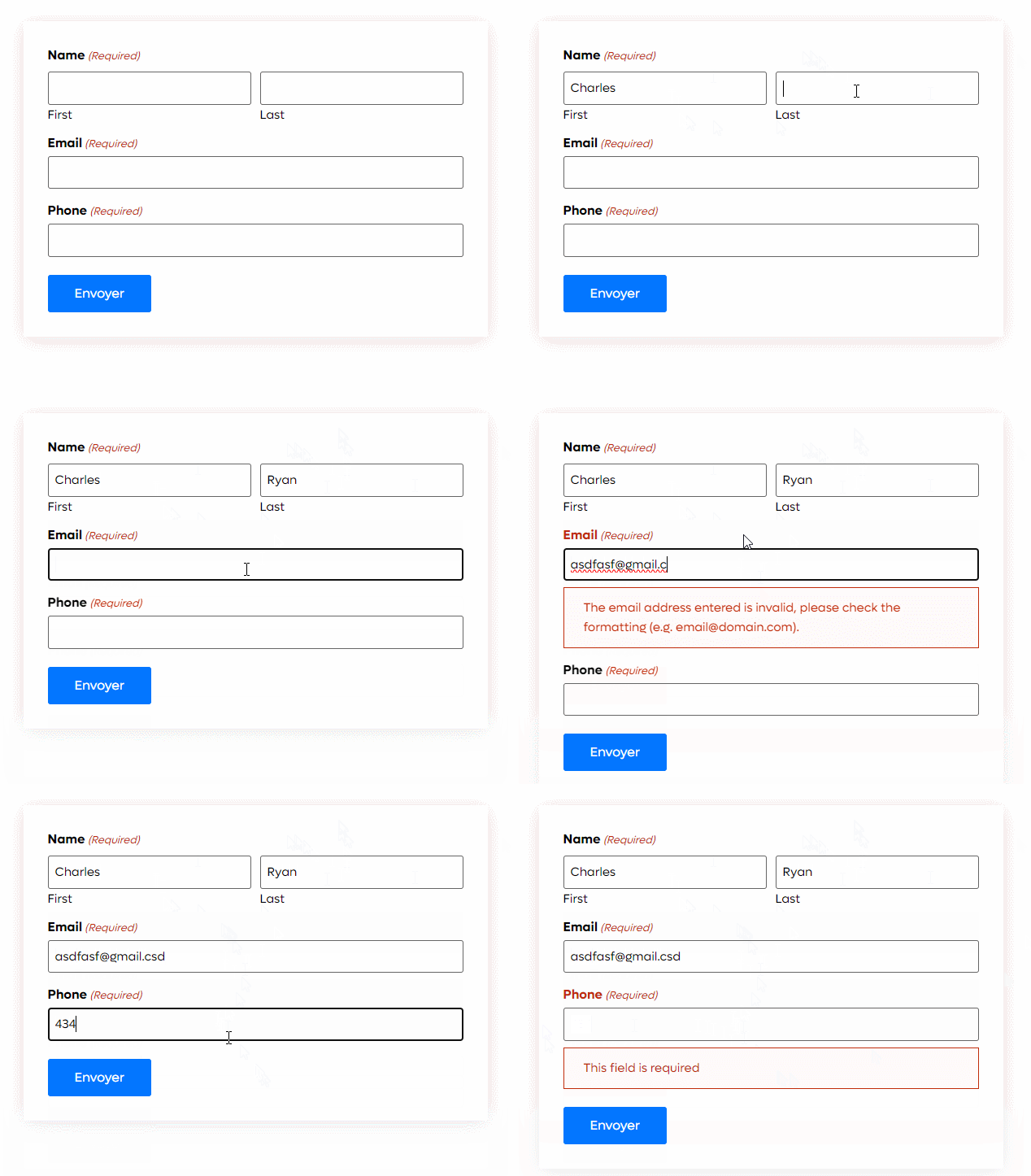
Add your fields to the form, mark them as required and see instant feedback.

Faq
Which fields are validated?
Required fields of the supported types, plus any Text or Number field with a regular expression enabled.
Does it work inside the Repeater field?
Yes. From version 1.0.5 every row is validated, including rows added after the form loads.
My regular expression does not seem to work. What should I check?
Make sure the pattern is valid and uses ^ and $ if the whole value must match. An invalid pattern is ignored, so it never blocks the form. Also note that Number fields only accept digits while typing.
Does it replace Gravity Forms’ own validation?
No. It adds instant feedback in the browser. Gravity Forms still validates everything on submit.
Reviews
Working well in 2024
By  zubsero on September 17, 2024
But is it possible to add a different phone number validation?
// Pattern that allows digits, +, (), -, and spaces $pattern = "/^(\+?\d{1,4}[\s-]?)?(\(?\d{3,4}\)?[\s-]?)?\d{3}[\s-]?\d{3,4}$/";
So it works with different phone numbers
Example of valid phone numbers:
+44 123 456-7890+1 (123) 456-7890(012) 345 6789494-934-128123 456 7890
Very helpful plugin
By  Shahin Ahmed (iamshahin) on March 19, 2024
One of the best plugin for Gravity Forms
Changelog
1.0.5
- New: Real time validation for fields inside the Repeater field, including newly added rows.
- New: Regular expressions can be written as
/pattern/flags(supported flags: i, m, s, u). - Fix: Patterns containing
/failed on form submit. - Fix: Patterns saved with extra spaces, new lines or wrapping backticks never matched.
- Fix: An invalid regular expression stopped validation in the browser and blocked form submission.
- Fix: An empty pattern on a required field showed a blank error message.
- Fix: The value “0” skipped the regular expression check on submit.
- Fix: JavaScript error on Product and Quantity fields using the number input type.
1.0.4
- New: Support for the “Alpha Addons For Gravity Forms” limit checkbox addon.
- Fix: Other bug fixes.
1.0.3
- New: Image Choice and Multiple Choice fields.
- Fix: Bug fixes.
1.0.2
- Fix: Email validation message issue.
- Fix: Bug fixes.
1.0.1
- New: Regular expression validation for Text and Number fields.
- New: Custom validation message for regular expressions.
- Fix: Bug fixes.
1.0
- Initial release.