
GDPR Compliance & Cookie Consent
Description
GDPR Compliance & Cookie Consent is a free WordPress plugin that helps you handle visitor consent and personal data requests on your website. It adds a customizable cookie consent banner, consent checkboxes for comments and popular form and e-commerce plugins, and a form where visitors can ask for a copy of their personal data or ask for it to be erased.
The plugin is a tool to help you work towards GDPR compliance. It does not give legal advice and does not make a site compliant on its own: you remain responsible for your privacy policy, your cookies and the way you process personal data.
Features
- Cookie consent banner with your own text, button label, colors, position and optional custom CSS, plus an optional Decline button
- Google Consent Mode v2: Google tags (Analytics, Ads, Tag Manager) wait for consent, and the visitor’s choice is passed on to them (see “Google Consent Mode v2” below)
- Works with page caching: the banner is shown or hidden in the browser from the consent cookie, so cached pages are correct for every visitor
- Adjustable consent expiry time (default six months)
- Optional cookie blocking until the visitor accepts the banner (see “What cookie blocking does” below)
- Link to your Privacy Policy page from the banner, with custom link text
- Consent checkboxes for WordPress comments, Contact Form 7, Gravity Forms, WooCommerce, BuddyPress and MailChimp forms, each with its own label and error message
- Data access and erasure form for visitors, using WordPress’ built-in personal data export and erasure requests with an email confirmation link
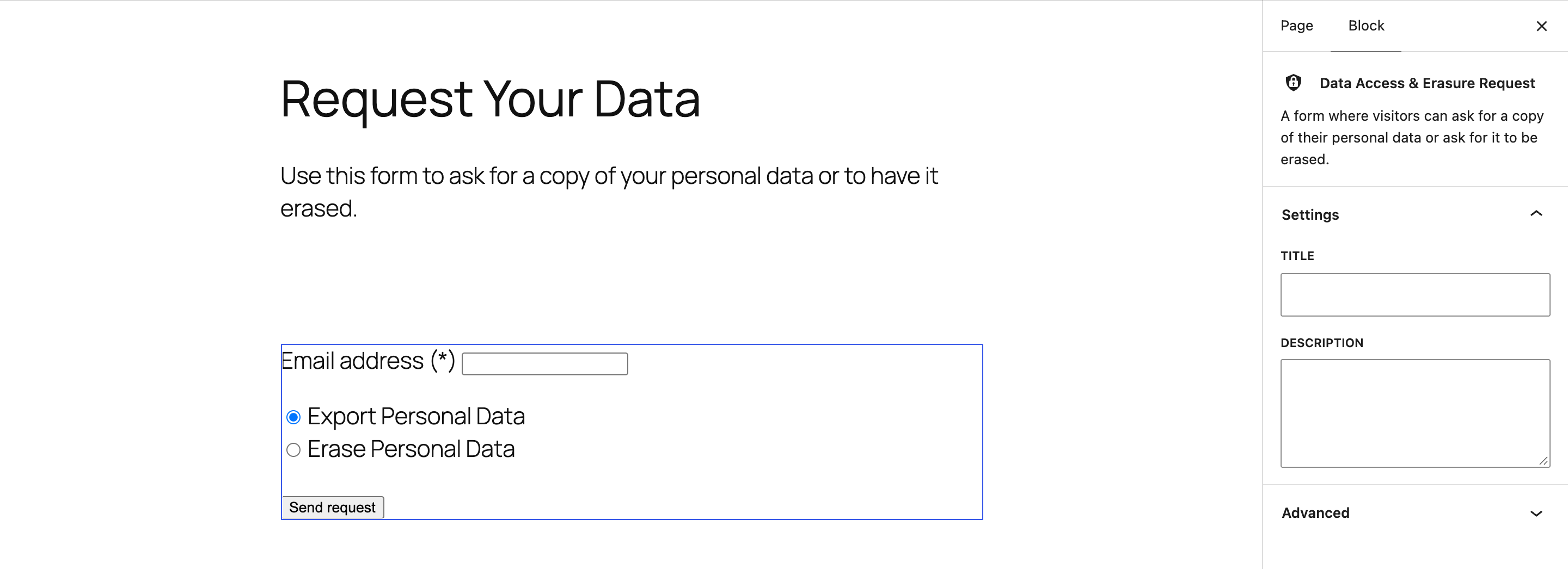
- Gutenberg block “Data Access & Erasure Request”, shortcode and widget to place the data request form anywhere
- Translation-ready
- Comment consent is recorded: the comments list shows when each commenter accepted
How to use
After activation open “GDPR” in the admin menu. It has tabs for General (banner, cookie blocking, expiry, colors and position), Privacy Policy, Integrated plugins and Data access & to be forgotten. Click “Save changes” on each tab.
To offer visitors the data access and erasure form, add the “Data Access & Erasure Request” block to a page, or use this shortcode (optional attributes title and description), or the “GDPR Compliance Widget”:
[stm-gpdr-data-access]
Google Consent Mode v2
The option “Google Consent Mode v2” (General tab, on by default, active while the consent banner is enabled) prints the Consent Mode default as early as possible in the page head: ad_storage, ad_user_data, ad_personalization and analytics_storage are denied, with wait_for_update set to 500 ms, together with the dataLayer/gtag stub. When the visitor accepts, declines, or a category is changed, the plugin calls gtag('consent', 'update', ...). Analytics maps to analytics_storage; marketing maps to ad_storage, ad_user_data and ad_personalization. “Accept” grants both, “Decline” denies both, and returning visitors get their stored choice applied as an update on every page load. This happens in the browser from the consent cookie, so it works with cached pages. Themes and other plugins can set categories separately with window.stmGdprSetConsent({analytics: true, marketing: false}), and listen to the stm_gdpr_consent event. Your Google tags must load after the plugin’s snippet (the plugin prints it with priority 1 in wp_head) and must respect Consent Mode, which Google Tag and Google Tag Manager templates do by default.
What cookie blocking does
When the “Block Cookies” option is on, until a visitor accepts the banner the plugin stops WordPress and other PHP plugins from setting cookies on the front end of your site, and a small script prevents cookies being written from JavaScript. It does not scan your site, categorize cookies, or stop third-party scripts (for example analytics or advertising tags) from loading, so check those separately.
What this plugin does not do
- It does not provide legal advice or a legal guarantee
- It does not write your privacy policy for you
- It does not automatically scan or classify the cookies used on your site
Installation
- Upload the plugin files to the
/wp-content/plugins/directory, or install the plugin through the WordPress plugins screen directly. - Activate the plugin through the ‘Plugins’ screen in WordPress
- Set Up Page in Menu -> GDPR.
Screenshots

The cookie consent banner with Accept and Decline buttons.
The data access and erasure request form (shortcode [stm-gpdr-data-access] or the Data Access & Erasure Request block).
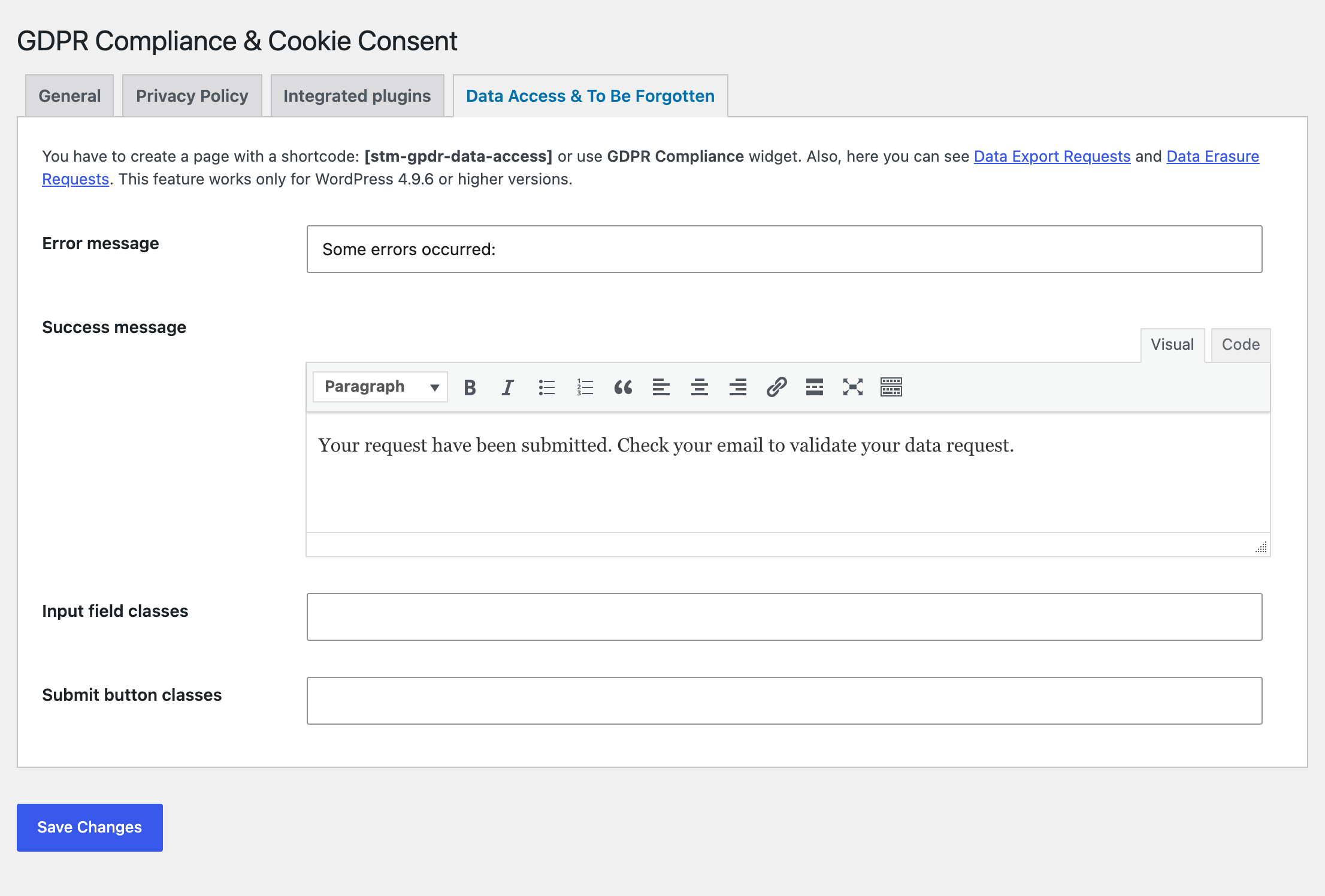
Data access settings: messages and CSS classes for the request form.
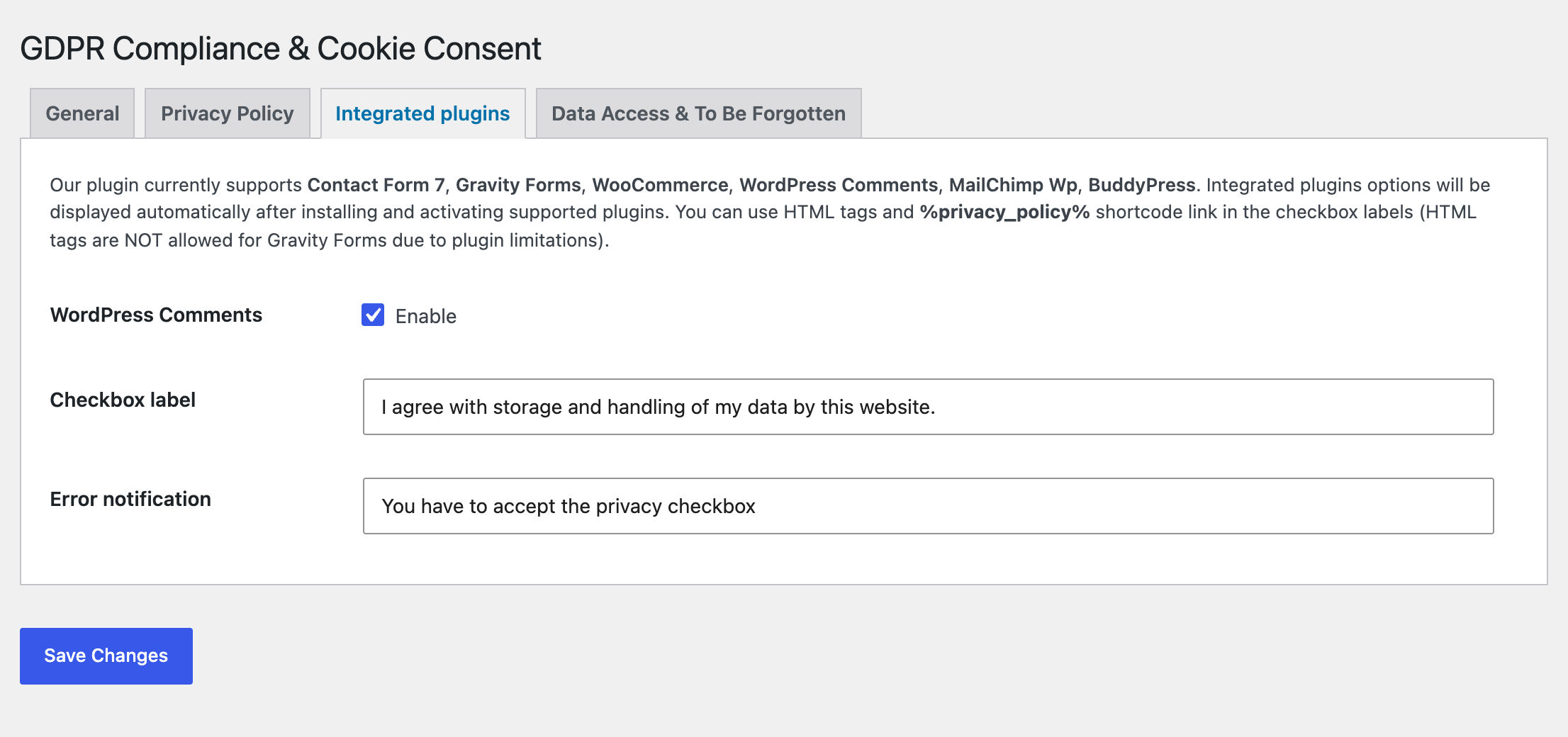
Consent checkbox settings for integrated plugins such as WordPress comments, Contact Form 7 and WooCommerce.
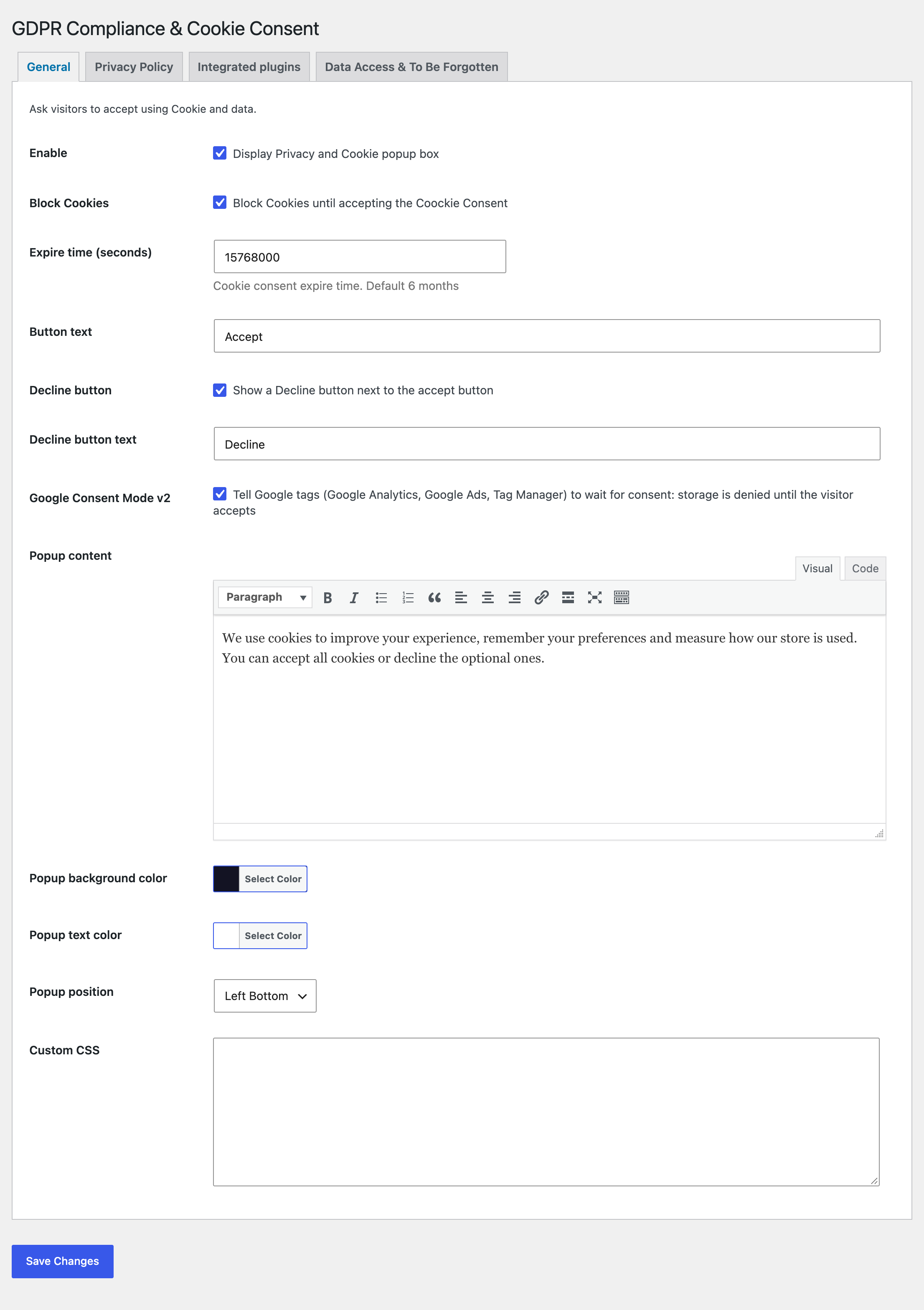
General settings: banner, Decline button and Google Consent Mode v2.
The Data Access & Erasure Request block in the block editor, with its settings in the sidebar.

![The data access and erasure request form (shortcode [stm-gpdr-data-access] or the Data Access & Erasure Request block).](https://ps.w.org/gdpr-compliance-cookie-consent/assets/screenshot-2.png?rev=3769375)
Faq
Does it block cookies before consent?
If you enable “Block Cookies” in the General tab, yes for cookies set by WordPress and PHP plugins on the front end and for cookies written by JavaScript on your pages, until the visitor accepts the banner. It does not stop third-party scripts such as analytics or ad tags from loading, so those need to be handled separately, for example by loading them only after consent.
Does it make my website GDPR compliant on its own?
No. It helps with several parts of the job, such as a consent banner, consent checkboxes and data requests, but compliance also depends on your privacy policy, how you process data and which services you use. If you need legal certainty, ask a qualified lawyer.
How do visitors request data deletion or a copy of their data?
Place the [stm-gpdr-data-access] shortcode on a page (or add the “GDPR Compliance Widget”). A visitor enters their email address and chooses “Export Personal Data” or “Erase Personal Data”. WordPress sends a confirmation email, and after the visitor confirms, the request appears in your admin under Tools > Export Personal Data or Erase Personal Data, where you process it.
Which forms get consent checkboxes?
WordPress comments, Contact Form 7, Gravity Forms, WooCommerce, BuddyPress and MailChimp forms. Enable each integration on the “Integrated plugins” tab and edit its checkbox label and error message.
Is consent logged?
For WordPress comments the date and time the commenter ticked the checkbox is stored with the comment and shown in the comments list. For the cookie banner, acceptance is remembered in a cookie on the visitor’s browser (and, for logged-in users, in their user profile data) until it expires; the plugin does not keep a central log of banner acceptances.
Does it work with caching plugins?
Yes. The banner is always printed hidden and the visitor’s browser shows it only when there is no consent cookie, so page caches (WP Rocket, W3 Total Cache, LiteSpeed, Cloudflare and others) can serve the same HTML to everyone and no cookie needs to be excluded from the cache. Saving the plugin settings also clears the page cache of the common caching plugins. Cookie blocking and Consent Mode also run in the browser. If you still see an old banner after changing settings, purge your cache once.
Does it support Google Consent Mode v2?
Yes, it is on by default; see “Google Consent Mode v2” in the description. You can switch it off in the General tab. It works with Google Tag Manager, GA4 and Google Ads tags that honour Consent Mode, including those added by Site Kit.
How do I add the request form?
Add the “Data Access & Erasure Request” block in the block editor, or place the [stm-gpdr-data-access] shortcode on a page, or use the “GDPR Compliance Widget”.
Can I show a Decline button?
Yes. New installs show it by default; on sites that already had the plugin, tick “Decline button” on the General tab. Under the GDPR, declining should be as easy as accepting. A declined visitor does not see the banner again until the consent cookie expires, Consent Mode stays denied, and the cookie blocker (if enabled) stays active.
The banner or the editor misbehaves in a page builder.
The banner, the cookie blocker and Consent Mode are skipped in the Customizer preview and in the WPBakery, Elementor, Divi, Beaver Builder, Oxygen, Brizy, Thrive and SiteOrigin editors.
Reviews
As expected
By  Mortgage Calculator (mlcalc) on April 8, 2024
Works as expected, old bugs fixed
Works perfectly
By  gdprcompliancewp on March 25, 2024
Currently works perfectly!
Really it's nice plugin
By  Maruf Hasan (marufhasan) on August 15, 2021
Cookies window opens on every page of the site
By  Jak (123456jk) on February 21, 2021
cache plugin conflicts
By  luis3alvarez on December 3, 2020
I dont understand the 5 star reviews.
By  yourypro on July 4, 2020
It's no use to anyone!
By  Sean (wordjuicer) on March 29, 2020
No save button renders the plugin useless.
By  Robert Stevens (zoeitsolutions) on December 18, 2019
Great plugin for GDPR
By  Ninja Team (ninjateam) on April 15, 2021
Doesn't work.
By  futur22 on November 23, 2019
Changelog
1.7.1
- Fixed typos: “Coockie Consent” in the settings and “Your request have been submitted” in the default data request message (sites that kept the default message get it corrected).
1.7.0
- Added Google Consent Mode v2 (on by default): consent defaults are printed in the page head, and accept, decline or category changes update Google tags. Returning visitors get their stored choice applied on load.
- Added a Decline button: on by default for new installs, off for existing sites until you enable it (General tab).
- Fixed the banner coming back on every page behind a page cache: it is now shown or hidden in the browser from the consent cookie, and an expired nonce on a cached page no longer prevents the choice from being saved.
- Fixed the JavaScript cookie blocker, which blocked the consent cookie itself and was only loaded for visitors without the cookie.
- Saving the settings now clears the page cache of WP Rocket, W3 Total Cache, WP Super Cache, SiteGround Optimizer and LiteSpeed Cache.
- The banner, cookie blocker and Consent Mode no longer run inside page builder editors such as the WPBakery frontend editor.
- Added a Gutenberg block for the data access and erasure request form; the shortcode accepts title and description.
- Translation-ready: remaining strings, including the default texts, can be translated.
- Review reminder in the admin after two weeks, dismissible.
- Requires WordPress 5.7 or higher.
1.6.3
- Security hardening: all output of the cookie popup, consent checkboxes, widget and data access form is now escaped; popup colours, position and custom CSS are validated.
- Replaced the bundled CMB2 library with a native WordPress Settings API page. Stored settings are unchanged.
- Fixed a fatal error when a comment was submitted without ticking the consent checkbox, and the Contact Form 7 consent tag handler.
- Translations load through WordPress itself; settings load their admin assets only on the plugin page; the consent cookie is set with the Secure and SameSite attributes.
1.6.2
- Tested with WordPress 7.1. Outbound credit links now carry rel=”nofollow”.
1.6
- Added default values. Popup enabled by default
1.5
- Minor bug fix.
1.4
- Minor bug fix.
1.3
- Security update.
1.2
- Minor bug fixes.
1.1
- WPML Translation bug fixed.
- Minor bug fixes.
1.0.1
- Contact Form 7 conflict fixed.
1.0
- First Version of Plugin.