

Happy FAQs – FAQ, Product FAQ & Help Center
Description
Write your FAQs once and show them everywhere: help pages, a one-click Help Center, and WooCommerce product pages. AI writes the first drafts for you, with no API key on WordPress 7.0+.
Product FAQs that fill themselves in. Assign an FAQ to a product category or tag once, and every product in it shows that FAQ. Free, with no add-on needed.
Documentation | Video Tutorials | Get Support | Happy FAQs Pro
Site FAQs: create FAQs once in one library and show them anywhere: a FAQ page, a one-click Help Center, posts, Gutenberg, Elementor, Divi, or a shortcode. Product FAQs: add FAQs to products, product categories, and tags. WooCommerce is optional: start with site FAQs, then add product FAQs when you open a store. Happy FAQs Pro adds product Q&A and FAQs on shop, cart, and checkout pages.
✨ New in Happy FAQs 3.0
- 🎛️ Brand-new admin: a fast, modern dashboard with a slim header, live previews, and no page reloads
- 🗂️ One FAQs screen: All FAQs, Add New, and Categories in tabs, with quick edit and bulk actions
- 🧩 21 ready-made FAQ patterns: help center, shipping and returns, pricing, and 10 industries, in one click
- 🏠 One-click Help Center page: search, most asked questions, and every FAQ by topic
- 🎨 22 toggle icon sets and 3 modern FAQ styles (Cards, Minimal, Soft)
- 🤖 AI FAQ generator without an API key: uses the AI provider connected in WordPress, plus Improve with AI in the editor
- 🔗 Shortcode builder with a live preview, and Gutenberg, Elementor, and Divi 4/5 blocks
- 📈 Most viewed and newest FAQ lists, “Was this helpful?” votes, and view counts
- 💬 Product Q&A with voting (PRO): customers answer each other, you mark the best answer
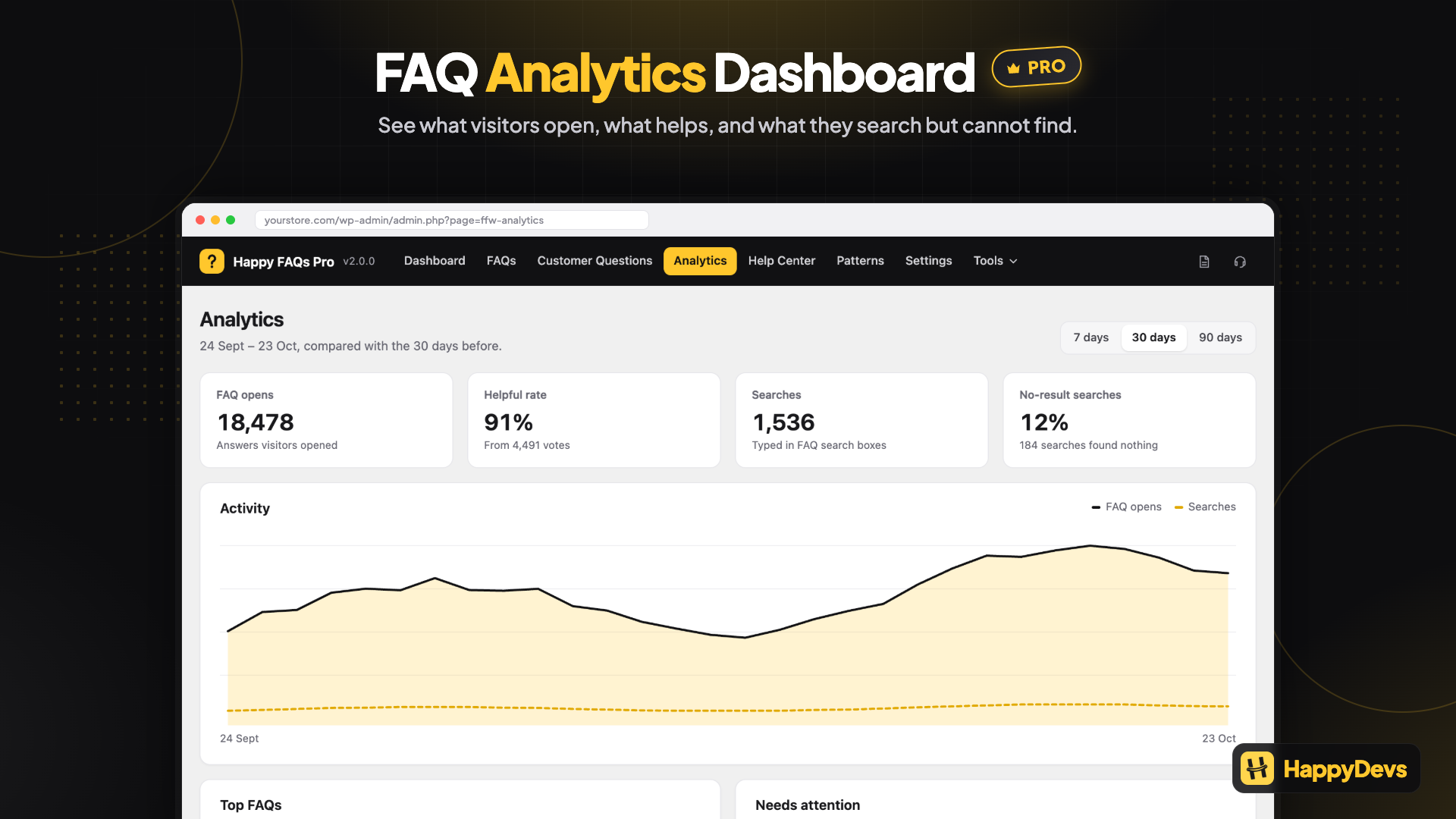
- 📊 FAQ analytics dashboard (PRO): top FAQs, helpful rate, and searches with no answer
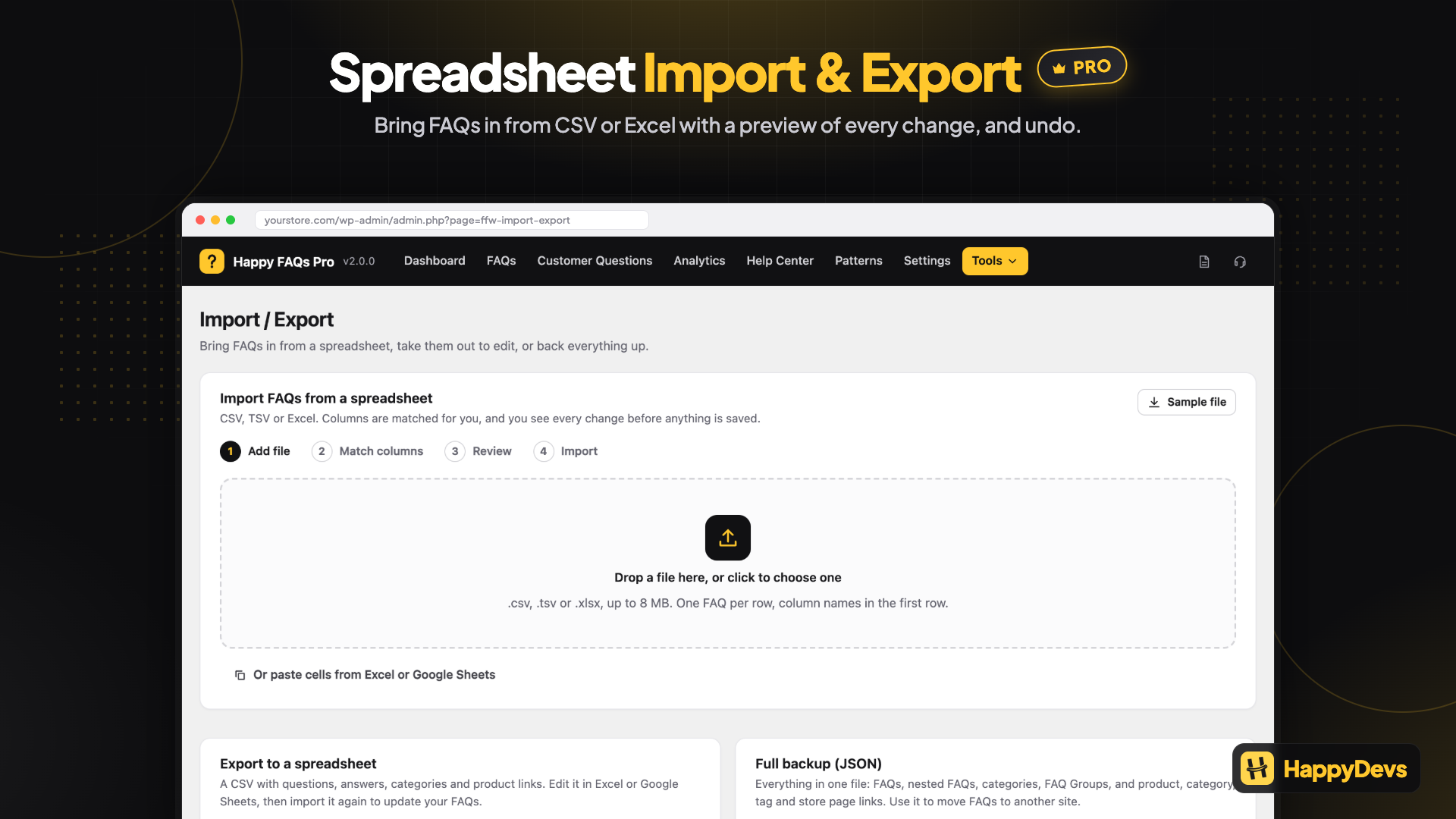
- 📥 Spreadsheet import and export (PRO): CSV and Excel with a preview and undo
Write the answer once. Reuse it on a FAQ page, in Gutenberg, Elementor, or Divi, and on WooCommerce products. WooCommerce is optional — use it as a site FAQ plugin, then add product FAQs when you have a store.
21 ready-made FAQ patterns give you a designed FAQ section in one click: help center, shipping and returns, pricing, product questions, and FAQ sections for restaurants, hotels, courses, events, agencies, and more. Every pattern is bundled with the plugin, free, and comes with real starter questions.
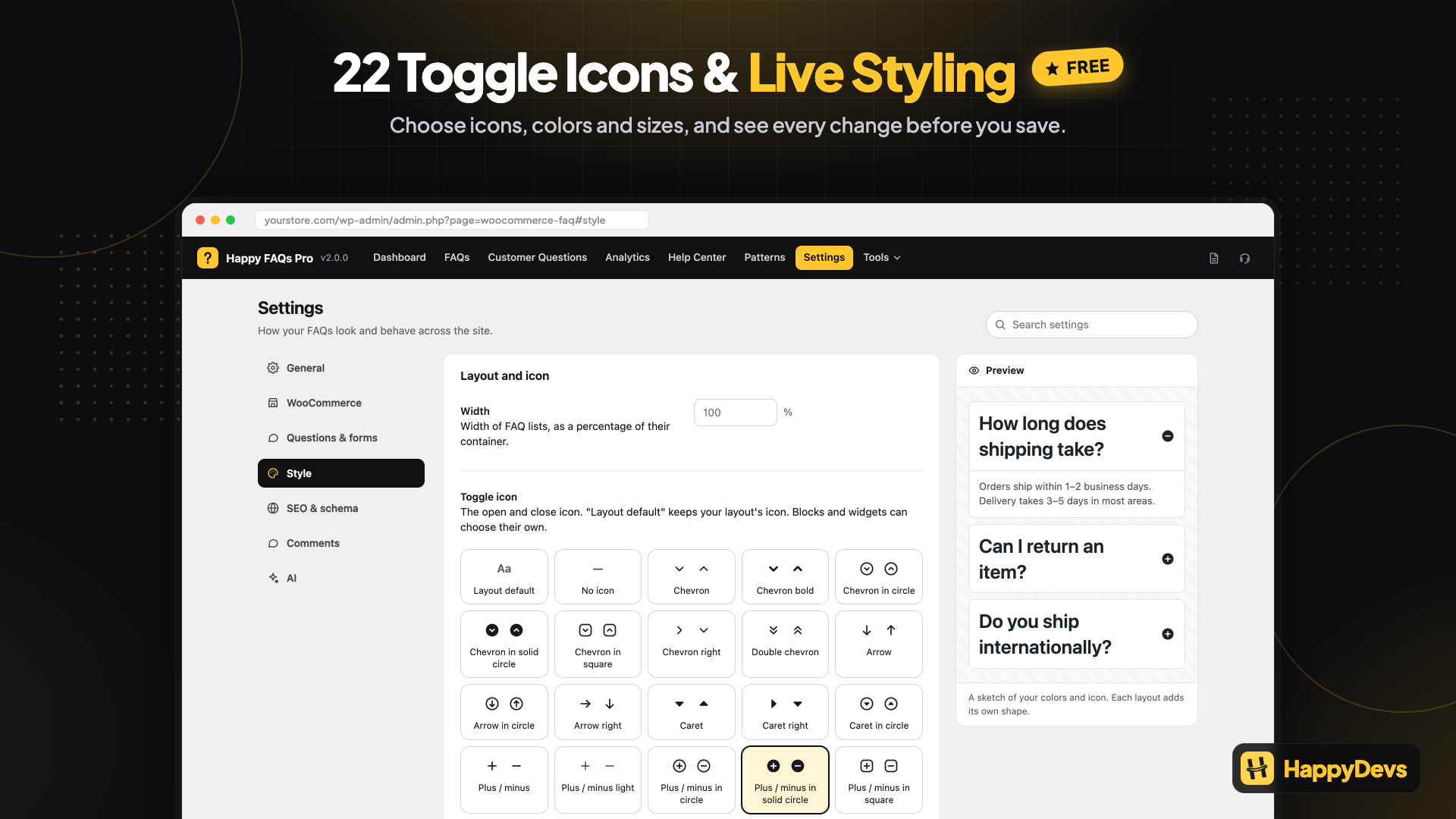
22 toggle icon sets (chevrons, arrows, carets, plus/minus, plus-to-close, folder, switch, and more) work with every accordion layout. Choose one site-wide or per block and widget, and set its position, color, and size.
FAQ schema (FAQPage structured data), an AI FAQ generator that works with the AI provider connected in WordPress (no extra API key), a category filter, “Was this helpful?” votes, accessible keyboard-friendly accordions, RTL support, and custom accordion layouts are included. Scripts and styles load only on pages that show FAQs.
Happy FAQs Pro
See the questions you haven’t answered yet. FAQ analytics shows the searches that found no answer, with one click to add the missing FAQ, and AI gap filling drafts those answers overnight from the product’s own data.
Stop support tickets before they’re sent. FAQ suggestions inside WPForms, Contact Form 7, and Fluent Forms show a matching answer while visitors type, and Pro counts every ticket avoided.Pro also adds product Q&A with voting, visitor questions on any page, variation product FAQs, shop, cart, and checkout FAQs, course FAQs, bulk AI FAQs, FAQ Groups, nested FAQs, AJAX FAQ search, extra accordion layouts, CSV and Excel import/export, and priority email support. See Happy FAQs Pro
Who it is for
- WordPress sites that need a FAQ accordion, help center, or FAQ page with FAQ schema
- WooCommerce stores that need product FAQs, category FAQs, and question-and-answer content on products
- Builders using Gutenberg, Elementor, or Divi
How it works
Create a FAQ once. On that FAQ screen, the Happy FAQs Panel metabox is where you choose where it appears.
- Go to Happy FAQs Add New. The title is the question. The editor is the answer (HTML, images, and video are allowed).
- Optionally assign a FAQ category (for example Shipping or Returns). You can later show that whole category on a help page.
- Open the Happy FAQs Panel metabox and assign:
- Products — search and attach specific WooCommerce products.
- Product categories — every product in those categories inherits this FAQ.
- Product tags — every product with those tags inherits this FAQ.
- Display in pages — product pages (free). Shop, cart, and checkout are (PRO).
- Global FAQs (PRO) — show this FAQ on every product.
- Product attributes (PRO) — insert live values such as
{product_price}in the answer. - Nested FAQs (PRO) — show other FAQs inside this answer as a smaller accordion.
- To show FAQs on a normal WordPress page, use a shortcode, Happy Prebuilt FAQs or Happy Custom FAQs (Gutenberg block, Elementor widget, or Divi 4/5 module), or Settings FAQ page.
You can also attach FAQs from the product edit screen. One FAQ can appear in more than one place.
Top features
- Unlimited WordPress FAQs and WooCommerce product FAQs
- A fast, modern admin: a slim header on every screen, actions without page reloads, search across settings, and live previews
- One FAQs screen: All FAQs, Add New, and Categories in tabs on one page, with no page reloads
- 21 ready-made FAQ patterns with live previews and one-click pages
- One-click Help Center page: search, most asked questions, every FAQ by topic (filter tabs or a category sidebar), and a “Still need help?” section
- 3 modern FAQ styles for the blocks: Cards, Minimal, and Soft
- 22 toggle icon sets with position, color, and size controls, for every layout
- Per-block style controls: question and answer colors, font sizes, border, corner radius, and spacing
- FAQ accordion layouts (5 free, 4 more in Pro)
- FAQ schema (FAQPage) on pages and products, one merged block per page with duplicates removed
- FAQ categories, shortcodes, and an FAQ page setting
- Happy Prebuilt FAQs: Gutenberg block, Elementor widget, and Divi 4/5 module (library FAQs)
- Happy Custom FAQs: Gutenberg block, Elementor widget, and Divi 4/5 module (write Q&A on the page)
- AI FAQs without an API key: uses the AI provider connected in WordPress (Settings Connectors), with your own OpenAI key as a fallback
- Inline FAQ search and FAQ category filter
- “Was this helpful?” votes and FAQ view counts
- “Show more” button for long FAQ lists
- Accessible FAQ accordions: keyboard and screen reader friendly
- Lightweight: CSS and JS load only where FAQs appear
- Setup wizard with ready-made common questions
- Comments, media in answers, expand/collapse all
- Assign FAQs to products, product categories, and product tags
- WPML, Polylang, and RTL (right-to-left) languages
- FAQ analytics dashboard: top FAQs, helpful rate, top searches, and searches with no answer (PRO)
- FAQ Groups, AJAX search (PRO)
- Spreadsheet import and export: CSV and Excel files with column matching, a preview of every change, and undo (PRO)
- Nested FAQs: FAQs inside an answer as a smaller accordion, up to three levels deep (PRO)
- Visitor questions on any page: “Ask a question” form, moderation queue, “Publish as FAQ”, and answered questions shown on the product or page (PRO)
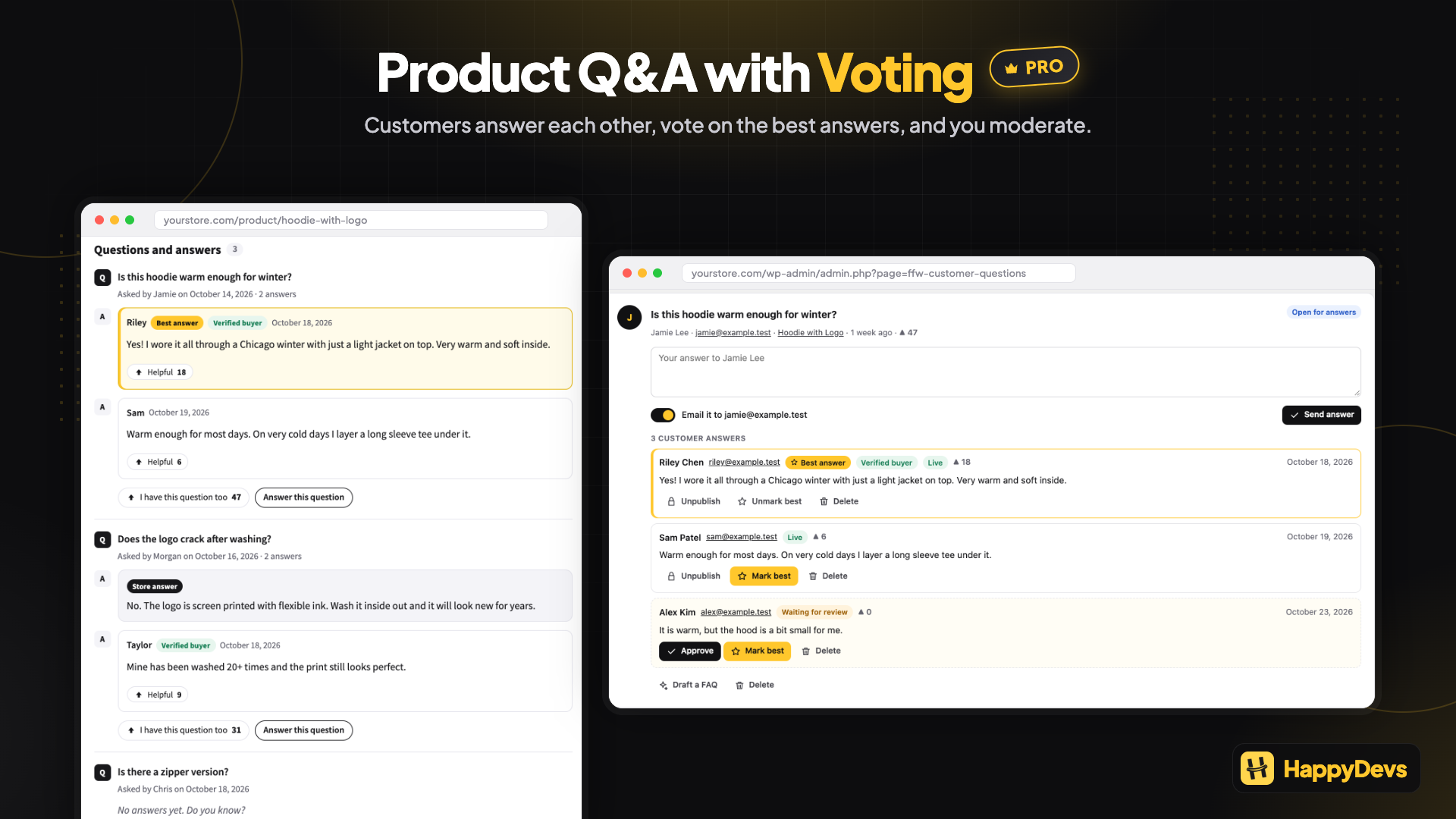
- Product Q&A with voting: customers answer each other’s questions, you mark the best answer, and votes bring the most useful questions and answers to the top (PRO)
- AI gap filling: turn searches with no answer and unanswered questions into draft FAQs, by hand or every night (PRO)
- FAQ suggestions in contact forms: WPForms, Contact Form 7, and Fluent Forms show matching answers while visitors type, and count the tickets they avoid (PRO)
- Course and lesson FAQs for Tutor LMS, LearnDash, and LearnPress (PRO)
- Variation FAQs, shop/cart/checkout FAQs (PRO)
FAQ accordion
- Unlimited FAQs in one reusable library, with FAQ categories (Shipping, Returns, and so on)
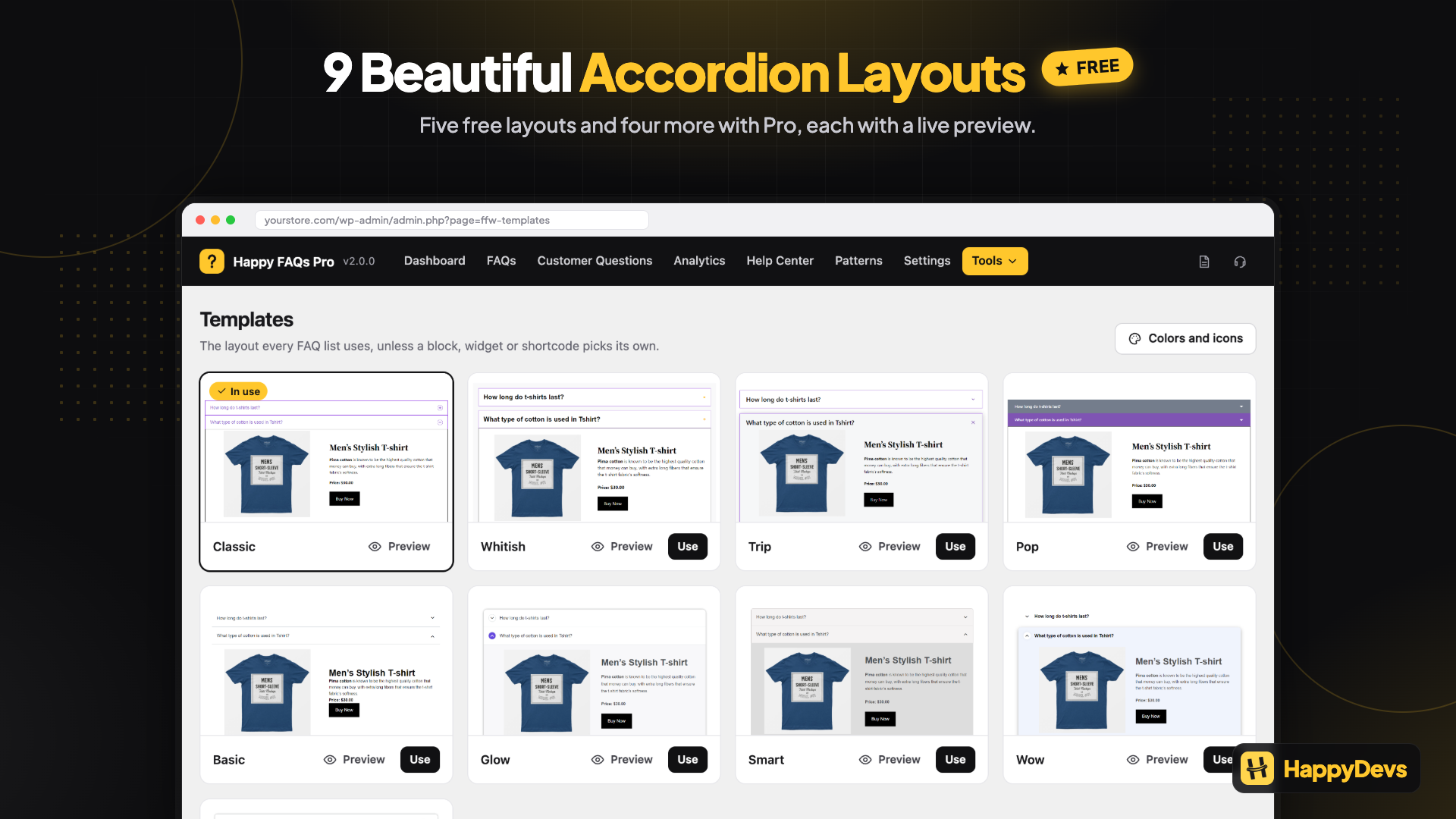
- Five accordion layouts (Classic, Whitish, Trip, Pop, Basic), colors, width, and display options
- 22 toggle icon sets for the open and close icon: chevron, bold chevron, chevron in circle, solid circle, or square, chevron right, double chevron, arrow, arrow in circle, arrow right, caret, caret right, caret in circle, plus/minus (regular, light, in circle, solid circle, or square), plus to close (plain or in circle), folder, and switch
- Every icon animates between closed and open, and works with all accordion layouts (5 free, 4 Pro)
- Icon position (left or right of the question), color, and size: site-wide in Settings Style, or per block, Elementor widget, and shortcode
- 3 block styles: Cards, Minimal, and Soft, for Happy Prebuilt FAQs and Happy Custom FAQs
- Per-block style controls: question and answer colors, font sizes, border color, corner radius, and spacing
- Inline search that filters the FAQs already on the page
- FAQ category filter: buttons that show one FAQ category at a time
- “Show more” button: show a few FAQs first, reveal the rest on click (all FAQs stay in schema)
- Expand / collapse all, or open every answer on load
- Images, video, and other media in answers, and comments on FAQs
- Right-to-left (RTL) layouts for Arabic, Hebrew, Persian, and other RTL languages, automatic for RTL site languages
- Light, elegant design that follows your theme’s fonts and works on mobile
FAQ page and Help Center
- Help Center builder on Happy FAQs Help Center Page: pick filter tabs or a category sidebar (topic list with a section per category and one search box for every topic), a Cards, Minimal or Soft style, a most asked questions section, and a contact button, with a live preview. Create a draft or publish in one click; the page stays in sync with your FAQ library. With Pro, the page gets a search across every FAQ at the top and an “Ask a question” form
- 21 ready-made FAQ sections, bundled with the plugin: no account, no remote downloads, works offline
- 6 general patterns: centered, two-column, contact card, minimal, two lists, and a help center with search
- 2 live lists: most viewed questions and newest questions, updated automatically
- 3 store patterns: shipping and returns, orders and payments, and product questions
- 10 industry patterns: pricing and billing, getting started, agency services, online course, restaurant, events, hotel, gym membership, real estate, and privacy
- Happy FAQs Patterns gallery with live previews in your theme, category tabs, and search
- One click creates a draft page from a pattern, or copy it into any page. Also in the block editor inserter under Patterns Happy FAQs
- FAQ page setting: pick a page and Happy FAQs adds the accordion to it
WooCommerce product FAQ
- Assign FAQs to products from the product screen or the FAQ screen
- Inherit FAQs from WooCommerce product categories and tags, free
- Drag to sort FAQs on each product
- Product tab, show/hide answers on load, and tab order
[ffw_template dynamic_post="true"]for product templates
AI FAQ generator
- AI FAQ generator: write FAQs from a WooCommerce product, any page or post, or a topic you type. Pick how many, the language, and what to focus on. Questions already on the product or page are skipped. Edit every question and answer before saving, publish or save as drafts, and add them to the page in one click
- No Happy FAQs API key needed: AI uses the provider connected in WordPress (Settings Connectors, WordPress 7.0 or later). Your own OpenAI key still works as a fallback, or on older WordPress
- Improve with AI in the FAQ editor (block and classic): improve, shorten, expand, or make an answer friendlier or more professional, and review it before it replaces the old one
FAQ schema
- FAQPage structured data (JSON-LD) on help pages and product pages
- One merged schema block per page, with duplicate questions removed, even with several FAQ lists on the page
- Answers in schema as HTML or plain text, or switch schema off
- Choose whether single FAQ pages are indexed by search engines
Structured FAQs give search engines and AI assistants a clean version of your answers to read. Google now shows FAQ rich results only for a limited set of sites, so don’t count on them.
Elementor, Divi and Gutenberg FAQ
- Happy Prebuilt FAQs: Gutenberg block, Elementor widget, and Divi 4/5 module (library FAQs, same markup as the shortcode)
- Happy Custom FAQs: Gutenberg block, Elementor widget, and Divi 4/5 module (write Q&A on the page)
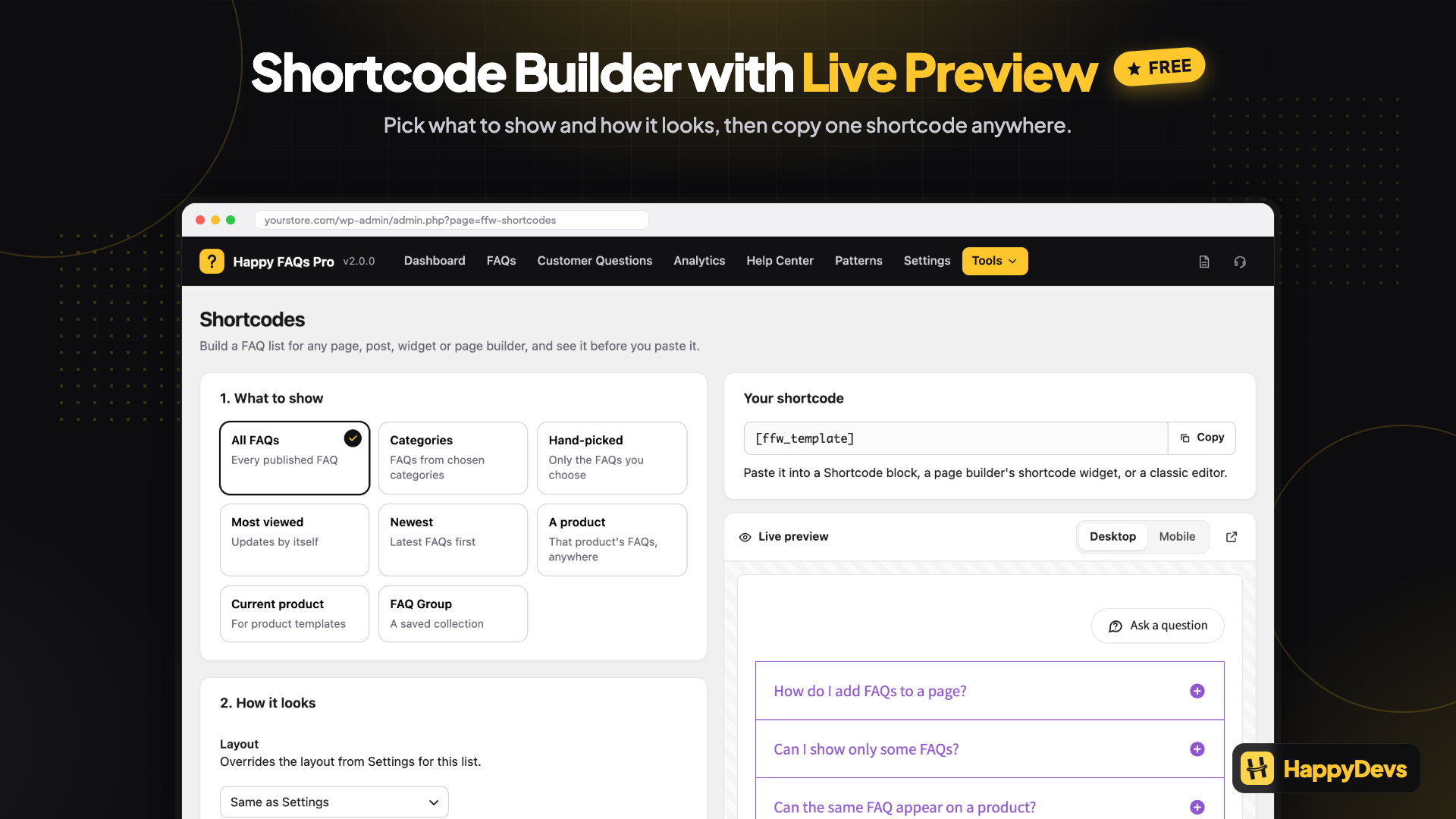
- Shortcodes for all FAQs, a FAQ category, selected FAQ IDs, or the current product, with a shortcode builder and live preview
- Classic Editor and block editor support
Accessible
Every layout uses button semantics, an aria-expanded state, Enter and Space keys, and a visible focus outline.
Lightweight
CSS and JS load only on pages that show FAQs, and only for the layouts in use.
Easy to manage
- FAQs screen: All FAQs, Add New, and Categories in tabs on one page, with no page reloads. Search questions and answers, filter by status or category, sort by views or helpful votes, quick add, quick edit, duplicate, copy a shortcode, and bulk publish, move to drafts, trash, or add to a category. Each FAQ shows where it appears (products, categories, tags, store pages, or global), and the full editor with the Happy FAQs Panel opens in place
- Setup wizard on first activation: pick General or Product FAQs, start from common questions, and copy your shortcode
- “Was this helpful? Yes / No” votes and answer view counts, with sortable Views and Helpful columns on All FAQs. No IP addresses are stored
- WPML and Polylang support
Shortcodes
Show all FAQs:
[ffw_template]
Show a FAQ category. faq_cat is the FAQ category ID (Happy FAQs Categories):
[ffw_template faq_cat="32"]
Show selected FAQs. faq_ids are FAQ post IDs (Happy FAQs All FAQs):
[ffw_template faq_ids="10,11,12"]
Show FAQs for a WooCommerce product:
[ffw_template id="20"]

id is the WooCommerce **product ID**, not the FAQ ID. Find it under **Products → All Products**: hover the product, or open it and read `post=20` in the browser URL. Replace `20` with your product’s ID.
Show FAQs for the current product (use this on a single product page or product template):
[ffw_template dynamic_post="true"]
Pick an accordion layout with template:
- 1 Classic, 2 Whitish, 3 Trip, 4 Pop, 5 Basic
- Pro layouts (PRO): 6 Glow, 7 Smart, 8 Wow, 9 Zoom
Example: [ffw_template template="1" id="20"]
Sort with …
Installation
Requirements:
- WordPress 4.4 or later
- PHP 7.4 or later
- WooCommerce is optional. Install WooCommerce only if you need product FAQs.
From the dashboard
- Go to Plugins Add New.
- Search for Happy FAQs.
- Install and activate.
Manual
- Upload the
faq-for-woocommercefolder to/wp-content/plugins/. - Activate the plugin.
- Open Happy FAQs in the admin menu.
- Add a FAQ, then show it with a shortcode, Gutenberg block, Elementor widget, Divi module, or Settings FAQ page.
Screenshots

Answer every question from one FAQ library: on FAQ pages, product pages, and (with Pro) cart and checkout (Free + Pro)
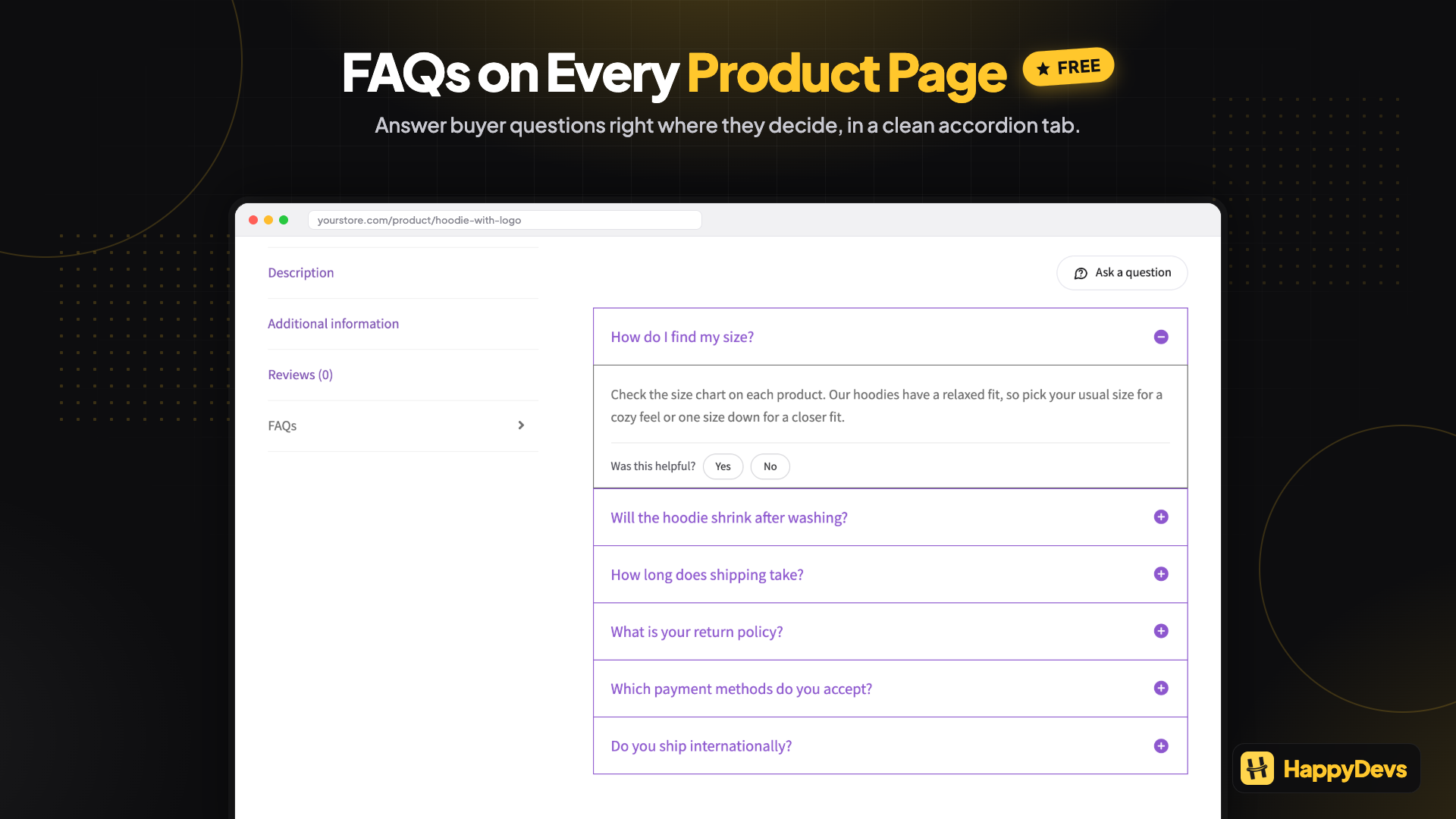
Answer buyer questions right on the product page, in a clean FAQ tab (Free)
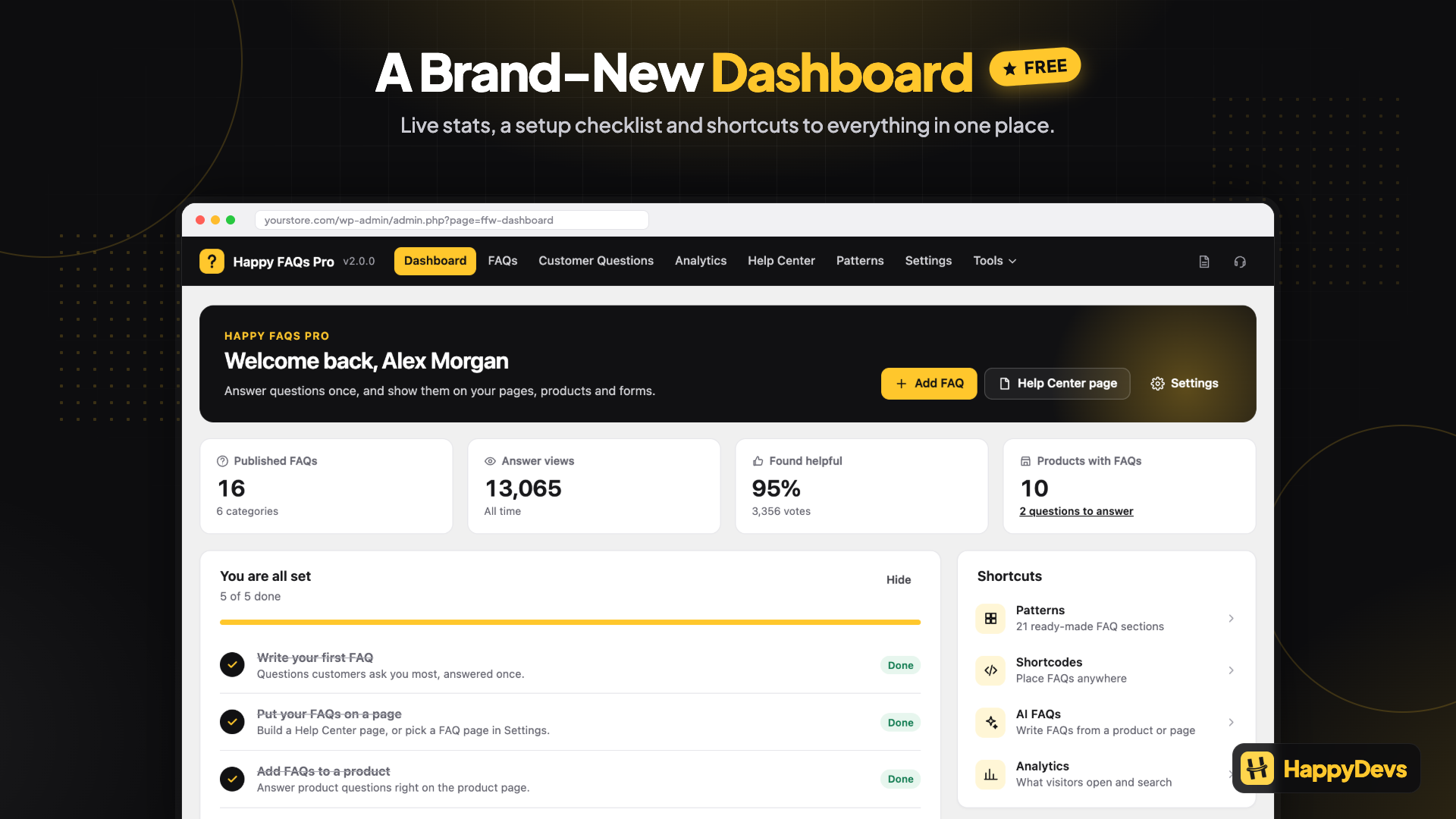
See your setup progress, live counts, and next steps on the dashboard (Free)
Start from 21 ready-made FAQ sections for stores, services, and industries (Free)
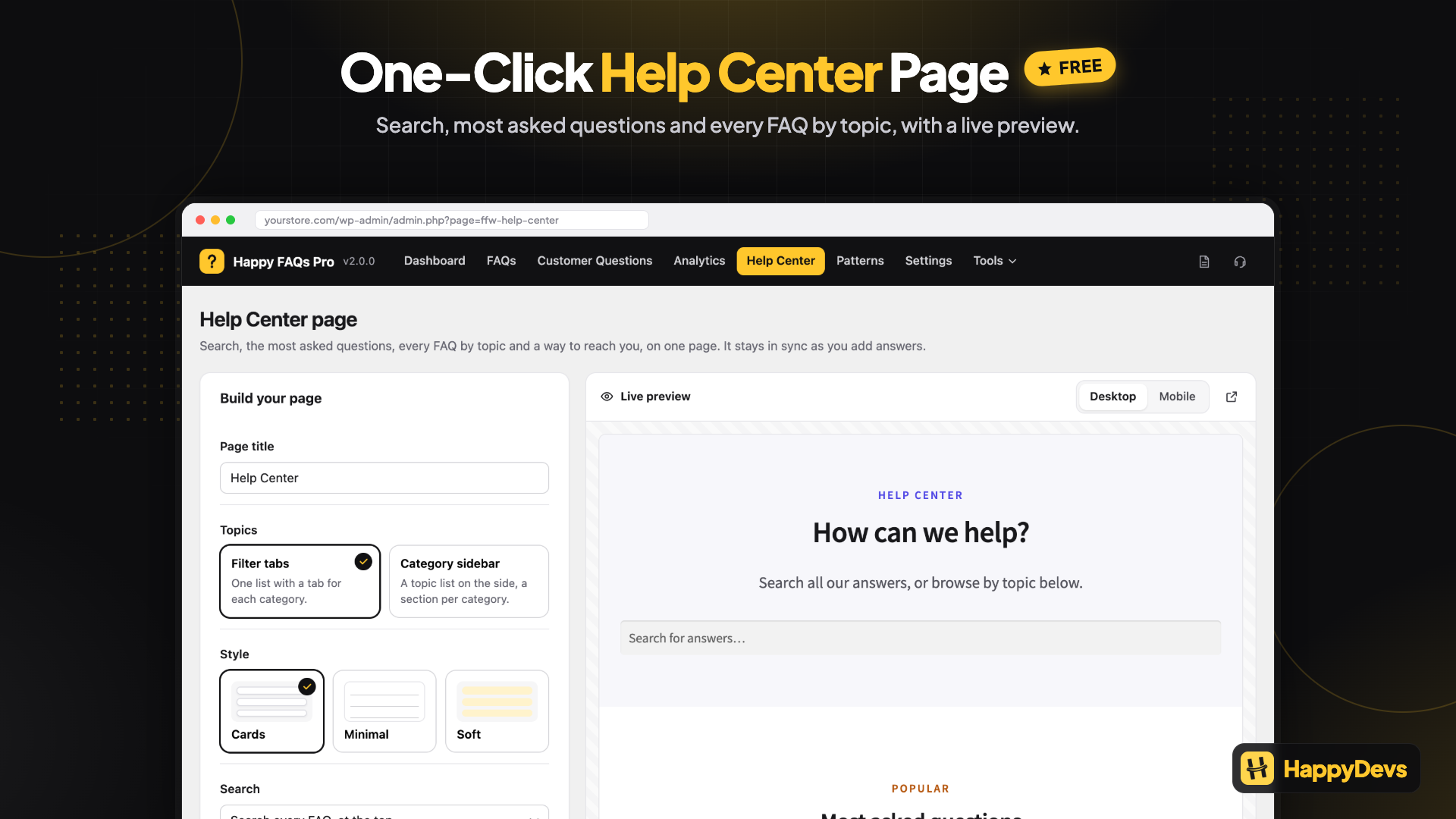
Build a Help Center page in one click, with search, most asked questions, and topics (Free)
Let AI write FAQs from a product, page, or topic, with no extra API key (Free)
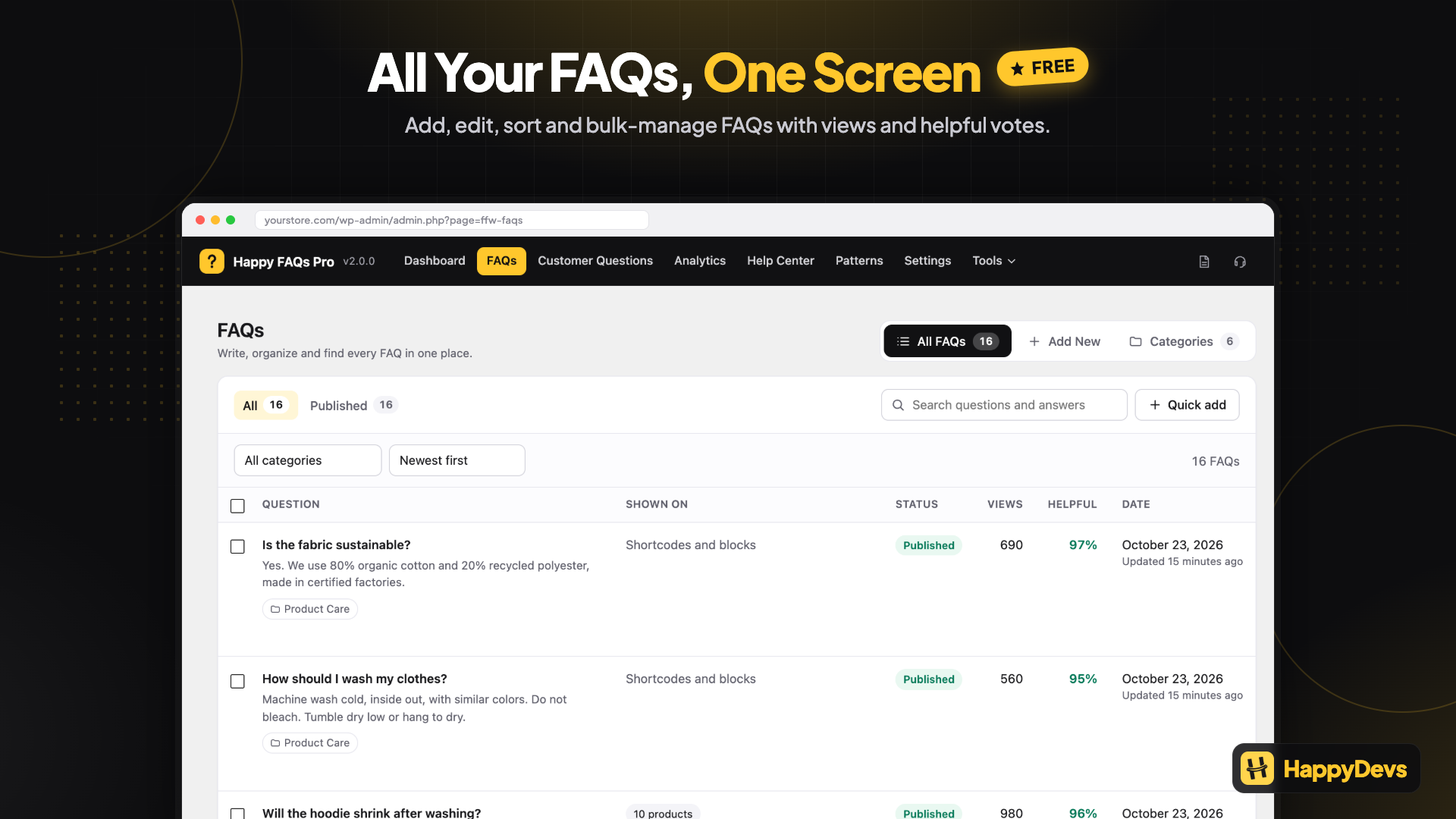
Manage every FAQ on one screen: views, helpful votes, and bulk actions (Free)
Build any shortcode with a live preview, no docs needed (Free)
Match your site with 22 toggle icons and live styling (Free)
Pick from 9 accordion layouts: 5 free and 4 more in Pro (Free + Pro)
Let customers answer each other with product Q&A and voting, moderated by you (Pro)
See what visitors searched for and couldn’t find, then add the missing FAQ (Pro)
Move FAQs in and out with spreadsheet import and export, with a preview of every change (Pro)



Faq
Is this a WooCommerce FAQ plugin or a WordPress FAQ plugin?
Both. Happy FAQs is a WordPress FAQ accordion plugin. Product FAQs work when WooCommerce is active. You can use it without WooCommerce for site FAQs.
Do I need WooCommerce?
No. Use it as a site FAQ plugin. WooCommerce is only needed for product FAQs and store extras.
Does it work with any theme?
Yes. It works with standard WordPress themes.
How do I add a product FAQ?
Go to Happy FAQs Add New, write the question and answer, then in the Happy FAQs Panel metabox search and select products. You can also assign product categories or tags so many products inherit the same FAQ. Or open a product and attach FAQs there.
How do I show FAQs on a normal page, not a product?
Paste [ffw_template] in the page, insert Happy Prebuilt FAQs (library) or Happy Custom FAQs (write Q&A on the page) as a Gutenberg block, Elementor widget, or Divi 4/5 module, or pick a page in Happy FAQs Settings FAQ page.
How do I find the product ID for the shortcode?
Go to Products All Products. Hover the product, or edit it and look at the URL: post=20 means the product ID is 20. Use [ffw_template id="20"].
Can I assign product categories and tags to FAQs?
Yes, in the free version. Every product in that category or tag can inherit those FAQs.
Can I show FAQs on shop, cart, checkout, or archive pages?
Product pages are included in free. Shop, cart, checkout, and product archive locations are Pro.
Does Happy FAQs add FAQ schema?
Yes. FAQPage structured data (JSON-LD) is added for help pages and product pages. If a page has several FAQ lists, they are merged into one schema block with duplicate questions removed. You can switch schema off, or output answers as plain text.
Will my FAQs show as rich results in Google?
Probably not. Since 2023, Google shows FAQ rich results only for a limited set of sites. FAQ schema is still useful: it gives search engines and AI assistants a clean, structured version of your answers.
Will Happy FAQs slow down my site?
It loads its CSS and JavaScript only on pages that show FAQs, and only for the layouts you use.
Can I make a help center page?
Yes. Go to Happy FAQs Help Center Page. Choose filter tabs or a category sidebar, add a most asked questions section and a contact button, then create a draft or publish. Happy FAQs Pro adds a search across every FAQ and an “Ask a question” form.
Are there ready-made FAQ designs?
Yes. Happy FAQs includes 21 ready-made FAQ patterns. Open Happy FAQs Patterns to see live previews, then click Create page, or insert them in the block editor from Patterns Happy FAQs. Each pattern has real starter questions you can edit. Pick a look in the block’s Styles panel: Cards, Minimal, or Soft.
Can I use Gutenberg, Elementor, or Divi?
Yes. Free includes Happy Prebuilt FAQs and Happy Custom FAQs as a Gutenberg block, Elementor widget, and Divi 4/5 module. Prebuilt shows FAQs from your library. Custom lets you write questions and answers on the page.
Can I import FAQs from a spreadsheet?
Yes, with Happy FAQs Pro. Go to Happy FAQs Import / Export, add a CSV or Excel file (or paste cells from Google Sheets), check the matched columns, review the changes, and import. You can undo an import afterwards. Download CSV exports your FAQs to edit in a spreadsheet and import again.
Can I move my FAQs from another FAQ plugin?
Yes, with Happy FAQs Pro: export your FAQs from the other plugin as a spreadsheet, then use Happy FAQs Import / Export. You see a review of every change before anything is saved, and you can undo the last 5 imports.
Can I put FAQs inside another FAQ’s answer?
Yes, with Happy FAQs Pro. Open a FAQ and pick other FAQs in the Nested FAQs row of the Happy FAQs Panel. They show inside its answer as a smaller accordion, in the order you drag them to, up to three levels deep. Good for long help topics with follow-up questions.
Can FAQs answer people before they contact us?
Yes, with Happy FAQs Pro. Turn on Contact Form Suggestions in Settings. While visitors type in a WPForms, Contact Form 7, or Fluent Forms contact form, matching FAQs appear under the message, and they can read the answer without leaving the form. Analytics shows how many tickets were avoided.
Can I write HTML or add media in answers?
Yes. Answers use the WordPress editor, so you can add HTML, images, and video.
Can I sort FAQs?
Yes. Drag FAQs on a product, or use order and order_by on the shortcode.
Can I change the open and close icon?
Yes. Choose from 22 toggle icon sets in Settings Style, with a preview of the closed and open state. Set the icon position, color, and size there too. Each block, Elementor widget, or shortcode can pick its own icon, for example [ffw_template icon="plus-minus"]. Icons work with every layout.
Do I need an OpenAI key for AI FAQs?
No, not on WordPress 7.0 or later. Connect an AI provider once in Settings Connectors and Happy FAQs uses it. On older WordPress, or if you prefer, add your own OpenAI key in Happy FAQs Settings AI FAQs. Generated FAQs are always shown for review before they are saved.
How many accordion layouts are there?
Five in free (Classic, Whitish, Trip, Pop, Basic). Four more in Pro (Glow, Smart, Wow, Zoom).
What is the difference between inline search and AJAX library search?
Inline search (free) filters the FAQs already on the page. AJAX library search (Pro) searches all published FAQs and can be placed anywhere with [ffw_search].
Can visitors filter FAQs by category?
Yes. Add filter="true" to the shortcode, or turn on Show category filter in the Happy Prebuilt FAQs block or Elementor widget. Visitors see one button per FAQ category.
Can I show a few FAQs and load the rest on click?
Yes. [ffw_template per_page="5"] shows five FAQs and a Show more FAQs button. The block and Elementor widget have the same option. Hidden FAQs still appear in search, the category filter, and FAQ schema.
Can I see which FAQs are helpful or most viewed?
Yes. Turn on Helpful Votes in Settings to show “Was this helpful? Yes / No” under each answer. All FAQs shows sortable Views and Helpful columns. IP addresses are not stored; repeat votes are blocked with a short-lived anonymous hash. Happy FAQs Pro adds an Analytics dashboard with trends, top searches, and searches that found no answer.
Does it work with LMS plugins?
Yes, with Happy FAQs Pro. Tutor LMS, LearnDash, and LearnPress courses and lessons get their own FAQs, assigned the same way as product FAQs. They show after the course or lesson content, or where you place [ffw_lms_faqs].
Are the FAQ accordions accessible?
Yes. Every layout works with the keyboard (Tab, Enter, Space), shows a visible focus outline, and tells screen readers whether an answer is open or closed.
Does it support right-to-left languages?
Yes, in the free version. Settings Right to Left (RTL) follows your site language automatically, or you can set it to always or never.
Reviews
An Easy-to-Use Plugin with Excellent Support!
By  manjotkaur on October 30, 2026
I was looking for a customer Q&A solution that would allow customers to ask questions on individual product pages, and that’s when I came across Happy WooCommerce FAQs Pro.
The plugin was incredibly easy to set up and worked perfectly for my requirements. I especially liked the flexibility it offers. You can customize the design to match your website or choose from the available pre-designed styles.
Initially, I was concerned about unwanted or inappropriate questions being published without approval. I reached out to the support team to explain the feature I needed, and they were incredibly responsive. They understood my requirements and provided an update very quickly.
Overall, it’s one of the easiest plugins I’ve worked with. Great functionality, simple setup, customization flexibility, and excellent customer support. Highly recommended!
Horrible practice
By  anondogcom on November 24, 2025
Repeatedly annoyng popup reminder to rate the plugin.
Awesome experience
By  xthefox7 on October 15, 2025
I had an issue with multilingual FAQs not displaying correctly, and the HappyDevs team solved it quickly and professionally.
Their communication was clear, fast, and genuinely helpful.
Highly recommended!
Useful plugin with great support
By  martaperessini on November 27, 2024
The plugin works well and it’s very useful for both Woocommerce products and other uses thanks to shortcodes.
I needed help for an issue with my site and the support team was not only answering quick, but also very careful and promptly gave me a customized solution.
I would totally recommend as it is easy to use for “beginners” and it has a great support
The beste among the WooCommerce FAQ plugins!
By  sag982384 ([email protected]) on October 26, 2024
Great plugin with all the features you need, like FAQ per product, per tag, per product category and global FAQ. Also supporting Schema and really important for people who use builders (like Brick Builder): a shortcode!
Good
By  quickeye on February 12, 2024
Seems good
One of The Best WooCommerce Product FAQ Plugin
By  Sheikh Muhammad Shahidul Islam (shahiduldesigne) on December 30, 2023
One of the best WooCommerce Accordion FAQ Plugin out there also supports product FAQs which is a great feature.
verry usefull and attractive plugin,
By  NF Tushar (nftushar) on December 11, 2023
it’s a very useful and attractive plugin for woocommerce product faq
Good Experience
By  mubashar7860 on December 22, 2022
Very Good Experience with this Plugin
Great customer service!
By  sangredeespana on October 16, 2022
Changelog
3.0.0
- Added: A new admin. Every Happy FAQs screen is rebuilt with a slim header, and its actions work without page reloads: Dashboard with a setup checklist and live counts, Settings with search and a live style preview, a shortcode builder with a live preview, Templates with live previews of your FAQs, AI FAQs, Analytics, Help Center page builder, Patterns, Customer Questions and the setup wizard. Saved settings and data are unchanged, and each previous screen is still there (add
&ffw_classic=1). - Added: One FAQs screen with tabs for All FAQs, Add New, and Categories, with no page reloads. Quick add, quick edit, bulk actions, duplicate, where each FAQ is shown, and the editor in place. The old screens are still there (add
&ffw_classic=1). - Added: FAQ pattern library: 21 ready-made FAQ sections with live previews, a Patterns gallery, one-click pages, and 3 block styles (Cards, Minimal, Soft).
- Added: One-click Help Center page builder with filter tabs or a category sidebar, a most asked questions section, and a contact button.
- Added: 22 toggle icon sets with position, color, and size controls, site-wide or per block, widget, and shortcode.
- Added: AI FAQs use the AI provider connected in WordPress (Settings Connectors), with no extra API key. Write FAQs for products, pages, or topics, and Improve with AI in the FAQ editor.
- Added: Most viewed and newest FAQ lists.
- Added: Dashboard Free vs Pro comparison and supported page builders.
- Improved: Divi 5 module ships in the production build.
- Fixed: Plugin Check errors.
- Fixed: “Before the FAQs” and “After the FAQs” content showed its HTML as text on the site.
- Fixed: The two shortcode switches in Settings now say what they do: they hide [ffw_template] lists on the site.
- Fixed: Clicking formatted text inside a Pop layout answer closed the answer.
- Fixed: A FAQ whose answer contains the
[ffw_template]shortcode made the page run out of memory. A FAQ list inside an answer now leaves that FAQ out and shows its own answers only. - Fixed: Opening a Classic or Pop FAQ that contains another FAQ list opened every answer in that list.
2.1.0
- Added: FAQ category filter. Use
filter="true"or the new block and Elementor option. - Added: “Show more” button for long lists (
per_page), andlimiton the shortcode. - Added: “Was this helpful?” votes and answer view counts, with sortable Views and Helpful columns on All FAQs.
- Added: Right-to-left (RTL) support in the free version, automatic for RTL site languages.
- Improved: Accessible accordions in every layout: keyboard support, aria-expanded state, and a visible focus outline.
- Improved: CSS and JS now load only on pages that show FAQs, for the layouts in use.
- Improved: Inline search now works with every layout.
- Fixed: Shortcodes using a layout other than the default (for example Pop or Basic) did not open.
- Fixed: A Pop layout answer could not be closed once opened.
2.0.5
- Added: Setup wizard on first activation. Choose General or Product FAQs, start from common questions and replies, copy your shortcode, and finish in a few clicks. Every step can be skipped.
- Fixed: Removing a FAQ from a product, category, tag, or page could remove a different FAQ from it.
- Fixed: Saving a FAQ after removing all of its product tags caused an error.
- Fixed: AI FAQ generator now shows API errors and rejects empty fields.
- Security: Product, category, tag, and page inputs are sanitized when a FAQ is saved.
2.0.4
- Fixed: Happy Prebuilt FAQs Gutenberg block styles in the editor.
- Updated: Gutenberg block metadata so WordPress.org can list the plugin’s blocks.
2.0.3
- Fixed: Product archive FAQs displayed when Enable FAQs in Archive was off.
- Updated: Removed the Shortcode column from the All FAQs list.
2.0.2
- Added: WordPress version 7.0.0 compatability.
2.0.1
- Added: Site-wide FAQs. WooCommerce is now optional.
- Added: Shortcode modes for all FAQs, FAQ categories, and selected FAQ IDs.
- Added: FAQ page setting, FAQPage schema on general pages, and onboarding samples.
- Added: Happy Prebuilt FAQs Gutenberg block, Elementor widget, and Divi 4/5 module. Same markup as the shortcode.
- Added: Happy Custom FAQs Gutenberg block, Elementor widget, and Divi 4/5 module. Write questions and answers on the page.
1.8.17
- Added: WooCommerce 10.6 version compatability.
- Fixed: Shortcode in archive page not working.
1.8.16
- Added: WPML translations support.
- Added: WordPress 6.9 version compatability.
1.8.15
- Added: Shortcode page in admin.
1.8.14
- Fixed: Plugin add new page warning has been fixed.
1.8.13
- Fixed: Product name missing in FAQs admin list, issue has been fixed.
- Fixed: Appsero Tracker warning fixed.
- Enhancement: Essentials resources enhanced.
1.8.12
- Fixed: Responsive issue fixed.
1.8.11
- Added: Polylang translations support added.
1.8.10
- Added: Filter to change faqs of shortcode.
- Added: WordPress 6.8 compatability added.
1.8.9
- Fixed: Responsive issue fixed.
- Enhancement: Responsive issue fixed.
1.8.8
- Enhancement: Readme updated.
1.8.7
- Fixed: Duplicate function issue for free and premium version fixed.
1.8.6
- Added: WooCommerce 9.6 compatibility added.
1.8.5
- Added: Video playlist in readme file.
1.8.4
- Fixed: Shortcode override – issue has been fixed
1.8.3
- Fixed: Customer Question Form shortcode displaying – issue has been fixed
1.8.2
- Fixed: ‘Basic Template’ style override – issue has been fixed
- Fixed: ‘Glow Template’ style override – issue has been fixed
1.8.1
- Fixed: Tabs hidden for product who have no faqs – issue has been fixed
1.8.0
- Added: Customer Question Asking compatability – Advanced Version
1.7.8
- Added: WordPress 6.7 compatability added
- Fixed: Shortcode content appears before content – issue has been fixed.
1.7.7
- Fixed: Discount Banner is not closing – issue has been fixed.
- Added: Compatability to display FAQs in Shop Page, Cart Page and Checkout Page (Advanced Version).
1.7.6
- Added: Rebranding to Happy WooCommerce FAQs.
- Added: Support for Display FAQs in Product Archive pages (category & tag) – Advanced version.
1.7.5
- Added: FAQs by Product Tags – controls added.
- Added: FAQs by Product Categories – controls added.
1.7.4
- Added: AppSero latest version compatability.
1.7.3
- Fixed: Search input html broken – issue fixed.
- Fixed: ffw_template shortcode not fetching correct faqs – issue fixed.
1.7.2
- Enhancement: Template page has been separated from setting submenu.
1.7.1
- Added: WordPress 6.6 compatibility added.
- Added: WooCommerce 9.0 compatibility added.
- Fixed: New faqs can not be added for the ‘shop manager’ role – issue has been fixed.
- Fixed: FAQs schema generated null faqs – issue has been fixed.
1.7.0
- Added: Introducing ‘AI FAQs Generator’.
- Added: Global FAQs appearance option to set global faqs displaying first or last of other faqs.
1.6.4
- Fixed: Broken UI in product page when empty faqs – issue has been fixed.
1.6.3
- Enhancement: Removed extra buttons when faqs are published.
- Enhancement: Dashboard UI improvement and more user-friendly.
1.6.2
- Fixed: FAQs fetching from the advanced version previous setup issue has been fixed.
1.6.1
- Added: Filter for Global FAQs [Pro Feature].
1.6.0
- Added: Assign product categories to FAQs compatibility [Pro Feature].
- Fixed: Removing products from the FAQs not working, The issue is fixed.
1.5.1
- Updated: AppSero SDK updated.
1.5.0
- Added: Variation product support (Premium version).
- Added: WordPress 6.4 compatability added.
- Fixed: Bulk faqs causing issue has been fixed.
- Enhancement: Query speedup.
1.4.14
- Added: HPOS (High Performance Order Storage) compatability added.
1.4.13
- Added: Display location to display faqs anywhere on product page [Advanced Version].
1.4.12
- Fixed: Hiding menu issue fixed.
1.4.11
- Added: Advanced FAQs templates support.
- Fixed: Basic template with custom styling issue fixed.
- Fixed: FAQs templates not be displayed after activation issue fixed.
1.4.10
- Added: Dashboard page added.
1.4.8
- Updated: Admin assets version updated.
1.4.7
- Added: Gutenberg editor support.
1.4.6
- Fixed: Happy WooCommerce FAQs admin menu hide issue has been fixed.
1.4.5
- Added: New template added (Basic template).
- Added: Introduced template page.
- Updated: New settings UI.
- Tested: WordPress 6.3 version compatibility tested.
1.4.4
- Fixed: Clear search input at product edit page.
- Updated: Settings priority input text to number.
- Updated: Settings UI updated to new UI.
1.4.3
- Added: WooCommerce 7.9.0 version compatibility tested.
- Added: WordPress 6.2.0 version compatibility tested.
1.4.2
- Fixed: FAQ Count style broken issue fixed.
1.4.1
- Added: WordPress 6.1.0 version compatibility tested.
- Added: WooCommerce 7.0.0 version compatibility tested.
- Fixed: Undefined index
post_typeissue has been fixed. - Fixed: Undefined index
ffw_faq_productsissue has been fixed. - Fixed: Deleted FAQ shows in the product issue has been fixed.
1.4.0
- Added: Product selector metabox in FAQ edit page.
- Fixed: Can’t declare FS_Storage class issue has been fixed.
1.3.35
- Fixed: After deleting all the faqs, new insertion does not work properly has been fixed.
- Updated: Performance boosted.
1.3.34
- Fixed: Question and border color doesn’t work for classic template has been fixed.
- Updated: Classic template UI updated.
1.3.33
- Fixed: Setting page design broken issue has been fixed.
1.3.32
- Added: WordPress Tested upto 6.0 version.
1.3.31
- Added: Expand/Collapse all faqs settings.
- Added: Dashboard new UI.
1.3.30
- Added: FAQ post type pages index/noindex settings.
1.3.29
- Added: FAQ schema support for faq shortcode.
1.3.28
- Fixed: FAQ tab shows empty faq – issue has been fixed.
1.3.27
- Added: Order and sorting feature for shortcode, order and orderby parameter added.
1.3.26
- Fixed: Woocommerce Tested upto 6.3 version.
1.3.25
- Fixed: WordPress Tested upto 5.9.2 version.
1.3.24
- Fixed: Fatal Error about Too few arguments has been solved.
1.3.23
- Added: FAQs by categories shortcode added, please see description to know how to add specific categories faqs by shortcode.
1.3.22
- Added: WordPress 5.9 version compatibility added.
1.3.21
- Added: Woocommerce 6.0.0 version compatibility added.
- Fixed: Undefined before & after output for fresh installation – issue has been fixed.
1.3.20
- Fixed: Undefined function for schema does not work – issue has been fixed.
1.3.19
- Added: Schema description type options and schema settings. Now user can choose to add description with HTML and without HTML.
- Fixed: New product adding page has faq broken markup – issue has been fixed.
1.3.18
- Added: Product FAQs Comments support has been added. You just have to enable the comment support from “Woo FAQs > Settings > Comment” page.
1.3.17
- Added: Show or Hide FAQs Counter in front with faqs tab. By default, the counter option is hide, you need to enable it from the settings and faqs counter will show for the current product page.
- Fixed: Performance enhancement.
1.3.16
- Added: Extra form submit button added in setting page at the top.
- Added: Documentation page link has been added in the plugin page.
1.3.15
- Fixed: During FAQ search clear an extra faq added in product edit page, the issue has been fixed.
- Fixed: Deleting the extra FAQ not working, the issue has been fixed.
1.3.14
- Added: FAQ answer text color style setting has been added.
- Added: WooCommerce 5.7.1 compatibility added.
1.3.13
- Fixed: Ajax issue of the faqs adding from search in product page has been fixed.
1.3.12
- Improved: Manages boring review notice.
- Improved: WordPress 5.8.1 compatibility tested.
1.3.11
- Added: New Settings for general and dynamic shortcode preview.
1.3.10
- Added: Dynamic product id feature for shortcode to use in single product page has been added.
1.3.9
- Added: WordPress 5.8 version compatibility tested.
1.3.8
- Fixed: FAQ sorting does not work after insert from search and quick add form – issue has been solved.
- Added: Loader added after adding faq from search options.
1.3.7
- Added: Demo and Documentation link added in readme.
- Fixed: Classic template spacing issue has been fixed.
1.3.6
- Fixed: FAQ answer page load issue fixed.
- Fixed: Code enhancement.
1.3.5
- Added: FAQ Reorder settings added.
- Added: FAQ Answers on page load settings added.
1.3.4
- Fixed: Post content as faq answer showing issue has been fixed.
1.3.3
- Fixed: Trip template Iframe issue has been solved. Thanks to @gao9099 to inform us.
1.3.2
- Fixed: Select2 undefined issue has been solved.
1.3.1
- Added: FAQs counter in product list table, counter show/hide options in settings page.
- Added: FAQs settings instruction has been added, every options are instructed.
- Added: FAQs post type access roles, admin can set roles to access ffw post type.
1.3.0
- Added: FAQs post feature.
- Added: FAQs sortable feature.
- Added: FAQs translation file.
1.2.8
- Added: FAQs width control in style.
- Added: FAQs tab label is now dynamic.
- Fixed: FAQs Schema mainEntity issue solved.
1.2.7
- Tweak: WordPress 5.7 compatibility tested.
1.2.6
- Added: Minified all the assets files.
1.2.5
- Tweak: Admin setting preview templates in apple monitor look.
1.2.4
- Fixed: Popup position wrong has been solved.
1.2.3
- Added: Setting link added as action link.
1.2.2
- Added: Schema support added.
- Fixed: Global bootstrap file loaded issue solved.
1.2.1
- Fixed: Setting page design broken issue solved.
- Fixed: Undefined function issue solved.
1.2.0
- Added: Custom styling options.
- Fixed: Popup wrong position solved.
1.1.7
- Fixed: Junk file cleaned.
- Tweak: Performance enhancement.
1.1.6
- Added: Plugin compatibility test with wordpress 5.6.
1.1.5
- Added: Media/Image support for faq answer.
- Added: Media/Image support for before/after content.
1.1.4
- Fix: Speed Optimization.
- Fix: Clean junks.
1.1.3
- Added: Shortcode support.
- Fix: Label showing when faqs empty, solved.
1.1.2
- Tweak: Admin panel preview new look.
- Fix: After insert faq answer as html.
1.1.1
- Tweak: Textdomain updated.
- Fix: Pop template animation.
1.1.0
- Added: Pop template.
1.0.9
- Fix: Setting page escaping issues.
- Tweak: Performance enhancement.
1.0.8
- Added: Trip template.
- Fix: Junk cleaned.
1.0.7
- Fix: Coding Standard solved.
- Tweak: Cleaning and enhancement.
1.0.6
- Tweak: Runtime template preview.
1.0.5
- Added: Whitish front template.
1.0.4
- Added: Product metabox loader.
1.0.3
- Tweak: FAQ options header button new style.
- Fix: FAQ options static line to dynamic.
- Fix: Junk clean up.
1.0.2
- Added: Update faq feature.
- Tweak: DOM manipulation in faq list.
- Fix: Code enhancement.
1.0.1
- Fix: Add or delete faq issue.
- Tweak: Rename Labels.
1.0.0
- First Release.