
Export Variable Products
Description
WooCommerce is an awesome eCommerce plugin that allows you to sell anything. This plugin helps you to export the variations of a variable product to an Excel (.xlsx) sheet, edit prices, SKUs, dimensions and attributes in your favourite spreadsheet editor, and import the file back.
Features
- Export and Import buttons right on the variable product edit screen.
- Exports parent id, variation id, slug, SKU, regular and sale price, weight, length, width, height and every variation attribute.
- Safe import: only .xlsx files are accepted, every row is validated, and rows with problems are skipped and listed in a clear summary.
- Only the variations of the product you are editing can be changed by the file.
- Translations: German, Spanish and French.
Premium features (plug and play, available with the premium copy)
- More columns: stock, backorders, tax class, shipping class, description, status, virtual and sale schedule.
- Bulk export of several variable products from the Products list.
-
Bulk import for many products from a single file.
-
Author: Fahad Mahmood
- Project URI: http://androidbubble.com/blog/wordpress/plugins/export-variable-products
License
This WordPress plugin is free software: you can redistribute it and/or modify
it under the terms of the GNU General Public License as published by
the Free Software Foundation, either version 2 of the License, or
any later version.
This WordPress plugin is distributed in the hope that it will be useful,
but WITHOUT ANY WARRANTY; without even the implied warranty of
MERCHANTABILITY or FITNESS FOR A PARTICULAR PURPOSE. See the
GNU General Public License for more details.
You should have received a copy of the GNU General Public License
along with this WordPress plugin. If not, see http://www.gnu.org/licenses/gpl-2.0.html.
Installation
- Upload the plugin files to the
/wp-content/plugins/directory, or install the plugin through the WordPress plugins screen directly. - Activate the plugin through the ‘Plugins’ screen in WordPress. WooCommerce must be active.
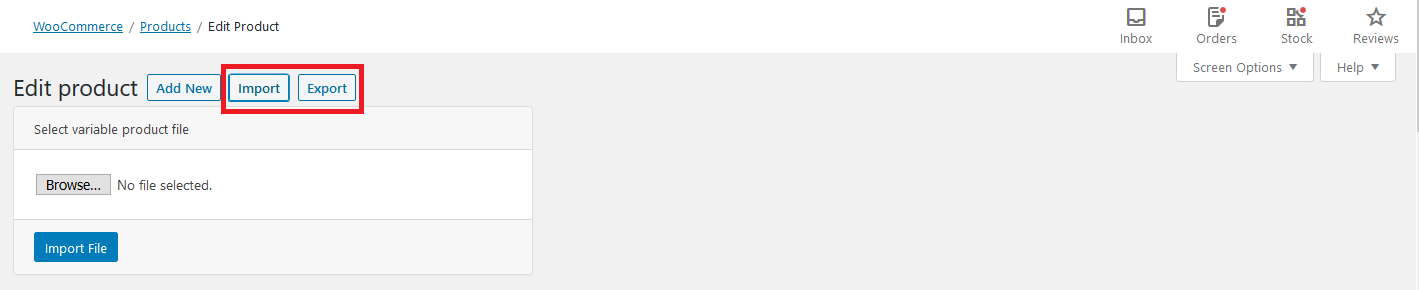
- Open any variable product. The Import and Export buttons appear next to the page title.
Screenshots

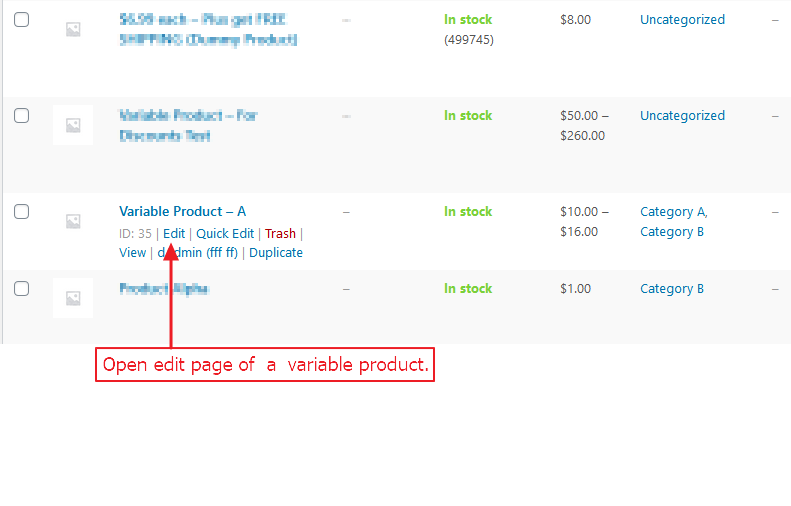
Products list page > open any variable product in edit mode.
By using export option, you can export variatons meta data in xlsx file for easy edits.
By using import option, you can update/replace variatons meta data from xlsx file to WooCommerce with convenience.


Faq
How to use this plugin?
Open any WooCommerce variable product, you will see the export button on product edit page.
In which format data will be exported?
This plugin export data in an excel sheet (.xlsx).
How to import product?
There is an Import button with Export button on edit page of WooCommerce variable product. Click Import button and browse file to import. Use a file that was exported from the same product and do not change the parent_id and id columns.
Why was a row not imported?
After the import a summary shows every row with a problem, for example an invalid price, a duplicate SKU, or an attribute value that does not exist on the parent product. Rows with a problem are skipped completely, the other rows are still imported.
Which PHP extension is required?
The ZipArchive extension (php-zip), which almost every host provides.
Reviews
Great Plugin. Easy and Effective
By  supadigital on April 16, 2025
I struggled to find a free plugin to export and import variable products with all variations and imagery included. This plugin did that all and so easily. Very impressed, grateful and surprised that this plugin isn’t more popular. Thanks to the creators!
Excelente plugin para produtos variáveis.
By  Sites (ccsites) on December 19, 2021
useless
By  FarhangQ (imfq) on May 9, 2021
Changelog
1.3.0
- Tested up to WordPress 7.1.
- Security: capability checks for export and import, stricter nonce and input validation, uploaded files are parsed from PHP’s temporary file instead of being stored, import values are validated and saved through WooCommerce, removed the public error log file and a reflected script injection in the admin header.
- Import summary with updated / unchanged / failed counts and an error list, shown after the import instead of a log file.
- Usability: file type check, confirmation before importing, busy buttons, file name display, Cancel button, clearer settings page.
- Fixed export columns when variations use different attributes.
- Translations are now loaded; the plugin is compatible with WooCommerce HPOS.
- Scripts and styles load only where they are needed and use the plugin version for caching.
- Premium directory prepared (extra columns, bulk export, bulk import).
1.2.6
- Version updated with the improved security checklist reviewed. [08/02/2024]
1.2.5
- Version updated for WordPress. [02/05/2023]
1.2.4
- Version updated for WordPress.
1.2.3
- Screen type updated so import button appear on correct screens. [Thanks to Team Ibulb Work]
1.2.2
- Improved user experience.
1.2.1
- Updating with a bug fix on admin side.
1.2
- Languages added.
1.0
- First release.