
Event Tickets with Ticket Scanner
Description
Run your entire ticketing workflow inside WordPress. No platform service fees, no per-ticket commissions — you only pay your payment processor (Stripe, PayPal, etc.).
Event Tickets with Ticket Scanner turns your events into scannable tickets — complete with QR code, downloadable PDF, and a built-in mobile ticket scanner for your team at the door.
Unlike ticketing platforms that charge service fees on paid tickets, this plugin adds no per-ticket commission — you keep your ticket revenue (minus your payment processor’s standard fee). Unlike other WordPress plugins, you get a visual seating plan designer and a ticket PDF designer included — not as expensive add-ons.
Active on 1,000+ WordPress sites — from small community events to large concert venues.
Who is this for?
- Selling at the door — evening box office (POS)? The built-in Kasse is a complete point of sale: sell tickets, memberships, day passes, ride tickets and entries at the counter, with ticket types, automatic totals and a cash change calculator. No event, no online shop required
- Concert & festival organizers — sell general admission or assigned seats with interactive seat selection
- Theaters & venues — design your seating layout with drag & drop, let customers pick their seats
- Sports events & arenas — handle high scan volumes with rapid-scan queueing and team scanner access
- Conferences & congresses — give attendees a private companion portal with programme, speakers, downloads and time-controlled access, opened straight from the ticket (see “Congress & Attendee Portal” below)
- Single events with an info app — any event, not just big congresses: build a mobile info page (schedule, speaker info, downloads, support pages) your visitors open with their ticket — no separate app to install
- Clubs, spas, gyms & theme parks — sell multi-entry passes, family tickets, or memberships with expiration
- Community events & fundraisers — get started in minutes with the free version (up to 50 tickets)
How it works — 3 steps
- Install the plugin and create a ticket list under “Event Tickets”
- Enable “Ticket Sales” on any WooCommerce product
- Customers receive a unique QR code ticket — scan and redeem at the entrance
That’s it. No coding required. Watch the quickstart video
🎨 Visual Seating Plan Designer
Create professional venue layouts without any design tools:
- Drag & drop seats, shapes, labels, and text onto your canvas
- Upload venue floor plans as background images
- Rotate, duplicate, and bulk-edit elements
- Color-code seat categories and pricing tiers
- Customers see a real-time interactive seat map during checkout
- Seats are automatically blocked during checkout and released on cancel/refund
🎟️ Ticket PDF Designer
Design tickets that match your brand — not generic templates:
- Add your logo, custom colors, header and background images
- Position QR codes exactly where you want them
- Create event badges for staff and VIP passes
- Multi-page PDF support with attached documents
- Full bleed mode for edge-to-edge designs
📱 Built-in Ticket Scanner
No extra app needed. The scanner runs in any mobile browser — or install it as a PWA:
- Scan QR codes with your phone camera — works on iOS and Android
- Install as PWA — add to home screen for instant launch without browser chrome
- Fullscreen mode — immersive scanning with a single tap
- Haptic feedback — vibration confirms valid/invalid tickets instantly
- Grant team members scanner access via Auth Tokens (no WordPress login needed)
- See ticket details, seat position, and venue map instantly after scan
- Voice output confirms valid/invalid tickets for fast processing
- Protection against fake tickets, double redemption, and brute-force attempts
- Supports hardware barcode scanners for high-traffic entrances
- Customizable theme color to match your brand
📲 Vollstart Wallet — All Tickets in One App
Your customers can collect tickets from multiple shops in one free app:
- Vollstart Wallet at wallet.vollstart.com — a Progressive Web App that works on iOS, Android, and desktop
- Tickets are added with one click from the ticket page or order email
- QR code always available — even offline
- Privacy first — ticket data flows directly from your shop to the customer’s browser. Vollstart never receives or stores any data
- Learn more about security & privacy
Enable it in Settings Digital Wallets. Free for all users.
🎓 Congress & Attendee Portal
Give ticket holders a private event portal — no extra login, no separate app. Assign a congress to any ticket product and buyers reach it straight from their ticket ID.
- Organize content into pages — a start page plus as many pages as you need (Speakers, Programme, Downloads, Sponsors …), with a sidebar on desktop and a hamburger menu on mobile
- Rich section types — formatted text, a day-by-day programme schedule, downloadable files, link lists, image galleries, single images, and embedded videos (paste a YouTube/Vimeo link or upload your own)
- Password-protect individual sections for VIP or speaker-only content
- Fast by design — the start page loads instantly and other pages are fetched on demand, so even congresses with dozens of speakers stay snappy
- Installable & offline-friendly — the portal ships as a mini Progressive Web App
- Time-controlled access — open the portal a set number of hours before the event and keep it available for a chosen number of days afterwards
- Recurring events — duplicate a congress as a “new edition” in one click
Build it under the Congresses menu, assign it in the product’s Event Tickets tab, and optionally add a portal link to the order email. Included free.
Powerful Ticket Types
- Single entry — classic one-time event ticket
- Multi-entry passes — allow multiple scans (configurable limit)
- Family tickets — generate multiple tickets per order item
- Memberships & season passes — set expiration dates
- Day chooser tickets — let customers pick their event date at checkout
- Purchase allowance codes — require a valid ticket or access code before a product can be bought. Use it for presale and access codes, or to require a ticket from an earlier event (for example a group-stage ticket in order to buy the final). Per product you decide whether a code unlocks one purchase or several
Also supports WooCommerce
Sell standalone with the built-in checkout and Kasse — or plug into your existing WooCommerce store, whichever you prefer.
- Works with product variants (e.g., VIP vs. General Admission)
- Tickets auto-generate on order completion
- Refunded orders automatically recover and recycle ticket numbers
- Compatible with WooCommerce Subscriptions
- Works with WooCommerce PDF Invoices & Packing Slips
- WPML compatible for multilingual stores
Free vs. Premium
The free version covers everything you need to start selling tickets — ideal for small events up to 50 tickets:
- ✅ Ticket generation with QR codes (up to 50 tickets, 5 ticket lists)
- ✅ PDF ticket download (via link in email)
- ✅ Built-in ticket scanner
- ✅ Interactive seating plan designer (1 plan, up to 20 seats)
- ✅ Seat selection at checkout
- ✅ Multi-entry and family tickets
- ✅ Day chooser for date-based events
- ✅ Congress / attendee portal (pages, programme, downloads, media, password-protected sections)
- ✅ Purchase allowance codes (presale/access codes, or require a ticket from an earlier event)
- ✅ Webhooks for third-party integrations
Premium adds professional features for larger events and removes all ticket limits:
- 🔓 PDF ticket as email attachment (not just a link)
- 🔓 Team scanner access via Auth Tokens
- 🔓 Calendar invites (ICS files) in emails
- 🔓 Custom flyers and multi-page PDFs
- 🔓 CVV security check on tickets
- 🔓 Brute-force IP blocking
- 🔓 Unlimited tickets (removes the 50-ticket free limit)
- 🔓 Advanced shortcodes for ticket display and validation
Links
Installation
Requirements
- WordPress 5.0 or greater
- WooCommerce 6.0 or greater
- PHP 8.1 or greater (PHP 8.4 compatible)
- PHP extensions: php-curl, php-imagick
Installation
- Go to Plugins Add New in your WordPress admin
- Search for “Event Tickets with Ticket Scanner”
- Click Install Now, then Activate
- Go to Event Tickets in your admin menu and create your first ticket list
- Edit any WooCommerce product open the Event Tickets tab enable ticket sales
Quick Setup
The plugin extends WooCommerce so any product can become a ticket. Enable the checkbox on your product, assign a ticket list, and you’re ready to sell.
Tip: Set the product as “Virtual” so WooCommerce auto-completes the order and triggers ticket generation immediately after payment.
To test: Create a manual order in WooCommerce, set it to “Completed”, and check the order email for the ticket link.
For a step-by-step walkthrough, watch the quickstart video.
Screenshots

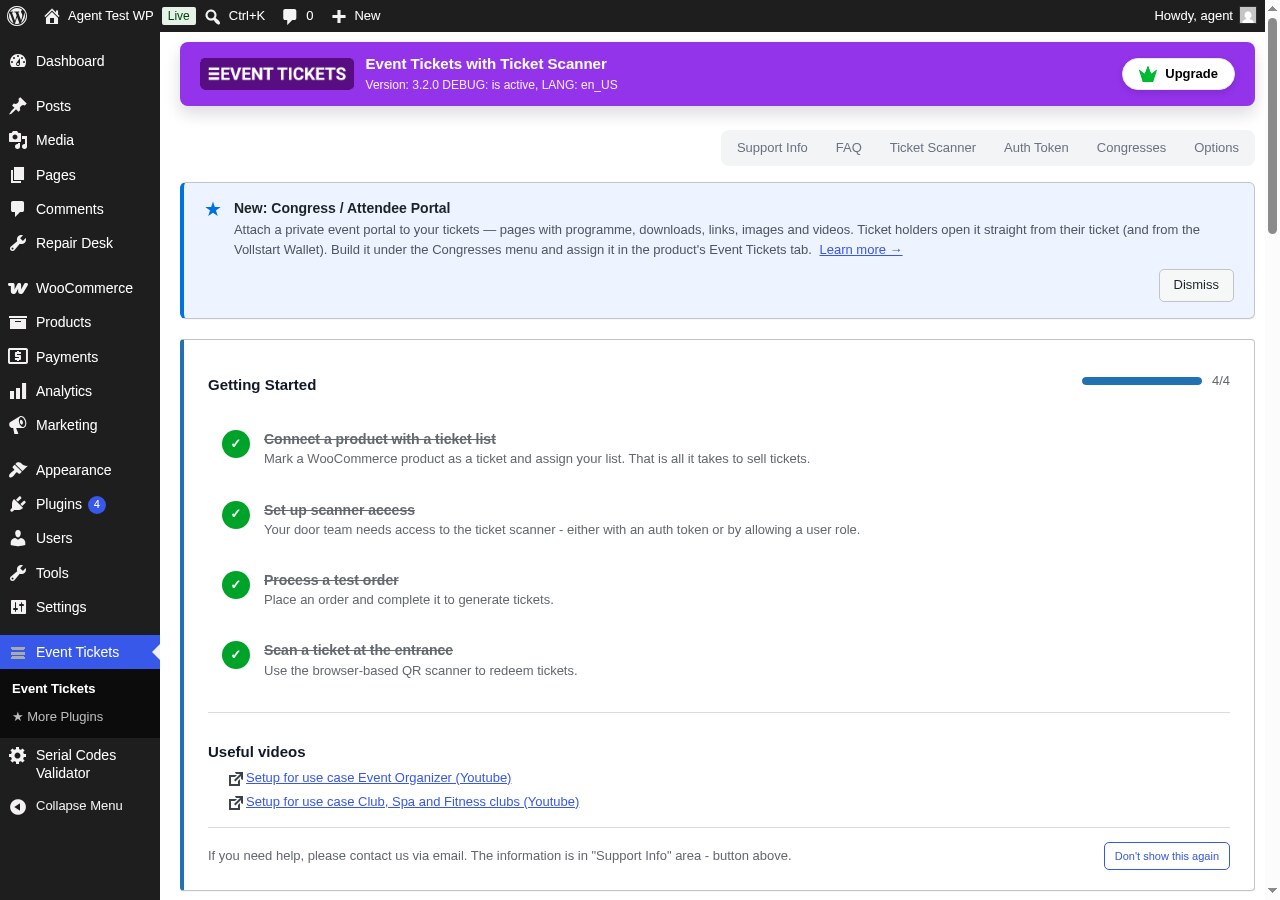
Event Tickets Dashboard — Manage ticket lists, sold tickets, and everything else from one place in your WordPress admin.
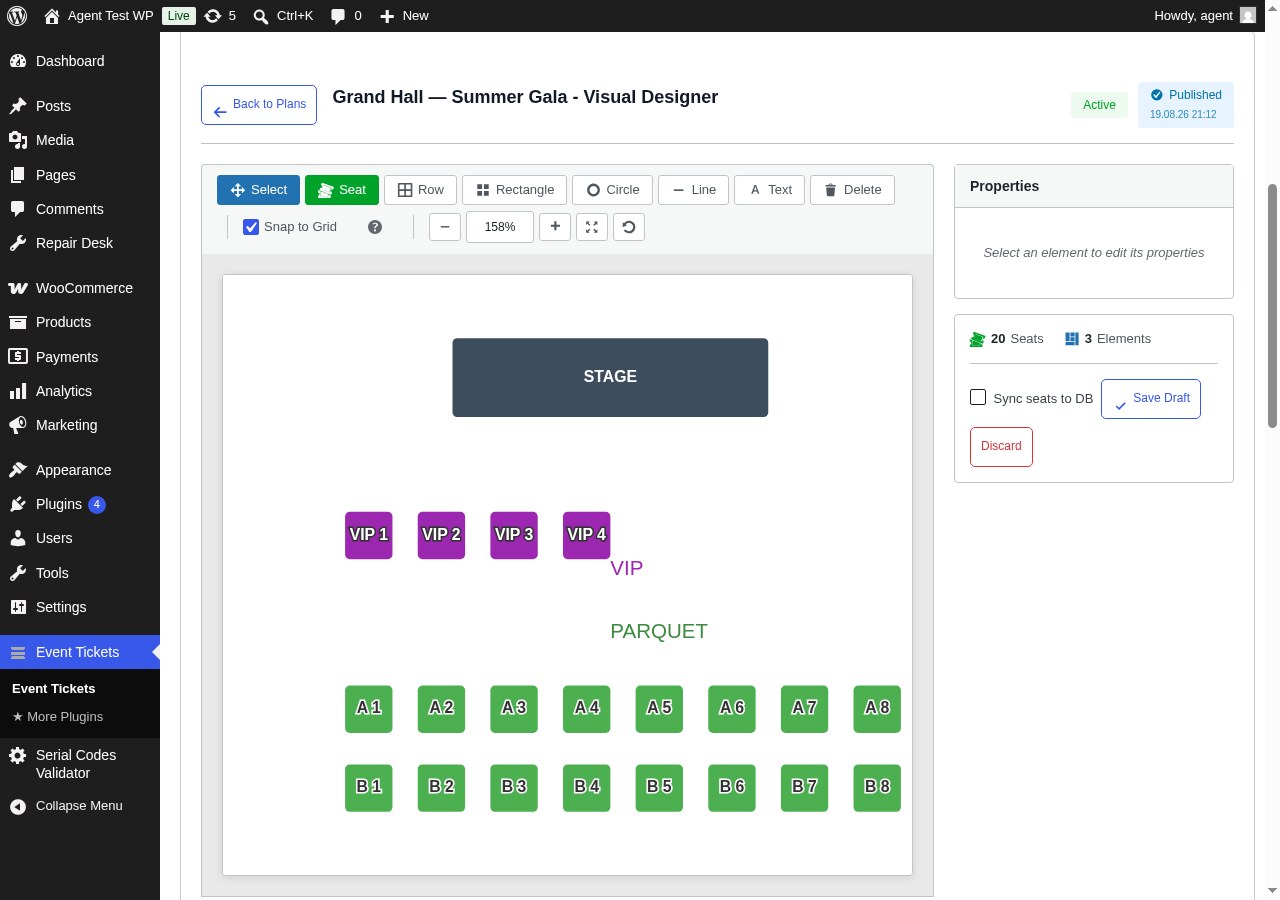
Visual Seating Plan Designer — Drag & drop seats, rows, shapes and labels to design your venue. No design tools needed.
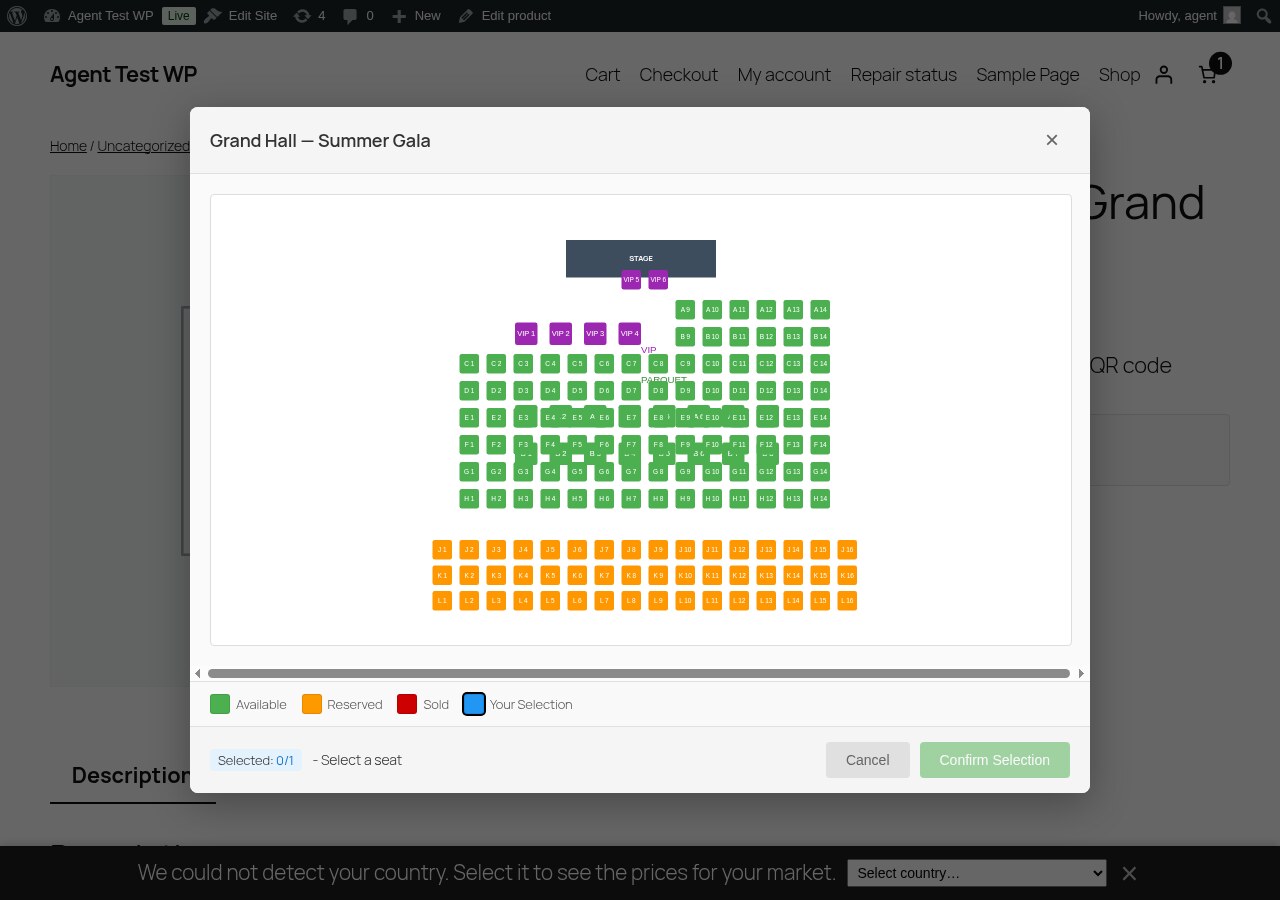
Interactive Seat Map at Checkout — Customers pick their own seat on a live seat map. Taken seats are blocked automatically.
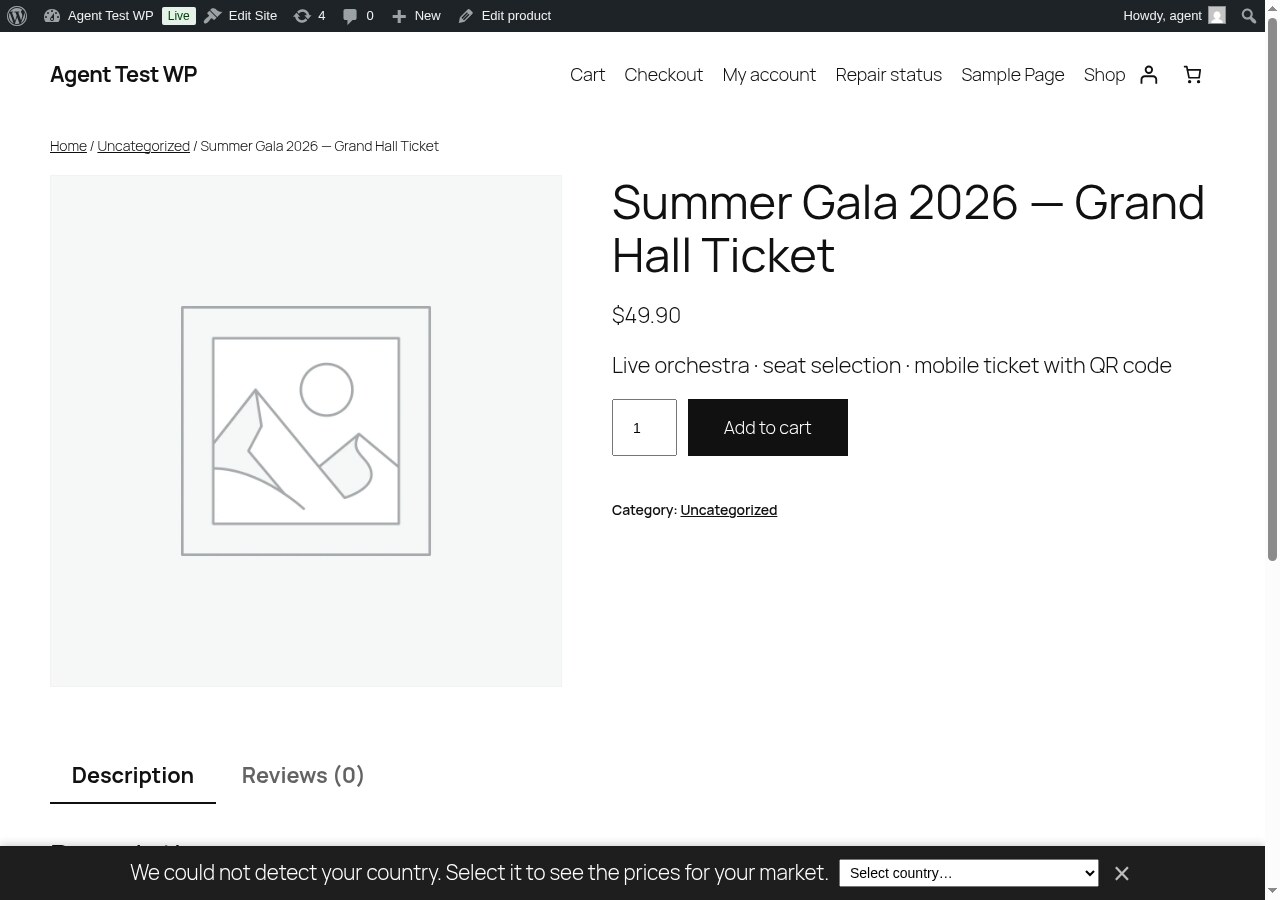
Sell Tickets as WooCommerce Products — Any product becomes a ticket with one checkbox. Works with variations like VIP or General Admission.
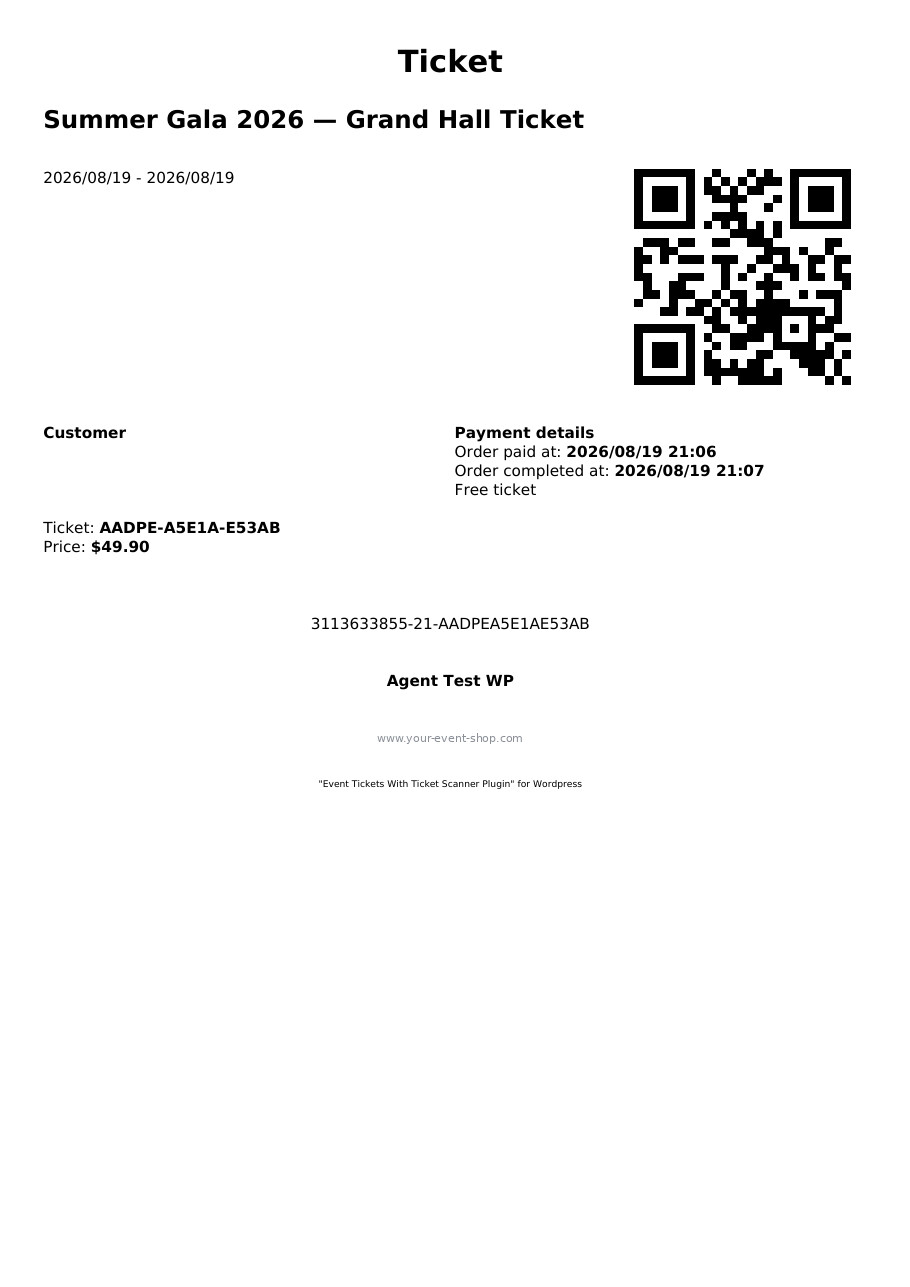
PDF Ticket — Branded PDF ticket with QR code, ready for print or mobile display.
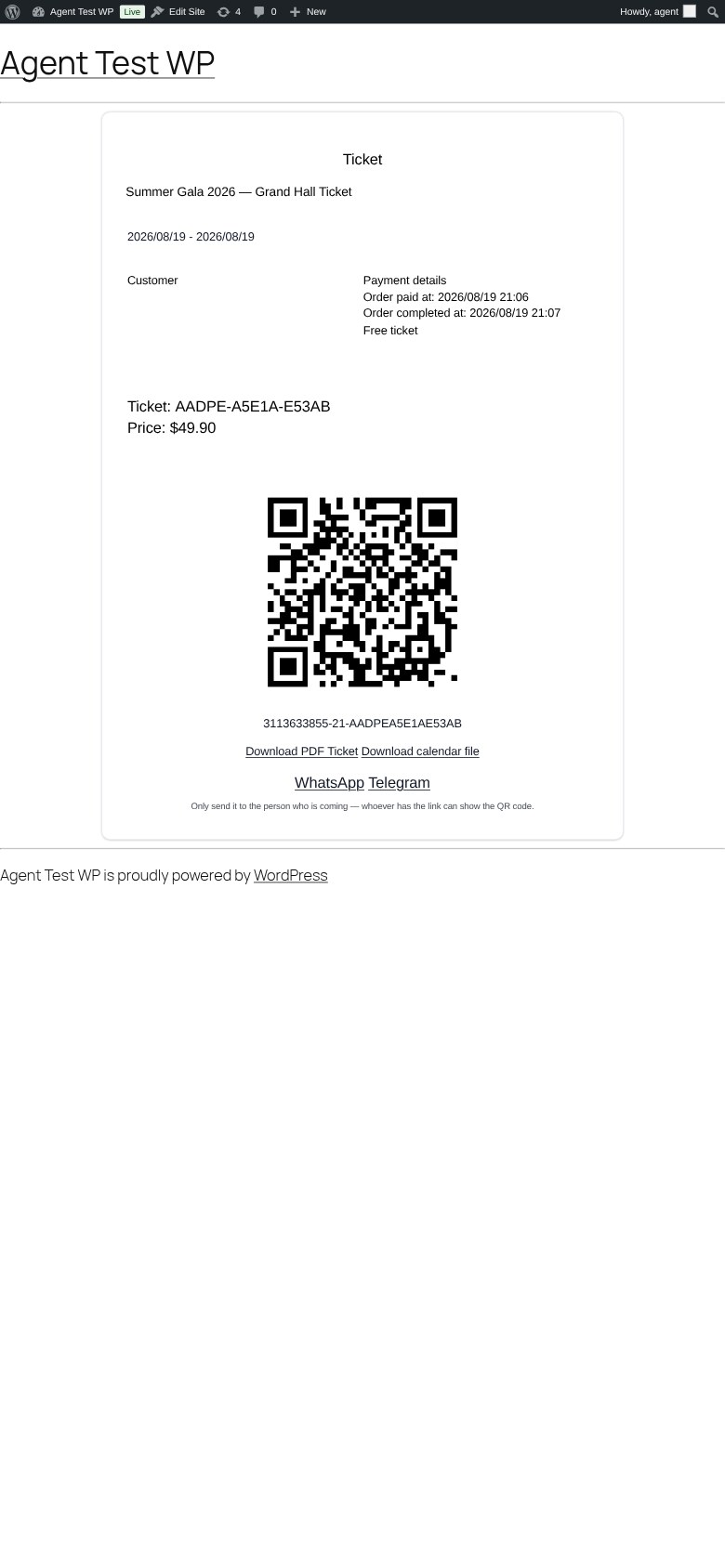
Ticket on Mobile — Customers see their ticket with QR code, PDF download and calendar file on any device.
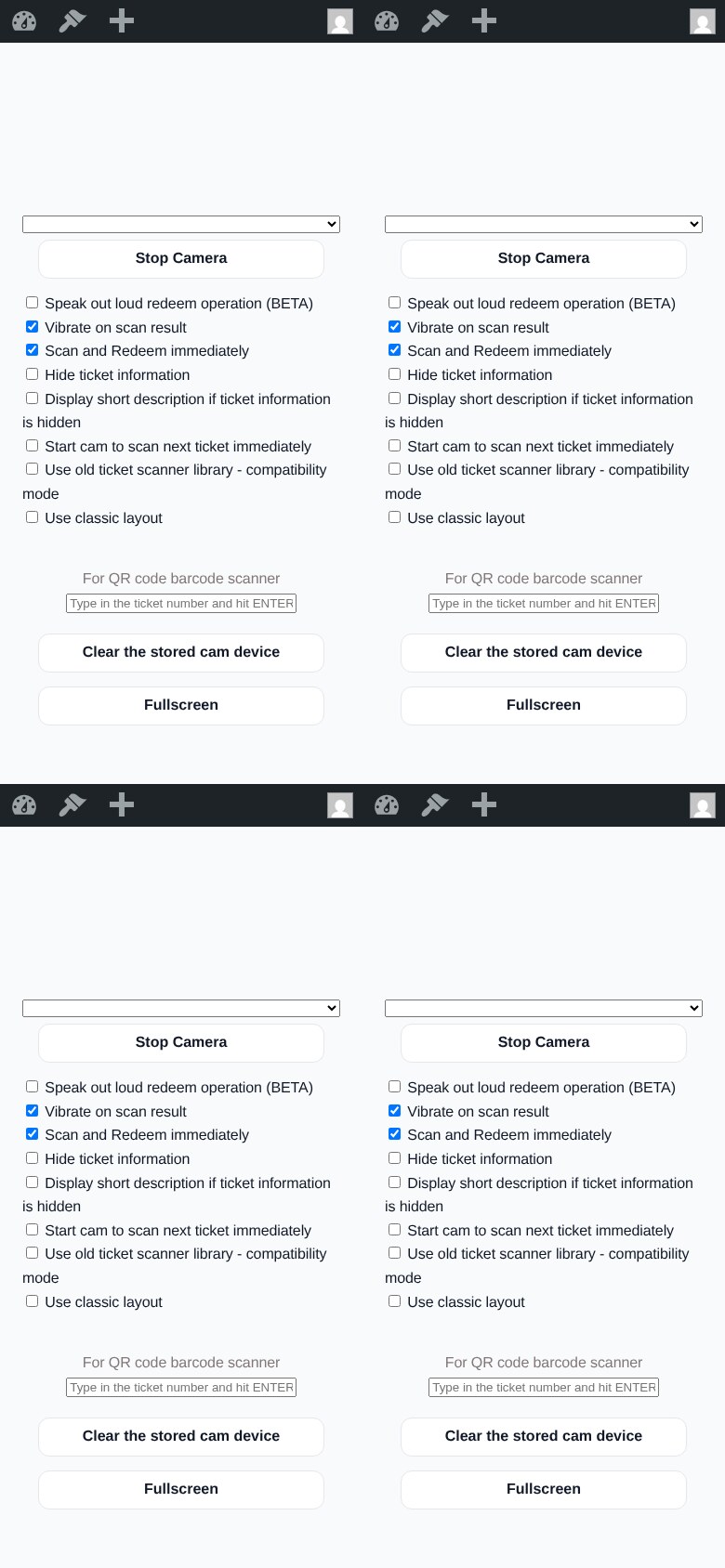
Ticket Scanner — Scan and redeem tickets with any phone. No extra app required; installs as a PWA with fullscreen mode.
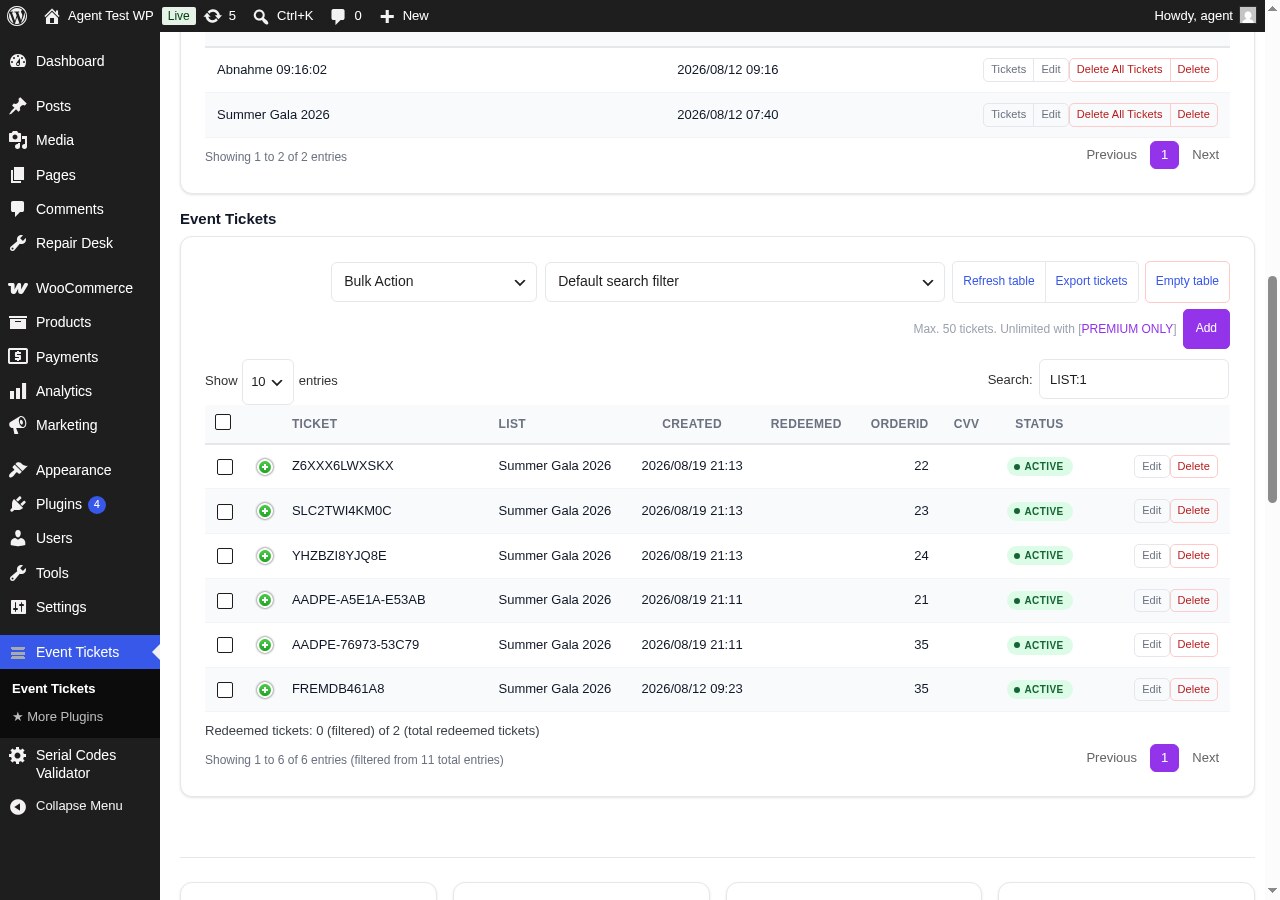
Ticket Management — All generated tickets with status, redemption info, filters and CSV export.
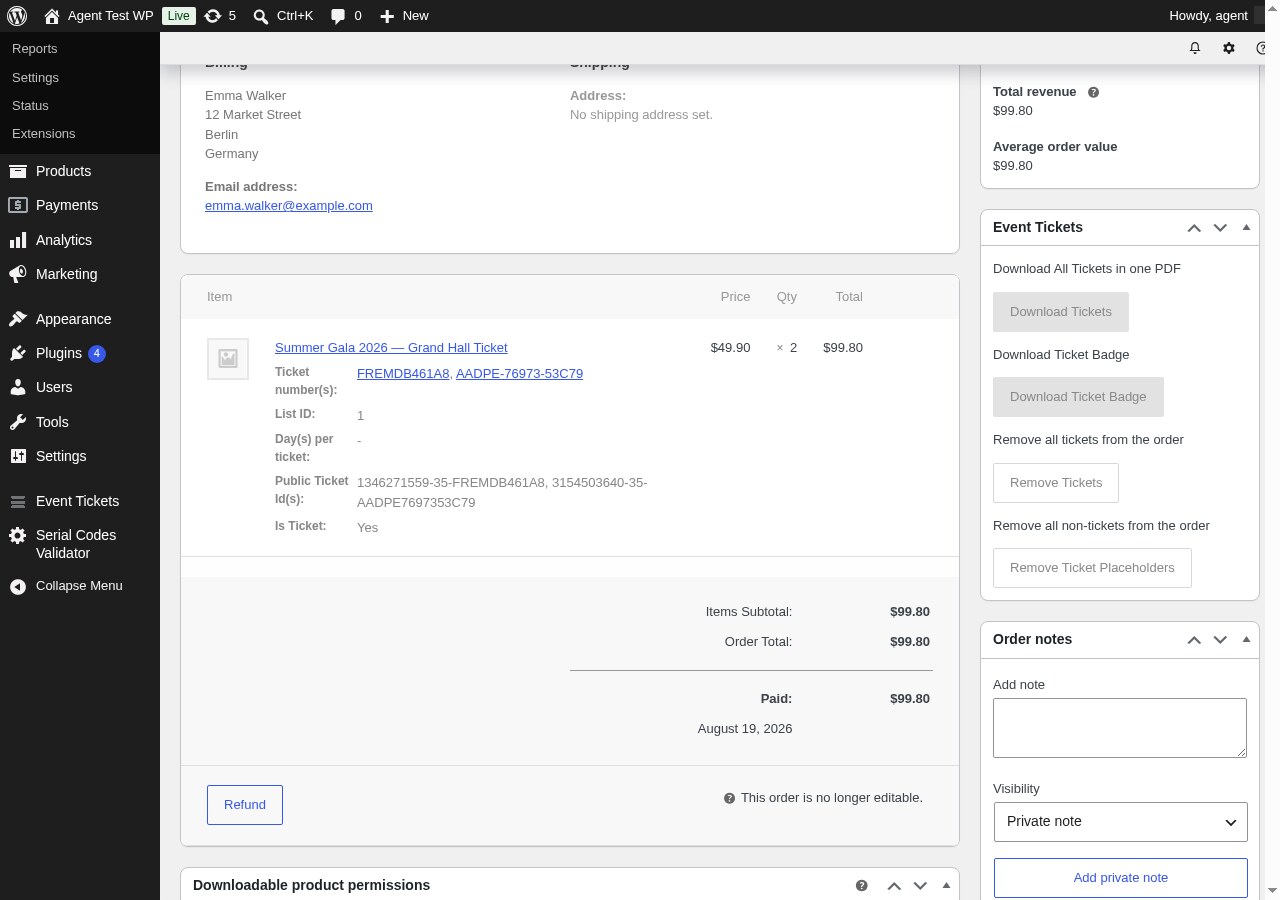
Tickets on the Order Page — See and quick-scan the tickets of every WooCommerce order directly in the order detail view.
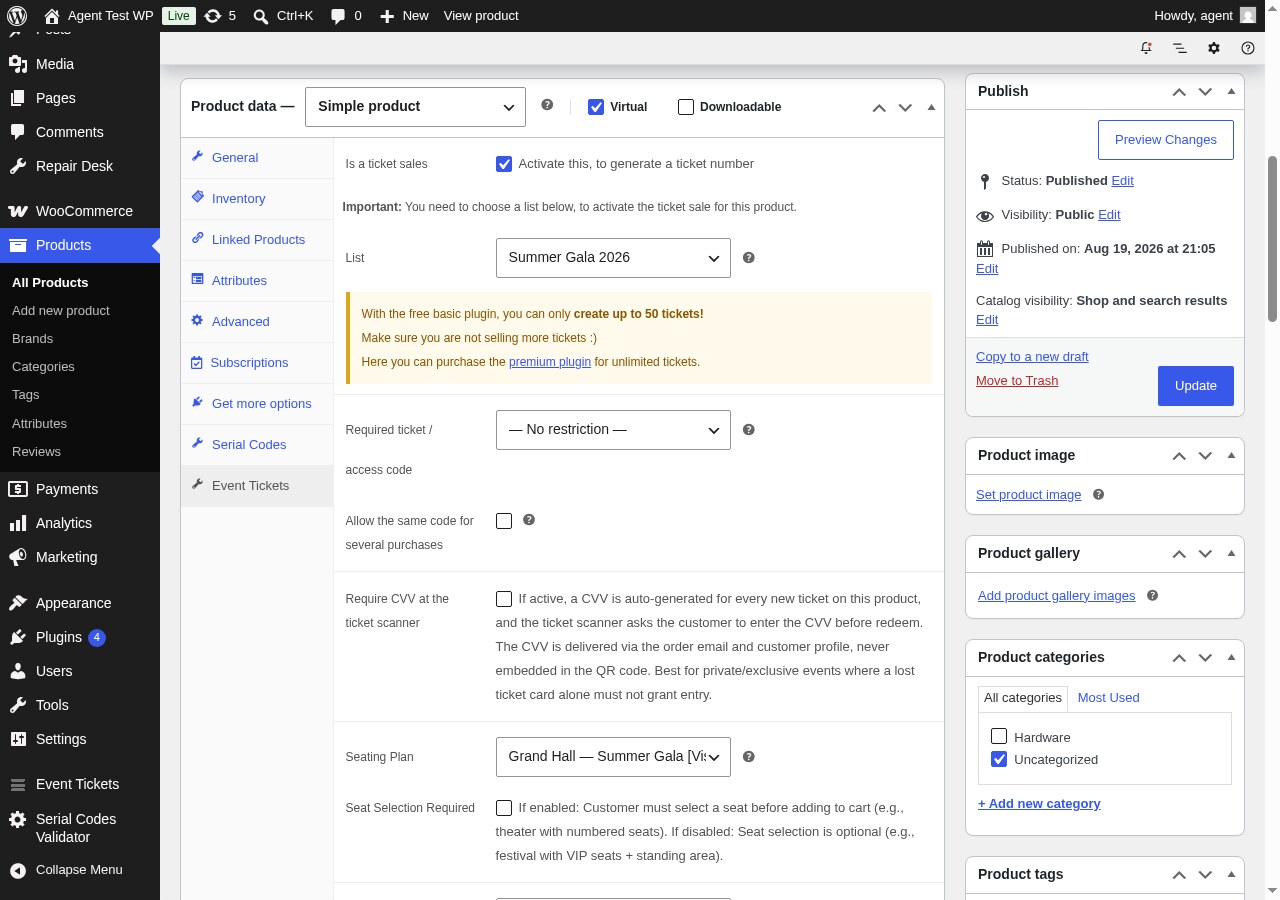
Product Settings — Enable ticket sales, assign a ticket list and a seating plan on the product’s Event Tickets tab.
Faq
Do I need any other plugins?
No. Everything is included — no additional ticketing add-ons required. The built-in checkout (premium) handles payments and orders on its own.
Does this work without WooCommerce?
Yes. The Kasse (direct sales) and the online shop (premium) sell tickets with their own checkout — no WooCommerce needed. And if you already run a WooCommerce store, the plugin supports it as fully as ever.
Can my team scan tickets without a WordPress account?
Yes! Premium includes Auth Tokens that give your door staff scanner access via a simple URL — no login required.
Does the scanner work offline?
By default the scanner validates live against your site (it is browser-based and built for speed: rapid scans are queued automatically, so nothing gets lost while a result is still on screen, and the app is an installable PWA). Premium adds true offline scanning: enable it on the scanner’s auth token, choose which ticket lists get preloaded, and your door team keeps scanning when the venue network drops — scans are validated locally, queued, and synced automatically once the connection returns, with conflict reports when two scanners hit the same ticket.
Can customers choose their own seats?
Yes. Design your venue layout with the drag & drop seating designer, and customers will see an interactive seat map during checkout where they can pick available seats.
What ticket types can I create?
Single entry, multi-entry passes, family tickets (multiple tickets per purchase), memberships with expiration dates, and day-chooser tickets where customers pick their event date.
How are tickets delivered to customers?
In the free version, the order confirmation email includes a link to download the ticket PDF and view the QR code. Premium allows attaching the PDF directly to the email and adding calendar invites (ICS).
What happens when an order is refunded?
The ticket is automatically deactivated, the assigned seat is released, and the ticket number is recovered for reuse.
Is the plugin compatible with WPML?
Yes. WPML is supported for multilingual ticket sales. The plugin also ships translations for German, Spanish, French, Italian, Hungarian, Japanese, Dutch, Portuguese, and Chinese.
What if I exceed the free ticket limit?
The free version supports up to 50 tickets. If you reach the limit, the plugin shows a notice in the admin area (your customers are never blocked from purchasing). Premium removes the limit entirely.
Can I use my own QR code or barcode scanner hardware?
Yes. The built-in scanner page accepts input from hardware barcode scanners in addition to camera-based QR scanning.
How do I prevent ticket fraud?
Every ticket number is unique. The scanner detects duplicate redemption attempts. Premium adds CVV verification and brute-force IP blocking for additional security.
What is the congress / attendee portal?
It’s a private event portal you can attach to a ticket product — organized into pages (start page, speakers, programme, downloads, sponsors, etc.) with text, schedules, files, image galleries and embedded videos. Ticket holders open it directly via their ticket, no separate account needed. You can password-protect individual sections, control when the portal opens and how long it stays available, and the page works offline as a mini PWA. It’s included in the free version; build it under the Congresses menu and assign it in the product’s Event Tickets tab.
Reviews
easy to setup, with a lot of Depth
By  spotkanieartystow1234 on September 9, 2026
Overall I like this Plugin a lot. It is relatively easy to setup and the built-in Scanner works without problems. Customer Support is also very courteous and fast.
The only “downside” I see from my Standpoint as a WordPress Beginner is the level of customisation this Plugin offers. WooCommerce is already tricky with lots of Options, and there are even more options in this Plugin. I wish there was some kind of a “simple Mode” that would break it all down to the bare minimum and get rid of the technical fluff.
Regardless of that, I can absolutely recommend this Plugin for all event Organizers who are looking for an easy to implement and solid solution.
Best Ticketing Plugin I know
By  Sebastian "rawsta" Fiele (rawsta) on April 22, 2026
This is an excellent and thought-through plugin that gives you all tools necessary to successfully sell tickets. I don’t know any plugin that can come close in terms of functionality
Crashed my site on install
By  (LieliskaisTM) on February 15, 2026
Threw error right after installing, that prevented me from accessing admin panel. Had to remove it manually, to get site back to working order. (System conforms with published requirements.)
Also unnecessary bloated. Bigger that Woocommerce, although doing way less.
Great support
By  sterasoft on January 21, 2026
The support guys were quick and helpful. Strongly recommend the plugin.
No options for actually selecting the date when on the product pages
By  DevDevington (superstardev) on June 10, 2025
Documentation extremely unclear on how to even get it to run properly. All I see is the Add to Cart option, this plugin doesn’t automatically add the other required fields on the product page.
Straight forward, easy to use and great support
By  copy77cat on December 7, 2024
It seems like a great plugin and extremely easy to use. I’ve checked out several other options, but this one was the most straight – forward.
I also received pre-sell support, very fast and accurate, exchanged some emails to clarify the possibilities and limitations. The only one is that it doesn’t wok offline and I will love it if this can be upgraded in the future.
Great job!
Essential tool for Event Management
By  Nu Ad Agency (nuadagency) on August 24, 2024
We’ve had the pleasure of using this plugin, and I must say, I’m impressed by the amount of work put into it. The plugin is not only highly flexible but also thoughtfully designed, making the ticketing process seamless from start to finish. The scanner feature works efficiently, ensuring a smooth check-in experience. It’s evident that a lot of care and attention to detail went into creating this tool. I truly hope the author continues to support and update this plugin, because despite some bugs and quirks that require workarounds, it remains indispensable for event management.
Really good plugin
By  2GIKA on April 25, 2024
Has everything that you need for big events. Instant buy.
Fantastic!
By  dratom on February 21, 2025
Smooth installation, incredible features, just open wp-admin on phone to get the link and use the link to scan ticket to redeem (on need to login).
After a whole day fighting with other WooCommerce extensions, this plugin was a ray of sunshine 🙂
The only caveat I found is that if you forget to activate “generating ticket” and somebody buys the ticket, you can’t re-generate the ticket (I didn’t found a way)
Brilliant, Simple To Use, Highly Impressive On Clients & Their Customers!
By  bighitsdigitalmedia on April 7, 2024
Really easy to use, does exactly what it is meant to do and a very simple to use plugin with great impact – customers loved seeing tickets produced with a QR code and then being scanned so easily at their events. Excellent!
Changelog
3.3.0 – 2026-11-01
- New: Products & Tax — VAT rates as manageable entities and products with a type (event ticket, add-on, fee) plus optional/auto-add flags and per-list default rates; every sale freezes the resolved rate per line (product rate > list default > 0%) into a cent-exact net/tax/gross breakdown. Managed in its own admin section (data tables, dialog editing) beside Seating Plans; while WooCommerce is active a notice marks these entries as unnecessary there.
- New: sell products without an event (drinks, merchandise) with categories and type-aware descriptions alongside ticket types — in the online shop and at the Kasse; auto-add fees sit on every order of their list (or globally) and start at quantity 1 in the sell dialog, add-ons only when chosen.
- New: public shop catalog [sasoEventTicketsValidator_shop_catalog] and event detail page [sasoEventTicketsValidator_shop_event] for lists marked “show in shop” — Buy opens the event’s own order page (premium), and both pages are freely designable via sandboxed Twig templates.
- New: Kasse receipts (Kassenbelege) — numbered, sequential, reprintable snapshots with per-rate tax breakdown, business name and VAT ID from the settings; plus an order detail view (lines, tax breakdown, payment trail) on every order card.
- Security: audit follow-up — escaped exception output, prepared ticket-number lookup, removed dead legacy endpoints, capability checks on destructive admin actions.
- Fix: Kasse printing — direct-sale tickets print again (the ticket-number check compared the wrong order id), and draft (unpaid) orders no longer offer ticket printing or PDFs.
- Fix: seating hardening — empty seat map on updated schemas, third-party price refreshes (geo-pricing) no longer clear a confirmed seat selection before add-to-cart, and the seat-map refresh race right after confirming seats.
- Fix: duplicate ticket codes on multi-quantity orders when the payment webhook and the order-status trigger raced — ticket generation is now claimed atomically per order line.
3.2.10
- Fix: every WooCommerce checkout failed with a fatal error since 3.2.9 (class-gclid.php) – the Google Ads click tracking read the checkout data array as a session object. Checkouts work again immediately after updating.
3.2.9 – 2026-10-27
- Kasse: touch-friendly minus/plus steppers around each ticket product quantity field.
-
Kasse: the change calculator now works like a real calculator — quick buttons add onto the current amount, typed digits append to it, and a backspace key (⌫) removes the last entered digit.
-
Kasse: change calculator with keypad and additive quick buttons (5/10/20/50/100) plus a big live change display — payment method and amounts are tracked in the order meta JSON.
- Kasse: ticket products are prefetched once per visit instead of one request per dialog — noticeably faster product display.
- Security: offline scanner sync event IDs are now passed as prepared SQL parameters (hardens the sync endpoint against SQL injection via crafted event payloads).* Security: admin table searches (codes, error logs, options history) escape the decoded search term before it enters the query — URL-encoded quotes can no longer break out of the search filter.* Security: error messages that echo back scanned or entered ticket codes are HTML-escaped at the source, in the legacy ticket/scanner fallbacks, and are rendered as plain text by the scanner and the public validation widget (protects against malicious QR codes).* Security: sensitive admin actions (option changes, code deletion, CSV exports, auth-token management) now require the manage_options capability — plugin admin-area access alone is no longer sufficient.* Security: releasing a fresh seat reservation requires the matching ownership token issued when the seat was blocked.* Security: visitor-controlled proxy headers (X-Forwarded-For, Client-IP) are no longer trusted for rate limits and IP blocks. IP-based limits now use the server-side address; sites behind a CDN/reverse proxy can enable the new option “Trust proxy IP headers (X-Forwarded-For)” (trustProxyIpHeaders) to restore proxy resolution.
- Security: the wallet ticket lookup endpoint is now rate-limited per IP to block ticket-ID enumeration attempts.
- Offline ticket scanning (premium): a master option enables the feature; per auth token you choose which ticket lists that scanner preloads. Scanners opened without a token are asked at start whether to preload tickets — all from today onwards, or today only (ask mode, choice remembered for the session, changeable any time). Scans keep working without a connection — validated locally, queued, and synced automatically when the network returns (online event, periodic retry, sync button). Safe with several scanners: the server replays every queued scan through the regular redeem path, retries are idempotent per scan id, and conflicts are reported. With the option off, everything behaves exactly as before.
- Unpaid online-shop orders no longer block contingents: draft orders older than 48 hours (filterable) are cancelled automatically once a day and release their reserved tickets.
- Wallet: tickets sold through the Kasse and the built-in online shop can now be saved into the Vollstart Wallet app — the wallet previously accepted WooCommerce-paid tickets only.
- Google Ads measurement: visits that arrive with a ?gclid= click parameter keep it through the session and store it on the order at checkout (private order meta), so advertising conversions can be measured per order.
-
New lists open directly in the edit dialog after saving — ticket products with prices, limits and shop settings are visible immediately instead of showing up only when editing an existing list.
-
Ticket types (Kasse and online shop): new optional eligibility-proof switch for discounted types — the ticket scanner asks at the entrance to check the proof (ID, student or retiree pass) before it redeems the ticket.
- Events without WooCommerce: date, times and location now live on the event (ticket list) — tickets sold via Kasse and the online shop print them on the PDF, together with the ticket type each ticket was sold as.
- Admin: when the security session (nonce) expires after a long idle time, a single dialog explains it and reloads the page via OK — instead of an error message on every action.
- Ticket scanner: new per-element large display options — guest name from the order (WooCommerce or the plugin’s own checkout), ticket values and ticket type can each be shown in big, clearly visible letters right after validation.
- Ticket scanner, “Redeem Complete Order”: the batch now cross-checks the order’s tickets in the database — tickets missing from the order item code list (for example after partial refunds) are redeemed too, and the scan answer reports how many were reconciled.
- Own checkout (Kasse and online shop): the buyer’s name is now frozen onto every ticket at sale time, so the scanner treats tickets sold without WooCommerce exactly like WooCommerce tickets.
- Own checkout: optional per-type ticket contingent — a maximum sellable quantity per ticket type. The Kasse and the online shop stop automatically at the limit and show how many are already sold; open orders count as reserved.
- Ticket lists: optional overall capacity — set a total maximum on the list and all ticket types share one pool. Mixed sales (regular + discounted) can no longer oversell the venue’s seats.
- Ticket lists: new “Show in shop catalog” switch — every list sells in the central ticket shop catalog by default; turn it off per list when an event should not be offered there.
3.2.8 – 2026-10-20
- Fix: When two orders are paid at the exact same moment, a ticket could end up linked to the other order. Ticket generation now locks per order and the ticket data writes are protected against such parallel-payment mix-ups.
- Fix: PDF library compatibility reworked — plugins that bundle their own TCPDF/FPDF (e.g. shipping-label plugins) no longer crash when both libraries load in the same request; the legacy class names are now provided lazily on reference instead of being occupied at load time.
- New: Internal order API for the premium online shop — public sales pages sell ticket products without WooCommerce (premium feature, 1.9.0).
- New: Ticket products (ticket types) with prices — sell different ticket types directly at the Kasse (direct sales) with automatic totals and a cash change calculator, no WooCommerce needed.
- New: Manage ticket products per event in the list editor — name, price, currency and active state; the Kasse switches to them automatically once one exists.
- Fix: The calendar file (ICS) of a variable ticket product now uses the event date of the purchased variation. When event dates were only set on the variations (parent product empty, \”date valid for all variants\” off), the ICS file carried today’s date instead of the variation’s event date.
3.2.7 – 2026-10-14
- New: The German translation is complete again — 174 previously untranslated strings are now in German, including every new Kasse (direct sales) and ticket scanner text of this version.
- New: Optional auto refresh for the direct sales (Kasse) table — a checkbox in the toolbar reloads the table every 30 seconds, so parallel kassen always see each other’s sales. The setting is remembered per browser.
- Fix: Opening the direct sales (Kasse) view a second time fired the orders request twice — the list cache rendered immediately and again after its background refresh. The refresh now updates the cache silently.
- New: A refresh button above the direct sales (Kasse) table reloads the current rows without losing your search, filters or page position — useful when several kassen sell in parallel.
- Fix: The direct sales (Kasse) table in the admin showed no rows while the pager counted many pages — the server response carried a success envelope the table could not read.
- Fix: The ticket list description on the Kasse tiles is now rendered as formatted text — HTML tags are executed (safely sanitized server-side) and stray backslashes before quotes are gone, including for lists saved before this update.
- New: Scanner option “Redeem button at the top” (default active) — shows a redeem button at the top of the redeemed view, right below the ticket information, so staff can read the ticket details and redeem the next admission without scrolling. Can be toggled per device in the scanner options; a new global preset (Events Settings Ticket scanner) controls the default for all devices.
- Fix: Scanning the same group ticket again (one QR code, multiple admissions) now reliably redeems the next admission. After a previous fix removed a crash, an internal processing lock could stay engaged, so the second scan of the same code stalled until the page was reloaded. The lock is now released before the re-scan is queued, making back-to-back scans of one group ticket work without reloading. The scanner’s timing checks also no longer assume the full ticket data set — a reduced server response used to stop the second scan with a script error.
- Fix: PDF tickets downloaded from the WooCommerce order admin are now saved with the suggested filename (e.g.
tickets_702394.pdf) on every browser, not just most. Some browser-security-plugin combinations used to ignore the inline download and fall back to the request URL as the filename (e.g.admin-ajax.php.pdf). The PDF now carries an explicit attachment header that the browser must honor.
3.2.6 – 2026-10-13
- Fix: PDF library isolation now also keeps the global class aliases for TCPDF and FPDF, so plugins that ship their own PDF subclasses (shipping label generators, invoicing, etc.) keep working without changes on their side. After 3.2.5 introduced the underlying isolation, the legacy class names are restored alongside it. Shops without such plugins see no change.
- Tweak: The “Show seating plan link in shop overview” option has moved to the Seating Plan settings section, where it belongs next to the other seat-map behaviour switches. Setting value is preserved.
- Tweak: The “Congress” portal has been renamed to “Event Guide” across the admin area, options headings, and the public ticket-link view label. Internal option keys, database columns and REST namespaces stay the same for backward compatibility.
- Fix: Resolved a scanner crash on servers returning partial ticket metadata. The scanner now safely handles responses where the ticket’s redemption metadata is missing — instead of stopping with an error, it falls back to the operator-driven redeem path. No action needed for previously-working tickets; the behaviour is unchanged for them.
3.2.5 – 2026-10-02
- Fix: Ticket scanner no longer traps multi-redeem tickets in the self-redeem echo. Scanning a group ticket (one QR for N guests) for guest #2..N now flows through to the next redeem instead of locking on “already redeemed by this scanner a moment ago” until a manual browser refresh. Single-redeem tickets still show the calm echo — that protection is unchanged.
- Fix: PDF library isolation — the bundled TCPDF classes and constants are now prefixed (SASOET_TCPDF*) and the loader no longer falls back to system-wide TCPDF installations. Fixes fatal “Cannot redeclare class TCPDF_FONT_DATA” crashes when another plugin also bundles TCPDF (e.g. DPD Connect shipping labels) — whoever loads first, both plugins keep working.
3.2.4 – 2026-09-29
- New: Deleting a ticket list that still contains tickets is now blocked by default. The list delete dialog has a new checkbox “Block if list still contains tickets” (checked by default) — unchecking it allows the delete anyway. Prevents accidentally orphaning tickets whose QR code, PDF and scanner checks depend on the list.
- New: You decide how long the ticket scanner ignores a repeated scan of the same ticket — set the waiting time in seconds in the global options (default 7 seconds), so the camera never picks up the same ticket twice by accident.
3.2.3 – 2026-09-27
- New: The seat map opens as a fullscreen overlay on every device. The confirm buttons sit in a footer that stays visible at the bottom edge, so they can no longer be cut off on small phone displays. Close anytime with the large X in the top right corner.
- New: Zoom buttons beside the seat map. Stacked vertically in a narrow bar on the right, they never cover the map. Zooming is useful on phones to pick the right seat on large plans.
- New: Global option “Confirm seat selection automatically once complete” (default off) — the seat map confirms as soon as the customer has picked all seats, one less tap on mobile.
3.2.2 – 2026-09-22
- Fix: Redeem operations are now protected against parallel scanner writes (optimistic locking). When two devices redeem or edit the same ticket code at the same moment, the second write is detected, re-read and safely retried instead of silently overwriting the first one’s redeem entry.
- New: Admin notice on the product edit screen when the product’s seating plan has seats but was never published — until now the product page simply showed no seat selection, with no hint why. The notice links straight to the plan for publishing.
- Fix: On MariaDB servers without strict mode, a never-published seating plan could be treated as published (“0000-00-00” zero-date) — the product page then rendered an empty plan instead of none. Zero dates are now handled correctly.
- Fix: Publishing a seating plan did not sync the seats table — after deleting and re-creating seats in the designer, the shop showed only a fraction of the seats (or none) while the designer showed them all. Publish now re-activates the plan’s seats so the shop matches the designer.
- Fix: The seat statistics (“total seats / available”) counted inactive and deleted seats, reporting seats as available that the shop could not sell. Counts now match what the seat selector actually offers.
- Fix: Seating-plan JSON exports are timestamped down to the second in the download filename so multiple exports on the same day do not overwrite each other.
- Fix: The seat-map selector endpoint could still show deleted decorations (rect9) because getPlanForProductFrontend merged with array_replace_recursive directly instead of using the helper that replaces element lists. The selector now renders exactly the published decorations.
- Fix: The shop’s seat map could show deleted decorations and seats from an old layout version (e.g. overlapping “ghost” seats) although the designer showed the current plan — the page merged the plan’s legacy meta column into the current published version, and list-merging resurrects deleted elements. The seat map now renders exactly the published version.
- Fix: Seat maps stayed empty on MySQL 8 servers with strict SQL mode — comparing the (empty) event date against a DATE column aborted the seat query with “Incorrect DATE value” while the shop showed no error. Empty and zero dates are now normalized before every seat query. The support info block additionally shows the server’s SQL mode.
- New: “Import Plan (JSON)” next to “Add Seating Plan” — restores a plan export in one click. Two clearly explained modes: create a new plan (gets “(imported)” added, stays unpublished for review) or replace the draft of an existing plan (published version stays live until you publish; sold tickets are never touched). Seat dates are now stored and compared as integer timestamps with self-healing backfill of existing rows — MySQL 8 strict mode can no longer break seat maps.
- New: The seating plan designer and the seat list show an approximate element limit (“n / ~2000”) — plans are stored as JSON and saving extremely large plans can fail silently depending on the server configuration. The counter turns red with a warning when the approximate maximum is reached.
- New: Seating plan designer: “Navigator” — a collapsible element list between the properties panel and the save buttons. Every seat, decoration, line and label is listed by name; click a row to select the element (works for overlapping elements that are hard to click on the canvas), hover to highlight it on the canvas. Essential for debugging customer plans.
- Fix: Deleted elements in the seating plan designer came back after saving and reopening the plan — the server merged the new element list into the stored one instead of replacing it, resurrecting every deleted decoration, line and label. This made plans impossible to clean up (the root cause behind seats never matching the designer). Lists are now replaced on save.
- Fix: Publishing a seating plan raced the draft upload — the publish request fired on a fixed timer instead of waiting for the save to finish, so on slower connections the shop was published with a stale draft while the editor showed “published successfully”. Publish now waits for the save roundtrip and aborts with a clear error if saving fails.
- New: “Export Plan (JSON)” button in the seating plan seat view — downloads the complete plan (canvas, decorations, draft, published version and all seats) without any customer data, so a plan can be shared with support and re-created 1:1 for debugging.
- Tweak: The “Starter plugin is installed” warning now recognizes when the full Premium plugin is already installed next to the Starter and tells you to simply delete the Starter, instead of suggesting a Premium upload you do not need.
3.2.1 – 2026-09-18
- Fix: With “Reserve seat only when adding to cart” enabled, the reservation was stored under wrong identifiers — the seat was not reliably blocked for other customers until the order was completed. Reservations created by this option now block the seat correctly.
- Fix: On block themes (like Twenty Twenty-Four) the public ticket page fell back to a deprecated WordPress legacy template and printed a deprecation notice — the page now renders a clean minimal shell there.
- New: The print preview in the Kasse opens the ticket as a PDF.
- Fix: Selling a ticket crashed with a server error when the ticket list used a code format — the format reached the code generator in the wrong shape; the generator now handles both shapes.
- New: The Kasse area shows one button per ticket list — a single click opens the sale popup with the list preselected (switchable inside the popup), amount, payment note and customer name.
- New: Sell tickets directly at the counter — the new “Kasse” area issues tickets from a ticket list without a shop order, attaches an internal sale number to every ticket and confirms payment with one click. Sales can be cancelled or partially refunded; cancelled tickets are freed for reuse. Print preview opens each ticket in the browser. The sale confirmation is checked at the scanner: a ticket whose direct sale was not confirmed yet does not redeem.
3.2.0 – 2026-09-13
- New: Kasse is now switchable (default on) — turn the whole Kasse tab off as a safety stop or for handheld-only shops.
- New: The Kasse ticket-list overview is switchable (default on) — disable to open the sale popup directly on touch screens.
- New: The Kasse orders table now uses server-side DataTable processing (search / paging / sorting), status pills, and per-row Confirm / Cancel / Refund / Partial refund / Print tickets actions. Filtering and ordering are handled on the server.
- New: Filter the ticket list by scanner account — new search filter “AUTHTOKEN:” shows all tickets redeemed by one ticket scanner (enter the id shown in the scanner details), so you can review each entrance team member’s activity without opening every ticket.
- New: The scanner makes a successful read unmistakable — the camera area lights up with a green frame (like card payment terminals) and a clear “code read, waiting for server” message the moment a QR code is recognized, followed by a short deliberate pause before the next scan is processed. Queued scans of group members are never lost and keep their order.
- Fix: The ticket scanner silently dropped scans that arrived while the previous ticket was still loading (slow Wi-Fi, fast consecutive scanning of groups) — those guests were never redeemed in the dashboard. Scans are now queued and processed one after another, with a short on-screen note.
- Fix: Re-scanning a ticket that this scanner redeemed moments ago showed a red “ticket already used” error — confusing operators at the entrance. The scanner now recognizes its own successful redeems and shows a calm green confirmation instead.
- Fix: The same seat could be sold twice — a second order (or a double add-to-cart with the same seat) confirmed a seat that already belonged to another order, creating two paid tickets for one seat while the seat map only showed one sale. A seat already confirmed for another order is now refused, and a selection containing the same seat more than once is rejected at add-to-cart with a clear message.
- Fix: When an order was refunded or cancelled, the freed tickets kept a user registration from the previous buyer — the old owner stayed visible on the ticket and could interfere with its next use. Registrations are now cleared together with the other order information, and when a ticket is reused for a new purchase, any leftover registration or usage information is swept automatically.
- New: Tickets without WooCommerce — the big decoupling step. Ticket lists, ticket numbers, PDF tickets and the ticket scanner now work without a WooCommerce order behind them, for printed cards you hand out yourself. (Details follow with the release.)
- New: The PDF path for tickets without an order — the single ticket PDF, the ticket page and the bulk “one PDF” print sheet now render order-less tickets instead of failing with an order error. The ticket shows its own number, its list, the QR code and the redemption state; everything that normally comes from the order (customer, purchase dates) stays empty. With the “allow tickets without order” switch off, everything behaves exactly as before.
- Fix: Order-related errors (#7001/#7002/#8010/#8013/#8020/#8021) no longer appear for tickets that are deliberately allowed to have no order.
- New: The setup wizard now asks whether you will sell or hand out tickets directly, without a WooCommerce order — at the door, by invoice or as printed cards — and explains what the switch does. The option’s description in the settings was extended the same way.
- New: The admin area formerly known as “Congresses” is now the “Event App” — the companion page your visitors open with their ticket (programme, speaker info, downloads, support pages; for a congress just as much as for a single event). Each app row has an “Open example” button that opens the visitor view in a new tab, using one of the app’s real tickets. The button appears once a ticket exists.
- Tweak: The support info block now reads “Tested up to”, “Requires at least” and “Requires PHP” live from readme.txt instead of carrying hardcoded values that lagged behind (it showed 6.9 while the readme said 7.1).
- New: The setup wizard has a fifth use case, “Direct sales — no WooCommerce” — for tickets you sell at the door, by invoice or as printed cards. It switches the without-order path on and carries scanner defaults instead of order-processing options. When WooCommerce is not installed, this use case is preselected automatically.
- Tweak: The “Allow tickets without a WooCommerce order” setting now lives in its own section, “Direct sales (no WooCommerce order)”, instead of deep inside the WooCommerce sales section — easier to find, especially on sites without WooCommerce. Nothing about the option itself has changed.
3.1.14 – 2026-09-07
- Security: Added nonce verification to the admin-area AJAX endpoint (executeWCBackend) to block cross-site request forgery. The frontend already shipped the nonce; the server now verifies it.
- Security: Restricted WooCommerce order/product data actions (downloadTicketInfosOfProduct, downloadAllTicketsAsOnePDF, removeAllTicketsFromOrder, removeAllNonTicketsFromOrder, downloadPDFTicketBadge) to users with the manage_woocommerce or edit_shop_orders capability. Without this, a low-privilege role granted admin-area access via the “Allow only specific roles” setting could read or delete every customer’s ticket data through the plugin-internal role check.
- Security: Removed an
eval(data)call after$.getScript()in the seating-admin loader (backend.js, _displaySeatingplanArea, line 1288).$.getScript()already executes the loaded script; the extra eval ran every byte of the response through the JS engine again. CWE-95 — a server-side change tojs/seating_admin.jswould have given code-injection on every admin page that opens the seating-plan area. No callers, no behaviour change beyond the redundant execute. - Security: Ticket codes, scanner auth tokens and ticket idcodes are now generated with a cryptographically secure random source (
random_bytes) instead of a hash of the current time (md5(time() ...)). The old values were predictable: two codes created in the same second shared their time component, so anyone who knew roughly when a ticket was issued could narrow the guessing range dramatically. CWE-338. Five generators were changed — the ticket code and the code-list lock in the WooCommerce assignment path, the per-list and per-order idcode, and the ticket-scanner auth token. The printed format is unchanged (same length and character set), existing tickets and tokens keep working, and no migration is needed.
3.1.13 – 2026-09-03
- Tweak: Products with variations no longer show the seat selector on the shop overview page. In the overview no variation is chosen, so the selector could not work there anyway – it only pushed the product image out of its card. The “Select options” link leads to the product page, where the full seat selection (and its validation) lives. Simple products keep the quick selector in the overview.
3.1.12 – 2026-09-02
- Tweak: The premium wizard now says exactly what the “Enable Recommended Settings” button does before you click it: attach tickets as PDF to the purchase email, merge all tickets of an order into one PDF, and raise the attachment limit to 21. Previously the popup only vaguely asked to “enable PDF ticket attachment” and revealed the actual settings only after they had already been changed.
- Tweak: “Skip” in the premium wizard closes the popup instantly instead of waiting for the server. The “don’t show again” marker is written exactly once per installation – the first time the wizard is skipped while it is still unset; re-opening the wizard later sends no request at all.
- Fix: In multilingual shops (WPML), the seat check on “add to cart” was silently skipped when the customer bought in a secondary language. The check read the seat settings from the translated product, where they do not exist – a shop could sell numbered-seat tickets without a chosen seat. The check now reads the settings from the original product, like the cart display already did.
- New: A safety net at checkout. If a product with required seat selection reaches the cart or checkout without a seat on its line – possible when the seating plan was still unpublished at add-to-cart, when a seat reservation expired and was removed, or when another plugin rewrote the cart – the order is now blocked with a clear message until a seat is selected. Products with optional seats are unaffected.
3.1.11 – 2026-09-01
- Fix: Adding a ticket with a chosen seat to the cart failed with “Invalid seat selection” on every attempt since 3.1.8. The seat check compared the chosen seat against a value that the variation-plan rework had left behind, so no seat could ever pass – on products with and without variations. Valid seats are accepted again.
3.1.10 – 2026-08-31
- Fix: Two errors that blocked a shop after a staging-to-live database migration. (1) The Event Tickets admin page stayed on the loading spinner and showed “#505 auth token not found” as soon as a ticket in the list referenced a scanner token that no longer existed in the new database – the audit column tried to read the token’s name and the missing-row error crashed the whole page. (2) Membership products that were never ticket products suddenly demanded a “ticket or access code” in the cart and at checkout, even though their product settings showed no restriction. Both came from values that the database carried over from staging. (1) is caught and falls back to “AUTHTOKEN DELETED” in the audit column; the migration artefact no longer breaks the page. (2) sits behind the same …