

Easy Testimonial Blocks – Testimonial Grid, Customer Reviews & Star Ratings
Description
Easy Testimonial Blocks is a lightweight testimonial plugin built for the WordPress block editor (Gutenberg). Add a testimonial grid to any page, post or template in seconds. You can show client testimonials, customer reviews, star ratings and reviewer photos without shortcodes, page builders or code.
Social proof turns visitors into customers. A well-designed testimonials section on your homepage, landing page, pricing page or service page builds trust where buyers make up their minds. Easy Testimonial Blocks makes that section quick to build and easy to match to your brand. It keeps your site fast too.
Who is it for?
- Small businesses and local services – show what happy customers say about you
- Agencies and freelancers – client testimonials for portfolios and case studies
- SaaS, apps and online courses – customer reviews next to your pricing and sign-up buttons
- Coaches, consultants and creators – personal recommendations that build credibility
- E-commerce and product pages – highlight ratings and buyer feedback
Key features
- Native testimonial block – built with core WordPress block APIs. No shortcodes, no page builder, no lock-in.
- 13 card designs – Classic, Elevated, Outline, Minimal, Speech bubble, Spotlight, Midnight, Aurora, Glass, Accent stripe, Editorial, Pastel and Side by side. Pick one from visual thumbnails, set an accent color, add a hover effect or custom shadow, and fine-tune every detail
- Design picker – insert the block and choose a ready-made design from a visual picker, or start blank
- Ready-made testimonial sections – 13 block patterns (three cards, featured quote, two columns, dark section, wall of love, spotlight, speech bubbles, aurora gradient, frosted glass, accent stripe, editorial, side by side and minimal) you can insert and edit in one click
- Responsive testimonial grid – set columns and spacing separately for desktop, tablet and mobile
- Star ratings – show ratings out of 5, including decimals like 4.5 or 4.8, with crisp SVG stars and an optional number
- Reviewer details – name, job title, company and photo for every testimonial
- Reviewer photos – responsive, lazy-loaded images with size, border and border radius controls
- Quote icons – choose from four quote icon styles and set their size, color and opacity
- Design controls – background, text and rating colors, font sizes, alignment, borders, border radius, padding and box shadow
- Theme-aware section styling – native background, gradient, text color, padding and margin controls that use your theme’s color palette and spacing presets
- Live device preview – responsive settings follow the editor’s desktop, tablet and mobile preview
- SEO-friendly markup – choose the HTML tag for reviewer names (H2–H6, paragraph or div) to keep your heading structure clean
- Accessible – screen reader labels for ratings and alt text for reviewer photos
- Fast and lightweight – no JavaScript on the frontend, no jQuery, and CSS loads only on pages that use the block
- Works with any theme – block themes, classic themes, full site editing and block-based widget areas
- Plugin dashboard – see how many testimonials you have, where they appear and your average rating, and create a page from a ready-made design in one click (Settings Testimonial Blocks)
- Translation ready – every label can be translated, and RTL languages are supported
How it works
- Insert the Testimonial Grid block and choose a ready-made design, or start blank. The designs are also under Patterns Testimonials.
- Type the testimonial text, then add the reviewer’s name, title, company and photo.
- Set the star rating for each testimonial.
- Adjust columns, colors, icons and spacing from the block sidebar.
- Publish. Your testimonials section is live and responsive.
Video tutorial
Built for performance
Many testimonial plugins load sliders, jQuery and large stylesheets on every page. Easy Testimonial Blocks renders plain HTML and inline SVG on the server. It adds no frontend JavaScript and loads its styles only where the block is used. That keeps your Core Web Vitals and PageSpeed scores healthy.
Support and feedback
Found a bug or have a feature request? Open a thread in the support forum. If the plugin helps your site, please leave a review. It helps other people find it.
Installation
From your WordPress dashboard
- Go to Plugins Add New Plugin.
- Search for Easy Testimonial Blocks.
- Click Install Now, then Activate.
- Open any page or post in the block editor, click + and search for Testimonial.
Manual installation
- Download the plugin zip file.
- Go to Plugins Add New Plugin Upload Plugin and upload the zip, or unzip it into
/wp-content/plugins/easy-testimonial-blocks/. - Activate the plugin from the Plugins screen.
After activation, open Settings Testimonial Blocks for the plugin dashboard: usage stats, ready-made designs, the video tutorial and support links.
Screenshots

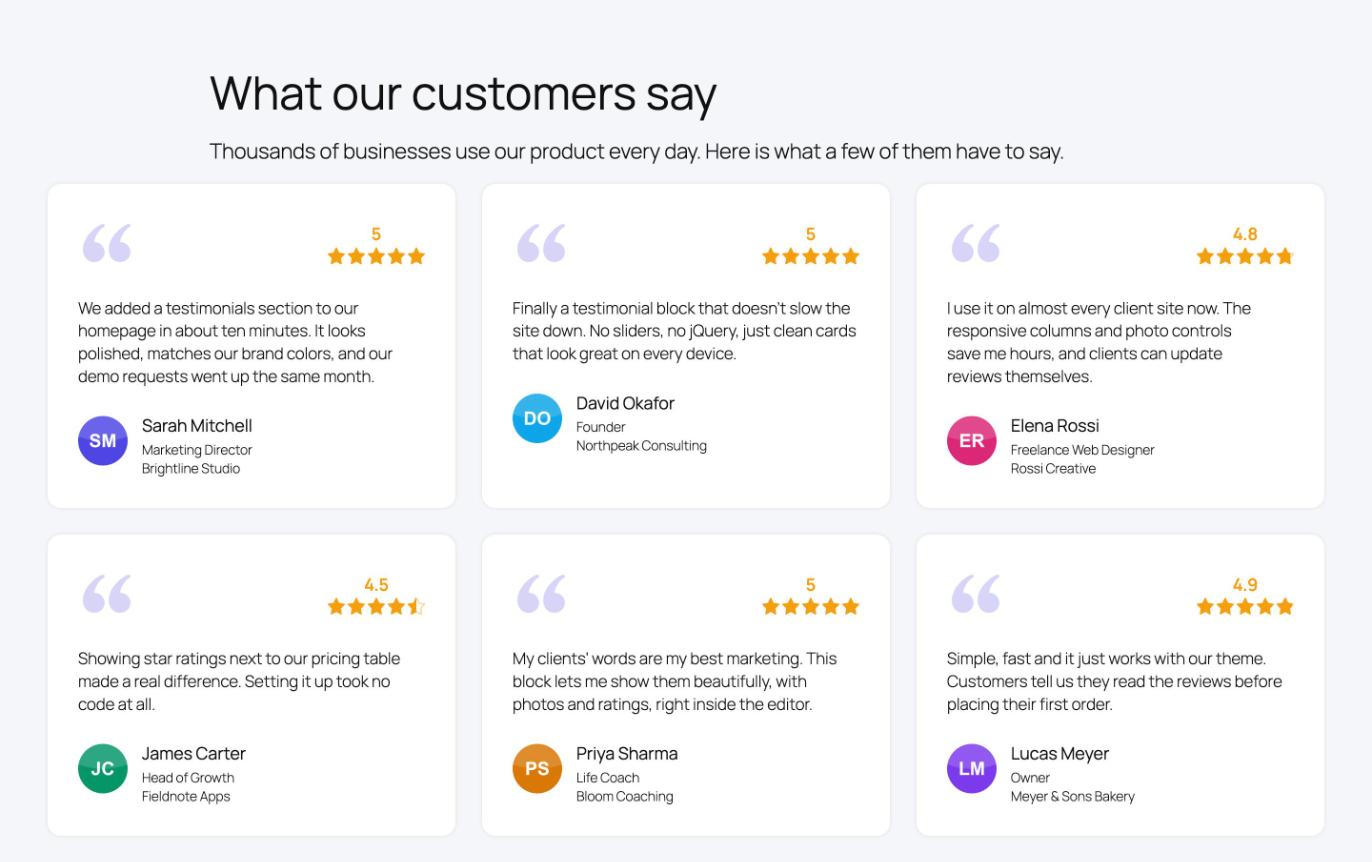
A testimonial grid with star ratings, quote icons and reviewer photos on the frontend.
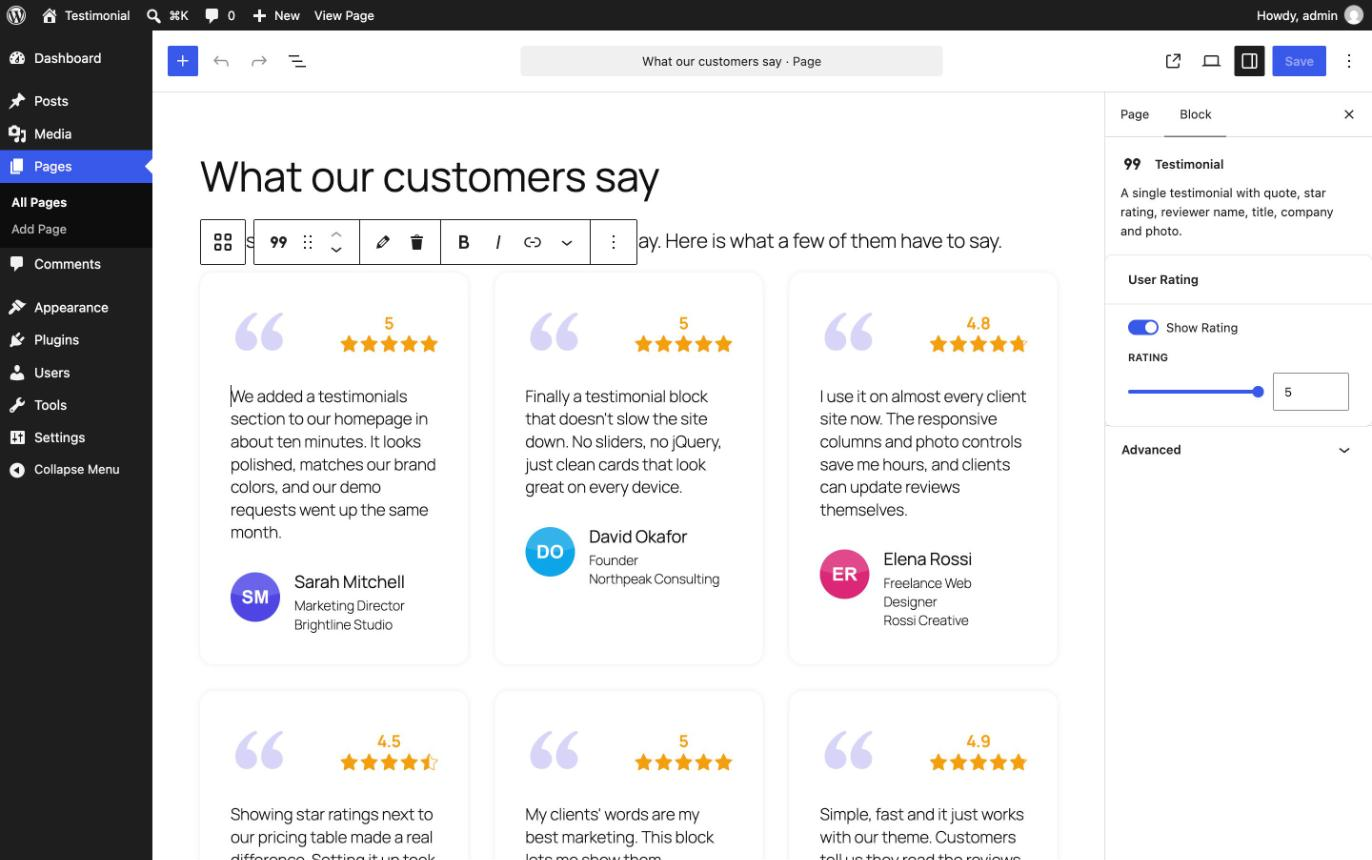
Adding and editing testimonials directly in the block editor.
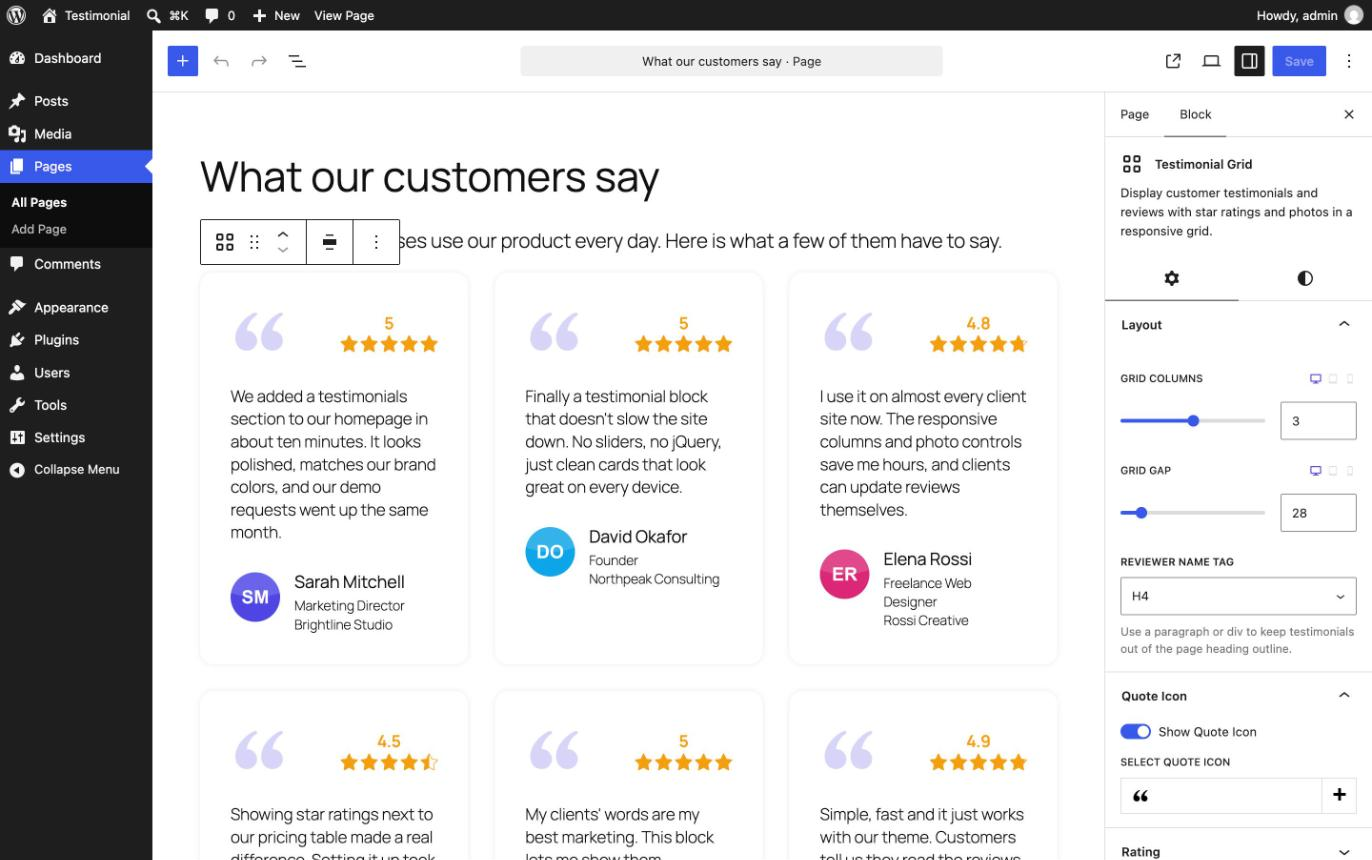
Layout settings: responsive columns, grid gap, reviewer name tag and quote icon styles.
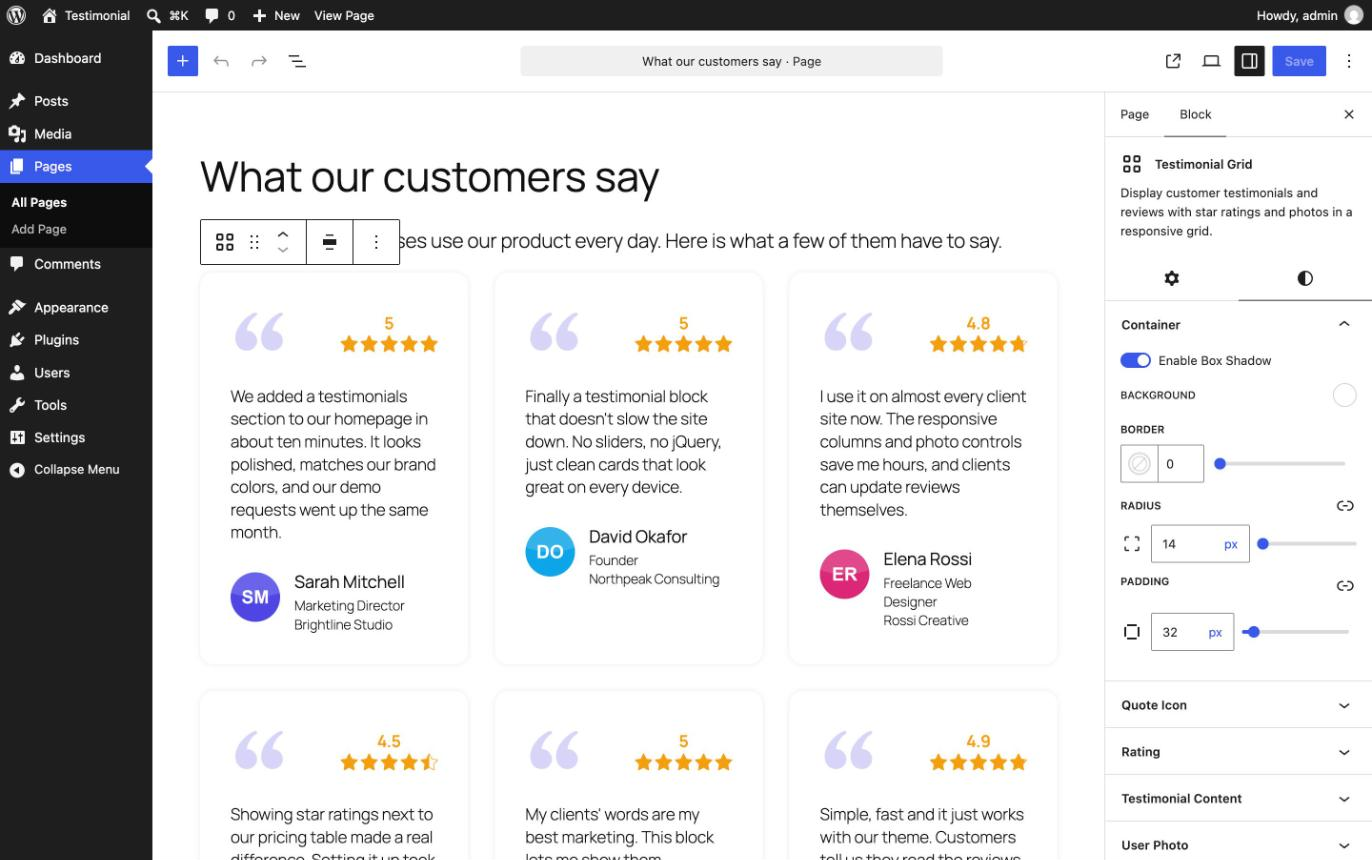
Style settings: background, borders, border radius, padding and box shadow, plus colors and font sizes for every element.
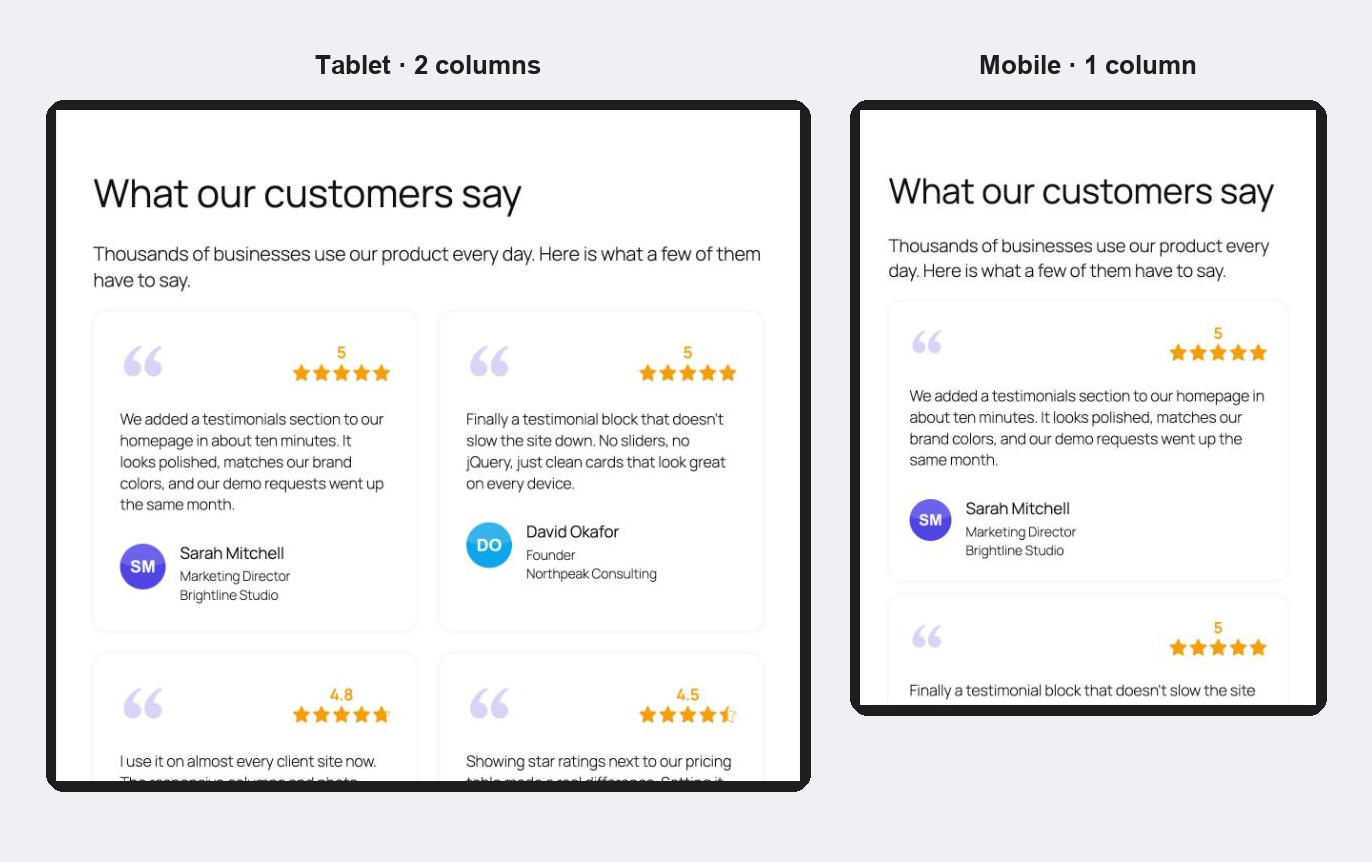
Responsive preview on tablet and mobile.
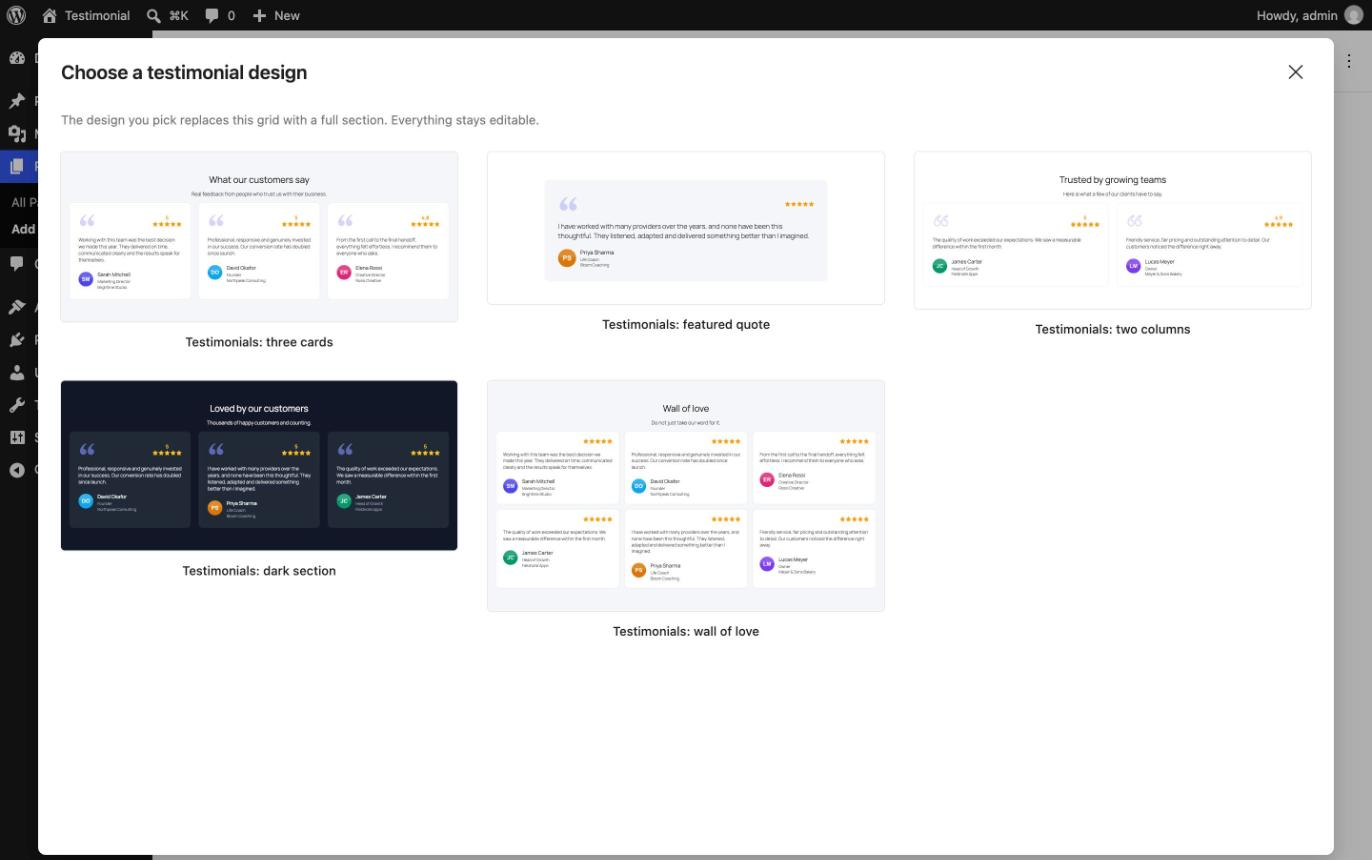
The design picker: insert the block and choose a ready-made testimonial section, or start blank.
Faq
How do I add testimonials to my WordPress site?
Open a page or post in the block editor and insert the Testimonial Grid block. Choose a ready-made design or start blank, then fill in the text, reviewer details and rating. Add more testimonials with the block appender. You can also create a complete testimonials page in one click from Settings Testimonial Blocks Designs.
Is Easy Testimonial Blocks free?
Yes. The plugin is 100% free and open source under the GPL.
Will it slow down my website?
No. The plugin outputs no JavaScript on the frontend, and its CSS loads only on pages that contain a testimonial block. Reviewer photos use responsive image sizes with lazy loading.
Can I show star ratings with each testimonial?
Yes. Every testimonial has a rating from 0 to 5, including decimal values such as 4.5. Stars are drawn as SVG, so they stay sharp on every screen. You can also show the number next to the stars or hide the rating.
Can I change the number of columns on mobile?
Yes. Columns, gaps, font sizes, icon sizes, photo sizes and padding can each be set separately for desktop, tablet and mobile.
Does it work with block themes and full site editing?
Yes. You can use the testimonial block in posts, pages, templates, template parts and block-based widget areas, with both block themes and classic themes.
Are there ready-made testimonial designs?
Yes. When you insert the Testimonial Grid block, click Choose a design to pick one visually. You can also open Patterns Testimonials in the block inserter. There are 13 sections: three cards, featured quote, two columns, dark section, wall of love, spotlight, speech bubbles, aurora gradient, frosted glass, accent stripe, editorial, side by side and minimal. Every pattern is fully editable, so replace the sample text, photos and ratings with your own.
Can I change how the testimonial cards look?
Yes. Select the Testimonial Grid and open the Design panel in the block sidebar. Choose one of 13 card designs from the thumbnails, pick an accent color, add a hover effect (Lift, Grow, Glow, Highlight border or Focus) and a custom shadow for the normal and hover states. Every color, size and spacing value a design sets can be fine-tuned in the Styles tab.
Do I need to know how to code?
No. Every option is in the block sidebar, under the Settings and Styles tabs.
Can I add a photo or avatar for each reviewer?
Yes. Upload or choose a photo from the Media Library for each testimonial. You can set the photo size, border and border radius, for example to make round avatars.
Can I import Google reviews or show a testimonial slider?
Not yet. You add testimonials by hand inside the block, and they display in a responsive grid. A slider layout and more testimonial features are planned. Suggestions are welcome in the support forum.
Is the plugin translation ready?
Yes. All strings can be translated through translate.wordpress.org, and right-to-left languages are supported.
Which WordPress and PHP versions are required?
WordPress 6.5 or higher and PHP 7.0 or higher.
Reviews
Cool
By  zakaria100 on July 8, 2023
Cool, a great free plugin for showing testimonial. thanks
Great testimonial plugin
By  bingojoviken on June 30, 2023
Best free testimonial gutenberg block plugin I have tested. Why it doesn’t get the full five star is because I miss the carousel option.
Would be great if it was possible with random order.
But will it be maintained and tested for new versions of wordpress?
Changelog
1.2.1
- Fix: the custom color picker no longer flickers while you drag. Color settings now include an opacity slider.
1.2.0
- New: 12 new card designs (Elevated, Outline, Minimal, Speech bubble, Spotlight, Midnight, Aurora, Glass, Accent stripe, Editorial, Pastel and Side by side), chosen from visual thumbnails in the new Design panel. Classic stays the default, and existing grids are unchanged.
- New: accent color setting for the card designs that use one.
- New: card hover effects: Lift, Grow, Glow, Highlight border and Focus (fades the other cards).
- New: custom card shadow with separate Normal and Hover settings (offset, blur, spread and color) and a live preview.
- New: plugin dashboard under Settings Testimonial Blocks, with live testimonial stats, a list of the pages that use testimonials, a getting-started checklist, one-click pages from ready-made designs, and the video tutorial (it loads from YouTube only when you press play).
- New: design picker. A newly inserted Testimonial Grid lets you choose a ready-made design with live previews, or start blank. Inside columns or other blocks, only the testimonial cards are used.
- New: 13 ready-made testimonial patterns (three cards, featured quote, two columns, dark section, wall of love, spotlight, speech bubbles, aurora gradient, frosted glass, accent stripe, editorial, side by side and minimal) in the Testimonials pattern category.
- New: native background, gradient, text color, padding and margin controls for the whole testimonial grid, using your theme’s presets.
- New: more search keywords in the block inserter, such as “reviews”, “rating” and “social proof”, and sample testimonials in the inserter preview.
- New: translation template (languages/easy-testimonial-blocks.pot).
- Fix: when the quote icon is hidden, the star rating now sits in the same place on the frontend as in the editor.
- Removed: leftover accent bar settings that stopped working in 1.1.0. Existing grids are cleaned up automatically the next time they are edited.
1.1.2
- Fix: posts containing the testimonial grid were marked as changed every time they were opened in the editor.
- Fix: block editor strings were not translatable because of a text domain mismatch.
- Fix: duplicated grids now get their own unique styles.
- Improvement: reviewer photos use responsive, lazy-loaded image sizes instead of the full-size file.
- Improvement: star rating labels for screen readers are now translatable.
- New: choose the HTML tag for the reviewer name (H2–H6, paragraph or div).
- New: remove a reviewer photo from the block toolbar.
- New: ratings can be set to 0.
1.1.1
- Security: hardened the grid block’s inline CSS generation with dedicated color, dimension and keyword sanitizers, so malicious block attribute values cannot inject CSS.
1.1.0
- Replaced styled-components with lightweight dynamic CSS in the editor (smaller bundle).
- Replaced react-rater with a native SVG star rating component in the editor and on the frontend.
- Testimonial stars now render without jQuery on the frontend.
- Sidebar settings reorganized into the native Settings and Styles tabs.
- Updated development dependencies.
1.0.1
- Changed the block title.
- Added an admin support page.
1.0.0
- Initial release.