

Duplicate Page and Post
Description
Duplicate Page and Post provides a simple way to create a clone of pages, posts and custom post types. The duplicate can be created with the post status selected in the plugin settings.
The plugin is lightweight and focused on fast, straightforward content duplication. Existing plugin settings are preserved when updating to newer versions.
Major features of this plugin include
- Create a clone of a particular page.
- Create a clone of a particular post.
- Create a clone of a particular custom post type (CPT).
- Option to select editor (Classic and Gutenberg).
- Option to add text before and after duplicated post and page titles.
- Option to customize the text shown for the Duplicate action.
- Option to select the status of duplicated posts.
- Option to select the redirect behavior after duplication.
♥️ Enjoying the Plugin?
Please consider giving a review. Your feedback helps us improve the plugin and helps other WordPress users discover it.
Installation
The plugin is simple to install:
- Download duplicate-wp-page-post.zip
- Unzip
- Upload the duplicate-wp-page-post directory to your /wp-content/plugins directory
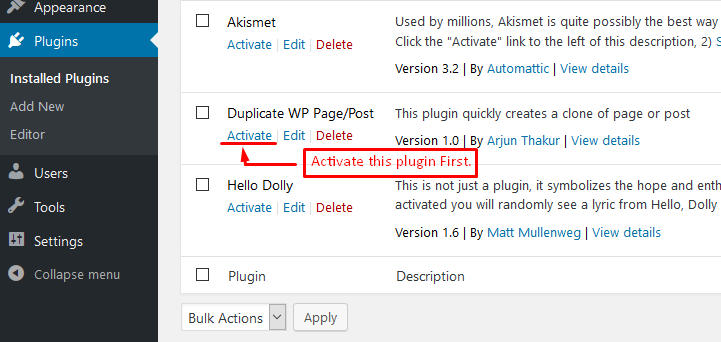
- Go to the Plugins menu in WordPress and activate the plugin
Screenshots

Activate the plugin – The plugin can be activated from the WordPress Plugins page by clicking the Activate button.
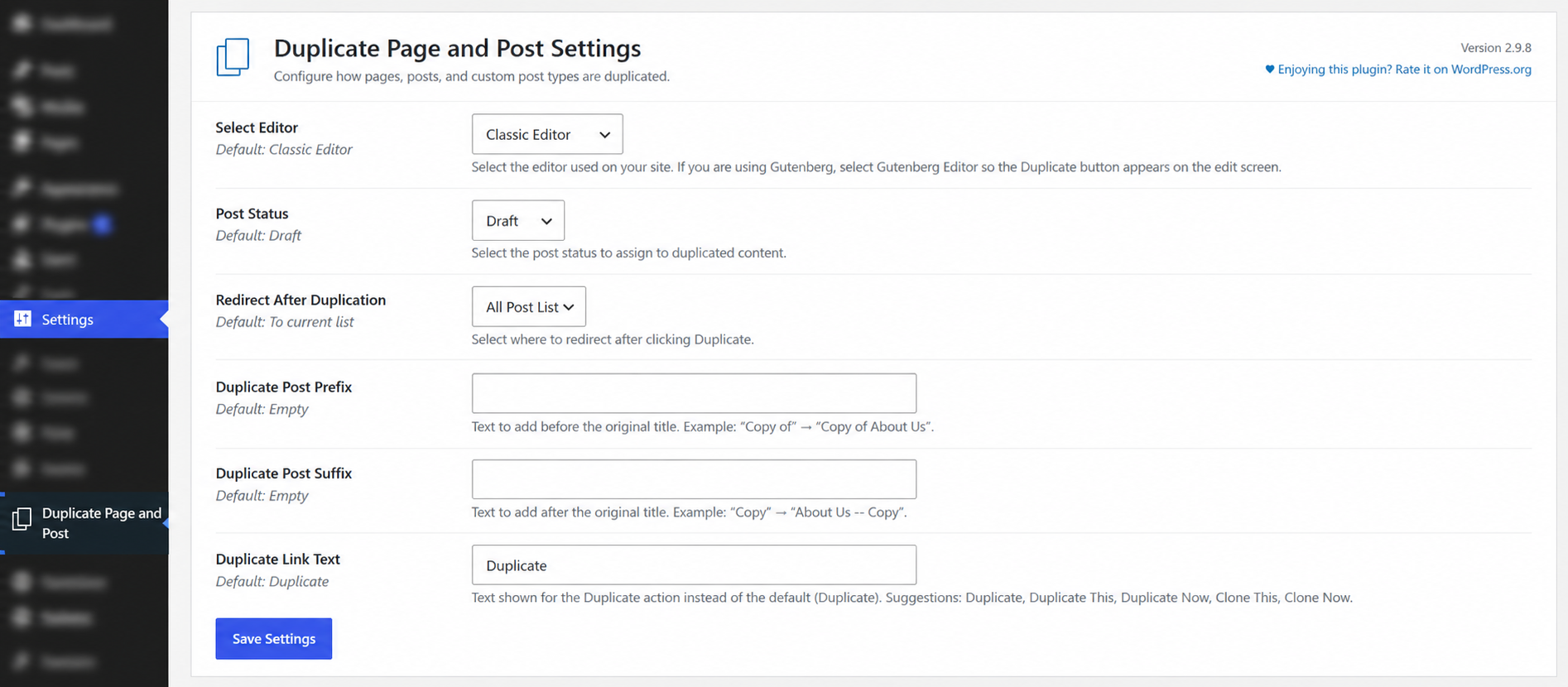
Plugin Settings – Configure the editor, duplicate status, redirect behavior, title prefix and suffix, duplicate link text, and other plugin options from the settings page.
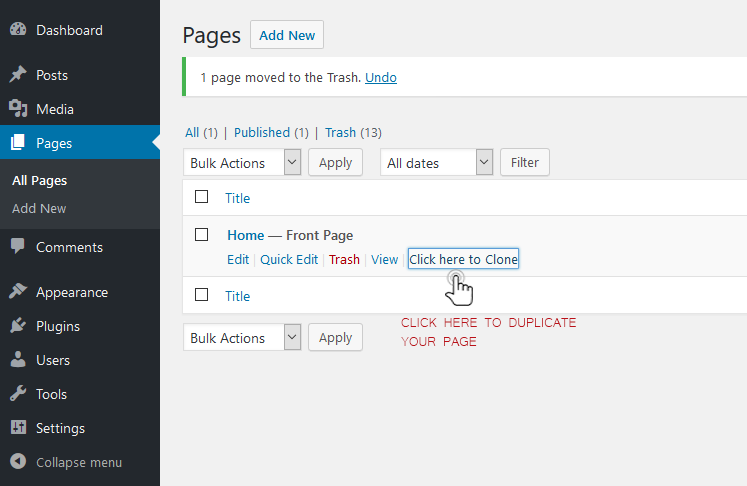
Duplicate pages – The Duplicate option is available directly from the Pages listing, making it easy to clone a page with one click.
Duplicate posts – The Duplicate option is available directly from the Posts listing, making it easy to clone a post with one click.

Faq
After activating the plugin, go to the Pages or Posts list. Use the Duplicate action for the content you want to copy. The duplicated content will be created using the status and redirect options selected in the plugin settings.
Yes. You can use Duplicate Post Prefix and Duplicate Post Suffix to customize the title of duplicated content.
For example:
- Prefix:
Copy ofCopy of About Us - Suffix:
CopyAbout Us -- Copy
You can also customize the text displayed for the Duplicate action.
Yes. Duplicate Page and Post supports duplicating posts, pages, and supported custom post types. The available content types depend on the post types registered by your WordPress site and the plugin configuration.
If you are using the WordPress block editor (Gutenberg), go to Settings Duplicate Page and Post and select Gutenberg Editor under Select Editor. This allows the Duplicate action to appear correctly on the edit screen.
Reviews
Easy and efficient tool
By  navajamm on July 9, 2025
Thank you for this plugin. I ultimately need this feature, and have used several similar plugins before, even paid. This plugin might be the last I will probably use forever, as it is simple and does not distort the content.
Excellent.
By  wpfan10 on February 13, 2024
Very useful tool. Thanks
Excels at what it does
By  aaronlkh on April 29, 2022
My favorite
By  Dom Martigne on April 13, 2022
Quick and easy
By  Eve Lurie (elurie) on March 31, 2022
Really helpful
By  nqui on March 29, 2022
Very good
By  joienegru on February 26, 2022
Good plugin
By  redkorn on November 17, 2021
Simple and best plugin
By  sanchitdman on May 12, 2021
perfetto
By  funkycisto on April 30, 2021
Changelog
2.9.8
- Added an option to add a prefix to duplicated post and page titles.
- Refreshed the plugin settings page with a more compact WordPress-native layout, clearer descriptions, and plugin branding.
2.9.7
- Improved security through stronger input validation, nonce verification, and output escaping.
- Improved compatibility with supported WordPress versions.
- Updated the plugin text domain to match the WordPress.org plugin slug.
- Improved internationalization support with translator comments for strings containing placeholders.
2.9.6
- Security fixes for SQL injection vulnerabilities.
- Improved authorization checks when duplicating posts, pages and custom post types.
- Improved input validation and output escaping.
- Fixed an activation warning on fresh installations.
- Preserved existing plugin settings during activation and upgrades.
- Preserved existing option keys and values when saving plugin settings.
- Improved post metadata and taxonomy duplication.
- Added error handling for failed post creation.
- Improved compatibility with current WordPress versions.
- Maintained PHP 5.6-compatible plugin code syntax.