
Disable Admin Notices – Hide Dashboard Notifications
Description
WordPress admin notices and dashboard notifications can quickly become overwhelming. Plugin alerts, theme warnings, update messages, and promotional notices often take up valuable space and disrupt your workflow. Disable Admin Notices gives you full control by letting you hide, remove, or disable admin notices across the entire dashboard.
You can hide all notifications, disable selected notices only, or move everything into a clean compact bar so messages no longer clutter your admin screen. The plugin also lets you disable plugin and theme update notifications, disable WordPress core update alerts, manage which items appear in the admin bar, and even block redirect URLs used by some plugins to show ads or promotional pages.
Whether you want a cleaner dashboard, fewer interruptions, or complete control over WordPress admin notifications, this plugin helps you keep your workspace organized and distraction-free.
Key Features
Disable Admin Notices
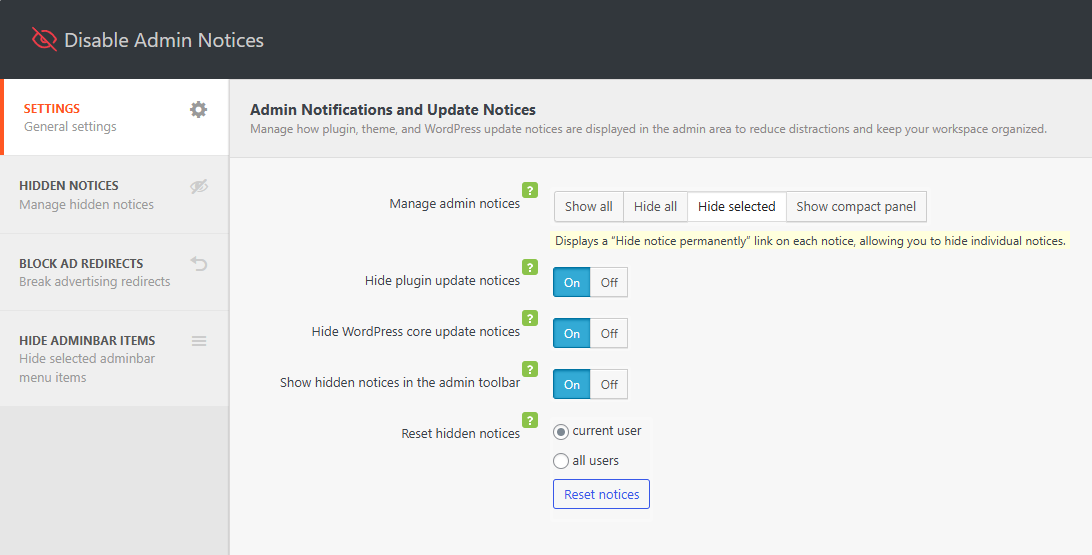
– Disable admin notices globally or hide selected notifications only
– Hide dashboard notices and show them in a single compact line
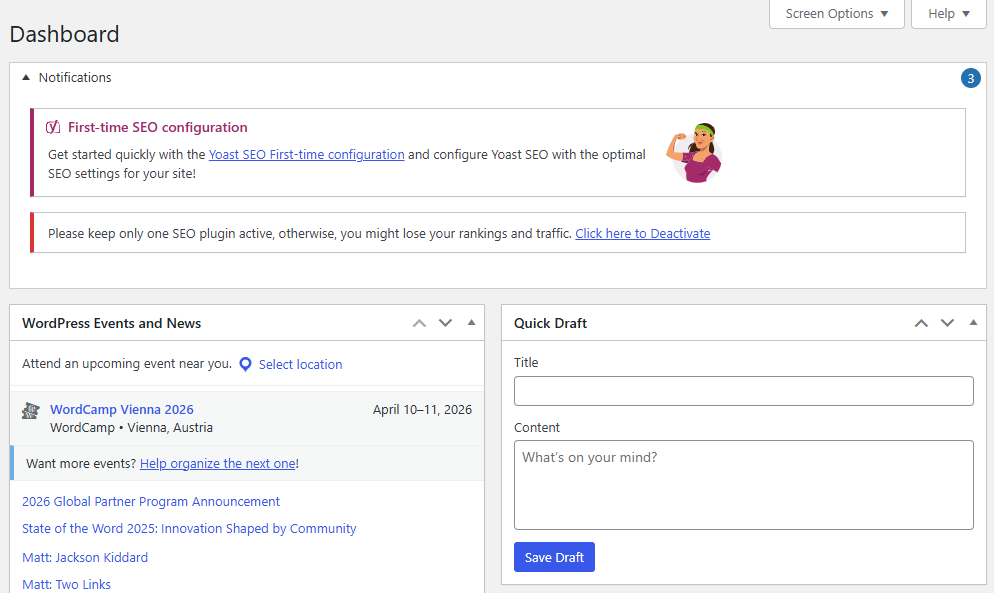
– Option to display all admin notifications in the WordPress admin bar
– Disable plugin update notifications
– Disable WordPress core update notifications
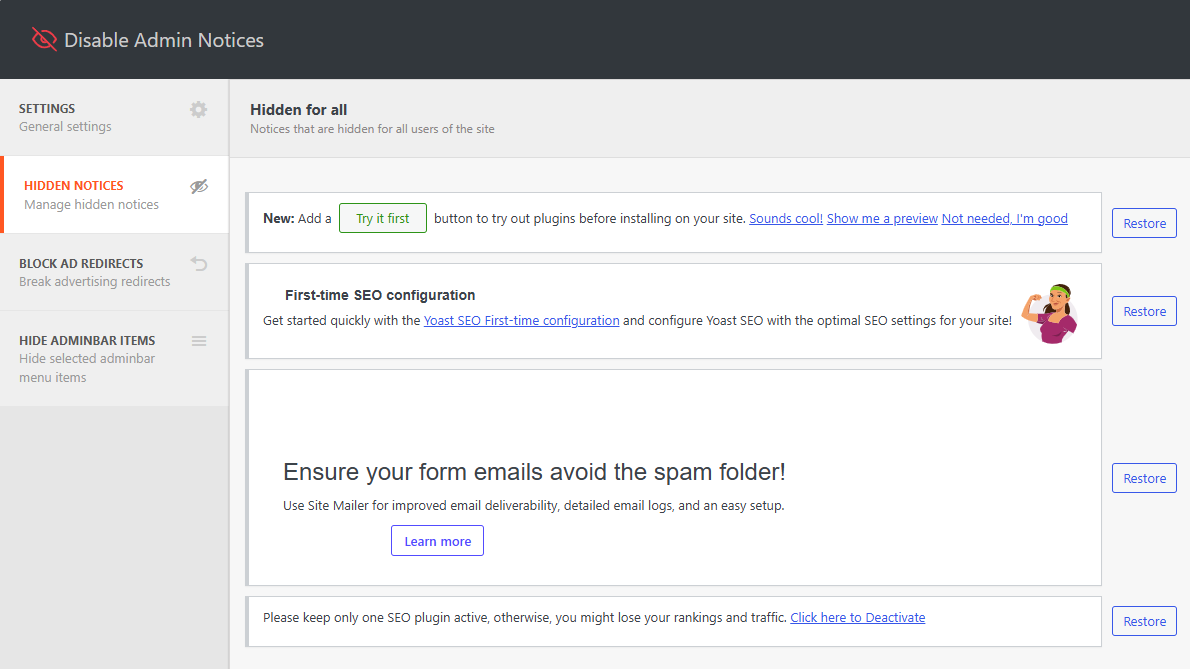
– Access all hidden notices anytime from the plugin dashboard
– Reset or restore hidden notices at any time
Disable Admin Bar Items
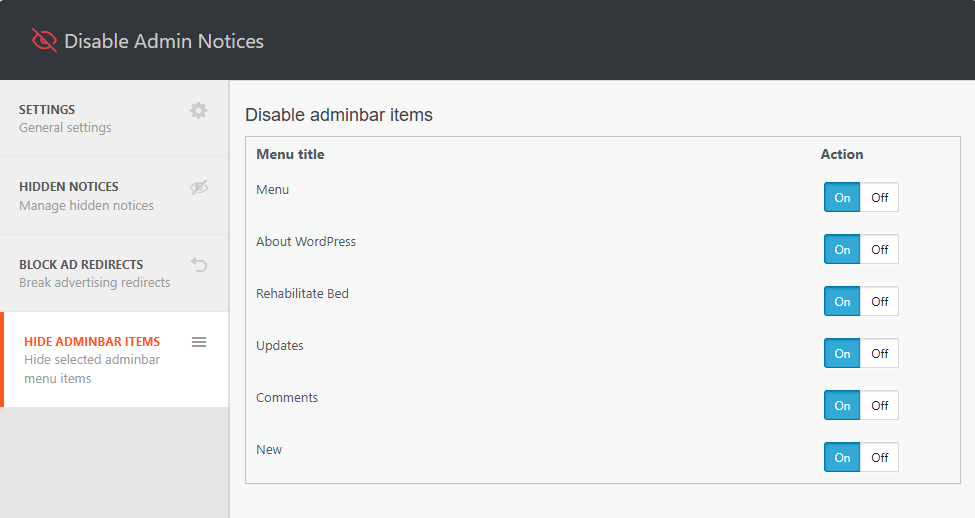
– Choose which items appear in the WordPress admin bar
– Hide or remove unnecessary plugin, theme, or tool menu items to reduce clutter
Block Ad Redirects
– Block specific redirect URLs to prevent plugins from sending you to ads or promotional screens
– Avoid unexpected admin redirects when activating or updating plugins
Support
We’re here to help. Feel free to open a new thread on the Support Forum.
Useful Resources
- If you like this plugin, you’re sure to love our other plugins as well.
- Our blog is a great place to learn more about WordPress.
- Get the most out of your website with our helpful WordPress YouTube Tutorials.
Installation
- In your WordPress admin, go to Plugins > Add New
- In the Search field, type “Disable Admin Notices”
- Under “Disable Admin Notices” by Themeisle, click the Install Now link
- Once the process is complete, click the Activate Plugin link
- Go to Settings Hide admin notices to configure the plugin.
Screenshots

Plugin settings
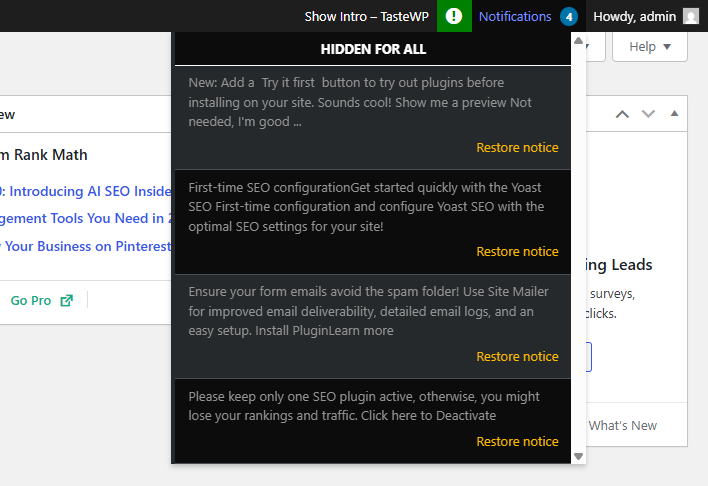
Access hidden admin notices
Group all admin notification in a compact panel
Display notification in the admin bar
Disable admin bar items
Faq
No. Hiding or disabling admin notices does not affect how plugins or themes function. It only removes or moves the visual notifications they display in the dashboard.
Reviews
Works like a charm
By  anilu on October 5, 2026
Great plugin. So happy i chose it
Great Plugin
By  BobbyB (Babel31484) on September 17, 2026
Now will his pop up notice disappear??
Useful
By  rivmanbx on September 15, 2026
Thank you, for letting us having this plugin that is very useful.
Very Good
By  romulodertinati on August 28, 2026
Very good plugin
Excellent plugin
By  zahidbadr on August 26, 2026
Works very well
Worked As Promised!
By  trlogga on August 25, 2026
Awesome. Got rid of all notices that were looping even though the actions were taken.
Great Plugin
By  koenig4712 on August 24, 2026
This is absolutly a very nice and helpfull plugin for Admins, great job guys
Excelent
By  colepicoloeliane on August 21, 2026
For those unwanted notifications that keep popping up in your admin interface, this plugin is the best option to disable them and live like an IT monk!
great plugin
By  eliterust on August 21, 2026
Thankyou just what I needed sick of clicking off notifications that just kept coming back on dashboard.
Does the job well compared to other similar plugins.
By  Jerome Esperanza (jaesperanza) on August 20, 2026
Part of our SOP now. Does the job well compared to other similar plugins. Simply efficient, non-intrusive.
Changelog
Version 1.4.8 (2026-09-14)
- Fixed admin screens crashing when a notice callback is unavailable.
- Updated dependencies
Version 1.4.7 (2026-07-29)
- Updated dependencies
Version 1.4.6 (2026-07-24)
- Fixed an issue where admin bar items you chose to hide were still visible when viewing the sites frontend.
- Updated dependencies
- Enhanced security
Version 1.4.5 (2026-05-25)
- Updated dependencies
Version 1.4.4 (2026-04-09)
- Updated dependencies
Version 1.4.3 (2026-02-17)
- Enhanced security
Version 1.4.2 (2026-01-13)
- Improved UI and removed tooltip color
- Removed support box and simplified review CTA
- Improved setting page labels
- Fixed broken notices
- Removed all related notifications from appearing
- Updated newsletter
- Updated title, added explanation text, fixed errors with strings
- Enhanced security
Version 1.4.1 (2025-12-16)
- Enhanced security
Version 1.4.0 (2025-11-05)
Disable Admin Notices plugin has been acquired by Themeisle 🎉
We’re happy to announce that Themeisle is now the new owner of Disable Admin Notices. This acquisition will help ensure the plugin’s continued development, better support, and exciting new updates in the future.
Your existing setup will continue to work as usual — no action is required on your part.
1.3.6 (05.12.2024)
- Added: Compatibility with WordPress 6.7
- Fixed: Security issue
1.3.5 (22.03.2024)
- Added: Compatibility with WordPress 6.5
- Added: Compatibility with php 8.3
1.3.4 (22.03.2023)
- Added: Compatibility with WordPress 6.4
- Added: Compatibility with php 8.2
1.3.3 (22.03.2023)
- Fixed: Freemius framework conflict
- Added: Compatibility with WordPress 6.2
1.3.0 (27.05.2022)
- Added: Compatibility with WordPress 6.0
1.2.9 (23.03.2022)
- Added: Compatibility with WordPress 5.9
- Fixed: Minor bugs
1.2.8 (13.01.2022)
- Fixed: compatibility error with plugin WP Fastest Cache
1.2.7 (20.10.2021)
- Added: Compatibility with WordPress 5.8
- Fixed: Minor bugs
= 1.2.6 (04.02.2021)=
* ATTENTION! Now the required PHP version is 7.0 or higher.
= 1.2.5 (03.02.2021)=
* Added: Compatibility with Google SiteKit plugin
= 1.2.4 (16.12.2020)=
* Added: Subscribe widget
* Fixed: Minor bugs
1.2.3
- Fixed: Compatibility with other plugins
- Fixed: Appearance of the list of hidden notifications in the adminbar
- [PRO] Added: Added a page with a list of all hidden notifications with the ability to restore.
- [PRO] Added: Ability to hide notifications for ALL users
- [PRO] Added: Multisite support
1.2.2 (09.08.2020)
- Fixed: It was impossible to hide the notice with an offer to buy a pro version.
- Updated: Improved the accuracy of filters when hiding notifications.
1.2.0 (16.07.2020)
- Fixed: Minor bugs
1.2.0 (10.07.2020)
- Fixed: Fixed some compatibility issues with third-party plugins.
- Added: Premium features
1.1.3 (01.07.2020)
- Removed: Ads notices and dashboard widget
- Fixed: Minor bugs
1.1.2 (23.06.2020)
- Added: Compatibility with WordPress 5.4
- Fixed: Minor bugs
1.1.1
- Added: Compatibility with Learndash
- Added: Compatibility with WordPress 4.2 – 5.x
- Added: Multisite support
- Added: Minor link style (hide notification forever) changes.
1.0.6
- Fixed: compatibility with some plugins and themes
1.0.5
- Fixed: Prefix bug
1.0.4
- Fixed: Compatibility with Clearfy plugin
- ADDED: Plugin options caching to reduce database queries for 90%. Clearfy became lighter and faster.
- ADDED: Compress and cache the plugin core files, to reduce the load on the admin panel
1.0.3
- Added a new feature: To restore hidden admin notices individually
- Fixed: Core bugs
1.0.2
- Updated styles for the “Hide notification forever” link
- Compatibility with plugins from webcraftic is updated
1.0.0
- Plugin release