

Customer Email Verification for WooCommerce – OTP Verification, Block Fake Signups
Description
Customer Email Verification for WooCommerce stops fake accounts and spam registrations at the source. When a customer tries to register on your WooCommerce store, they must verify their email address with a one-time OTP code before their account is created — so every account on your store has a real, working email address behind it.
The verification popup appears seamlessly during registration, the OTP is sent immediately via WooCommerce’s email system, and accounts are only created after successful verification. Setup takes minutes, requires no coding, and works out of the box with WooCommerce’s standard registration flow.
HPOS Compatible · 2,000+ Active Stores · Free & Open Source
How It Works
- A customer enters their email and clicks to register on your WooCommerce store.
- A verification popup appears and an OTP code is sent to their email address immediately.
- The customer enters the OTP. If correct, their account is created. If not verified, no account is created.
An address that doesn’t exist, or that nobody can actually open, never receives a code — so the account is never created. Blocking disposable and temporary email providers outright, and scoring each signup for risk before it becomes a customer, are available in CEV PRO.
What’s Included in the Free Version
- OTP-based email verification at registration — Customers must verify their email with a one-time code before their WooCommerce account is created. No verification, no account.
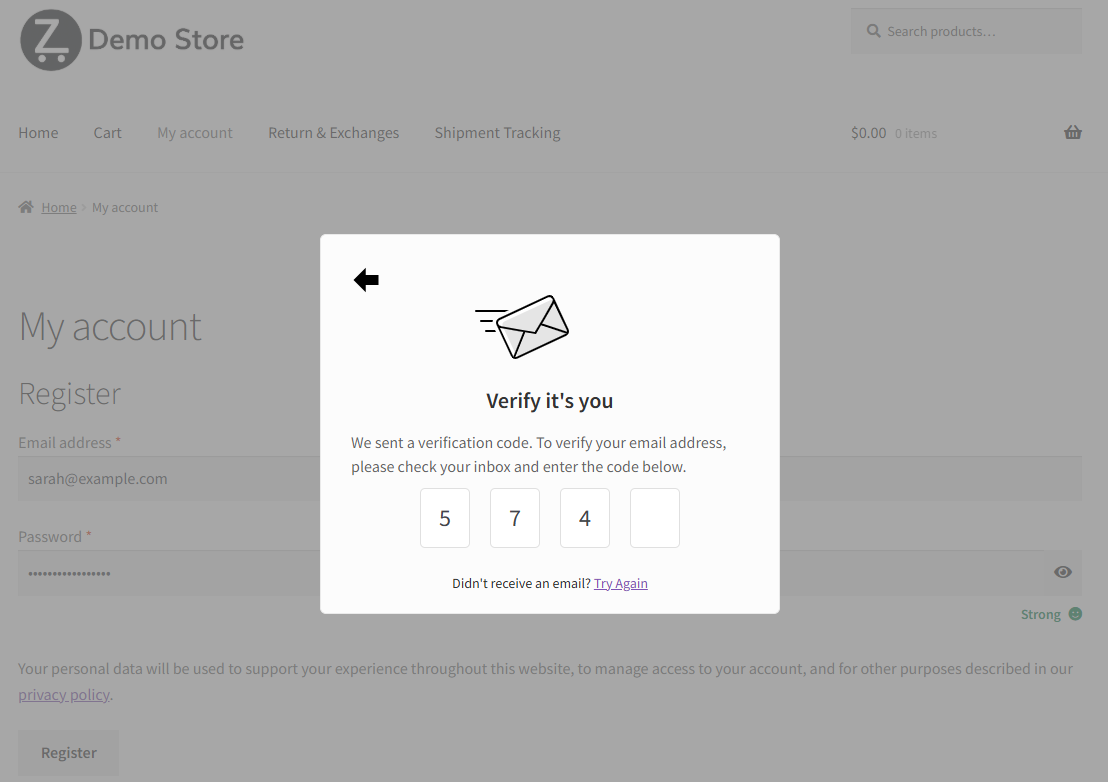
- Verification popup on the registration form — A modal popup appears instantly after the customer enters their email, prompting them to check their inbox and enter the OTP. No page reload required.
- Resend OTP option — Customers can request a new OTP if they didn’t receive the first one.
- OTP length, expiry and resend limit — Choose 4- or 6-digit codes, how long a code stays valid, how many resends are allowed, and the message shown when the limit is reached.
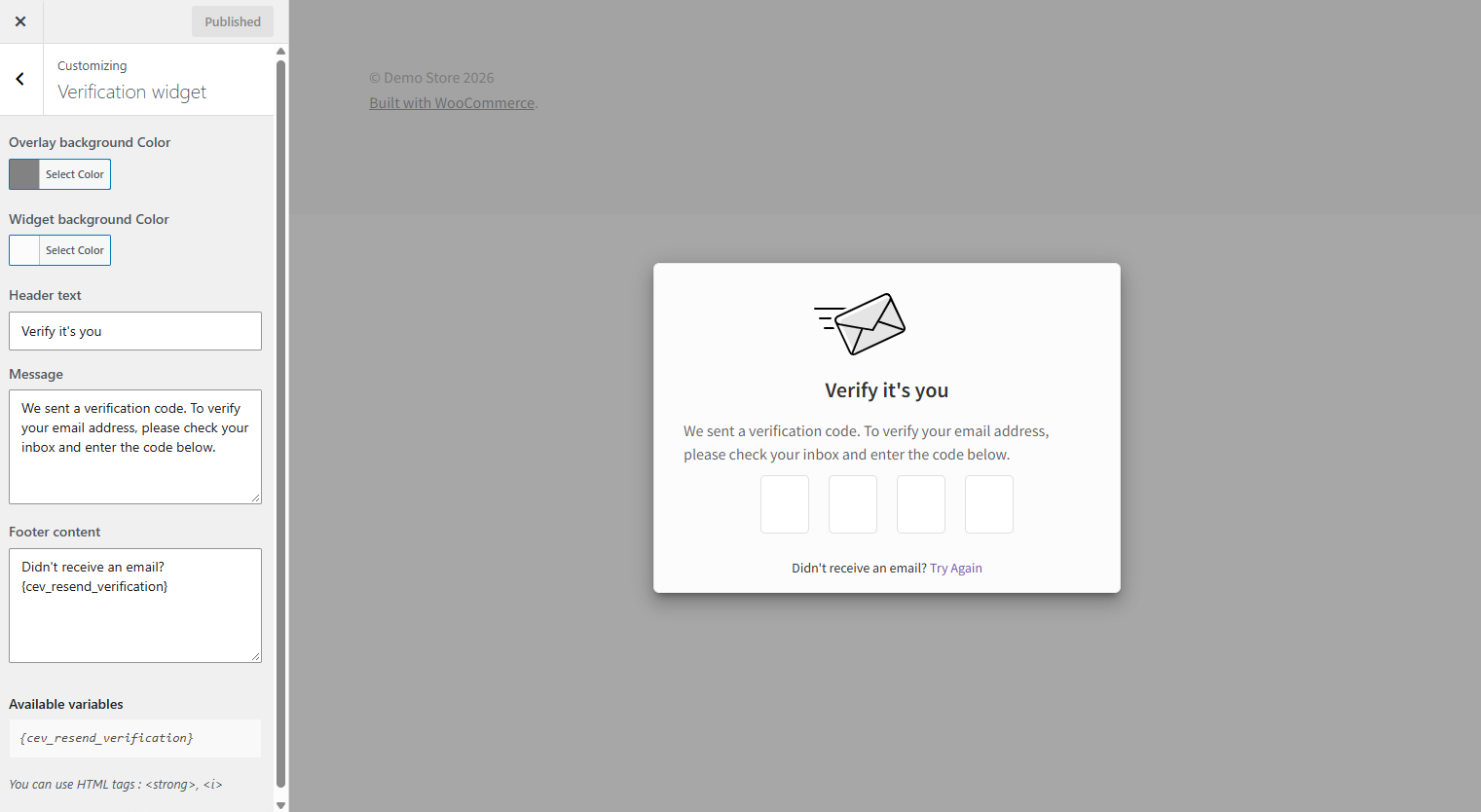
- Customizable verification popup — Modify the popup’s design, colors, and messages to match your store’s branding using the built-in live preview customizer.
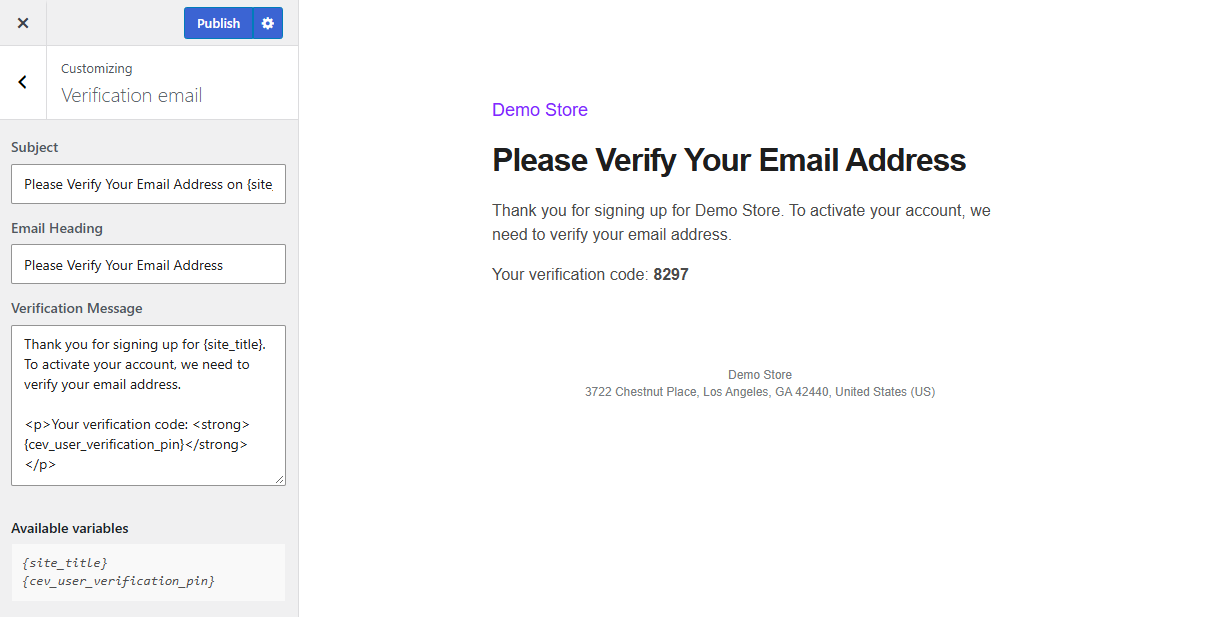
- Customizable verification email — Edit the OTP email subject, heading, and message content to match your brand voice.
- Admin verification management — View and manage email verification statuses for all users from the WordPress Users admin panel. Manually verify or re-send verification emails in bulk.
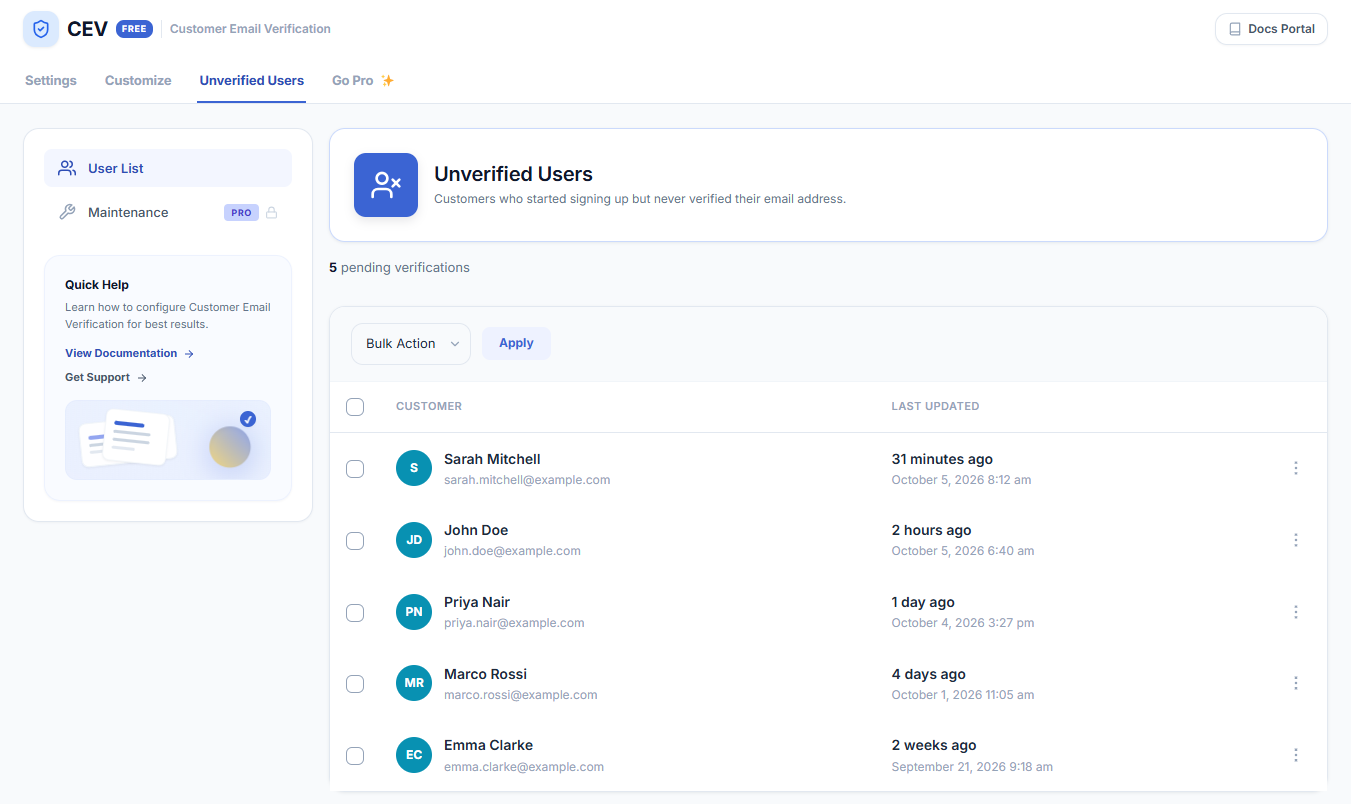
- Unverified Users list — See everyone who started signing up but never verified, resend the verification email to any of them, or delete pending signups.
- Verification stats — See how many customers verified this month, in total, and how many signups are still pending.
- Setup checklist — A short checklist on the settings page walks you through turning verification on, sending a test email and customizing it.
- HPOS Compatible — Fully compatible with WooCommerce High-Performance Order Storage.
Free vs PRO — What’s the Difference?
CEV Free covers registration verification. CEV PRO is a full anti-spam and identity layer for WooCommerce — checkout and guest verification, disposable email blocking, AI risk scoring, SMS OTP, two-factor authentication and a verification analytics dashboard.
CEV Free includes:
- OTP email verification at registration
- Verification popup on the registration form
- Resend OTP option
- OTP length, expiration and resend limit
- Customizable popup design and messages
- Customizable verification email template
- Admin verification management panel
- Unverified Users list with resend
- Verification stats and setup checklist
- HPOS compatible
CEV PRO adds:
- Disposable email blocking — Block signups from temporary and throwaway email providers, covering 430+ known domains.
- AI risk scoring — Score every signup from 0 to 100 before it becomes a customer, so risky registrations are caught even when the address looks ordinary.
- AI temp-mail matcher — Catch brand-new disposable domains before public blocklists have caught up with them.
- Bot-cluster detection — Identify coordinated attack patterns across multiple signups rather than judging each one in isolation.
- DNS-based MX record validation — Confirm the email domain has a working mail server before an OTP is ever sent.
- OTP verification at checkout — Require guest users to verify their email before completing a purchase, blocking fake and fraudulent orders at checkout.
- Cart page verification — Optionally trigger email verification from the cart page, before the customer even reaches checkout.
- Phone (SMS) verification — Verify customers with an SMS OTP instead of, or alongside, email — via MSG91, Twilio, Vonage or WhatsApp.
- Two-factor authentication (2FA) — Add Google Authenticator, Authy or Microsoft Authenticator for stronger account security.
- Login authentication — Require OTP verification when a customer logs in from an unrecognized device or browser.
- New device/location detection — Define what counts as an unrecognized login — new device, new browser, new location, or after a set period of inactivity.
- Require OTP at every login — A universal authentication mode for stores that need it.
- B2B allowlist and address blocklist — Allow only specific domains to register, or block specific addresses outright.
- Role-based verification rules — Enforce different verification rules per user role.
- Paid-order gatekeeping — Hold customer perks until their first paid order is completed.
- Smart Form — branded login and registration — Replace WooCommerce’s default forms with fully branded registration and login layouts, from four ready-made templates.
- Verification analytics dashboard — Track signups, verification rates, failed attempts and blocked spam over time.
- Login notification emails — Email the customer whenever their account is accessed, so an unexpected login is noticed straight away.
- WooCommerce Block Checkout support — Verification works on the new block-based checkout as well as the classic one.
- Polylang compatibility — Works alongside the existing WPML support for multilingual stores.
- Auto-cleanup verification log — Purge old verification log entries automatically on a schedule.
- Re-engagement reminder emails — Automatically remind unverified customers to finish verifying, at intervals you choose.
- Force re-verify all customers — Flip every verified account back to unverified in one action, after a breach or a list cleanup.
- Automatic database cleanup — A daily cron job removes stale unverified accounts so your user table stays clean.
- Advanced email and popup customization — Additional control over OTP email templates and verification popup styling.
- Priority support — Faster, dedicated assistance from the Zorem team.
What It Stops
Email verification is the cheapest defence a WooCommerce store has against junk accounts and junk orders:
- Fake accounts and fake signups — registrations using an address nobody owns or can open. Blocked at registration in the free version.
- Bot registrations and spam signups — automated signups that bloat your user table, skew your customer counts and poison your email list.
- Unverified accounts piling up — see and manage every account’s verification status from the WordPress Users screen, and verify or resend in bulk.
- Disposable and temporary email addresses — throwaway inboxes used to farm coupons and free trials. Blocking 430+ known providers is available in CEV PRO.
- Fake and fraudulent orders, including fake cash-on-delivery (COD) orders — unverified COD orders become failed deliveries and returns to origin (RTO), and each one costs you a real shipment in both directions. Verify a guest’s email before the order is placed. Available in CEV PRO.
- Account takeover at login — OTP and two-factor authentication on unrecognized devices. Available in CEV PRO.
Who Uses Customer Email Verification
Any WooCommerce store with open registration collects junk accounts, but some business models pay for them more than others:
- Cash-on-delivery stores — in India, Southeast Asia and the Middle East, a fake COD order becomes a real shipment that comes back as an RTO, costing the courier fee in both directions. Verifying the buyer before the order is placed is checkout verification, available in CEV PRO; registration verification in the free version cuts the fake accounts those orders are placed from.
- Stores running a welcome coupon or first-order discount — a discount on registration is an invitation to register repeatedly. Verification means each code costs a working inbox.
- Free trials and digital downloads — when the product is delivered instantly by email, an address that cannot receive mail is a delivery failure, not just a bad record.
- Membership sites and online courses — every password reset, renewal notice and course email depends on the address being real.
- Wholesale and B2B stores — registration should be a real buyer at a real company. Restricting signups to approved domains is available in CEV PRO.
- High-ticket and made-to-order stores — one fraudulent order is expensive enough to justify verifying before it enters production.
- Dropshipping and print-on-demand stores — a bad address means a supplier ships to nowhere and you absorb the cost.
- Any store whose order emails have to land — order confirmations, shipment tracking and delivery updates are worthless if the address behind the account was never real.
Email verification is not a spam filter and it is not fraud screening. It proves one thing well: that the address attached to an account can actually receive mail.
Compatible With
Customer Email Verification is built to work smoothly with plugins that follow WooCommerce’s standard registration and checkout templates. The following plugins have been tested and confirmed compatible:
- Checkout builders — Checkout WC, WooCommerce Checkout & Funnel Builder by CartFlows
- Social login — WooCommerce Social Login, Nextend Social Login and Register
- Memberships — WooCommerce Memberships
- Affiliates — Affiliate For WooCommerce
- Store management — Smart Manager, Cashier
- Multilingual — WPML
Documentation & Support
More Plugins by Zorem
- Advanced Shipment Tracking for WooCommerce — The #1 WooCommerce shipment tracking plugin. Trusted by 70,000+ stores.
- SMS for WooCommerce — Automated SMS order and shipping notifications via Twilio, WhatsApp, and 18 other providers.
- Advanced Local Pickup PRO — Advanced local pickup with multiple locations, appointment scheduling, and ready-for-pickup notifications.
- Country Based Restrictions PRO — Restrict products and payment gateways by customer country using WooCommerce geolocation.
- Zorem Returns — Self-service returns, exchanges, and store credit management for WooCommerce.
Explore the full catalog at zorem.com
Installation
- Go to Plugins > Add New in your WordPress admin and search for “Customer Email Verification for WooCommerce”.
- Click Install Now, then Activate.
- Go to WooCommerce > Email Verification to configure the verification settings and customize the popup and email.
- Test the flow by visiting your registration page — the verification popup should appear after entering an email address.
Alternatively, upload the customer-email-verification-for-woocommerce folder to /wp-content/plugins/ and activate through the Plugins menu.
Screenshots

The OTP verification popup your customer sees — it appears inline on the registration form with no page reload, and the account is only created once the correct code is entered.
The verification email, with the subject line, heading and message all editable from the built-in live preview customizer.
Customize the verification popup to match your store — colours, header text, message and footer, with a live preview as you edit and no code required.
The Unverified Users screen: every customer who started signing up but never verified their email address, with verification stats and a resend option for each one.
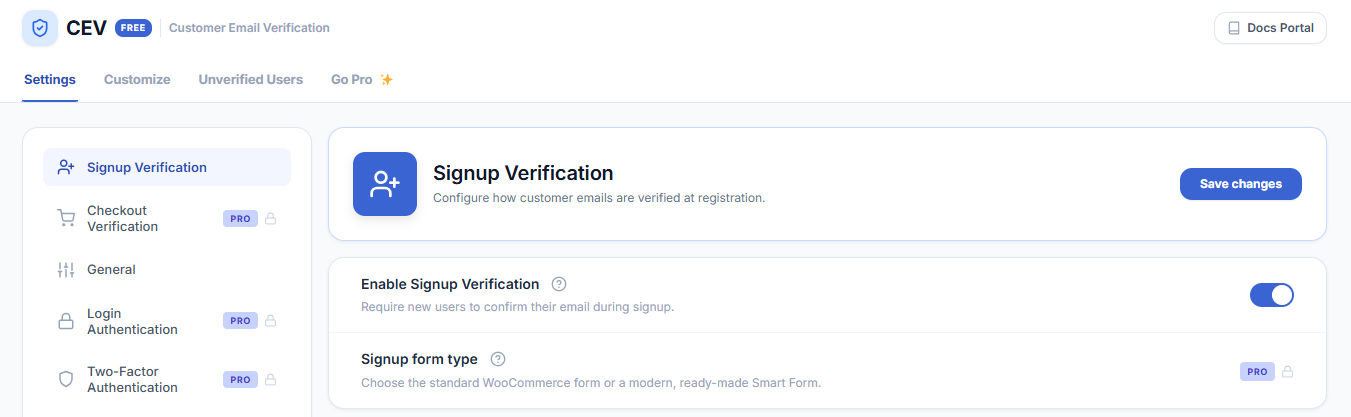
Signup verification settings — switch email verification on and configure it in a couple of minutes.
Faq
How does the OTP verification work?
When a customer enters their email on the WooCommerce registration form and submits, a verification popup appears and a one-time OTP code is sent to their email address. The customer enters the code in the popup. If it matches, their account is created. If they close the popup or enter the wrong code, no account is created. This ensures every registered account has a valid, accessible email address.
What happens if a customer doesn’t receive the OTP email?
The plugin includes a “Resend OTP” option in the verification popup. The customer can click to request a new code. Make sure your WooCommerce store has a reliable transactional email setup (SMTP plugin recommended) to ensure OTP emails are delivered.
Can I customize the look of the verification popup?
Yes. The plugin includes a built-in live preview customizer where you can change the popup colors, text, and messages without writing any code.
Can I customize the OTP email that gets sent to customers?
Yes. The OTP email subject line, heading, and body content are all editable from the plugin settings. The email is sent via WooCommerce’s email system, so it inherits your store’s email branding (header, logo, footer).
Can I skip verification for administrators or shop managers?
Administrators are always skipped automatically. Choosing additional roles to skip is not available in the free version.
Can I verify guest checkout customers (not just registered users)?
Guest checkout OTP verification — requiring email verification before a guest can complete a purchase — is available in CEV PRO.
Can I require OTP verification at login (2FA)?
Login authentication with OTP verification for unrecognized devices or browsers is available in CEV PRO.
Does this work with social login plugins?
Yes. CEV is compatible with WooCommerce Social Login and Nextend Social Login and Register. See the full compatibility list for details.
Is CEV compatible with HPOS (High-Performance Order Storage)?
Yes. Customer Email Verification is fully compatible with WooCommerce High-Performance Order Storage (custom order tables).
Does CEV work with WPML or Polylang for multilingual stores?
Yes. CEV has been tested with WPML and the plugin strings are translatable. Polylang compatibility is available in CEV PRO.
Can I bulk-verify users or resend verification emails in bulk?
Yes. From the WordPress Users admin panel, you can select multiple users and use the bulk actions to manually verify their email addresses or resend verification emails.
Will email verification hurt my registration conversion rate?
The OTP step adds one screen to registration, and the popup appears inline without a page reload, so genuine customers usually complete it in a few seconds. What you lose is the registrations that were never going to buy — bots, throwaway addresses and mistyped emails — and what you gain is a customer list where every address actually receives your order emails.
Does CEV block disposable or temporary email addresses?
Disposable email blocking, covering 430+ known temporary email providers, is available in CEV PRO, along with an AI temp-mail matcher that catches new throwaway domains before public blocklists update. The free version verifies that the address is real and reachable, but does not maintain a blocklist of providers.
Can I verify customers by SMS instead of email?
Phone verification with an SMS OTP is available in CEV PRO, sent through MSG91, Twilio, Vonage or WhatsApp. The free version verifies by email only.
Can it stop fake or fraudulent orders, including cash-on-delivery (COD) orders?
Yes — with checkout verification in CEV PRO, which requires a guest to verify their email before the order is placed. This is the usual setup for stores offering cash on delivery, where every fake order becomes a real shipment that comes back as an RTO (return to origin), carrying the courier cost both ways. Verifying before the order is created cuts those out before they reach the courier. The free version verifies at registration, so it protects account creation rather than guest checkout.
Does it check that an email domain actually exists before sending the code?
DNS-based MX record validation, which confirms the domain has a working mail server before an OTP is sent, is available in CEV PRO.
Will this reduce my email bounce rate?
Yes. Every account created after verification has an address that received and acted on a message, so order confirmations and shipping notifications have somewhere to land. Mistyped addresses and dead inboxes never become customer records in the first place, which also protects your sending reputation with mailbox providers.
Can it stop coupon and free-trial abuse?
Partly, in the free version. A welcome coupon or free trial tied to registration invites people to register repeatedly, and requiring a working inbox for each signup raises the cost of doing that. Someone with several real mailboxes can still sign up several times. Blocking disposable and throwaway providers outright, which is what closes most of the remaining gap, is available in CEV PRO.
Does verification slow registration down or add a page reload?
No page reload. The popup opens inline on the registration form as soon as the customer submits their email, and the OTP is sent straight away, so a genuine customer typically finishes in a few seconds. How long a code stays valid, how many resends are allowed and the code length are all configurable in the free version.
Does it stop bot and automated signups?
A bot has to receive and read a one-time code sent to the address it submitted, which defeats the ordinary scripted signup. Detecting coordinated attacks across many signups, and scoring each registration for risk before the account is created, are available in CEV PRO.
Reviews
Absolutely useless plugin
By  VAPI (vehicleapi) on October 13, 2026
The plugin is absolutely useless.
It adds an OTP form to the front end, but it doesn’t stop bots from creating fake accounts.
The plugin’s protection can easily be bypassed by sending a POST request to /my-account/ with body: email=EMAIL&woocommerce-register-nonce=NONCE®ister=Register
Very limited features
By  dkexception on June 25, 2024
The plugin does not support social register/login. Only pro version has the support for only 2 social login plugins which are not free. So you have to pay for 2 different plugins.
Does not support custom HTML email templates in free or pro version. The inbuilt email template looks very basic and not good, the template builder has very limited customization.
If you are looking for OTP based login and registration, check out Digits in codecanyon. It will save you a ton of money and has lot more feature.
Simple and Elegant
By  flashaha on May 29, 2024
At first I was a bit reluctant to use this plugin since it has not been updated for a few months and there were 1 or 2 negative reviews, but after trying a few others and having little success, I decided to try it. The plugin worked perfectly and the popup is a really nice touch. Importantly, I like that you can customise the verification email, something other free plugins do not allow. The email is sent via Woocommerce, so it has the coloured bar at the top and the shop logo. Some of the other plugins I tried, sent an email containing a single line of text which got instantly junked!
This plugin is simple, elegant and gets the job done. I would recommend it for small e-commerce stores that are on a tight budget.
The Best Login/Email Verification Plugin
By  littleideasbigdreams on October 16, 2023
A fantastic plugin that does everything you need it to for customer verification, even allowing users to login the first time without verification, but giving them a very nicely designed verification popup upon their second login. 5/5
Broken plugin, bad support
By  Anonymous User (anonymized_15741666) on May 30, 2023
This plugin is not working.
I tried my best to contact the developer and help them to troubleshoot the issue but they were not able to solve it.
The email with the code never arrives for newly registered users.
I did what they asked but it did not help.
Installed it on two fresh servers, one local and one hosted, with no other plugin installed, it still doesn’t work.
The support reply was “We are not supposed to provide answers for a free plugin”. How are they going to sell the product then?
Works as intended, great support
By  nyadna on April 4, 2023
The plugin works flawlessly and has very simple and easy settings. The customer support team was also very quick in resolving a bug I reported. Overall, I’m very happy that after trying out other similar plugins, I found one that actually WORKS for my current setup. It’s definitely worth the money.
Is not working =/
By  clebersleite on January 25, 2023
When I install and configure, the plugin send me to a 404 page after register. My permalink to account is minha-conta and not my-account, I believe that is the problem? The customize not woking too, I’m using Astra Theme
Very poor and lazy support team
By  nick1999 on December 7, 2021
Working perfectly
By  syedaliazlan on November 12, 2021
Make Email verification optional
By  raviwordpresssupport on May 18, 2021
Changelog
2.8.4
- Improved – Renamed the plugin to “Customer Email Verification for WooCommerce – OTP Verification, Block Fake Signups”. The plugin slug, settings and all existing data are unchanged.
- Improved – Updated the plugin readme.
- Fix – A JavaScript error on the Customer Email Verification settings screen could stop other click handlers on the page from running.
- Dev – Tested with WooCommerce 11.2.1 and WordPress 7.1.4.
2.8.3
- Enhancement – Limited-time CEV PRO offer banner with a live countdown on the Settings and Unverified Users tabs.
- Enhancement – Added a dismissible AI Agent OS launch notice in wp-admin (hidden on the CEV settings page).
- Security – Verification links now use a random code instead of one built from the email address and the time.
- Security – Verification codes are now compared in constant time.
- Security – Wrong signup OTP guesses are now capped per email address (5 by default, filterable with cev_signup_otp_max_attempts).
2.8.2
- Enhancement – OTP length, OTP expiration, verification email resend limit and the resend limit message are now available in the free version.
- Enhancement – Resend the verification email to any pending signup from the Unverified Users list.
- Enhancement – Verification stats on the Unverified Users tab: verified this month, verified in total and pending.
- Enhancement – Setup checklist on the settings page, with a “Send test email” button.
- Enhancement – PRO-only settings now show an unlock card with a preview, and locked options explain themselves when clicked.
- Enhancement – Redesigned the Go Pro tab.
- Enhancement – The upgrade notice now waits 7 days after install, only appears once a customer has verified, and stays dismissed for 90 days.
- Enhancement – The {customer_email} tag in the verification popup message is now replaced with the customer’s email address.
- Fix – Customers who entered the correct code were saved as unverified once their account was created.
- Fix – The OTP Length setting was not applied to signup verification codes.
- Fix – Raw CSS appeared at the top of the email customizer preview.
- Fix – The email customizer preview always showed the same code, whatever the OTP Length setting.
- Fix – Opening another section in the customizer published unsaved changes.
- Fix – Clearing the popup heading, message or footer in the customizer showed a blank instead of the default text.
- Fix – Typo in the default popup heading (“Verify its you.”).
- Fix – Sorting and paging were missing on the Unverified Users table.
- Fix – Broken “Go Pro” link on the Plugins page and broken add-on links on the Go Pro tab.
- Fix – Corrected the disposable email domain count to 430+.
- Fix – Helper text in the verification widget customizer now reads “You can use HTML tags:”.
- Security – Added capability checks to saving settings, deleting pending signups and changing a user’s verification status.
- Dev – Removed unused legacy admin screens.
- Dev – Tested with WooCommerce 11.1.2 and WordPress 7.1.3.
2.8.1
- Fix – Register button on the My Account registration form gave no feedback while the verification request was processing, so repeat clicks sent multiple verification emails and each new email invalidated the code in the previous one.
- Improvement – The Register button is now disabled and shows a “Please wait” loader while the verification request runs, and duplicate requests are blocked on both the front end and the server.
- Dev – Tested with WooCommerce 11.1.0 and WordPress 7.1.
2.8
- Fix – Undefined variable $expire_time.
- Improvement – Redesigned the entire admin experience with the new Zorem UI design system (ZUI).
- Dev – Tested with WooCommerce 10.9.1 and WordPress 7.0.
2.7
- Dev – Tested with WooCommerce 10.7.0 and WordPress 6.9.4.
2.6.9
- Fix – Fixed admin notice dismiss functionality not working when clicking the dismiss button or X icon. The notice now properly dismisses and redirects to a clean URL.
- Fix – Resolved issue where WordPress converts dots to underscores in query parameters, preventing the dismiss handler from detecting the parameter correctly.
2.6.8
- Enhancement – Added PRO upsell elements (locked PRO fields, upgrade banner, Go PRO tab with comparison and benefits).
- Dev – Tested with WooCommerce 10.5.1 and WordPress 6.9.1.
2.6.7
- Fix – Resolved issue where users were redirected to /my-account/email-verification/ (404) instead of seeing the verification popup on new installations.
- Dev – Tested with WooCommerce 10.4.2 and WordPress 6.9.
2.6.6
- Fix – Updated deprecated WooCommerce script handles (jquery-blockui, jquery-tiptip, serializejson) to new handles (wc-jquery-blockui, wc-jquery-tiptip, wc-serializejson) for compatibility with WooCommerce 10.3+.
- Fix – User verification filter on users page.
- Dev – Tested with WooCommerce 10.3.3 and WordPress 6.8.3.
2.6.5
- Dev – Tested with WooCommerce 10.1.2.
2.6.4
- Fix – JavaScript link for “Already Have a Verification Code?” not working.
- Fix – Tooltip not working with WooCommerce 10.
- Dev – Tested with WooCommerce 10.0.4 and WordPress 6.8.2.
2.6.3
- Fix – PHP Warning: Undefined array key.
- Fix – Grammar in Verification Page — changed “4-digits code” to “4-digit code”.
- Fix – Verification widget not opening in customizer.
- Dev – Tested with WooCommerce 9.9.5.
2.6.2
- Dev – Tested with WooCommerce 9.8.5 and WordPress 6.8.1.
2.6.1
- Fix – Function _load_textdomain_just_in_time was called incorrectly.
- Dev – Tested with WooCommerce 9.8.1 and WordPress 6.8.
2.6
- Dev – Updated the promotional notice on the settings page.
- Dev – Tested with WooCommerce 9.7.1.
2.5
- Fix – Resolved a fatal error where the class “cev_new_account_email_customizer” was not found.
- Enhancement – Removed all console.log statements from JavaScript files to improve performance.
- Fix – Resolved the passcode verification issue by ensuring the user table is created properly during the plugin update process.
- Dev – Tested with WooCommerce 9.7.0.
2.4
- Fix – Signup email verification issue: verification code doesn’t match.
2.3
- Dev – Created new signup verification flow where users cannot create an account without verifying their email.
- Dev – Updated admin page design to match the new signup verification flow.
- Dev – Updated customizer to match the new signup verification flow.
- Dev – Tested with WooCommerce 9.6.2 and WordPress 6.7.2.
2.2
- Fix – Uncaught TypeError: Cannot read properties of undefined (reading ‘top’).
- Fix – PHP Notice: Function _load_textdomain_just_in_time was called incorrectly.
- Fix – Deprecated: explode(): Passing null to parameter.
- Dev – Tested with WooCommerce 9.5.1 and WordPress 6.7.1.
2.1
- Enhancement – Tested with WPML 4.7 and updated the documentation.
- Dev – Tested with WooCommerce 9.4.2 and WordPress 6.7.
2.0
- Enhancement – Added UTM links for all external links to zorem.com.
- Enhancement – Added text domain to all strings in customizer.
- Dev – Tested with WooCommerce 8.9.1 and WordPress 6.5.3.
1.8
- Fix – Broken HTML on Users page.
- Fix – User approval function on backend not working.
- Dev – Tested with WooCommerce 8.5.1.
1.7
- Enhancement – Improved design of PRO banner.
- Dev – Compatibility with PHP 8.2.
- Dev – Tested with WooCommerce 8.3.0 and WordPress 6.4.1.
1.6
- Dev – Tested with WooCommerce 6.9.4 and WordPress 6.0.2.
- Dev – Added compatibility with WooCommerce HPOS.
1.5
- Dev – Tested with WooCommerce 6.9.4 and WordPress 6.0.2.
- Dev – Tested with WooCommerce Multilingual 5.0.0 Beta.
- Enhancement – Updated the settings page design.
1.4.1
- Fix – “Try Again” link in email verification popup.
1.4
- Enhancement – Updated design of settings page.
- Enhancement – Updated design of Go PRO page.
- Dev – Improved code security.
- Dev – Tested with WooCommerce 5.5.2 and WordPress 5.8.
1.3.9
- Enhancement – Tested WooCommerce customer email verification compatibility.
- Dev – Tested with WooCommerce 5.4.1 and WordPress 5.7.2.
1.3.8
- Fix – PHP Fatal error: Call to undefined function wc_cev_customizer().
1.3.7
- Fix – Uncaught Error: Class ‘cev_initialise_customizer_settings’ not found.
1.3.6
- Enhancement – Updated settings page design.
- Enhancement – Added AJAX on Email Verification and Actions panel on users listing page.
- Dev – Tested with WooCommerce 5.2.1 and WordPress 5.7.1.
1.3.5
- Enhancement – Improved the “Email Verification” link HTML in user verification email.
- Dev – Tested with WooCommerce 5.0.0 and WordPress 5.6.
1.3.4
- Fix – Verification widget always showing for administrator users on My Account page.
- Fix – Skip email verification for selected user roles option not working correctly.
- Dev – Tested with WooCommerce 4.9.2 and WordPress 5.6.
1.3.3
- Enhancement – Set up My Account change email verification text.
- Enhancement – Customizer improvements.
- Dev – Tested with WooCommerce 4.9.2 and WordPress 5.6.
1.3.2
- Enhancement – Updated settings page design.
- Enhancement – Added new customizer for verification display on the new account email.
- Enhancement – Added new customizer for verification widget style and message.
- Enhancement – Removed customer view settings page tab.
- Dev – Tested with WooCommerce 4.9.1 and WordPress 5.6.
1.3.1
- Enhancement – Updated settings page design.
- Enhancement – Updated users list page design for Email Verification and actions panel.
- Enhancement – Updated edit user page design for Email Verification panel.
- Enhancement – Added functionality of live preview of verification widget.
- Enhancement – Added verification success message in general settings.
- Dev – Tested with WooCommerce 4.8 and WordPress 5.6.
1.3
- Enhancement – Added option for “Redirect to selected page after verification”.
- Dev – Tested with WooCommerce 4.5.
1.2
- Fix – Fixed ERR_TOO_MANY_REDIRECTS issue in email verification page.
- Dev – Tested with WordPress 5.5.
1.1
- Enhancement – Merged verification status fields in WordPress users admin and added action icons.
- Enhancement – Added bulk actions to resend verification email and verify user email addresses.
- Fix – Auto-refresh the permalink.
1.0.9
- Enhancement – Added filter in Users list page for verified and non-verified users.
- Enhancement – Added option “Allow first login after registration without email verification”.
- Fix – Fixed warnings: Undefined offset: 0 in class-wc-customer-email-verification-admin.php.
1.0.8
- Enhancement – Changed navigation label.
- Fix – Settings page design issue.
- Fix – User page layout issue.
- Fix – Undefined index 0 warnings.
1.0.7
- Dev – Added functionality to skip email verification for already-registered users.
1.0.6
- Enhancement – Updated design of OTP input box in email verification form.
- Enhancement – Updated design of email verification form.
- Dev – Changed default values for email heading and content.
1.0.5
- Fix – Separate email subject issue.
- Fix – WooCommerce email verification endpoint not found issue.
1.0.4
- Enhancement – Added Enable/Disable option for customer email verification.
- Enhancement – Added spinner and settings save message in settings page.
- Fix – Fixed warnings in frontend page.
1.0.3
- Dev – Updated email verification process and added OTP verification functionality.
- Dev – After login, block all My Account pages until user verifies their email.
1.0.2
- Dev – Tested with WooCommerce 4.0 and WordPress 5.4.
1.0.1
- Fix – WooCommerce email issue.
- Fix – Skip email verification for selected roles option save issue.
- Fix – Warnings from users list page.
1.0
- Initial version.