

Custom Site Logo
Description
Custom Site Logo helps you manage your WordPress website’s logo without editing a single line of code. Upload a new logo, or reuse one from your Media Library, then let the plugin place it wherever your site shows its branding — your theme’s header, the login and registration screens, the admin bar, even WooCommerce emails.
If your theme already has a logo slot, switch on one option and the plugin fills it for you. If it doesn’t, drop in a shortcode, a block, a widget, or a one-line template tag.
Put Your Logo Everywhere
- Your theme’s own logo slot — switch on one option and the plugin fills the logo area your theme already has. No shortcode, no template editing.
- A shortcode, block, widget or template tag — use
[csl_display_logo]in any post or page, add the “Custom Site Logo” block, drag the widget into a sidebar, or callcsl_CustomSiteLogo_show_logo()in your theme. - The login, registration, and lost-password screens — replace the WordPress logo on those screens with your own, at the width you choose.
- The admin bar and dashboard footer — brand the admin for your clients.
- WooCommerce emails — use your logo as the header image on order and account emails.
- Printed pages — keep your logo (or a print-friendly version of it) on paper.
One Logo Per Situation
- Retina/@2x — a high-resolution logo for crisp display on high-DPI screens.
- Dark mode — an alternate logo shown automatically based on the visitor’s OS/browser colour scheme.
- Mobile — a different logo for small screens, with a breakpoint you control.
- Sticky/shrink on scroll — scale the logo down as the visitor scrolls, and optionally swap in a compact version.
- Per page or post — override the logo on an individual page from the editor sidebar, retina, dark and mobile versions included.
- Size and layout — set a width and height, center the logo, and make it scale to fit smaller screens.
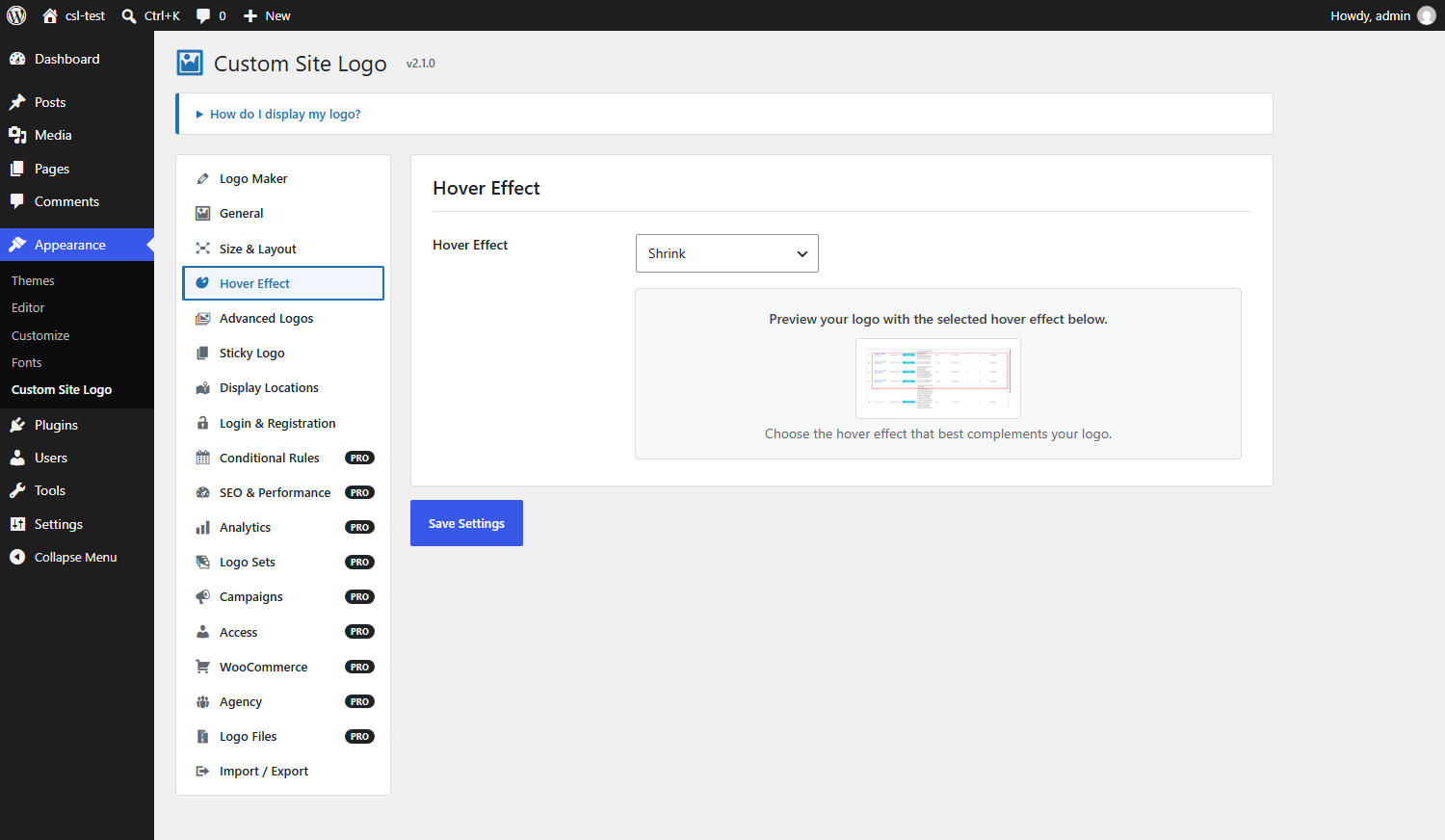
- Hover effects — choose an effect and preview it on the settings page.
For Developers
- REST API —
GET /wp-json/custom-site-logo/v1/logoreturns the resolved logo, its variants, dimensions and markup, ready for a headless front end. - Filters —
custom_site_logo_settings,custom_site_logo_resolved_image,custom_site_logo_markupandcustom_site_logo_structured_datalet you change what is resolved and rendered. - One renderer — the shortcode, block, widget and template tag all render through a single class, so output never drifts between them.
Getting Started
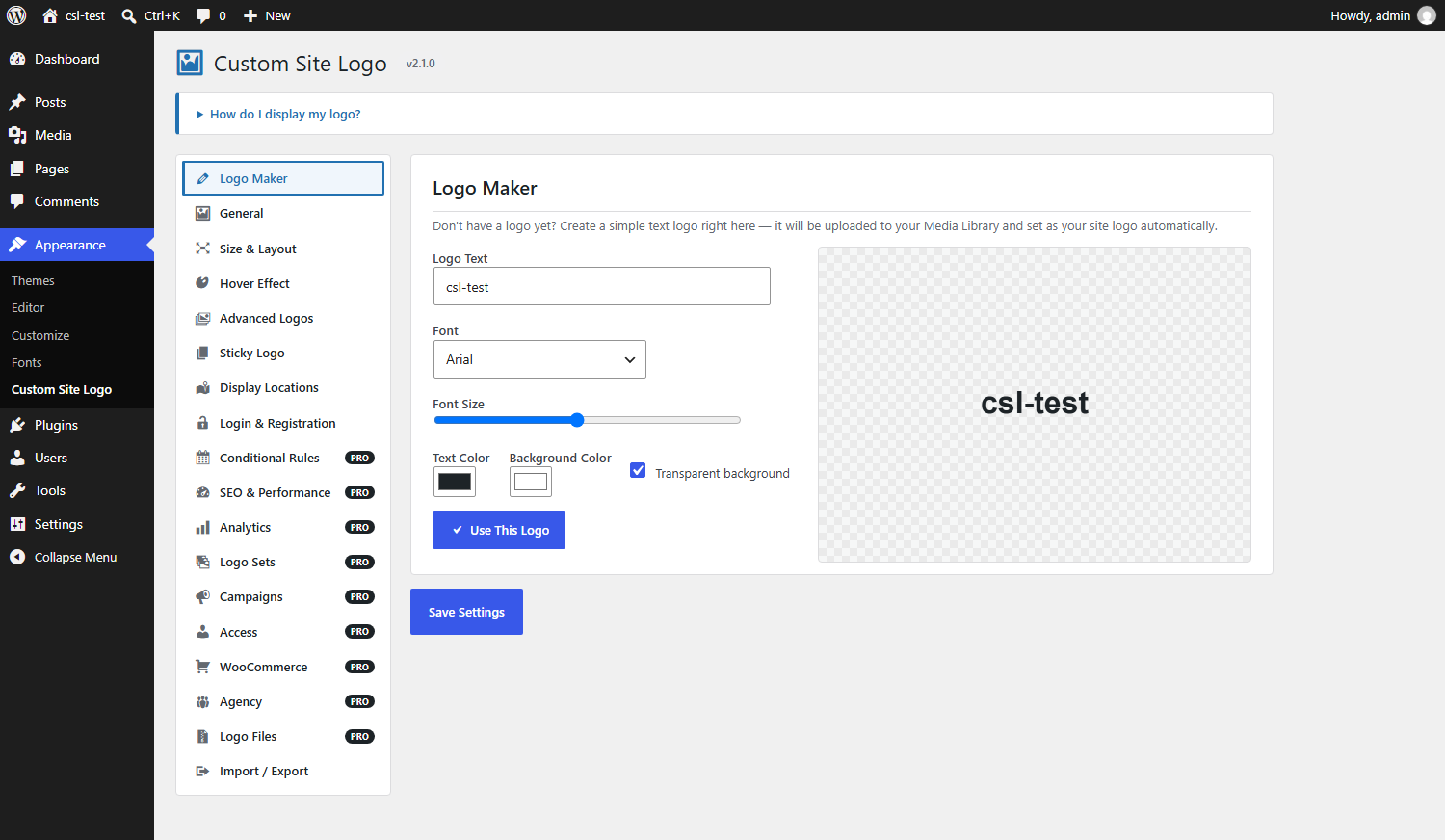
- Built-in Logo Maker — no logo yet? Type your site name, pick a font and colours, and generate a simple text logo right on the settings page. It’s uploaded to your Media Library and set as your logo automatically.
- SVG support — upload SVG logos alongside raster images, with basic upload sanitization.
- Live preview in the Customizer — configure and preview from Appearance » Customize.
- Export, import and reset — back up your configuration as a JSON file, move it to another site, or return everything to defaults.
How to Use It
The quickest route needs no code at all: go to Appearance » Custom Site Logo, upload your logo on the General tab, then switch on “Replace the theme’s logo” on the Display Locations tab. If your theme has a logo area, your logo appears in it.
If your theme has no logo area, you have four options:
- Add the
[csl_display_logo]shortcode to any post or page. - Add the “Custom Site Logo” block in the block editor.
- Drag the “Custom Site Logo” widget into a widget area.
- Open your theme’s
header.phpand paste<?php echo csl_CustomSiteLogo_show_logo(); ?>where you want the logo.
The settings screen is split into Logo Maker, General, Size & Layout, Hover Effect, Advanced Logos, Sticky Logo, Display Locations, Login & Registration, and Import / Export.
If you run into any issues setting up the plugin, please reach out via the support forum.
Custom Site Logo Pro
Scheduled logos, conditional rules, SEO controls, and click reports are part of Custom Site Logo Pro. Pro is a separate add-on. Install it next to this plugin and leave both active. This free plugin keeps working on its own, and any Pro settings you have already saved stay stored until Pro is active.
Custom Site Logo Pro adds:
- Conditional Rules — swap the logo between two dates, show one when a condition is met, assign a logo to a language, or rotate through a set of logos. Dated campaigns can repeat every year.
- SEO & Performance — turn the logo link off, open it in a new tab, add
nofollow, set a title and ARIA label, add width and height attributes, preload the logo, lazy-load it, and publish Organization structured data. - Analytics — totals for today, the last 7 days, the last 30 days, and all time, plus daily history, mobile and desktop, top pages, link destinations, CSV export, and a Google Analytics event.
- Logo Sets — a separate logo for the footer, WooCommerce emails, PDF invoices, checkout, the customer account menu, and refund emails. Place one with
[csl_pro_logo]. - Campaigns — point a scheduled logo at a sale page, add a Black Friday or Christmas schedule in one click, and email the admin three days before a campaign ends. The same reminder can go to Slack.
- WooCommerce — one logo for a product category, one logo for visitors in a chosen country, and a logo shown during business hours.
- Agency — limit shop managers to the main logo, hold their changes for approval, rename the settings menu, save a Logo Maker wordmark as an SVG, and scan the theme for the logo it uses.
- Logo Lockup block — place a logo together with text.
- Multisite — a network default logo and a network lock, edited from Network Admin.
Pro requires this plugin, version 2.0.0 or newer, WordPress 5.0, and PHP 5.6. Get it at https://kommercely.com/product/custom-site-logo-pro/.
External services
The Logo Maker, on the plugin’s own settings screen, loads font previews from Google Fonts (fonts.googleapis.com). This request runs only in wp-admin, for an administrator viewing Appearance » Custom Site Logo. It sends the font stylesheet request to Google. No front-end visitor is sent there by this plugin. Google Fonts is provided by Google and is subject to Google’s privacy policy.
Installation
From your WordPress dashboard
- Go to Plugins » Add New.
- Search for “Custom Site Logo”.
- Click Install Now, then Activate.
- Go to Appearance » Custom Site Logo to upload your logo and configure it, or Appearance » Customize for a live preview.
Manual installation
- Upload the
custom-site-logofolder to the/wp-content/plugins/directory. - Activate the plugin through the “Plugins” menu in WordPress.
- Go to Appearance » Custom Site Logo to upload your logo and configure it.
Screenshots

The Logo Maker tab in 2.1.0 — type your site name, pick a font and colors, and generate a text logo without ever leaving the settings page.
The General tab — upload or choose a logo, and optionally link it to a custom URL.
The Size & Layout tab — set a custom width/height, center the logo, and make it responsive.
The Hover Effect tab — pick a hover effect and preview it live.
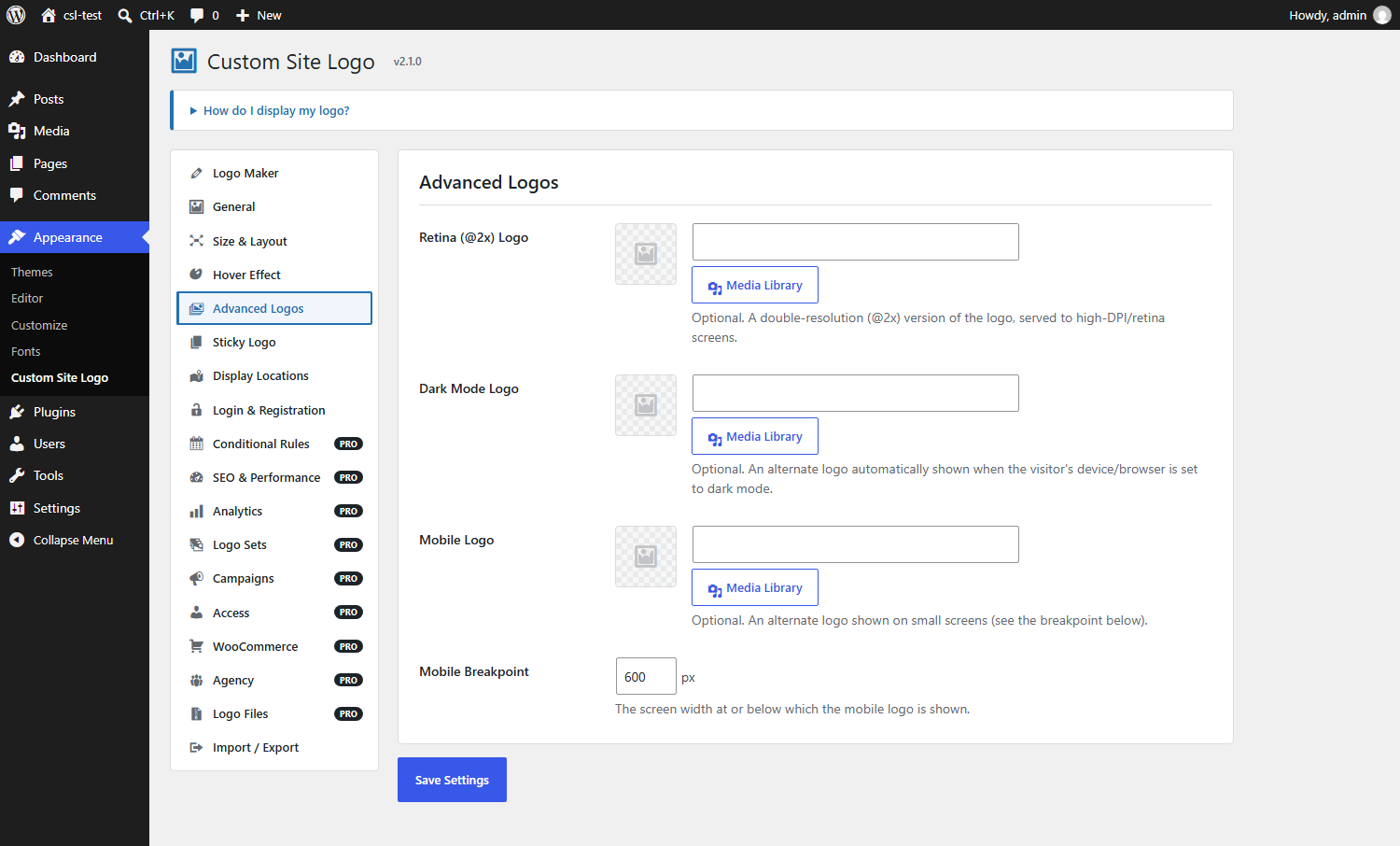
The Advanced Logos tab — configure retina/@2x, dark-mode, and mobile logos.
The Import / Export tab — back up your settings as a JSON file, or restore them from one.



Faq
Do I have to edit my theme files?
No. Upload your logo, then turn on “Replace the theme’s logo” on the Display Locations tab. The plugin fills the logo area your theme already has. Editing header.php is only needed if your theme has no logo area at all.
How do I insert the logo manually?
Use the [csl_display_logo] shortcode in any post or page, add the “Custom Site Logo” block in the block editor, drag the “Custom Site Logo” widget into a widget area, or paste <?php echo csl_CustomSiteLogo_show_logo(); ?> into your theme’s header.php.
Can I use a different logo on a specific page?
Yes. Edit the page or post and use the “Custom Site Logo” box in the sidebar to pick an override logo for that page only. You can set retina, dark-mode and mobile versions of the override too.
Does it support retina screens and dark mode?
Yes. On the Advanced Logos tab you can upload a retina/@2x logo, a dark-mode logo and a mobile logo. Each is shown automatically under the right conditions — the dark-mode logo follows the visitor’s own OS or browser colour scheme preference.
Can I replace the WordPress logo on the login screen?
Yes. Open the Login & Registration tab, turn the login logo on, choose an image, and set the width you want. The same logo is used on the registration and lost-password screens, and it links to your site. Display Locations covers the theme logo, the admin bar, the dashboard footer, WooCommerce emails, and printed pages.
Can the logo shrink when visitors scroll?
Yes. Turn on the sticky logo on the Sticky Logo tab. You can set how far down the page the effect starts, how much the logo scales down, and optionally a separate compact logo to swap in.
Can I schedule a seasonal or campaign logo?
That is part of Custom Site Logo Pro. On the Conditional Rules tab, add a schedule with a start date, an end date, and an image. Pro swaps that logo in and out for you. A campaign can also repeat on the same dates every year.
Can I show a different logo on different pages?
A logo for one page or post is included here, in the editor sidebar. Rules for a post type, category, user role, device, the front page, archives, search, or logged-in visitors are part of Custom Site Logo Pro. The first matching rule wins.
Can I use a different logo per language?
Yes, with Custom Site Logo Pro. Add one row per locale on the Conditional Rules tab. Pro matches the locale WordPress has determined for the current request, so it works alongside the usual multilingual plugins.
Why does my logo look too big?
Uncheck “Make Logo Responsive” on the Size & Layout tab, or set a custom width and/or height for your logo.
Will this slow my site down?
The plugin is built to add as little as possible. The hover-effect stylesheet is only loaded when you actually choose a hover effect, and the front-end script is only loaded when sticky mode is on. If you use neither, no extra CSS or JavaScript is added to your pages.
Does it help or hurt Core Web Vitals?
The Size & Layout tab can set the logo’s width and height in CSS. Automatic width and height attributes, preloading, and lazy loading are part of Custom Site Logo Pro, on the SEO & Performance tab. Those attributes let the browser reserve space so the page does not jump while the logo loads.
Does the click tracking collect personal data?
Click tracking is part of Custom Site Logo Pro and is off until you turn it on. It stores daily click counts, device type, the page path, and the link destination. To stop the endpoint being spammed, a visitor’s IP address and user agent are combined into a hash that lives in a temporary 60-second cache — the address itself is never written to your database. If you also enable the Google Analytics event, that data goes to Google under your own Analytics configuration.
Is uploading SVG logos safe?
SVG upload is limited to users who can already change your plugin settings, and uploaded files are passed through a sanitizer that strips <script> tags and inline event-handler attributes. As with any SVG upload, only use files you trust.
Does it work on multisite?
Yes. Each site keeps its own logo settings. A network default logo and a network lock are part of Custom Site Logo Pro, and those are edited from Network Admin.
Can I use this with a headless or React front end?
Yes. GET /wp-json/custom-site-logo/v1/logo returns the resolved logo URL, its retina, dark and mobile variants, its dimensions, and the rendered markup. When Custom Site Logo Pro is active, the response includes the logo selected by your rules.
Where is the settings page?
Go to Appearance » Custom Site Logo. You can also configure and preview your logo live from Appearance » Customize.
Can I back up or transfer my settings?
Yes. Use the Import / Export tab to download your configuration as a JSON file and import it on this site or another one. The same tab has a Reset button that returns every setting to its default.
What happens to my settings if I delete the plugin?
Deleting the plugin removes its settings, click statistics, and per-page logo overrides. Your logo images stay in your Media Library, because they belong to your site rather than to the plugin.
Do I need Custom Site Logo Pro?
No. Theme logos, the login screen, retina, dark mode, mobile, sticky, per-page logos, the Logo Maker, and import/export all work in this plugin. Pro adds campaigns, extra logo locations, store logos, analytics, and agency controls: https://kommercely.com/product/custom-site-logo-pro/.
Reviews
Does not have alt text
By  primorudy10 on October 13, 2023
Fine plugin for logo management
Does not display the image ALT text
By  Mimi (immeemz) on January 16, 2021
Get your logo from a CDN
By  photoworkout on January 11, 2020
And…….a logo!
By  Curtis (salsaFire) on December 22, 2019
GREAT Plugin and AWESOME Support
By  ewdaadmin on August 3, 2018
Simple plugin
By  galvinxpertex on April 11, 2018
Best Logo plugin
By  crunchdevelopers on April 9, 2018
Great plugin
By  dosantobrasil on November 27, 2017
Best Logo Plugin
By  Awais Altaf (iticiti) on June 22, 2017
Changelog
2.1.0
Release Date: October 26th, 2026
New features:
- Added a Login & Registration tab. The login logo is also used on the registration and lost-password screens, and it links to your site.
- Added Custom Site Logo Pro as an optional add-on for campaigns, extra logo locations, store logos, analytics, and agency controls. Pro does not replace this plugin.
Updates:
- Conditional Rules, SEO & Performance, and Analytics are now Pro features. The tabs stay on the settings screen. The saved values are kept, and they take effect when Pro is active.
- Scheduled logos, conditional logos, per-language logos, logo rotation, and the network default logo run only when Pro is active.
- New tab, nofollow, disabling the logo link, the title and ARIA label, width and height attributes, preloading, lazy loading, structured data, and click tracking run only when Pro is active.
- Tested up to WordPress 7.1.
Bugfixes:
- Fixed the width and height from Size & Layout not being written onto the logo image.
2.0.0
Release Date: August 22nd, 2026
New features:
- Added an option to fill your theme’s own logo slot, so the logo can be placed without a shortcode or any template editing.
- Added a logo for the login screen, with a configurable width.
- Added a logo for the admin bar and the dashboard footer.
- Added a logo for WooCommerce transactional emails.
- Added a print stylesheet, with the option of a separate print-friendly logo.
- Added a sticky logo that scales down as the visitor scrolls, with an optional compact logo to swap in.
- Added scheduled logos: give a logo a start and end date and it swaps itself in and out.
- Added conditional logo rules based on post type, post/page ID, category, user role, device, the front page, archives, search results, and whether the visitor is logged in.
- Added per-language logos, matched against the locale determined for the current request.
- Added random logo rotation across a set of images, with one picked per page view.
- Added a network-wide default logo for multisite, which individual sites can opt into and still override.
- Added custom alt text, title and ARIA label fields, plus options to open the logo link in a new tab, mark it
nofollow, or remove the link entirely. - Added automatic width and height attributes to prevent layout shift, with the resolved dimensions cached.
- Added optional preloading (with
fetchpriority) and optional lazy loading. - Added optional Organization JSON-LD structured data.
- Added optional logo click tracking, with a stats panel on the settings page and a Google Analytics event.
- Added a REST endpoint,
GET /wp-json/custom-site-logo/v1/logo, returning the resolved logo, its variants, dimensions and markup for headless front ends. - Added retina, dark-mode and mobile versions to the per-page/post logo override.
- Added a logo version selector to the block, along with Dark, Compact and Retina block variations and support for alignment, anchors and spacing.
- Added a Reset button that returns every setting to its default.
- Added a welcome notice that points first-time users at the two things worth doing first.
- Added the
custom_site_logo_settings,custom_site_logo_resolved_image,custom_site_logo_markupandcustom_site_logo_structured_datafilters.
Updates:
- Rebuilt the settings page navigation as a vertical sidebar. The old horizontal tabs had run out of room and were wrapping onto a second row and overlapping the page content.
- Added Sticky Logo, Display Locations, Conditional Rules and SEO & Performance tabs, and collapsed the introductory help text so it no longer pushes the settings down the page.
- The hover-effect stylesheet is now only loaded when a hover effect is actually selected, and the front-end script only when sticky mode or click tracking is enabled. Sites using neither now load no extra CSS or JavaScript.
- Every setting is now declared in one place, with a single default and sanitizer, which the settings page, the Customizer, and the import routine all share.
- Imported settings files are now sanitized through the same whitelist the settings form uses, so an import can no longer introduce an unknown key or an unexpected value.
- Raised the minimum supported WordPress version to 5.0.
Bugfixes:
- Fixed garbled characters in several admin labels and descriptions, where the “»” separator in menu paths such as “Appearance » Customize” displayed as unreadable symbols. Those strings were double-encoded in the previous release.
- Fixed saving from the Customizer being able to silently switch features off, because settings absent from the Customizer’s payload were treated as disabled rather than left alone.
- Fixed random logo rotation picking a different image for each place the logo appeared on a page; one image is now chosen per request.
- Fixed per-page logo overrides dropping the retina, dark-mode and mobile versions.
- Fixed the logo linking to
#when no custom URL was set; it now links to your home page. - Fixed the “no logo uploaded” notice being visible to visitors instead of only to administrators.
- Fixed the Media Library button not working on the newer image fields.
- Fixed the settings form refusing to save when the main logo field was left empty, which made the other tabs impossible to configure first.
- Rate-limited the click-tracking endpoint so it cannot be used to write to the database repeatedly.
- Resolved all PHPCS (WordPress Coding Standards) reported issues across the codebase, and added the plugin’s ruleset so the standard is reproducible.
1.2.0
Release Date: August 15th, 2026
New features:
- Added a “Custom Site Logo” block for the block editor, with a live preview.
- Added a “Custom Site Logo” classic widget.
- Added retina/@2x logo support.
- Added an alternate dark-mode logo, shown automatically based on the visitor’s OS/browser preference.
- Added an alternate mobile logo with a configurable breakpoint.
- Added SVG logo upload support with basic sanitization.
- Added a per-page/post logo override meta box.
- Added a live-preview Customizer section (Appearance » Customize).
- Added settings export/import (as a JSON file).
- Added a “Logo Maker” tab: no logo yet? Type your site name, pick a font and colors, and generate a text logo right on the settings page. It’s uploaded to your Media Library and set as your logo automatically.
Updates:
- Reorganized the settings page into tabs (General, Size & Layout, Hover Effect, Advanced Logos, Import/Export) for easier navigation. The active tab is remembered between visits.
- Redesigned the settings page with a proper page header, thumbnail previews next to every logo field (with a one-click “Remove”), modern on/off toggle switches for checkbox options, and a two-card layout for Import/Export.
- Shrunk the oversized hover-effect preview image on the settings page.
Bugfixes:
- Fixed the “no logo uploaded” notice incorrectly appearing on every page/request; it is now only shown where the logo is actually rendered.
- Fixed a fatal error (
TypeErrorinWP_List_Table::row_actions()) on the Plugins page caused by the “Settings” action link filter. - Fixed the Media Library upload button being broken on other admin screens due to an unnecessary, globally-loaded Thickbox stylesheet.
- Fixed the logo image field silently storing the literal placeholder text “Select Logo” as its value when no logo was chosen.
- Fixed the “Save Settings” button showing on the Import/Export tab, where it didn’t apply.
1.0.3
Release Date: August 14th, 2026
Updates:
- Resolved all PHPCS (WordPress Coding Standards) reported issues across the codebase.
- Escaped all admin and front-end output, and added a nonce-safe check around the settings-saved notice.
- Fixed the
[csl_display_logo]shortcode to correctly return its markup instead of echoing it directly. - Added an
altattribute to the rendered logo image for better accessibility. - Clarified and improved the wording of settings page labels, descriptions, and messages.
- Corrected a translation domain mismatch on the plugin’s “Settings” action link.
- Updated “Tested up to” to the latest WordPress version.
1.0.2
Release Date: May 09th, 2023
Bugfixes:
- Fixes PHP Function.
1.0.1
Release Date: May 25th, 2023
Bugfixes:
- Fixes PHP warnings.
Updates:
Update the code standards.