
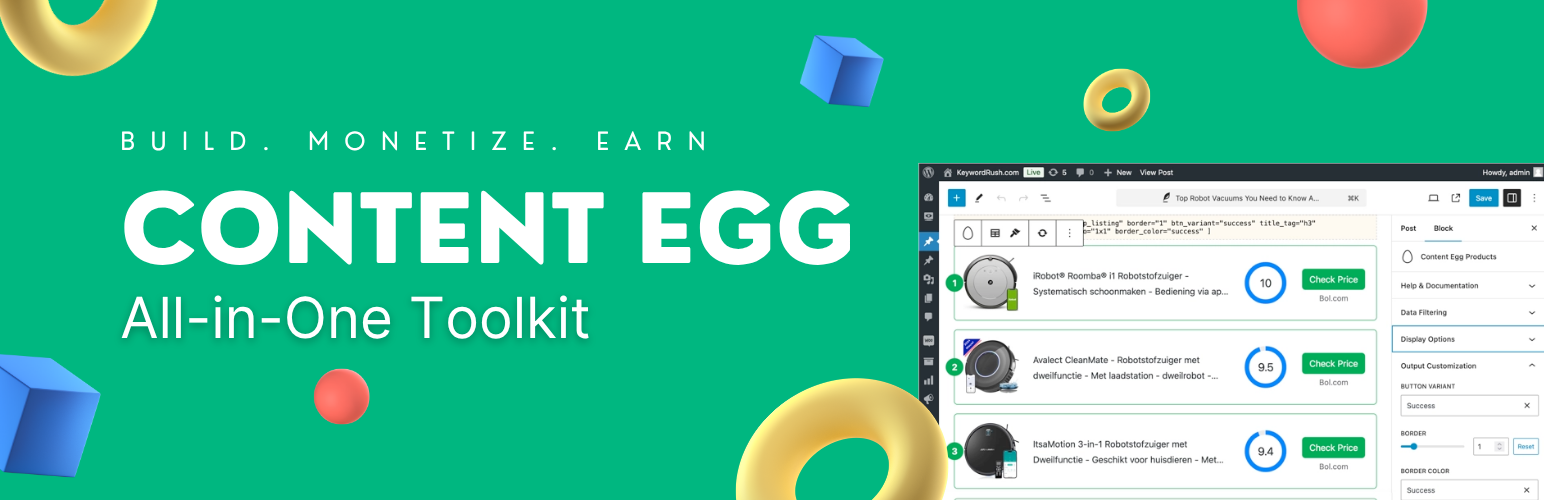
Content Egg – Affiliate Product Importer & Price Comparison
Description
Content Egg is an affiliate marketing plugin for WordPress and WooCommerce. It pulls live product data — prices, availability, images, offers — from affiliate networks, supplier feeds and almost any online store, keeps it current on a schedule, and publishes it in your posts as editorial blocks, comparison tables and price lists.
Two things make it more than a shortcode-and-table plugin:
- 25+ Egg Blocks — labelled, schema-ready article sections (FAQ, pros & cons, methodology, comparison table, verdict) wired straight to your product data. These are the self-contained chunks AI search engines quote.
- AI Agents — connect ChatGPT, Claude, or any assistant that can call an API, then work in plain language: “Add a live price list of the Ninja air fryer to my review.”
Every feature is in the free version. PRO adds more affiliate networks, more feed slots, and write access for AI agents.
What is this plugin for?
✔ Product reviews & niche blogs
✔ Price comparison sites
✔ Automated affiliate sites
✔ WooCommerce listings
✔ Daily deals & coupons
Official website · Egg Blocks demo article · Documentation
Egg Blocks — 25+ Editorial Gutenberg Blocks for Affiliate Content
Stop building product reviews from generic paragraphs and shortcodes. Egg Blocks are 25+ purpose-built Gutenberg blocks designed for affiliate content — each one semantically labelled, schema-ready, and wired directly to your Content Egg products.
Article structure: intro, conclusion, section header, table of contents, FAQ, callout, step list
Editorial insights: key takeaways, criteria, methodology, definitions, myth vs fact, pros & cons
Product & commerce: product card, editorial product, quick picks, where to buy, comparison table, verdict, rating breakdown, specifications
Conversion & social proof: contextual CTA, pricing, testimonial, trust signals
Navigation: related posts
The editorial product block is the quiet one: a real product shown as part of the article, with no price, rating or buy button, so a guide can cite products and still read like a guide.
Why it matters for SEO: AI search engines (Google AI Overviews, Perplexity, ChatGPT) cite chunks of content, not whole pages. Egg Blocks break your article into self-contained, machine-readable sections — a labeled FAQ block, a methodology block, a pros/cons section — each one a candidate for AI citation and rich results. The FAQ block emits FAQPage structured data automatically.
EggBlocks Writer: a free external skill you paste into ChatGPT, Claude, or any capable AI chat. Ask for a full article and the AI outputs ready-to-paste Gutenberg markup using real Egg Blocks. Copy, paste into the WordPress Code Editor, assign your Content Egg products, publish.
AI Agents — Run Content Egg from ChatGPT or Claude
Connect ChatGPT, Claude, Claude Code, Cursor, or anything that can call an API, then just ask in plain language. Your assistant talks to your site directly over the WordPress REST API — no middleman service, no API keys to manage. Set-up is a WordPress application password, and every action your assistant takes is logged. Requires WordPress 6.9 or newer.
Free version — your assistant can research, compose and preview. Content Egg’s own write actions are PRO:
- “Which modules are active, and did my CSV feed import last night?”
- “Search my feeds for robot vacuums under $300.”
- “Find 3 YouTube videos and 5 images for my air fryer post.”
- “What products and blocks are already on ‘Best Air Fryers’?”
- “Compose a roundup of the 5 best countertop blenders with Egg Blocks and show me a preview.”
You get the rendered preview plus the finished block markup — paste it into the editor yourself, or let your assistant create the draft through WordPress’s own REST API. Editorial blocks land ready to publish; blocks that display products stay empty until products are attached, which is a PRO action.
PRO — your assistant does the work on your site, from one message:
- “Create a full roundup article of the 5 best countertop blenders.”
- “Add an FAQ section to my post ‘Best Air Fryers’.”
- “Drop a live price list of the Ninja air fryer into my review.”
- “Rewrite this post with Egg Blocks.”
- “Refresh the prices on my Ninja review and set its featured image.”
- “Connect this feed to my site: example.com/products.csv”
- “Activate the Amazon module and set price updates every 24 hours.”
Behind those prompts: attach products (including custom ones you describe), edit, reorder and remove them, refresh prices, add images, videos and coupons, insert blocks, create a full draft page, publish or schedule it, and manage modules, settings, feeds and new affiliate shops.
▶ Claude Scheduled Tasks for WordPress: Automate Article Publishing
Both videos show the PRO workflow end to end. Full set-up guide: AI Agents.
Import Products from CSV, XML and JSON Feeds
Paste a supplier feed URL and the setup wizard detects the format, encoding, currency and CSV settings, lets you map fields against real sample data, then imports in the background with live progress. Feeds are cached between syncs and re-import on the schedule you set — including into WooCommerce.
Create Product Posts and WooCommerce Products
No more copy-pasting product details. Turn imported data into posts or WooCommerce products in one click — ready to publish and monetize. Bulk keyword import creates a post per keyword, and product prefill monetizes the posts you already have.
Price Comparison for WordPress
- Price Blocks: Combine offers from multiple networks into one block.
- Historical Price Data: Display past prices to help users find the best purchase times.
- Dynamic Charts: Create charts showing price changes over time.
- Price Drop Alerts: Email alerts for price drops.
- EAN Search: Merge products into a single comparison list using EANs.
Deals Websites
Run a deals site on your own WordPress install: every deal is a post with its own page, and Content Egg keeps its price current.
- Deal pages with price, old price, discount, store, coupon code, a countdown and “checked 2 hours ago”.
- Automatic expiry: a deal expires when the product goes out of stock or its price rises, and comes back when it recovers.
- Community voting with a “Hot” badge, sorting by newest, biggest discount, popular or ending soon.
- Store and category pages with breadcrumbs, plus a Deals block for your homepage.
- Import deals from a list of product links, or automatically with a minimum-discount rule.
AI Content Generation for Product Reviews
Write from the product data you imported — title, specs, offers, attributes — instead of from a blank prompt. One click per section:
- Product reviews
- How-to-use instructions
- Buyer’s guides
- Product descriptions
- Translations, summaries and rewrites
Every prompt is editable and takes dynamic variables for product fields. Works with the current OpenAI (GPT-5.x) and Anthropic (Claude) models.
Bridge Pages
Create clean, product-focused landing pages on your site before sending visitors to merchants. Bridge Pages keep users engaged longer, improve SEO with targeted keywords, and boost affiliate conversions.
- 1-Click setup: Instantly build from Content Egg offers.
- Flexible layouts: Use as product, review, or comparison pages.
- SEO control: Set global or post-specific canonical options.
▶ Watch Bridge Pages in action
How It Works
- Activate the modules you need
- Add or import products from supported networks and stores
- Publish content and start earning affiliate commissions
Plugin Features
Import & sync: one-click feed import for full supplier catalogs · scheduled auto-import at custom intervals · bulk keyword import to create product posts · CSV, XML and JSON feeds · WooCommerce sync and autoblogging · Affiliate Egg integration for stores without an API · official network APIs
Prices & offers: automatic price updates with tracker & alerts · price comparison blocks with multiple offers · historical prices and charts · add offers by keyword or product URL · EAN matching · auto-insert affiliate IDs in links
Publish: 25+ Egg Blocks for reviews, roundups and buying guides · high-conversion product templates (ready-made or custom) · create custom templates with ChatGPT · shortcodes for flexible placement · images, videos, news and coupons · works with any WordPress theme · multi-language
Automate & measure: AI Agents (ChatGPT, Claude, MCP) · AI content generation · product prefill for existing posts · Bridge Pages · clicks statistics reports
Free Version vs Content Egg PRO
Every feature is in the free version — feed imports, price comparison and price history, AI content generation, Egg Blocks, Bridge Pages, clicks statistics, WooCommerce sync and autoblogging. PRO widens the reach rather than unlocking the basics:
- 32 more network modules — Amazon, eBay, AliExpress, Walmart, AWIN, CJ, Rakuten and more
- 50 feed modules instead of 3
- Write access for AI agents — your assistant builds and edits pages instead of only researching them
- Fully automatic AI prefill — monetize existing posts unattended, start to finish
Free version modules:
Includes CSV-XML Feed, CJ Links, Coupon, GdeSlon, Google Images, Offer, Pexels, Pexels Videos, Pixabay, Related Keywords, RSS Fetcher, Skimlinks Coupons, Sovrn, Unsplash, YouTube.
PRO adds:
Includes Aliexpress, AllKeyShop, Amazon, Amazon NoAPI, Avantlink, AWIN, BestBuy, Billigerde, Bol.com, CJ Products, CityAds.com, Clickbank, Clickwise, Coupang, eBay, Envato, Flipkart, Geizhalsde, Impact Radius, Kelkoogroup, Kieskeurig.nl, Linkwise, Lomadee.com, Magalu, Paytm.com, Rakuten (LinkShare), Shopee, Tradedoubler, TradeTracker, Trovaprezzi, Walmart, Webgains.
➡️ Visit us at www.keywordrush.com/contentegg
Demos & Guides
Official website: www.keywordrush.com/contentegg
Egg Blocks demo: best-noise-cancelling-headphones
Product templates demo: content-egg-pro-output-demo
Documentation: ce-docs.keywordrush.com
Video Guides: YouTube Playlist
AI Power: www.keywordrush.com/toomuchniche
Installation
Requirements
- PHP version 8.0 or higher.
- WordPress 6.9 or higher.
Installation Instructions
- Upload the content-egg folder to the /wp-content/plugins/ directory.
- Activate the plugin through the ‘Plugins’ menu in WordPress.
- Configure the plugin settings.
- For detailed configuration instructions, refer to the Content Egg User Guide
Screenshots

Modules dashboard
Product import tools
Product search — add products by keyword or URL
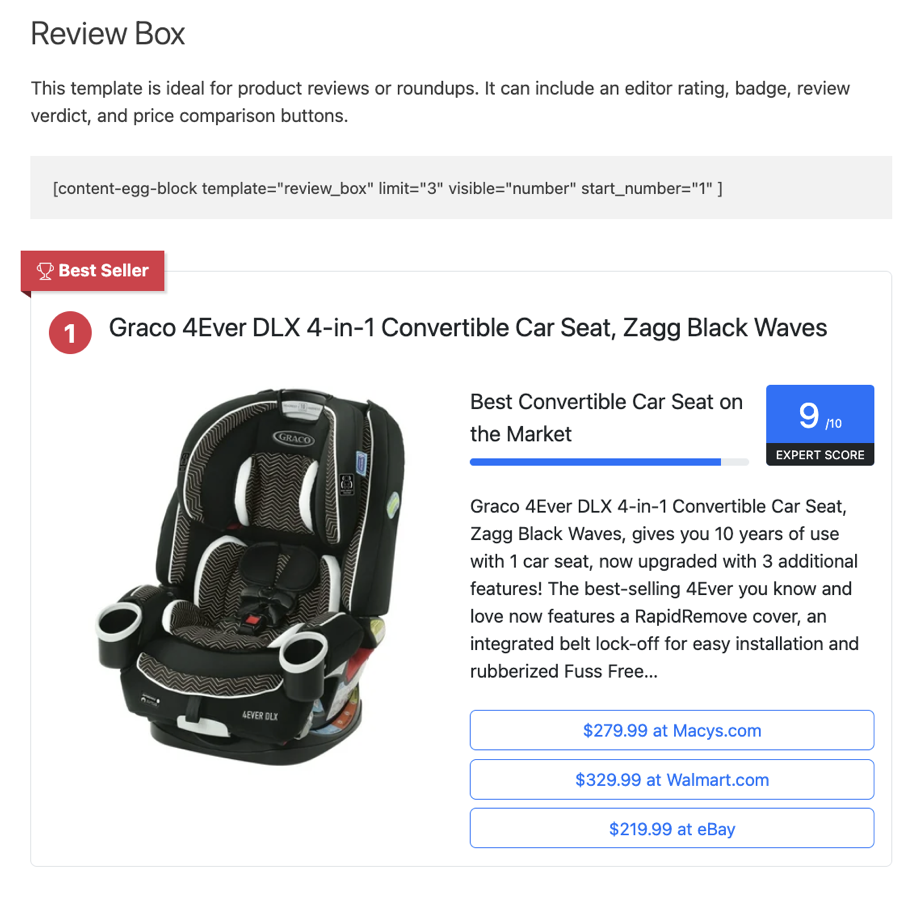
Product block demo — product card
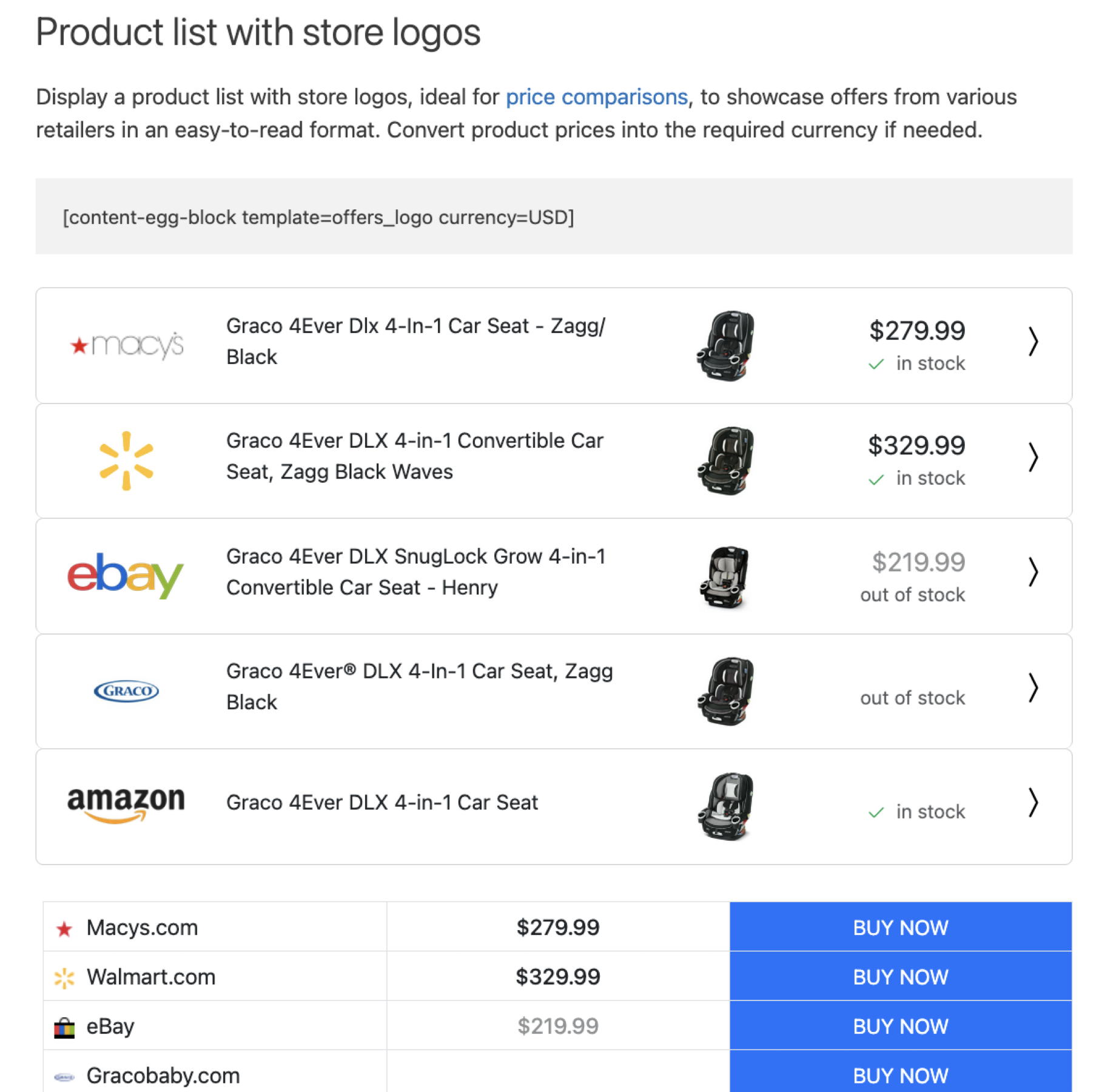
Product block demo — price comparison
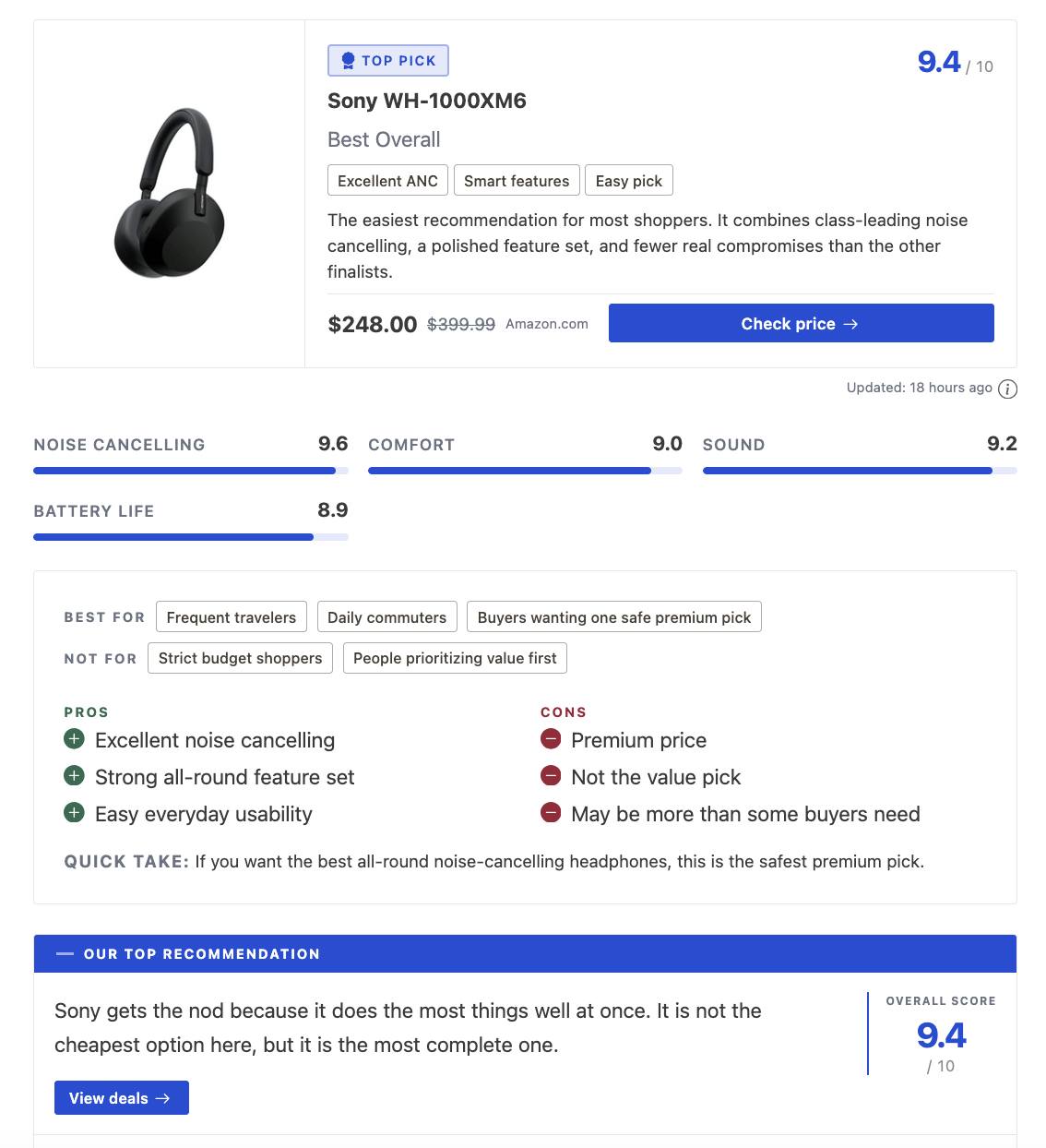
Egg Blocks demo — product card, pros & cons, verdict
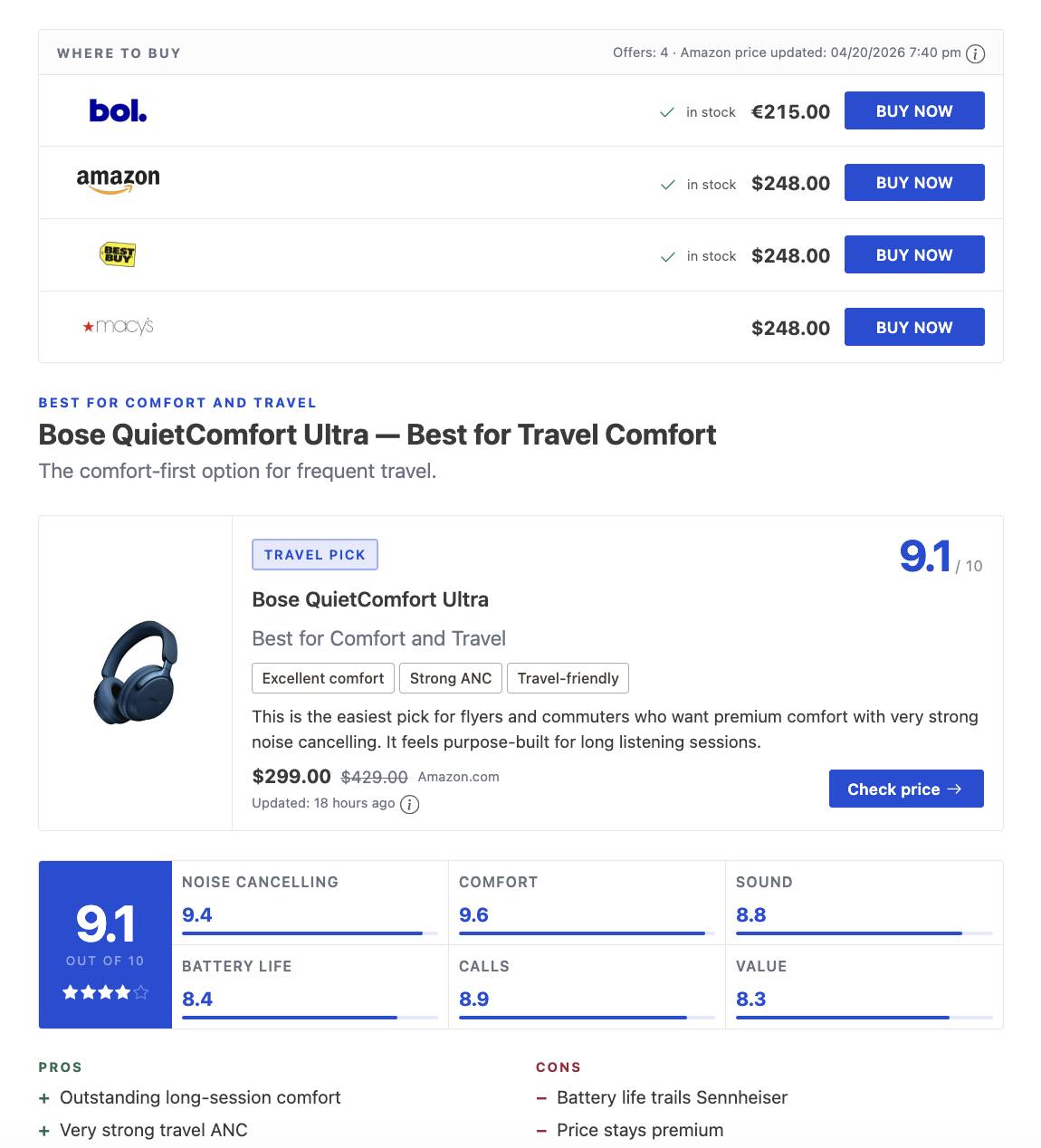
Egg Blocks demo — where to buy, product card, rating breakdown
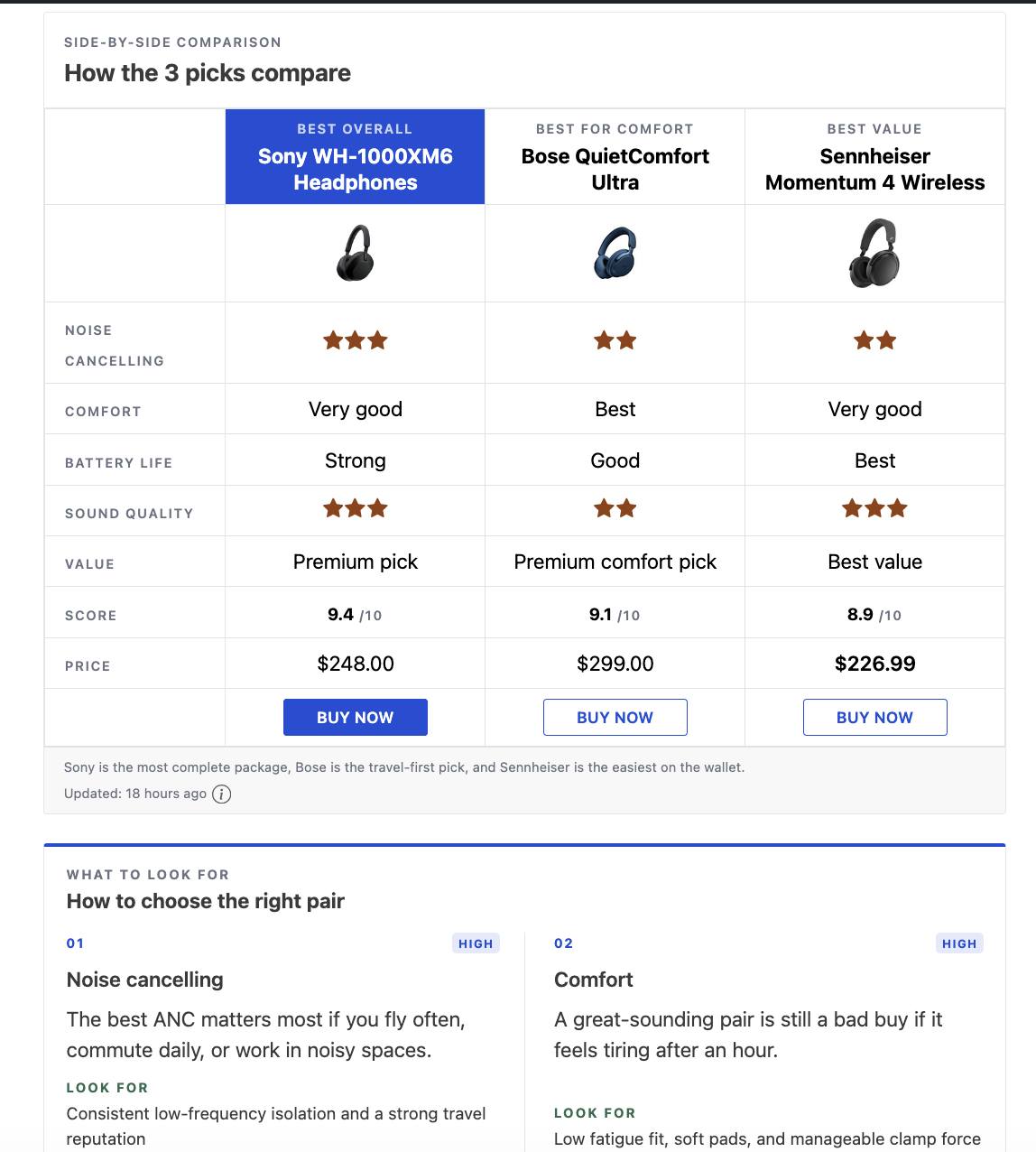
Egg Blocks demo — comparison table
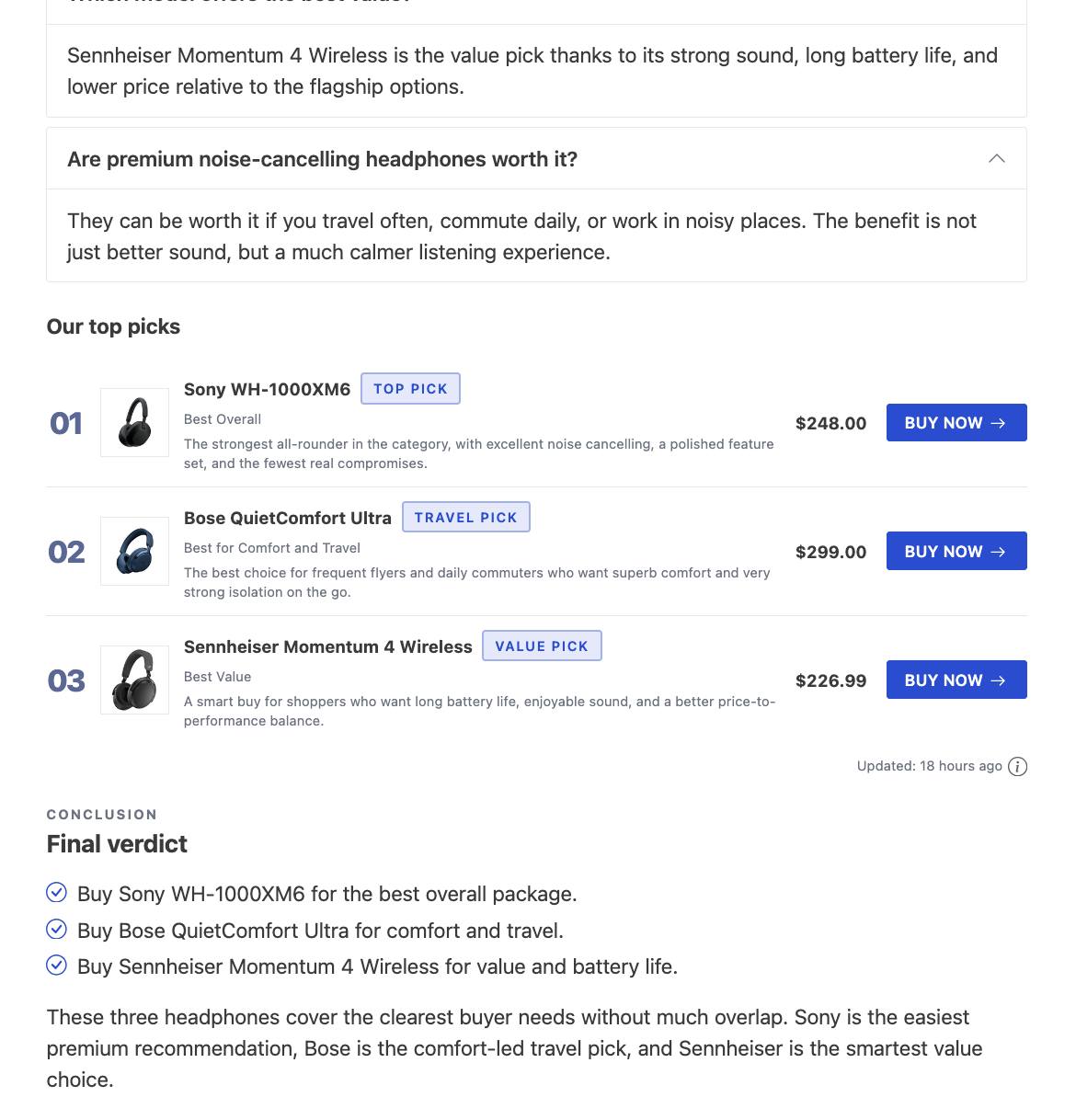
Egg Blocks demo — quick picks, conclusion


Faq
Every feature: feed and product import, price comparison and price history, AI content generation, all 25+ Egg Blocks, Bridge Pages, WooCommerce sync, autoblogging, clicks statistics, and AI Agents.
PRO adds 32 more affiliate network modules (Amazon, eBay, AliExpress, Walmart and others), 50 feed modules instead of 3, write access for AI agents, and fully automatic AI prefill.
Yes. Turn on AI Agents, create a WordPress application password, and connect your assistant — the screen gives you the guide link, the text to paste into a ChatGPT project, and an MCP endpoint for Claude Desktop, Codex, Cursor and similar tools. ChatGPT Work, Claude, Claude Code, scripts and any HTTP client need no set-up beyond the guide link and your credentials.
Your assistant calls your own site over the WordPress REST API, so no third-party service sits in between, and every Content Egg action is logged on the AI Agents screen. Requires WordPress 6.9 or newer.
In the free version your assistant can read everything and compose a complete page, but Content Egg’s write actions — attaching products, inserting blocks, changing modules, settings and feeds — need PRO. An application password is a WordPress credential, so the assistant still has whatever core REST access that user has, including creating and editing posts. Read the AI Agents guide.
If your advertiser isn’t listed among our supported modules, we offer several flexible solutions:
- Feed Modules: Work with any CSV or XML product feeds.
- Offer Module: Manually add any products.
- Affiliate Egg Integration: Use custom Affiliate Egg parsers for additional support.
For more information, read: My network isn’t listed.
- Free Version: Create up to 3 separate feed modules.
- Pro Version: Create up to 50 separate feed modules.
Additionally, you can use merged feeds for multiple merchants, as many affiliate networks provide this option.
Amazon is supported in the Pro version with two available modules:
- Amazon via official API: Connect with the Amazon Creators API — the current integration, created in Associates Central Tools Creators API.
- NoAPI Module: Designed for beginners, this module allows you to make your first sales and gain API access.
Yes, you can create custom templates. Here are two ways to do it:
- Manual Customization: You’ll need skills in PHP, HTML, and CSS. The default templates use the Bootstrap CSS framework.
- AI Assistance: Use a specially trained ChatGPT to create a custom template. Simply describe what you need, and the AI will generate the code for you instantly.
-
Content Egg: Operates through official product APIs and offers numerous modules for various affiliate networks. Ideal for product review blogs, price comparison websites, and daily deals websites.
-
Affiliate Egg: Functions as a web parser, requiring no API access. It allows you to use Affiliate Egg parsers as separate modules within the Content Egg plugin.
For more details, read: Content Egg vs. Affiliate Egg.
Reviews
Great plugin
By  da commerce (rcdelar) on September 10, 2026
great plugin and support!
Great plugin, Great support
By  pikapower on September 6, 2026
I’ve been using Content egg for a long time now and there support is always fast and the plugin stable!
Also the last AI-agents add-on saves me all lot of time, thanks guys!
A powerful plugin backed by genuinely responsive support
By  hoainguyenha on August 13, 2026
I have been using Content Egg for some time and have contacted the developer about many different questions and issues, including product displays, comparison templates, mobile usability, and practical setup problems on my websites.
What I appreciate most is that the developer does not simply send a generic reply. He listens carefully, explains what is happening, and, when appropriate, improves the plugin itself. The recent update to version 21.4.5 is a good example: the Product List template for comparison tables was improved so that products display as readable cards on mobile devices instead of an awkward horizontal table.
No plugin is perfect, especially one with as many features and integrations as Content Egg. What matters is whether it is actively maintained and whether the developer takes real user feedback seriously. In my experience, Content Egg has both.
Thank you for your patience, continued support, and willingness to keep improving the plugin. It has become an important part of how I build affiliate content on my blogs.
Super plugin to handle several affiliates
By  deLisle on August 11, 2026
Having to handle several affiliate programs and over 18k products has never been easier with Content Egg.
I have been using it for several years now and it has worked great.
Any issues i might have is quickly fixed by their support.
Tres utile et fonctionnel
By  lexavss on August 9, 2026
je recommande vivement Content Egg. Perso j ai la version pro et il y a énormément de possibilités.
En évolution constante merci aux créateurs et en cas de souci une réponse très rapide avec des échanges constructifs qui donnent lieu à une mise a jour de correction en quelques heures ou d’évolution.
Vous comprendrez que je suis très satisfait su produit et de l’assistance.
Exceptionally positive experience
By  lebuda on June 30, 2026
Exceptionally positive experience with both the support team and the plugin. Ignore the negative comments. Good software takes time, effort, and ongoing maintenance, so it’s only fair that developers charge for it. I genuinely don’t understand why some people expect high-quality tools to be free.
And seriously… $59 per year? Excellent value. The support I’ve received from their team has been far beyond what I’ve experienced from many companies charging significantly more.
Could not be happier with both the plugin, and the support. I wish I found this plugin couple years ago.
NOT free, misleading
By  gabriella9999 on October 23, 2025
not free, if you want to use amazon or anything else you have to pay, missleading
Мне нравится
By  juramz on January 5, 2025
<font _mstmutation=”1″></font>Мне нравится
Great product, great support
By  goodgabble on March 28, 2024
We started looking for an affiliate plugin that can work with posts and WooCommerce products, and there is not many good ones out there that does both, Content Egg combined with Affiliate Egg is fantastic, the product is great and the support is quick and very helpful before the purchase and after the purchase. I dont do reviews unless i am really impressed, i really like the tools they have to offer, great job and keep up the good work.
Thanks
don't waste your time
By  dunavista on February 24, 2024
the greed of these developers has taken over
with the np api option; what they are doing now is purposely blocking your ip address to amazon and then warning that your ip address is blocked with amazon.
they redirect you to a page that has affiliate links on, you have no option now but to use
Changelog
12.0.0
- Deals are off by default: nothing changes on your site until you turn them on in Settings Deals.
- New: Deals. Turn on Settings Deals to get a Deal post type with ready-made deal pages (price, old price, discount, store, “checked N hours ago”, lowest-price-in-30-days badge, countdown, voting), a /deals/ archive with sorting and store/category filters, and a Deals block. Deals expire on their own when the product goes out of stock, its price rises, or its end date passes, and come back when the product does.
- New: Deals Add deals creates deals from a list of product links.
- New: A coupon code per deal, with a one-click Copy button on the deal page, a “Coupon” label on cards, a “With coupon” filter and a coupon-only option in the Deals block.
- New: Store and category pages for deals — breadcrumbs with BreadcrumbList markup, a store header with logo, deal count and store link, category links, and a link to the store’s Cashback Tracker page when Cashback Tracker is installed.
- New: “Hot” badge for deals whose vote score reaches Settings Deals Hot deal score (default 50), with cegg_deal_hot_score and cegg_deal_is_hot filters.
- New: Deal button text setting, “Get deal at {store}” by default.
- New: Auto-import rules can require a minimum discount and in-stock products.
- New: “Used and Refurbished Offers” setting (General settings). When enabled, used and refurbished offers no longer set the best price, the WooCommerce price, price history or price alerts, and they get a “Used” or “Refurbished” label. An offer with “Renewed”, “Refurbished” or a similar word in its title counts as refurbished even when the shop lists it as new. Enabled by default on new installations; existing sites keep their current behavior until you turn it on.
- New: WooCommerce “Automatic Synchronization Scope”. Sync product prices from all modules and exclude the ones you don’t want, or keep syncing only the selected modules. New installations sync from all modules; existing sites keep their current setting. A notice now tells you when automatic sync is off because no module is selected.
- New: Comparable prices with and without VAT. Set each shop’s VAT basis and rate in Shops, then choose Excluding or Including VAT in Settings Normalize Shop Prices. Prices are converted before they are saved, so price history, charts and price alerts stay consistent. Existing data is recalculated in the background.
- New: Default shipping cost per shop by price range, used when a product has no shipping cost from its source.
- New: Optional shipping line (visible=shipping_cost) in the Price comparison widget, Price comparison card and Sorted offers list with product images templates.
- New: Feed modules — “condition” column in the feed mapping.
- New: Feed modules — search by the feed’s own product ID with “id:12345” to add an exact offer. Works in the editor search, Prefill and auto-update keywords; separate several IDs with commas (id:123,id:456).
- New: Prefill — “Values are feed product IDs” option for the Custom Field source. Plain feed product IDs saved in a custom field are matched exactly, one per field value or comma-separated.
- New: AI agents see which modules can search by EAN, URL or product ID and get the product identifiers needed to compare offers. The agent guide is now split into topics, including a new price comparison topic.
- New: ChatGPT connects through ChatGPT Work and a ChatGPT project, with scheduled tasks that run in the cloud. The AI Agents screen shows the new steps; Custom GPTs, which OpenAI is retiring, are no longer needed.
- Improved: Merchant logos work again without an API key. The default logo source is now the shop’s website icon, since Clearbit no longer provides logos.
- Improved: Every shop now gets its logo from the Logo Source setting, so all logos look the same; your own logos still take priority. When Brandfetch or Logo.dev has no logo for a shop, or no key is set, the shop’s website icon is used instead.
- Improved: Changing Logo Source now replaces the logos Content Egg downloaded before; logos you placed in the ce-logos folder yourself are kept. A logo that could not be downloaded is tried again after 7 days.
- Improved: Prefill no longer sends an EAN to modules that can’t search by EAN.
- Improved: Content Egg now bundles Action Scheduler, so background tasks run reliably even when no other plugin provides it.
- Improved: Block styles now load only on pages that use the blocks.
- Improved: Price comparison and price history templates fit mobile screens.
- Improved: Price history chart dates no longer overlap.
- Improved: Sorted and filtered deal archive pages are no longer indexed by search engines.
- Fixed: Feed modules — an offer stayed out of stock for good once the merchant re-listed the product under a new ID. The update now falls back to the EAN within the same shop and reconnects the offer on a single unambiguous match, refreshing price, stock, image and links while keeping the saved product data and price history.
- Fixed: Sovrn — offers from many shops had no logo. They now get the logo Sovrn provides, and Target, The Home Depot, Lowe’s, Ace Hardware, Wayfair, REI and other shops are matched to their website.
- Fixed: Large product feeds served through a redirect could exhaust PHP memory before the import started.
- Fixed: Products stayed unticked under Post Types when WooCommerce was installed after Content Egg’s settings had been saved. Activating WooCommerce now turns them on, and saving the settings while WooCommerce is inactive no longer unticks them.
- Fixed: Sorting by highest price, and the “Maximum Price” WooCommerce sync, put out-of-stock offers first.
- Fixed: WooCommerce product schema (AggregateOffer) included out-of-stock offers.
- Fixed: WooCommerce attributes were re-synced for every offer marked for attribute sync instead of only the first.
- Fixed: The currency option did not convert shipping costs.
- Fixed: Price statistics showed the wrong product name for the lowest price.
- Fixed: Price history chart not showing in blocks rendered via AJAX (async or lazy load).
- Fixed: Clearing a product price in the editor was undone on save.
- Fixed: PHP 8.4 deprecation notices.
- Fixed: Codex could not use the MCP endpoint on sites with WooCommerce, and asked to approve every call.
11.9.0
- New: Shop badge — a badge text and color on each shop’s Content Egg > Shops page, shown automatically on every offer from that domain unless the offer already has its own badge.
- New: Update keywords by group — one keyword per row with an optional product group, so a single post refreshes several CE Products blocks at once: one EAN per group, one group per block.
- New: Paste a list into product search — one keyword, product URL or EAN per line — instead of searching for five products one at a time. Results are grouped under the line that found them, each group with its own “Add all”, so a URL that finds nothing is one line’s problem rather than a failed search.
- Fixed: Feed setup wizard — analysing a large feed always failed with a 30-second timeout when the feed host ignores range requests, as Admitad and other on-the-fly feed generators do. The analysis now ends the download itself once it has the sample it needs, whatever the feed’s size.
- Fixed: sort=price in a block shortcode was ignored whenever the products carried a manual order (drag-and-drop, the Order field, or a [1] title prefix). An explicit sort now takes priority over that order.
- Fixed: Security hardening and fixes.
- Changed: Affiliate modules now default to Cron Job updates instead of Page View, so every post refreshes on the same schedule instead of waiting for a visitor to arrive.
11.8.1
- Fixed: “Save images on server” — every automatic price update downloaded the product image again, filling the uploads folder with product-1.jpg, product-2.jpg and so on. Affects AE and custom feed modules.
11.8.0
- New: Egg Blocks — a Plain variant for nine blocks, including Product Card, Verdict, Pros & Cons and Callout. No panel, no tinted background, no bordered tags: the blocks line up on a shared label column so a review reads as one article instead of a stack of widgets.
- New: Import presets — Category Mapping. Send a merchant’s feed category to one of your own categories, so products arrive filed correctly instead of needing cleanup. A rule can name the full path or a single level, and * matches a whole branch.
- New: Editorial Product — an alt text field for the product image.
- Fixed: Editorial Product was missing from the block catalog the agent API publishes, so an AI agent could not create or validate one.
- Fixed: AWIN — the maximum price was ignored when searching a feed.
11.7.0
- New: Editorial Product block — show a product as part of the article, not as an advert. Four layouts, from a full-width figure to a one-line mention, with no price, rating, score or buy button; the link rides on the product name and image.
11.6.0
- New: Shops — one screen for every shop in your product data. Give a shop a display name or a logo, or attach a coupon code that shows up beside that shop’s offers in your product blocks.
- New: Shop coupons — set a start and end date, and limit a coupon to chosen categories so it only appears on the posts it applies to. One click copies the code and opens the shop.
- New: Shop coupons — limit a coupon to specific products, for time-limited per-product promotions like a free bonus item with one product. The offer retires itself on its end date.
- New: Products — “Copy product reference” in a product row’s menu, for binding a coupon to that product.
- New: Feed modules — import only the products you need from a huge catalog. Filter by category, title or brand, and the rest is skipped before it ever reaches your database.
- New: All Products — “Bridge Mappings” creates the missing canonical Bridge Page links for product pages you imported earlier, so those products link to your pages site-wide.
- New: Cashback Tracker integration — the cashback rate now appears in every product template that shows coupons, and reads as a sentence: “Plus 4.5% Cash Back”.
- New: Image Optimization — resize oversized locally saved product images in the background for faster pages. Configurable max size and quality; existing images included.
- Improved: Egg Blocks could be wrecked by plugins that rewrite post content, such as internal linking tools — a link inserted into a block’s stored settings broke the block and left its raw code showing in the article. Content Egg now refuses such a save and keeps the working version.
- Improved: Shop logos — a shop can now use a logo you choose, instead of whatever the logo provider returns.
- Improved: Locally saved images get readable, SEO-friendly file names from the product title.
- Fixed: Feed — sync state was lost with a persistent object cache (Redis, LiteSpeed Cache 7.8+), causing repeated re-imports.
11.5.0
- New: AI Agents — connect your own AI assistant (ChatGPT, Claude, and others) and work with Content Egg in plain language: search products across your networks, find images, videos and coupons, review the products and blocks already on a post, and compose, validate and preview a complete Egg Blocks page. In the free version the assistant can research and show you the finished page; saving products, blocks or settings to your site needs Content Egg Pro. Secured with WordPress application passwords; Guide.
- New: Product Manager — manage products inside the editor instead of the metabox below: a Content Egg sidebar in the block editor, or inline on Classic/WooCommerce/other post types. Search, add, edit (rich-text), reorder, group, refresh prices, and insert blocks without leaving the editor. Default for new installs; pick your interface under Settings. The classic metabox is now deprecated.
- New: Coupons manager — manage vouchers and deals in the editor: search coupon networks or add coupons by hand, then list, reorder, edit, and insert them.
- New: Coupons block — display coupons on the page: all coupons on the post, narrowed by module or group, or specific ones. Aggregates every coupon source into one list.
- New: Coupons block — two templates: a voucher-style “Coupon ticket” (default; tear-off stub, click-to-reveal, one-click copy) and a “Coupon list”.
- New: Media manager — manage images and videos in the editor: search media sources, add them to a post, then list, reorder, edit, and group them — no metabox.
- New: Images and Videos blocks — display media on the page: all media, filtered by module or group, or specific items dragged from the sidebar.
- New: Media templates — new layouts for the Images and Videos blocks: “Big images”, “Images masonry” (with lightbox), “Videos grid”, and “Videos playlist”.
- New: Products block — Product Binding: keep showing every attached product (default), or switch to “Choose products” to display only specific ones — so multiple product blocks can sit on the same page, each with its own set.
- New: Content Egg block category — the Products, Coupons, Images and Videos blocks are now grouped in a “Content Egg” section in the block inserter.
- New: Media modules — image and video sources grouped under “Media modules”; Google Books, Google News, RSS Fetcher and Related Keywords are deprecated.
- New: Prefill — “ThirstyAffiliates Link” keyword source: resolves a product’s affiliate link and searches by it, so URL-lookup modules match the exact product.
- New: Image Optimization — resize oversized locally saved product images in the background for faster pages. Configurable max size and quality; existing images included.
- New: Import presets — Custom Prompts: add as many as you need instead of five. Name a prompt, then use its %AI.name% placeholder in the title and body templates, in custom meta fields, or pick it in the AI Title/Content/Short Description menus. Existing presets, including Extra Sections, are converted automatically.
- New: Import presets — “Add a known field” fills in SEO meta keys for Yoast SEO, Rank Math, SEOPress and The SEO Framework.
- Improved: Locally saved images get readable, SEO-friendly file names from the product title.
- Changed: The Global auto-update keyword now applies to product modules only; coupon, image and video modules use their own per-module keyword.
- Fixed: Feed — sync state was lost with a persistent object cache (Redis, LiteSpeed Cache 7.8+), causing repeated re-imports.
11.4.0
- New: Feed — “Add a Feed” setup wizard: paste a feed URL and the plugin auto-detects the format, encoding, currency and CSV settings, lets you map fields against real sample data, then imports in the background with live progress.
- New: Feed — option to clear the cached feed file from the module’s settings page.
- New: Merchant Names — map a shop domain to a display name from the Shops settings, used for the %MERCHANT% tag and the merchant label in templates.
- Improved: Feed — feeds are now cached and reused between syncs instead of being re-downloaded and reprocessed when nothing changed, and imports always run in the background so pages never wait on a slow feed download.
- Fixed: Feed — the “Loading data feed…” message in product search no longer shows misleadingly when the catalog is empty and an import is pending or has failed.
- Fixed: Security hardening and fixes. Updating is recommended for all users.
11.3.0
- New: Affiliate Egg integration — connect almost any online store as a module by its domain and pull live product data. Requires the Affiliate Egg plugin.
- New: Added latest OpenAI (GPT-5.5/5.4/5-pro) and Anthropic (Claude Sonnet 5, Fable 5, Opus 4.8/4.7) AI models.
- New:
[content-egg-block]sourcesattribute — aggregate curated picks (per-post, group-filtered, price-sorted, badge-tagged) from multiple posts into one block.
11.2.1
- Polishing Egg Blocks.
11.2.0
- New: Unsplash module.
- New: Pexels module.
- New: Pexels Videos module.
11.1.0
- New: WordPress 7.0 compatibility.
- New: EggBlocks — 4 new conversion blocks: contextual-cta, pricing, testimonial, trust-signals.
- New: EggBlocks — profile hydration: conversion blocks auto-fill from a linked TMN Offer/Business Profile at render time.
- New: Feed modules — “Filter variations” option to skip duplicate product variants (colors, sizes, etc.) during import.
- New: Added “Copy all product references” button to the metabox.
- New: EggBlocks Writer skill now auto-assigns product_ref when product data is pasted from the metabox.
11.0.0
- New: Egg Blocks — 21 purpose-built Gutenberg blocks for product reviews, roundups, and buying guides.
- New: Article structure blocks: intro, conclusion, section-header, toc, faq, callout, step-list.
- New: Editorial insight blocks: key-takeaways, criteria, methodology, definitions, myth-fact, pros-cons.
- New: Product & commerce blocks: product-card, quick-picks, where-to-buy, comparison-table, verdict, rating-breakdown, specifications.
- New: Navigation block: related-posts.
- New: Product-bound blocks pull live price, stock, merchant logo, and affiliate URL from Content Egg automatically.
- New: EggBlocks Writer skill — a free external skill for ChatGPT, Claude, and other AI chats that generates complete articles in Egg Blocks markup, ready to paste into WordPress.
- New: Global theme and color scheme settings (light / dark / auto) for consistent styling across all blocks.
- New: Product Blocks/Shortcodes — added optional async (AJAX) rendering with lazy loading support.
- New: Added a “Both (affiliate and bridge)” link destination option for dual action buttons.
- New: Import Presets — added two new custom prompts.
- New: Import Presets — added two new AI-powered sections for generating custom post content in separate blocks.
- New: Import Presets — added a custom AI model selection option.
- New: Offers Count Shortcodes — added
[content-egg-offers-count]and[content-egg-offers-badge]for displaying offers count anywhere. - New: Added offers count badge support for WooCommerce shop and archive pages.
- New: Feed module — added “Decimal separator for price data” option.
- New: Added “Reset presets” action in Import Presets tab, allowing quick restoration of all built-in presets.
10.1.0
- New: SubID tracking parameters for the Feed module.
- New: SubID option for the Awin module with dynamic placeholders.
- New: Added support for syncing GTIN to WooCommerce native field.
- New: Added “Avoid Duplicates by WooCommerce GTIN/EAN” import preset option.
- New: The Price Comparison feature in Import Tools now also searches within the main module.
- New: Feed module — added manual CSV Delimiter option for custom field separation.
- New: Feed module — added manual CSV Enclosure option for defining text qualifiers.
- Fix: Uninstall processing.
10.0.0
- New: Clicks Statistics dashboard.
- New: Track Clicks With Redirect – record aggregated clicks for local redirect links.
- New: Track Clicks Without Redirect – count clicks on direct affiliate links.
- New: Local redirect links with human-readable product-title slugs.
- New: Bridge Pages import from the post editor.
- New: Safe placeholders to use for SubIDs/deeplinks.
- New: Click Stats Retention (days) setting.
- New: Redirect Status Code setting for local redirects.
- New: “All Products” admin table – shows total clicks and last 30 days.
- New: Post edit screen — per-product total and last 30 days clicks.
- New: Deeplinks – support for advanced placeholders.
- New: Preset option — make imported Bridge Pages canonical.
- New: Frontend setting — link destination preference (affiliate vs bridge).
- New: Shortcode parameter — link_target: affiliate|bridge|auto.
- New: Products block option — Link Destination.
- New: Products block option — Source Post ID.
- New: Setting — Bridge Button Text.
- New: Added
group_pickshortcode parameter to select one product per group. - New: Feed module — added support for FTP and FTPS feed URLs.
- New: Feed module — added support for GZIP archive format.
- Improved: Feed modules are now used for automatic price comparison for Import tools.
- Improved: Added extra parameters to GA4 events.
- Improved: Feed module — added XML processor option.
- Deprecated: ShareASale is shutting down and is fully transitioning to the Awin platform.
9.0.2
- Fix: Importing to the selected category.
- Fix: Unable to disable “Skip import if product already exists” option.
9.0.1
- Fix: Wp-admin UI bug fixes.
9.0.0
- New: Search and import products by keywords.
- New: Bulk import using multiple keywords or product URLs.
- New: Feed Import – import all products from a feed with one click.
- New: Auto Import – scheduled imports based on keywords.
- New: Import Presets – reusable settings for import configuration.
- New: Import Queue – background task manager for all imports.
- New: WooCommerce sync gallery option.
- New: External gallery image support via direct image URLs.
- New: WP Media Library gallery scheduler.
- New: WooCommerce Brand taxonomy support for product sync.
- New: Added “Generate Search Keyword” option to import presets.
- New: Import presets now support any number of custom fields.
- New: Feed module – added “additional image link” field for gallery images.
- New: Added support for GPT-5 models.
- New: Content modules – auto-update by keyword.
- New: Content modules – support for the keyword shortcode parameter.
- New: Added Logo Source option with support for Clearbit, Brandfetch, and Logodev.
- New: Purge Cached Logos link.
- New: Added Logo Hotlinking option.
- New: Added support for attribute placeholders %PRODUCT.ATTRIBUTE.attribute-name% in prefill custom fields.
- New: AI-powered field mapping in the Feed module.
- New: Feed sync interval setting to control how often product feeds are re-synced with the local database.
- New: “Reload feed data” button in the Feed module settings.
- New: Subtitle field added to the Feed module.
- New: Price Drops widget – added ability to include or exclude specific module IDs.
- New: Prefill tool to add products to existing posts, with AI-powered product selection.
- New: Prefill now runs in the background via WP-Cron.
- New: Prefill button on the post edit page to automatically add product offers.
- New: Export/Import plugin settings to a file.
- New: Export/Import module settings to a file.
- Improved: “All Products” page now ignores trashed posts.
- Improved: Autoblogging now supports Draft and Private post statuses.
- Improved: Significantly reduced memory usage when processing large ZIP-compressed feeds.
- Deprecated: Autoblogging feature.
8.0.0
- New: Introduced Gutenberg product blocks for product display.
- New: Complete redesign and improvement of all templates.
- New: Dark mode added, which can be enabled via global settings or shortcode parameter.
- New: Affiliate link tracking integrated with GA4 custom events for better analytics.
- New: Price history charts now show the lowest prices from multiple merchants.
- New: Reveal coupon feature added.
- New: Affiliate disclaimer option for posts.
- New: Affiliate disclaimer feature for individual product blocks.
- New: Product badge label and badge color fields.
- New: Badge icons available.
- New: Added product subtitle field for additional details.
- New: Product rating field.
- New: Product order number field added.
- New: Button variants added, customizable through global options or shortcode parameters.
- New: Option to display Amazon price update date.
- New:
exclude_modulesshortcode parameter. - New:
tabs_typeshortcode parameter. - New:
borderandborder_colorshortcode parameters. - New:
start_numbershortcode parameter. - New:
title_tagshortcode parameter. - New:
img_ratioshortcode parameter. - New: Shortcode parameters:
cols_sm,cols_md,cols_lg,cols_xl,cols_xxl. - New: Show/hide values:
price_updateanddisclaimer. - New: Show/hide values:
cols_order,shipping_cost,new_used_price,logo,prime. - New: Show/hide values:
button,percentageSaved,priceOld,badge,merchant. - New: CSS purge optimization for faster load times and cleaner code.
- New: Default sorting by product badge and module priority.
- New: Enabled attribute mapping support in Feed modules.
- New: AI prompts to generate concise bullet points and product subtitles.
- New: Clone option added for all affiliate modules.
- New: Feed modules can now be deleted along with all associated data.
- New: Support for OpenRouter, a unified interface for LLMs.
- New: Added AI models – GPT-4.5-preview and Claude-3.7-Sonnet-latest.
- New: Added support for Claude 3.5 haiku.
- New: Added local proxy support for external images.
- New: WooCommerce Settings: Added a shortcode for Single Product Pages.
- New: WooCommerce Settings: Added a shortcode for Archive Pages.
- New: Introduced a Feed Module supporting regex syntax for extracting product data from feed fields.
- New: Added a new template: Review Box.
- New: Added a new template: Top Listings with “Show More” Button.
- New: Added a new template, “Sorted offers list with store logos and buttons”.
- New:
hide=coupon_revealshortcode parameter added. - New: Added full Bootstrap 5 CSS for custom templates.
- New: Added Deeplink settings to the CJ Products module.
- New: Smart Groups added to categorize products with AI.
- Improvement: Added support for WordPress 6.8.
- Improvements: Added a Products IDs Filter to the CE block.
- Improvement: Price history charts: dates follow WordPress date settings.
- Improvement: Price history charts: prices follow locale settings.
- Improvement: Frontend search – shortcode parameters applied.
- Improvement: Security patch.
- Deprecated: “Title” module option removed.
- Deprecated: “Show stock status” option removed.
- Deprecated: Shop info > Popup type option removed.
- Deprecated:
btn_colorandbtn_classshortcode parameters.
7.0.0
- New: AI features to generate unique product content.
- New: Sovrn (Viglink) module updated with the new Sovrn Product API.
- New: Clear, compact interface for CE metabox.
- New: ‘Description only’ template added.
- New: ChatGTP Template Creator.
- New: Preparation for integration with the GreenShift plugin.
- New: Greenshift template: Grid template added.
- New: Shipping cost field mapping for the Feed module.
- New: New template “Sorted list with store logos and shipping price”.
- New: New template “Sorted list with store logos and shipping price + group pills”.
- New: Sorting parameter by total_price.
- New: Implemented WP-CLI command to trigger updates by keyword.
- New: Added large image format to the Pixabay module.
- New: Added a button to copy product IDs for use in Too Much Niche articles.
- Improvement: Implementation of module priority for selecting featured images.
- Improvement: Added ‘img+url’ show parameter for the “Customizable” template.
- Improvement: Enhanced grid templates.
- Improvement: Price history charts.
6.0.0
- New: Global autoupdate keywords.
- New: EAN synchronization for WooCommerce.
- New: ISBN synchronization for WooCommerce.
- New: Autoblogging: Avoid product duplicates by EAN/ISBN.
- New: Feed modules: XML mapping: xPath syntax is allowed.
- New: Feed module: Exact phrase search.
- New: Feed module: Strict mode for full text search.
- New: Feed module: Option to search products in stock only.
- New: Feed modules: Short description mapping.
- New: Feed modules: ISBN field mapping.
- New: Shop coupons (experimental feature).
- New: Block shortcode parameter: remove_duplicates_by=”product field name”.
- New: Shop info popup type: Modal dialog or popover.
- New: WooCommerce settings: Sync description (disabled by default).
- New: Module shortcodes: keyword parameter.
- New: Option to process out of stock products for WooCommerce.
- New: Pass-through query parameters to redirect links.
- New: Custom sorting for global shortcodes.
- New: Shortcodes: Filtering products by EANs.
- New: Product tags can be used for Deeplink settings.
- New: Brand taxonomy synchronization for Rehub theme.
- New: “Update prices” button on post edit pages.
- New: “Refresh listings” button on post edit pages.
- New: Displaying EAN codes on post edit pages.
- New: Option to add Product/AggregateOffer markup to posts.
- Improvement: Extra product data for autoblogging tags.
- Improvement: Block shortcodes: Sorting is applied before limit/offset.
- Improvement: Frontend search: Support for the latest WP version.
- Improvement: Feed modules: Price filter is applied to EAN search.
- Improvement: Update cron starts every 10 minutes.
- Improvement: Internal update limits have been increased.
- Improvement: More fields for schema markup.
- Improvement: Shop info settings: TinyMCE editor.
- Improvement: Shop info settings: Shortcode support.
- Improvement: The module priority is considered when selecting a featured image.
5.5.0
- New: Block template: Button with price comparison popup.
- New: Block template: Product card with price comparison popup.
- New: Option to add AggregateOffer to product structured data.
- New: Autoblog: Slug template.
- New: Feed module: Exact phrase search.
- Improvement: Extra product data for autoblogging tags.
- Improvement: Group matching by keyword search: keyword -> group name.
5.4.0
- Fix: WordPress coding standards.
5.3.0
- New: Multiple keyword search.
- New: REST API for module data.
- New: Feed module: Support for XML format.
- New: Feed module: Deeplink.
- New: Feed module: Feed encoding option.
- New: Feed module: JSON feed format.
- New: Module shortcodes: sort parameter.
- New: Offer modules: Default currency option.
- New: Shortcode parameters: add_query_arg.
- Improvement: Locale filter for block shortcodes.
- Improvement: Feed modules: Feeds will be updated twice a day.
- Improvement: Feed modules: Update by page view.
- Improvement: Offer modules: Domain editing capability.
- Improvement: Alt tag for featured images.
- Fix: AMP styles.
- Fix: Feed modules: WooCommerce sync.
- Fix: Feed modules: Stock status.
- Fix: Fixed theoretical security issue (XSS) in admin dashboard.
5.2.0
- New: Feed module to work with custom CSV feeds.
- New: Viglink module.
- New: Merchant settings: Shop info.
- New: Block template: Top listing.
- New: Price alert email templates.
- New: Price alerts option: General alert for all products in a post.
- New: Frontend text settings.
- Improvement: Compatibility with WooCommerce 5.1.0.
- Improvement: Glyphicons are no longer used on frontend.
5.1.0
- New: Template settings (price color, stock status, etc.)
- New: Block …