

Clear Cache Everywhere
Description
Clear Cache Everywhere allows administrators to instantly clear various cache sources directly from the WordPress admin bar. This ensures changes are reflected immediately without waiting for cache expiration.
Features:
- One-Click Cache Clearing: Clears multiple cache layers across WordPress, server, and browser.
- Individual Clear Actions: Run specific cache clearing actions independently.
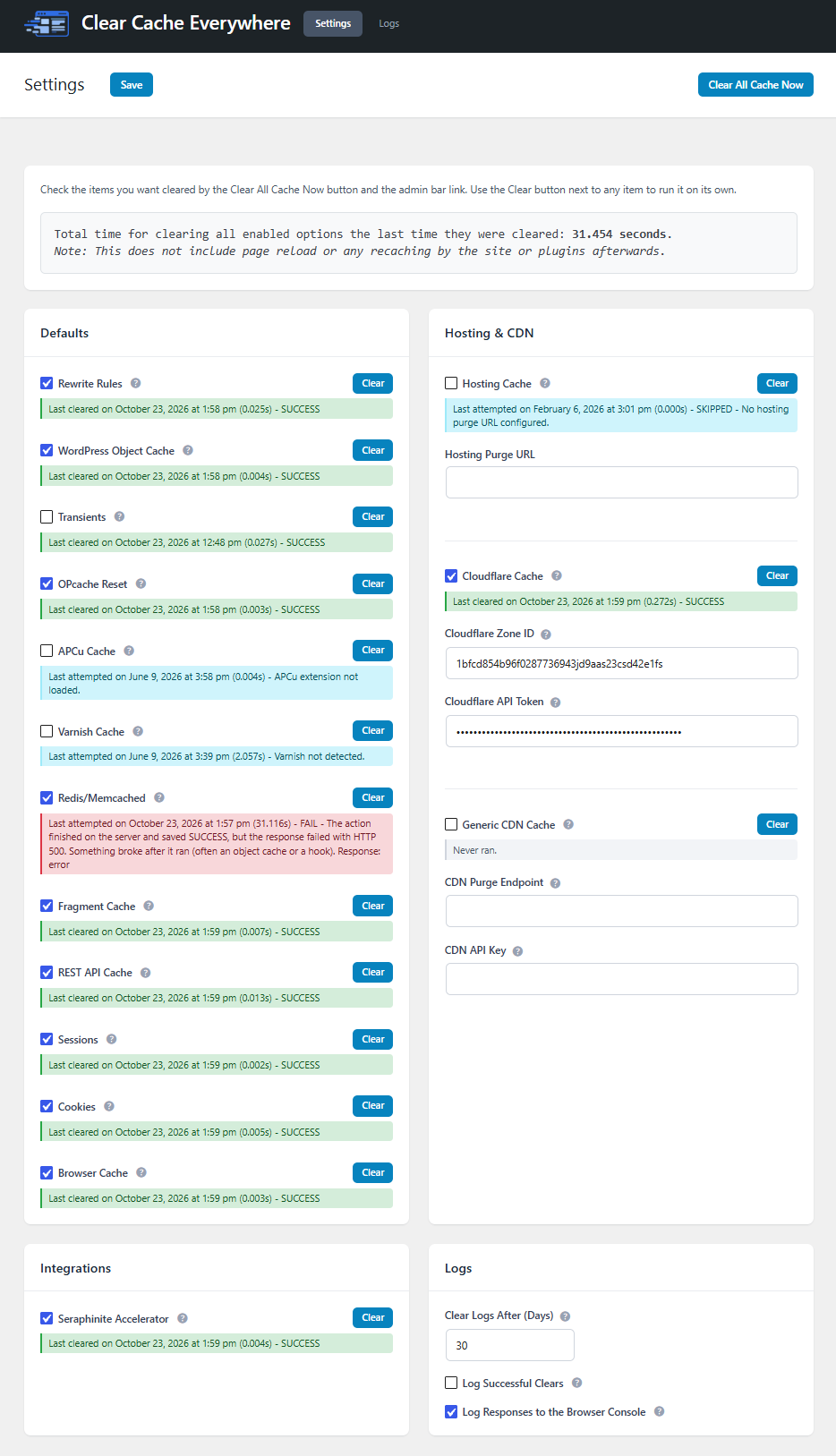
- Status at a Glance: Every action shows when it last ran and whether it succeeded, so you can see what was skipped or failed.
- Admin Bar Access: Quick purge button in the WordPress admin bar (eraser icon).
- Hosting Integration: Supports clearing hosting-level cache via configurable purge URL.
- Third-Party Support: Clears cache for supported plugins and services.
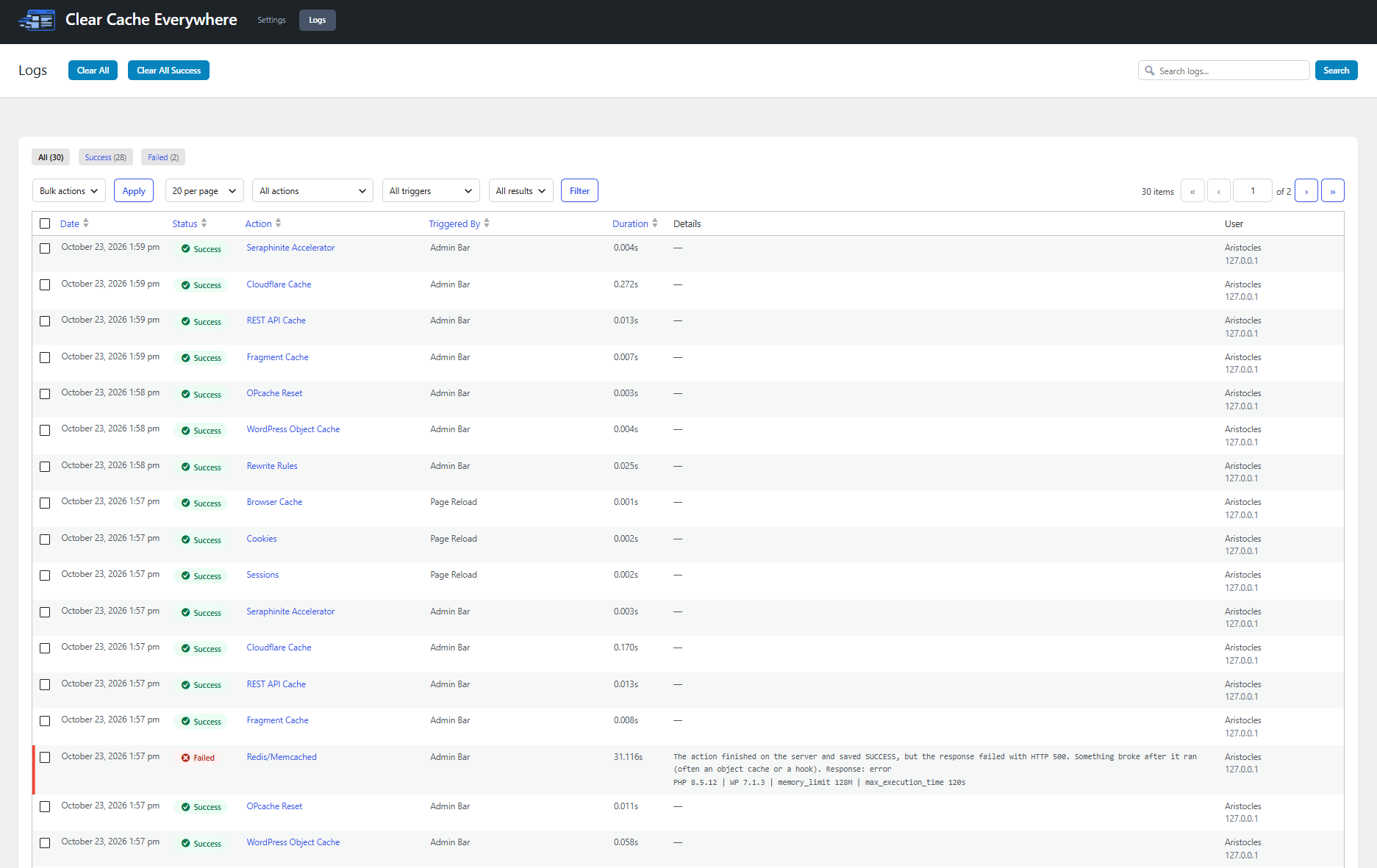
- Detailed Logging: A Logs tab records every failed clear with the HTTP status, PHP error, file and line, and server environment details. Successful clears can be logged too, with an automatic cleanup period.
- Developer Hooks: Add additional cache clearing actions via developer hooks.
The following clearing actions are available:
- Rewrite Rules – Flushes WordPress rewrite rules so permalink and routing changes apply immediately.
- WordPress Object Cache – Clears the in-memory object cache used to store database query results.
- Transients – Deletes all transients, forcing temporary data to regenerate on next load.
- OPcache Reset – Resets PHP OPcache so compiled scripts reload from disk.
- APCu Cache – Clears the APCu user cache, a PHP data cache separate from OPcache.
- Varnish Cache – Sends a purge request to Varnish to invalidate reverse proxy cached pages.
- Redis / Memcached – Flushes persistent object cache if Redis or Memcached is active.
- Fragment Cache – Clears cached template fragments generated by themes or plugins.
- REST API Cache – Removes cached REST responses to ensure endpoints return fresh data.
- Sessions – Destroys active PHP sessions. Users may need to log in again.
- Cookies – Removes site-related browser cookies set by WordPress or plugins.
- Browser Cache – Forces browsers to revalidate and reload cached static assets.
- Hosting Cache – Triggers a configured purge endpoint to clear host-level caching.
- Cloudflare Cache – Purges all Cloudflare-cached content via the Cloudflare API.
- Generic CDN Cache – Purges cache via a configured CDN endpoint and API key.
Integrations:
The plugin already supports clearing cache for the following third-party plugins:
- Autoptimize
- Breeze (Cloudways)
- Cache Enabler
- Cachify
- Cloudflare
- Comet Cache
- Cornerstone
- Elementor
- Hummingbird
- Kinsta
- LiteSpeed Cache
- Nginx Helper
- NitroPack
- Object Cache Pro
- Pantheon Advanced Page Cache
- Powered Cache
- Rocket.net
- Seraphinite Accelerator
- SiteGround Optimizer
- SpinupWP
- Swift Performance
- W3 Total Cache
- WP Cloudflare Super Page Cache
- WP Engine
- WP Fastest Cache
- WP Rocket
- WP Super Cache
- WP-Optimize
This plugin is ideal for developers, content managers, and site owners who need immediate cache flushing across multiple layers.
Demo
Installation
- Upload the plugin files to the
/wp-content/plugins/clear-cache-everywhere/directory. - Activate the plugin through the ‘Plugins’ menu in WordPress.
- The Clear Cache button will appear in the admin bar.
Screenshots

Settings page and admin bar button.

Faq
How does this plugin clear cache?
It executes multiple cache-clearing actions across WordPress core, object caching systems, server-level caching, browser cache, and supported third-party plugins. Individual actions can be triggered independently.
Why does it take so long to clear the cache sometimes?
Clearing cache is not just a single action. When you click “Clear All,” the plugin may be flushing multiple cache layers: object cache, persistent cache (Redis/Memcached), OPcache, reverse proxies like Varnish, REST caches, transients, sessions, and third-party integrations. Each layer operates differently and may require disk I/O, memory resets, or network requests.
On larger sites, clearing cache can take longer because:
• Persistent object caches may contain thousands of keys that must be invalidated.
• OPcache must reload compiled PHP scripts into memory.
• Reverse proxies and CDNs require network-based purge requests.
• Transients and fragment caches may involve large amounts of stored data.
After cache is cleared, the site must rebuild it. Themes and plugins will:
• Re-run expensive database queries.
• Recompile templates.
• Regenerate CSS/JS assets.
• Rebuild REST responses.
• Recreate transients and computed data.
This recaching happens on the next page load and can temporarily slow down the first request after a purge. That is expected behavior.
If you find that clearing everything takes longer than you prefer, certain actions (such as Transients) can be disabled from the “Clear All” button and admin bar in the settings. They can still be cleared independently from the settings page when needed.
In some cases, you may not need to clear every layer. For example, content edits typically do not require transients or OPcache to be reset. Selectively clearing only what is necessary can significantly reduce execution time.
Does this work with all hosting providers?
This depends on your hosting provider. If they offer a cache purge URL, you can configure it in the plugin settings. For example, if you have GoDaddy’s Website Security and Backups, you can navigate to Firewall > Settings > Performance > Clear Cache, then grab the Clear Cache API link to put in your settings.
Will this force browsers to load fresh content?
Yes! The plugin sends cache-control headers to prompt browsers to reload updated content.
Can I add custom cache clearing actions?
Yes. Developers can hook into the clearing process to add custom actions or settings. Full developer documentation is available here:
https://pluginrx.com/docs/plugin/clear-cache-everywhere/
Is there a function to trigger clearing cache everywhere?
Yes! A helper function is available for you to use: cceverywhere_clear_all( $log_results = false ).
The function returns the results of the cache clearing processing. Optionally, you can log the results by setting the $log_results parameter to true. This will log the results to the debug log. Results from this function also appear in the Logs tab, labeled “Helper Function.”
Where can I see what failed?
Open the Logs tab in the plugin header. Failures are always logged with the action, where it was triggered from (settings page, admin bar, individual button, URL, cron, or helper function), the duration, and the error. HTTP errors such as a 500 include the response, and PHP fatals include the file and line.
Are successful clears logged?
Not by default. Turn on Log Successful Clears in the Logs settings at the bottom of the Settings tab if you want a full history. Logs are deleted automatically after the number of days set in Clear Logs After (Days), which defaults to 30. You can also delete entries manually from the Logs tab.
What does Log Responses to the Browser Console do?
It prints each clearing request’s response to your browser’s developer console, which is useful for troubleshooting and verifying that everything has actually been cleared while on the front-end. It is on by default and can be turned off in the Logs settings.
Where can I request features and get further support?
We recommend using our website support forum as the primary method for requesting features and getting help. You can also reach out via our Discord support server or the WordPress.org support forum, but please note that WordPress.org doesn’t always notify us of new posts, so it’s not ideal for time-sensitive issues.
Reviews
Perfect Cache Purge Plugin
By  Skrlance (seanlance) on March 16, 2026
I was struggling to purge souin cache on its custom api where no other cache purge plugin supported it but this plugin has purge option on custom api and it is working, while this plugin also has option to purge cache of various others such as opcache, redis, cf, etc which makes this a perfect cache purge plugin. Moreover it is very lightweight and does the work without being bloated.
Changelog
1.2.5.2
- Update: Added a “Delete All Data on Uninstall” option in a new Advanced panel. When enabled, deleting the plugin removes its settings, last results, logs table, and scheduled cleanup
- Update: Added How-To Guide, Developer Docs, and Support buttons and the plugin version to the right side of the Settings subheader
- Tweak: Moved the Clear All Cache Now button next to the Save button in the Settings subheader
1.2.5.1
- Fix: The browser console showed “undefined” after progress messages when logging responses to the console was on
- Update: IP addresses are no longer stored in the logs. The column is removed from existing log tables automatically
- Tweak: Log Successful Clears is now off by default. Failures are always logged
- Tweak: Added Logs tab details to the readme description and FAQ
1.2.5
- Fix: Clear All no longer freezes when an action returns an HTTP error such as a 500. It now records the error and continues to the next action
- Fix: WP Engine cache clearing failed with a “Class not found” error. The call to the global WpeCommon class is now fully qualified.
- Fix: An action that saved a success but whose response then failed (for example, a 500 after flushing Redis/Memcached) is now recorded as a failure instead of showing as successful after the page reloads
- Fix: Fatal errors that happen while an action runs, or in the hooks right after it, are now captured with the file and line
- Fix: Clearing Fragment Cache and REST API Cache now deletes in batches and never touches this plugin’s own options, which could cause timeouts and 500 errors on large sites
- Fix: Unchecking a checkbox that is on by default now saves correctly
- Update: Added a Logs tab with filters, search, bulk delete, and Clear All / Clear All Success buttons. Failures include the HTTP status, PHP error, and environment details (PHP, WordPress, memory limit, execution time)
- Update: Added Logs settings: Clear Logs After (Days), Log Successful Clears, and Log Responses to the Browser Console
- Update: Added Settings and Logs tabs to the header
- Update: Setting descriptions moved to tooltips and fields restyled to match our other plugins
- Update: Every action now shows a persistent status row (“Never ran.” or the last result), and a spinner shows while an action is running or finalizing
- Tweak: Renamed the button to Clear All Cache Now
- Tweak: Added more spacing between the settings header and content, and between result rows and the next option
- Tweak: Settings assets now load only on the Settings tab
1.2.4
- Update: Added Seraphinite Accelerator integration
- Note: Seraphinite processes cache deletion in the background, so it may take up to a minute to take effect
- Update: Added a Settings link to the plugin’s action links on the Plugins page
- Update: Rebranded the settings page with a new header, subheader, and rounded content box to match our PluginRx rebrand
- Update: Settings page colors now automatically inherit from Admin Help Docs when it is active
- Update: Settings now save via AJAX from the Save button in the header, with Ctrl+S / Cmd+S support and an inline saved confirmation
- Update: Added an unsaved changes reminder and a browser warning when leaving the settings page with unsaved changes
- Tweak: Moved the Clear Cache Now button to the right side of the header
- Tweak: Clear Cache Now now uses the newly saved settings immediately after saving, without a page reload
1.2.3
- Fix: Nginx Helper integration was calling a non-existent function; now uses the correct
rt_nginx_helper_purge_allaction hook - Fix: Hummingbird integration used
function_exists()on a class method, which never evaluates true; now usesmethod_exists() - Update: Added Breeze, NitroPack, and Pantheon Advanced Page Cache existence guards to their clearing methods and settings field registration
- Update: Added Cache Enabler, SpinupWP, Cachify, Powered Cache, Rocket.net, Object Cache Pro, and WP Cloudflare Super Page Cache integrations
- Update: Added generic CDN purge action (purge URL + API key) for CDNs without a dedicated integration
- Update: All integration settings fields now verify the target plugin’s function/class/hook actually exists before displaying, in addition to
is_plugin_active(), so unverified or version-mismatched integrations no longer surface as failing checkboxes
1.2.2.1
- Fix: Cornerstone integration wasn’t working on X Theme Pro
1.2.2
- Fix:
cceverywhere_clear_all()helper function now correctly supports the$log_resultsparameter - Fix: Custom callbacks on page-context actions now fire correctly
- Fix: Hummingbird cache detection now uses
method_exists()instead offunction_exists() - Fix: Added capability check to
clear_all()for requests coming through the URL parameter - Fix: Auth cookies
wordpress_sec_*andwp-settings-*are now preserved when clearing cookies - Fix: Removed invalid
hrefattribute from Clear Cache button on settings page - Performance:
get_clearing_actions()now caches its result to avoid redundant calls per request - Developer: Added
cceverywhere_clearing_actionsfilter to allow modifying the actions array programmatically - Update: Clarified readme description of available clearing actions
- Update: Added APCu cache clearing action
- Update: Added Breeze (Cloudways) integration
- Update: Added WP Engine cache integration
- Update: Added Kinsta cache integration
- Update: Added NitroPack integration
- Update: Added Pantheon Advanced Page Cache integration
- Update: Clarified readme description of available clearing actions
1.2.1.1
- Compatibility: Increased minimum required WordPress version to 6.0
- Compatibility: Tested with WordPress 7.0
1.2.1
- Update: Added option to clear Cloudflare cache
1.2.0
- Update: Added
cceverywhere_before_clearandcceverywhere_after_clearhooks - Update:
cceverywhere_before_clear_cacheandcceverywhere_after_clear_cacheremoved - Update:
cceverywhere_custom_settingshook updated to acceptrun_contextandcallbackhooks, please see updated developer docs - Update: Added animated border to admin bar while it’s clearing cache
- Update: Moved some actions to ajax while leaving sessions, cookies, and browser cache for page reloads
- Update: Added descriptions to each action
- Update: Added individual clear buttons to each action
- Update: Added logging of last results, displayed on settings page
- Update: Removed notices and
show_skipped_noticehook - Update: Added opcache_reset, varnish, redis_memcached, fragment_cache, and rest_api_cache
1.1.1
- Tweak: Update admin bar spacing
1.1.0
- Update: New support links
1.0.2.1
- Fix: Sanitized cookie names
- Update: Moved scripts and styles to enqueue
1.0.2
- Update: Updated author name and website per WordPress trademark policy
1.0.1
- Initial Release on March 19, 2025