

Spam protection, AntiSpam, FireWall by CleanTalk
Description
Advanced anti-spam protection for comments, users & contact forms, with Spam FireWall and cloud filtering. We catch spam others miss!
🛡️ Anti-Spam Protection for your entire WordPress site
- Contact forms — block spam submitted through Contact Form 7, WPForms, Elementor Forms, Gravity Forms, Fluent Forms, Formidable Forms, and many others.
- WordPress comments — automatically detect and block spam comments.
- WooCommerce — stop fake orders, spam registrations, and spam reviews.
- User registrations — prevent spam accounts and automated registrations.
- Subscriptions and bookings — filter unwanted and automated submissions.
- Email validation — detect fake, disposable, and suspicious email addresses.
- Spam FireWall — block known spam bots before they reach your forms.
🧩 No CAPTCHA. No Puzzles. Less Friction.
CleanTalk analyzes submissions automatically in the background. Visitors don’t need to solve CAPTCHA challenges, select images, or complete additional verification steps.
⚡Quick Setup
Install the plugin, connect it to the CleanTalk Anti-Spam service, and your WordPress site is protected.
⭐ Public reviews
It’s more than just a tool to combat spam; it’s an integral component that enhances the overall quality and performance of your website.
techbusinessnews.com.auImprove Your Security WordPress Spam Protection With CleanTalk Anti-Spam
The Hacker News.
Free trial then $12 per year
CleanTalk is an anti-spam plugin which works with the premium Cloud Anti-Spam service cleantalk.org. This plugin as a service https://developer.wordpress.org/plugins/wordpress-org/detailed-plugin-guidelines/#6-software-as-a-service-is-permitted
🗂️ Managing Multiple Websites?
CleanTalk also works well for agencies, developers, and website managers. Protect and manage multiple client websites from one CleanTalk account with unlimited checks for spam.
💬 AntiSpam protection for comments
Native spam protection for WordPress, JetPack comments and any other comment plugins. The plugin moves spam comments to SPAM folder or you can set the option to ban spam comments silently. You can also enable the option in the plugin settings to auto-delete comments from SPAM folder.
📩 Contact Form 7 Antispam
Plugin extends spam protection for Contact Form 7 (CF7). It can be used with any other third-party spam filters.
How to protect your Contact Form 7 using CleanTalk Anti-Spam plugin
Contact Form by WPForms Antispam
Plugin extends Contact Form by WPForms to provide spam protection. It filters spam submissions for each type of forms – simple contact form, marketing form, request a quote and etc.
Antispam for WooCommerce & fake orders filter
Anti-spam by CleanTalk filters spam registrations, spam reviews, and fake orders for WooCommerce (any eCommerce plugin as well). The plugin is fully compatible with WooCommerce 2.1+ and online stores.
Many other great contact, signups and all kind of forms that supported by Anti-Spam plugin by CleanTalk
- Asgaros Forum
- Avada Forms
- AWeber form builder
- Awesome Support – WordPress HelpDesk & Support Plugin
- Back In Stock Notifier for WooCommerce | WooCommerce Waitlist Pro
- bbPress by John James Jacoby
- Brave Popup Builder – Popup, Optins, Lead Generation, Survey & Interactive Content
- Brevo – Email, SMS, Web Push, Chat, and more by Brevo
- Calculated Fields Form
- Chatway Live Chat – AI Chatbot, Customer Support, FAQ & Helpdesk Customer Service & Chat Buttons
- Contact Form Clean and Simple
- Contact Form by BestWebSoft – Advanced WP Contact Form Builder for WordPress
- Contact Form Plugin by Fluent Forms Ninja forms
- Contact Form by Supsystic
- Contact Form Email
- Constant Contact Forms
- Comments – wpDiscuz By AdvancedCoding
- Customer Reviews for WooCommerce
- Floating Chat Widget: Contact Chat Icons, Telegram Chat, Line Messenger, WeChat, Email, SMS, Call Button – Chaty
- Forminator Forms – Contact Form, Payment Form & Custom Form Builder
- Easy Digital Downloads – eCommerce Payments and Subscriptions made easy
- eForm – WordPress Form Builder
- Elementor – Build, Design & Manage Forms From One Place
- Elfsight Blocks for Elementor — 80+ Widgets
- Events Manager – Calendar, Bookings, Tickets, and more! By Marcus (aka @msykes)
- Everest Forms – Contact Form, Payment Form, Quiz, Survey & Custom Form Builder with AI
- FiboSearch – Ajax Search for WooCommerce
- Flamingo
- Fluentbooking.com
- Formidable Forms – WordPress Form Builder for Contact Forms, Calculators, Quizzes & More
- Form Maker by 10Web – Mobile-Friendly Drag & Drop Contact Form Builder
- GeoDirectory – WP Business Directory Plugin and Classified Listings Directory
- GiveWP – Donation Plugin and Fundraising Platform
- gravityforms.com – Powerful data capture fueled by Gravity Forms
- Gwolle Guestbook
- Happyforms – Form Builder for WordPress: Drag & Drop Contact Forms, Surveys, Payments & Multipurpose Forms
- HivePress – Business Directory, Listings & Classified Ads Plugin
- HubSpot All-In-One Marketing – Forms, Popups, Live Chat
- Hustle – Email Marketing, Lead Generation, Optins, Popups
- JetFormBuilder — Dynamic Blocks Form Builder
- Jetpack – WP Security, Backup, Speed, & Growth
- Jotform – Online Forms — Customizable Payment, Contact, Quiz, Survey Form Builder
- Kadence Blocks — Page Builder Toolkit for Gutenberg Editor
- Kali Forms (Free & Pro) — Contact Form & Drag-and-Drop Builder
- Klaviyo
- Kulahub
- Landing Page Builder – Coming Soon page, Maintenance Mode, Lead Page, WordPress Landing Pages
- Leaky Paywall
- LearnPress – WordPress LMS Plugin for Create and Sell Online Courses
- Lead Form Builder & Contact Form By ThemeHunk
- Login & Register Customizer – Popup | Slider | Inline | WooCommerce
- MailChimp Forms by MailMunch
- MailOptin – Popup, Optin Forms & Email Newsletters for Mailchimp, HubSpot, AWeber Etc.
- My Sticky Elements – All-in-one Sticky Floating Contact Form, Call, Click to Chat, and 50+ Social Icon Tabs
- MetForm – Contact Form, Survey, Quiz, & Custom Form Builder for Elementor
- Newsletter – Send awesome emails from WordPress by Stefano Lissa
- Newsletters by Tribulant Software
- Newsletters – MC4WP: Mailchimp for WordPress
- NEX-Forms – Ultimate Forms Plugin for WordPress by Basix
- Nextend Social Login and Register by Nextendweb
- Ninja forms by Kevin Stover
- Piotnet by piotnet.com
- Product Enquiry for WooCommerce (Now with AI Assistant) By WisdmLabs
- Quform by quform.com
- QuickCal by quickcal.co
- RegistrationMagic – Custom Registration Forms, User Registration, Payment, and User Login By Metagauss
- Simple Registration for WooCommerce By Astoundify
- Smart Forms – when you need more than just a contact form By EDGARROJAS
- Strong Testimonials By WP Chill
- SureForms – Drag & Drop Contact Form & Form Builder, Payment Form, Survey, Quiz & Calculator By Brainstorm Force
- User Registration & Membership – Free & Paid Memberships, Subscriptions, Content Restriction, User Profile, Custom User Registration & Login Builder By wpeverest
- Visual Form Builder By Matthew Muro
- WP Booking System – Booking Calendar By Roland Murg
- User Frontend: AI Powered Frontend Posting, User Directory, Profile, Membership & User Registration By weDevs
- WS Form LITE – Drag & Drop Contact Form Builder By Mark Westguard
- Wufoo Shortcode By wronganswersonly
- WP User Frontend, UserPro
- WordPress Landing Pages
- ZeroBounce Email Verification & Validation By zerobounce
- Zoho Forms – Drag & Drop Form Builder for Websites – Contact Forms, Payment Forms, Order Forms & More By Zoho Forms
Protection for the forms above works as a built-in feature of Anti-Spam by CleanTalk without requiring any additional actions from the user.
Check existing comments for spam. Bulk spam comments removal. Spam comment Cleaner
With the help of anti-spam by CleanTalk you can inspect through existing comments to find and quickly delete spam comments at once. To use this function, go to WP Console -> Comments -> Find spam comments.
Check existing users for spam. Bulk spam accounts removal. Spam users cleaner
With the help of anti-spam by CleanTalk you can inspect through existing accounts to find and quickly delete spam users at once. For use this function, go to WP Console -> Users -> Check for spam. Also, you can export a list of spam users to the CSV.
Private black lists for anti-spam service
Automatically block comments and registrations from your private black IP/email address list.
Hide «Website» field for comments
This option hides the «Website» field from standard WordPress comments forms. After that spammers won’t be able to send spam links using «Website» field in the bottom of the comments form.
Low false/positive rate
This plugin uses multiple anti-spam tests to filter spam bots having as low false/positive rate as possible.
Spam FireWall
Spam FireWall allows blocking the most active spam bots before they get access to your website. It prevents spam bots from loading website pages so your web server doesn’t have to perform all scripts on these pages. Also it prevents scanning of pages of the website by spam bots. Therefore Spam FireWall significantly reduces the load on your web server. Spam FireWall also makes CleanTalk the two-step protection from spam bots. Spam FireWall is the first step and it blocks the most active spam bots. CleanTalk Anti-Spam is the second step and checks all other requests on the website in the moment of submitting comments/registers etc. How does it work?
- The visitor enters to your web site.
- HTTP request data are being checked in the nearly 5.8 million of the identified spam bot IPs.
- If it is an active spam bot, the bot gets a blank page, if it is a visitor then he receives a normal page. This process is completely transparent for the visitors.
All the CleanTalk Spam FireWall activity is being logged in the process of filtering.
Spam FireWall: Anti-Flood & Anti-Crawler
Spam FireWall: Anti-Flood and Anti-Crawler options are intended for blocking unwanted bots, content parsing, shop goods prices parsing or aggressive website scanning bots. Learn more https://cleantalk.org/help/anti-flood-and-anti-crawler
By default, well-known good bots — including AI crawlers such as GPTBot (ChatGPT), ClaudeBot (Claude), Google-Extended (Gemini), and Copilot — are allowed. You can choose which of these bots to block individually in your private lists. Blocking a bot will stop the corresponding AI service from accessing your content.
How to protect sites from spam bots without CAPTCHA?
CleanTalk Anti-Spam protects websites from spam bots without using traditional CAPTCHA, reCAPTCHA, or other visitor challenges. Instead of showing CAPTCHA puzzles, the service uses behavioral analysis, invisible JavaScript tests, and a global spam database to detect spam automatically in the background. This CAPTCHA-free anti-spam protection works for contact forms, comments, registrations, and WooCommerce checkouts without creating friction for real visitors. By replacing CAPTCHA with automated spam detection, CleanTalk helps improve usability, accessibility, and conversion rates while still blocking spam effectively.
Sometimes CAPTCHA reminds us of the doodles of a two year old child. For users with vision problems CAPTCHA is an insurmountable obstacle. Users hate captcha. Captcha for users means “hate”. Unreadable CAPTCHA stops about 80% of site visitors. After 2 failed attempts to decipher CAPTCHA 95% of visitors reject further attempts. At the sight of CAPTCHA and after input errors, many visitors leave the resource. Thus, CAPTCHA helps to protect the resource spam both from bots and visitors. CAPTCHA is not a panacea from spam. Doubts concerning the Need for CAPTCHA?
“Ultimately, CAPTCHAs are useless for spam because they’re designed to tell you if someone is ‘human’ or not, but not whether something is spam or not.” Matt Mullenweg
Real-time email validation. Is email real or Not.
It is very important to be sure that the user used his real email address. Spambots very often use fake email addresses, i.e. which addresses do not exist.
CleanTalk will check email addresses for existence in real time.
Non-existing email addresses also entail several other problems for website owners.
- You can never contact them by email,
- the client will never receive any notifications from you (account activation letter, password recovery, email distribution, notifications, etc.),
- if you use email marketing for your clients, then a large number of nonexistent emails in the mailing list may result in your IP address being added to various blacklists of email servers.
Improve your email list with email validation without fake emails.
Blocking disposable & temporary emails
Block fake and suspicious users with disposable & temporary emails to improve email delivery. So, it also prevents malicious activity, spam bots, and internet trolls.
Stops Spam in Search Form
Spam bots can use your search form to make a GET request with spam text. CleanTalk Anti-Spam has the option to protect your website search form from spam bots. Each time, the search generates a new page and if there are many requests, this can create additional load. So, under some conditions, spam searches can be indexed, which affects SEO,
- Anti-Spam protection for website search forms repels spam bots.
- If your search form gets data too often the CleanTalk Anti-Spam plugin will add a pause and increase it with each new attempt to send data. It saves your web server processor time.
- Spam protection allows you to not forbid indexation for the crawler bots if you really need it but simultaneously you will get protection from spam bots.
You will always know what users were looking for on your site.
Disable comments
This option disables comments on your site. You can choose one or several options:
- Disable comments for posts
- Disable comments for pages
- Disable comments for media
When using Disables comments, existing comments will not be deleted and will remain on the pages.
Email, Phones Address Encoder
CleanTalk Anti-Spam offers a feature called “Encode contact data” that is designed to encode all email addresses on the website pages. Encoding email, phontes addresses increases the level of protection of contact data from being abused, parsed, getting spammed and used in spam mailing lists by bots and online criminals. To reveal the encoded email address simply click on it and it will be decoded instantly.
Honeypot field
The option helps to block bots. The honeypot field option adds a hidden field to the form. When spambots come to a website form, they can fill out each input field. Enable this option to make the protection stronger on these forms. Learn more about supported forms here.
Installation
Installation instructions
-
Download, install and activate ‘Anti-spam by CleanTalk’.
-
Get Access key https://cleantalk.org/register
-
Enter Access key in the settings: WordPress console -> Settings -> Antispam by CleanTalk
-
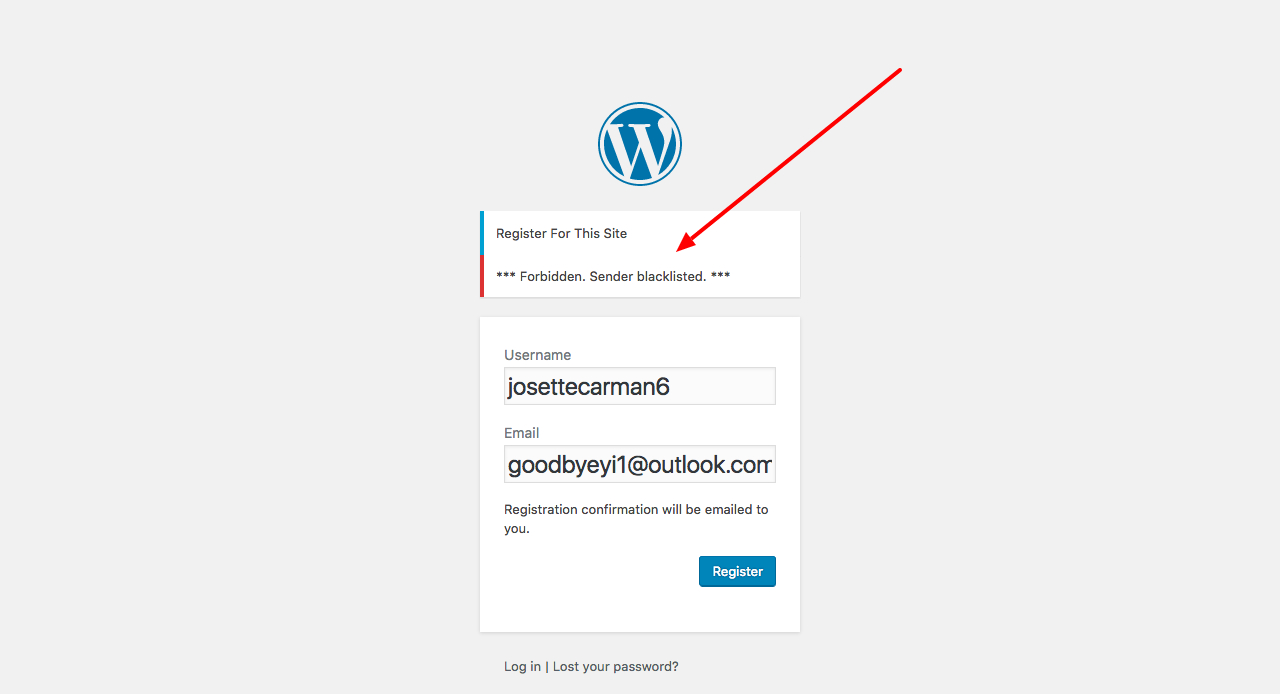
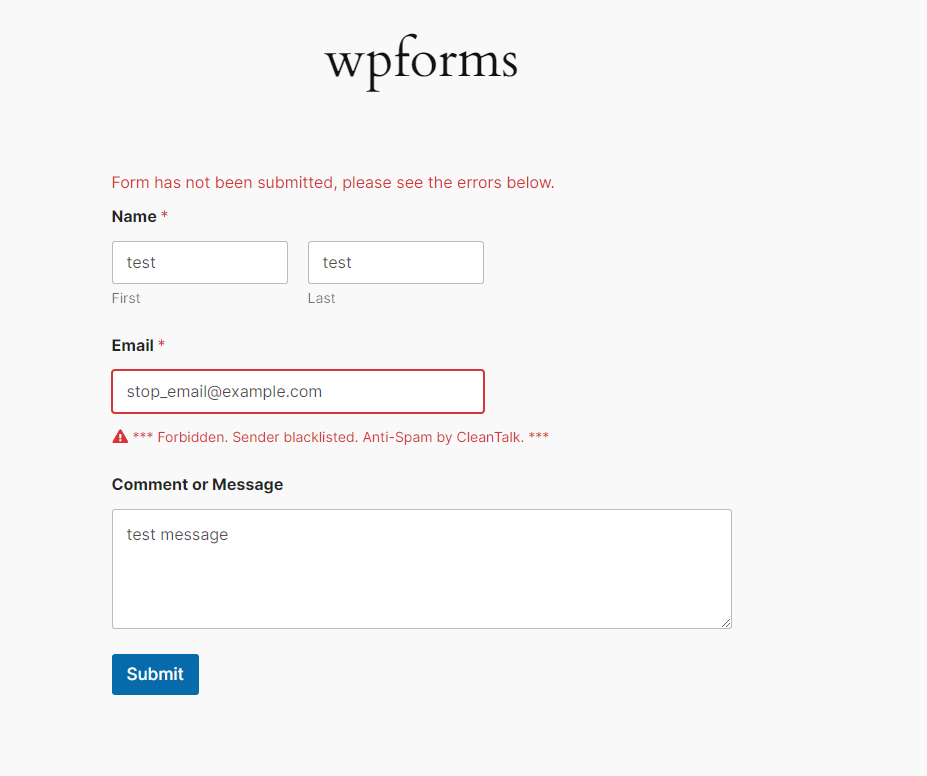
Do dummy spam comment (registration or contact message) with email [email protected]. You should see notice: Forbidden. Sender blacklisted.
-
Done! The plugin is ready to use.
Video guide – Anti-Spam Plugin Installation in WordPress
Important! To test spam protection you must post a dummy submissions as website visitor (use must logged out from WordPress console), because the plugin doesn’t filter submissions from WordPress administrators.
How can setup plugin in WPMU version?
In WordPress multisite version you can switch the plugin to use Global Access key. In this way the plugin doesn’t show any options to enter Access key in plugin settings and doesn’t show Trial banner in WordPress backend. To setup global CleanTalk access key for all websites in WPMS, define constant in your wp-config.php file before defining database constants:
define('CLEANTALK_ACCESS_KEY', 'place your key here');
Make it before you activated the plugin. If the plugin already activated, deactivate it and add the code and active it again.
Now, all subsites will have this access key.
Screenshots

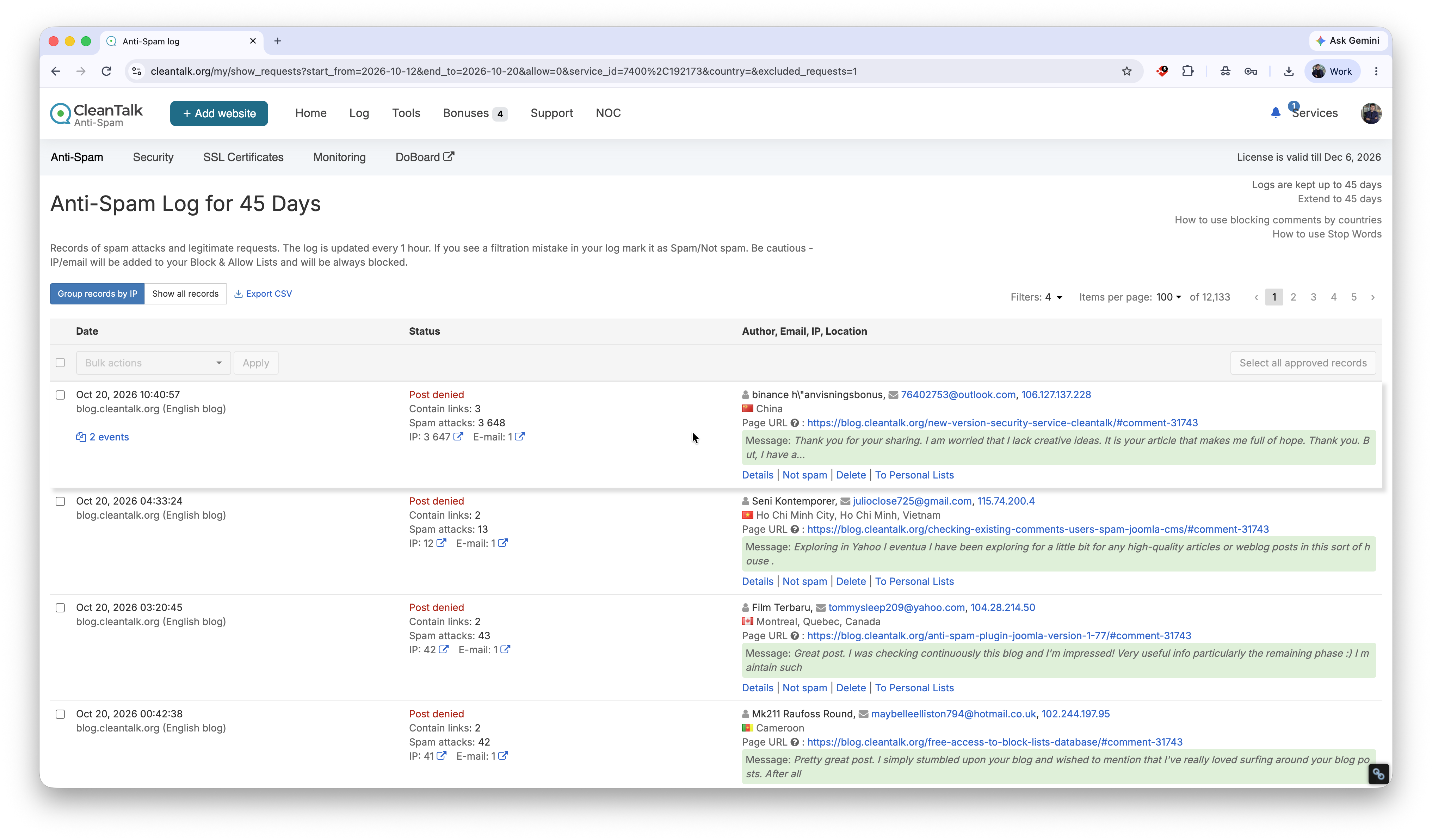
CleanTalk automatically blocks spam from contact forms, comments, registrations, and WooCommerce without CAPTCHA.
The AntiSpam plugin rejected a spam bot on a CAPTCHA-free registration form. The plugin provides an explanation to visitors and website owners for each rejected comment, registration, or contact message.
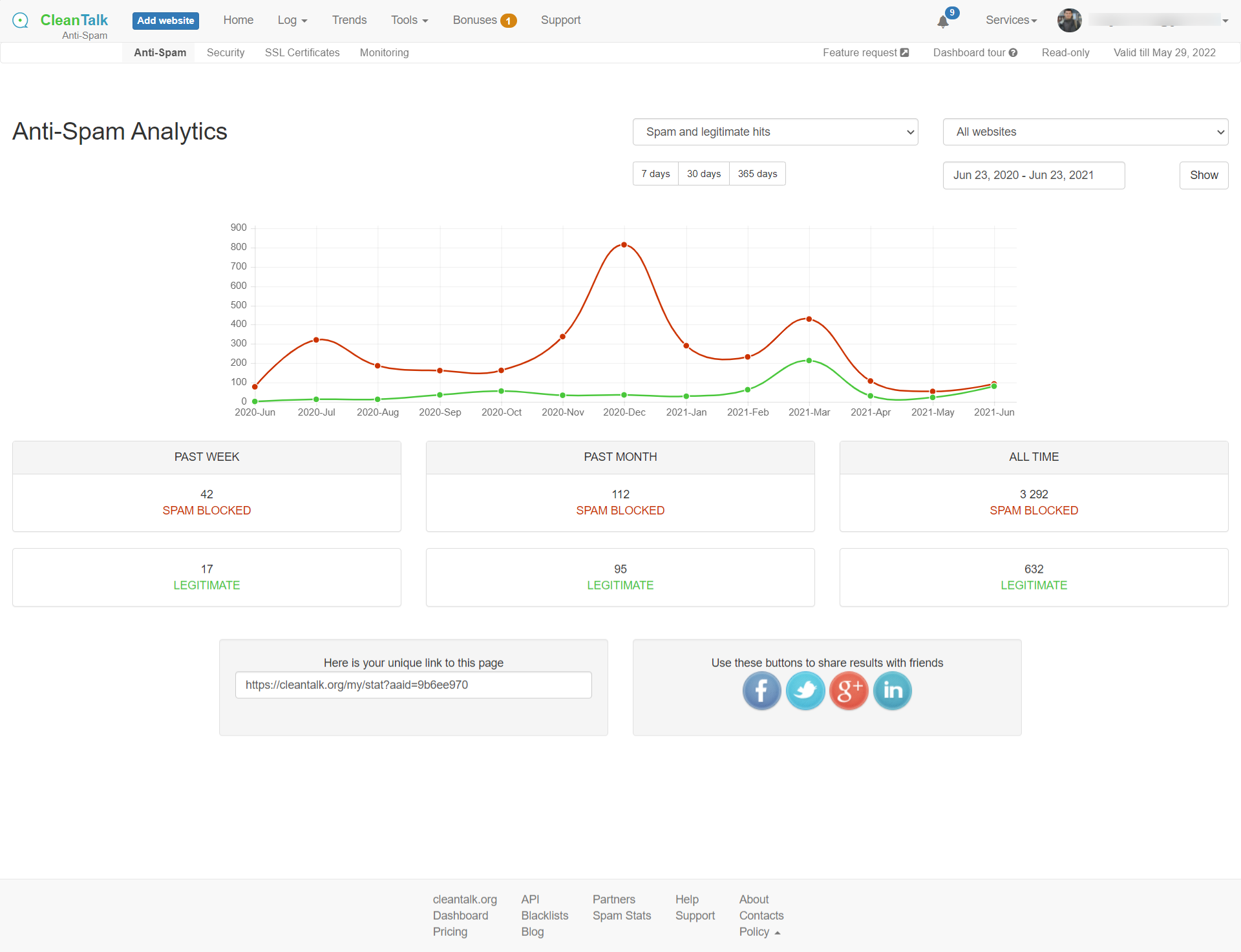
Use the AntiSpam analytics tool for each website in the service dashboard to view spam and legitimate request statistics.
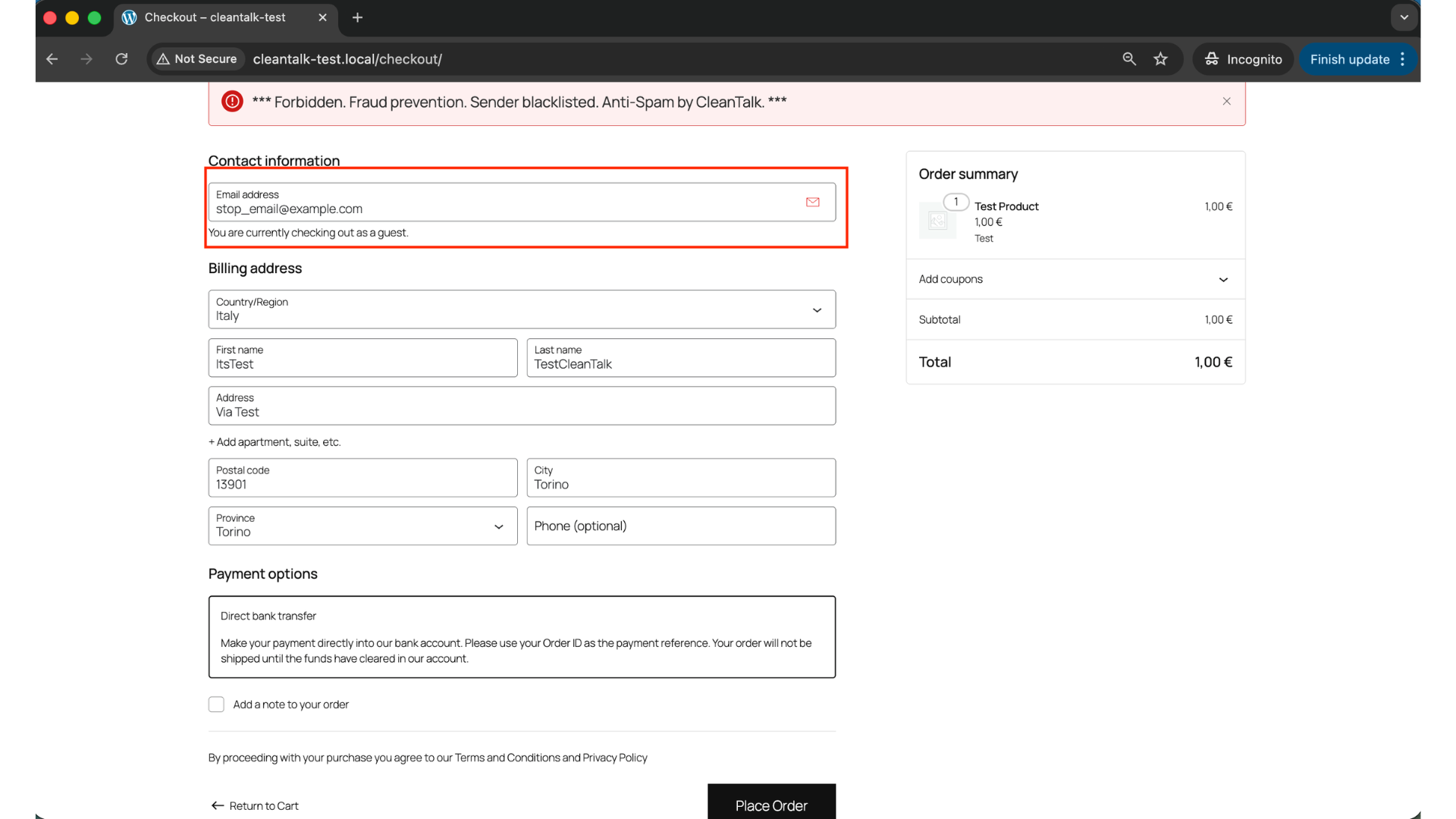
Prevent spammers from placing WooCommerce orders.
Prevent spam from other forms as well, including WPForms.
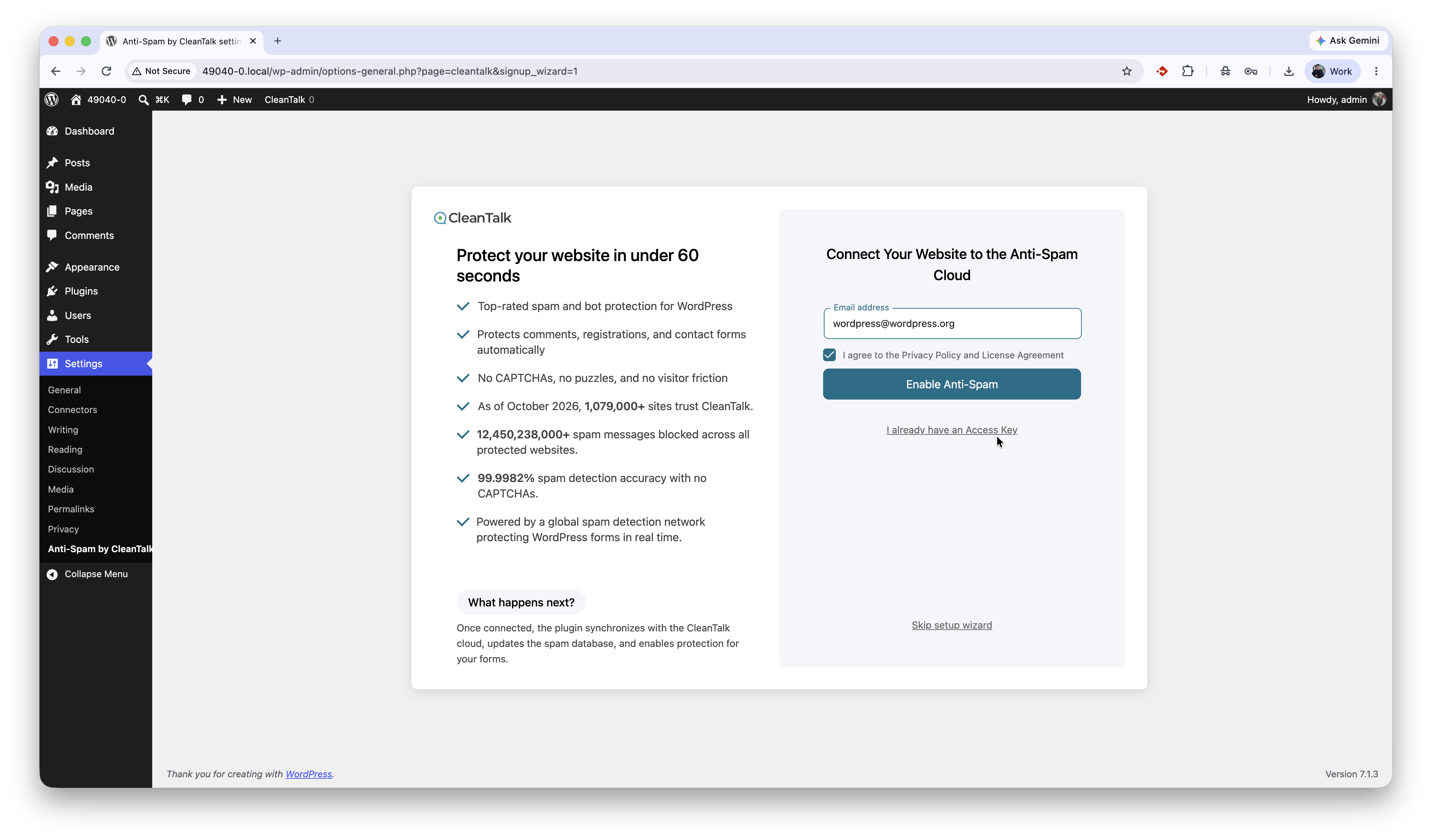
One step set-up wizard.
Faq
Yes, CleanTalk works completely without CAPTCHA, puzzles, or manual user challenges.
Yes, CleanTalk stops spam in contact forms, registration forms, comments, and other forms on your website. It uses a combination of algorithms and a cloud-based database to identify and block spam submissions in real-time.
Yes, CleanTalk protects WooCommerce from fake orders and spam registrations. It checks all incoming orders and registrations against its anti-spam database and algorithms to ensure that only legitimate users can place orders or register on your site.
CleanTalk protects all WordPress forms, including but not limited to:
* Comments
* Registration forms
* Contact forms
* Sign-up forms
* Search forms
* Subscription forms
Spammers want to get backlinks from your site to improve their site’s PageRank or redirect your visitors to malicious sites.This level of spam can damage your reputation with readers and commentators if you fail to tackle it. It is not uncommon for some WordPress websites to receive hundreds or even thousands of comments every week. However, by using a CleanTalk plugin, spam can be easily handled by your WordPress website.
Yes, it is. The plugin doesn’t block mobile visitors as well as desktop website visitors. It uses several independent anti-spam tests to decrease the number of false outcomes and to have as low false-positive rate as possible. Multiple anti-spam tests help to avoid false/positive blocks for real website visitors even if one of the tests failed.
Spam comments are being moved to SPAM folder by default or you can set the option to ban spam comments silently.
Please use the email [email protected] for comments, contacts or signups to see how the anti-spam protection works. Also, you can see the logs for the last 7 days in the Dashboard or look at the folder “Spam” for banned comments.
Please, note – administrator’s actions are NOT being checked.
The plugin uses several simple tests to stop spammers:
- JavaScript anti-spam test. 99% of spam bots don’t have full JavaScript functions support. So, the plugin has the code which can be run by normal visitor and can’t be run by the spam bot.
- Email, IP, domain spam activity list entries check. The plugin uses spam activity database online at cleantalk.org, consisting of more than 20 billion spam activity records of IPs, Emails, Domains and ASN. If the sender’s IP or Email is in the database, the sender gets some spam scores. To reduce false/positive rate the plugin not only uses the blacklist test to ban spammers, the sender will be banned when and only when multiple spam tests have been failed.
- Comment submit time. Spam bots usually submit the info immediately after the page has been loaded, this happens because spam bots don’t actually fill the web form, they just send $_POST data to the blog. The normal visitor sends the data after several seconds or minutes.
The plugin does not filter trackbacks or pingbacks, but it can disable them using WordPress core functionality. To enable this option, go to: WordPress Dashboard Settings Anti-Spam by CleanTalk Advanced Settings “Disable Pingbacks and Trackbacks”.
Yes, you can. The plugin has the option to test all pending comments via database of spam active IP/Email, found spam comments will be moved to Trash folder.
The plugin checks all non-spam comments in the blacklist database and shows you those senders who have spam activity on other websites.
There are some differences between blacklist database and API to protect you from spam bot registrations/comments online. Blacklists show all history of spam activity, but our API (which is used in spam tests) relies on other parameters too: last day of activity, number of spam attacks during the last days etc. These mechanisms help us to reduce the number of false outcomes. So, there is nothing strange, if some emails/IPs are not found by bulk comments/accounts test.
To check comments please go here:
WordPress console -> Comments -> Find spam comments
To check users please go here:
WordPress console -> Users -> Find spam users
Yes, the plugin is compatible with WordPress MultiUser. Each blog in multisite environment has individual anti-spam options for the protection from spam bots.
There are a few reasons for this:
- With the indexing of your web-site by the search systems, appearance of external links and better search results position, your web-site attracts more and more spambots.
- Non-transparent protection systems like CAPTCHA or question/answer, that don’t have spam attacks stats, don’t let you see the whole picture, or the picture is incomplete.
- Counting methods for spam attacks and spam bots are different for different systems, thus the diversity appears. We seek to provide detailed stats.
The plugin has several options to detect spam bots and humans. If you just post spammy text like this:
"I want to sell something", "Buy something here.." and etc
the comments will be passed, because the plugin detects sender as a human. So, use special email [email protected] to test the anti-spam functionality or wait a few days to see how the plugin works.
The plugin includes a free trial and requires a paid subscription after the trial ends. It uses the CleanTalk cloud to filter spam on your website, providing highly effective spam protection. Cloud-based filtering is more sophisticated than standalone solutions, reducing the risk of blocking legitimate visitors while allowing fewer spammers through.
Pricing starts at $12/year/site and includes unlimited spam checks.
Anti-spam by CleanTalk doesn’t use static HTML code in its templates, so all anti-spam functions work correctly with any WordPress cache plugins.
Yes, it does. Plugin protects web-forms on your websites which send data to third-party servers (like MailChimp). To enable this protection set the option ‘Protect external forms’ in the plugin settings.
CleanTalk is fully compatible with CloudFlare. Service doesn’t filter CloudFlares IP’s (AS13335) through blacklists database, so in this case plugin/service filters spam bots using other anti-spam tests.
Yes, it is. CleanTalk works with any CDN system, i.e. CloudFlare, MaxCDN, Akamai.
Yes, you can. Follow this guide https://cleantalk.org/help/api-check-message
This script is used for AJAX JavaScript checking. Different themes use different mechanisms of loading, so we use two methods for loading our script. If you absolutely know what you are doing, you can switch one of the methods off by defining constants in your wp-config.php file:
define('CLEANTALK_AJAX_USE_BUFFER', false); //false - don't use output buffering to include AJAX script, true - use it
or
define('CLEANTALK_AJAX_USE_FOOTER_HEADER', false); //false - don't use wp_footer() and wp_header() for including AJAX script, true - use it
Yes, you can. There is a special setting in plugin settings.
You could use this guide to learn more: https://cleantalk.org/help/exclusion-from-anti-spam-checking#wordpress
Yes, you can exclude your data. There is a special setting in plugin settings.
You could use this guide to learn more: https://cleantalk.org/help/exclusion-from-anti-spam-checking#WordPress_field_exclusions
Use special IP 10.10.10.10 in URL to test Spam FireWall. For example,
https://cleantalk.org/blog/?sfw_test_ip=10.10.10.10
Attention! The incognito mode should be enabled in your browser when you do a test. To enable incognito mode press Ctrl+Shift+N for Chrome, Opera и Safari browsers; press Ctrl+Shift+P for Firefox, Internet Explorer and Microsoft Edge. A full guide to enable Incognito mode is here: https://www.wikihow.com/Activate-Incognito-Mode
To set up global CleanTalk access key for all websites in WPMU, define constant in your wp-config.php file before defining database constants:
define('CLEANTALK_ACCESS_KEY', 'place your key here');
Now, all subsites will have this access key.
CleanTalk works with Varnish, it protects WordPress against spam, but by default the plugin generates a few cookies for the protection from spam bots and it also disables Varnish cache on pages where CleanTalk’s cookies have been stored. To get rid of the issue with cache turn off the option ‘Set cookies’ in the plugin settings.
WordPress console -> Settings -> CleanTalk -> Advanced settings
Now the plugin will protect WordPress comments, registrations and most of popular contact forms, but will not protect some of rarely used contact forms.
Yes, it does. But you have to turn off the SpamFireWall and the option ‘Use AJAX for JavaScript check’ in Advanced settigns of the plugin to be fully compatible with Accelerated Mobile Pages.
No. You don’t need to change anything in the plugin’s settings or in your CleanTalk Dashboard. The plugin will work regardless of the protocol.
By default, all spam comments are placed in the spam folder, now you can change the way the plugin deals with spam comments:
- Move to the Spam folder. All spam comments will be placed to the folder “Spam” in the WordPress Comments section except comments with Stop-Words. Stop-Word comments will be always stored in the “Pending” folder.
You can prevent the proliferation of Spam folder. It can be cleaned automatically using the option “Keep spam comments for 15 days.” Enable this option in the settings of the plugin: WordPress Admin Page -> Settings -> Antispam by CleanTalk -> Advanced settings -> enable “Keep spam comments for 15 days” -> Save Changes.
-
Move to Trash. All spam comments will be placed to the folder “Trash” in the WordPress Comments section except comments with Stop-Words. Stop-Word comments will be always stored in the “Pending” folder.
-
Ban comments without moving to WordPress backend. All spam comments will be deleted permanently without going to the WordPress backend except comments with Stop-Words. Stop-Word comments will be always stored in the “Pending” folder.
What comments were blocked and banned can be seen in the Anti-Spam Log here: https://cleantalk.org/my/show_requests?int=week
To manage the actions with spam comments, go to the Control Panel, select the website you want to change the actions for and go to “Settings” under the name of the website.
Please, read more here:
https://cleantalk.org/help/spam-comment-management
Yes, it is. Please read this article,
https://cleantalk.org/publicoffer#cleantalk_gdpr_compliance
Yes, CleanTalk can be used as an alternative to reCAPTCHA, but it works differently.
Instead of showing challenges, it blocks spam automatically in the background with no user interaction, improving user experience and conversions.
Reviews
Excellent spam protection and top-notch support
By  gnostis on October 15, 2026
It does an excellent job of keeping spam away. It blocks spam comments. On top of that, the support team is outstanding – professional, responsive, and genuinely helpful. I highly recommend it to anyone looking for a reliable anti-spam solution.
PHENOMENAL SECURITY APP….
By  Mr T. (franktjr702) on October 13, 2026
What an Outstanding Security Solution That I Can Highly Recommend...

I've been using CleanTalk for years to protect my financial blog, Home Office Investments (HomeOfficeInvestments.com), and I can confidently say that it has been one of the best security investments I've ever made for my website!

Running a financial opportunities and solutions blog means constantly dealing with the potential threats of malicious bots, spam attacks, suspicious activity, and individuals with less-than-honorable intentions. Fortunately, CleanTalk has been an exceptional line of defense, helping protect my WordPress website from all kinds of unwanted and potentially harmful activity.

What impresses me most about CleanTalk is its reliability, effectiveness, and ability to work quietly behind the scenes. While I'm busy researching financial opportunities, publishing articles, and growing my online business, CleanTalk is working around the clock to help keep unwanted visitors, automated spam, and other nefarious activity at bay.

The peace of mind alone is worth every penny!

Over the years, I've come to appreciate just how important dependable website protection really is. A WordPress website is more than just a collection of pages. It's a business, a brand, an investment, and a reputation that deserves to be protected. CleanTalk has consistently earned my trust by helping safeguard everything I've worked so hard to build.

Another reason I appreciate CleanTalk is that it allows me to focus on what matters most: creating valuable content and serving my readers instead of constantly worrying about spam and malicious interference.

In my personal experience, CleanTalk is simply the BEST WordPress security and anti-spam protection service I've used!

I wholeheartedly recommend CleanTalk to bloggers, entrepreneurs, affiliate marketers, small business owners, and anyone operating a WordPress website. Whether you're launching your very first blog or managing an established online business, having reliable protection should be a top priority.

After years of using their services, CleanTalk has earned not only my five-star rating but also my continued loyalty and enthusiastic recommendation.

Thank you, CleanTalk, for helping protect Home Office Investments year after year. Keep up the outstanding work!

⭐⭐⭐⭐⭐ FIVE STARS — HIGHLY RECOMMENDED!

FRANK T.
Founder & Publisher
HomeOfficeInvestments.com
Extremely fast and helpful support
By  garethc77 on October 2, 2026
I had an issue I needed to be sorted quickly. The team fixed everything for me quickly and efficiently. Much appreciated.
Brilliant Anti-Spam plugin
By  christine2 on October 1, 2026
I wish I could rate you guys higher than 5 stars. Your plugin is the best, super easy to setup. Literally a “plug and play”
Super affordable and great support if you need their assistance.
I love seeing the stats on my WP dashboard on how many spam attacks were blocked in the past few days.
Thanks CleanTalk for handling the spam while I can focus on what I enjoy most, developing WP sites 🙂
Great plugin, even better support
By  EncodeDotHost (encodedothost) on September 30, 2026
We have been using this plugin for a while and found it to be great, however, what set them apart is when we found a bug their support was very quick and even supplied a patched version prior to general release.
Highly recommend.
Excellent Support!
By  madzam on September 26, 2026
The plugin works grandly, and when it didn’t the support team worked professionally to correct the problem! Heart-felt thanks go out to the product support team and developers!
Very good!
By  toonkuipers on September 22, 2026
Many thanks; no more spam mail!
About Plugin
By  nvijay101 on September 21, 2026
The Plugin was so helpful.It breaks the spamming also secured handle the attacker using their own way & such a great plugin for used.100% working
Добавление IP адреса в белые списки
By  oleg166 on September 3, 2026
Обратился в поддержку по поводу добавления нужных IP адресов в белые списки. Так как у мня на сайте раздел ,,Основные настройки,, не открывался. Проблема была решена очень быстро, техподдержка внесла со своей стороны IP адреса в белые списки и устранили баг плагина на сайте.
For my own websites and those of clients
By  Margriet (margrietburorader) on September 1, 2026
CleanTalk is my preferred anti-spam plugin for my own websites and for client websites. Easy to install and set up and never fails to stop stam.
Changelog
6.90 13.10.2026
- Fix. Comments checker. Feedback success message fixed. (#907)
- Fix. Force protection. Checking bot detector fixed.
- Fix. Code. Parsing the response and text output
- Fix. Code. Replacing the first occurrence of the search only in the element text
- Fix. ContactEncoder. Edit to the tag attribute definition
- New. Integrations. BuddyNext plugin registration.
- Upd. Contacts encoder. Short codes functionality optimized. (#900)
- Fix. ContactEncoder. Default value for method
6.89.1 08.10.2026
Fix. Settings. WooCommerce protection options changed.
6.89 05.10.2026
New. Integration. Integration with Pagelayer.
New. WooCommerce. Spam orders admin list table redesigned: statuses, bulk actions, sortable totals.
Upd. ContactsEncoder. Lot of search logic updates.
New. Plugins page. Show changelog in the update notice.
Upd. WooCommerce. New option to manage if rejection message have to be shown for blocked visitor.
Upd. Firewall. Emergency bypass logic updated to token-via-email model.
Fix. SimpleMembership. Editing the integration for working with a multi-site.
Fix. ExternalForms. Editing changes to form fields, checking whether they belong to the formSelector.
Fix. Contacts Encoder. Simple precheck content before high-cost logic run.
Fix. Code. Checking ajax_type and editing ctPublicFunctions search.
Fix. Code. Deleting service fields after checking for spam.
Fix. JS. Flag for logic initiation in case of a one-time DOMContentLoaded event.
6.88 16.09.2026
New. ContactEncoder. Add option to exclude selected contact data.
New. Code. IMetric service. Integrations performance metrics.
New. BotDetectorService. Frontend data log.
New. Code. Integrations performance base metrics.
Upd.Code. frontend_data logger.
Upd. BotDetectorService. FD log updates.
Upd. IMetricDTOTrait. Now integration metrics can be disabled via const APBCT_SERVICE__DISABLE_INTEGRATION_METRICS.
Upd. Settings. On wpms improve warnings appears.
Upd. Frontend Data log. AltSession transport implemented.
Upd. Code. Make patterns for case-insensitivity and improve helper methods.
Upd. Integrations. Improve ajax prefilter.
Upd. ContactEncoder. Imrove area-label processing.
Upd. ContactEncoder. Improve shortcode flow.
Mod. Banners. Editing texts in trial and renew banners
Fix. ContactEncoder. Unfreeze composer version.
Fix. RemoteCalls. Edits by update_settings.
Fix. SFW. Clearing SFW Outdated errors when updating by cron or in manual mode
Fix. AltSession. Editing in rest alt session endpoint
Fix. Moderate url fixed.
Fix. RemoteCalls. Edits by update_settings
Fix. ContactEncoder. Shortcode edits
Fix. AltSession. Editing in rest alt session endpoint
Fix. Alt cookies. Validation apbct_antiflood_passed fixed.
Fix. Imetric. Cast to int float values.
Fix. Cookie. Renaming the wordpress_apbct_antibot cookie
Fix. Code. Fixed compatibility with php8.5.
Fix. TRP. Editing styles.
6.87 02.09.2026
Fix. Integrations. Improve statement to attaching assets on login page.
Fix. ContactEncoder. Improve compatibility with WP Grid Builder.
New. Integrations. Add compatibility with WebMagicStudio. (#860)
Fix. ContactEncoder. Improve shortcode statement. (#861)
Fix. FW. Improve AC module to correct processing loopback. (#862)
Fix. FW. Improve flow on block page to reduce duplicate headers.
Fix. ContactEncoder. Improve shortcode statement. (#863)
Upd. Code. Security review
Fix. Settings. Update notify statement for approved comments.
Ref. Cookie. Removing unnecessary code
New. Settings. Add CSP nonce support. (#868)
Fix. Settings. Add localize to form sign.
Fix. Settings. Improve template processing.
Fix. ContactEncoder. Skip encoding inside excluded HTML attributes. (#869)
New. Settings. Warn user before cookie mode changed if a cache detected in the environment.
CP. Typo fix.
Fix. Connection reports. Deleted old (6 months) reports. (#871)
Fix. Request. Fallback to socket when cURL is unavailable
6.86 19.08.2026
- New. Banners. New banner design
- Fix. Wizarg. Edit style
- Mod. Banners. Edit layout full page banner
- Mod. Banners. Bringing banners to a unified look with spbct
- Upd. TRP. Modified TRP badge size.
- Fix. SFW. Improve gathering logs.
- Upd. Renamed the account creation button and description. Add new params in request
- Fix. ContactEncoder. Improve compabilities.
- Fix. ContactEncoder. Improve statement before process data.
- Upd. Integrations. Improve flow on external forms.
- Customization Anti-Crawler options
- Fix. ContactEncoder. Improve statement before process data.
- Fix. Code. Improve structure.
- Udp.Code.Constants
- Udp. Search form. Process requests only if a native search form is used.
- Fix. Settings. Improve curl wrapper.
- Fix. Integrations. Improve cowork with otp verification.
- Upd. SFW. Improve AntiCrawler flow.
- Fix. ContactEncoder. Improve compatibility with WP Grid Builder.
- Fix. Integrations. Web Magic Studio.
- Fix. Integrations. Improve detect Web Magic Studio.
- Upd. Readme. Tested up to WP 7.1.
6.85 05.08.2026
Fix. Code. Unit tests isolation implemented.
Fix. Integrations. Fixed Forminator multi-step form email gathering.
Fix. Integration. Tutor LMS – tutors signup catching implemented.
Fix. Settings. Fix work of templates in WL mode.
Fix. Settings. Improve compatibility with third-party plugins.
Fix. Settings. Update certificate requirements.
Fix. WC spam orders. Unused code removed.
New. Integrations. Event Prime integration implemented.
New. Integrations. Add AMember integration implemented.
Upd. ContactEncoder. Improve skip shortcode work.
Upd. SFW. Update SFW worker remote call.
Upd. Honeypot. Hidden fields updated.
Upd. Integrations. Nextend Social Login. Set altsession mode if Google auth provided and set up.
Upd. Remote Calls. Call \’update_settings\’ has been updated.
Upd. Spam orders. New column order_date added.
6.84 23.07.2026
New. Integration. WooCommerce. Spam order details modal windows implemented.
New. Integration. Catch fetch request. Iframe forms of sender.com protected.
Fix. Settings. Improve alt storage.
Fix. ContactEncoder. Addition typecheck.
Fix. Code. Deprecated notice fixed.
Fix. Integrations. XStore checkout update flow.
Fix. Integrations. Woo fluent checkout update flow.
6.83.1 16.07.2026
Upd. Settings. Implement honey test.
6.83 09.07.2026
New. Settings. Getting apikey wizard.
New. RateLimit. Enabled the RateLimit shared library
New. Footer. New link on Website Feedback Plugin
Upd. Contacts Encoder. Flow improvements.
Upd. ContactEncoder. Improve shortcode flow.
Mod. BannerReview. Changing the design of the review banner
Mod. LinkConstructor. Changing all links on the settings page to LinkConstructor
Fix. ContactEncoder. Edits made in the shortcode omitted from encoding.
Fix. SFW. RSS exclusion fixed.
Fix. RemoteCalls. Editing multiple calls
Fix. SFW. Update SFW fix
Fix. SFW. Modules die pages fixed.
Fix. Integration. Amelia integration fixed: event_token added.
Fix. Integration. Brevo integration fixed.
Fix. Integration. WooCommerce register requests protection fixed.
6.82 24.06.2026
- New. Integration. Integration with Email Subscribers
- Fix. Integration. Editing the doBlock method
- New. Integration. Integration edits when on and off js
- Fix. Code. Editing the check_value parametere
6.81 10.06.2026
- New. Code. Amelia integration
- Code. Links from backend
- Fix. Code. Improve statement.
- Fix. Code. Editing the array key transfer
- Fix. SFWUpdateLog. Transferring values to placeholders prepare()
- Fix. SFW. Mixing values in cookies SFW
- New. Pingback and trackback rejection implemented.
- Code. Mobile styles fix (#803)
- Mod. Integrations. Opting out of force alt cookies for SmartForms. (#808)
6.80 28.05.2026
- Fix. catchJqueryAjax. Object as null comparison fixed.
- Fix. CatchXHR. Mailpoet integration added to provide the event_token.
- Upd. Bot Detector Service. Added alternative source URL.
- Upd. Bot Detector Service. Updates.
- Fix. PHP8. Prevent duplicate headers before sending HTTP response code.
- Fix. TRP. Correctly save TRP hashes.
- Mod. Settings. Transferring an option and deleting its description
- Fix. Code. Bug fixes after WP 7.0 update
- Fix. Admin banners. Call-to-action buttons visibility fixed.
- Mod. Settings. Editing the description of the Anti-Crawler option
- Fix. Settings. Edit long description
- Mod. Integration. Opting out of force alt cookies for UserRegistrationPro members
- Fix. BotDetector. Editing the bot detector connection
- Fix. CheckJS. Edit the check_js entry if the global key is not available
- Fix. Code. Added a space between the username and the TRP text
6.79.1 25.05.2026
- Fix. Admin banners. Call-to-action buttons visibility fixed.
6.79 14.05.2026
- Mod. Settings. Moving the AC option
- Fix. Search forms. Add a sign of ‘s’ GET param to a native search form signs.
- Fix. Contacts Encoder. Shortcodes. Content sanitization improved.
- Fix. NoCookieData. Correcting an error when encoding a NoCookie array
- Fix. CheckForSpam. Editing the deletion of spam check logs
- Mod. AntiCrawler. Editing the option description
= Look for early changelogs in changelog.txt=