
Popup Builder by Claspo – Email Popup, Spin the Wheel, Exit Intent
Description
📈 Turn your traffic into subscribers, leads and sales
Claspo is a popup builder for WordPress and WooCommerce. Build email popups, spin-the-wheel and other gamified campaigns, exit-intent offers, countdown deals and lead forms from 1,000+ ready templates in a drag-and-drop editor, without code. Then let targeting, display rules and A/B testing on autopilot do the rest.
Claspo popups run on 100,000+ sites and have been shown 1.6 billion times. Rated 5.0 on WordPress.org, 4.9 on G2 and 5.0 on the Shopify App Store.
“We saw a huge improvement in sign-up rates, going from around 3–5% to as high as 50% with the gamified popups. And around 30% of those new subscribers actually used their discount and completed a purchase.”
— Borys Skowron, Founder of WHOSE. Read the case study
🔥 Ready to get started?
- 👉 Create a free Claspo account, no card needed
- 👉 Browse 1,000+ templates
- 👉 Popup playbooks: 16 proven tactics for list growth, sales and leads
- 👉 Popup benchmarks: what converts, with numbers
🎬 See Claspo in action
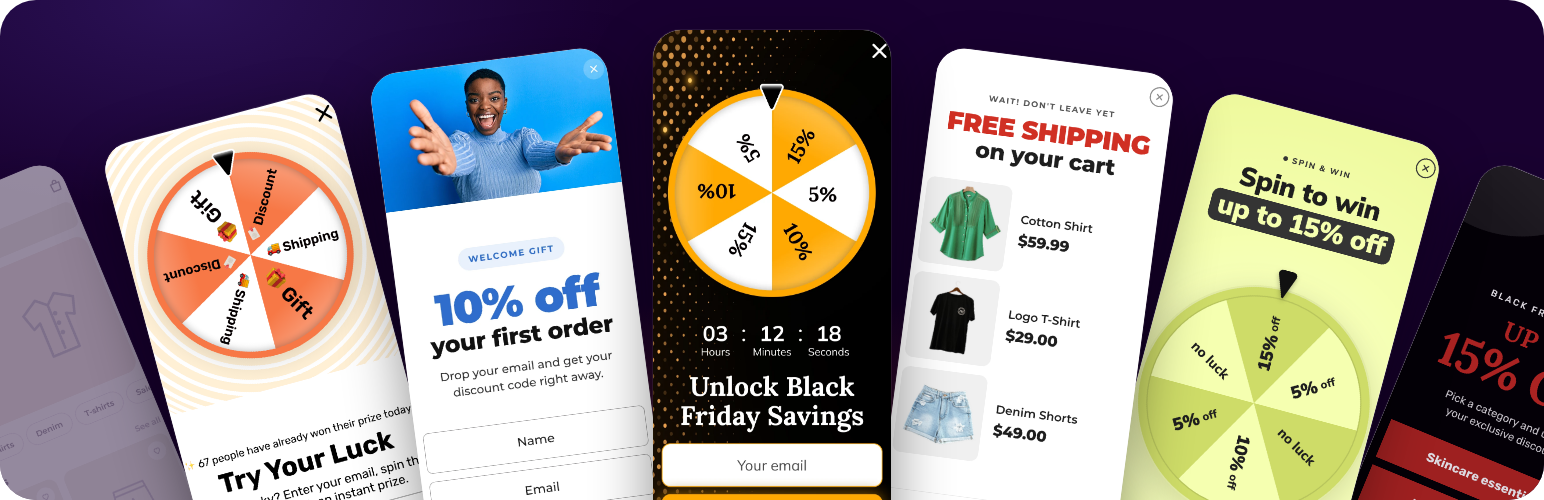
🎡 Gamified popups that convert 3x
Visitors ignore plain popups. A game gives them a reason to interact. In our benchmarks, built on thousands of live widgets across industries, gamified popups convert on average 3x better than standard ones, and the top quarter of campaigns reach a 26% opt-in rate.
- Spin the Wheel: a prize wheel in exchange for an email
- Scratch Card: made for mobile, scratch to reveal the prize
- Gift Box: pick a box, open a reward
- Seasonal mechanics: Break the Egg, Shake the Christmas Tree and more
You decide the rewards, the chance of each one and how often it comes up. For example: 50% for 5% off, 25% for 10% off, 15% for 15% off and 10% for free shipping.
🧩 Every popup type you need
- Lightbox popup: a window over the page for offers, announcements and forms
- Floating box: stays in the corner while the visitor scrolls
- Floating bar: a bar at the top or bottom of the screen
- Built-in widget: a form embedded in the page content
- Launcher: an icon or button that opens the popup on click
- Content locker: unlocks content after a form is filled in
There is a template for every job: newsletter signup, welcome offer, exit intent, lead magnet, lead collection, preorders, callback request, age verification, exit-intent survey, notifications, video popup and many more.
🎯 The right popup for the right visitor
Set placement and display conditions without a developer:
- Audience: new or returning visitors, device, country, region and city
- Behavior: time on site or page, scroll depth, inactivity, exit intent, number of pageviews
- Context: page URL, traffic source, UTM parameters, cart activity
- Your own data: cookies, local storage, Data Layer values and JavaScript variables
With UTM targeting, a visitor from a specific email, social or paid campaign sees the popup made for that campaign, so discounts go to the moments that close a sale rather than to everyone.
WordPress targeting out of the box. The plugin hands Claspo what WordPress knows about the page and the visitor: the kind of page, its categories and tags, the WooCommerce product with its price and stock, the cart total, items and coupons, and whether the visitor is signed in. Use any of them as a display condition. Every group can be switched off on the plugin’s Targeting data tab.
🧠 Qualify before you collect
An email is easy to get. Knowing who you are adding to the list is worth more. Ask a question or offer a choice before the contact form: a multi-step flow lowers friction and tells you what the visitor is interested in, how ready they are to buy and which incentive works. A teaser lets them reopen the offer after closing it.
🤫 Popups that do not annoy
- Silence interval: a gap between popups, 3 minutes by default, adjustable
- Overlap protection: two widgets never show at the same time, even with duplicated rules
- Frequency rules: how often a returning visitor sees the same campaign
🧪 A/B testing on autopilot
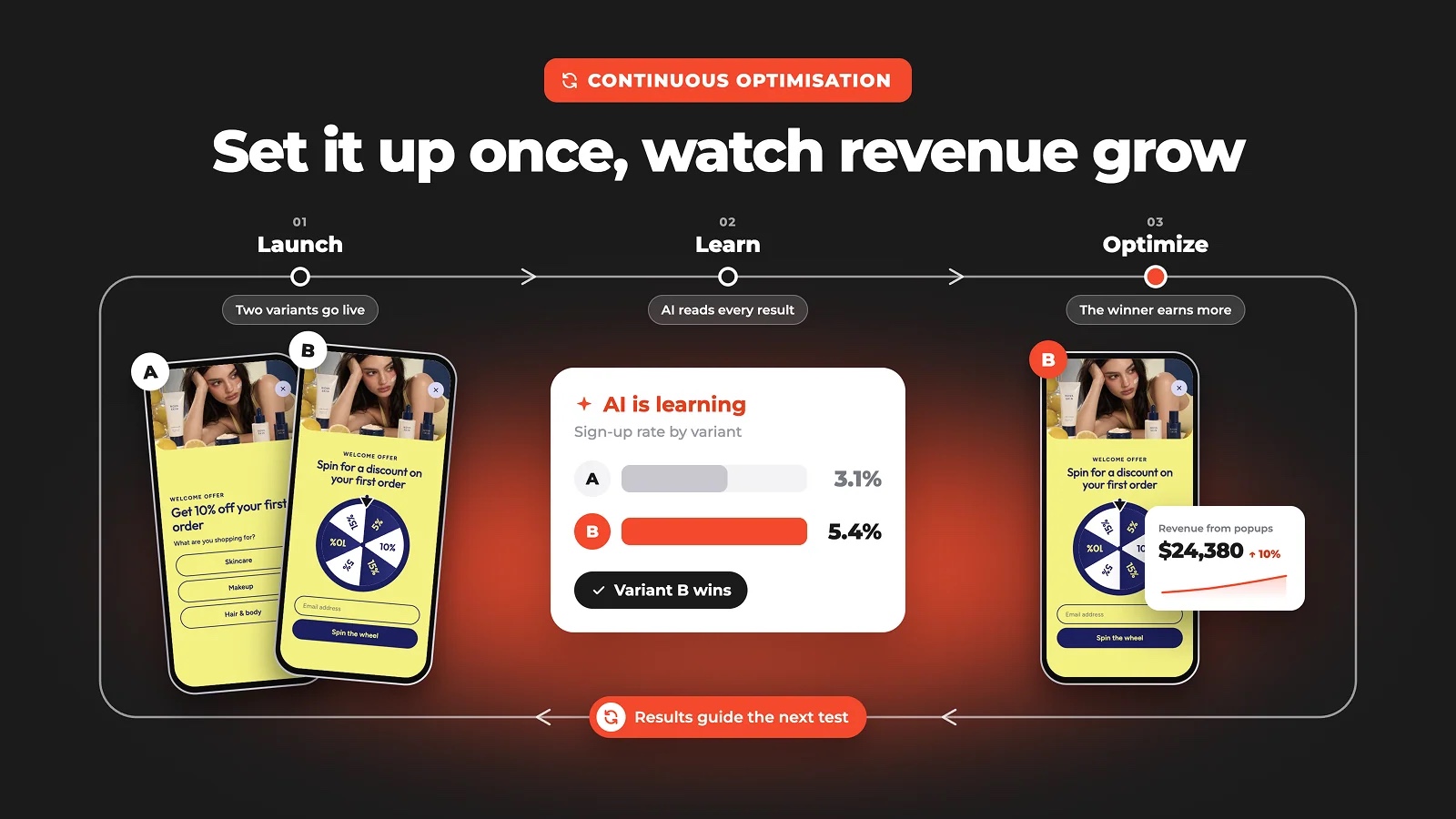
Compare offers, audiences, messages, triggers, layouts or game mechanics, not just button colors. Autopilot shifts traffic to the variant that performs better and keeps the test running. Analytics show views, conversions, target actions, device data, reward statistics and confidence scores, so you know which version is ahead and how sure the result is.
✨ Conversion components
- Dynamic text roller: rotate several offers in one line, handy for Black Friday and other short events
- Slider: several images or videos in one popup
- Multi-step form: basics first, preferences later
- Countdown timer: starts for each visitor individually
- Promo codes: shown right after conversion, no email round trip
- Exit-intent survey: ask leaving visitors why
🎨 Templates and the editor
Start from one of 1,000+ CRO-ready templates or from a blank canvas. Change copy, buttons, colors, fonts, logos, images and video; add fields, components and steps. Every design is responsive, with separate desktop and mobile views. Multilingual content with AI auto-translate, right-to-left languages and accessibility-friendly designs are included.
🔌 Works with your tools
New contacts go straight to your marketing stack, together with the data from the popup: Mailchimp, MailerLite, HubSpot, Salesforce, Klaviyo, GetResponse, SendGrid and many more, plus Zapier and webhooks for anything custom.
Claspo works with WooCommerce and any theme, and alongside caching plugins such as WP Rocket, WP Fastest Cache, LiteSpeed Cache, Autoptimize and Hummingbird. The script loads asynchronously, so pages never wait for it.
🛠️ What the plugin does in WordPress
- One-step connect: paste your Script ID, or sign up and the site connects itself
- Status where you work: a dashboard widget, an entry in the toolbar on your site, and a notice if popups stop showing because the pageview limit is reached or nothing is published
- Your widgets at a glance: which are live, which are drafts, which are in an A/B test, with a link to each widget’s leads
- Targeting data: WordPress and WooCommerce values for display conditions, with a reference table of every variable
- Cache aware: clears popular caching plugins when the script or the settings change
🚀 Live in five minutes
- Install the plugin and connect your Claspo account.
- Pick a template or start from scratch.
- Edit the design and the message.
- Choose the audience and the display rules.
- Connect your email or CRM tool.
- Publish, then check the results and test a new version.
💚 Free forever
The free plan includes unlimited active widgets, every feature and template, and 3,000 pageviews a month. Pro lifts the pageview limit and adds multiple sites and custom domains. Compare plans.
🤝 Need help?
- 💬 Support forum: we answer here
- 📚 Claspo blog: guides, benchmarks and case studies
- ⭐ Leave a review: it helps other WordPress users find Claspo
Screenshots

Gamification: spin the wheel, scratch card, memory cards, gift box, slot machine and more
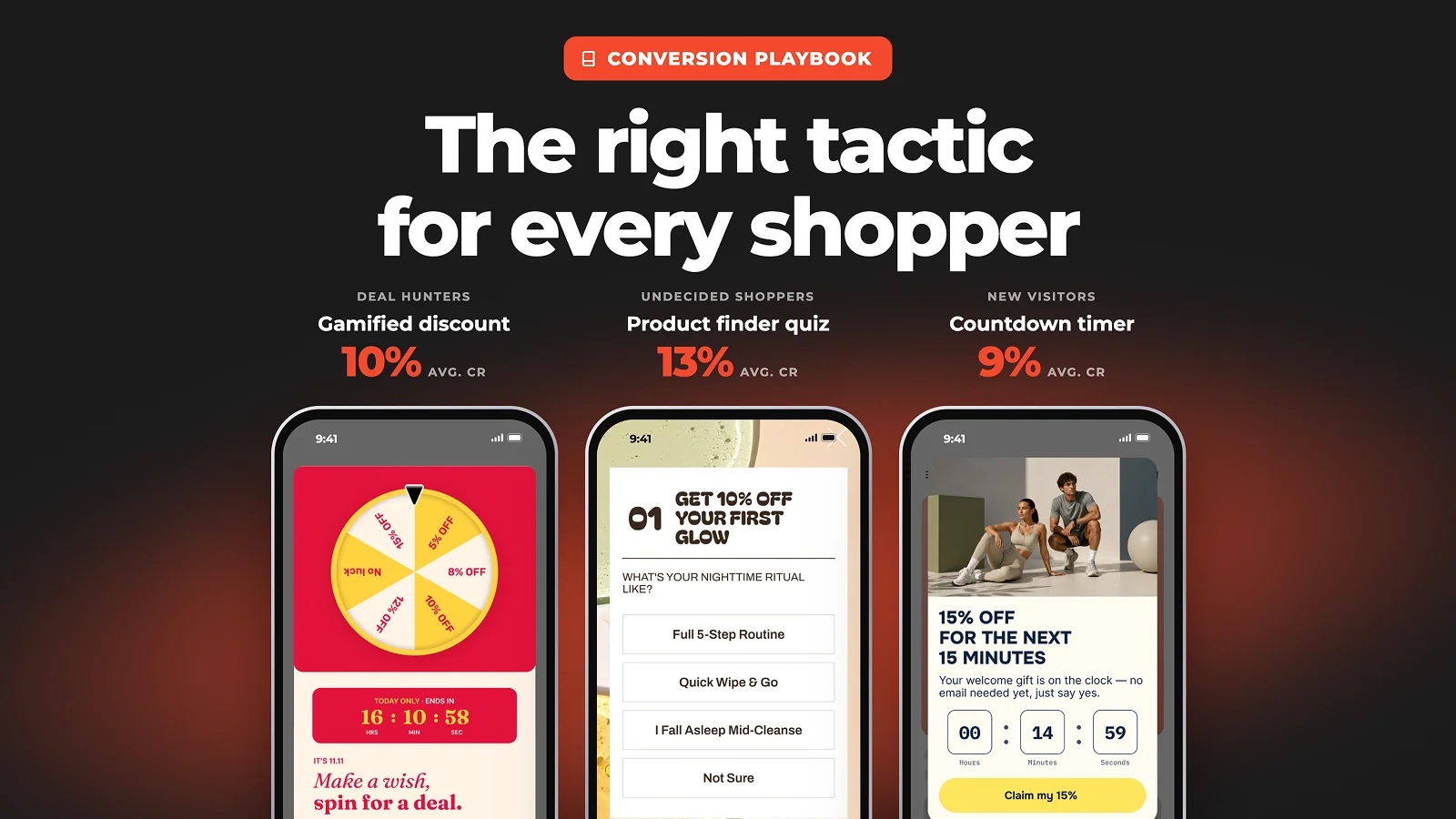
The right tactic for every shopper: gamified discounts, product quizzes and countdown timers
Quiz popups collect zero-party data and sync it to your email platform
Personalised, margin-safe offers chosen per visitor segment
Smart triggering: welcome, exit intent, cart and browse abandonment, back in stock
A/B testing autopilot keeps the winning variant running




Faq
What’s included in the free Claspo plan?
Claspo’s free plan provides everything you need to get started:
- Unlimited active widgets;
- 3,000 pageviews per month;
- Access to all features and templates.
Is there an expiration date on the free plan?
No. The free plan has no time limit and no hidden fees. You can use it for as long as it meets your needs, and upgrade later if your traffic grows or you need higher limits.
If I hit the free plan’s pageviews limit, can I trial Pro before upgrading?
Yes. You can activate a 14-day Pro trial when you reach the limit.
During the trial, you get:
- higher limits;
- multiple websites support;
- custom domains;
- advanced features.
After 14 days, the selected plan continues as a paid subscription with a 30-day billing cycle.
How are pageviews calculated?
A pageview is counted each time a page with the Claspo script loads.
If a visitor refreshes or revisits the page, it counts again.
We use pageviews, not impressions, because triggers are evaluated on every visit:
- time delays;
- scroll depth;
- exit intent;
- cart behavior.
Even if no popup is shown, the system processes the visit to decide whether it should appear.
Can I integrate Claspo with my email or CRM platform?
Yes. Claspo integrates directly with popular tools:
- Mailchimp
- MailerLite
- HubSpot
- Salesforce
- Klaviyo
- GetResponse
- SendGrid
You can also use webhooks or Zapier for custom integrations.
Does Claspo work with WooCommerce?
Yes. Claspo works alongside WooCommerce and is declared compatible with High-Performance Order Storage. You can target campaigns by cart activity and shopping context without changing the rest of your setup.
Will Claspo conflict with other plugins or affect site performance?
No.
- Loads asynchronously, so it does not block page rendering;
- Triggers evaluate in about 200ms;
- Compatible with modern WordPress versions;
- Works alongside other plugins, including caching plugins such as WP Rocket, WP Fastest Cache, LiteSpeed Cache, Autoptimize, and Hummingbird.
Can I cancel my subscription?
Yes. You can cancel at any time from your account settings.
How does Claspo handle user data?
This plugin uses the Claspo service to enable features such as popups for email capture, lead generation, notifications, and surveys. Claspo provides the platform for creating and managing these web widgets.
To understand how Claspo handles user data collected on your website, please refer to our Data Processing Agreement, Terms of Use, and Privacy Policy.
What does the plugin itself send to Claspo?
Two things, and both are listed here so there are no surprises.
- To show the status of your widgets in wp-admin, the plugin asks script.claspo.io for the public configuration of your Script ID: once a day, when you open the plugin page or the dashboard, and when you click Check now. The request carries only the Script ID. No content, users or visitor data from your site are sent.
- With a targeting group switched on under Targeting data, the plugin hands the matching values to the Claspo script in the visitor’s browser, so you can use them in display conditions: the kind of page and its categories, the name and price of the WooCommerce product being viewed, the cart total and item count, and whether the visitor is signed in. Product and cart groups appear only on sites with WooCommerce. Cart and sign-in values are fetched per visitor and never written into a cached page. Every group can be switched off.
Reviews
Great So Far
By  scottspeicher67 on August 4, 2026
Started about two weeks ago, so far so good.
Claspo Review
By  sunitag on July 7, 2026
Great plugin to add coupons in websites!
Powerful, Easy-to-Use, and Great for Conversions!
By  fakeisum on March 5, 2026
I’ve tried several popup plugins before, but Claspo is by far one of the best solutions I’ve used for WordPress. The setup was incredibly simple, and I was able to create my first popup within minutes without touching any code. The interface is very intuitive, and the drag-and-drop editor makes customization effortless.
Overall, Claspo is a powerful yet user-friendly plugin that delivers real results. If you want to boost engagement, collect leads, and increase conversions on your WordPress site, I highly recommend giving it a try!
Great software and v. good deal for micro business
By  mshellsh on March 4, 2026
I tried another well known software that did the same thing as Claspo but cost so much more. Claspo is great. Easy design and set up. Many widgets to choose from and very easy to set up A& B testing.
Highly recommend.
Super!
By  marticls on March 3, 2026
Claspo is an easy-to-use popup builder that helps increase conversions and collect leads. It offers customizable templates and smart targeting options. Overall, it’s a practical and effective tool for improving website engagement.
Claspo is one of the best for popus
By  abdulahad1122 on February 26, 2026
I use claspo for lead collection popups, they are great and very easy to setup
Just perfect
By  michaelwolffdk on February 24, 2026
Everything works perfectly. It’s user-friendly, easy to manage, and the setup takes only a few minutes. Highly recommended.
Excellent Product
By  Steve P (UK) (stevepalmeratwordpress) on February 21, 2026
As the Tech Lead for our voluneer-driven Trust here in the UK, we needed a quick solution to integrating a popup to encourage visitors to donate to our major fundraising activities. I tried quite a few similar Plugins before settling on Claspo. It was so easy to set up and our popup was working in less than three minutes. The feature I found most useful was the ability to upload a supporting photograph and have total control over the overall colours used. Wow!!!
Amazing!!!!
By  everwildetreats on February 7, 2026
this is an amazing tool that every website owner should use. Quick simple and adds a ton of value to your pop ups. Love it ❤️
Amazing plugin!
By  eastessenceperfumes on January 27, 2026
I was searching for a popup plugin and so far this is perfect. I can easily customize the popup based for my website, the interface is very easy to use, and I would definitely recommend!
Changelog
2.0.0
- New plugin page: whether your popups are running, which widgets are live, and a link to each widget’s leads
- Status in the WordPress toolbar on your site and in a dashboard widget
- Admin notice when popups stop showing: pageview limit reached, nothing published, or no widgets yet
- Targeting data tab: page, WooCommerce product, cart and visitor variables for display conditions in Claspo
- Daily check of your widget status, with a Check now button
- Redesigned connect screen; the connect form now notices when the site was connected from another tab
- WordPress 7.1 compatibility
- Updated plugin description
1.2.0
- Automatic activation via background handshake from Claspo right after registration
- Fixed “Security check failed” error when returning to WordPress via the Go to WordPress button
1.1.0
- Auto-verification of script installation after saving Script ID
- Bug fixes
- UI improvements
1.0.9
- WooCommerce compatibility
1.0.8
- Security fix: Added authorization checks to prevent unauthorized access (CVE-2025-68568)
- Security fix: Implemented nonce verification for callback requests
- Improved security with proper capability checks for script management functions
1.0.7
- Fixed a bug with automatic cache cleaning in LiteSpeed Cache
1.0.6
- WordPress 6.9 compatibility
1.0.5
- WordPress 6.8 compatibility
1.0.4
- WordPress 6.7 compatibility
1.0.3
- New branding and video
1.0.2
- Introduced compatibility with popular caching plugins such as WP Rocket, WP Fastest Cache, LiteSpeed Cache, Autoptimize, and Hummingbird.
1.0.1
- Bug fixes
- UI improvements
1.0.0
Initial release