

Burst Statistics – Simple WordPress Analytics (Google Analytics Alternative)
Description
Finally, WordPress analytics you’ll actually use
Google Analytics is overkill. Most other WordPress statistics plugins are cluttered and confusing. You just want to track visitors and know what’s happening on your site, without a data science degree.
Burst Statistics gives you a clean, intuitive analytics dashboard focused on the metrics that actually matter. No external analytics accounts. No complex setup. Install, activate, and understand your website traffic in seconds.
Trusted by 200,000+ WordPress sites. Built by the team behind Team Updraft, known for UpdraftPlus, WP-Optimize, and All-In-One Security (AIOS).
What our users are saying
“Finally, an analytics plugin I can actually explain to clients.”
— @anguskeystone on wordpress.org“I tried WP Statistics and Independent Analytics, but they’re overloaded and confusing. Burst’s UI is intuitive and focused on what matters to me.”
— @vallered on wordpress.org
Why Burst Statistics?
Analytics designed to be actionable
Other analytics plugins throw everything at you. Burst shows what matters, visitors, pageviews, referrers, top pages, in a dashboard you’ll actually use. No data overload. No confusing menus. See why Burst is perfect for bloggers.
Privacy analytics by design
All site stats stay on your server, making Burst a true local analytics solution. No external tracking. Your data is yours, we never see it without your explicit permission. Designed for GDPR compliant analytics out of the box. Read why Burst Statistics is privacy-friendly.
Zero setup friction
Install, activate, done. No Google Analytics account, no GA4 setup, no tracking codes, no configuration headaches. Start seeing live visitors immediately. New to analytics? Start with our guide on WordPress analytics.
WordPress-native analytics
Not a port from another platform. Built specifically for WordPress with native performance and seamless integration. Works with WooCommerce, blogs, business sites and membership sites.
Lightweight analytics, fast by default
Optimized database queries. A tiny tracking script under 4 KB. No external dependencies slowing down your pages. Designed to track accurately even when using aggressive server-side caching. See the proof in does Burst slow down my website.
Features
Understand your website traffic
- Top performing pages and posts at a glance
- Track key metrics: visitors, sessions, pageviews, bounce rate
- Breakdown of visitors by device (desktop, tablet, mobile)
- Filter data by custom date ranges
- Compare traffic between periods
- Search Console integration, view Google searches right on your dashboard
Real-time analytics
- Identify the real-time source for live visitors
- See the specific pages users are visiting now
- Live count of active users on your site
See what content performs
- Top pages and posts ranked by views
- Compare any date range
- Track individual page performance
Custom conversion and goal tracking
- Track views, clicks and WordPress hooks
- Track WooCommerce analytics & sales (Burst Pro Business)
- Track custom events and conversions
- Step-by-step setup in our goals guide
Privacy-friendly analytics without compromise
- 100% self-hosted, all statistics stored locally in your WordPress database
- Cookieless tracking option, a cookie free analytics setup with no consent banner required in many countries
- Analytics designed to support GDPR, CCPA, DSGVO, AVG, RGPD and PECR compliance
- No data shared with Google, Facebook or any third party
Stay informed
- Weekly or monthly email reports delivered to your inbox
- Compare periods to spot trends
- Get notified when tracking does not work
A WordPress-native Google Analytics alternative
If you’ve outgrown Google Analytics, or never wanted GA4 in the first place, Burst is built for you. As a Google Analytics alternative, Burst trades GA4’s complexity for clarity. You get the metrics that matter on a single dashboard, without sampling, without data thresholding, and without sending your visitors through Google’s ad network.
GA4 is built to make Google’s ad business better. Burst is built to make your website better.
Curious about the full picture? Read why WordPress site owners are leaving Google Analytics behind or the head-to-head Burst Statistics vs Google Analytics.
From the team behind UpdraftPlus, WP-Optimize and All-In-One Security
Burst Statistics is part of Team Updraft, the team behind some of the most installed WordPress plugins on the market:
- UpdraftPlus – WP backup and migration plugin
- WP-Optimize – cache, image compression, minification and database cleanup
- All-In-One Security (AIOS) – security and firewall
Who is Burst Statistics for?
Burst works for any WordPress site, but we’ve built specific solutions for the four audiences who get the most out of it:
- Bloggers and content creators, see which posts resonate with your audience
- Entrepreneurs and small business owners, understand your traffic and campaigns without complexity
- WooCommerce stores, track visitor behavior, revenue and product performance
- Agencies and freelancers, manage analytics and reporting for multiple client sites
- Privacy-conscious site owners, GDPR compliant analytics without consent banners
- Anyone tired of Google Analytics, get clarity instead of confusion
Free vs Pro
Burst Statistics (free) includes everything you need to understand your website traffic. Visitors, pageviews, referrers, top content, device stats, goal tracking, email reports and more.
Burst Pro adds advanced features for businesses and professionals. Compare all plans on the pricing page.
CREATOR PLAN
- UTM campaign tracking, see which marketing efforts drive results
- Geographic data, country and city-level visitor insights
- Advanced filtering, segment data by any dimension
- Data archiving settings, keep your database lean automatically
- Priority support, direct contact with our developers
BUSINESS PLAN
- Everything in the Creator plan, plus
- Full WooCommerce sales dashboard, see which content brings in the most revenue
- Revenue attribution, connect WooCommerce sales to traffic sources
AGENCY PLAN
- Everything in the Business plan, plus
- Reporting, generate shareable performance reports for clients
All Burst Pro plans include priority support. You’ll have direct contact with our developers, real humans, not a chatbot.
How Burst compares to other WordPress analytics plugins
We’re often asked how Burst stacks up against other tools. Honest, short version:
- Google Analytics / GA4, GA4 is powerful but built for advertisers, not site owners. It’s complex, applies sampling and thresholding to your numbers, and requires a cookie banner in most countries. Burst is a simpler, privacy-friendly GA4 alternative that shows real numbers without the setup. Read the full comparison.
- MonsterInsights, MonsterInsights is a connector that pipes your data into Google Analytics. If you want a true MonsterInsights alternative that keeps data on your own site instead of sending it to Google, Burst is a better fit.
- Independent Analytics, a respectful competitor with a similar privacy-first, WordPress-native approach. Burst leans harder into actionable dashboards, deeper UTM and goal tracking, WooCommerce revenue analytics and Agency-tier reporting. Try both and pick the one that clicks.
- Koko Analytics, a clean, lightweight option that focuses on the basics. Burst goes further with goal tracking, real-time analytics, UTM campaigns, WooCommerce analytics and email reports.
- WP Statistics, a long-standing WordPress stats plugin with a lot of options. Many users find the interface cluttered. Burst focuses on a single, clear dashboard designed for clarity over feature count.
- Matomo, self-hostable and feature-rich, but heavier and more complex to run. Burst is the simpler, faster, fully WordPress-native option.
Useful guides and resources
Learn the metrics, fix common problems, get more out of your analytics. All free, all on burst-statistics.com.
Getting started
- WordPress analytics and the metrics that actually matter
- How to install Burst Statistics from the WordPress Repository
- How to set up your first goal
Privacy and GDPR
- Why Burst Statistics is privacy-friendly
- How to configure your website without a cookie banner
- How Burst tracks website visitors without cookies
Metrics and data interpretation
- How to reduce bounce rate in WordPress
- What is bounce rate?
- What is a pageview?
- What is conversion rate?
Campaigns and conversions
- How to track UTM (and Burst) parameters
- Campaign URL builder
- How to create and A/B test marketing campaigns with Burst
WooCommerce
- 10 proven ways to reduce WooCommerce cart abandonment
- Introducing sales analytics for WooCommerce in Burst Pro
Browse the full Learn hub for more.
Installation
- Go to Plugins Add New in your WordPress dashboard
- Search for Burst
- Click Install Now, then Activate
- Visit Statistics Dashboard to see your analytics
That’s it. No external accounts. No tracking codes to paste. Burst starts collecting site stats immediately.
Prefer installing manually or via Composer? See installing Burst Statistics with Composer.
External services
Burst works entirely on your own server and does not send your data anywhere. The two optional features below are the only ones that contact an external service, and neither is required to use Burst. Please see our privacy statement for our privacy policy; each feature below links to its own, more specific policy.
Google Search Console integration (optional)
When you connect your Google account on the Integrations settings page, Burst retrieves your search performance data (queries, clicks, impressions and positions) from the Google Search Console API (googleapis.com) and shows it in your dashboard. This is a one-way flow: your site fetches data from Google, and no visitor or statistics data is sent to Google or to us. Only the OAuth handshake and token refresh run through our relay at search-console.burst-statistics.com; the retrieved search data goes directly from Google to your own site. Nothing happens until you connect an account, and you can disconnect at any time, which revokes the token at Google. Read our Search Console integration privacy policy, and see Google’s privacy policy and Google API Services User Data Policy.
Anonymous data sharing (optional)
This is the only case in which Burst sends data to us, and it is strictly opt-in. When you choose to enable it, Burst periodically sends anonymized, aggregated usage and performance statistics (no visitor data, no personal data) to api.burst-statistics.com. In return you get community performance benchmarks in your dashboard, comparing your site against anonymized community averages, and it helps us improve the plugin. Read how we handle anonymous usage data.
Credits
Country-level geographic data is provided by the MaxMind GeoLite2 database. This product includes GeoLite2 Data created by MaxMind, available from https://www.maxmind.com/.
Source code
The plugin ships the compiled analytics dashboard in includes/Admin/App/build/. The human-readable React/TypeScript source (includes/Admin/App/src/) and the build tooling are published on GitHub. Issues and pull requests are welcome there.
Screenshots

Burst Statistics: Analytics Dashboard
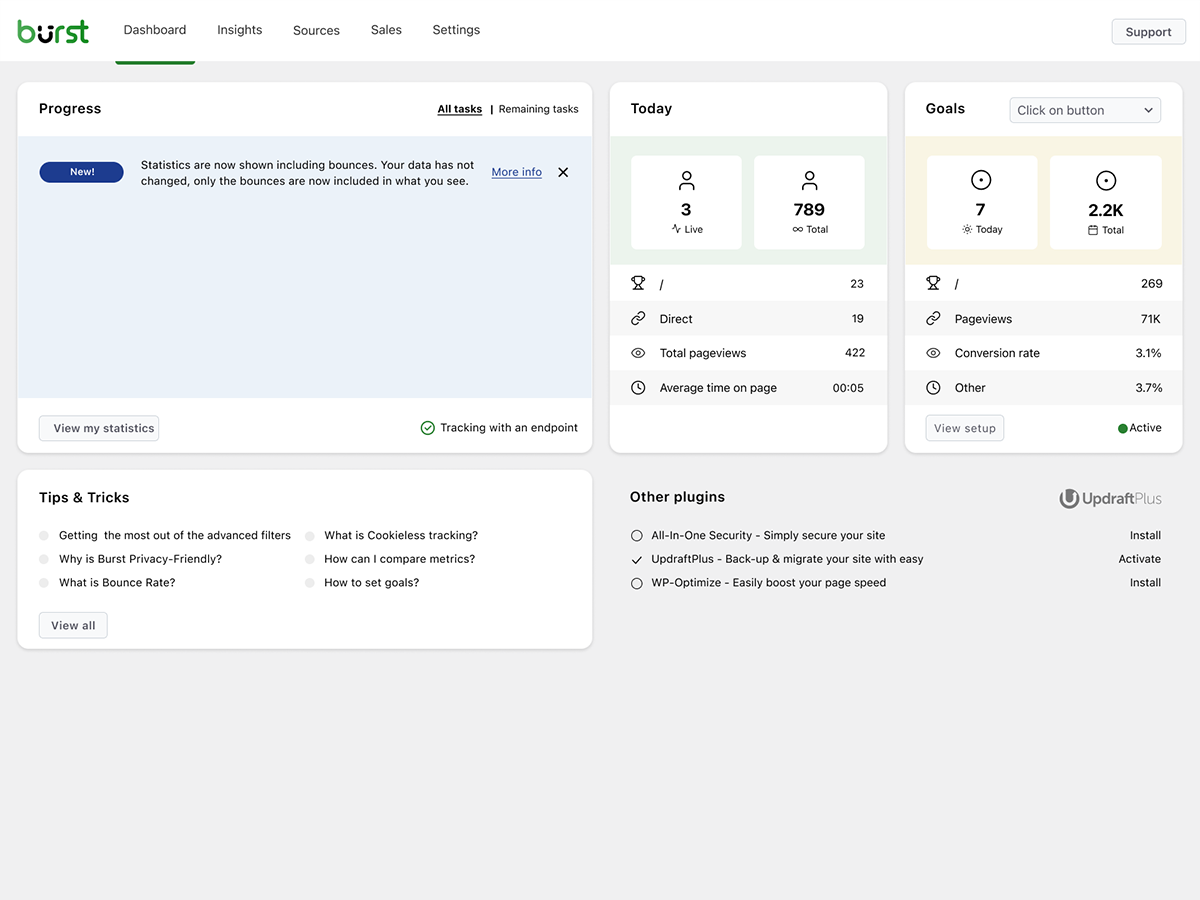
Dashboard: Clean and easy-to-read overview
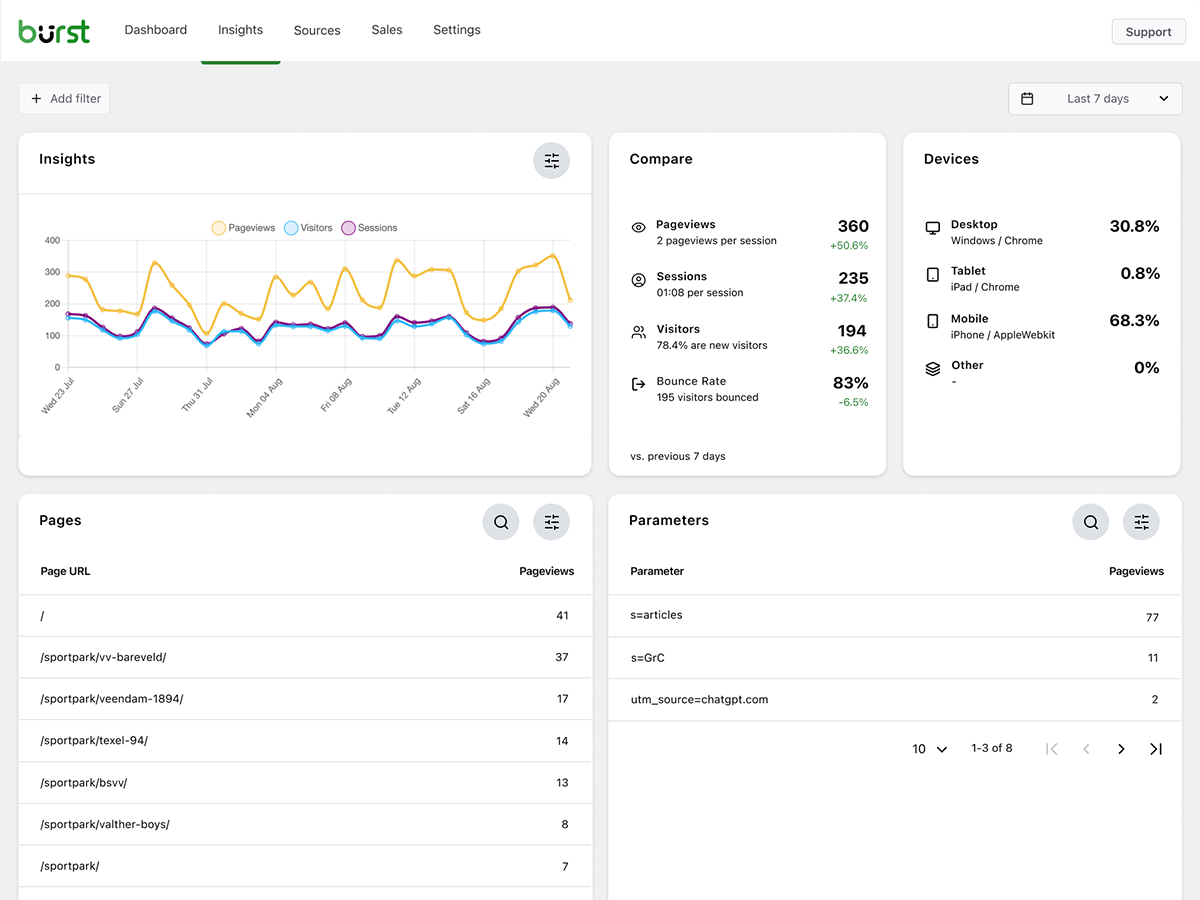
Insights: See exactly how your website performs
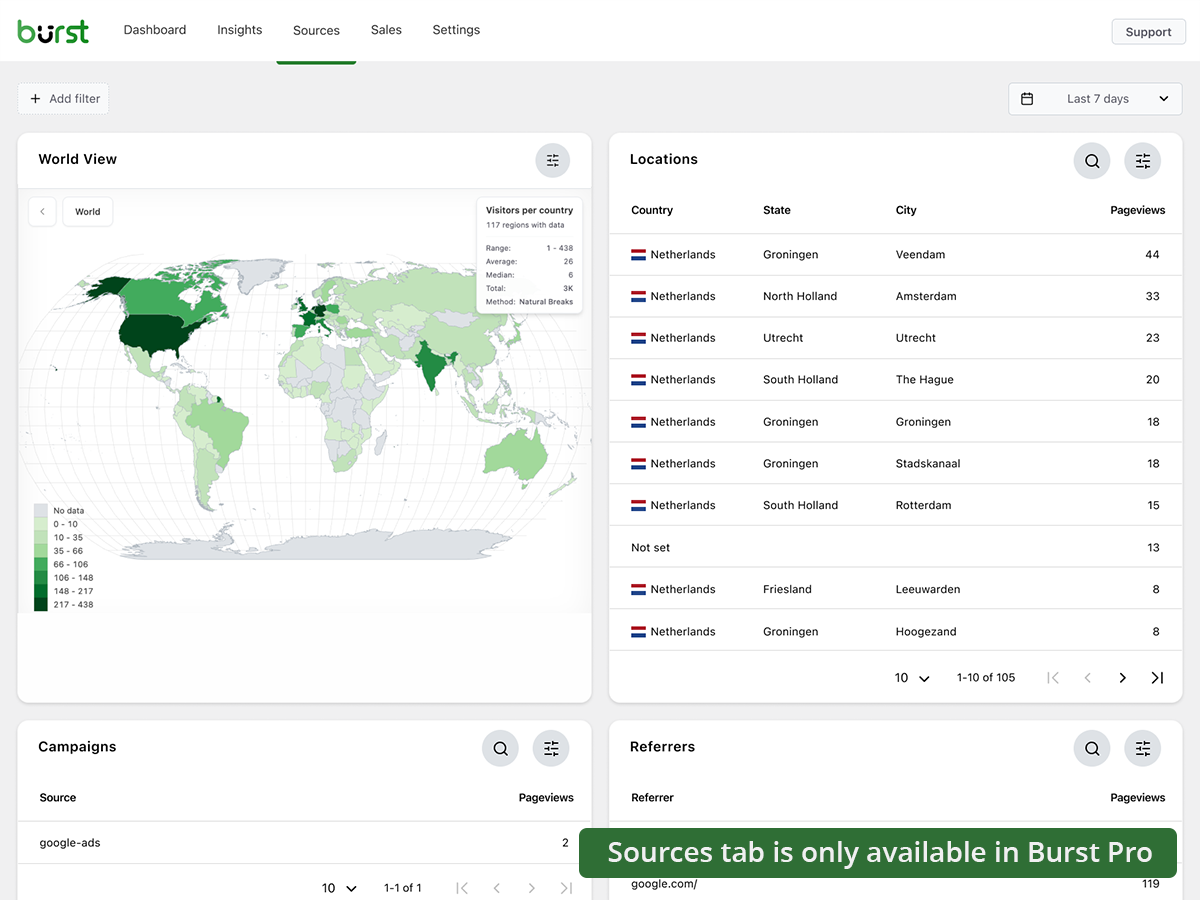
Sources: Analyze where your visitors come from (Burst Pro)
Faq
Yes. Burst Statistics is 100% free with no tracking limits. Burst Pro is optional for users who need advanced features like UTM tracking, revenue attribution, geographic data or client reporting. That’s how we keep Burst Statistics free for most users.
All statistics are stored in your own WordPress database. Unlike Google Analytics or cloud-based tools, we have zero access to your data. Your data never leaves your server, unless you manually opt in to share anonymous usage insights with us. Read more about how Burst handles your data.
Yes. If you find GA4 too complex, or you’re concerned about sending visitor data to Google, Burst is a clean replacement. You get the website traffic stats you actually need, visitors, referrers, top pages, conversions, without the overwhelm. Read our Google Analytics alternative guide for the full comparison.
Yes. Burst was built as a privacy-friendly GA4 alternative for site owners who want clarity instead of complexity. No Google account, no tag manager, no cookie banner in most cases. See why WordPress site owners are leaving Google Analytics behind.
Yes. MonsterInsights connects your WordPress site to Google Analytics, so your data still flows to Google. Burst keeps everything on your own server, with its own dashboard inside WordPress. If you want analytics that don’t depend on Google, Burst is the simpler MonsterInsights alternative.
Burst focuses on clarity over quantity. While some other WordPress analytics plugins can feel cluttered, Burst’s dashboard is designed to show you what matters without the noise. Independent Analytics is closest in spirit, with a shared privacy-first, WordPress-native approach. Burst differentiates with deeper UTM tracking, WooCommerce analytics and Agency-tier reporting. WP Statistics offers a wider feature set, but many users find it overwhelming. Koko Analytics is intentionally minimal, so it works well for very basic needs.
Matomo tries to be a full Google Analytics replacement. Burst tries to be the clearest, most actionable WordPress analytics tool. If you want simplicity, fast setup and a native WordPress experience, Burst is the better fit. If you need granular configuration and a full GA-style feature set, Matomo may suit you better.
No, you don’t need an account, and no data is sent to another website. If you connect Google Search Console, Burst only retrieves your search data from Google; nothing about your visitors is sent out. The one exception is anonymous data sharing, an opt-in option that shares anonymized statistics with us and gives you community performance benchmarks in return.
No. The only limiting factor is your own database and server.
There is an option to use cookieless tracking if you prefer. By default, Burst uses cookies because they’re more accurate and lightweight. Even with cookies, Burst remains privacy-friendly because all data is anonymous and stored on your server. Read more about why cookies are misunderstood.
Burst Statistics can be used without setting cookies or storing data in browsers. This can affect accuracy slightly, so a hybrid option with cookies after consent is also possible. See how Burst tracks visitors without cookies.
Burst is designed to support GDPR, CCPA, DSGVO, AVG, RGPD and PECR compliance. Data stays on your server, tracking is anonymous, and you can disable cookies entirely. For most setups, no consent banner is needed for analytics. See how to configure your website without a cookie banner.
Yes. Many users run both during a transition period, or keep GA4 for historical data while using Burst for daily insights. There’s no conflict.
No. Burst is built for performance with optimized database queries, a minimal tracking script and a Turbo Mode if speed matters more than perfect accuracy. The full breakdown is in does Burst Statistics slow down my website.
Yes. Basic pageview tracking works in the free version. For full WooCommerce analytics, revenue tracking, product performance and sales attribution, you’ll need Burst Pro Business.
Install and activate Burst, it starts tracking immediately. Historical data from other plugins can’t be imported, but you can run both side-by-side during a transition period.
Yes. Both the free and premium plugins can be managed with Composer. Read the Composer installation guide for more information.
We value your feedback. You can submit a support request on the WordPress forums, and we will respond promptly.
Reviews
Very Quick Easy Plugin to use
By  oxalissdigital on September 30, 2026
Very Quick Easy Plugin to use
very good for report
By  rayaco2000 on September 19, 2026
very good for report
عالی و سپاس از افزونه خوبتون
By  eTab (ebrahimt) on September 11, 2026
بهترین انتخاب برای رصد آمار سایت. سبک، ساده و حرفه ای و قابل توسعه.
so cool
By  saraergas75 on August 21, 2026
this is relay cool plug
Great plugin, A great help!
By  cmjklein on May 26, 2026
Great plugin, A great help!
Burst is no-fuss compared to G.Analytics
By  3cstudio on May 18, 2026
We were able to do Dashboard results comparisons against Google Analytics stats and Burst is as easily (if not better) read for the layman just interested in seeing how their site is doing, and is without all the setup and effort to get it installed and running. Had some odd questions about a specific site and its email alerts — Hessel very patiently explained that we had a couple of things wrong or mistaken in the client account setup, and got us back on track once more. 🙂
A great plugin even for non-IT specialists
By  jirixdolezal on May 12, 2026
An excellent plugin that allows even me as an IT non-specialist a comfortable view of the results of my websites.
jxd
Grrrrrrreat plugin
By  ontwerperij on May 6, 2026
Burst is doing a wonderful job.
Dashboard user interface
By  BigSamX (techlector) on May 6, 2026
The Dashboard user interface is not properly arranged. It needs proper css checks
Great, Easy to handle and a great help
By  retroarthotel on May 5, 2026
Perfect. Quickly to install and works perfect. Great .
Changelog
3.7.3
- October 19th 2026
- New: custom events. Send events from your site with burst.event() or the burst_event action and see them, with their properties, in the new Events block on the Engagement page. Turn it on under Settings > Features.
- New: a Page weight block on the Engagement page shows how heavy your pages are and estimates the CO2 emission per pageview, with a carbon rating and an optional check whether your host runs on green energy.
- New: a goal wizard that guides you step by step through creating a goal, with an element picker that lets you click the button or link to track on a preview of the page.
- New: the ‘website searches’ block shows which result the SmartMatch Search plugin suggested for each search, how often it found a match and how often visitors clicked it, when SmartMatch is active.
- New: Brevo integration, form submissions can be tracked as goals.
- New: a Notifications settings page that brings alerts, email recipients and dashboard notices together, with a choice per alert which channel it uses.
- Improvement: faster tracking on busy sites: fewer database lookups per hit and no redundant session updates.
- Improvement: deleting archived statistics and cleaning up orphaned sessions now runs in batches, so it no longer times out or locks the tables on large sites.
- Improvement: the visitor counts background build resumes where it stopped, so it completes on sites where a single run hits the time limit.
- Improvement: the database uses less space: the columns kept after the 3.7.0 migration for rollback and a redundant index on the statistics table are removed.
- Improvement: searches that are template injection probes, such as {{7*7}}, are recognized as spam and no longer show up in the Website searches block.
- Improvement: the bounce rate and conversion rate filters that were marked as coming soon are removed from the filter list.
- Improvement: the goal filter now shows the whole visit in which the goal was completed, not only the page it was completed on. A goal on a thank-you page now also shows the pages visitors saw before it, and a goal filter combined with a filter on the landing page, such as a UTM parameter, no longer shows no data.
- Fix: the query time limit was ignored on MariaDB and for some queries on MySQL, so a slow statistics query could keep running for minutes.
- Fix: on hosts that limit the length of database queries, such as WP Engine, visitor counts filtered by device, browser or operating system left out the visitors of busy days.
- Fix: excluding a goal or URL parameter in the filters counted hits more than once, which inflated pageviews, or showed no data at all.
- Fix: the per-page view showed 0 pageviews for a page after its slug had changed, while the Pages table did count them.
- Fix: on hosts that limit the length of database queries, such as WP Engine, the Pages table showed empty urls for archive and pagination pages on sites with many of them.
- Fix: the fix button on the task about anomalous visits from one visitor removed nothing. It now removes all hits of that visitor, also those from before the last day, in batches.
- Fix: a fatal error on admin pages and in application password logins when another plugin checked a capability without a name, such as a menu page registered without a capability.
- Fix: Site Health reported a plugin auto-update issue caused by the Burst update window.
- Fix: clicking Continue twice in onboarding submitted the same step twice.
- Fix: predefined goals showed an undefined title in the MainWP dashboard.
3.7.2
- September 29th 2026
- New: an AI summary block for email reports, which sums up the report period in a few sentences. The block is available when the AI assistant is enabled.
- New: the 404 pages block shows which pages link to a missing page, split into internal and external referrers, with a link to edit the internal page that holds the broken link.
- Improvement: informative dashboard tasks are shown one at a time, and after you dismiss one the next appears three days later. Warnings and errors are always shown.
- Improvement: the interactive tour fills the dashboard with sample data while it runs, instead of installing demo data in the database.
- Improvement: the page picker for goals loads faster on sites with a lot of statistics, and lists pages of every post type.
- Improvement: every dashboard task declares whether it applies inside the MainWP dashboard; tasks that assume the site’s own wp-admin are no longer served to MainWP.
- Improvement: the GoogleOther and Google-InspectionTool crawlers are recognized as bots and no longer tracked, props @draven666
- Fix: the MainWP dashboard offered every date range preset except “All time”; the presets are now localized from one list for the WP admin and the MainWP dashboard.
- Fix: the interactive tour is no longer offered inside the MainWP dashboard (task and settings button), where it cannot run.
- Fix: long messages in the report log batch details wrapped outside their row.
- Fix: since 3.7.1 the beacon hit was sent with fetch() instead of navigator.sendBeacon, so crawlers that render JavaScript, such as Google’s renderer, were counted as visitors. The hit is sent with sendBeacon again; fetch is only used when the beacon cannot be queued, or in debug mode, props @draven666
- Hardening: a user with share link access could extend access to the statistics after the share link expired by changing the password, props Chloe Chamberland / Wordfence.
3.7.1
- September 17th 2026
- New: CartFlows integration, checkout steps count as checkout visits in the Live traffic block.
- New: interactive tour: a guided walkthrough of the dashboard, insights, data tables, traffic sources, AI assistant, reading engagement, reports, goals and settings, using sample data so every block is populated; the tour can be paused and resumed where you left off.
- Improvement: the cookieless fingerprint no longer renders a WebGL test image, which removed most of the tracking script’s CPU time on first interaction (up to ~190ms on desktop, more on mobile) with no meaningful loss of uniqueness; cookieless visitors are counted as new visitors once after the update.
- Improvement: visitor icons in the Live traffic block use twelve distinct colors and a better hash, so different visitors are easier to tell apart.
- Improvement: activating or deactivating a plugin during an optimized Burst REST request can no longer persist the reduced plugin list the REST API optimizer uses for that request, props Will Lassalle / JLSTech.
- Fix: the Compare block counted sessions, visitors and bounces for visits that only requested non-existing pages (404 hits, typically bot scans), while the Today block and the other blocks left those out; all blocks now apply the same rule, and existing sessions are updated by a background migration.
- Fix: pages of post types registered by plugins, such as WooCommerce products, showed an empty url in the Pages table; existing data is completed by a background migration.
- Fix: the “Today” count in the Goals block started the day at UTC midnight instead of midnight in the WordPress timezone.
- Fix: visitor counts for historic date ranges showed near zero while the 3.7.0 visitor-index migration was still running; rows the migration has not converted yet are now counted by their legacy visitor id until the migration completes.
- Fix: the database upgrade progress notice started in the nineties and barely moved, because it counted every upgrade ever shipped instead of the tasks in the running batch.
- Fix: the Source column of the Campaigns table had no header label, and campaign queries on that column were not recognized as campaign queries by the goal filter.
- Fix: a missing-table notice was shown for a search-terms table that is no longer in use.
- Fix: the tracking script did not start when the consent-change event of a cookie banner did not include the statistics category; it now also checks the WP Consent API directly, and the beacon request uses fetch with keepalive where available.
- Fix: the REST API optimizer read and decoded the request body once per active plugin instead of once per request, and now inspects at most 64 KB of it, props Will Lassalle / JLSTech.
For the full changelog, see burst-statistics.com/docs/changelog.