
Better Messages – Chat Rooms, Group Chat, Private Messages & AI Chat Bots
Description
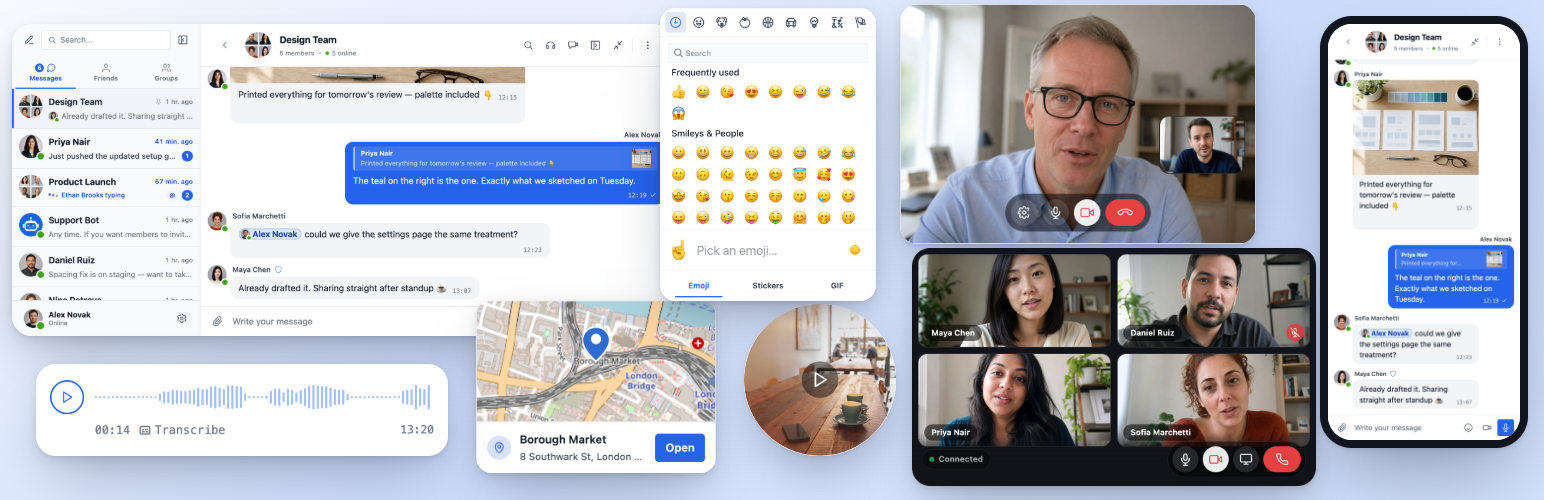
Better Messages is the most feature-rich realtime private messaging system for WordPress, with native integrations for BuddyPress, BuddyBoss Platform, Ultimate Member, PeepSo and any other WordPress powered websites.
Transform your WordPress site into a powerful communication platform with private messaging, chat rooms, video and audio calls, group video chats, AI chat bots, and native mobile apps.
Whether you’re building a private or public community, social network, intranet, chat-rooms site, marketplace, membership site, dating platform, or creator economy site – Better Messages provides enterprise-level messaging features with an easy-to-use interface.
Try Better Messages:
- Live Demo — fully functional demo site
- Documentation & Knowledge Base — setup guides, features, FAQ
- All Integrations — every supported plugin and theme
- Pricing — free vs WebSocket version comparison
- Blog & Tutorials — guides, walkthroughs, integration deep-dives
For developers:
- REST API Reference — every endpoint and parameter
- PHP Hooks — actions, filters, helper functions
- JavaScript Hooks — frontend events and customization API
- Changelog — every release and bug fix
- Roadmap — upcoming features and votes
Popular use cases:
Better Messages is widely used to power messaging for:
- Private communities — paid and members-only community platforms, mastermind groups, alumni networks, course cohorts, coaching circles, role-restricted messaging, group chats, AI Chat Bots for onboarding and FAQs, end-to-end encryption for sensitive conversations
- Public communities and social networks — open social platforms, hobby and interest communities, BuddyPress / BuddyBoss / PeepSo / FluentCommunity-powered sites, private messaging, group conversations, chat rooms, mini chat widgets that follow users across the site
- Intranet and corporate websites — internal employee communication, team and department channels, role-restricted access by WordPress role, file sharing, voice and video calls for remote teams, self-hosted plan for sites with data-sovereignty requirements
- Chat rooms websites — sites built around real-time chat rooms as the primary feature, public and private rooms, topic-based discussion, guest access for unregistered visitors, AJAX or WebSocket delivery
- Dating and matchmaking sites — private 1-on-1 chat, photo and video attachments, voice and video calls, profile-to-profile chat buttons on member directories, guest chat for browsing visitors, end-to-end encryption for private conversations
- Creator economy and fan platforms — paid messaging with per-message and per-call billing via GamiPress or MyCRED, private video calls, mass messaging to fans, always-on mini chat widgets
- Premium and monetized DM platforms — charge per direct message or per call with per-role pricing, balance display, role-restricted messaging, AI Content Moderation to filter spam and scam attempts
- Coaching and mentorship platforms — client-to-coach DMs, scheduled video calls, voice messages, file sharing, course chat rooms via LMS integrations
- Online stores (WooCommerce) — pre-sales chat on product pages, post-purchase order support, cart-context-aware messages, embedded inbox in My Account
- Multi-vendor marketplaces and classifieds — buyer-to-seller chat on every listing, per-listing threads, guest chat for unregistered visitors
- Online courses (LMS) — course chat rooms, instructor-to-student DMs, group conversations for cohort-based courses
- Forums and Q&A communities — Private Message link on every reply, follow-up chat for thread participants
- Real estate and listings sites — agent inquiry messaging, property-context chat threads, guest chat for browsing visitors
- Live events and webinars — event lobby chat rooms, guest access for non-registered attendees, group voice and video calls for AMAs, pinned messages with event agendas
- Booking and appointment platforms — guest-to-host messaging on listings and bookings, file sharing for documents, voice and video calls before check-in
- Crypto and Web3 communities — token-gated chat rooms via membership plugin and WordPress roles, AMA group calls, AI knowledge bots for whitepaper questions, mobile apps for on-the-go engagement
“Better Messages” plugin is formerly called “BP Better Messages“.
Translate Better Messages to your language
Core Messaging Features:
- AJAX or WebSocket powered realtime conversations
- Private one-to-one conversations
- Group conversations with unlimited participants
- Chat Rooms with guest access support
- Messages for BuddyPress Groups, PeepSo Groups, Ultimate Member Groups, FluentCommunity Groups
- Subjects for conversations
- Search across all messages
- Mark messages as favorite
- Pin important messages to conversation top
- Pin favorite conversations to list top
- Filter conversations list to show only unread conversations
- Reply to specific messages
- Edit sent messages (with edit indicator)
- Delete messages
- Forward messages to other conversations
- Mute conversation notifications
- Message draft autosave with recovery
AI & Automation:
- AI Chat Bots powered by OpenAI, Anthropic (Claude) and Google Gemini
- AI Chat Bots in group conversations with mention-based responses
- Conversation summarization and scheduled digests with AI
- Token usage tracking with cost estimation
- Voice message transcription powered by Better Messages Cloud AI or OpenAI
- Web Search capability for AI bots
- File Search tool for AI bots
- Image generation with AI
- PDF file support for AI conversations
Media & Content:
- File sharing with resumable uploads and ability to protect files from direct access (images, videos, documents)
- Client-side image and video optimization for cross-browser compatibility and saving storage space (format conversion, quality control, metadata stripping)
- Photo cropping and editing before sending
- Location messages with a map picker and nearby place suggestions
- Voice messages and video messages (available as addon)
- Embedded links with thumbnails and descriptions
- oEmbed support for YouTube, Vimeo, Spotify, SoundCloud, Flickr and 20+ services
- Emoji selector
- Built-in sticker packs with role-based access and per-locale support
- GIF integration with GIPHY and Klipy providers
- Inline sticker suggestions while typing
- Markdown text formatting support
Notifications:
- Email notifications for unread messages (customizable templates)
- Unsubscribe link support in emails
- Sound notifications for new messages
- On-site toast notifications anywhere on your website
Moderation & Security:
- AI Content Moderation with two providers:
- Better Messages Moderation AI — included with WebSocket license at no additional cost, no third-party API keys required. Powered by Better Messages Cloud with extended categories, custom rules, and conversation context awareness
- OpenAI Moderation API — free to use, requires an OpenAI API key
- Custom moderation rules — define your own rules in plain text
- Conversation context awareness — detect patterns split across multiple messages
- Choose between “Flag Only” (recommended) or “Hold for Review” moderation actions
- Pre-Moderated Messages – review messages before delivery
- Report messages feature
- Bad words filter with customizable blacklist
- Block user feature
- Role-based access control
- User whitelist/blacklist for moderation
Engagement Features:
- Reactions to messages
- Mentions (@username)
- Mass messaging from WP Admin with scheduling, file attachments, and background processing
- Suggested conversations for new users
- Embed conversation entry points anywhere on your site without using shortcodes
- Five widgets: Friends, Groups, Users, AI Bots, Chat Rooms
- Two display styles: Classic Bar or Floating Bubble (with chat heads)
- Three placement surfaces: bottom bar, side panel, mobile tab bar
- Per-widget icon picker, search box, role restrictions, and “Hide Tab When Empty” toggle
- Users widget with three display modes (all / by role / hand-picked) and sorting by last activity or registration date
- Customizable order of tabs in mini widgets, side panel and mobile view
Customization:
- Modern, fully customizable design
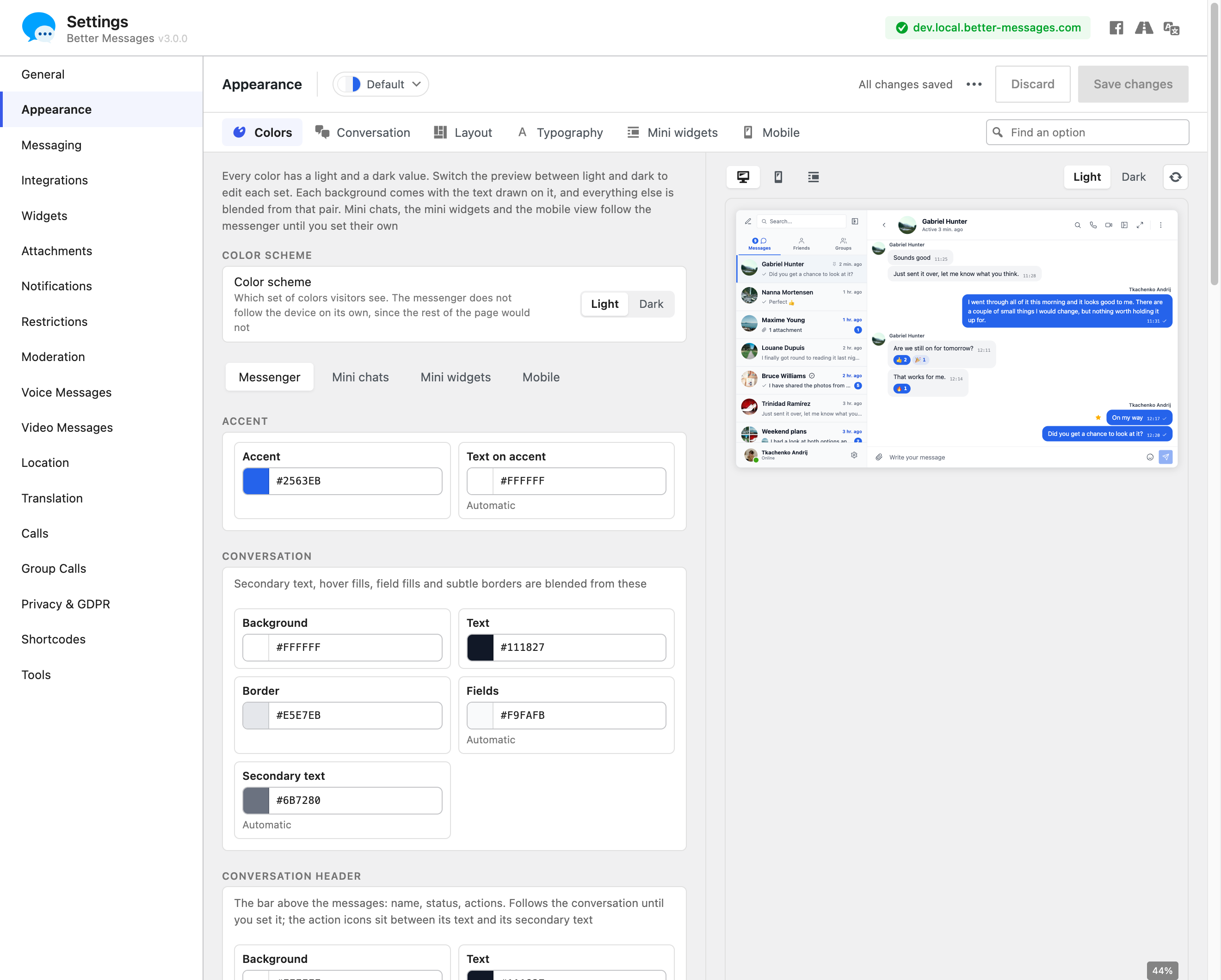
- Appearance tab — repaint every part of the messenger, reshape its corners and spacing and tune dark mode, with a live preview
- Custom notification sounds
- RTL layout support
- White label solution
- Fully translatable
- Auto-delete old messages option
Privacy & GDPR:
- Dedicated Privacy & GDPR settings page
- All message data stored on your own server
- AI moderation (when enabled) sends message content for analysis — Better Messages Cloud does not store any data, review OpenAI’s data policy if using OpenAI provider
- WordPress personal data export and erasure support (Tools Export/Erase Personal Data)
- Suggested privacy policy text that adapts based on enabled features
- Self-hosted emoji images option — no external CDN requests
- Privacy-friendly video embeds — YouTube, Vimeo load only after user clicks
- No cookies set, no analytics or tracking scripts
- Privacy & GDPR documentation
This is not a complete list of features – Better Messages has many more small features and options that are not listed here. We are constantly adding new features and improvements based on user feedback.
Compatible plugins & themes — 35+ native integrations:
Better Messages works on any WordPress site out of the box. If your site already runs a community plugin, an LMS, a marketplace, or a directory, Better Messages plugs into it directly — inheriting members, profiles, groups, courses, listings, and posts so chat surfaces appear in the right places without setup.
Community & Membership Platforms — replaces the built-in messenger and inherits members, profiles, friends, and groups:
- BuddyPress
- BuddyBoss Platform — including BuddyBoss Theme and ReadyLaunch
- PeepSo
- Ultimate Member
- FluentCommunity — including Spaces and Courses
- SureDash
- ProfileGrid
- UsersWP
- WP User Manager
Learning Management Systems (LMS) — course chat rooms, instructor messaging, and student-to-student conversations:
- LearnDash — including Instructor Role add-on
- LearnPress
- Tutor LMS
- MasterStudy LMS
- FluentCommunity Courses
E-commerce — WooCommerce — pre-sales and order support chat for online stores:
- WooCommerce — Contact buttons on product, cart, checkout, and order pages. Cart contents are auto-posted into the conversation as a rich message so your support agent immediately sees what the customer is looking at, order pages post a structured order context card. Plain product URLs pasted into any chat are expanded into rich product cards. Embedded inbox lives inside WooCommerce My Account. HPOS-compatible, block-theme-compatible, works with guest checkout. Available on both the free and WebSocket versions — the WebSocket version opens chats as a popup mini-widget overlay instead of navigating away.
Marketplaces & Multi-Vendor — buyer-to-vendor chat on top of WooCommerce, with per-vendor opt-in and contact buttons on vendor stores, product pages, and order details:
Listings, Directories & Classifieds — contact buttons on every listing, with per-listing threads:
- HivePress
- Directorist
- GeoDirectory
- Classified Listing
- Motors – Car Dealer, Classifieds & Listing
- WP Job Manager
Real Estate Themes — agent and inquiry messaging on property listings:
Forums — Private Message link on every reply:
- wpForo
- bbPress
Gamification, Points & Paid Access — charge per message or call with per-role pricing and balance display:
Automation & Page Builders:
- Uncanny Automator — triggers and actions for chat events
- AutomatorWP — triggers and actions for chat events
- Crocoblock JetEngine Profile Builder — profile and chat shortcodes for JetEngine listings
Push & PWA:
- FluentNotify — web push through your own Firebase project
- OneSignal — web push notifications
- Progressify PWA — install-to-home-screen prompts on the messenger
Universal Shortcode Builder — add chat to anything else:
Don’t see your plugin or theme in the list? Better Messages ships a visual Shortcode Builder at WP Admin Better Messages Shortcodes that lets you drop a Live Chat Button onto any custom post type, directory, marketplace listing, agent profile, or page builder block — without writing PHP. Point it at a sample post, choose how the target user is resolved (post author, postmeta-stored user ID, or a fixed inbox), set a thread strategy and label, and copy the generated shortcode. The same shortcode then works for every post of the same shape, with automatic per-post threading and an optional in-chat banner. Paste it into Gutenberg, Elementor, Bricks, Divi, or directly into a theme template.
Feel free to report any incompatibility or request more integrations — that is very important and helps improve Better Messages!
WebSocket version:
WebSocket version is a paid option, you can get license key on our website.
We use our dedicated servers to implement WebSocket communications between your site and users. Our servers are completely private and do not store or track any private data — all messages remain in your database.
Performance & Reliability:
- Significantly reduces the load on your server
- Instant message delivery in realtime, up to 200x faster than AJAX
- Works with any hosting including shared hosting
- No limits on concurrent connections or monthly active users
Video & Audio Calls:
- HD Video Calls (1-to-1)
- HD Audio Calls (1-to-1)
- Group Video Chats (up to 32 participants)
- Group Audio Chats (up to 50 participants)
- Screen Sharing in calls and group chats
Mobile Apps:
- iOS Mobile App (build your own branded app)
- Android Mobile App (build your own branded app)
- Push notifications for calls and messages
- VoIP notifications for incoming calls
Realtime Features:
- Messages Delivery Status (sent, delivered, seen)
- Typing, voice recording and file uploading activity indicators
- Online/Offline presence indicator
- User statuses (Online, Away, Do Not Disturb)
- Mini Chats – chat windows anywhere on your site
- Mini Conversations widget – list and continue recent threads from any page
- Online-only filter and online-first ordering for the Users mini widget
Better Messages Cloud AI:
- Automatic message translation in 1-to-1 conversations — 53 languages, auto-detection
- AI Content Moderation — 23 categories, custom rules, conversation context awareness
- Voice message transcription — 99+ languages with auto-detection
- No third-party API keys required — included with WebSocket license at no additional cost
Security & Encryption:
- Optional End-to-End Encryption (E2EE) — can be enabled at the website level and per conversation, messages and files encrypted in users’ browsers with AES-256-GCM, server never sees plaintext
- Local browser encryption (AES256) for offline message storage
- Web Push Notifications (works even when the browser is closed)
- All data encrypted in transit, so we can’t read it on our servers
Support:
- Priority email support
- Regular updates and new features
Why WebSockets are a game-changer?
Get WebSocket version license key | Terms of Use
RTL layout is built into the plugin.
You can translate plugin to your language with LocoTranslate or participate in plugin translation.
Installation
- Upload the plugin files to the
/wp-content/plugins/bp-better-messagesdirectory, or install the plugin through the WordPress plugins screen directly. - Activate the plugin through the ‘Plugins’ screen in WordPress
- Use the Settings -> Better Messages to configure the plugin
Screenshots

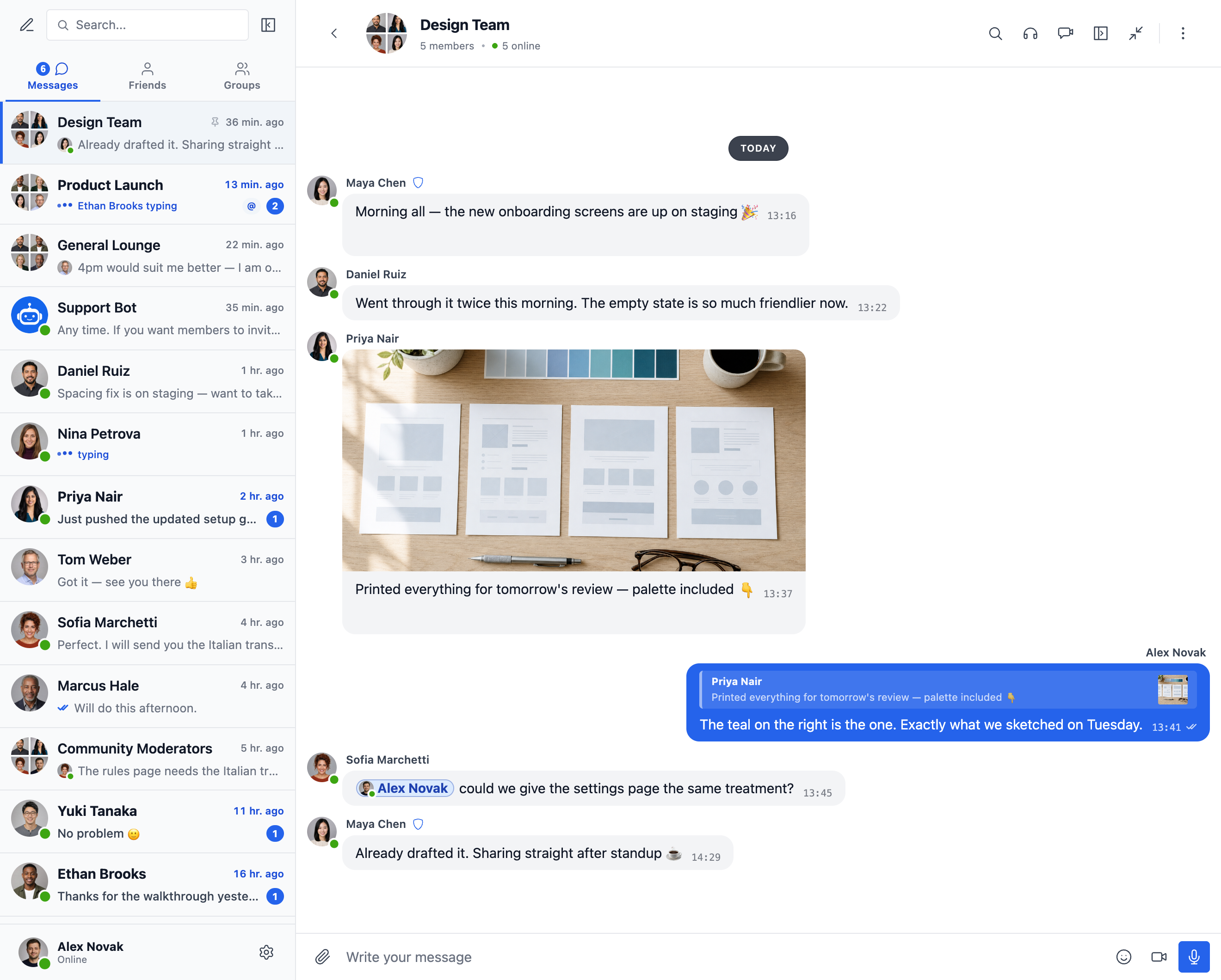
Group conversation with photo sharing, emoji reactions, replies and @mentions — alongside a conversations list with unread badges, pinned chats, online presence and live typing indicators
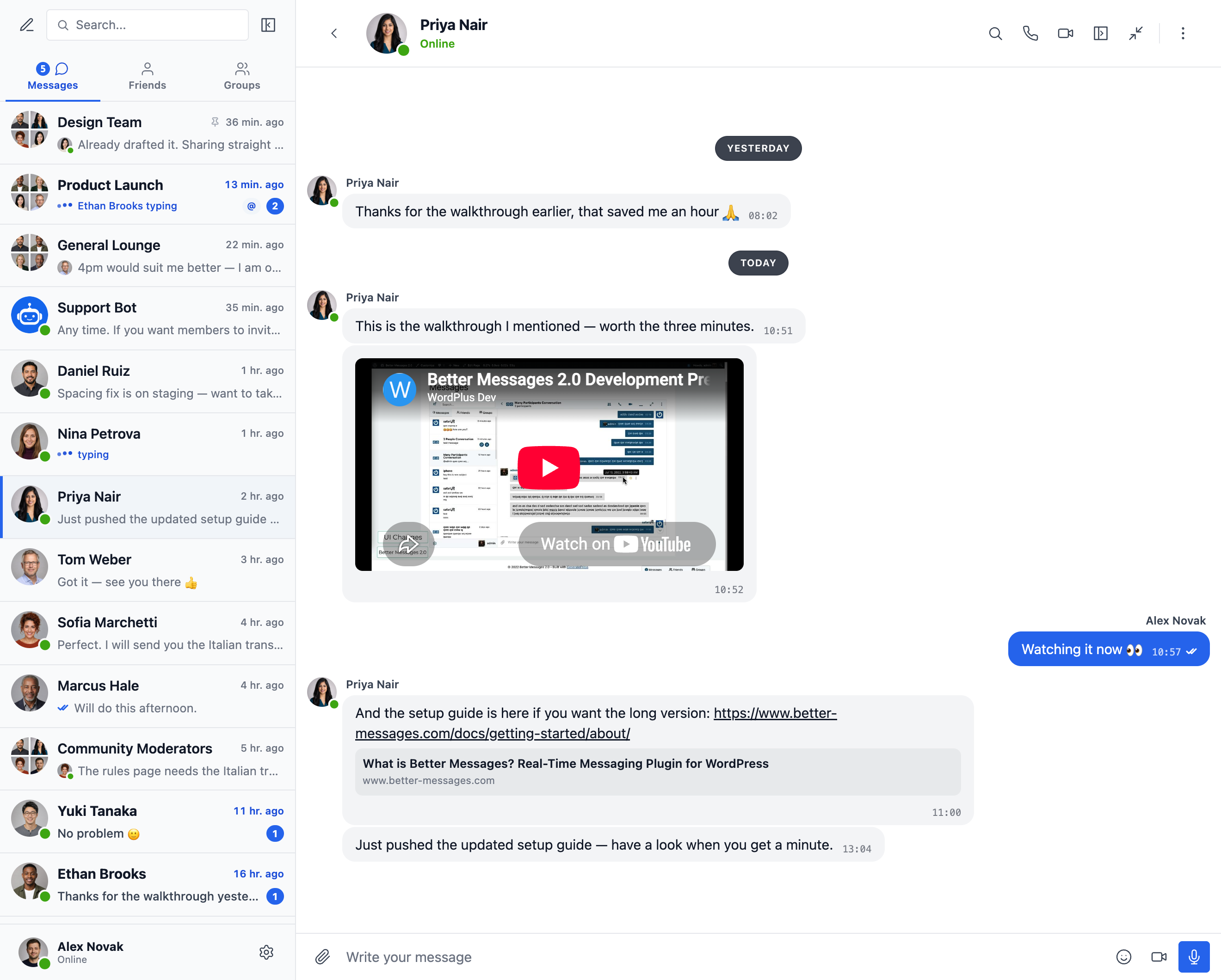
Embedded video and link previews — YouTube, Vimeo, Spotify, and 20+ oEmbed providers
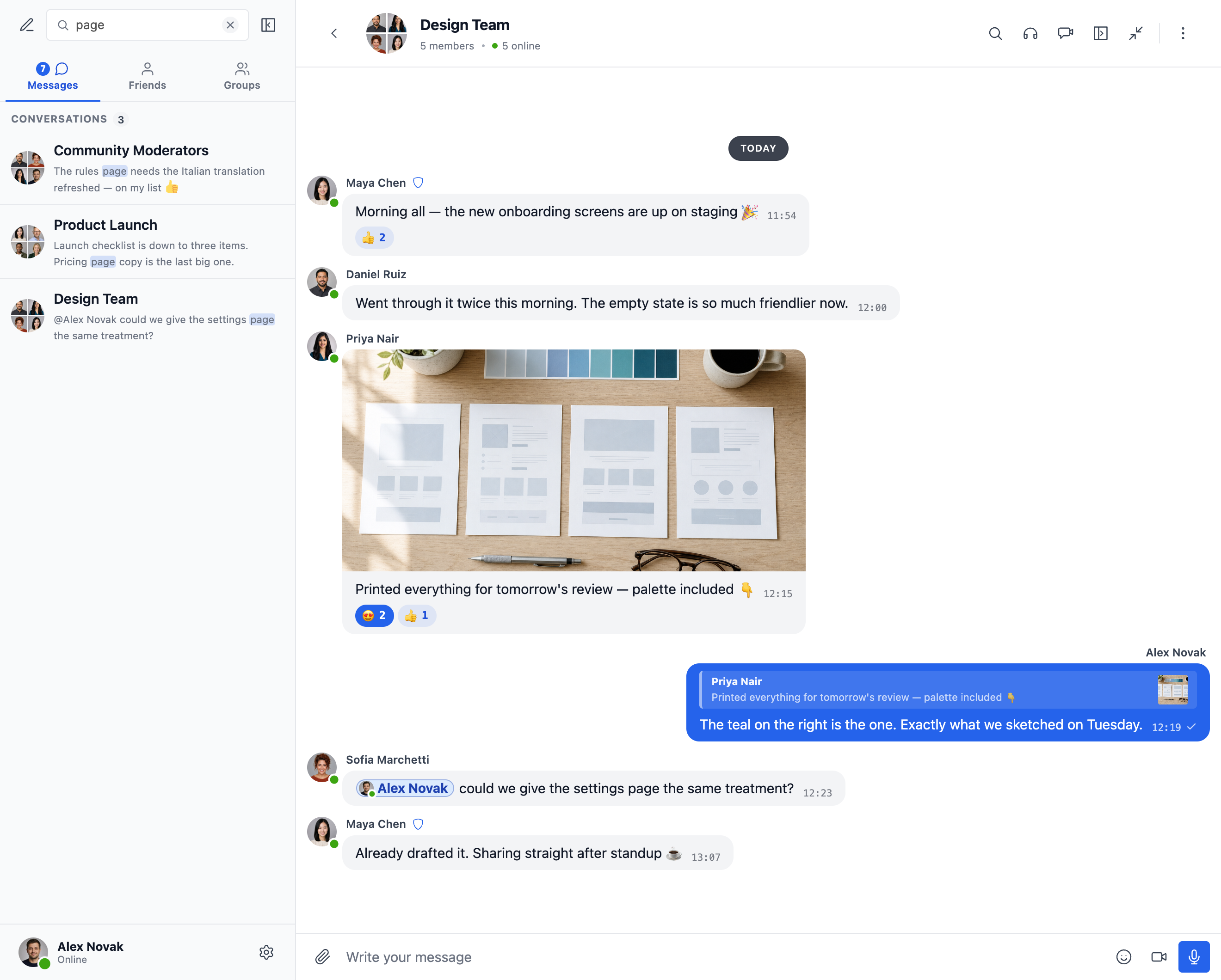
Full-text search across every message, with matches highlighted in the conversations list
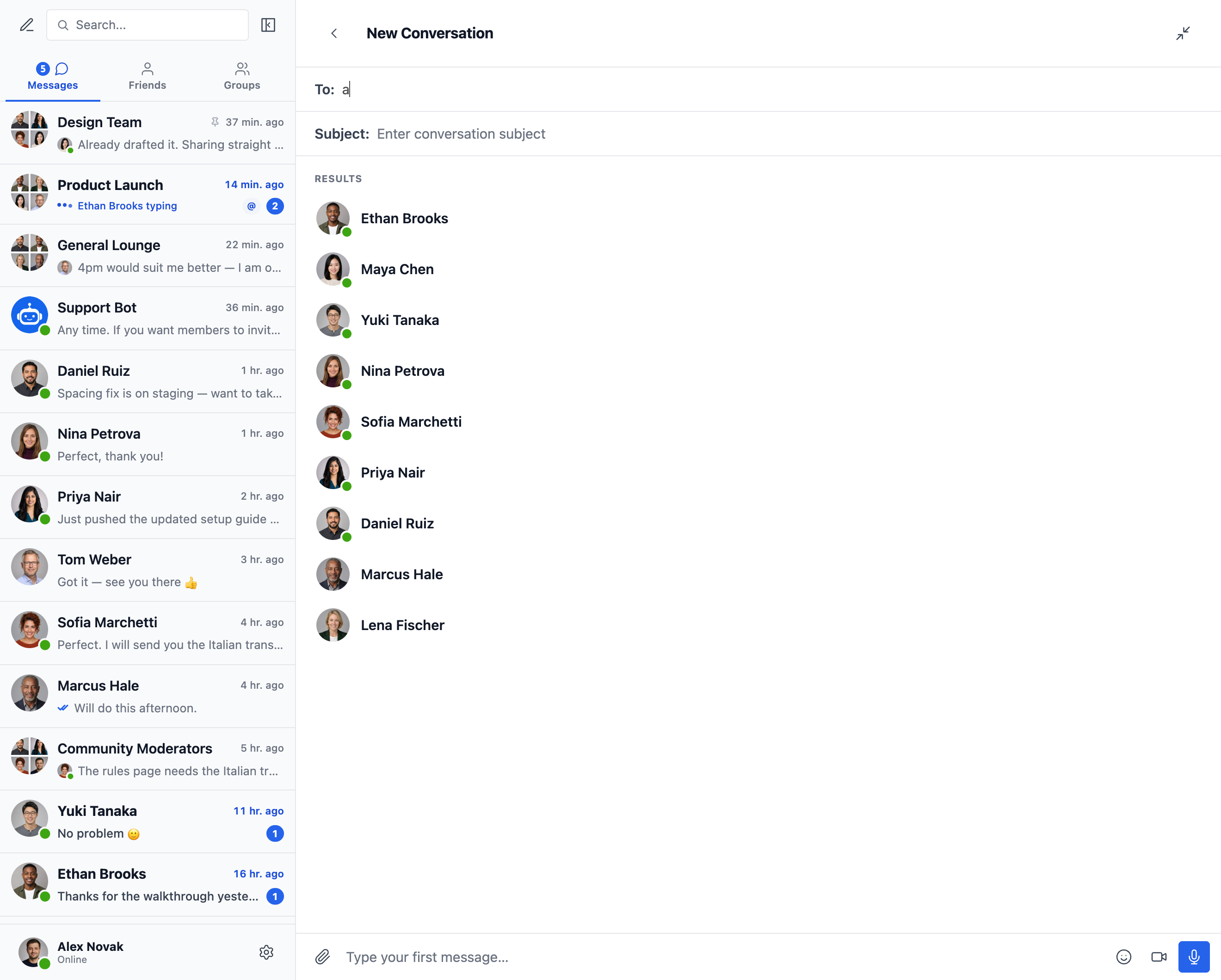
Start a new conversation — recipient search with live results and online status
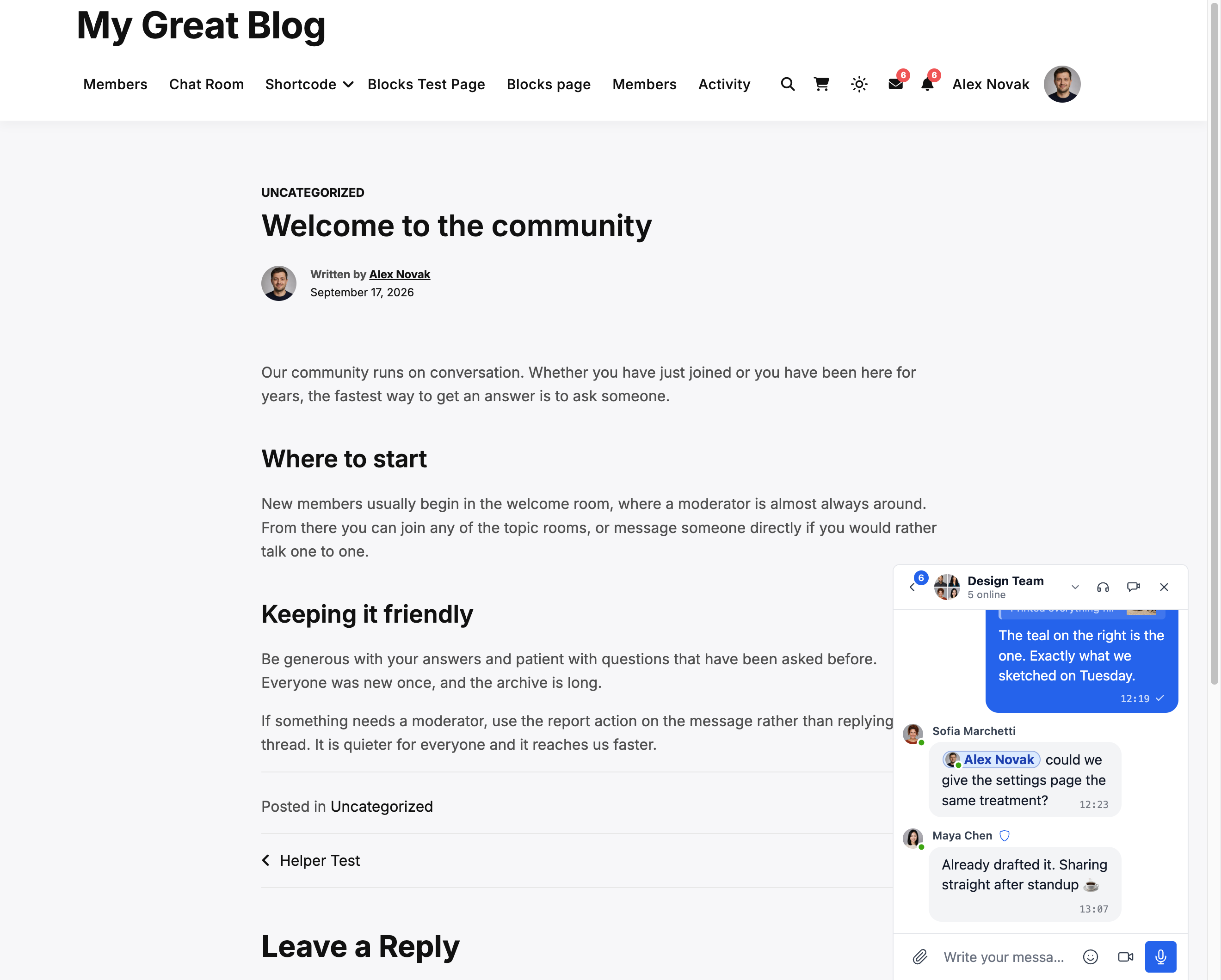
Mini chat window that follows members across your whole WordPress site
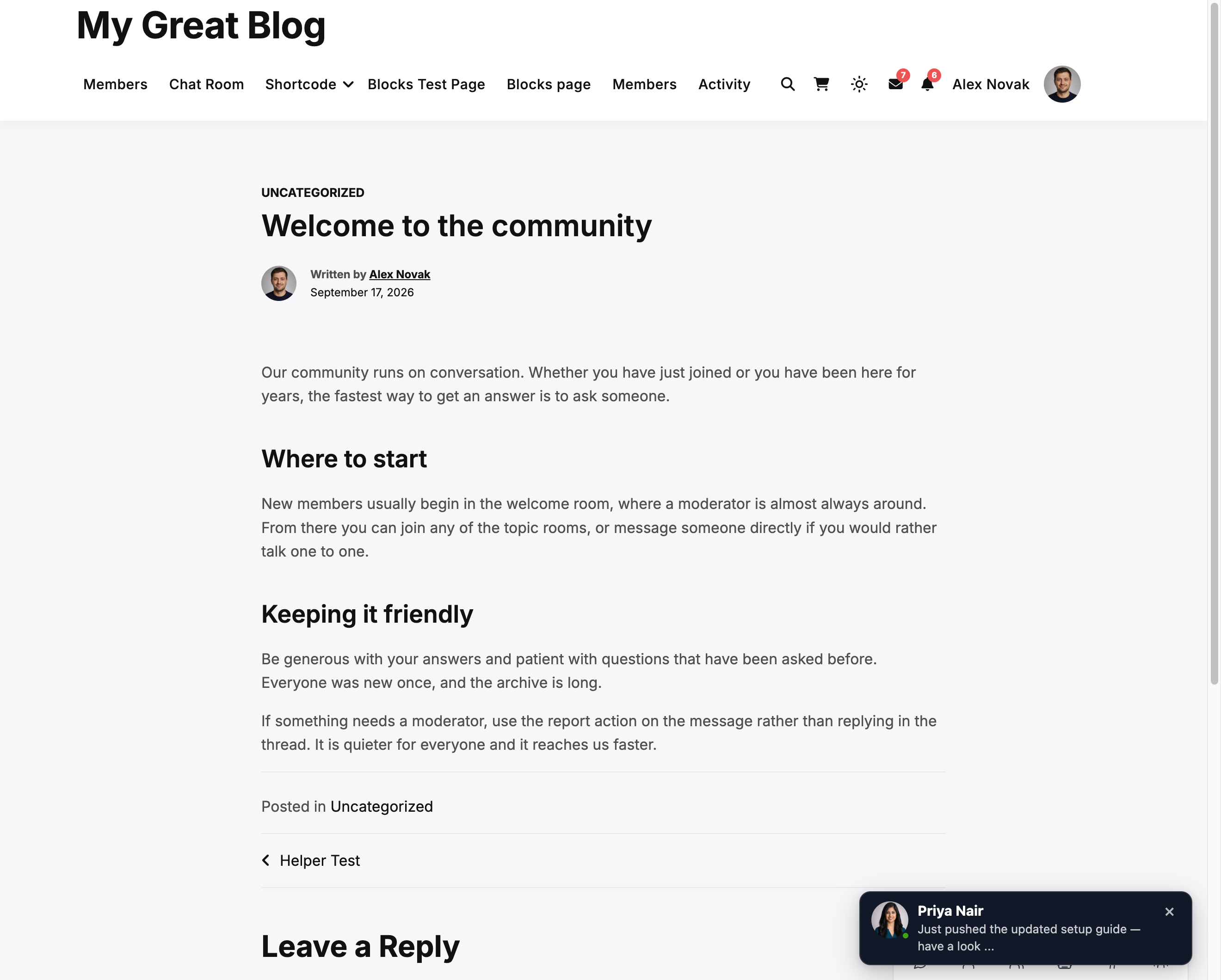
On-site toast notifications for new messages — visible anywhere on your WordPress site
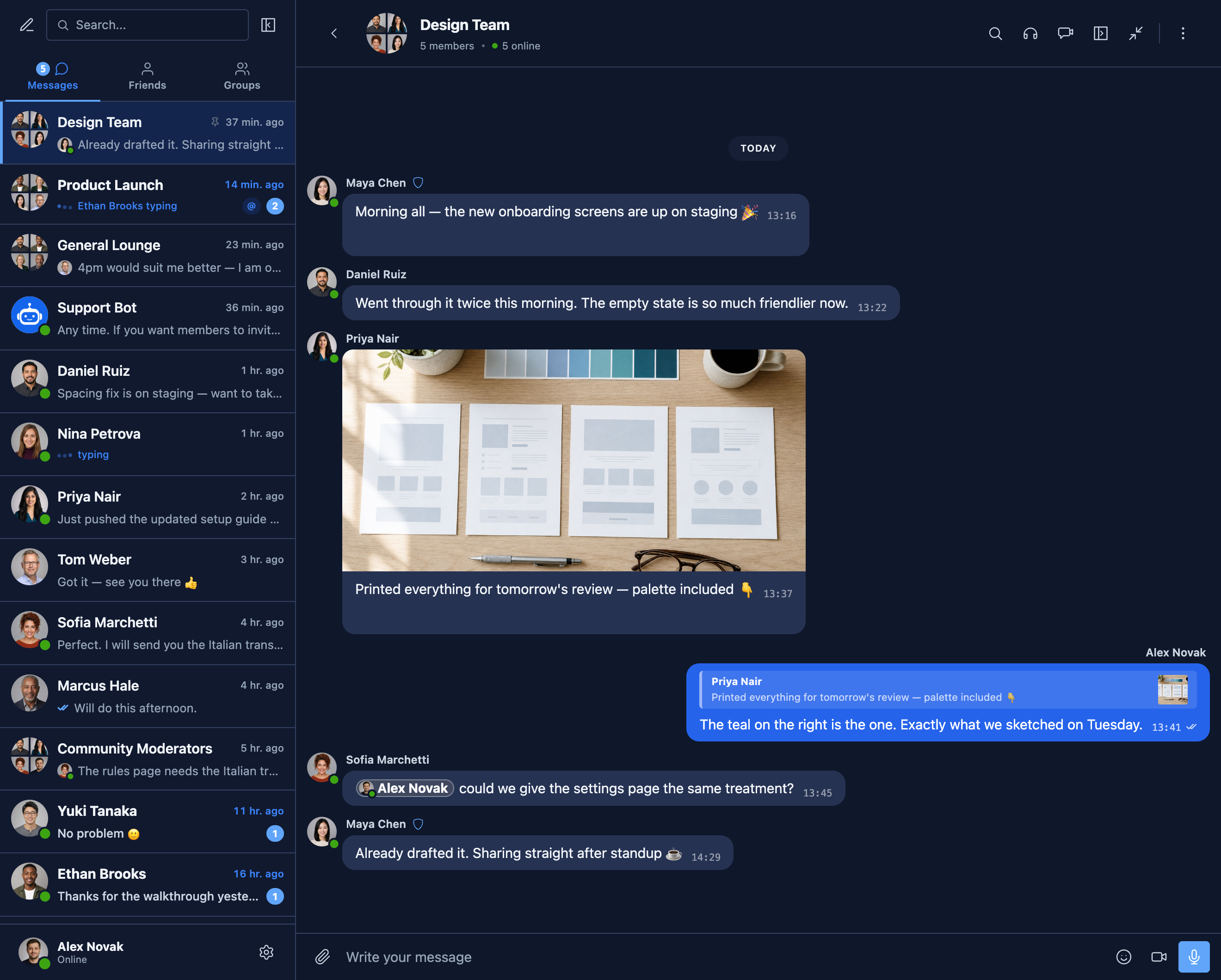
Dark mode across every surface of the messenger
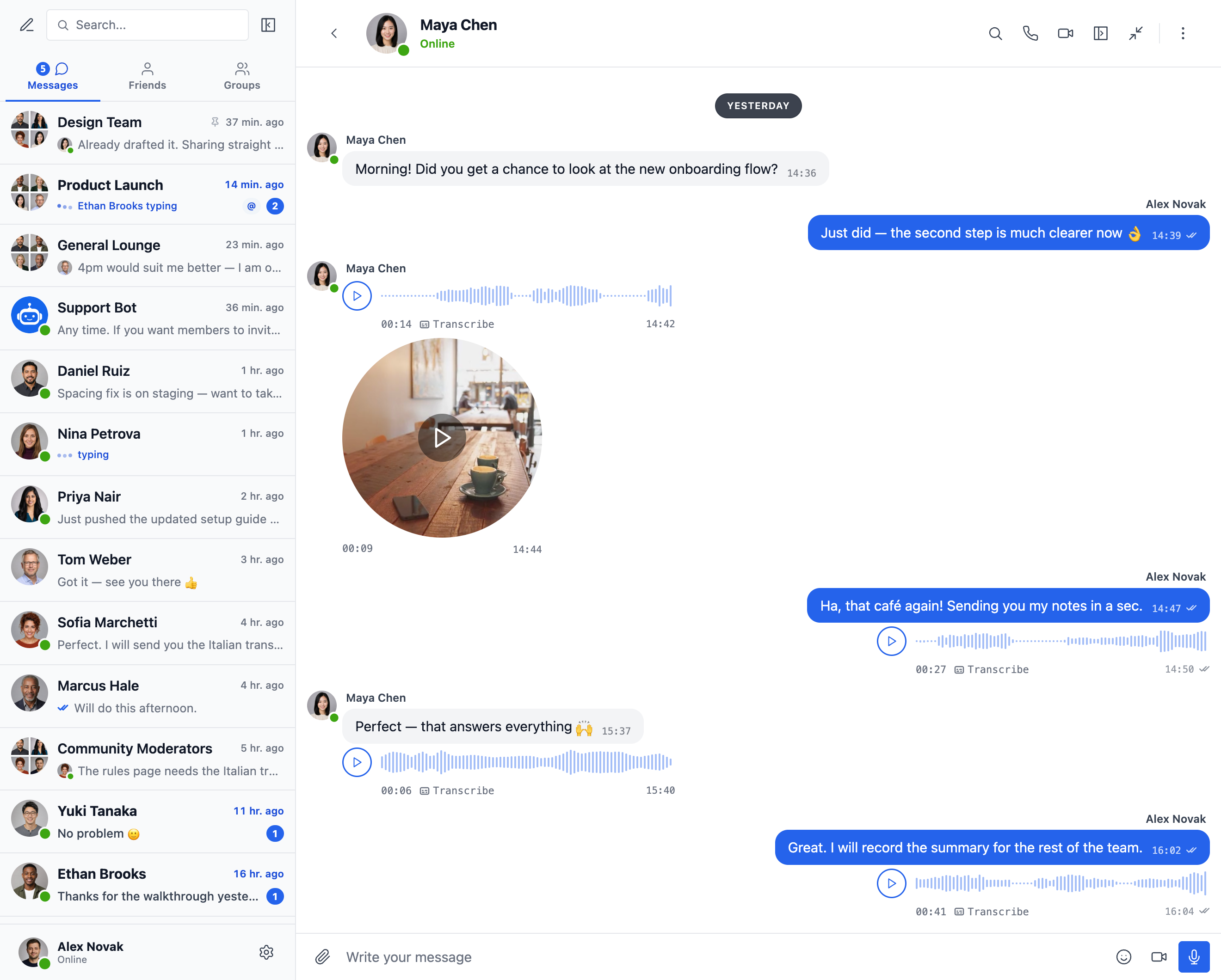
Voice and video messages, with one-tap transcription
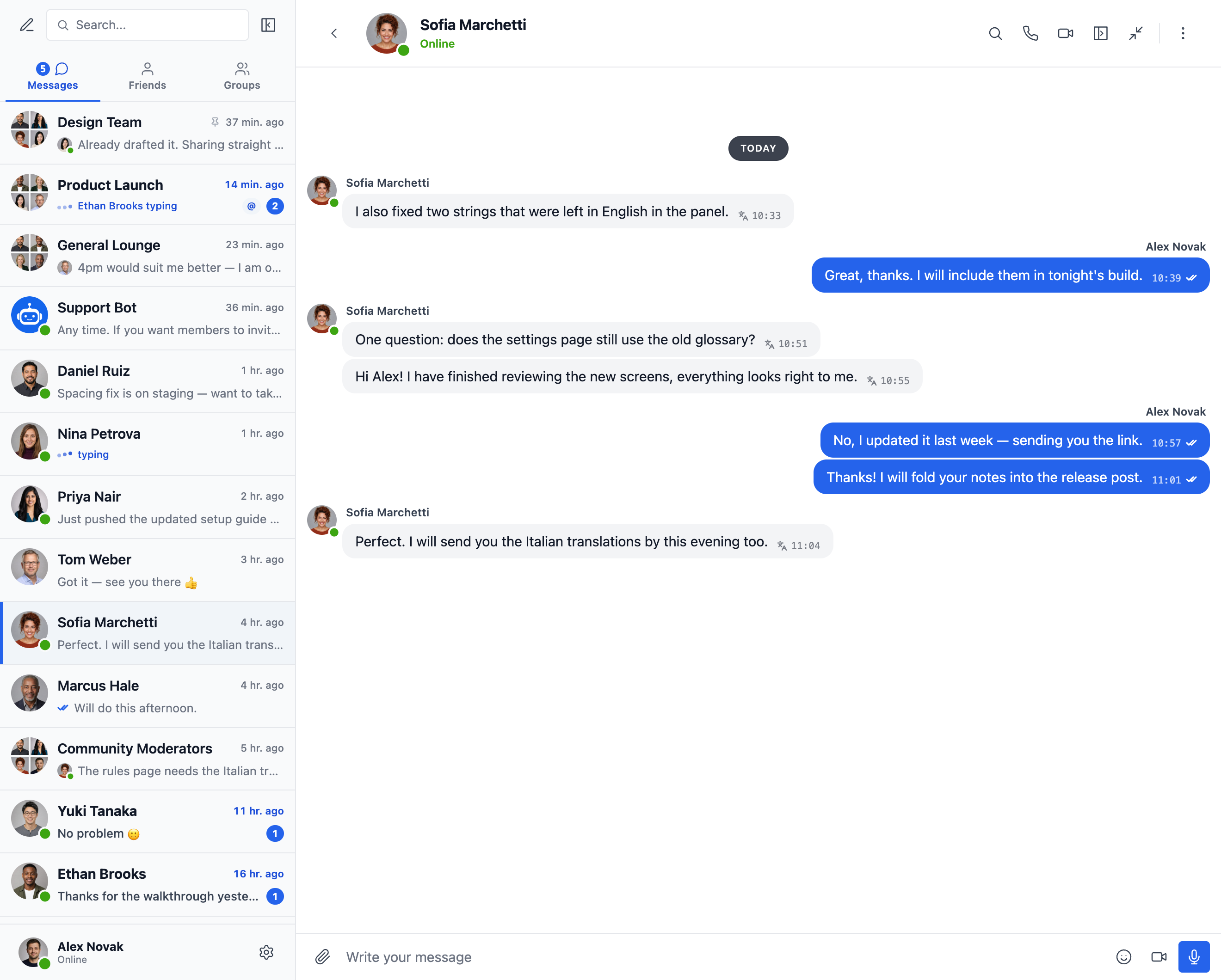
Read a conversation in your own language — messages arrive translated, with the original one tap away
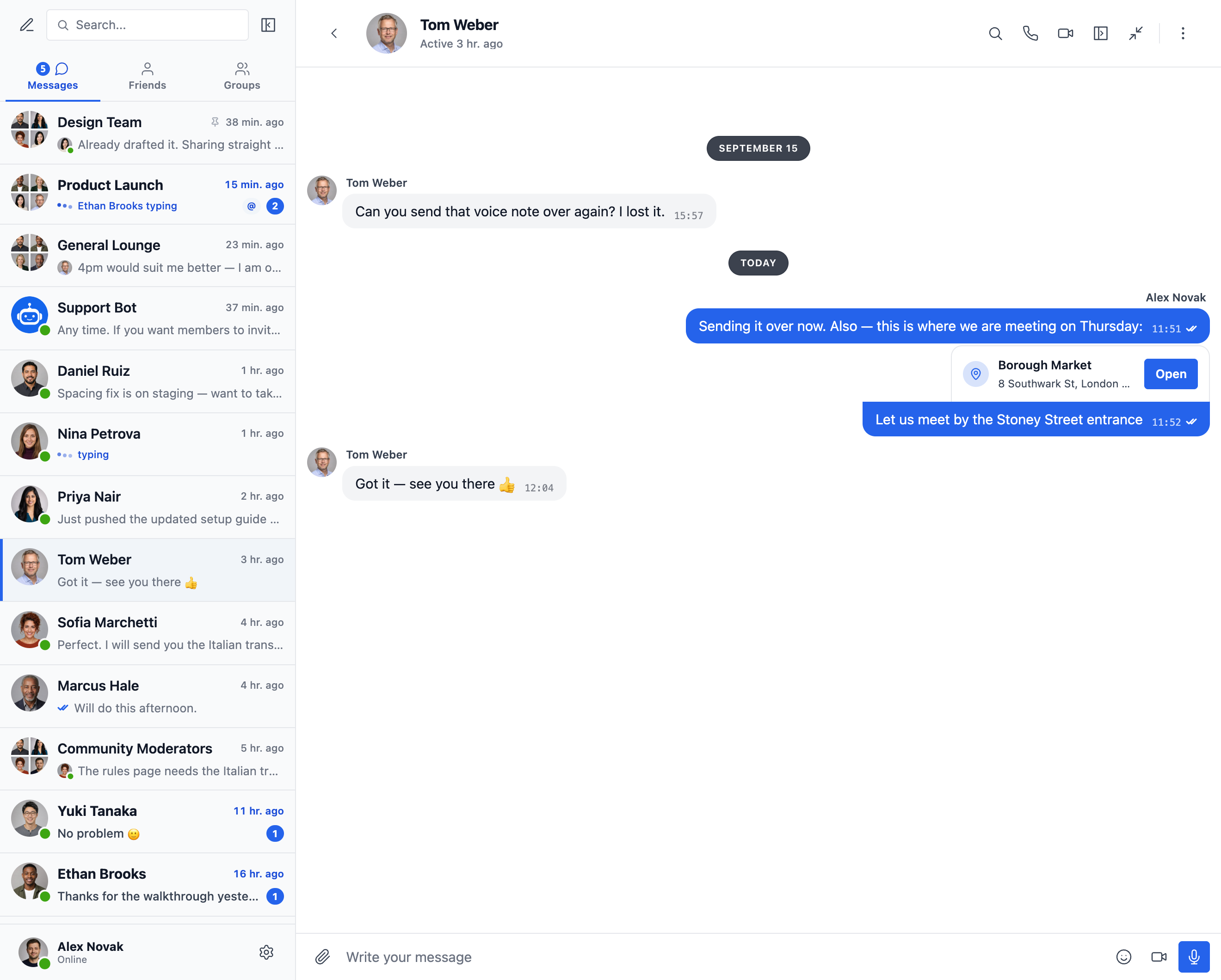
Share a location with a map picker and nearby place suggestions
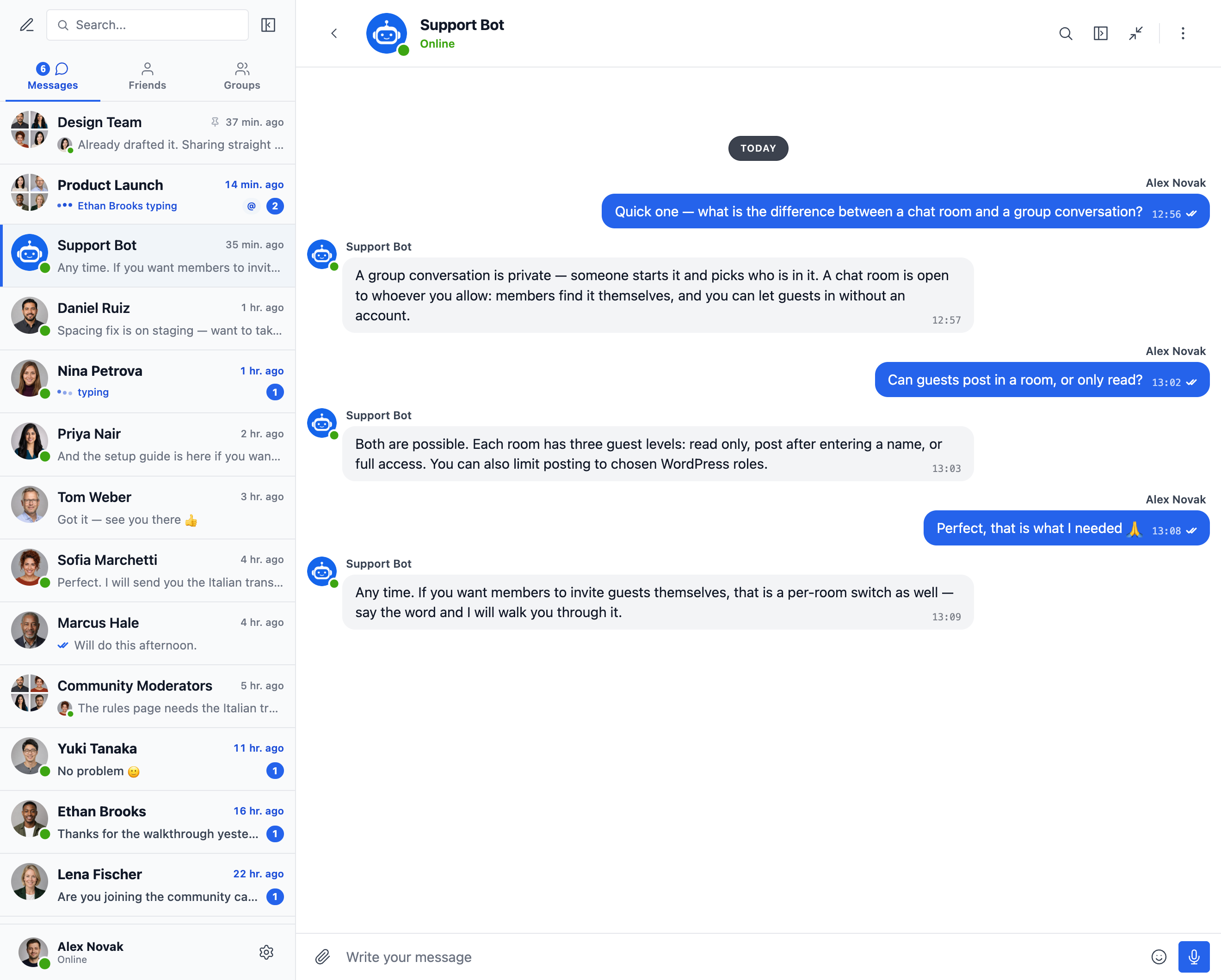
AI chat bots powered by OpenAI, Anthropic (Claude) and Google Gemini
Appearance tab — repaint any part of the messenger and watch every change in the live preview
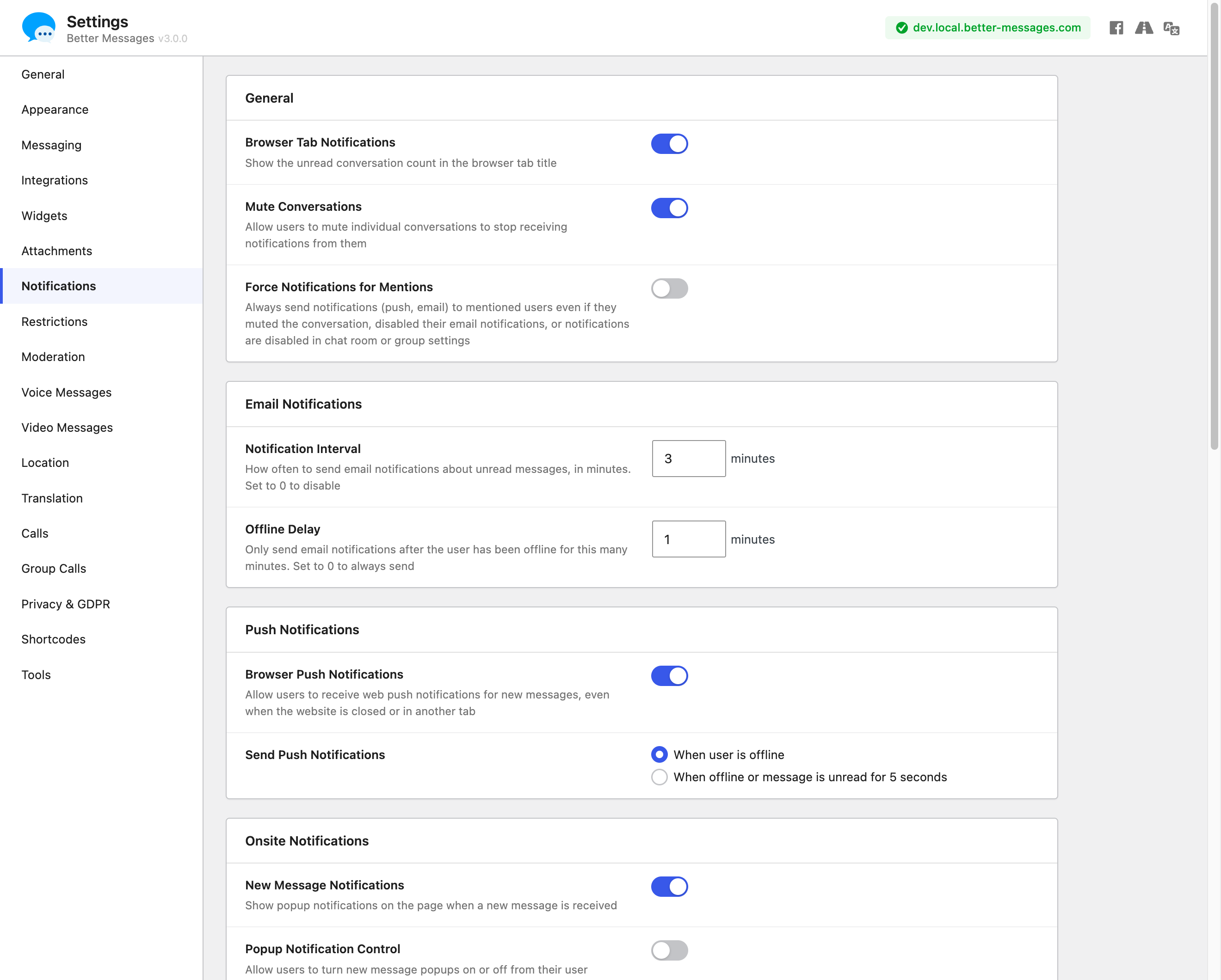
Settings — email, browser push and on-site notifications, and 18 more tabs of options
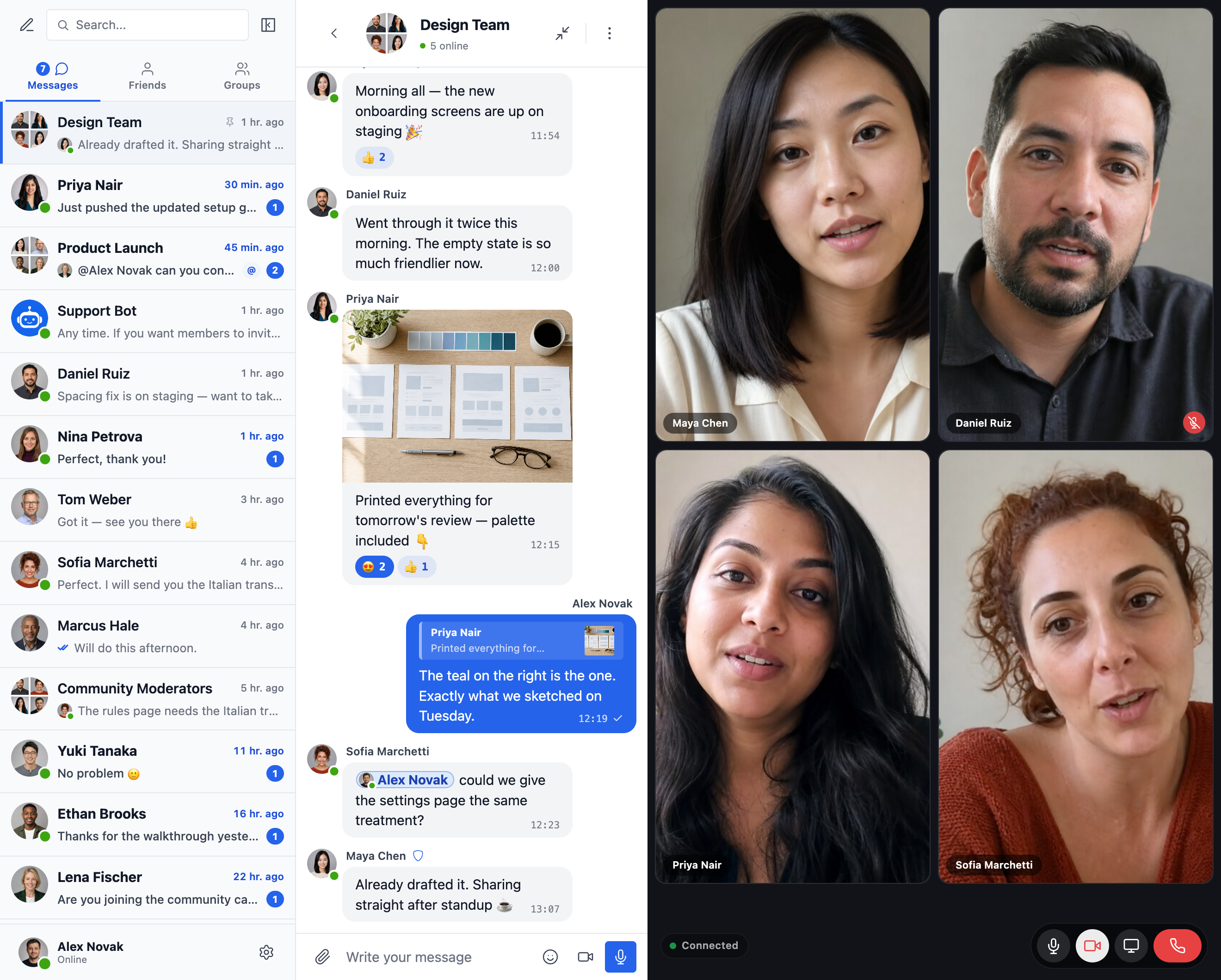
Group video calls for up to 32 participants, right beside the conversation (WebSocket version)
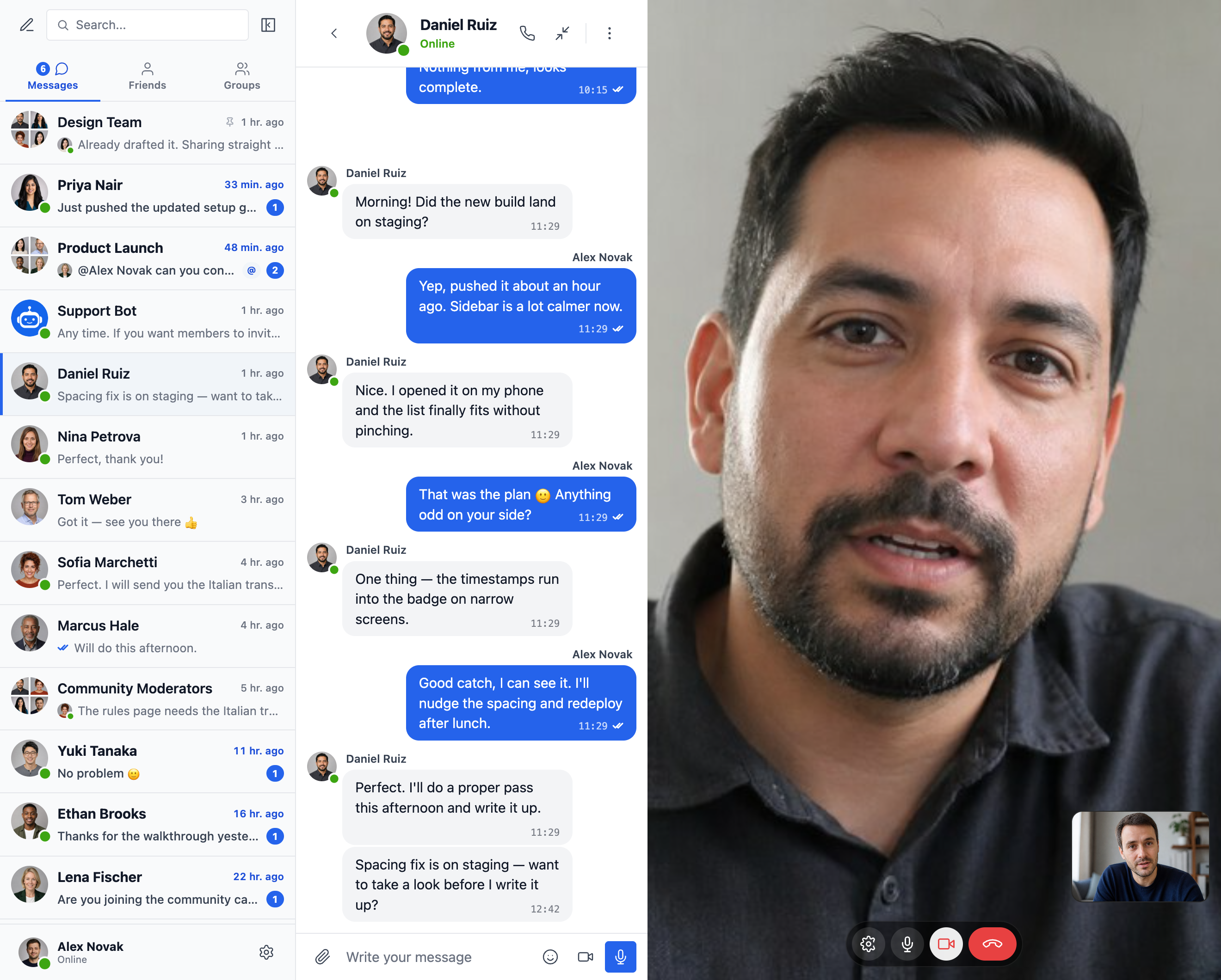
One-to-one HD video and audio calls from any conversation (WebSocket version)
Faq
Yes — install the free version from WordPress.org. It supports private and group conversations, chat rooms, file sharing, oEmbed previews, smart-batched email notifications, role-based access, guest chat, and the standard messenger feature set. The WebSocket version is paid and unlocks instant delivery, one-on-one and group voice / video calls, Better Messages Cloud AI (content moderation, message translation and voice message transcription with no API key of your own), web push, and end-to-end encryption.
35+ native integrations across community platforms (BuddyPress, BuddyBoss Platform, PeepSo, Ultimate Member, FluentCommunity, SureDash, ProfileGrid, UsersWP, WP User Manager), LMS (LearnDash, LearnPress, Tutor LMS, MasterStudy LMS), e-commerce (WooCommerce — pre-sales and order support chat with contact buttons on product, cart, checkout, and order pages), multi-vendor marketplaces (Dokan, WCFM, WC Vendors, MultiVendorX), listings and directories (HivePress, Directorist, GeoDirectory, Classified Listing, Motors, WP Job Manager), real estate themes (Houzez, RealHomes), forums (wpForo, bbPress), gamification (GamiPress, MyCRED), automation (Uncanny Automator, AutomatorWP), page builders (Crocoblock JetEngine), and push / PWA (OneSignal, Progressify). If your plugin isn’t listed, the built-in visual Shortcode Builder lets you add a Live Chat Button to any custom post type without writing PHP. See the full list of integrations.
Yes — first-class group chats with shared history, mentions, reactions, file uploads, replies, edit / delete / forward, and group voice / video calls (WebSocket version). Group chats can be auto-paired with BuddyPress / BuddyBoss / PeepSo / Ultimate Member / FluentCommunity groups, with members joining and leaving the chat in sync with the source community group.
Yes — Guest Chat lets unregistered visitors join chat rooms, message vendors on marketplaces, ask questions on directory listings, or chat with site support. Guests enter a display name (and optionally an email), then participate as a guest user. Their thread history is preserved if they later register.
Yes (WebSocket version) — one-on-one and group voice / video calls live inside the messenger thread, not as a separate Zoom / Whereby integration. Hosted media relay is included with the WebSocket license, no separate Twilio account, no Daily / Whereby subscription, no Zoom developer plan. Calls are full-screen on mobile and picture-in-picture on desktop.
Yes. All message data is stored only in your WordPress database. The WebSocket cloud relay is blind to message content — it routes encrypted events but does not read, store, or inspect what passes through. Better Messages also integrates with WordPress’s built-in Personal Data Export and Erasure tools. For sites with stricter data-sovereignty requirements (GDPR Article 9, HIPAA-adjacent, regulated-data workloads), a self-hosted plan is available — contact support.
Yes. AI Chat Bots (OpenAI, Anthropic Claude, Google Gemini) work in the free version with your own provider API key. They act as full participants in any thread, with custom system prompts and per-bot points charging via GamiPress / MyCRED. Better Messages Cloud AI (WebSocket version) provides AI Content Moderation (23+ categories including spam, scam, doxxing, contact sharing), AI Message Translation (53 languages with auto-detection), and Voice Message Transcription (99+ languages) — all included with the WebSocket license, no third-party API key required.
Yes — Better Messages ships native iOS and Android mobile apps built on Capacitor, with push notifications, real-time delivery, voice / video calls, and full messenger feature parity with the web. White-label rebuild is available for sites that want their own branded app on the App Store / Play Store under their own developer accounts.
Yes — Better Messages is fully translatable through standard WordPress translation tools (Loco Translate, WPML, Polylang) using the bp-better-messages text domain. Ships with 30+ community translations. Contribute or improve a translation at translate.wordpress.org.
Yes (WebSocket version). End-to-end encryption is enabled per thread — messages and file attachments are encrypted in the sender’s browser with AES-256-GCM before transmission, stay encrypted at rest in the database, and decrypt only in the recipient’s browser. The server stores ciphertext only, no admin, host engineer, or attacker with database access can read the message content of an E2E thread.
The complete documentation, integration guides, REST API reference, hooks reference, video tutorials, and 80+ blog posts are at www.better-messages.com.
The plugin connects to WordPlus Cloud, the plugin author’s service that sells and licenses the WebSocket version, only when an administrator uses one of these features:
- Plans, prices and reviews. When an administrator opens Better Messages Upgrade, the site asks WordPlus Cloud (api.wordplus.cloud) for the current plans, prices and customer reviews, and keeps the answer for an hour. No personal data is sent, only the request itself, which WordPress makes with the site’s address. The administrator’s browser then loads the reviews’ photos from WordPlus Cloud.
- Contact form. When an administrator sends a message from Better Messages Support, the plugin sends what they wrote, their name and email address, any files they attach, any access details they choose to share, and the site’s address and technical details (the WordPress, PHP, database and web server versions, the theme and the active plugins), which the form shows before sending.
- Better Messages Assistant, only after you press Start. The AI assistant on Better Messages Support sends nothing until an administrator presses Start under the list of what it sends. Start registers the site with WordPlus Cloud (its address, the plugin version and whether it is the free or the WebSocket version). Then each question goes to WordPlus Cloud’s assistant service (rest.wordplus.cloud) with the site’s address, the plugin’s settings (without keys or passwords), the plugin, WordPress, PHP and theme versions, the active plugins and the administrator’s language, and the answer comes back to the page. Questions and answers are stored and read by the plugin’s team to improve the assistant. Visitors’ data is never sent. “Turn off the assistant” under the chat stops it, and the
wordplus_sdk_assistant_enabledfilter hides it. - Buying. Buying happens on the WordPlus Cloud website (www.wordplus.cloud), never inside WordPress. The Upgrade buttons open it with the site’s address. After paying, the plugin sends WordPlus Cloud the one-time code it came back with, the site’s address, the plugin version and a random identifier of the site, and gets the licence key.
- Installing the WebSocket version, only when asked for. If the buyer asks for it on the WordPlus Cloud checkout page, WordPlus Cloud contacts the site, and the site downloads the WebSocket version from WordPlus Cloud and installs it. Nothing is installed unless the buyer asks on that page.
- Licence check. Once a licence key is saved, the site sends the key, its address and the plugin version to WordPlus Cloud once a day to confirm the licence.
- Emoji and sticker downloads, only when an administrator asks. “Download emoji images to your server”, the emoji names in other languages and the sticker packs come from WordPlus Cloud’s CDN (cdn.wordplus.cloud), or from WordPlus Cloud (api.wordplus.cloud) when the CDN fails, and the sticker settings ask it for the list of packs when they open. The administrator’s browser loads the packs’ cover pictures from the same addresses. These requests send the plugin’s name and version, and WordPress adds the site’s address to every request it makes.
- Usage data, only if you opt in. After the plugin is first activated, it asks once whether to share usage data, and nothing is sent unless an administrator chooses Allow & Continue. Then the site sends the administrator’s name and email address (to tell them about security and feature updates), the site’s address, title, language and time zone, the WordPress, PHP and plugin versions and whether the plugin is active, and, unless switched off, which of the plugin’s features and settings are in use (on/off values, numbers and short setting values, never your content, addresses or keys, and the size of the site’s messaging only as a range) and the names and versions of its plugins and themes. With them goes how far the setup in Get started has come (which of its cards are done or dismissed), and when the free trial notice was shown and which of its buttons was clicked. It sends them once a day when something changed, and when the plugin is activated, deactivated or deleted. The newsletter is a separate choice, off unless switched on. Each choice can be changed, or the sharing stopped, from the Opt out link under the plugin on the Plugins screen. Opting out has WordPlus Cloud erase what was shared. A site that opted in through Freemius in an earlier version stays opted in, and its administrators are told once that its data goes to WordPlus Cloud now. Only the WebSocket version adds the features and settings in use to what such a site shares, unless switched off. The free version shares them only once an administrator switches them on. A site that skipped Freemius’s opt-in is not asked again.
- Deactivation feedback, only when you send it. When the plugin is deactivated, it may ask why. The answer is sent to WordPlus Cloud only if the administrator submits it, without their email or the site’s address unless they opted in to usage data and left “Anonymous feedback” unticked.
WordPlus Cloud: terms of service, privacy policy.
Besides WordPlus Cloud, the plugin uses these services, each as described:
- Emoji images (jsDelivr). Emoji show as Apple’s images by default, and until the site downloads them, browsers load the image sheet from jsDelivr (cdn.jsdelivr.net), which receives the visitor’s IP address. “Download emoji images to your server” in the emoji settings, or the native emoji set, stops it. jsDelivr: terms of service, privacy policy.
- Video and media links (YouTube, Vimeo and other oEmbed providers). With oEmbeds on, which is the default, a link to a provider WordPress’s oEmbed support knows makes the site ask that provider for its player, and the player loads from the provider in the conversation. With “Privacy-friendly oEmbeds” on, a video loads only after a click. YouTube: terms of service, Google privacy policy. Vimeo: terms of service, privacy policy.
- GIFs (GIPHY, KLIPY), only with your own API key. Searches typed in the GIF picker go from the site to the chosen provider, with a random identifier for each member and never their name, and GIFs load in browsers from the provider’s servers. GIPHY: terms of service, privacy policy. KLIPY: API terms, privacy policy.
- Stipop stickers, only with your own API key. The sticker store and sticker searches go to Stipop (messenger.stipop.io) with the member’s numeric ID on the site and the chosen language, and the stickers load in browsers from img.stipop.io. Stipop: terms of service, privacy policy.
- AI chat bots and AI features, only with your own API key. With an OpenAI, Anthropic or Google Gemini key, the messages of conversations with an AI bot, with the bot’s instructions, and the content an AI feature works on (messages it checks, voice messages it transcribes) go to that provider. OpenAI: terms of use, privacy policy. Anthropic: commercial terms, privacy policy. Google Gemini: API terms, privacy policy.
- Location sharing, only when switched on. Browsers showing a shared place load the map from tile.openstreetmap.org, and the place search and nearby places send the search text or the map’s position to nominatim.openstreetmap.org and overpass-api.de. These addresses can be changed in the location settings. OpenStreetMap: tile usage policy, Nominatim usage policy, privacy policy. Overpass API: terms.
- OneSignal, only with the OneSignal plugin. When the OneSignal integration is used, the site links each member’s push subscription to their numeric ID on the site at OneSignal (api.onesignal.com), so message notifications reach them. OneSignal: terms of service, privacy policy.
- Cloud storage, only when connected. With a storage provider connected (Amazon S3, Cloudflare R2 or another S3-compatible service), files sent in messages are kept with that provider in the administrator’s own account, and browsers upload and download them there. The provider’s own terms and privacy policy apply.
- Mobile App, only when an administrator sets one up. On Better Messages Mobile App, the Android signing key and its passwords are sent to the plugin author’s app builder (builder.better-messages.com) to check or create them, and the Apple and Google keys the administrator enters are checked with Apple (api.appstoreconnect.apple.com) and Google. Apple: privacy policy. Google Firebase: terms, privacy policy.
- FFmpeg, only when downloaded. “FFmpeg WASM (~30 MB)” in the media settings downloads the video converter once from better-messages.com to the site, which then serves it to the browsers that convert videos before sending them.
Reviews
Wonderful plugin
By  Butterfly88 (butterfly888) on September 23, 2026
Wonderful and accessible plugin with rich features, highly extensible with powerful hooks and great support.
Great tool – even better support
By  domiwittmann on August 28, 2026
I am using the tool as a chatroom and messenger plugin on my site and it works very well. A lot of modifcations are possible and it can be easly adapted to the website.
What really stands out is the support. You get very quick responses and help whenever you need it. That is truly not something you can take for granted.
Better Messages
By  fwtrader on August 26, 2026
Better Messages is an outstanding plugin. It works flawlessly, is fast, stable, and integrates perfectly with Ultimate Member. Even more important: whenever you have a question, the support team responds quickly, kindly, and with exceptionally clear explanations. Their help is truly excellent.
I highly recommend this plugin — it delivers great functionality and top‑level support.
fwtrader – the Netherlands
PHENOMENAL
By  jamtpg23 on August 13, 2026
Plugins that are this well developed and supported are few and far between. The developer went above and beyond to help me with a strange (to me) site migration issue that I’m not even sure is within the scope of support. And the features are staggeringly extensive. This is THE messaging plugin for WordPress.
Get It Now!
By  Dianne (castings212) on July 24, 2026
If you are looking for a Messaging plugin for your site, look no further. Better Messages is all you need! Works perfectly and backed up by outstanding support!
Excellent Plugin and Support
By  codings on May 29, 2026
Looks great, functions better than expected, and excellent support. If only all WordPress plugins were this well made and maintained.
Great solution for marketplace messaging
By  costinpg on May 15, 2026
Better Messages has been a very useful plugin for our WooCommerce/Dokan marketplace. We use it for buyer-to-seller communication, and the WebSocket version makes the experience feel smooth and real-time.It is a practical and affordable alternative to external chat platforms, while still offering the main features we need: private conversations, notifications, and an internal inbox.One improvement that would help us a lot would be easier control over frontend notification prompts and translation strings, especially for browser push notifications.Overall, it is a strong plugin and a great choice for marketplaces that need internal messaging without building a custom chat system from scratch.
Perfect
By  vncnt198 on December 13, 2025
Perfectly suited to my needs, the free version is already very feature-rich. Well done.
Andrij and the team are amazing!
By  danieljproctor on August 7, 2025
I had the an issue with a small BUG in the plugin today. He responded within 3 minutes of sending the request and launched an update to wordpress within the hour. The issue was fixed faster than I could imagine. Thanks! Awesome work guys.
Couldn't be happier with this plugin
By  pnem on July 5, 2025
So easy to use, and so many features. It really is a next level WordPress plugin.
Changelog
Important — please read before updating to 3.0
3.0 is a full redesign. Your conversations, settings and integrations carry across untouched — including the colors and sizes you set in the Customizer.
Noticed something wrong after updating to 3.0? Please tell us. A redesign this large can behave differently on a theme or plugin combination we have not seen. If anything looks broken, missing or out of place, email us at [email protected] — or open a topic on the support forum if you are can not contact email for some reason — and we will get it fixed. Please do not leave it unreported, every report speeds up a fix for everyone.
Thank you to everyone who sent feedback and bug reports on the 3.0 release.
3.1.6
- Added
data-thread-idanddata-thread-typeto the open conversation (.bm-thread-col), anddata-open-thread-idanddata-open-thread-typeto the card around it and to mini chat windows, so custom CSS can style one conversation, or every chat room, its background and info panel included - Added Settings Integrations FluentCommunity Messages Icon for the Messages button in the portal header and bottom menu, Position in the Header to put it at the start of the header icons or next to the profile picture, and Messages Button on Phones to show it on phones in the header, the bottom menu or both
- Improved video in calls on the cloud call servers from Windows and Linux computers: the camera is tested as it turns on, with a spinner on its button, and goes out at up to 1080p in the codec the computer handles best: its hardware H.264 on Windows where it keeps up, else VP9
- Improved calls on the cloud call servers when a camera struggles during the call: it steps down from 1080p to 720p, or switches to a lighter codec while everyone sees “Optimizing video quality…” on its tile, in the browser and in the mobile app
- Improved screen sharing in calls on the cloud call servers from Windows and Linux computers, which now share in VP9 as smoothly as a Mac shares in H.264, where the hardware H.264 encoder of some Windows computers held a shared screen to a few frames a second
- Improved the CPU use of calls on the cloud call servers with many cameras, as the statistics of each connection are read once instead of once for every video
- Fixed voice and video messages recorded in Chrome failing to upload on sites whose PHP memory limit is unlimited, where they stayed at “Waiting to send”
- Fixed a message the site keeps failing to take holding back every message sent after it, also each time it was sent again by itself
- Fixed text messages waiting for a file, voice or video message that is still uploading, or for a message stuck in another conversation
- Fixed Send now on a waiting message trying an older failing message first instead of sending the message it was pressed on
- Fixed uploads that failed halfway staying in the Media Library instead of being removed with the other unused uploads
- Fixed each new page or tab fetching the encryption keys again when another open tab of the site had already fetched them
- Fixed the unread count sitting low in its circle in the collapsed conversations list on FluentCommunity and on themes with a tall line height
- Fixed the counts in search results sitting low in their circles, and the date and New messages labels of a conversation growing taller, on FluentCommunity and on themes with a tall line height
- Fixed deleting a message taking seconds on sites with many files, as it looked through every file sent in the messenger instead of the files of that message
- Fixed a message sent again after a lost connection waiting until the first send had finished all its work, instead of being answered as soon as the message was saved
- Fixed a camera paused by its device during a call on the cloud call servers, such as Safari on an iPad sent to the background, showing the others its last picture frozen instead of the avatar until it came back
- Fixed the messenger never finishing its load, even after a reload, when the browser database opened but stopped answering, as in Safari after a Mac woke from sleep: it moves to a fresh database, and every reload after that loads at once
- Fixed browser database timeouts the messenger works around reaching error tracking tools by the thousand as uncaught errors
- Other minor bugfixes and improvements
3.1.5
- Added custom tabs on the mini widgets bar, the side panel and the mobile tab bar, from Settings Appearance: a link, a page shown inside the messenger, or content with shortcodes rendered for each member, hidden per role and bar
- Added renaming of the built-in tabs, one name for all three bars
- Added the
better_messages_navigation_tabsJavaScript filter and thebetter_messages_custom_tabsPHP filter, to add, remove, reorder and rename the tabs of every bar from code — see Custom navigation tabs - Fixed the Courses widget icon picked in Appearance showing in the preview but not on the site, and its Show Search Box switch doing nothing
- Fixed the collapsed side panel showing the stock icons instead of the widget icons picked in Appearance
- Fixed the side panel showing the wrong number of tabs for a moment while the messenger loads
- Fixed the Restricted Roles of voice and video messages not applying in New Conversation, where restricted members and guests still had the mic and the camera: the site now also refuses their recordings
- Fixed Unique Guest Names letting a guest sign up or rename with the username or display name of a member, an administrator too
- Fixed Restrict Message Viewing letting restricted members read some messages: new messages, edits and AI replies as they arrived, ephemeral chat rooms, conversations they were added to, AI translations and transcripts, search results, and messages stored before the restriction
- Improved the sound of calls on the cloud call servers over unstable connections, as each audio packet now carries a copy of the one before it
- Improved video in calls on computers whose hardware video encoder drops camera frames: this is now detected, and the camera is encoded in software from its next start
- Tested up to WordPress 7.2
- Other minor bugfixes and improvements
3.1.4
- Added Better Messages Settings Get started, the page a new site opens on: one click each sets up the Messages page, chat with visitors, a chat room on its own page and the plugins on the site
- Added Get started cards for the look, file sharing, email notifications, reports and blocking, and restrictions, each one dismissible, with the Messages page required until it exists
- Added a new Better Messages Upgrade page: what the WebSocket version adds beside its price, monthly or yearly with the yearly saving shown, reviews from buyers, every feature side by side with the free version, and answers to the questions asked before buying
- Added the offer of the free WebSocket trial back, as before 3.1: a notice on the Dashboard and the Plugins screen once members are messaging, and, from then on, Better Messages Start trial while the site can still take it, with a subscription at once still one click away
- Fixed files sent from a private window in Safari staying at 0% and never being sent, in plain and end-to-end encrypted conversations
- Fixed typed messages showing as sent, and live for the others, but never being saved when the browser could not keep them in its local database
- Fixed video in calls running at 15 or 20 frames per second from webcams that give Full HD only at a lower frame rate, as many do: such a camera now opens at a smaller size at 30 frames per second
- Fixed an AI chat bot reply that could stay a pulsing dot for many minutes when the response ended without finishing, as on OpenAI with image generation off and web search on: it now says the response was interrupted
- Fixed an AI chat bot answer that is only a generated image still showing as typing in the conversations list after it arrived
- Fixed AI chat bot image costs counting less than OpenAI bills: an image made with OpenAI is now priced from the tokens OpenAI reports, the prompt and the pictures being edited included, so the usage figures and points pricing follow the real cost
- Fixed a message the site kept failing holding back every message sent after it, which looked sent but never arrived: it now shows Message not sent with Retry, and the others go out
- Fixed messages showing as sent when the site answered with something other than Better Messages, such as a firewall check page: they now show Message not sent with Retry
- Fixed messages sent just before closing the tab staying unsent until the site was opened again in the same browser: they now go out as the tab closes
- Fixed a message being lost, though the others may have seen it arrive, when the tab was closed or the phone locked right after pressing Send: it now goes out as the tab closes, or from the next page opened on the site
- Fixed messages waiting to be sent being lost when the browser lost them from its local database or was slow to save them, as on a device that is nearly full
- Fixed messages waiting to be sent being deleted when Browser Database Encryption was switched on or off
- Fixed attachments being left out when sending from New Conversation into a conversation that already exists
- Improved AI chat bots on OpenAI: the limits of images, web searches and file searches per response are enforced by OpenAI as one total when each tool in use has a limit, not only asked for in the instructions
- Improved calls on the cloud call servers: a video the server pauses for a weak connection shows “Paused: weak connection” instead of freezing without a word, and a group call says when every video is paused
- Improved lip sync in group calls: each voice keeps to its own camera, measured from what the browser plays in Chrome, Edge and other Chromium browsers, Bluetooth headphones included, and the sound of a shared screen, such as a video playing in a tab, keeps to the screen
- Security improvement: an error message carried in a link is shown as plain text, so a crafted link can no longer run script on the site, and every notice keeps only safe markup
- Improved the notice for a missing Messages page: one click on any admin screen creates the page, in place of an error that sent you to the settings
- Improved the deactivation survey: an admin who just installed the plugin is asked what they were trying to do, in a question above the answer box
- Improved the settings on phones and short screens: the header no longer covers the page title, and the side menu has a thin scrollbar
- Improved the usage data, for sites that share it: it also says how far the site got in Get started, which cards are done, dismissed or not set up, and when the trial notice was shown and which of its buttons was clicked
- Other minor bugfixes and improvements
See the full changelog for every earlier version.