

ATR Cookie Notice
Description
ATR Cookie Notice is a powerful and user-friendly cookie consent management plugin designed to help WordPress websites align with the Israeli Privacy Protection Law (PPL), including Amendment 13, and related privacy best practices. The plugin provides a customizable cookie banner with granular consent options for different types of cookies.
Documentation: Full documentation · Sample privacy policy · Testing guide
Key Features
- Israel Privacy Law Aligned – Oriented to Israel’s Privacy Protection Law (PPL), including Amendment 13
- Granular Cookie Control – Separate consent options for Essential, Analytics, and Marketing cookies
- Customizable Design – Full control over colors, positioning, and styling with WordPress color pickers
- Live Preview – Real-time floating preview that updates as you customize settings
- Customizable Content – Full control over banner text, buttons, and footer HTML with token support
- Multiple Banner Positions – Bottom, top, or overlay positioning options
- Auto-hide Functionality – Optional automatic banner dismissal
- Responsive Design – Works perfectly on all devices and screen sizes
- RTL Support – Proper right-to-left language support
- Multilingual Support – Built-in Hebrew and English translations
- Developer Friendly – Extensive hooks and filters for customization
- Privacy Policy Integration – Built-in privacy policy management with customizable footer
- Cookie Expiry Management – Configurable consent duration
- Debug Mode – Development tools for testing and troubleshooting
- Consent Modes – Choose between Full (disables the Google Analytics and Facebook Pixel functions until consent; tracking code from your theme must be wrapped, see “Important” above) and Simple (informational only)
- Tools – One-click “Purge caches and refresh assets” with cache busting, styling reset to defaults
Important: tracking code added by your theme or another plugin
Full mode disables the Google Analytics and Facebook Pixel functions until consent, but it does not stop tracking code that your theme or another plugin prints into the page (for example a Google Tag Manager snippet in the header, or a code added with a “header/footer scripts” plugin). That code runs before the visitor decides.
To put such code under the banner’s control, wrap it with the plugin’s consent marker. Change only the opening <script> tag:
<script type="text/plain" data-consent="analytics">
  ... your Google Tag Manager / Analytics code ...
</script>

<script type="text/plain" data-consent="marketing">
  ... your Facebook Pixel / advertising code ...
</script>
The browser does not run a text/plain script. After the visitor consents to that category, the plugin turns it into a normal script and runs it; if the visitor rejects, it never runs. It works for inline code and for scripts with src, wherever they are printed (theme header, wp_head, header/footer plugins, page builders). Code that another JavaScript file creates at runtime is not covered. The <noscript> parts of Google Tag Manager and Facebook Pixel (an iframe or image in the page body) cannot be wrapped: they load only when JavaScript is off, when no banner can ask for consent, so remove them.
Cookie Categories
The plugin manages three main cookie categories:
- Essential Cookies – Always enabled, required for basic website functionality
- Analytics Cookies – Optional, for website analytics and performance monitoring
- Marketing Cookies – Optional, for advertising and marketing purposes
Customization Options
- Visual Customization – WordPress color pickers for primary color, text color, background color with live preview
- Position Control – Choose from bottom, top, or center overlay positioning
- Behavior Settings – Auto-hide delay, cookie expiry duration
- Custom CSS – Add your own styling rules
- Content Customization – Customize banner text, buttons, and footer HTML with token support ({site_name}, {privacy_url}, {privacy_link})
- Styling Presets – Light, Dark, Minimal, High Contrast presets for quick setup
Privacy & Compliance
- Consent Storage – The visitor’s choice is stored only in their own browser (a cookie and localStorage) for the period set in Advanced Options. The plugin does not keep a record of who accepted or rejected cookies.
- Privacy Policy – Sample privacy policy in Hebrew and English on the plugin’s website
- Regulatory Alignment – Oriented to Israel’s Privacy Protection Law (PPL), including Amendment 13 (not legal advice)
Developer Features
- WordPress Coding Standards – Follows WPCS and best practices
- Extensive Hooks – Customize behavior with WordPress actions and filters
- Clean Code – Well-documented, maintainable codebase
- Performance Optimized – Minimal impact on site performance
Perfect for businesses, agencies, and developers who need a reliable cookie consent solution aligned with Israeli privacy law that can be easily customized to match any website design.
Liability Statement
This plugin is provided “as is” without warranties of any kind, express or implied. It is intended to help site owners align cookie consent UX and behavior with Israel’s Privacy Protection Law (including Amendment 13). It does not constitute legal advice, nor does it guarantee compliance. You are solely responsible for verifying your legal obligations and configuring the plugin to meet your specific requirements. The author and contributors are not liable for any damages, losses, or non-compliance resulting from the use of this plugin.
Installation
- Upload the plugin files to the
/wp-content/plugins/atr-cookie-noticedirectory, or install the plugin through the WordPress plugins screen directly. - Activate the plugin through the ‘Plugins’ screen in WordPress
- Navigate to Settings > ATR Cookie Notice in the WordPress admin menu to configure the plugin
- Check Enable Cookie Banner to show the cookie notice to visitors
- Customize the banner appearance, behavior, and cookie categories as needed
- Use the live preview to see changes in real-time
- Click Save Settings to apply your changes
- The cookie banner will appear on your website frontend
Screenshots

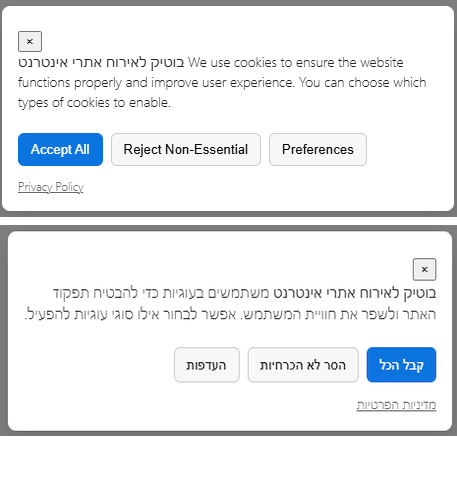
Cookie banner displayed at the bottom of the website with consent options for different cookie categories
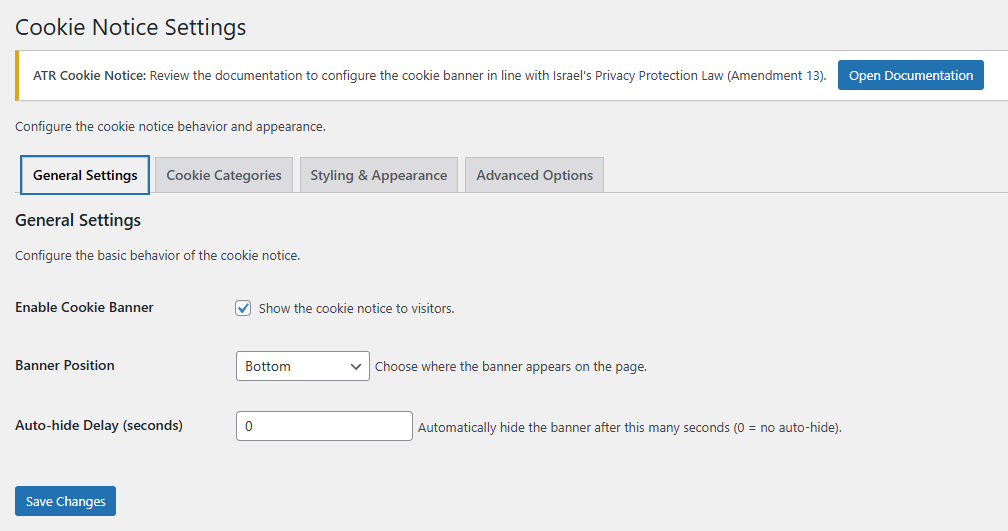
Plugin settings page showing the General Settings tab with banner configuration options
Faq
More answers, with step-by-step explanations: FAQ and troubleshooting.
Do I need to configure anything after installation?
The plugin works out of the box with default settings, but we recommend customizing the appearance and cookie categories to match your website’s design and compliance needs. Visit the plugin settings page (Settings > ATR Cookie Notice) to configure colors, positioning, content, and cookie categories.
Does this plugin help with Israel privacy law compliance?
ATR Cookie Notice is designed to help websites align with Israel’s Privacy Protection Law (including Amendment 13). It provides granular consent options, per-category consent stored in the visitor’s browser, and privacy policy resources. It is not legal advice—verify your requirements with a legal professional.
Can I customize the appearance of the cookie banner?
Absolutely! The plugin offers extensive customization options including WordPress color pickers with live preview, positioning, custom CSS, and styling presets (Light, Dark, Minimal, High Contrast). You can also customize the banner text, buttons, and footer HTML using tokens like {site_name}, {privacy_url}, and {privacy_link}.
What are the available content tokens?
You can use the following tokens in custom banner text and footer HTML:
* {site_name} – Your website name
* {privacy_url} – URL of your Privacy Policy page
* {privacy_link} – Full anchor tag linking to Privacy Policy
* [ok_button] – OK button (Simple mode)
* [accept_all_button] – Accept All button (Full mode)
* [reject_button] – Reject button (Full mode)
* [preferences_button] – Preferences button (Full mode)
* [privacy_link] – Privacy Policy link (Simple mode)
The button colors look different because of my theme
Enable Advanced Options > “Force override theme styles”. The banner then uses high-specificity rules that win over theme CSS.
A site popup covers the cookie banner
Raise Styling & Appearance > “Banner Z-Index”. The maximum value is 2147483647, which places the banner above almost everything. Visitors can also drag the banner aside using the handle at its top (dragging is not consent).
The banner does not appear in Brave or with an ad blocker
Brave (cookie notice blocking in Shields), uBlock Origin and AdGuard can use the public “EasyList Cookie” filter list, which blocks cookie-notice files by name. The plugin’s CSS and JavaScript files are blocked, so the banner is not shown. This is the visitor’s own choice. The visitor never consents, so scripts wrapped with data-consent never run for them. The banner markup stays hidden, so no unstyled buttons appear. To test the banner, use a browser without these blockers or turn the blocker off for your site.
Does the plugin support multiple languages?
Yes, the plugin includes built-in support for Hebrew and English with proper RTL layout support. Additional translations can be added through the WordPress translation system.
How do I translate my custom banner text on a multilingual site (WPML / Polylang)?
The plugin settings are one set for the whole site; switching the admin-bar language flag does not save a separate copy per language. The Content fields (Simple/Full Text, Actions and Footer HTML) are registered for translation through wpml-config.xml:
- Write the text in Settings > ATR Cookie Notice > Content in the site’s default language and save.
- Translate it following your multilingual plugin’s guide:
- WPML: Registering strings from the admin area and plugin settings – look for
atr-cookie-noticein the Admin Texts screen. - Polylang: Strings translation – group
plugins/atr-cookie-notice.
- WPML: Registering strings from the admin area and plugin settings – look for
- Check each language on the front end in a private window.
Empty fields use the built-in default text, which already follows the site language.
Are analytics and marketing cookies enabled by default?
No. In the Preferences form the Analytics and Marketing checkboxes start unchecked; the visitor has to opt in. Essential cookies are always enabled as they’re required for basic website functionality.
How long does the plugin remember user consent?
By default, consent is remembered for 365 days; change it in Advanced Options > “Cookie Expiry (days)”. After that period the banner asks again.
How can visitors change or withdraw their consent?
Add the shortcode [atr_cookie_notice_settings] to your privacy policy page, footer or menu widget. It shows a “Cookie settings” link; clicking it forgets the stored choice and shows the banner again. Change the link text with [atr_cookie_notice_settings text="Manage cookies"].
What exactly does Full mode block?
Until the visitor consents, Full mode disables the Google Analytics functions (gtag, ga, dataLayer.push) for the Analytics category and the Facebook Pixel function (fbq) for the Marketing category, so tracking calls are not sent. It does not stop the browser from downloading third-party script files that your theme or another plugin adds (for example gtag.js or the Google Tag Manager container).
Tracking code that your theme or another plugin prints into the page is not blocked automatically. To hold back a script completely until consent, mark it for the plugin instead of loading it directly:
<script type="text/plain" data-consent="analytics" src="https://www.googletagmanager.com/gtag/js?id=G-XXXX"></script>
Use data-consent="marketing" for advertising scripts. The plugin turns these into normal scripts only after the visitor consents to that category.
Is there a way to test the plugin before going live?
Yes, the plugin includes a debug mode that provides detailed information in the browser console, making it easy to test and troubleshoot during development.
The banner or updated assets don’t appear on some pages
First, clear your page cache/CDN as usual (and any optimizer caches). If the issue persists, use the plugin Tools on the settings page:
- Go to Settings > ATR Cookie Notice
- Click “Purge caches and refresh assets” (adds a cache-busting timestamp to CSS/JS and triggers safe cache purges)
- Reload the frontend in a private window; asset URLs should include
?ver={pluginVersion}-{timestamp}
The banner breaks after updating or using cache/optimization plugins
If using cache, minification, or JS optimization plugins, you may need to exclude the plugin’s JavaScript files from:
* Minify/Combine
* Defer/Delay loading
* Async loading
* CDN delivery
Exclude these files:
* /wp-content/plugins/atr-cookie-notice/public/js/atr-cookie-notice-public.js
* /wp-content/plugins/atr-cookie-notice/public/js/atr-cookie-notice-drag.js
* /wp-content/plugins/atr-cookie-notice/admin/js/atr-cookie-notice-admin.js
After making changes, use the “Purge caches and refresh assets” tool and test in a private browser window.
Can I customize a preset style?
Yes, but you must save the preset first before making custom changes. If you select a preset style (Light, Dark, Minimal, or High Contrast) and want to customize it further in the Styling & Appearance tab, follow these steps:
- Select your desired preset from the dropdown
- Click Save Settings to apply the preset
- Make your custom changes in the Styling & Appearance tab
- Click Save Settings again to save your customizations
If you make changes without saving the preset first, you’ll lose the preset values.
Can I reset styling settings to defaults?
Yes! In the Tools section of the plugin settings, you’ll find a “Reset Styling to defaults” button that resets only the Styling & Appearance settings while keeping all other configurations intact. A confirmation prompt prevents accidental resets.
Reviews
Excellent plugin
By  lucytech on July 19, 2026
Easy to configure, looks great.
Fast and simple
By  avihayd on August 2, 2026
Very fast installation work good
עובד נהדר, תמיכה טכנית אדיבה ומהירה
By  beariel on March 12, 2026
תוסף איכותי, פשוט להתקנה והפעלה, וכשהייתי צריך עזרה קיבלתי אותה באופן מהיר ואדיב, תודה רבה
עושה את העבודה, והתמיכה נהדרת, פתרון נהדר
By  taco100 on January 24, 2026
בתוך ים של תוספים שמגבילים עושים חצי עבודה, תוסף זה נותן פתרון ישר ולעניין, ויהודה המפתח עוזר ומשדרג כל הזמן.
תודה
ממליץ מאוד
By  netanely on January 19, 2026
תוסף ידידותי וקל לשימוש!!
הייתה לי שאלה לבעל התוסף והוא הסביר ופירט והיה סבלני מאוד
תודה
הכי קל ונוח!
By  liadscher on November 1, 2025
תוסף מעולה, עובד out of the box. החליף את כל האחרים מבחינתי.
הייתי שמחה לקצת יותר אפשרויות התאמת צבעים (במקום להוסיף הכל ב-css) מובנות אבל פונקציונליות פצצה.
תודה על זה!
Loved it
By  juroizman on October 21, 2025
Simple and delivers exactly what I needed. Thank you!
עובד מעולה ותמיכה מצויינת
By  omerdror on October 15, 2025
התוסף קל להתקנה והטמעה. והתמיכה שיהודה מספק מעולה
מעולה
By  eitayz on October 12, 2025
פשוט ועובד. תודה
מצויין!
By  Dan Stramer (danstramer) on September 18, 2025
קל לשימוש, מוסבר בצורה ברורה וקל להתאמה לאתר. מומלץ!
Changelog
1.3.0
- New: “Banner Side” setting (Right / Left) for the Bottom and Top positions
- New: “Hide Banner on Pages” setting (comma-separated page IDs) and filter
atr_cookie_notice_is_excluded_page - New:
wpml-config.xml– Content fields are translatable with WPML String Translation / Polylang - New: Drag handle – visitors can move the banner aside (mouse, touch, arrow keys); dragging is not consent
- New: Shortcode
[atr_cookie_notice_settings]– a “Cookie settings” link that lets visitors change or withdraw consent - New: Help tab in the settings with quick start, FAQ and documentation links
- Fix: Choosing “Reject” could turn off tracking blocking for visitors whose choice was stored in a cookie; blocking now follows each category (Analytics, Marketing)
- Fix: After “Accept All” in Full mode the server kept blocking tracking; the consent is now also stored in a cookie the server reads
- Fix: “Cookie Expiry (days)” now also applies to consent stored in the browser’s local storage
- Fix: The banner markup no longer depends on the visitor’s cookie, so a page cache cannot serve a page without the banner to new visitors
- Fix: When an ad or cookie-notice blocker blocks the plugin’s files (for example Brave), the banner stays hidden instead of showing unstyled buttons
- Fix: Consent given in version 1.2.0 (stored only in the browser) is copied to the consent cookie, so returning visitors keep their choice
- Docs: Explains how to put tracking code added by the theme or another plugin under the banner’s control (
type="text/plain" data-consent="..."), in the readme and in the settings Help tab - Fix: The plugin no longer overrides the generic
window.analytics,window.trackandwindow.trackingglobals (could break Segment and similar tools) - Fix: The review notice close (X) button now dismisses it permanently
- Fix: Default font stack was broken in the banner CSS; “Force override theme styles” did not apply in Simple mode
- Fix: Invalid color values are no longer saved
- Fix: Uninstalling the plugin now removes its settings
- Security: Custom banner HTML returned by filters is sanitized at output
- Improvement: Admin assets load only on the plugin screens; the front end no longer loads jQuery
- Improvement: JavaScript API renamed to
window.atrCookieNotice(window.scbkept as a deprecated alias) - Removed: In-admin documentation page; documentation moved to the plugin website
1.2.0
- New: Customizable banner content – full control over banner text, buttons, and footer HTML
- New: Content tokens support ({site_name}, {privacy_url}, {privacy_link}, button placeholders)
- New: WordPress color pickers with live preview in Styling & Appearance tab
- New: Floating live preview that follows active field and updates in real-time
- New: Styling presets (Light, Dark, Minimal, High Contrast) for quick setup
- New: “Reset Styling to defaults” tool with confirmation prompt (resets only styling settings)
- New: Cache reminder notice after saving settings with direct “Purge caches” button
- New: Sticky live preview on Styling tab (follows scrolling)
- Improvement: Moved plugin settings under WordPress Settings menu (Settings > ATR Cookie Notice)
- Improvement: Better RTL layout support with proper CSS positioning
- Improvement: Cache/optimization compatibility warnings and JS exclusion guidance in Tools tab
- Improvement: Advanced JavaScript optimization when Simple mode is active – unnecessary functions return early without executing (better cache compatibility)
- Improvement: Unique CSS classes matching IDs for all front-end elements
- Improvement: Security enhancements – ABSPATH checks, index.php files in all directories
- Improvement: CSS compliance – class-only selectors (no ID selectors)
- Improvement: Proper HTML sanitization with wp_kses for custom content
- Improvement: Multiple customization filters for banner HTML (atr_cookie_notice_text_html_simple, atr_cookie_notice_footer_html_full, etc.)
1.1.0
- New: Consent Mode setting — choose between Full (blocking non-essential until consent) and Simple (informational only)
- New: Simple mode banner with OK button; no blocking or script changes
- New: Tools “Purge caches and refresh assets” (adds asset-buster to CSS/JS and triggers safe cache purges)
- Improvement: Advanced JS no-ops when Simple mode is active (helps with caches)
- Fix: Ensure localized settings (e.g., autoHideDelay) are read correctly
1.0.0
- Initial release
- Cookie consent management
- Granular cookie category control (Essential, Analytics, Marketing)
- Customizable banner design and positioning
- Multiple banner positions (bottom, top, overlay)
- Auto-hide functionality with configurable delay
- Responsive design for all devices
- Hebrew and English language support
- Privacy policy integration
- Custom CSS support
- Debug mode for development
- WordPress Coding Standards compliance
- Extensive customization options
- Developer-friendly hooks and filters