
Animation Addons – Elementor Addons, GSAP Animations, Elementor V4 Atomic Widgets & Elementor Templates
Description
Animation Addons for Elementor is an all-in-one Elementor addons pack: 100+ Elementor widgets, 25+ Elementor extensions, 300+ Elementor templates and 10,000+ sections, 40+ Atomic Widgets built natively for Elementor 4, and the GSAP animation system that gives the plugin its name — scroll animations, text animation and motion effects inside the Elementor editor.
It is fully updated for Elementor 4. Animation Addons includes 40+ Atomic Widgets built natively for the Elementor V4 Atomic Editor, 30+ Elementor V4 website templates and 500+ V4 sections, all working with Classes, Variables and the unified Style tab — so the same plugin carries your sites from the classic editor into Elementor 4.
And when a page needs motion, you do not need a second plugin: scroll animations, text animation, motion effects, parallax, hover effects, sticky elements and interactive sections are built in, powered by GSAP, and set visually without writing a single line of code.
Animation Addons works with Elementor Free. Elementor Pro is not required – it is a free Elementor addons pack for the Elementor page builder, with Pro features for teams that need more.
Animation Addons
Elementor Widgets
Elementor V4 Atomic Widgets
Animation Extensions
Elementor Templates
Section Templates
Free vs Pro
Pricing
Documentation
Why Animation Addons: One Elementor Addons Pack for Widgets, Elementor 4 and Elementor Animation
Most Elementor addons give you widgets. Animation Addons gives you widgets, native Elementor 4 Atomic Widgets and a complete GSAP Elementor animation system — so one plugin covers the design, the editor upgrade and the motion.
- GSAP scroll animations – ScrollTrigger, scrub, pin, horizontal scroll, parallax and timeline animations on any Elementor element, classic or Atomic.
- Text animation and motion effects – GSAP SplitText by character, word or line, text scramble, typewriter, reveal animations, hover animations and hover effects, cursor effects, mouse-move effects, tilt, flip and draggable.
- 100+ Elementor widgets for content, marketing, navigation, sliders, forms, posts and dynamic WordPress data.
- 40+ Atomic Widgets built natively for Elementor 4 – real Atomic Elements with Classes, Variables, the unified Style tab and selectable child elements.
- Elementor templates – 300+ website templates, 10,000+ sections and ready page templates, plus 30+ Elementor V4 website templates and 500+ V4 sections.
- Dynamic content and site-building tools – Loop Grid and Loop Grid filters, Posts Grid, Dynamic Tags, Post Type Builder, forms, headers, footers and popups.
- Performance controls – lazy animation loading, reduced-motion support and per-widget on/off switches.
GSAP Animations for Elementor: Scroll Animations, Text Animation and Motion Effects
Animation Addons brings GSAP animations for Elementor into the editor itself — the classic editor and the Elementor V4 Atomic Editor — so you can build advanced, high-performance Elementor animations without custom JavaScript.
Elementor’s built-in motion effects cover simple entrance animations. Animation Addons adds the professional layer: scroll-driven storytelling, timeline control, text animation, SVG animation and interaction effects. That is why it is often chosen as the Elementor animation plugin even by teams that already use another addon for widgets.
GSAP animation features include:
🌟 GSAP ScrollTrigger scroll animations – scroll trigger, scrub, pin and markers
🎨 GSAP Animation Builder with timeline control and stagger animation
🎬 Preset Animations – one-click entrance, reveal, fade and bounce animations
⚡ Smooth Scrolling (ScrollSmoother), Horizontal Scroll sections and Scroll To
📌 Sticky Elements and Pin Element on Scroll
✂️ Split Text Animation (GSAP SplitText) and Text Scramble
🔄 Flip Animation, Draggable and Motion Path Animation
🎥 Lottie Animation, DrawSVG Animation and MorphSVG
🌍 Parallax Effects and multi-layer parallax
🎞️ Clip Path Animation, Image Mask and Image Sequence Animation
✨ Cursor Hover Effect, Mouse Move Effect and Custom Cursor
Every GSAP animation can be previewed live in the editor, set per device, and switched off for visitors who prefer reduced motion. Combine them for interactive animations – smooth scroll plus pinned sections plus text reveal – or apply a single preset for quick animation effects.
What you can build with GSAP animation in Elementor
- Hero text reveal – a headline that animates in word by word with SplitText, then a subheading and button that stagger in on a timeline.
- Scroll-pinned product showcase – pin an image while feature text scrolls past, powered by ScrollTrigger scrub.
- Horizontal scroll portfolio – a sideways-scrolling gallery of projects, like the best agency websites.
- Parallax and image sequence heroes – multi-layer parallax backgrounds, or a frame-by-frame image sequence scrubbed by the scrollbar.
- Sticky header effects – a header that shrinks, changes color or hides on scroll with the Sticky Pin extension.
- Hover and cursor interactions – image reveal on hover, tilt cards, a custom cursor that follows the mouse, and buttons with GSAP hover effects.
- SVG and Lottie motion – logos that draw themselves with DrawSVG, shapes that morph, and lightweight Lottie icons.
Presets cover the common cases in one click; the GSAP Animation Builder gives full control over easing, delay, duration, stagger and triggers when you want the animation to be exactly yours.
Elementor Extensions for Animation and Interaction
Browse the complete Elementor extensions library. Each extension adds GSAP animation controls to any Elementor element, in the classic editor and on Elementor V4 Atomic Elements.
- Scroll: Regular Animation (entrance and scroll animations), Parallax, Horizontal Scroll, Sticky Pin Element (sticky sections and pinned elements), Scroll To.
- Text and image: Text Animation (GSAP SplitText), Image Animation (image reveal on scroll), Image Hover (image hover effects).
- Cursor and hover: Cursor Hover Effect (custom cursor), Mouse Move Effect, Tilt, Advanced Tooltip.
- Layout: Popup (animated popups), Background Video.
Built for Elementor 4: the Atomic Editor, Classes and Variables
Elementor 4 introduces a more scalable way to build: Atomic Elements, reusable Classes, Variables, responsive controls and a unified styling system. Animation Addons was rebuilt for that workflow rather than patched onto it – a complete Elementor V4 toolkit, and one of the first Elementor 4 addons with native Atomic Widgets. Elementor 4 widgets, Elementor 4 templates and Elementor 4 animation extensions ship together in one package, so the Atomic Editor is production-ready from the day you switch it on.
- 40+ Elementor V4 Atomic Widgets – native Atomic Elements, not classic widgets wrapped for the new editor.
- Elementor V4 extensions – GSAP animation and interaction controls that attach to any Atomic Element.
- 30+ Elementor V4 website templates and 500+ Elementor V4 section templates, imported with their Classes and Variables so your design system comes with the template.
- Everything else in the plugin – the 100+ widgets, templates and tools – keeps working in Elementor 4 and alongside Atomic Elements on the same page.
How the Elementor 4 workflow changes with Animation Addons
- Classes and Variables – Style an Atomic Widget once with a Class, reuse it across the site, and change colors or spacing from a Variable. Elementor 4 templates from Animation Addons import with their Classes and Variables attached.
- Unified Style tab – Every Atomic Widget uses the Elementor 4 Style tab, not a custom panel, so there is nothing new to learn.
- Child elements – Composite widgets (Accordion, Timeline, Nested Slider, Loop Grid) expose their parts as selectable child elements you can style and animate individually.
- Elementor Free – None of the Atomic Widgets, V4 templates or animation extensions require Elementor Pro.
If you are moving to Elementor 4, you do not need to change your Elementor addon. Read the Elementor V4 guide for how Animation Addons fits the Atomic Editor.
40+ Elementor V4 Atomic Widgets Built Natively for Elementor 4
The Elementor V4 Atomic Widgets in Animation Addons are real Atomic Elements: they appear in the Atomic Elements panel, use the Elementor 4 unified Style tab, support reusable Classes and Variables and responsive controls, and composite widgets are made of selectable child elements you can style on their own. Browse the complete Atomic Widgets library — each widget links to its own page with a live demo and settings overview.
- Content and UI: Atomic Advanced Heading, Atomic Accordion, Atomic Icon List, Atomic Social Share, Atomic Image Compare, Atomic Countdown, Atomic Timeline, Atomic Progress Bar, Atomic Toggle Switcher, Atomic Button, Atomic Curved Text, Atomic Google Maps, Atomic Flip Box, Atomic Counter (Pro), Atomic Button Pro (Pro), Atomic Image Hotspot (Pro).
- Animation and interaction: Atomic Stack Cards (Pro), Atomic Lottie (Pro), Atomic Draw SVG (Pro), Atomic Offcanvas (Pro).
- Forms: Atomic Form (forms with Conditional Display, validation and Create User actions), Atomic Search Form.
- Posts, dynamic content and blog: Atomic Loop Grid, Atomic Posts Grid, Atomic Post Title, Atomic Post Content, Atomic Post Image, Atomic Post Pagination, Atomic Search Query, Atomic Table of Contents (Pro).
- Header and footer: Atomic WP Menu, Atomic Site Logo, Atomic Nav (Pro).
- Sliders and video: Atomic Nested Slider, Atomic Loop Grid Slider, Atomic Video, Atomic Video Mask.
Loop Grid Filters (Pro)
Build filtering experiences for Loop Grid layouts with the nine Atomic Loop Filter widgets: Taxonomy Filter, Author Filter, Field Filter, Date Filter, Search Filter, Sort Filter, Result Count, Active Filters and Filter Drawer. Results update without a full page reload.
100+ Elementor Widgets
Animation Addons is a full Elementor widgets addon, not only an animation layer. The complete Elementor widgets library works in every Elementor version, with Elementor Free and any WordPress theme, and each widget can be switched on or off from the dashboard. Unlike other Elementor addons, every one of these Elementor widgets can carry GSAP animation from the same panel.
- Content and media: Image Box, Image Box Slider, Image, Image Gallery, Brand Slider, Text Hover Image, Image Compare, Image Hotspot.
- Marketing and conversion: Counter, Progress Bar, Countdown, Notification, Advanced Pricing Table, Call to Action layouts.
- UI and interaction: Button, Advanced Button, Icon Box, Tabs, Services Tab, Advanced Accordion, Toggle Switcher, Clickdrop, Floating Elements, Advanced Tooltip.
- Sliders and carousels: Event Slider, Content Slider, Nested Slider, Scrollmotion Cards.
- Testimonials and team: Testimonial, Team.
- Navigation and layout: One Page Nav, Nav Menu, Mega Menu, Site Logo, Breadcrumbs, Offcanvas.
- Posts and dynamic WordPress data: Post Title, Post Content, Post Excerpt, Post Featured Image, Post Meta Info, Post Pagination, Posts, Featured Posts, Banner Posts, Archive Title, Portfolio, Category Showcase, Grid Hover Posts, Post Reactions, Post Rating, Video Posts Tab, Current Date, Search Form, Filterable Posts, Posts Read Later.
- Forms and integrations: Contact Form 7, Mailchimp, Advanced Mailchimp, Brevo.
- Animated text and media: Animated Text, Animated Title, Animated Heading, Typewriter, YouTube Video, Weather, Author Box.
- Pro widgets: GSAP DrawSVG, Lottie, Cube Scroll Reveal, Video Box Slider, Advanced Posts, Video Story, Live Events, Posts Slider, Breaking News Slider, Video Popup, Video Box, Video Mask, Scrollable Video, Stacked Cards, Flip Box, Vertical Marquee, Advanced Portfolio, Nested Motion Card.
Elementor Templates: 300+ Website Templates, 10,000+ Sections and Elementor V4 Templates
Start from a finished design instead of a blank page. The Animation Addons template library includes:
Elementor V4 templates
- 30+ Elementor V4 website templates – full-site template kits built with Atomic Elements for the Elementor 4 Atomic Editor.
- 500+ Elementor V4 section templates – hero, pricing, testimonial, team, CTA, header and footer sections.
- Template import carries the design system: Classes and Variables come in with the layout, and supported template assets can be imported locally.
Elementor templates for every site
- 300+ Elementor website templates – Elementor template kits for agencies, business, SaaS, portfolios, blogs and magazines, restaurants, real estate, medical, travel, fitness and more.
- 10,000+ Elementor section templates – hero, services, pricing, testimonials, team, FAQ, CTA, header and footer blocks.
- Ready-made Elementor page templates – landing, about, contact, service and coming-soon pages.
- Live Copy Paste and one-click template kit import from the Elementor template library.
Templates are pre-animated: import a section and the GSAP scroll animations and hover effects come with it.
Dynamic Content and Site-Building Tools
- Loop Grid and Posts Grid – Dynamic post layouts for blogs, magazines and portfolios, with Loop Grid Slider and nine Loop Grid filters (Pro).
- Dynamic Tags and custom fields – Dynamic WordPress data in any Elementor control, for dynamic websites built on posts, custom post types and custom fields.
- Post Type Builder – Create custom post types visually, without code.
- Header Footer Builder and Theme Builder – Custom headers, footers, single and archive templates with display conditions, on Elementor Free.
- Popup Builder – Banners, opt-ins and notices with animated entrances and exit-intent triggers.
- Form Builder – Visual forms with Conditional Display, custom validation and messages, date and time fields, Create User actions, Mailchimp and Brevo integration.
Utility Extensions
- Design and code: Dynamic Tags, Mask (image masking), Custom CSS, Custom Fonts, Custom Icon (IcoMoon), Code Snippet (CSS, JavaScript, HTML), Wrapper Link.
- Content and forms: Post Type Builder, Conditional Display, Validation Pro, Create User.
Lightweight and Built for Performance
Animation Addons is modular: enable only the widgets and extensions you use, and nothing else loads. Lazy animation loading fetches GSAP only when an animated element nears the viewport; reduced-motion support respects visitor preferences; and per-page performance controls, usage information, cache compatibility settings, GSAP display conditions and performance diagnostics are built into the dashboard.
Actual front-end performance depends on the widgets, animations, media, theme, hosting, caching configuration and other plugins used on the website.
Animation Addons vs Elementor’s Built-in Motion Effects
Elementor includes basic motion effects: simple entrance animations, limited scroll effects, no timeline control. As a WordPress animation plugin for Elementor, Animation Addons adds GSAP ScrollTrigger, SplitText, MotionPath and DrawSVG, timeline and trigger control, cursor and hover interactions and sticky effects inside the same editor. If you only need a fade-in, Elementor’s built-in animations are enough; for scroll storytelling and interactive motion, Animation Addons gives you the tools.
Who Is Animation Addons For?
Anyone who wants one Elementor addon instead of three.
- Agencies and freelancers – Free Elementor widgets, ready Elementor templates and GSAP animation in one plugin; switch off what a project does not use.
- SaaS, startup and product landing pages – High-converting Elementor landing pages with scroll animations and pre-animated sections.
- Portfolios and creative studios – Scroll storytelling, text animation and interactive motion effects without a JavaScript developer.
- Bloggers, magazines and small businesses – Posts Grid, Loop Grid, dynamic content and 300+ Elementor templates.
- Teams moving to Elementor 4 – An Elementor V4 addon with native Atomic Widgets, V4 templates and design systems built on Classes and Variables.
Works on Elementor Free or Pro, in the classic editor or the Elementor 4 Atomic Editor.
Documentation and Support
Documentation:
https://animation-addons.com/docs/
Animation Addons:
https://animation-addons.com/
Support:
https://crowdyflow.ticksy.com/
Elementor V4 Guide:
https://animation-addons.com/blog/elementor-v4-and-atomic-editor/
Trusted By Leading WordPress & Elementor Creators
Animation Addons is trusted and reviewed by WordPress and Elementor educators who demonstrate real-world animation workflows.
Featured & Reviewed By:
Matt Tutorials
Andrea Egli
Hamza – GoTechUG
…
Installation
Minimum Requirements
- WordPress 6.6 or greater
- PHP 7.4 or greater
- MySQL 5.7 or greater
- Elementor
Installation
- Install Animation Addons for Elementor from the WordPress Plugins screen.
- Activate the plugin.
- Make sure Elementor is installed and activated.
- Open Animation Addons from the WordPress admin menu.
- Enable the widgets and extensions you need.
- Open a page with Elementor.
- To use the Atomic Widgets, enable the Elementor 4 Atomic Editor experience from Elementor settings.
- Add widgets, extensions, templates or GSAP animations to the page.
Screenshots

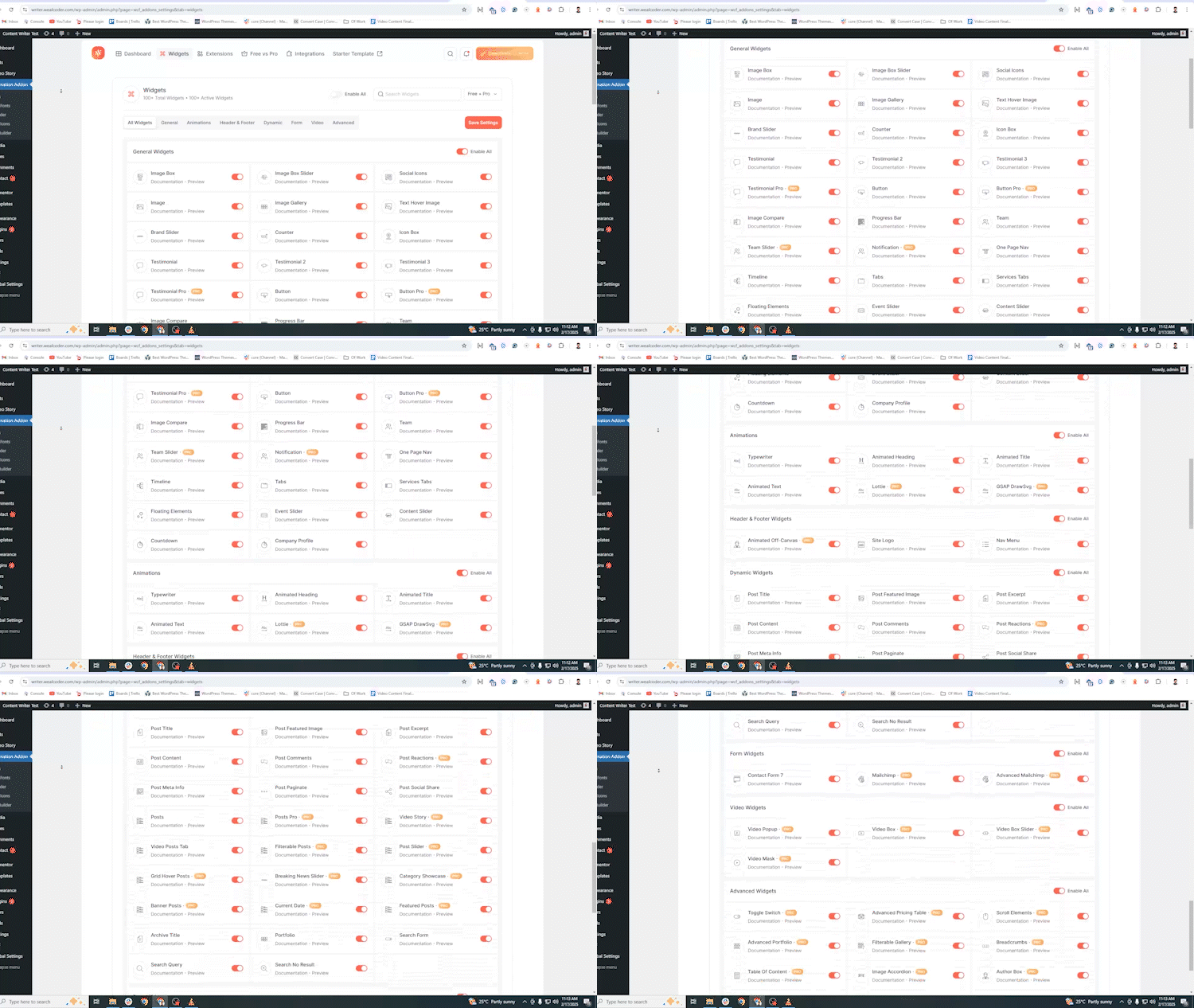
Animation Addons dashboard – Elementor widgets, Atomic Widgets and extensions.
Elementor V4 Atomic Widgets inside the Atomic Editor.
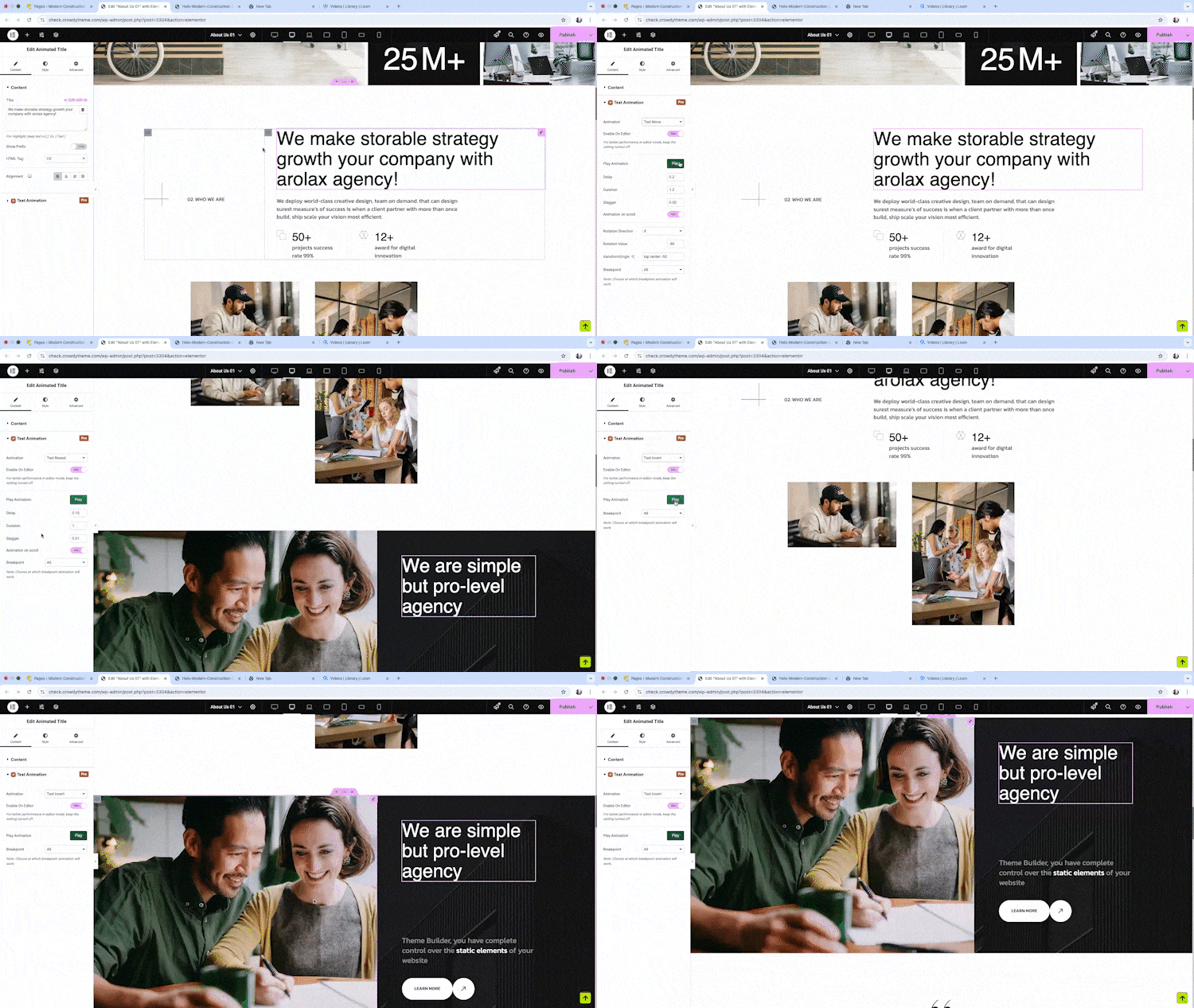
GSAP animation controls – ScrollTrigger, timeline and presets.
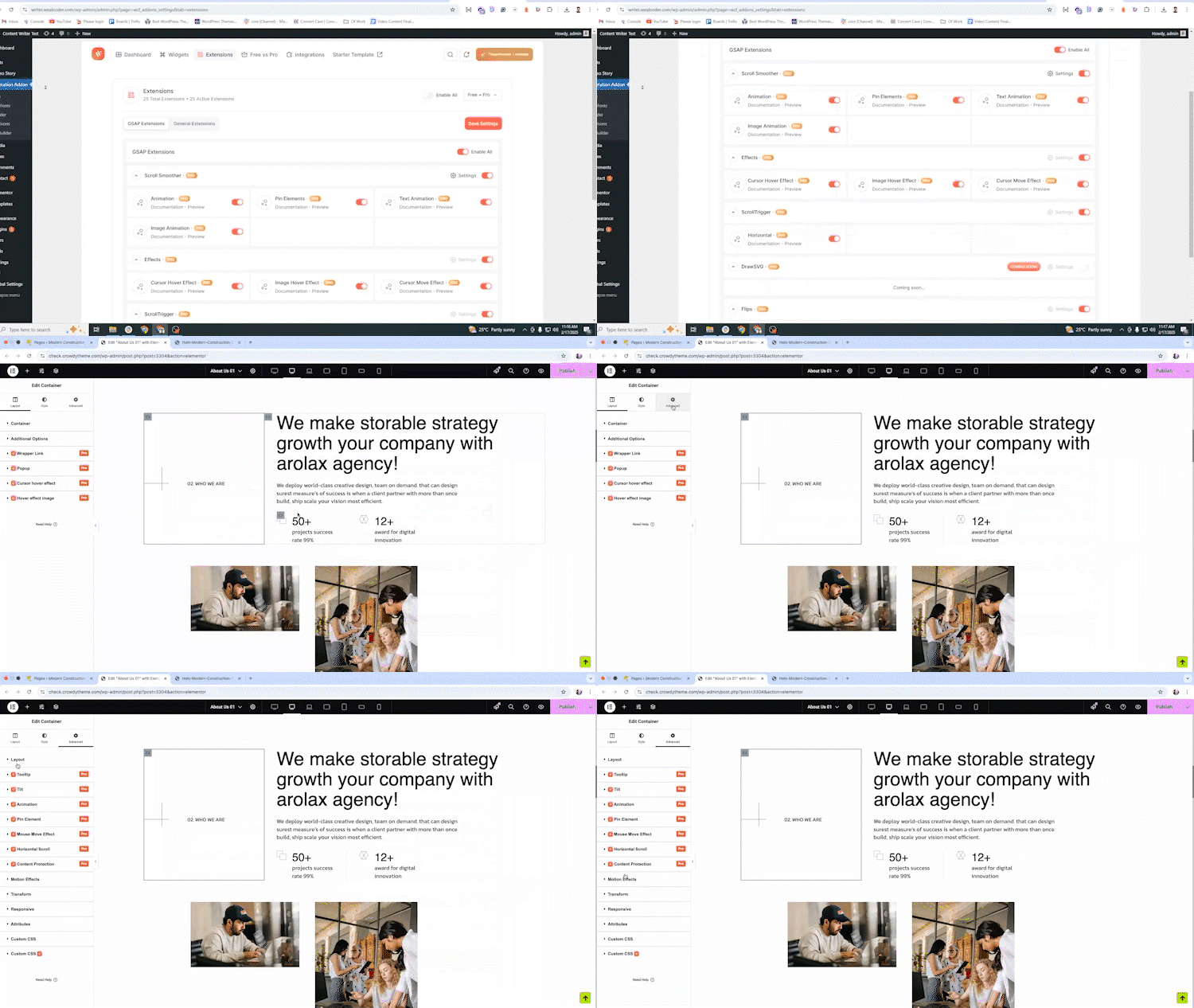
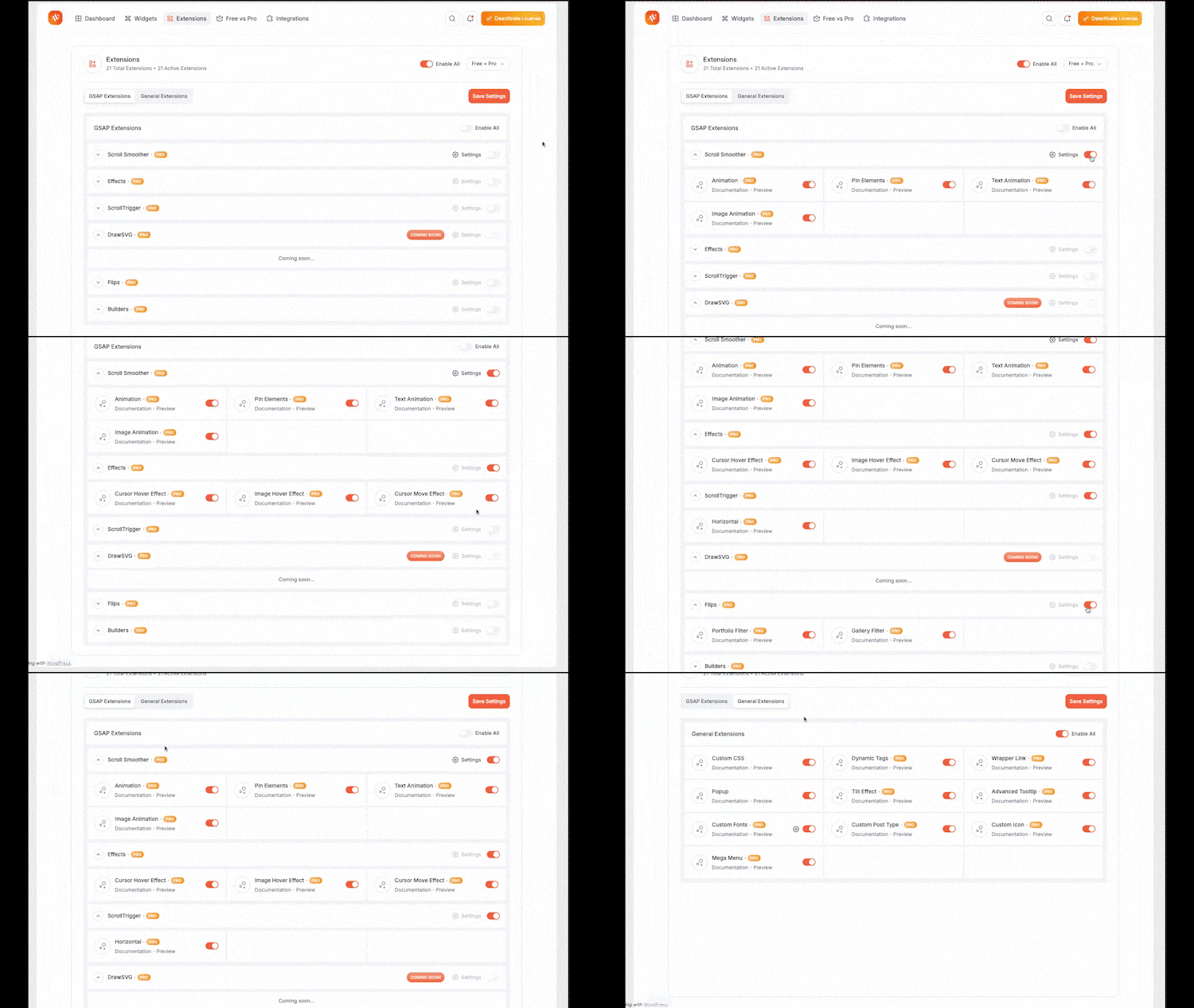
Animation and interaction extensions.
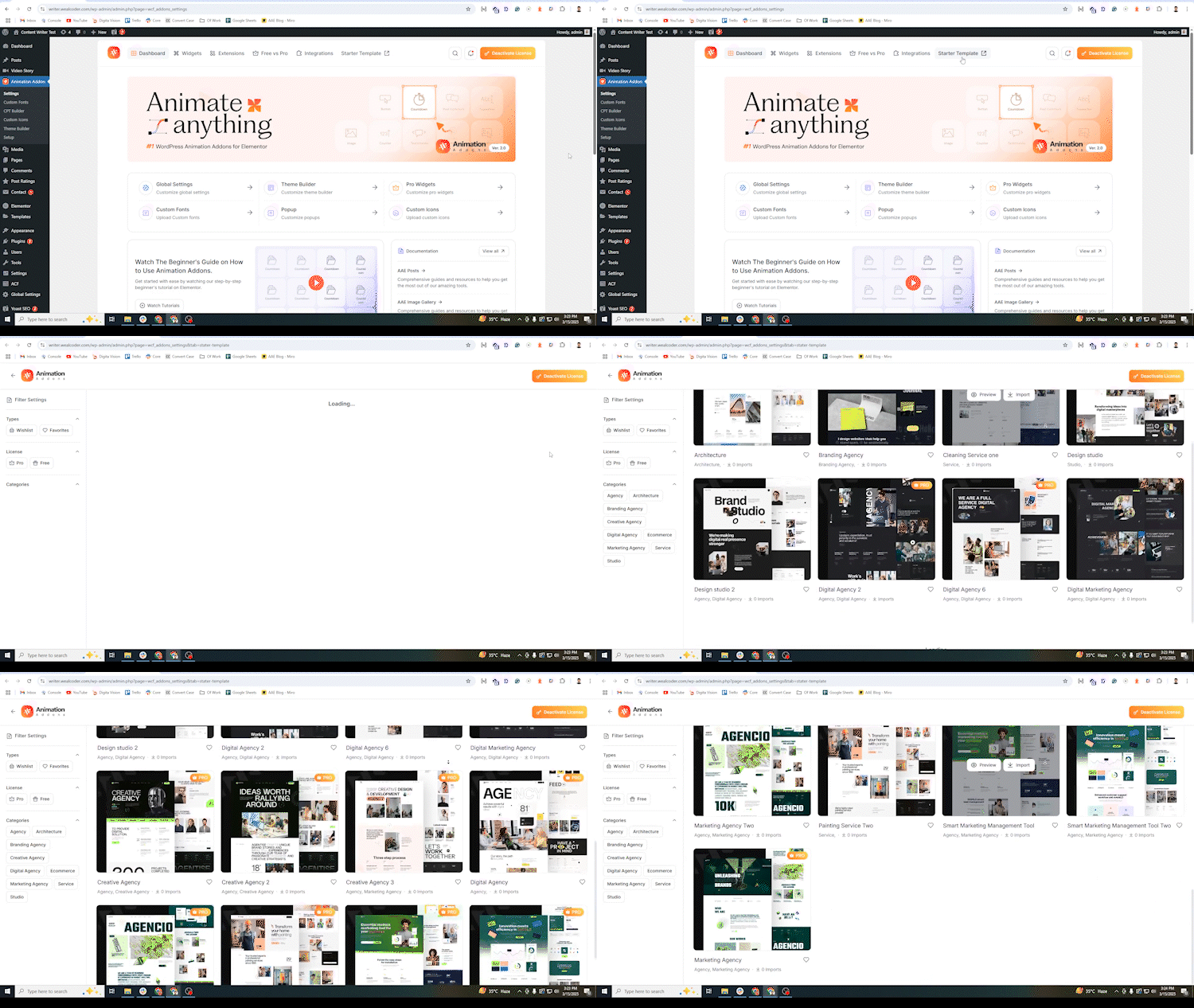
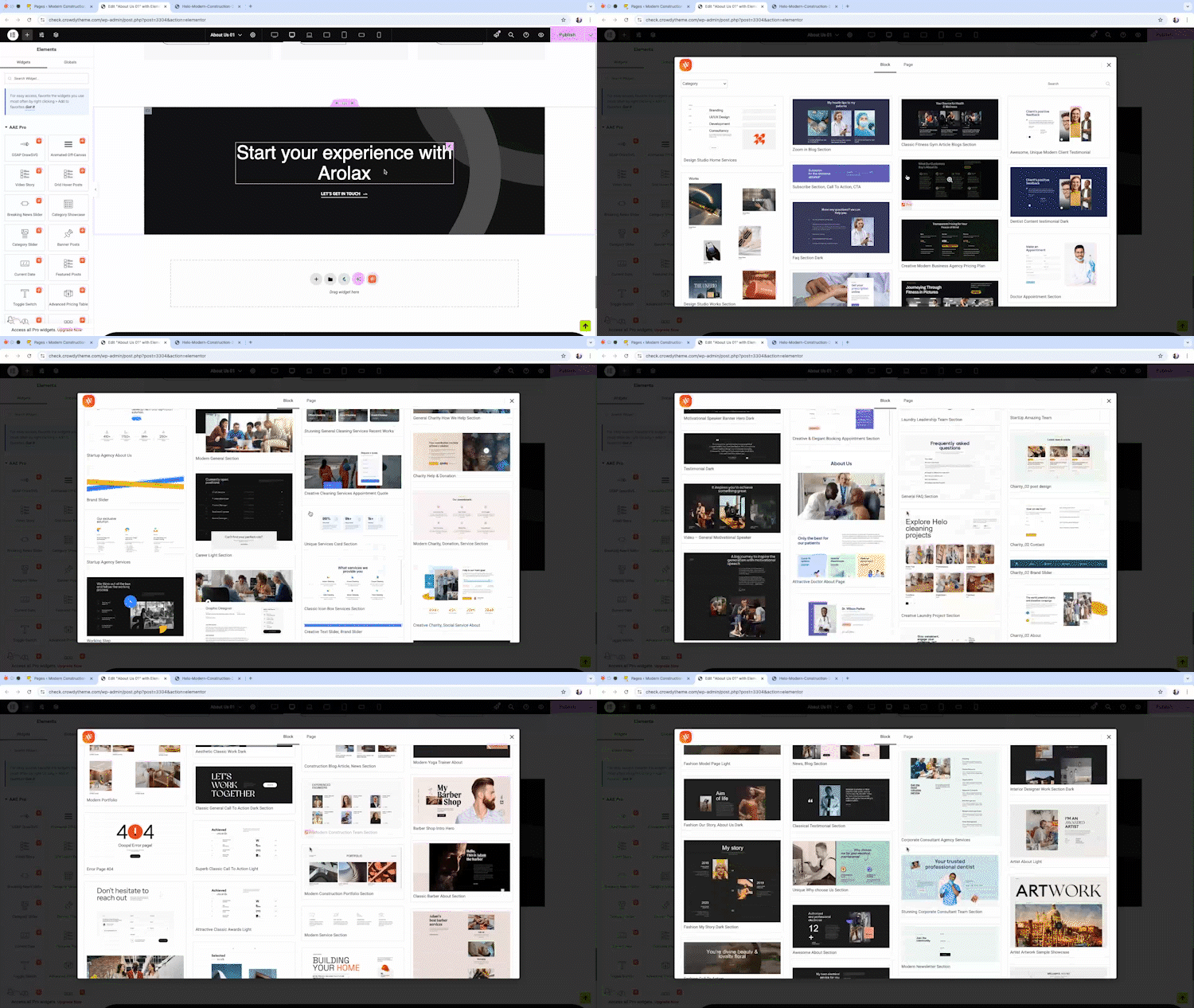
Template library – website templates and sections.
Forms and form extensions.
Loop Grid and dynamic filters.

Faq
A complete Elementor addon. Animation Addons includes 100+ Elementor widgets, 40+ Atomic Widgets for Elementor 4, 25+ extensions, 300+ Elementor templates, 10,000+ sections, Loop Grid, dynamic content and site-building tools – and a GSAP animation system on top. You can use it as your only Elementor addon.
Yes. Animation Addons is fully updated for Elementor 4. It includes 40+ Atomic Widgets built natively for the Elementor V4 Atomic Editor, with support for Classes, Variables and responsive controls, plus 30+ Elementor V4 website templates and 500+ V4 sections. All other widgets and animation extensions also work in Elementor 4 and alongside Atomic Elements.
Animation Addons combines GSAP’s animation engine with Elementor’s visual editor: ScrollTrigger scroll animations, SplitText text animation, MotionPath, DrawSVG, MorphSVG, Flip, Draggable, smooth scrolling and timeline control, all set visually without code – and it ships inside a full Elementor widgets and templates pack, so you do not need a separate animation plugin.
Yes. The free plugin includes animation extensions, preset animations, free Elementor widgets, Atomic Widgets and Elementor templates. Animation Addons Pro adds advanced GSAP animations, Pro widgets and Pro extensions. Compare on the Free vs Pro page.
Most popular Elementor addons offer widgets and templates. Animation Addons offers those – 100+ Elementor widgets, 300+ Elementor templates, 10,000+ sections and dynamic content tools – and adds two things the others do not: 40+ Atomic Widgets built natively for Elementor 4, and a complete GSAP animation system with ScrollTrigger, SplitText and timeline control. It also works alongside any other Elementor addon, so you can add it for the animation and the Elementor 4 widgets without replacing what you use today.
The 40+ widgets listed under “Elementor V4 Atomic Widgets Built Natively for Elementor 4” are Atomic Elements. The 100+ Elementor widgets in the main library are standard Elementor widgets that work in the classic editor and in Elementor 4. You can use both on the same site.
No. Animation Addons works with Elementor Free. The Atomic Widgets, animation extensions, Elementor templates, Header Footer Builder, Theme Builder, Popup Builder and Form Builder do not require Elementor Pro.
Yes. Select any element, open the Animation Addons controls, choose a preset or build a custom GSAP animation with ScrollTrigger, timeline, easing and device settings, and preview it live in the editor. No JavaScript is needed.
Yes. The animation extensions – Regular Animation, Text Animation, Image Animation, Parallax, Horizontal Scroll, Sticky, Tilt, Mouse Move, Cursor Hover, Scroll To and more – work on Atomic Elements as well as on standard Elementor widgets.
Go to Animation Addons > Settings in your WordPress dashboard, open the Extensions tab, enable Smooth Scroller (ScrollSmoother), then save.
Yes. 300+ Elementor website templates, 10,000+ section templates and ready page templates, plus 30+ Elementor V4 website templates and 500+ Elementor V4 section templates built with Classes and Variables.
Yes. Animation Addons Pro includes nine Atomic Loop Filter widgets: Taxonomy, Author, Field, Date, Search, Sort, Result Count, Active Filters and Filter Drawer.
Animation Addons loads only the widgets and extensions you enable, and GSAP loads lazily when an animated element nears the viewport. Reduced-motion support and cache compatibility controls are built in. Keep unused widgets disabled for the best Core Web Vitals.
Yes. The dashboard lets you switch individual widgets and extensions on or off.
Yes. It works with any theme that works with Elementor and alongside other Elementor addons. Each widget and extension can be disabled if you prefer another plugin’s version.
The free plugin supports CSS, JavaScript and HTML snippets. PHP snippet execution is an advanced feature available in Animation Addons Pro.
Reviews
Honest Review – Outstanding customer support!
By  yehtinaung on August 23, 2026
I experienced some issues while importing a template, and the Animation Addons support team responded incredibly fast. Within just 3 hours, they identified the problem, guided me through the solution, and successfully resolved everything.
The service team ,especially Habibur Rahman is professional, knowledgeable, and very responsive throughout the process. It’s rare to find such dedicated support these days. The plugin itself is excellent, but the customer service makes it even better.
Highly recommended to anyone looking for a reliable addon with an amazing support team. Thank you for the great experience!
Extremely disappointing experience
By  sanjas on August 12, 2026
This is easily one of the most disappointing plugins I’ve ever used.
Several of the advertised functionalities simply did not work as described on the website. I contacted the plugin’s support team, and while they did respond and appeared willing to help, their assistance ultimately did not resolve the issues I was experiencing.
Once I realized that the plugin could not deliver the animations I needed, I requested a refund for the Pro version. I received a confirmation email stating that my refund request would be reviewed. THREE MONTHS LATER, I am still waiting for that review to be completed, despite following up multiple times.
At this point, the lack of resolution is extremely frustrating and gives the impression that my refund request is simply being delayed in the hope that I will eventually stop asking about it.
Based on my experience, I strongly recommend avoiding the Pro version, as getting a refund appears to be far from straightforward if you decide the plugin isn’t right for you.
Great plugin
By  aoife1 on June 30, 2026
Really useful plugin!
Great Amazing plugin!
By  hilee on June 24, 2026
I purchased the Pro version a few days ago, and the features speak for themselves. I did encounter a minor issue, but the support team responded immediately and helped me resolve it very quickly. Seeing that level of support greatly increased my trust in the product.
That alone is more than enough reason to purchase the Pro version.
Outstanding Elementor Animation Plugin!
By  gianniskataras on June 2, 2026
Animation Addons for Elementor has completely transformed the way I build WordPress websites. The plugin combines powerful GSAP-based animations with an impressive collection of widgets, extensions, and ready-made templates, making it easy to create modern, interactive websites without writing code. The plugin offers advanced motion effects, scroll animations, and a huge template library while remaining user-friendly and performance-focused.
What impressed me most is how much time it saves during development. Whether you’re building landing pages, portfolio websites, business sites, or client projects, the pre-designed templates and animation features help you achieve professional results much faster. The interface integrates smoothly with Elementor, and the animations look polished and engaging.
The support team is also responsive and helpful, and it’s clear that the plugin is actively maintained and continuously improved. With strong ratings from users and regular updates, it has become one of my favorite Elementor add-ons.
If you’re looking to create stunning, dynamic Elementor websites with advanced animations and a massive library of design assets, I highly recommend Animation Addons for Elementor. An excellent plugin that delivers both functionality and value!
Btw Habibur is amazing!
Great Experience
By  contactdjaka on May 20, 2026
I’ve had a very goog experience with Animation Addons. I really appreciate the support team : fast, and very helpful. I definitely recommend it to anyone !
Also the themes are modern and with beautiful animation.
Excellent widgets and outstanding support
By  simone9909 on May 14, 2026
I’ve had a great experience with Animation Addons. I really appreciate the wide variety of beautiful widgets and useful extensions available – they make creating modern and dynamic websites much easier. What impressed me the most is the support team: always precise, fast, and very helpful whenever I needed assistance. I definitely recommend it to anyone working with Elementor and looking for more creative flexibility.
Good plugin and Great support
By  vb90 on May 6, 2026
The team replied to me quickly and solved the problem
Great plugin and best support ever
By  DevAtik (devatik) on April 9, 2026
I’ve tested quite a few Elementor add-ons over the years, and Animation Addons stands out for actually delivering on what it promises. The widget and template selection is genuinely useful — not just filler — and the animation effects are smooth enough that clients notice and comment on them.
What I appreciate most is the flexibility. Some projects need a full template, others just need one polished section. This plugin handles both without any friction. No custom code needed either, which keeps the workflow clean.
The support team is responsive and knowledgeable. Would recommend this to any designer or developer looking to level up their Elementor builds.
Very good experience
By  christianforza on March 27, 2026
Animation Addons Pro has been one of the best additions to my toolbox. The plugin itself makes the process of creating amazing websites very fast due to its enormous collection of templates and widgets. The whole system works incredibly well as Elementor makes it easy to just use parts of the templates no matter if it’s a full page design, or just that little cool element you need from an Animation Addons section template.
I’ve run into some bumps along the way, even slightly more related to Elementor than Animation Addons (I’m a Divi user normally). Animation Addons support has answered within minutes each time, and has not failed once to get me moving in the right direction.
I HIGHLY recommend this plugin! I feel bad for saying it, but after finding this, I might switch to Elementor for good, even though Divi 5 is out.
Changelog
4.2.8
- Added: Nav presets. Two one-click looks, “Header Nav” and “Mega Menu (Pill)”, applied from a new Presets section.
- Added: A Nav dropped on the canvas now builds itself from your WordPress menu. Only a freshly dropped Nav is touched — a pasted, duplicated or already-edited menu is left alone, and nothing is imported if the site has no menu.
- Added: Nav: “Auto-sync from WordPress”, with an Update button that pulls fresh labels from a chosen menu while keeping your styling and any items you added by hand.
- Added: Nav: a Dropdown Behavior section. “Open On” (Click or Hover) and a dropdown animation now apply to the whole menu, instead of being set on every item separately.
- Added: Nav: a Mobile Menu Icons section for choosing your own hamburger, close, dropdown and back icons.
- Added: Nav: a “pick a part to style” list in the Mobile Menu panel. One click selects the Hamburger, Drawer, Overlay, Header bar, Close button, Back button or Menu area and opens its Style tab, and the drawer appears on the canvas while you work on it.
- Added: Nav: copy one menu item’s styling to every item on the same level, from the menu item’s row.
- Added: Counter: Easing (five curves), Play once or every time it scrolls into view, a thousand separator, and decimal places.
- Added: Advanced Heading: a Link option.
- Added: Advanced Portfolio: a “Studio Grid” preset.
- Improved: A newly dropped Counter sizes to its content instead of spanning the whole row. Counters already on a page are not changed.
- Improved: A new mobile menu drawer starts at a 350px width and a neutral look, so it no longer picks up the theme’s button styling. Both stay editable in the Style tab, and existing menus are untouched.
- Improved: The inline text formatting toolbar has a cleaner look.
- Improved: A starter page or template whose content file is not a WordPress export (XML) now fails with a message that says so, instead of “No page was imported”. The failure screen highlights the cause, links to the support forum and shows the template’s name and ID to quote.
- Fixed: Nav: with “Open On: Click”, a parent item that had a link followed that link instead of opening its dropdown, so the submenu could never be opened with a mouse. The first click now opens the dropdown and a second click follows the link. A parent with no link, or with “#”, keeps its plain open and close toggle.
- Fixed: Nav: in the mobile drawer, a submenu’s items were laid out in a row, so only the first one was visible.
- Fixed: Nav: Tab could move focus out of an open mobile drawer and onto the page behind it.
- Fixed: Nav: on themes with a large line height, the mobile Back and Close icons were drawn below the drawer header instead of inside it.
- Fixed: Nav: icons chosen under “Mobile Menu Icons” only reached the mobile menu while the Mobile Menu section was open, and an icon set directly on a menu part was overwritten again on the next edit.
- Fixed: Nav: closing the drawer preview in the editor left the canvas showing the hamburger instead of the desktop menu.
- Fixed: The Elementor 4.3 “Prop type is missing” SVG error also affected the Search Form’s open and close buttons, the Form’s Next and Previous buttons, and the Image Hotspot close button.
- Fixed: Documentation links on the dashboard’s Extensions tab.
4.2.7
- Added: Dynamic Tags are now free. Post, Author, Site, Archive, Taxonomy, Comments, and Contact & Social tags (53 in all) work in Elementor V3 and V4 widgets without Animation Addons Pro. Content already built with these tags keeps working, because tag names are unchanged. ACF, Post Meta, and Custom Fields tags stay in Animation Addons Pro.
- Fixed: Saving a page as a non-administrator could end in a fatal error when it used an Author Info dynamic tag. The check that keeps email addresses out of non-admin edits now covers every dynamic control, not only the title.
- Changed: The shortcode dynamic tag’s “escape output” filter is now
aaeaddon/dynamic_tags/shortcode_should_escape. The previous name is still honored. - Security: Fixed a stored XSS in the Countdown widget labels and expire text (CVE-2025-8444), and the same class of issue in Starter Animation, Category Showcase, Image Gallery lightbox, Progress Bar, Search, Animated Title, Loop Builder, Template Library, Atomic Nav, Atomic Slider and Atomic Social Share.
- Security: Fixed a reflected XSS on the template import failure screens.
- Security: Tightened permission checks in Loop Builder previews, Toggle Switcher, Loop Grid, Theme Builder, Forms, Mailchimp and Code Snippets. Only published templates render on the front end.
- Security: Icon pack and kit uploads are extracted to a temporary folder and checked there before being moved into place. The XML importer no longer unserializes objects.
- Security: CSV exports are protected against spreadsheet formula injection.
- Security: The site-wide Mailchimp API key is no longer sent to the Elementor editor. Leave the widget’s key empty to use the site key; it is applied on the server.
- Security: The Popup widget renders a template only if it is published or the visitor may read it. The Atomic Loop Grid lists public post types only.
- Security: SVG icons fetched for the Atomic Nav dropdown and the slider arrows are reduced to plain SVG shapes before they are inserted.
- Security: Hardened the script-tag check in the HTML sanitizer and the XML importer’s handling of serialized meta.
- Fixed: Presets imported from another site now load Elementor’s placeholder image and the slider’s arrow icons from your own site instead of the authoring site.
- Fixed: The Atomic Search Query heading tag is now the widget root, so Kit and theme heading styles no longer override it.
- Improved: Atomic Timeline text parts use inline editing.
- Improved: WPML configuration for more widgets.
- Fixed: Asset version now matches the plugin version, so browsers load the updated scripts and styles after an update.
4.2.6
- Improved: Performance optimization in Theme Builder by removing redundant rewrite rule flushes on request initialization.
- Fixed: Compatibility with Elementor 4.3 Svg_Control in Atomic Menu and Nav widgets to prevent “Prop type is missing” errors.
- Improved: Enhanced WPML multilingual compatibility across widgets and theme builder.
- Fixed: Template Library dependency dialog styling to seamlessly adapt to Elementor’s Light and Dark themes.
- Improved: Template Library V4 insert now honors Live Paste image choices.
- Fixed: A brand-new install could show the “settings moved to new storage names” migration notice — when activated without the activation hook (installed by a template’s dependency installer, or a network site created later) or reinstalled after being deleted.
4.2.5
- Fixed: Section template previews in the Template Library opened without the template, because the preview link reached the demo site as “amp;post” instead of “post”.
4.2.4
- Fixed: Starter Template import now says “Theme ready” when the template’s theme is already your active theme, instead of asking you to install it.
Older versions: see changelog.txt for the full changelog.