
Advanced Custom Fields: Typography Field
Description
Typography field type for “Advanced Custom Fields” plugin that lets you add different text properties e.g. Font Size, Font Family, Font Color etc.
Supported Subfields
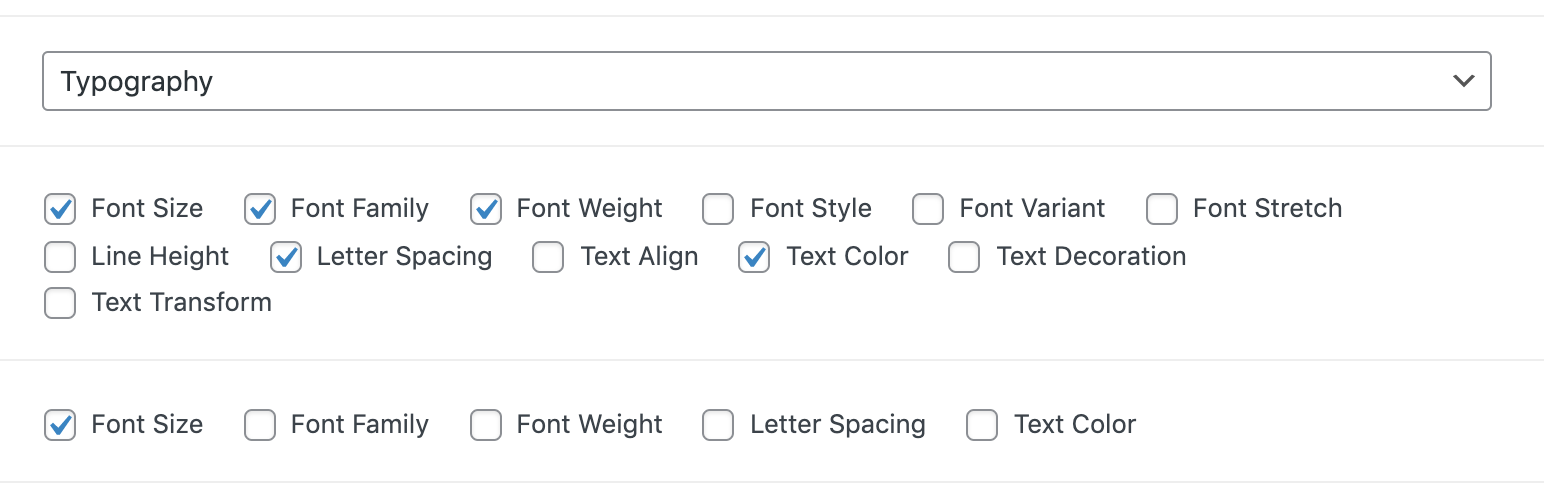
- Font Size
- Font Family
- Font Weight
- Font Style
- Font Variant
- Font Stretch
- Line Height
- Letter Spacing
- Text Align
- Text Color
- Text Decoration
- Text Transform
Other Features
- Supports Google Fonts. The selected Google Fonts are automatically enqueued on front-end of posts/pages. Google Fonts also work with ACF Options.
- Supports Gutenberg Blocks created with ACF.
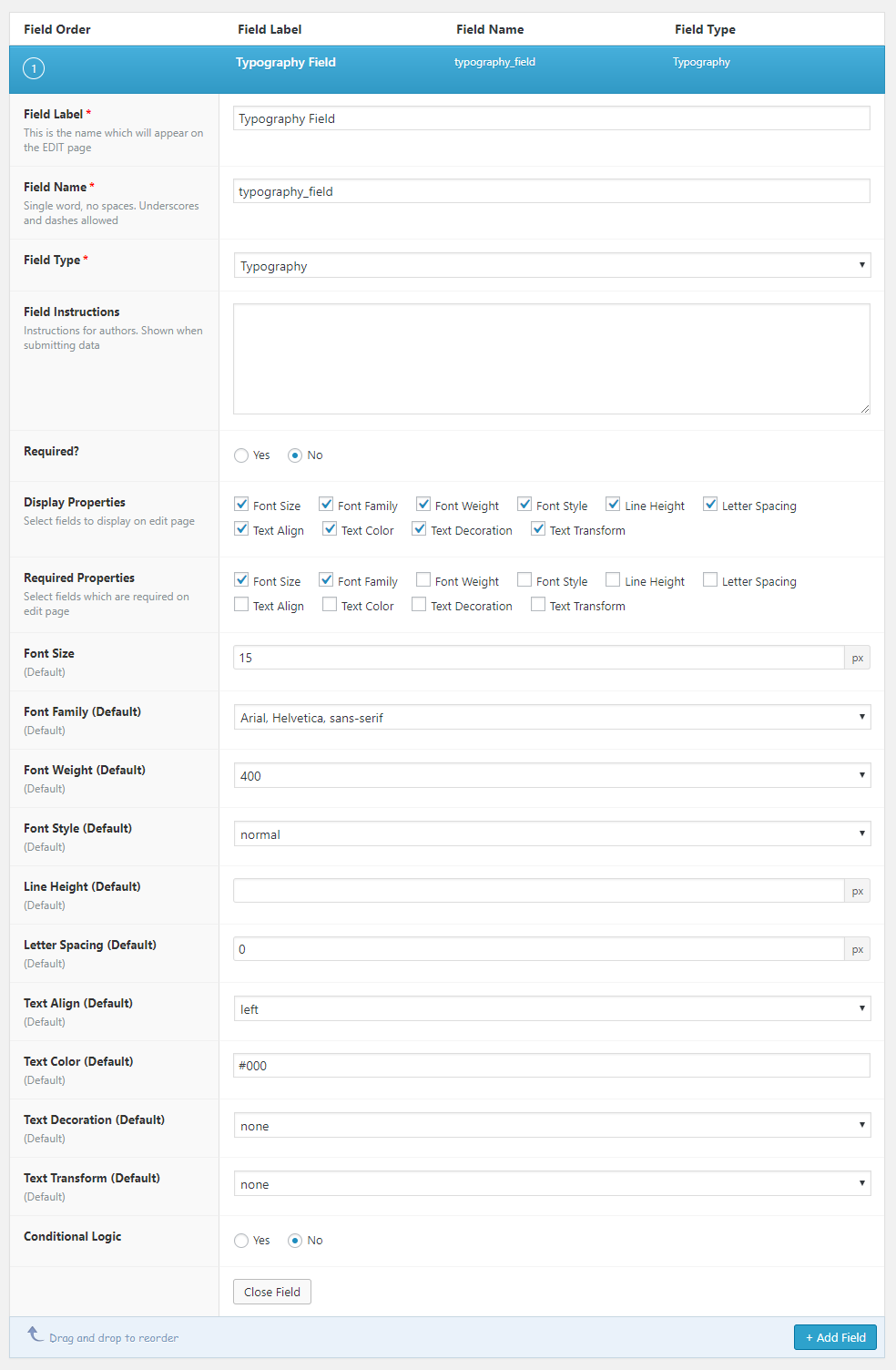
- Option to show/hide each subfield individually
- Option to make each subfield required individually
- Color Picker for Text Color subfield
Documentation
// Returns the value of a specific property
get_typography_field( $selector, $property, [$post_id], [$format_value] );

// Displays the value of a specific property
the_typography_field( $selector, $property, [$post_id], [$format_value] );

// Returns the value of a specific property from a sub field.
get_typography_sub_field( $selector, $property, [$format_value] );

// Displays the value of a specific property from a sub field.
the_typography_sub_field( $selector, $property, [$format_value] );
Shortcode
[acf_typography field="field-name" property="font_size" post_id="123" format_value="1"]
The shortcode only reads Typography fields.
Github repository
Compatibility
This ACF field type is compatible with:
* Free and paid versions of the ACF plugin
Installation
- Copy the
acf-typography-fieldfolder into yourwp-content/pluginsfolder - Activate the Typography plugin via the plugins admin page
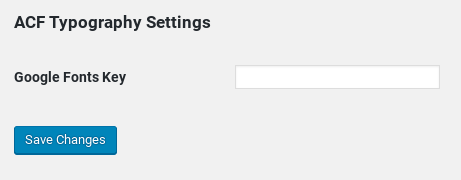
- Google API Key is required for Google Fonts. Please add one by going to
WordPress Admin Dashboard > Settings > ACF Typography Settings
Or define it inwp-config.php:define( 'ACFT_GOOGLE_API_KEY', 'your-key' );(this overrides the settings page) - Create a new field via ACF and select the Typography type
- Please refer to the description for more info regarding the field type settings
Screenshots

Typography Field Settings
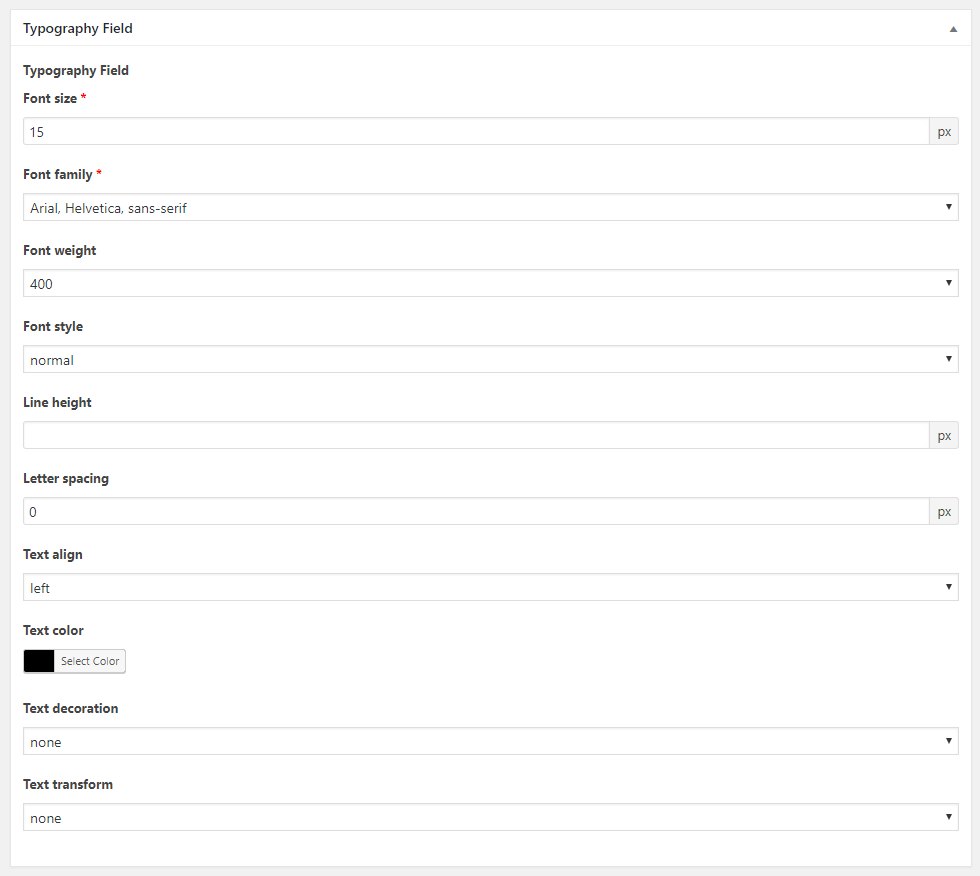
Typography Field Content Editing
Google Key Field required for Google Fonts
Faq
Q. Is it compatible with ACF Pro?
A. Yes. This plugin is compatiable with both free and paid ACF plugins.
Q. Does it support Google Fonts?
A. Version 3.0.0 and greater supports Google Fonts
Q. Why I do not see Google Fonts in the Font Family drop down?
A. Google API Key is required for Google Fonts. Please add one by going to WordPress Admin Dashboard > Settings > ACF Typography Settings
You can also define it in wp-config.php with define( 'ACFT_GOOGLE_API_KEY', 'your-key' );. If the fonts can’t be loaded, the settings page shows the reason.
If your site blocks outside requests with WP_HTTP_BLOCK_EXTERNAL, allow Google’s API: define( 'WP_ACCESSIBLE_HOSTS', 'www.googleapis.com' ); (add it to any hosts you already allow).
Q. Does it enqueue selected Google Fonts?
A. Yes. This plugin automatically enqueues user selected Google Fonts to front-end of posts/pages.
Q. Does it support Gutenberg Blocks?
A. Yes. This plugin does support Gutenberg Blocks created with ACF.
Q. How can I contribute?
A. Join in on Github repository @mujahidi/acf-typography
Reviews
Does not Enqueue Font(s) Selected
By  zdmdesigns (zmdesignz) on July 26, 2024
Great plugin. Does exactly what it says, which is very powerful!
Not bad
By  classikd on May 23, 2024
Great but font-weight changes are not taken into account in google fonts call…
Very nice
By  proyinfo on February 7, 2023
Works very well. However, on the Font API settings page, you could add some instruction to get the key.
Simple, but works well
By  AndyiBM on August 3, 2022
Does what it says
By  jimleeder123 on January 29, 2019
Changelog
3.3.0
- Now requires WordPress 6.2+ and PHP 7.4+. Tested up to WordPress 7.1.
- [NEW]
ACFT_GOOGLE_API_KEYconstant to set the Google API key inwp-config.php. - [NEW] Admins see a notice on ACF screens when Google Fonts can’t be loaded.
- [BUG] Chosen font weights are now loaded, with
display=swap. Web-safe fonts are no longer sent to Google Fonts. - [BUG] Fixed warnings and errors on PHP 8.x and when ACF is inactive.
- [BUG] The Google Fonts list is cached in the database and refreshed daily in the background, not during page loads.
- [BUG] Saved values are kept: a font missing from the list, a field group’s default font, and 0 (e.g. letter spacing).
- [BUG] Admin screens: property checkboxes are no longer cut off on small screens, and the settings page is easier to use with a screen reader and explains a missing or bad key.
- Security: values are cleaned when saved, output is escaped, and the
[acf_typography]shortcode only reads Typography fields. - The plugin can now be translated on WordPress.org (text domain
acf-typography-field). - Deleting the plugin now removes its settings and the cached font list.
- Deprecated: the
YOUR_API_KEYconstant andacft_update_gf_json_file(), both removed in 4.0. Developers: admin input ids have changed; see the full changelog. - Full list: CHANGELOG.md
3.2.3
- Added new font-weight values
3.2.2
- Fixed google fonts url too long issue
3.2.1
- Fixed typo and bugs
3.2.0
- [NEW] Added ‘initial’ and ‘inherit’ values for ‘font-family’ property.
- [NEW] Added support for ACF Blocks.
- [BUG] Fixed a PHP notice when any post does not have ACF Typography fields setup.
3.1.0
- [NEW] Google Fonts support for ACF Options
- [BUG] Different font weights were not enqueued when used in a repeater field
3.0.0
- [NEW] Introduces functions and shortcode
- [NEW] Hides nonselected properties in fieldgroup edit page
- [NEW] Supports Google Fonts
- [NEW] Enqueue google fonts CSS on page/post
2.2.0
- [NEW] Font Stretch subfield
2.1.0
- [NEW] Font Variant subfield
2.0.0
- [NEW] Now supports ACF 5 (Pro version)
1.1.1
- Fixed a bug
1.1.0
- [NEW] Text Transform subfield
1.0.0
- Initial Release.