
AAA Autoload Optimizer
Description
Every WordPress site loads dozens — sometimes hundreds — of autoloaded
options from the wp_options table on every single page request. Many of
those options belong to plugins you removed long ago, or simply don’t need
to be autoloaded. The result: a bigger database query, slower page loads,
and wasted server resources.
AAA Autoload Optimizer tracks which autoloaded options your site actually
uses, then shows you the ones it doesn’t — so you can safely remove them
or turn off autoloading.
How It Works
- Install the plugin and browse your site normally for a few days.
- The plugin quietly records which autoloaded options are actually used
during page rendering. - Visit the settings screen to see every autoloaded option that was
never used — and decide what to do with it.
You can remove unused options entirely (great for leftover data from
deactivated plugins) or disable autoloading for options that exist but
don’t need to load on every request. Disabling autoloading is
non-destructive — the option stays in your database, it just won’t be
fetched automatically.
Features
- Automatic usage tracking — monitors which autoloaded options are
loaded on every page, on both the front end and in the admin. - Bulk actions — optimize or delete multiple options at once instead
of one by one. - Known-plugin recognition — identifies which plugin or theme each
option belongs to, so you know exactly what you’re looking at. - “All Options” browser — view and manage every option in your
wp_options table, not just the unused ones. - Source filtering — filter options by their source plugin, theme, or
WordPress core to quickly find what you need. - Safe by design — disabling autoload is non-destructive. You can
always re-enable it. - Lightweight — the plugin’s own tracking data is stored in a custom
database table for optimal performance.
Why the “aaa” Slug?
WordPress loads plugins alphabetically. Because this plugin needs to start
tracking options as early as possible, the aaa-option-optimizer slug
ensures it loads first. It’s not vanity — it’s a technical requirement for
accurate measurement.
Links
- GitHub repository
— report bugs, contribute code, or browse the source. - Report a security vulnerability
— via the Patchstack Vulnerability Disclosure Program. - Built by the team behind
Progress Planner.
Installation
Automatic installation
- In your WordPress dashboard, go to Plugins Add New.
- Search for AAA Autoload Optimizer.
- Click Install Now, then Activate.
- Browse your site normally for a few days — or visit every page
manually if you’re in a hurry. - Go to Tools Autoload Optimizer to review and optimize your
autoloaded options.
Manual installation
- Download the plugin zip file.
- Upload it via Plugins Add New Upload Plugin, or extract it
to/wp-content/plugins/aaa-option-optimizer/via FTP. - Activate the plugin through the Plugins menu.
- Follow steps 4–5 above.
Screenshots

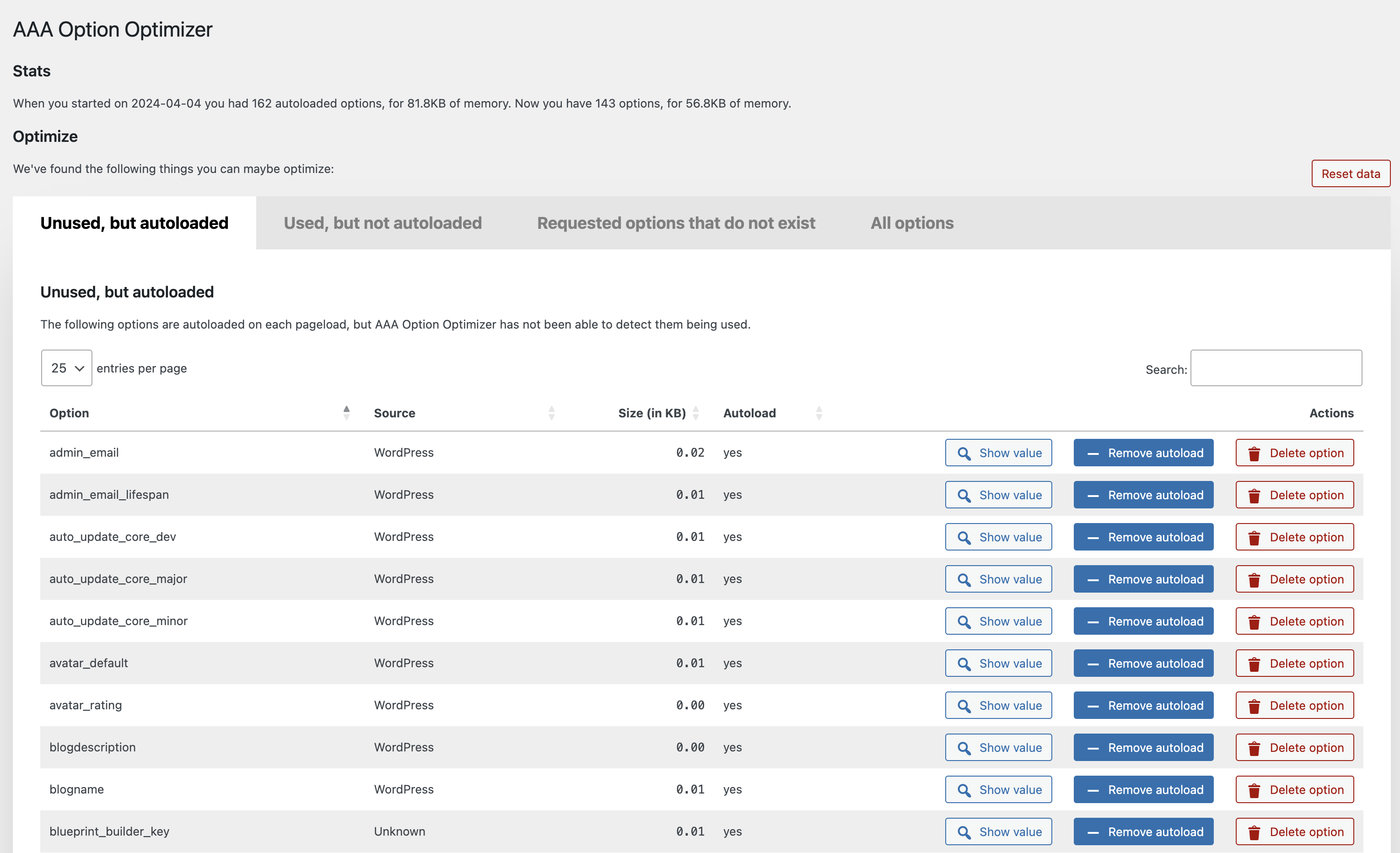
The main dashboard showing unused autoloaded options with their size, source plugin, and action buttons.
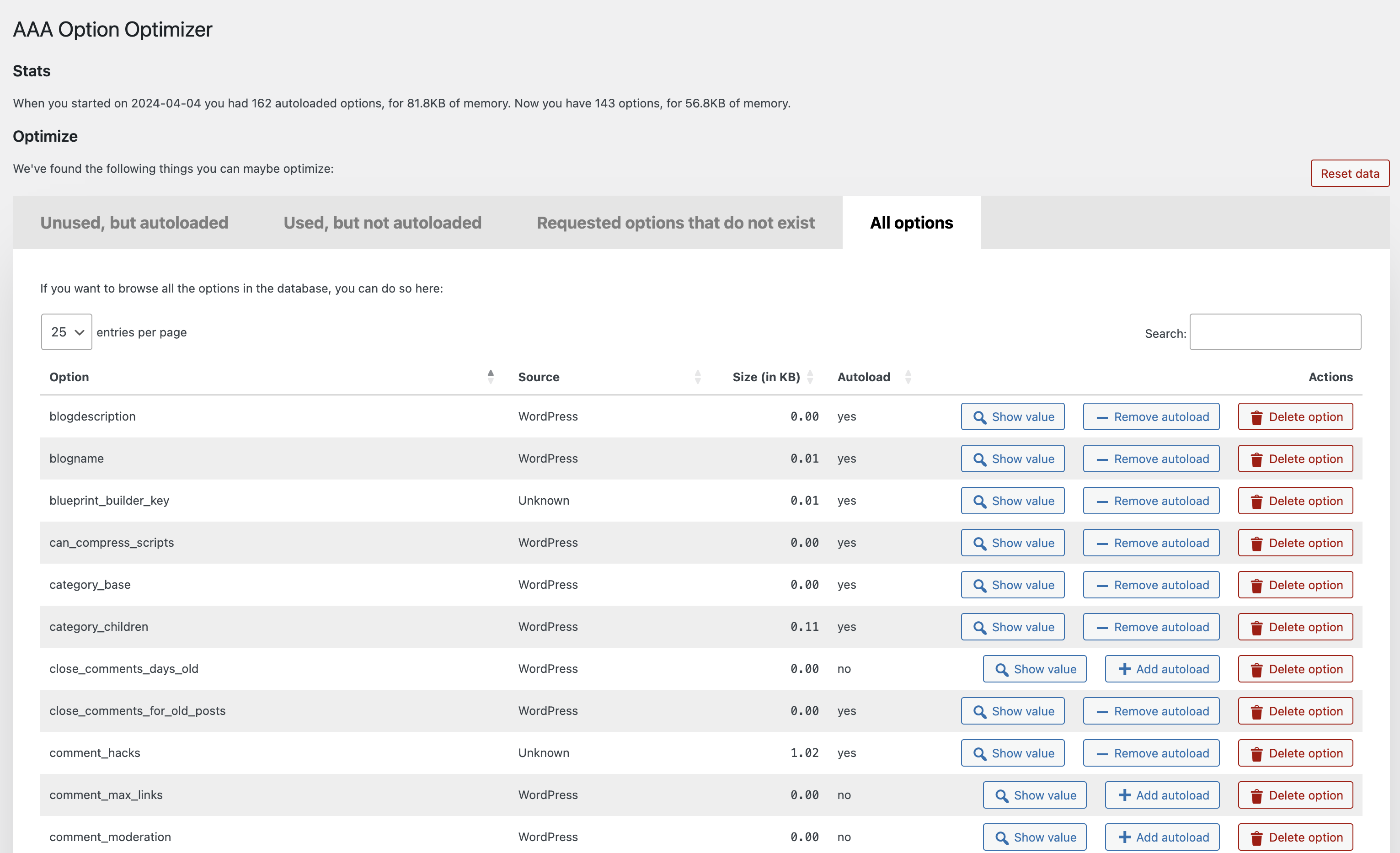
The “All Options” tab lets you browse and manage every option in your wp_options table.
Faq
The safest action — disabling autoload — is non-destructive. The option
remains in your database and can still be loaded on demand. Deleting an
option is permanent, so only do that for options you’re confident are no
longer needed (e.g., from plugins you’ve already removed). Always back up
your database before making bulk changes.
Disabling autoload can be reversed from the “All Options” tab. Deleting
an option is permanent. If you need it back, you’ll need to restore from
a database backup.
A few days of normal browsing is usually enough. If you have a lot of
visitors, a few hours might even suffice. The goal is to visit every major
page on your site (front end and admin) so the plugin can record which
options are actually used. If you’re thorough, you can start optimizing
sooner.
The plugin currently targets single-site installations. Multisite
compatibility has not been officially tested.
The plugin identifies the source of each option (which plugin, theme, or
WordPress core). If an option belongs to a plugin you’ve already
deactivated and removed, it’s generally safe to delete. When in doubt,
disable autoloading instead of deleting — it’s the safer choice.
Yes, always back up your database before optimizing. Disabling autoload
is safe and reversible, but deleting options is permanent.
Please use the GitHub repository
for bug reports and code suggestions. The WordPress.org support forum
works too for general questions.
Through the Patchstack Vulnerability Disclosure Program. The Patchstack
team validates, triages, and handles all security reports.
Report a security vulnerability here.
Submit a pull request on GitHub to
known-plugins.json.
Reviews
Wow, a plugin to solve the autoloader problem
By  ib.property on July 11, 2026
AAA Option Optimizer solved a problem I’d previously found unsolvable. The interface is clear, simple, logical, and comprehensive. Thank you!
Great for short term use
By  melinahein on December 10, 2025
The plugin was great for short term use to figure out unused options from old plugins after clicking through each page. It really helped to reduce autoloaded options.
When letting it run along for a while as suggested, though, it seems that its database saves were so large it caused our database to use up all the RAM and make our site unusable. So beware of that and only use it for a few days.
Edit: The Developer reached out immediately and is working on the issue. Great support!
A very useful plugin!!
By  momo-fr on August 30, 2025
Allows you to clean up the options on sites with a long history of themes and plugins installations.
Very useful.
Requested options that do not exist question
By  mattyscribs on August 29, 2025
Under “Requested options that do not exist”, I’m not sure to trust setting these to false. Is there a way to revert any actions I take. How do I know if these actions are actually needed or do I just trust this plugin’s assessment that they are basically broken and so can be set to false?
SOME EXAMPLES:
Option: advancedexcerpt_length | Source: Unknown | # Calls: 904564
Option: analyst_accounts_data | Source: Unknown | # Calls: 24907
Option: analyst_notices | Source: Unknown | # Calls: 24907
Option: code_embed_version | Source: Unknown | # Calls: 904564
Option: https_migration_required | Source: Unknown | # Calls: 904564
Thanks for your help
A joke!!!
By  Oxford Metadata Ltd (oxfordmetadata) on July 31, 2025
I wonder how on earth a plugin tha promises to optimize the wp_options tables, stores 25MB of data in the option_value !!!!
Maybe the guy who developed it does not understand the fundamentals of the internal database optimizers but such a huge deviation, totally ruins MariaDBs/MySQL internal optimizer. You see optimizers work on the assumption that in a table, the fields have somewhat related sizes.
For more details please go to MariaDB Jira and check for cases MDEV-34097 and MDEV 32663
If you add records with huge sizes (say > 100k) in wp_options table where each option is usually less than 30Bytes, then you have an issue. In our case the issue was caused by the very plugin that we used to monitor our options (that are by and large incorrect).
Avoid it at all costs.
Very helpful
By  adcapaust on July 10, 2025
Easily identified what was bloating my options table and allowed to set it to not autoload. Thank you!
Strange behavior
By  esquipulas on June 13, 2025
Installed it some times ago, worked well. Since some days generate a huge log saturating my server space disk (millions of lines …). Had to deactivate it.
Please update to new WP version
By  perelovski on May 8, 2025
As someone else mentioned before the plugin was working nice, but since WP change the things in the new versions, we cannot use it safely anymore. Can you please update to the latest WP version?
Thank You 🙂
*edit: Working well with the latest version. Keep up the good work!
Finally something that works
By  Basta (Backswim) on April 12, 2025
Very easy to use and it works very well.
Doesn't work as expected and identifies used options as unused
By  mtg169 on March 24, 2025
Doesn’t work as expected and identifies numerous used options as being unused, resulting in potential unintended data loss/destruction.
On initial install and when resetting data, it suggests wp_user_roles is unused. Deleting this option will make a site inaccessible to administrators as this is an imperative option for user roles.
While testing, there are also JS errors for the “remove autoload” and “delete” actions. This happens when attempting to delete:
Uncaught TypeError: Cannot read properties of null (reading 'nTr')
    at S (datatables.min.js?ver=2.0.1:16:25194)
    at U.<anonymous> (datatables.min.js?ver=2.0.1:16:51287)
    at U.iterator (datatables.min.js?ver=2.0.1:16:46398)
    at U.<anonymous> (datatables.min.js?ver=2.0.1:16:51247)
    at U.draw (datatables.min.js?ver=2.0.1:16:47678)
    at updateRowOnSuccess (admin-script.js?ver=1742829685:240:53)
    at Object.success (admin-script.js?ver=1742829685:221:27)
    at c (jquery.min.js:2:25304)
    at Object.fireWith [as resolveWith] (jquery.min.js:2:26053)
    at l (jquery.min.js:2:77782)
The options appear to still be deleted, but the table doesn’t update.
Changelog
1.7.0
- Rename the plugin to AAA Autoload Optimizer.
- Fix database deadlocks when concurrent requests write tracked options.
- Fix a fatal error when W3 Total Cache’s database cache is active.
- Readme improvements.
1.6.1
- Fix infinite recursion in option access monitoring that could cause a
fatal error in certain hosting environments.
1.6.0
- Replace using ‘all’ filter for monitoring option usage with
‘pre_option’ filter for better performance. - Migrate tracked options data from a single wp_option to a custom
database table for improved performance and reliability.
1.5.1
- Add “select all” checkbox.
- Fix table filtering by Source column.
1.5.0
- Prefix the Datatables script slug to avoid conflict with other plugins.
- Add MainWP to known-plugins list
- Add SliceWP to known-plugins list
- Add more known prefixes for WooCommerce options
- Fixed a bug in bulk-actions
1.4.0
- Performance improvements.
- Added bulk-actions to allow optimizing & deleting options in bulk.
- Added more known plugins.
1.3.2
- Performance fix: Do not autoload the plugin option.
1.3.1
- Fix JS error when deleting an option.
1.3
- Make plugin work with the latest autoload changes.
1.2.1
- Fix error in
known-plugins.json. - Prevent fatal error when there’s an error in
known-plugins.json.
1.2
Enhancements:
- Overhaul of the UX, implementing proper tabs, better buttons and more.
- Added a new “All options” tab, which, when you hit the button, loads
all the options from the database and allows you to manage them. - Added a “Reset data” button which resets the tracking data.
- Added a link to the Optimize Options page from the Plugins page.
- Much improved recognition of core WordPress options, themes and plugins
under “Source”, thanks in part to pull requests from
Rogier Lankhorst
and system4pc. - You can now also filter all tables by Source so you can more easily
find the options you’re looking for. - Many code and speed improvements under the hood, including adding a
class autoloader and some i18n fixes.
1.1.1
Implement the missing functionality to create an option with value
false when it’s being loaded but doesn’t exist.
1.1
The plugin now recognizes plugins from which the options came (thanks to
a great pull by
Rogier Lankhorst).
If you’re a plugin developer and want your plugin’s options properly
recognized, please do a pull request on
this file.
Small enhancements:
- Column width is now automatically determined which leads to better
spacing. - Action buttons are now centered in their columns.
Bugs fixed:
- If you removed autoload from or deleted an option, it’d be removed
from the table but would be back when you paginated, that’s fixed –
thanks to
Jono Alderson
for reporting. - Fixed sorting by filesize by moving the
KBto the table heading, so
that you can now properly sort numbers. - Fixed issue where an empty option would result in weird size output.
1.0.2
- Fixed a bug where the buttons wouldn’t work in a paginated state.
- Show the value of an option in a
popover, as suggested with a great
pull request by
@rogierlankhorst.
1.0.1
Fixed an error with values that are objects, not strings, which also
caused sorting not to work for some people.
1.0
Initial release on GitHub and WordPress.org.